• Skip to main content
  • Architecture
    • Overview
      Learn about VergeOS’ unique unfied architecture that integrates virtualization, storage, networking, AI, backup and DR into a single data center operating system
    • Infrastructure Wide Deduplication
      VergeOS transforms deduplication from a storage-only commodity into a native, infrastructure-wide capability that spans storage, virtualization, and networking, eliminating hidden resource taxes
    • VergeFS
      VergeFS is a distributed, high-performance global file system integrated into VergeOS, unifying storage across nodes, tiers, and workloads while eliminating the need for external SANs
    • VergeFabric
      VergeFabric is VergeOS’s integrated virtual networking layer, delivering high-speed, low-latency communication across nodes while eliminating the complexity of traditional network configurations.
    • Infrastructure Automation
      VergeOS integrates Packer, Terraform, and Ansible to deliver an end-to-end automation pipeline that eliminates infrastructure drift and enables predictable, scalable deployments.
    • VergeIQ
      Unlock secure, on-premises generative AI—natively integrated into VergeOS. With VergeIQ, your enterprise gains private AI capabilities without the complexity, cloud dependency, or token-based pricing.
  • Features
    • Virtual Data Centers
      A VergeOS Virtual Data Center (VDC) is a fully isolated, self-contained environment within a single VergeOS instance that includes its own compute, storage, networking, and management controls
    • High Availability
      VergeOS provides a unified, easy-to-manage infrastructure that ensures continuous high availability through automated failover, storage efficiency, clone-like snapshots, and simplified disaster recovery
    • ioClone
      ioClone utilizes global inline deduplication and a blockchain-inspired file system within VergeFS to create instant, independent, space-efficient, and immutable snapshots of individual VMs, volumes, or entire virtual data centers.
    • ioReplicate
      ioReplicate is a unified disaster-recovery solution that enables simple, cost-efficient DR testing and failover via three‑click recovery of entire Virtual Data Centers—including VMs, networking, and storage.
    • ioFortify
      ioFortify creates immutable, restorable VDC checkpoints and provides proactive ransomware detection with instant alerts for rapid recovery and response.
    • ioMigrate
      ioMigrate enables large-scale VMware migrations, automating the rehosting of hundreds of VMs (including networking settings) in seconds with minimal downtime by seamlessly transitioning entire VMware environments onto existing hardware stacks.
    • ioProtect
      ioProtect offers near-real-time replication of VMware VMs—including data, network, and compute configurations—to a remote disaster‑recovery site on existing hardware, slashing DR costs by over 60% while supporting seamless failover and testing in an efficient, turnkey VergeOS Infrastructure.
    • ioOptimize
      ioOptimize leverages AI and machine learning to seamlessly integrate new and old hardware and automatically migrate workloads from aging or failing servers.
    • ioGuardian
      ioGuardian is VergeIO’s built-in data protection and recovery capability, providing near-continuous backup and rapid VM recovery during multiple simultaneous drive or server failures.
  • IT Initiatives
    • VMware Alternative
      VergeOS offers seamless migration from VMware, enhancing performance and scalability by consolidating virtualization, storage, and networking into a single, efficient platform.
    • Hyperconverged Alternative
      VergeIO’s page introduces ultraconverged infrastructure (UCI) via VergeOS, which overcomes HCI limitations by supporting external storage, scaling compute and storage independently, using existing hardware, simplifying provisioning, boosting resiliency, and cutting licensing costs.
    • SAN Replacement / Storage Refresh
      VergeIO’s storage by replacing aging SAN/NAS systems within its ultraconverged infrastructure, enhancing security, scalability, and affordability.
    • Infrastructure Modernization
      Legacy infrastructure is fragmented, complex, and costly, built from disconnected components. VergeOS unifies virtualization, storage, networking, data protection, and AI into one platform, simplifying operations and reducing expenses.
    • Secure Research Computing
      VergeIO's Secure Research Computing solution combines speed, isolation, compliance, scalability, and resilience in a cohesive platform. It’s ideal for institutions needing segmented, compliant compute environments that are easy to deploy, manage, and recover.
    • Venues, Remote Offices, and Edge
      VergeOS delivers resiliency and centralized management across Edge, ROBO, and Venue environments. With one platform, IT can keep remote sites independent while managing them all from a single pane of glass.
    • Fight Data Center Inflation
      DRAM, SSD and server prices keep climbing. VergeOS uses as much as 50% less RAM per VM than VMware, runs on the servers you already own, and moves cold data to low-cost hard drives.
  • Blog
      • Comparing vSAN ESA to VergeFS
      • Edge Disaster Recovery: Keep Customer-Facing Locations OpenEdge disaster recovery for stores and venues. VergeOS runs a site on one server, recovers it locally from snapshots and fails it over to the core.
      • VMware Migration Testing Is Critical to Completing Your ExitVMware migration testing decides whether your exit finishes. VergeOS keeps the VMware image, takes instant snapshots and isolates each workload in a VDC.
    • View All Posts
  • Resources
    • Become a Partner
      Get repeatable sales and a platform built to simplify your customers’ infrastructure.
    • Technology Partners
      Learn about our technology and service partners who deliver VergeOS-powered solutions for cloud, VDI, and modern IT workloads.
    • White Papers
      Explore VergeIO’s white papers for practical insights on modernizing infrastructure. Each paper is written for IT pros who value clarity, performance, and ROI.
    • In The News
      See how VergeIO is making headlines as the leading VMware alternative. Industry analysts, press, and partners highlight our impact on modern infrastructure.
    • Press Releases
      Get the latest VergeOS press releases for news on product updates, customer wins, and strategic partnerships.
    • Case Studies
      See how organizations like yours replaced VMware, cut costs, and simplified IT with VergeOS. Real results, real environments—no fluff.
    • Webinars
      Explore VergeIO’s on-demand webinars to get straight-to-the-point demos and real-world infrastructure insights.
    • Documents
      Get quick, no-nonsense overviews of VergeOS capabilities with our datasheets—covering features, benefits, and technical specs in one place.
    • Videos
      Watch VergeIO videos for fast, focused walkthroughs of VergeOS features, customer success, and VMware migration strategies.
    • Technical Documentation
      Access in-depth VergeOS technical guides, configuration details, and step-by-step instructions for IT pros.
  • How to Buy
    • Schedule a Demo
      Seeing is believing, set up a call with one of our technical architects and see VergeOS in action.
    • Versions
      Discover VergeOS’s streamlined pricing and flexible deployment options—whether you bring your own hardware, choose a certified appliance, or run it on bare metal in the cloud.
    • Test Drive – No Hardware Required
      Explore VergeOS with VergeIO’s hands-on labs and gain real-world experience in VMware migration and data center resiliency—no hardware required
  • Company
    • About VergeIO
    • Support
      Get fast, expert help from VergeIO’s support team—focused on keeping your infrastructure running smoothly.
    • Careers
      Join VergeIO and help reshape the future of IT infrastructure. Explore open roles and growth opportunities.
  • 855-855-8300
  • Contact
  • Search
  • 855-855-8300
  • Contact
  • Search
  • Architecture
    • Overview
    • VergeFS
    • VergeFabric
    • Infrastructure Automation
    • VergeIQ
  • Features
    • Virtual Data Centers
    • High Availability
    • ioClone
    • ioReplicate
    • ioFortify
    • ioMigrate
    • ioProtect
    • ioOptimize
    • ioGuardian
  • IT Initiatives
    • VMware Alternative
    • Hyperconverged Alternative
    • SAN Replacement / Storage Refresh
    • Infrastructure Modernization
    • Secure Research Computing
    • Venues, Remote Offices, and Edge
    • Fight Data Center Inflation
  • Blog
  • Resources
    • Become a Partner
    • Technology Partners
    • White Papers
    • In The News
    • Press Releases
    • Case Studies
    • Webinars
    • Documents
    • Videos
    • Technical Documentation
  • How to Buy
    • Schedule a Demo
    • Versions
    • Test Drive – No Hardware Required
  • Company
    • About VergeIO
    • Support
    • Careers
×
  • Architecture
    • Overview
    • VergeFS
    • VergeFabric
    • Infrastructure Automation
    • VergeIQ
  • Features
    • Virtual Data Centers
    • High Availability
    • ioClone
    • ioReplicate
    • ioFortify
    • ioMigrate
    • ioProtect
    • ioOptimize
    • ioGuardian
  • IT Initiatives
    • VMware Alternative
    • Hyperconverged Alternative
    • SAN Replacement / Storage Refresh
    • Infrastructure Modernization
    • Secure Research Computing
    • Venues, Remote Offices, and Edge
    • Fight Data Center Inflation
  • Blog
  • Resources
    • Become a Partner
    • Technology Partners
    • White Papers
    • In The News
    • Press Releases
    • Case Studies
    • Webinars
    • Documents
    • Videos
    • Technical Documentation
  • How to Buy
    • Schedule a Demo
    • Versions
    • Test Drive – No Hardware Required
  • Company
    • About VergeIO
    • Support
    • Careers

ransomware

October 26, 2026 by George Crump

Edge disaster recovery means stores, venues and restaurants stay open through a failed drive, a ransomware attack or the loss of the local server. VergeOS 26.2 handles all of them.

Edge disaster recovery becomes urgent when the remote location serves customers directly. Entertainment venues, restaurants, retail stores, and customer service centers all share the same goal. Nobody standing at the counter should hear, “I’m sorry, our system is down,” or “the internet is out.” That sentence frustrates the customer and makes your brand look bad. VergeIO customers like Topgolf and Saratoga Casino run exactly these kinds of locations. In our on-demand webinar, VergeOS 26.2: Finish the VMware Exit, Dave Vincent showed how VergeOS keeps them serving customers through two very different kinds of failure: problems inside the site, and the loss of the site itself.

Key Takeaways
  • VergeOS runs a remote site on as few as one server, new in VergeOS 26.2, or on a small two-node HA cluster, with data protection built in so no local IT staff is required.
  • Drive failures, deleted files, corruption, and ransomware recover locally from VergeOS snapshots, and ioGuardian pulls missing blocks from the core when failures exceed the protection level.
  • Each site runs as a Virtual Data Center that replicates to the core on your schedule, so the core can run the entire site if the local servers go offline.

Edge Disaster Recovery Starts With Running Local

The main reason to keep servers at a remote location is to serve customers and keep operations running when the site is disconnected. If you are at Topgolf having fun, you want the fun to keep going when the internet connection drops. The problem with running local is that you probably can’t afford IT staff at each location. That means the infrastructure must be managed remotely, rely on automation, and provide local data protection and resiliency.

VergeOS meets this demand by running on as few as one server at a remote site, new in our 26.2 release. For local high availability, a small two-node HA cluster does the job. With no IT staff on site, these systems are exposed directly to the people using them, so VergeOS builds data protection and resiliency into the platform to guard against drive failures and accidental data deletion.

Running local keeps the store openRUNNING LOCALInternet + corelink downStore / venueVergeOS · 1 serverPOSInventoryGamesLink down. POS, inventory and games keep running.

Drive Failures

When a drive fails, VergeOS redirects reads and writes to the surviving redundant drives and the site keeps running. If the number of failed drives exceeds your protection level, for example two drives failing, VergeOS uses ioGuardian to transfer the needed blocks from the core data center to the venue or store. The only expense is the latency of moving those blocks across the wire. Customers keep checking out, and IT replaces the drives on its own schedule.

ioGuardian covers drive failuresDRIVE FAILURESCore data centersynchronized copy of the blocksioGuardianStore server · VergeOSPOSrunningInventoryrunningGamesrunningD1D2D3D4FAILEDFAILEDI/O reroutes to surviving drivesMissing blocks served from the coreTwo drives down. The VMs keep running.

Deleted Files, Corruption and Ransomware

If a user deletes a file or an application suffers corruption, VergeOS snapshots let you restore an individual file by mounting a snapshot as a drive to a virtual machine. Severe corruption or a ransomware attack calls for a bigger response, since ransomware is an infrastructure problem that reaches the VMs, the network and the configuration along with the data. VergeOS system snapshots restore the entire site locally, at local speed, without waiting on WAN bandwidth.

Follow our best practice: put each remote location in its own Virtual Data Center, and keep an attack contained to that site. Ransomware can’t creep up the wire into the core data center or spread to other remote sites.

Ransomware stays inside one VDCRANSOMWARE CONTAINEDStore A · VDCS1S2S3S4system snapshotsSite VMs + confighealthyencryptedrestored ✓Local restore from S4no wait on WAN bandwidthVDC isolation stops the spreadCore VDCcleanStore B VDCcleanOne site restored. Nothing else touched.

Edge Disaster Recovery When the Whole Site Goes Down

The second edge disaster recovery situation is the loss of the entire site. Single-server sites are especially vulnerable because there is nothing left to fail over to. The risk is a location that is technically open for business. Customers walk in the door, and the kitchen is open, but without the servers, nothing can be transacted.

VergeOS addresses this by establishing each remote location as a Virtual Data Center (VDC). A VDC encapsulates the entire remote data center into a single object, and VergeOS replicates that object to the core data center on a schedule you set. Each replication captures the site’s complete state, including data, network configuration, VM configurations, and storage settings, all consistent and in sync. The core holds everything it needs to run the remote site. VergeOS abstracts the hardware, so that VDC runs at the core even when the core uses different server, storage, and network hardware than the store.

The core runs the site when it failsVDC REPLICATION + FAILOVERStore usersRemote site · VDCPOSInventoryGamesdata · network · VM configs · storage settingsVDCreplicates onyour scheduleCore data centerSite VDC copystandby · in syncrunning at the corePOSInventoryGamesBGPThe core starts the site VDC and serves its users.
FailureVergeOS ResponseWhere Recovery Runs
One drive failsReads and writes move to surviving drivesLocal
Failures exceed protection levelioGuardian supplies missing blocks from the coreLocal, with blocks from the core
User deletes a fileSnapshot mounted as a drive to a VMLocal
Corruption or ransomwareSystem snapshot restores the whole siteLocal
Site servers go offlineReplicated VDC runs the site, BGP redirects trafficCore

See the Failover in the On-Demand Webinar

In the webinar, Dave used VergeOS’s built-in BGP routing to show the core copy of a remote location picking up the moment the remote servers went offline. The store keeps serving customers from the core, and IT can fix or replace the local hardware on its own schedule. Watch the on-demand webinar for the full session, or go straight to the Edge Site Recovery Demo. The VergeOS 26.2 datasheet covers single-server sites and the rest of the release. If you want to map this to your own locations, book a technical whiteboard session with our team.

BGP moves the store to the coreBGP FAILOVERCustomers + POSBGP reroutesStore serveronlineofflineCore · VDC copystandbyserving the siteStore stays opentransactions run from the core
On-Demand Webinar
VergeOS 26.2: Finish the VMware Exit
Aaron Richman and Dave Vincent demonstrate faster migration, Failover Clustering on VergeFS, and edge site recovery with BGP.
Watch Now
Key Terms
Edge Disaster Recovery
Protecting and restoring remote locations such as stores, venues and branch offices, where local IT staff is rare and downtime faces the customer.
Virtual Data Center (VDC)
A VergeOS object that holds an entire data center, including VMs, networking and storage settings, so it can be isolated, snapshotted and replicated as one unit.
ioGuardian
A VergeOS capability that repairs missing or corrupted blocks by retrieving them from a synchronized remote system, such as the core data center.
System Snapshot
A point-in-time copy of the complete VergeOS environment, used to roll back a whole site after corruption or a ransomware attack.
Frequently Asked Questions
Can VergeOS run a remote site on a single server?
Yes. VergeOS 26.2 adds support for single-server sites. Locations that want local high availability can run a two-node HA cluster instead.
What happens if two drives fail in a single-server site?
VergeOS uses ioGuardian to pull the blocks it needs from the core data center. The site keeps running, and the only cost is the latency of moving those blocks.
Does ransomware at one store reach the core data center?
With each remote location in its own Virtual Data Center, the attack stays isolated to that site. You restore the site locally from a VergeOS system snapshot.
What does the core need to run a failed remote site?
The core needs the replicated VDC, which holds the site’s data, network configuration, VM configurations and storage settings. The core hardware can differ from the hardware at the site.

Next Steps

The full webinar, the edge recovery demo and the datasheet are one click away.
On-Demand Webinar
Finish the VMware Exit
Aaron Richman and Dave Vincent demonstrate VergeOS 26.2, including edge site recovery.
Video Demo
Edge Site Recovery
Watch a remote site pick up at the core when its local servers go offline.
Datasheet
VergeOS 26.2
Faster VMware migration, Failover Clustering on VergeFS and single-server distributed data centers.

Filed Under: Edge Computing Tagged With: Disaster Recovery, Edge, ioGuardian, ransomware, ROBO, snapshots, VergeOS 26.2, virtual data center

October 13, 2026 by George Crump

A complete VMware migration now includes clustered SQL Server. VergeOS 26.2 cuts migration transfer time by about 55 percent and protects mission-critical workloads inside isolated virtual data centers.

A complete VMware migration moves every workload, including the clustered SQL Server instances that nobody wants to touch. Most VMware exits start with the easy virtual machines. File servers, web tiers and test systems move quickly. Then the project stalls on two problems: the cutover window for large, busy VMs and the Windows workloads that depend on Microsoft Failover Clustering. The organization ends up running two hypervisors and paying VMware to protect a handful of servers. VergeOS 26.2 solves both problems, so IT can finish a complete VMware migration.

Key Takeaways
  • VergeOS 26.2 adds asynchronous I/O to NBD transfers, so initial and final migration transfers finish in about 55 percent less time and cutover windows shrink.
  • Microsoft Failover Clustering now runs on VergeFS with shared disks and SCSI-3 Persistent Reservations, so a complete VMware migration includes clustered SQL Server.
  • Virtual data centers encapsulate those workloads for portable test and DR, and isolate them from the rest of the environment.

Why a Complete VMware Migration Stalls

A complete VMware migration stalls when clustered SQL Server stays behind on VMware VMware VMware Alternative Clustered SQL Migration progress Stalls at the last workloads

The last workloads in a VMware estate are the ones the business depends on most. They run the ERP database, the order system and the applications with uptime commitments written into contracts. Two issues hold them back. Large VMs with high change rates need a cutover window that application owners refuse to approve. Windows workloads protected by Microsoft Failover Clustering need a shared disk with SCSI-3 Persistent Reservations, a requirement that has historically pushed customers toward a dedicated storage array.

When those requirements go unmet, IT keeps a small VMware cluster running next to the new platform. That choice means two management interfaces, two support contracts and a VMware renewal sized around the servers that matter to the business. Many teams renew VMware for just one year to buy time, and the renewal repeats every year the hard workloads stay put. The exit stays incomplete, and the savings that justified it shrink.

Shorter Cutover for a Complete VMware Migration

VergeOS 26.2 cuts migration transfer time by about 55 percent compared to the previous VergeOS release Migration transfer time Previous VergeOS release VergeOS 26.2 About 55% less time 2.2x faster NBD transfers

The VergeOS VMware migration service has used changed block tracking for years. First, it copies the full VM with the source still running. Then it sends only the blocks that changed since the last pass. At cutover, the source VM powers off, the last changed blocks transfer, and the VM boots on VergeOS. Version 26.2 adds asynchronous I/O to its network block device (NBD) transfers, so both the initial full copy and the final transfer move faster. In VergeIO lab testing against VergeOS 26.1.8, transfers ran 2.2 times faster, cutting transfer time by about 55 percent.

A cutover that fits inside a standard maintenance window gets approved. One that stretches past it gets deferred, and deferred workloads are how VMware exits stall.

Mission-Critical Windows Workloads on VergeFS

SQL Server Failover Cluster Instances and clustered file servers rely on a shared disk that every cluster node can reach. Microsoft Failover Clustering also uses SCSI-3 Persistent Reservations to control which node owns that disk at any moment. VergeOS 26.2 delivers both inside VergeFS, the storage layer built into VergeOS. VergeFS aggregates the drives inside each server into a single high-performance pool, so the cluster gets its shared disk from the same servers that run it.

Clustered SQL Server now moves with the rest of the estate. For the workloads that kept VMware in the data center, a complete VMware migration is finally on the table.

Three VMware hosts in production Drain host 3 with vMotion Install VergeOS on host 3 Full copy of host 2’s workloads into VergeOS Validate the copies on VergeOS Incremental pass: changed blocks only Cutover: host 2’s workloads now run on VergeOS Move SQL node B to host 1 with vMotion Install VergeOS on host 2 Balance workloads across both VergeOS hosts Full copy of host 1’s workloads into VergeOS Validate, then send changed blocks only Cutover: only the SQL cluster remains on VMware Last move: the SQL cluster and its shared disk Final pass, then cutover to a VergeFS shared disk Install VergeOS on host 1 and retire the array Same three servers, one VergeOS cluster Add File node B: a file cluster with no new hardware VMware ESXiHost 1 VergeOSHost 1 VMware ESXiHost 2 VergeOSHost 2 VMware ESXiHost 3 VergeOSHost 3 Web 1 Web 2 File App 1 App 2 Print Dev Test SQL node A SQL node B App 1 App 2 Print Test Web 1 Web 2 FileFile node A Dev SQL node A SQL node B Storage array | shared disk VergeFS shared disk spans hosts 2 and 3 | SCSI-3 PR VergeFS spans all three hosts | SCSI-3 PR shared disk File node B LEAVE NO VM BEHIND | ONE CLUSTER, SAME SERVERS, NO ARRAY
One host at a time on the same servers. General workloads move first, and the SQL Server failover cluster and its shared disk move last, onto VergeFS. Once the move is complete, the file server becomes a cluster with no new infrastructure.

Protect Mission-Critical Workloads After a Complete VMware Migration

VergeOS virtual data centers (VDCs) give these workloads a home of their own. A VDC encapsulates virtual machines, virtual networks, storage and policies into a single object that IT manages as a unit. The clustered database, its application servers and the network that connects them all live inside one VDC.

A VergeOS virtual data center encapsulates mission-critical workloads after a complete VMware migration for test clones, DR replication and ransomware isolation Virtual Data Center SQL Cluster App Servers Virtual network Storage and policies Test cloneSame addressing, isolated network DR siteWhole VDC replicated as one unit Ransomware stops at the VDC boundary

Portable for Test and DR

IT snapshots, clones and replicates the entire VDC as one object. For example, cloning a production VDC creates a copy of the application environment, network configuration included, for testing patches, upgrades or a new SQL Server version without touching production. The clone keeps its internal addressing inside its own isolated network, so nobody re-addresses servers for a test lab. For disaster recovery, IT replicates the VDC to a second VergeOS site and brings up the whole application environment there with its networking intact.

Isolated from Ransomware

Each VDC runs in its own network space, separate from other VDCs and from the host environment. Ransomware that compromises a workstation or a general-purpose server elsewhere reaches the VDC holding the clustered database only through the paths IT explicitly allows. That boundary limits lateral movement, the technique attackers use to spread from an initial foothold to the systems that hold the most valuable data. Frequent VergeOS snapshots of the VDC also give IT a clean, complete point to recover from.

Live Webinar · October 22 · 12:00 PM CT
See VergeOS 26.2 Live
Aaron Richman and Dave Vincent demonstrate faster migration, Failover Clustering on VergeFS and VDC protection.
Register
Key Terms
Network Block Device (NBD)
The transport VergeOS uses to read VM disks from VMware during migration, with changed block tracking limiting later passes to the blocks that changed.
SCSI-3 Persistent Reservations
The disk-locking mechanism Microsoft Failover Clustering uses to control which node owns a shared disk.
Virtual Data Center (VDC)
A VergeOS object that encapsulates VMs, networks, storage and policies so IT manages, protects and moves them as one unit.

Before and After VergeOS 26.2

WorkloadWhat Held It on VMwareVergeOS 26.2
Large, busy VMsCutover window too longAsynchronous I/O on NBD cuts transfer time by about 55 percent
Clustered SQL ServerShared disk with SCSI-3 PRFailover Clustering on VergeFS
Critical app environmentsHard to clone, test and recover as a unitVDC snapshots, clones and replication

Finish Your Complete VMware Migration

VergeOS 26.2 removes the two most common reasons VMware migrations stop short. Once the workloads move, VDCs keep them portable and isolated. The VergeOS 26.2 datasheet covers everything in the release. Aaron Richman and Dave Vincent demonstrate it live on Thursday, October 22, 2026, at 12:00 PM CT. Register for the webinar. To scope your own exit, start with the VMware Exit Readiness Assessment or schedule a technical whiteboard session.

Frequently Asked Questions
Can a complete VMware migration include clustered SQL Server?
Yes. VergeOS 26.2 runs Microsoft Failover Clustering on VergeFS, which provides the shared disk and SCSI-3 Persistent Reservations from the drives inside the VergeOS servers.
How does VergeOS 26.2 shorten cutover?
Changed block tracking keeps the final transfer small, and asynchronous I/O on NBD cuts the time for both transfers by about 55 percent.
What does a virtual data center add for mission-critical workloads?
A VDC lets IT clone the full application environment for testing, replicate it for DR, and isolate it from other workloads to limit ransomware spread.

Next Steps

The datasheet, the live demonstration, the VDC overview and an exit readiness check are one click away.

Datasheet
VergeOS 26.2
Faster VMware migration, Failover Clustering on VergeFS and single-server distributed data centers.
Live Webinar · October 22
See VergeOS 26.2 Live
Aaron Richman and Dave Vincent demonstrate the release. 12:00 PM CT.
Platform
VergeOS Virtual Data Centers
Encapsulate, clone, replicate and isolate entire application environments.
Assessment · 3 Minutes
VMware Exit Readiness Assessment
Check your pain points, see which part of VergeOS addresses each one and get a live savings estimate.

Filed Under: VMwareExit Tagged With: ransomware, SQL Server, VergeOS 26.2, virtual data center, VMware, VMware exit, VMware migration

May 4, 2026 by George Crump

Live Webinar · May 2026
Flexibility at Scale

See the Storware-VergeOS architecture demonstrated live, including cross-hypervisor recovery and the four-of-six failure proof point. Live Q&A included.

Register Now →

Most VMware exit data protection plans treat the backup tier as a hand-me-down decision. The team picks a destination hypervisor, builds the migration runbook, and assumes the existing backup product will follow the workloads to wherever they land. That assumption is the source of more transition-window pain than any other architectural choice.

The reason is simple. A VMware-exit migration is rarely a single cutover event. Tier-two workloads move first because their dependencies are simple. Critical workloads stay on VMware longer because of NSX rules, custom backup hooks, vendor support contracts, and operational muscle memory. The result is a weeks-to-months-long parallel-operation window in which production data lives on the source hypervisor, the destination hypervisor, or both. A backup infrastructure that only knows how to talk to one of those hypervisors becomes a second migration project on top of the first.

Key Takeaways
The transition window is the hard part. Most VMware customers run two hypervisors for months. Backup tooling that only handles one creates a second migration project.
Two independent layers beat any single product. Infrastructure resilience and long-term retention are different problems with different failure modes.
96 percent of ransomware attacks now target backup repositories. Immutability has to exist at both the infrastructure and backup layers.
Cross-hypervisor recovery is a planned capability, not an emergency procedure. The right backup vendor lets a VMware workload land on VergeOS as a migration step.

VMware Exit Data Protection Starts in the Transition Window

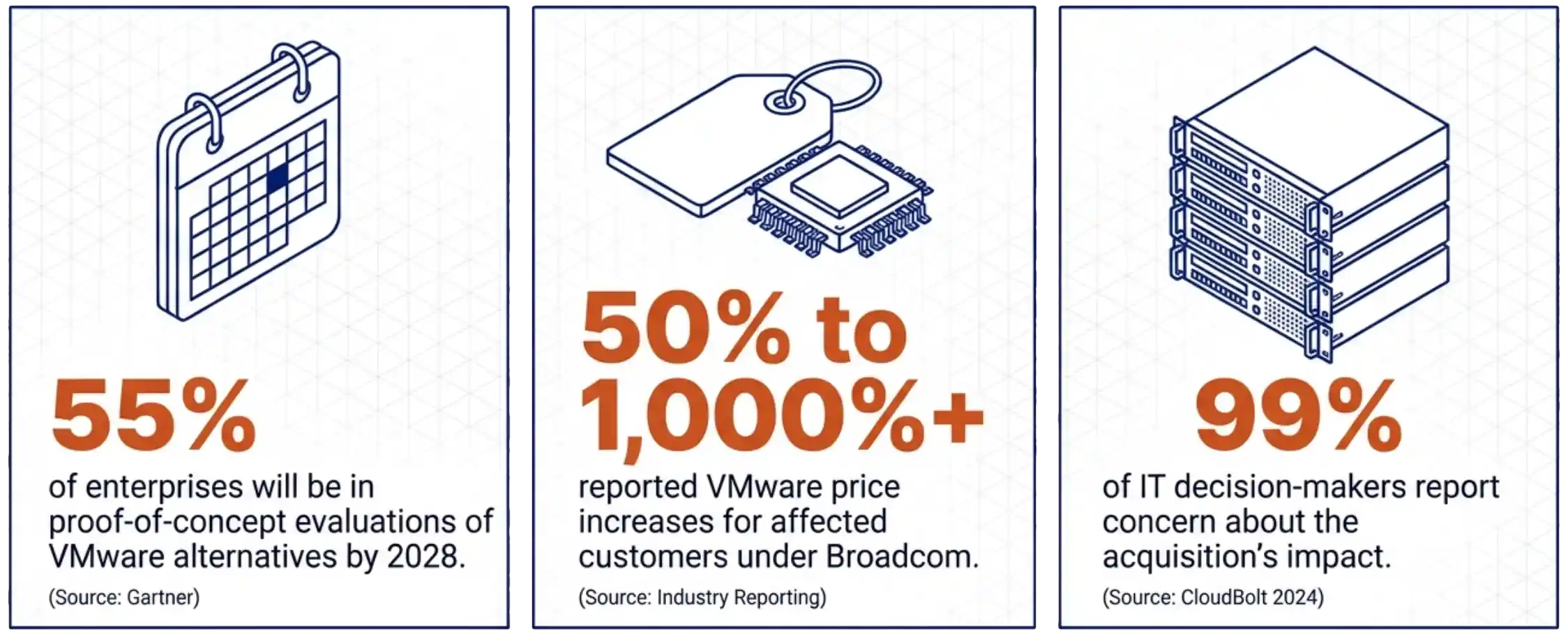
VMware exit data protection — split-hypervisor transition window diagramGartner’s planning data projects that 55 percent of enterprises will be in proof-of-concept evaluations of VMware alternatives by 2028. Industry reporting on VMware price increases under Broadcom shows a range from 50 percent to over 1,000 percent for affected customers. CloudBolt’s 2024 survey found 99 percent of IT decision-makers reporting concern about the acquisition’s impact. These three numbers explain why the migration question is no longer optional for most VMware shops. They do not explain why the backup tier needs to be redesigned alongside it.
The redesign argument comes from operational reality. A team running two hypervisors needs backup tooling that runs against both hypervisors with the same policies, recovery procedures, and retention horizon. Anything less produces parallel backup operations, parallel recovery rehearsals, and parallel staff training. The cost shows up in the transition window, where the team is already managing two infrastructure platforms.

A backup vendor built for heterogeneous environments removes that cost. The same Server, the same policy model, and the same recovery workflow apply to both sides of the migration. The architectural decision is not which backup product is best in isolation. The decision is which backup product survives the transition without forcing a second migration. This shift has been characterized as the chance to rebuild data protection alongside the hypervisor exit, not after it.

“Heterogeneous environments are the norm now, not the exception.” — Paweł Mączka, CTO, Storware. April 2026.

Two Layers, Not One Consolidated Product

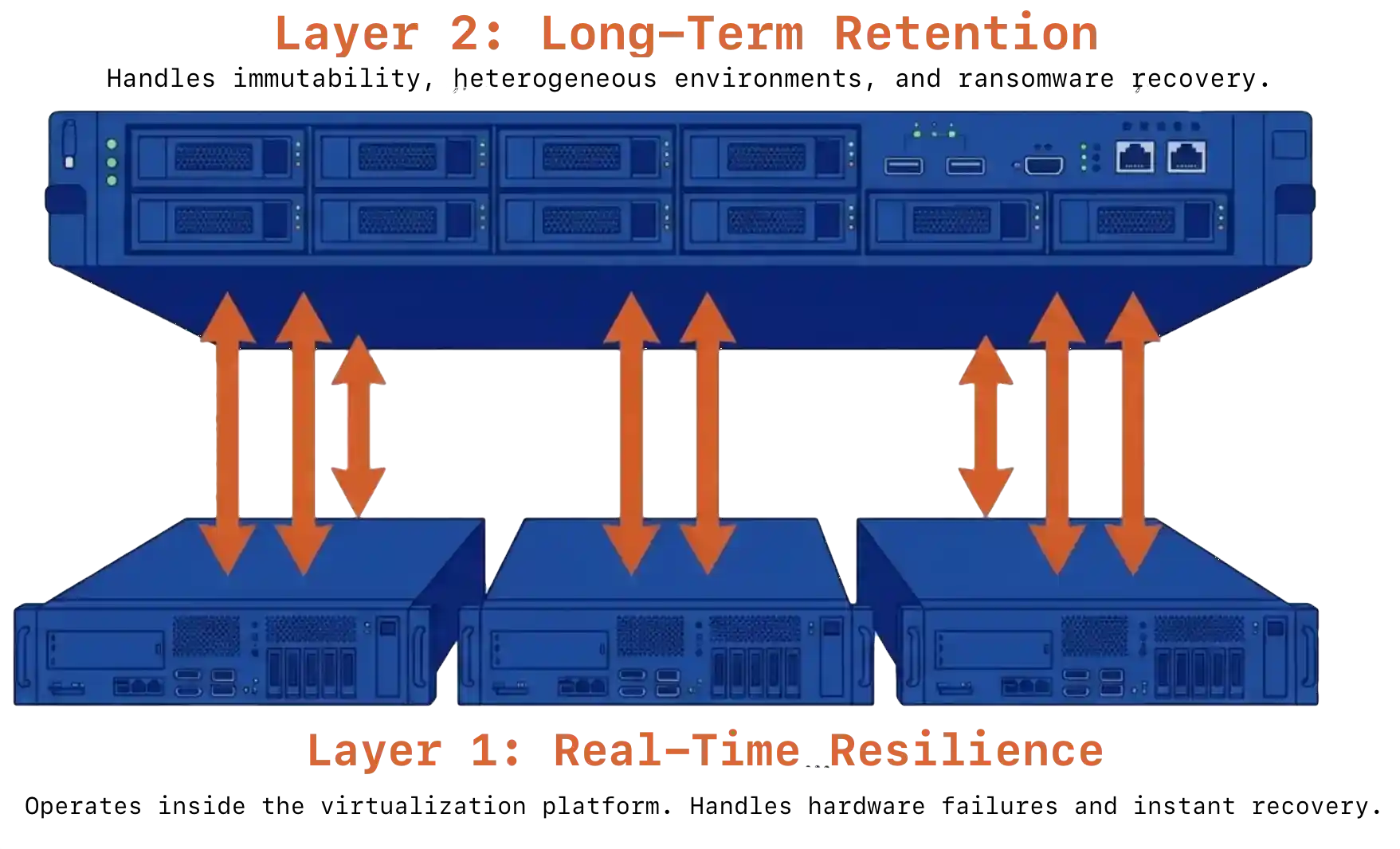
Multi-layer infrastructure data protection model spanning VergeOS and StorwareSingle-product VMware exit data protection fails one of two tests. Infrastructure-only protection lives inside the virtualization platform. It handles hardware failures and operational continuity well, but offers no compliance retention, no air-gapped immutability, and limited defense against ransomware targeting the production cluster itself. Backup-only protection can take minutes to hours to recover after a hardware event and depends entirely on backup scheduling for meaningful protection.
The architecture that survives both modes places independent layers at each level of the stack. Layer one handles real-time resilience. Layer two handles long-term retention and ransomware recovery. The two layers operate independently and reinforce each other.

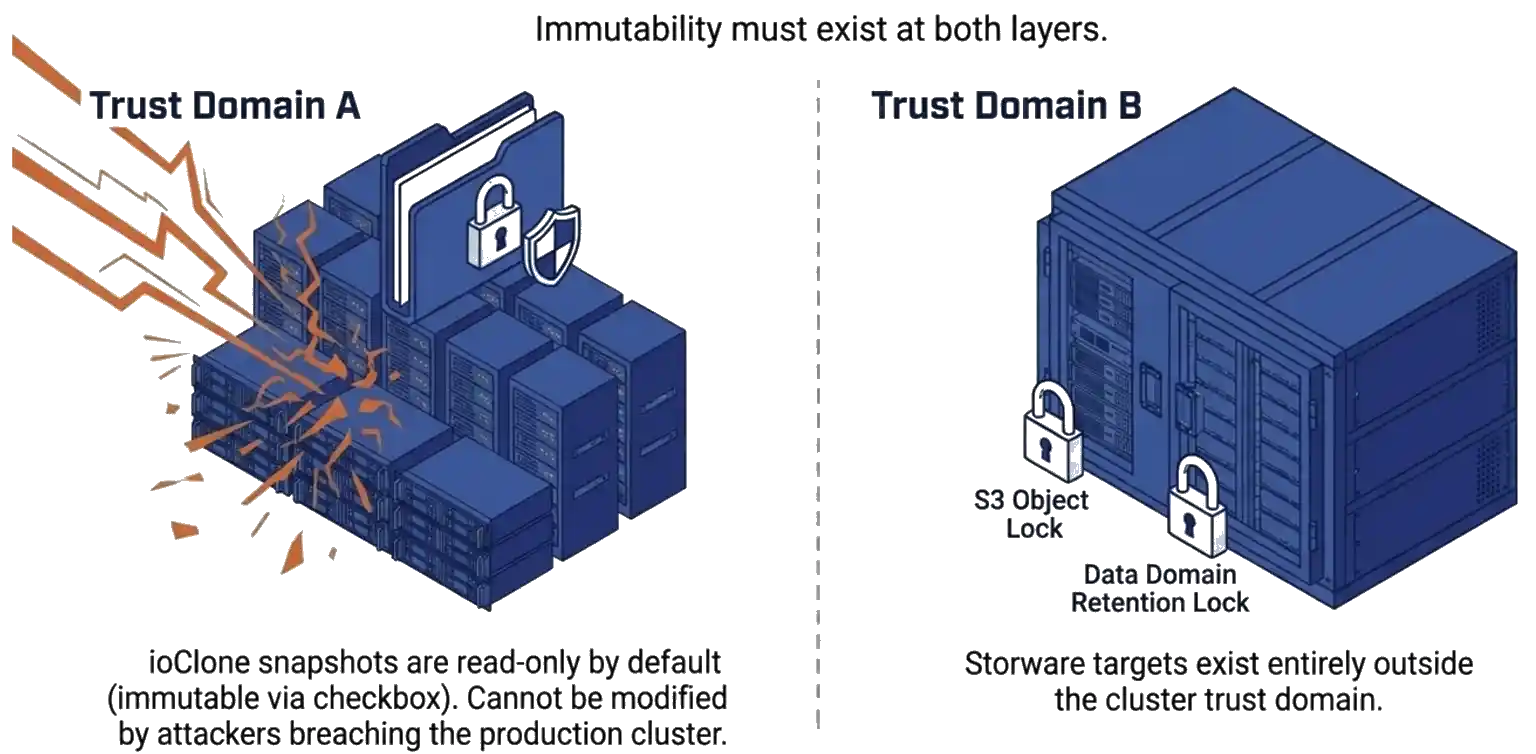
VergeOS handles layer one. Replication Factors distribute data across cluster nodes as a distributed mirror. ioGuardian sits beside RF and actively serves data during failures rather than only accelerating repair. A production VergeOS cluster running RF2 with ioGuardian survived the failure of four of six servers, with zero downtime and zero data loss. ioClone produces fully independent snapshots of entire instances or specific VMs as read-only objects an attacker cannot modify. Global inline deduplication runs across the cluster, so snapshots and replication do not consume duplicate capacity.

Storware Backup and Recovery handles layer two, and the architectural fit is deliberate. For deeper context on how the platform layer drives recovery readiness, see our companion piece on how VergeOS and the backup tier split the DR job.

Key Terms
Replication Factor (RF)

VergeOS data resilience model. RF2 distributes data across cluster nodes as a distributed mirror. RF3 distributes data as a triple mirror.

ioGuardian

VergeOS technology that actively serves data during cluster failures rather than only accelerating repair. Survived four-of-six node loss with zero downtime in a production customer environment.

ioClone

VergeOS independent snapshot mechanism. Produces full copies of entire instances, virtual data centers, or individual VMs as read-only objects with no parent dependencies.

Universal License

Storware licensing model under which a single agreement covers all supported hypervisors and platforms. Removes the per-platform billing barrier during a hypervisor migration.

V2V Conversion

Virtual-to-virtual migration capability that recovers a workload backed up from one hypervisor onto a different destination hypervisor. Critical during transition windows.

Why Consider Storware as a Layer-Two Partner

Storware is a data protection platform built specifically for the multi-hypervisor world that VMware-exit migrations create. Breadth is the architectural feature. The platform supports VMware, VergeOS, Proxmox, Nutanix AHV, Red Hat Virtualization, OpenStack, oVirt, KubeVirt, and several KVM variants under a single management plane. A team running two hypervisors during a transition window manages one product, one policy model, and one recovery workflow rather than two of each.

The licensing model reinforces the architecture. Storware operates on a universal license that covers all supported platforms under one agreement. Protecting both VMware and VergeOS during the parallel-operation window produces no additional license fee. The transition becomes a budgeted operational state rather than a billing event.

The integration with VergeOS is direct and documented. The Storware Server holds metadata, exposes a RESTful API, and manages policies. The Storware Node deploys as a VM inside the VergeOS cluster or as an external system with network access. Backup jobs use VergeOS ioClone snapshots as the source, read through an NFSv4 share served by a VergeOS NAS service, and apply changed block tracking so incremental jobs transfer only changed data. Synthetic forever-incremental support consolidates the backup chain at the destination, removing the need for periodic full re-runs against production. Supported destinations include NFS, SMB, S3 and Azure Blob object storage, Dell PowerProtect Data Domain via DD Boost, and tape.

Cross-hypervisor recovery is the capability that pays off the design. Storware supports V2V conversion across several platform pairs, including VMware-to-OpenStack and several KVM-based combinations. A workload protected on VMware can be recovered onto VergeOS as a planned migration step rather than as an emergency procedure. An architect builds a parallel VergeOS cluster on existing hardware, recovers protected VMware VMs onto that cluster through Storware, and validates the recovery before committing to migration. The data path during this kind of staged recovery is the same one used in production, so the operation is rehearsed, not improvised.

The Ransomware Layer Is the Real Test

Ransomware reshaped what backup means. The numbers explain why the architecture has to change.

96%
of ransomware attacks target backup repositories (Veeam 2024)
94%
independent targeting rate confirmed by Sophos (2024)
35%
of orgs expecting hours-long recovery actually achieve it (Backblaze 2024)

Two-layer immutability defense for VMware exit data protectionThe numbers point to a single architectural answer. A backup that lives in the same trust domain as production has been compromised by definition once an attacker reaches the production system. Immutability has to exist at both layers. ioClone snapshots inside VergeOS are read-only by default and can be set to immutable by checking a box. As a result, they cannot be modified by an attacker who reaches the production cluster. Storware adds immutable storage targets, such as S3 Object Lock and Data Domain Retention Lock, outside the cluster trust domain. Recovery from in-cluster snapshots is near-instant. Recovery from the Storware tier is slower but provides the long-term retention horizon for compliance and forensic analysis.
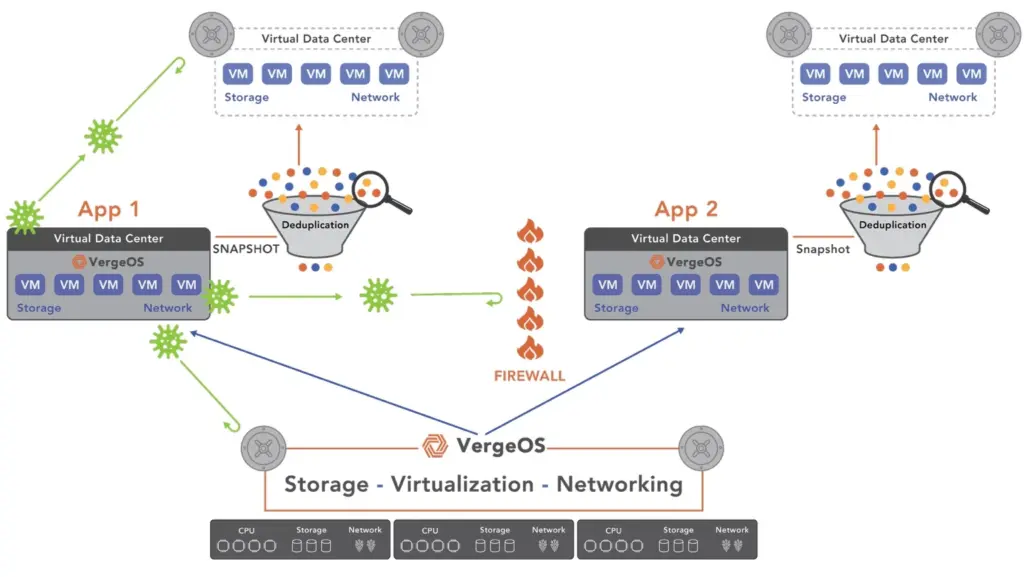
Practical implementation is straightforward. Use ioClone snapshots for short-window recovery, typically 30 minutes to 30 days. Use Storware backups with immutable destinations for the long-term horizon, typically a year or longer, depending on compliance requirements. Test both monthly. The 25-point gap in Backblaze’s data between expected and actual recovery times is directly attributable to how often teams rehearse.

Who Owns Which Layer

 VergeOS (Layer 1)Storware (Layer 2)
Hardware failure resiliencePrimary—
In-cluster snapshot protectionPrimary—
Long-term retention—Primary
Cross-hypervisor recoverySupportsPrimary
Air-gapped immutable storage—Primary
Ransomware-resistant snapshotsPrimarySupports
Universal multi-platform licensing—Primary

The VMware Exit Data Protection Decision

VMware exit data protection in 2026 is no longer a single-product decision. The infrastructure stack is being rebuilt under transition pressure. The data protection tier needs to span source and destination platforms during that transition. The cost of getting either layer wrong is measured in budget cycles. The architecture that survives places independent protection at each level and treats the transition window as a planned operational state.

For architects evaluating this design, the practical next step is a paired proof-of-concept on existing hardware. Stand up a small VergeOS cluster, deploy a Storware Server and Node against it, protect a VMware VM, and recover it onto VergeOS through Storware. A week with the running system communicates more than any document.

The full white paper, Resilience Without Lock-In, walks through the complete two-layer architecture, the Storware reference implementation against VergeOS 4.13 and higher, sizing recommendations for the NAS service, cross-hypervisor recovery scenarios, and the role-by-role comparison of which product owns which layer. Read the white paper →

Frequently Asked Questions
Why does the backup tier need to be redesigned during a VMware exit?
A VMware exit produces a months-long transition window where production data lives on two hypervisors at once. A backup tier that only knows how to talk to one of them creates a second migration project on top of the first. Heterogeneous backup tooling lets one product, one policy model, and one recovery workflow span both sides of the move.
What is the two-layer protection model?
Layer one handles real-time resilience against hardware failure and operational error through the infrastructure platform itself. Layer two handles long-term retention, granular recovery, and ransomware defense through an independent backup product. The two layers operate independently and reinforce each other against different failure modes.
Why is Storware a fit as the layer-two partner for VergeOS?
Storware supports VMware, VergeOS, Proxmox, Nutanix AHV, Red Hat Virtualization, OpenStack, oVirt, KubeVirt, and several KVM variants under one universal license. That breadth means a transition team manages one backup product across both hypervisors with no additional license fee during the parallel-operation window.
How does the architecture defend against ransomware?
Immutability sits at both layers. ioClone snapshots inside VergeOS are read-only objects an attacker cannot modify. Storware adds immutable storage targets such as S3 Object Lock and Data Domain Retention Lock outside the cluster trust domain. In-cluster recovery is near-instant. Storware-tier recovery is slower but provides the long-term retention horizon for compliance and forensic analysis.
What is cross-hypervisor recovery and why does it matter?
Cross-hypervisor recovery uses V2V conversion to recover a workload backed up from one hypervisor onto a different destination hypervisor. A workload protected on VMware can be recovered onto VergeOS as a planned migration step rather than as an emergency procedure, letting an architect validate the recovery before committing to migration.

Filed Under: Protection Tagged With: dataprotection, IT infrastructure, ransomware, storware-webinar-campaign

November 4, 2025 by George Crump

Ransomware recovery versus immutability is a critical consideration for organizations seeking to protect their data and ensure business continuity amid cyber threats. Immutable backups are not the sole solution to the ransomware threat. They are storage. Valuable, necessary, but still just storage. Treating them as the solution to ransomware recovery is like saying a vault prevents theft—it doesn’t. It only protects what’s inside, and only if you manage to get something valuable into it in the first place.

Recent industry commentary has implied that immutability alone neutralizes ransomware. That’s dangerously misleading. Immutable storage is one-third of the recovery equation. It’s not a recovery strategy, and it’s certainly not resilience.

True ransomware recovery depends on three elements working in concert:

  1. Frequent backup,
  2. Immutable storage
  3. Rapid, data center–wide recovery.

Miss any one of them, and you leave a gap large enough for attackers to exploit—and even if recovery eventually succeeds, it will be slow, costly, and operationally disruptive.

Frequent, Immutable Protection — Because Ransomware Doesn’t Wait for Your Schedule

Ransomware doesn’t strike politely during maintenance windows. It hits when you’re unprepared. The difference between losing a few minutes of data and losing an entire business day is measured in backup frequency.

Most IT shops still run daily or twice-daily backups—habits left over from tape systems that couldn’t do better. That schedule creates 12- to 24-hour exposure windows, during which ransomware runs free and undetected.

A financial services company experienced the ransomware recovery versus immutability firsthand during an incident. They scheduled immutable backups at midnight and noon. The attack started at 2 p.m., encrypting six hours of transaction data before detection. They flawlessly restored from the immutable backup, returning to the noon backup point, but lost six hours of verified transactions. Additionally, they faced a day of downtime while completing the full restore and manually rebuilding unprotected network and storage configuration settings. While the immutability feature proved effective, their schedule and process did not.

Modern infrastructure eliminates that trade-off. VergeOS provides infrastructure-level protection, creating immutable snapshots every hour without a performance penalty. This frequency provides a significant improvement in RPO.

The Downside of Immutable Protection

Immutability backup is essential, but it isn’t without challenges. The same protection that prevents deletion also prevents cleanup. If your storage pool runs out of space, you can’t purge old immutable backups until their retention policies expire. Keeping one long-term immutable backup makes sense for compliance, but for ongoing operations, organizations need a blend of rapid, short-lived immutable backups and read-only operational snapshots that can be rotated frequently.

Two problems emerge. First, most immutable storage systems can’t sustain frequent backups—they rely on traditional backups that must later be transferred to immutable storage, adding time, complexity, and duplication. Second, this delayed immutability undermines recovery speed and increases the exposure window by separating protection from production.

VergeOS solves both problems. It supports immutable and read-only snapshots simultaneously, enabling near-continuous protection without bottlenecks. Administrators can define short-term, immutable snapshots for ransomware defense and operational read-only snapshots for daily continuity, maintaining a balance between performance and capacity.

Immutable Protection IS Necessary

Attackers don’t just encrypt data. They steal credentials. They script the deletion of your backups before the encryption even starts.

That’s why immutable storage is essential—but only if it’s implemented correctly. Traditional backup systems depend on the integrity of credentials. Admins can delete or alter backups at will, which means attackers with admin credentials can, too. That’s not security. That’s wishful thinking.

VergeOS eliminates that dependency. Once created, an immutable snapshot cannot be deleted or modified until its retention policy expires. Not by an administrator. Not by a domain admin. Compromised credentials make no difference. The infrastructure-integrated snapshots remain untouched and serve as the foundation for full recovery.

And this is the point most “immutability solves ransomware” advocates miss: immutability that lives outside your production environment introduces risk. External immutable storage adds latency, dependency, and cost. Data has to travel across networks to reach protection, then travel back for recovery. That’s the time you don’t have when recovering from an attack.

Immutable Protection – Head-to-Head Comparison

Ransomware recovery versus immutability backup must factor in the total time to recover, not just that the data is stored in an immutable state. Recovering from an external object store requires three things before a VM is usable: the source must read and rehydrate deduplicated chunks, the network must carry the full logical data, and the all-flash target must ingest and, often, run inline deduplication. The slowest stage determines the elapsed time. A simple way to express it is:

Time = Logical bytes to restore ÷ Sustained end-to-end throughput.

On a 10 GbE path, wire rate is 10 Gbit/s = 1.25 GB/s. Real payload after protocol overhead typically lands in the 0.9–1.1 GB/s range. Using 0.9 GB/s as a realistic single-link figure, a 100 TB restore is:

100 TB ≈ 100,000 GB ÷ 0.9 GB/s ≈ 111,111 s ≈ 31 hours.

That represents the best case when the source can continuously feed the link.

Ransomware recovery versus immutability

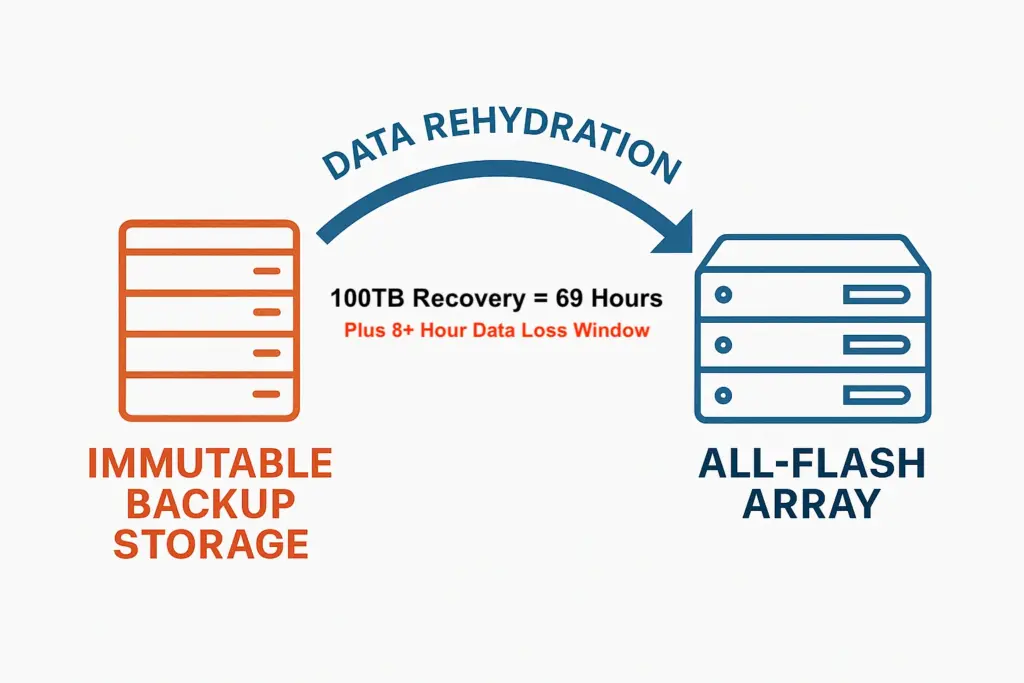
In practice, a deduplicated HDD source must rehydrate chunks, which means it performs many small, random reads and index lookups. Spinning disks handle that poorly, so sustained rates often fall to 0.6 GB/s or less. At that rate, 100 TB ÷ 0.6 GB/s ≈ 166,667 s, or 46 hours. If rehydration drops further to 0.4 GB/s due to seek-bound disks or cold indexes, the same job stretches to ~69 hours. The all-flash target’s inline deduplication adds a small amount of CPU work but rarely becomes the bottleneck on a single 10 GbE stream.

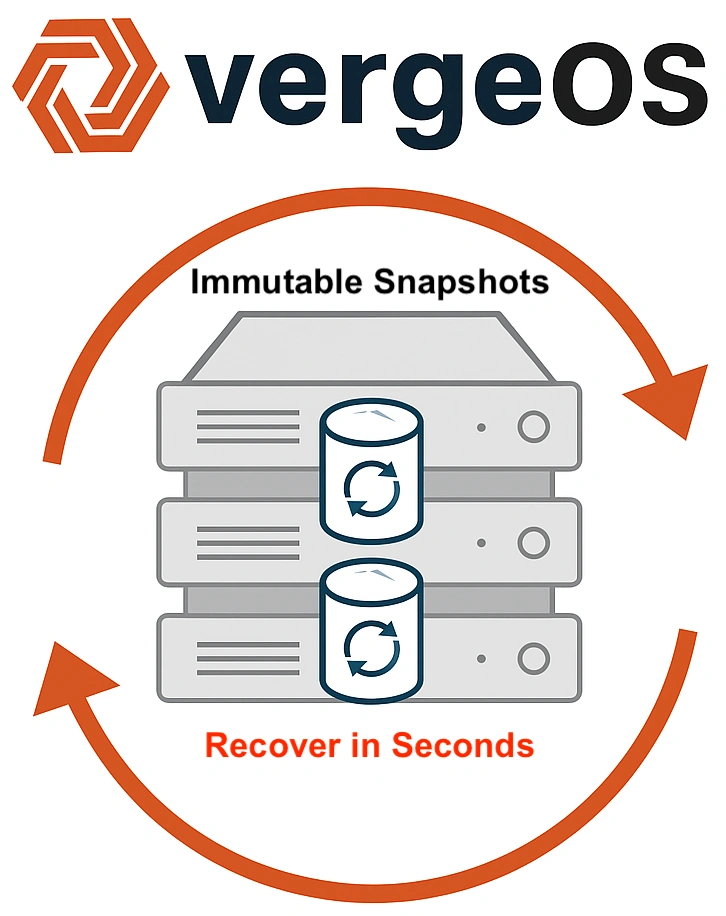
With VergeOS snapshots, immutability is integrated directly into the infrastructure. There are no external targets and no data transfers. Recovery simply re-references existing deduplicated blocks and advances metadata to a known-good point. There’s no rehydration stage and no bulk restore across the network. The operation primarily involves metadata manipulation and completes in seconds, even in a 100 TB (or 100PB) environment.

Both methods provide immutable recovery points, but only VergeOS snapshots deliver operational resilience. By eliminating data movement and rehydration, VergeOS removes the slowest steps from the recovery process—turning a 31–69 hour restore into an instant return to operation.

Data Center–Wide Recovery — Because Ransomware Doesn’t Attack VMs, It Attacks Environments

Ransomware rarely stops at a single system. It moves laterally, encrypting application servers, databases, file shares, and authentication layers. Typical attacks touch dozens to hundreds of VMs across interdependent workloads. Restoring them one by one isn’t recovery—it’s triage.

Most backup tools still treat VMs as isolated entities: pick a VM, select a point in time, restore, reconfigure, and hope it connects. That works for a disk failure, not a data center compromise.

This piecemeal approach produces inconsistency. The database restores to midnight, the app server to 6 a.m., the file server to 3 a.m. They all start—but none agree. Logs reference transactions that no longer exist. Configuration files point to data that isn’t there. The environment boots but fails operationally.

A manufacturer learned that a ransomware recovery versus immutability focus can learned that moving the data back in position is only a part of the recovery effort. After restoring 140 VMs over four days following an attack they realized the environment came online but didn’t work. Database schemas didn’t match application versions. Systems pointed to the wrong shares. It took another week to reconcile data and configuration mismatches. They recovered VMs, not a business.

VergeOS avoids this through Virtual Data Centers (VDCs)—self-contained environments that encapsulate compute, storage, networking, and security policies. A VDC restores as a unit. One operation brings back the entire environment—every VM, every dependency, every policy—all synchronized to the same moment in time.

That’s not just recovery. That’s continuity.

A Final Word on “Ransomware’s Kryptonite”

Calling immutable backups ransomware’s kryptonite is like calling a safe a security system. It’s useful, but without detection, frequency, and the ability to rebuild what’s lost, it’s just a box of cold data. All immutable storage does not equal ransomware protection. Ransomware isn’t defeated by immutability—it’s defeated by recovery. Immutable storage buys you time; VergeOS gives you your business back.

Watch our Webinar on the latest version of VergeOS 26 to learn how to

  • Exit VMware without disruption or licensing risk
  • Repatriate workloads from costly public clouds
  • Improve cyber resiliency through integrated architecture
  • Prepare for AI by consolidating infrastructure into a unified platform

On-Demand Now

Filed Under: Ransomware Tagged With: Disaster Recovery, ransomware, VMware

October 1, 2024 by George Crump

The shared responsibility of data protection requires collaboration between infrastructure software and backup software. Both systems must work together to ensure data resiliency, protection, and recovery. Relying solely on one or the other can leave gaps, creating vulnerabilities that put critical data and operations at risk.

Learn why data protection requires shared responsibility.

In this shared responsibility model, infrastructure software (including hypervisors, storage, and networking) handles hardware failures and maintains uptime. Meanwhile, backup software safeguards against user errors and cyberattacks and ensures long-term data retention. This balanced approach ensures complete protection across all potential points of failure.

The Complexity of Modern IT Environments

Data centers today are more intricate than ever before. Enterprises rely on a combination of hypervisors, bare-metal systems, containers, and cloud services across various platforms and environments. The traditional single-backup-system approach is no longer sufficient. Businesses must implement solutions that address the unique challenges of each infrastructure component.

Infrastructure software, which manages virtual machines, networking, and storage, should provide data resilience, ensuring that workloads continue running despite multiple simultaneous hardware failures. Meanwhile, backup software protects data from soft errors—such as accidental deletions, ransomware attacks, or software bugs—and provides long-term data retention and compliance.

The shared responsibility model creates a structured way for infrastructure and backup systems to complement each other, ensuring no gaps in data protection.

On Thursday, October 3rd, at 11:00 AM ET, we will explore the shared responsibility model in greater depth and demonstrate how its two components can work together to deliver unprecedented levels of resilience, protection, and recovery.

Register here to secure your spot!


VergeOS and Storware: A Shared Responsibility for Data Protection

The collaboration between infrastructure and backup solutions is at the heart of the shared responsibility model. The integration of VergeOS and Storware provides an excellent example of an end-to-end solution for data resilience, protection, and recovery.

VergeOS: The Role of Infrastructure in Data Resiliency

VergeOS is more than just a VMware alternative. It’s an ultraconverged infrastructure consolidating the hypervisor, storage, and networking into a single piece of software. In addition to delivering a more efficient infrastructure software solution, this approach allows VergeOS to provide superior protection against hardware failures, ensuring superior uptime and resiliency.

One of VergeOS’s standout features is its IOclone technology, which creates fully independent snapshots of selected objects, such as virtual data centers, instances, or virtual machines. Unlike traditional snapshots that rely on the redirect-on-write method, VergeOS’s IOclone ensures that snapshots are independent of the original object. If the original object is deleted, the snapshot remains intact and can be restored.

VergeOS also incorporates integrated deduplication, making snapshots highly efficient in terms of storage capacity consumption. This enables businesses to keep thousands of snapshots over long periods without any performance degradation.

In addition, VergeOS features ioGuardian, a real-time recovery solution that activates during multiple hardware failures. With inline recovery, ioGuardian provides missing data segments to virtual machines in real time, preventing downtime even during catastrophic failures. This ensures infrastructure resiliency, addressing gaps that often occur when infrastructure systems rely too heavily on backup systems for recovery.

Storware: The Role of Backup in Data Protection and Recovery

While VergeOS handles hardware-level protection and resiliency, Storware ensures data is safeguarded from user errors, accidental deletions, and ransomware attacks. Storware’s backup solution supports KVM-based hypervisors (including VergeOS), bare-metal systems, containers, and cloud environments such as Amazon AWS, Microsoft Azure, and Google Cloud Platform.

Storware’s two-stage backup architecture offers scalability and flexibility in data protection. In the first stage, Storware collects data from multiple sources and stores it temporarily in Storware nodes. These nodes can scale to meet increasing capacity or performance demands.

In the second stage, the data is transferred to a final repository, which could include object storage, file systems (NFS or SMB), enterprise-grade storage (such as Dell EMC Data Domain or HPE StoreOnce), or even tape libraries for organizations that need offline data storage.

Storware’s support for incremental forever backups captures only changes after the initial backup, reducing backup times and network strain. Additionally, Storware performs data consolidation in the staging area, ensuring that recoveries are full-speed, even when multiple incremental backups are involved.

When integrated with VergeOS, Storware leverages Change Block Tracking (CBT) technology to optimize backup efficiency by minimizing the amount of data transferred over the network.

Why the Shared Responsibility Model is Crucial for Modern Businesses

The partnership between VergeOS and Storware highlights the power of the shared responsibility model. Together, they provide comprehensive protection across all failure points—whether hardware-related or human error.

Organizations relying solely on backup software for all data protection risk gaps in infrastructure resiliency. Conversely, relying only on infrastructure software without a dedicated backup strategy can make meeting compliance or data protection best practices demands challenging. The shared responsibility model ensures that both systems—infrastructure and backup—work together harmoniously.

With VergeOS managing uptime and resiliency during hardware failures and Storware protecting against soft errors and enabling long-term retention, businesses can be confident that their data is fully protected. This holistic approach is particularly crucial for organizations managing multi-tenant environments, hybrid cloud infrastructures, or complex virtualized systems, where any failure can lead to severe consequences.

Conclusion: Shared Responsibility Equals Stronger Protection

Modern IT environments are vital to an organization’s success and demand a comprehensive approach to data protection. By adopting the shared responsibility model, organizations can ensure that infrastructure and backup systems work together to provide seamless data resiliency, protection, and recovery.

The collaboration between VergeOS and Storware exemplifies this model in action. VergeOS protects infrastructure from hardware failures and ensures uptime, while Storware safeguards data against soft errors and provides long-term retention. Together, they offer a turnkey solution that helps businesses of all sizes protect their most valuable asset—their data.


Join Our Webinar: How to Protect VMware Alternatives with VergeIO and Storware
Interested in learning more about how infrastructure and backup software can work together to safeguard your data? Join us for a live webinar, “How to Protect VMware Alternatives with VergeIO and Storware,” where we’ll explore these concepts further and demonstrate how the two solutions integrate seamlessly.

  • Date: Thursday, October 3rd, 2024

  • Time: 11:00 AM ET / 8:00 AM PT

  • Duration: 30 minutes + Q&A
    Register here~ to secure your spot!

Filed Under: Blog, Protection Tagged With: Alternative, Disaster Recovery, ransomware

June 26, 2024 by George Crump

There are best practices that on-premises IT can learn from MSPs to streamline operations, improve responsiveness, and enhance efficiency simply by applying them. Managed Service Providers (MSPs) and Cloud Service Providers are adept at navigating a rapidly evolving technological landscape, under constant pressure to lower costs. They excel in efficiency, scalability, and security across numerous customers while focusing on cost management, data resiliency, and disaster recovery.

Live Interview and Demo Thursday, June 27th at 1:00 PM ET / 10:00 AM PT – Register Now!

Modernized infrastructure software is critical in enabling MSPs and On-Premises IT to meet these challenges. Modernized infrastructure software combines virtualization services delivered via a hypervisor, storage services, networking services, and cloud services like multi-tenancy.

Applying MSP/CSP Best Practices for Server Longevity

While MSPs/CSPs provide infrastructure to their customers on a subscription basis, they, in most cases, must pay for the hardware upfront. The longer they can extract useful life from that hardware, the better the return on its investment. Maximizing hardware longevity requires infrastructure software with low overhead that leaves more of the available compute resources for customer virtual machines (VMs). It also requires software abstracted from the hardware so that it does not have to remove support for specific hardware configurations as they age and the software advances. Nothing is more frustrating and wasteful than having hardware idle because the software no longer supports it.

In terms of resiliency, the infrastructure software must move beyond no single point of failure, to multiple points of redundancy. Aging hardware is more likely to fail than new hardware; also, maintaining aging hardware under a service contract is more expensive. The infrastructure software should deliver such high levels of redundancy and availability that older servers can run until they fail, and when they fail, there is minimal disruption to operations. This capability also requires the software to be able to mix servers within the infrastructure from different server brands, processor generations, and storage configurations.

On-Premises Server Longevity

On-premises IT can learn from MSPs and use a similar strategy. In these data centers, there are often more than enough computing resources, and the only reason for a server refresh is to maintain warranty coverage. Suppose the infrastructure software can enable these servers to operate safely and with support beyond their original warranty. In that case, the on-premises IT operator can meet the challenge of flat or shrinking IT budgets. If the infrastructure software can also support the intermixing of new and old servers on-premises, IT can gradually add servers to the infrastructure, finally ending the never-ending cycle of storage refreshes and mass migrations.

VergeOS Extends The Life of Servers

VergeOS is unique in infrastructure software. Instead of creating an “IT stack” of loosely coupled software applications, we tightly integrated all infrastructure services into a single code base. This code base includes all the services required for infrastructure, including virtualization services, storage services, networking services, and cloud services. The integration enables VergeOS to deliver near-bare-metal CPU performance, outperform dedicated all-flash arrays, and maximize network efficiency.

VergeOS is also highly portable. It runs on your existing hardware. Its unprecedented level of abstraction from the hardware means that within the same instance, it can support servers of different brands, CPU generations, and storage media types. Six-year-old servers can run alongside six-month-old servers with operational simplicity. As a result, IT can scale its environment from two nodes to over 200 servers within a single instance, and those nodes can come from various server manufacturers with different configurations.

on-premises IT can learn from MSPs

Lastly, VergeOS is resilient. High availability is built into the software. It protects from drive and server failures, and ioGuardian extends the resiliency to withstand multiple drive failures and near-catastrophic server outages. Its Virtual Data Center (VDC) tenant technology, popular with MSPs to isolate customers, also simplifies disaster recovery for on-premises IT because it encapsulates the entire data center as a single, consistent object that makes replication and recovery at a remote site work the first time every time.

Applying MSP/CSP Best Practices for Data Center Density

Successful MSPs/CSPs face the challenge of building highly compact data centers. On-premises IT can learn from MSPs because, like them, they are always looking for ways to reduce their physical footprint, which lowers power and cooling costs. MSPs must also maximize the number of VMs per physical host without compromising performance. This requires an infrastructure software solution that doesn’t burden CPU resources, protects against the disruptive effects of ‘noisy neighbors,’ and has a licensing model that doesn’t penalize customers for investing in robust, dense, quad-processor servers. No one in IT wants to have to explain why the software is twice the price of the hardware.

On-Premises IT Density

On-premises IT operators can benefit from a similar strategy. Imagine cutting the physical server count by two-thirds. While quad-processor servers are more expensive than dual-processor servers, you will need fewer of them, so there is a significant opportunity to reduce server acquisition costs, which will lower power and cooling costs. Using highly dense servers to decrease footprint generally has two problems. First, most infrastructure software solutions are licensed by the number of cores, often making the software more expensive than the server itself.

The second problem is managing potentially double the number of VMs per physical server and protecting against the “noisy neighbor” problem. Most infrastructure software solutions are complex and limited in their ability to isolate workloads.

VergeOS Delivers Affordable Density

VergeOS solves the licensing and noisy neighbor problems. First, it is licensed by the physical host, not by the number of processors or cores. Customers can use the most potent servers without fear of a software penalty. Second, it enables on-premises IT to allocate specific physical hardware resources to specific VDCs. Mission-critical or performance-sensitive workloads could be placed in a particular VDC, and resources could be hard allocated to those VDCs and made available exclusively to those workloads.

Applying MSP/CSP Best Practices for Security

Security is a, if not the, top concern of MSPs. If, for example, ransomware sneaks its way into their environment because of a careless customer, all the customers in their environment could potentially be impacted. They must ensure they invest in capabilities to detect an attack, minimize its impact, and rapidly recover customers in the event of a ransomware detonation. MSPs are looking to move away from the multiple-point solutions they are using to protect and recover from the various attack angles. Instead, they are looking for software that takes an infrastructure-wide approach that is resilient to an attack and can aid recovery.

On-Premises IT Security

On-premises IT can learn from MSPs’ attention to security details. Ransomware protection and recovery are priorities for all organizations, not just MSPs. While the scope of the ransomware event may not be as broad, on-premises IT doesn’t have the same time, budget, or personnel available as MSPs. In addition to the MSP requirements of limiting the attack surface, detection, and recovery, simplicity must be added to the on-premises IT requirements.

VergeOS Delivers Ransomware Resiliency

Storage Features Only

VergeOS takes an infrastructure-wide approach to ransomware protection and recovery. First, it uses multi-factor authentication for all login attempts. Second, when VergeOS is installed, it is installed read-only so that it cannot be modified during an attack. When a VDC is created, a read-write copy of VergeOS is placed inside the VDC. If the OS within the VDC is ever compromised, a quick refresh of the VDC loads a new copy of VergeOS. Each VDC is firewalled off from the others, so an attack within the VDC will not spread to other VDCs. Our alert subscription technology powers our ioFortify product, and you can build an alerting mechanism that allows you to receive near real-time notifications in the event of an attack. We’ve demonstrated this capability on multiple live webinars where we’ve detected an attack within five minutes. Finally, our snapshots are read-only and protected from attack.

All of these capabilities work together to enable you to limit the spread of an attack, detect an attack quickly, and recover to the last known good snapshot prior to the attack within minutes. A typical recovery time for a VergeOS customer to successfully recover from and eliminate a ransomware attack is less than thirty minutes.

Conclusion

On-premises IT can learn from MSPs by adopting their best practices. These practices enhance efficiency, scalability, security, and cost management. Modern infrastructure software, like VergeOS, integrates virtualization, storage, networking, and cloud services, extending server longevity and supporting diverse hardware configurations while ensuring high availability and reducing the need for frequent server refreshes. This approach achieves greater data center density with efficient resource utilization and cost-effective licensing models. VergeOS enhances security with features like multi-factor authentication, read-only OS installations, and isolated Virtual Data Centers (VDCs), ensuring rapid recovery from cyber threats.

Filed Under: MSP Tagged With: Hyperconverged, MSP, ransomware

  • Page 1
  • Page 2
  • Page 3
  • Go to Next Page »

855-855-8300

Get Started

  • Versions
  • Request Tour

VergeIO For

  • SAN Replacement
  • Solving Infrastructure Modernization Challenges
  • Artificial Intelligence
  • Hyperconverged
  • Server Room
  • Secure Research Computing

Product

  • Benefits
  • Documents
  • Architecture Overview
  • Use Cases
  • Videos

Company

  • Blog
  • Technical Documentation
  • Legal

© 2026 VergeIO. All Rights Reserved.