• Skip to main content
  • Architecture
    • Overview
      Learn about VergeOS’ unique unfied architecture that integrates virtualization, storage, networking, AI, backup and DR into a single data center operating system
    • Infrastructure Wide Deduplication
      VergeOS transforms deduplication from a storage-only commodity into a native, infrastructure-wide capability that spans storage, virtualization, and networking, eliminating hidden resource taxes
    • VergeFS
      VergeFS is a distributed, high-performance global file system integrated into VergeOS, unifying storage across nodes, tiers, and workloads while eliminating the need for external SANs
    • VergeFabric
      VergeFabric is VergeOS’s integrated virtual networking layer, delivering high-speed, low-latency communication across nodes while eliminating the complexity of traditional network configurations.
    • Infrastructure Automation
      VergeOS integrates Packer, Terraform, and Ansible to deliver an end-to-end automation pipeline that eliminates infrastructure drift and enables predictable, scalable deployments.
    • VergeIQ
      Unlock secure, on-premises generative AI—natively integrated into VergeOS. With VergeIQ, your enterprise gains private AI capabilities without the complexity, cloud dependency, or token-based pricing.
  • Features
    • Virtual Data Centers
      A VergeOS Virtual Data Center (VDC) is a fully isolated, self-contained environment within a single VergeOS instance that includes its own compute, storage, networking, and management controls
    • High Availability
      VergeOS provides a unified, easy-to-manage infrastructure that ensures continuous high availability through automated failover, storage efficiency, clone-like snapshots, and simplified disaster recovery
    • ioClone
      ioClone utilizes global inline deduplication and a blockchain-inspired file system within VergeFS to create instant, independent, space-efficient, and immutable snapshots of individual VMs, volumes, or entire virtual data centers.
    • ioReplicate
      ioReplicate is a unified disaster-recovery solution that enables simple, cost-efficient DR testing and failover via three‑click recovery of entire Virtual Data Centers—including VMs, networking, and storage.
    • ioFortify
      ioFortify creates immutable, restorable VDC checkpoints and provides proactive ransomware detection with instant alerts for rapid recovery and response.
    • ioMigrate
      ioMigrate enables large-scale VMware migrations, automating the rehosting of hundreds of VMs (including networking settings) in seconds with minimal downtime by seamlessly transitioning entire VMware environments onto existing hardware stacks.
    • ioProtect
      ioProtect offers near-real-time replication of VMware VMs—including data, network, and compute configurations—to a remote disaster‑recovery site on existing hardware, slashing DR costs by over 60% while supporting seamless failover and testing in an efficient, turnkey VergeOS Infrastructure.
    • ioOptimize
      ioOptimize leverages AI and machine learning to seamlessly integrate new and old hardware and automatically migrate workloads from aging or failing servers.
    • ioGuardian
      ioGuardian is VergeIO’s built-in data protection and recovery capability, providing near-continuous backup and rapid VM recovery during multiple simultaneous drive or server failures.
  • IT Initiatives
    • VMware Alternative
      VergeOS offers seamless migration from VMware, enhancing performance and scalability by consolidating virtualization, storage, and networking into a single, efficient platform.
    • Hyperconverged Alternative
      VergeIO’s page introduces ultraconverged infrastructure (UCI) via VergeOS, which overcomes HCI limitations by supporting external storage, scaling compute and storage independently, using existing hardware, simplifying provisioning, boosting resiliency, and cutting licensing costs.
    • SAN Replacement / Storage Refresh
      VergeIO’s storage by replacing aging SAN/NAS systems within its ultraconverged infrastructure, enhancing security, scalability, and affordability.
    • Infrastructure Modernization
      Legacy infrastructure is fragmented, complex, and costly, built from disconnected components. VergeOS unifies virtualization, storage, networking, data protection, and AI into one platform, simplifying operations and reducing expenses.
    • Secure Research Computing
      VergeIO's Secure Research Computing solution combines speed, isolation, compliance, scalability, and resilience in a cohesive platform. It’s ideal for institutions needing segmented, compliant compute environments that are easy to deploy, manage, and recover.
    • Venues, Remote Offices, and Edge
      VergeOS delivers resiliency and centralized management across Edge, ROBO, and Venue environments. With one platform, IT can keep remote sites independent while managing them all from a single pane of glass.
    • Fight Data Center Inflation
      DRAM, SSD and server prices keep climbing. VergeOS uses as much as 50% less RAM per VM than VMware, runs on the servers you already own, and moves cold data to low-cost hard drives.
  • Blog
      • The Midsize Enterprise Needs Greater ResiliencyResiliency belongs in every VMware alternative evaluation for small IT teams. See how VergeOS keeps midsize enterprise workloads running through drive and server failures, locks snapshots against ransomware, and turns Patch Tuesday from a weekend maintenance window into a weekday task.
      • Edge Disaster Recovery: Keep Customer-Facing Locations OpenEdge disaster recovery for stores and venues. VergeOS runs a site on one server, recovers it locally from snapshots and fails it over to the core.
      • VMware Migration Testing Is Critical to Completing Your ExitVMware migration testing decides whether your exit finishes. VergeOS keeps the VMware image, takes instant snapshots and isolates each workload in a VDC.
    • View All Posts
  • Resources
    • Become a Partner
      Get repeatable sales and a platform built to simplify your customers’ infrastructure.
    • Technology Partners
      Learn about our technology and service partners who deliver VergeOS-powered solutions for cloud, VDI, and modern IT workloads.
    • White Papers
      Explore VergeIO’s white papers for practical insights on modernizing infrastructure. Each paper is written for IT pros who value clarity, performance, and ROI.
    • In The News
      See how VergeIO is making headlines as the leading VMware alternative. Industry analysts, press, and partners highlight our impact on modern infrastructure.
    • Press Releases
      Get the latest VergeOS press releases for news on product updates, customer wins, and strategic partnerships.
    • Case Studies
      See how organizations like yours replaced VMware, cut costs, and simplified IT with VergeOS. Real results, real environments—no fluff.
    • Webinars
      Explore VergeIO’s on-demand webinars to get straight-to-the-point demos and real-world infrastructure insights.
    • Documents
      Get quick, no-nonsense overviews of VergeOS capabilities with our datasheets—covering features, benefits, and technical specs in one place.
    • Videos
      Watch VergeIO videos for fast, focused walkthroughs of VergeOS features, customer success, and VMware migration strategies.
    • Technical Documentation
      Access in-depth VergeOS technical guides, configuration details, and step-by-step instructions for IT pros.
  • How to Buy
    • Schedule a Demo
      Seeing is believing, set up a call with one of our technical architects and see VergeOS in action.
    • Versions
      Discover VergeOS’s streamlined pricing and flexible deployment options—whether you bring your own hardware, choose a certified appliance, or run it on bare metal in the cloud.
    • Test Drive – No Hardware Required
      Explore VergeOS with VergeIO’s hands-on labs and gain real-world experience in VMware migration and data center resiliency—no hardware required
  • Company
    • About VergeIO
    • Support
      Get fast, expert help from VergeIO’s support team—focused on keeping your infrastructure running smoothly.
    • Careers
      Join VergeIO and help reshape the future of IT infrastructure. Explore open roles and growth opportunities.
  • 855-855-8300
  • Contact
  • Search
  • 855-855-8300
  • Contact
  • Search
  • Architecture
    • Overview
    • VergeFS
    • VergeFabric
    • Infrastructure Automation
    • VergeIQ
  • Features
    • Virtual Data Centers
    • High Availability
    • ioClone
    • ioReplicate
    • ioFortify
    • ioMigrate
    • ioProtect
    • ioOptimize
    • ioGuardian
  • IT Initiatives
    • VMware Alternative
    • Hyperconverged Alternative
    • SAN Replacement / Storage Refresh
    • Infrastructure Modernization
    • Secure Research Computing
    • Venues, Remote Offices, and Edge
    • Fight Data Center Inflation
  • Blog
  • Resources
    • Become a Partner
    • Technology Partners
    • White Papers
    • In The News
    • Press Releases
    • Case Studies
    • Webinars
    • Documents
    • Videos
    • Technical Documentation
  • How to Buy
    • Schedule a Demo
    • Versions
    • Test Drive – No Hardware Required
  • Company
    • About VergeIO
    • Support
    • Careers
×
  • Architecture
    • Overview
    • VergeFS
    • VergeFabric
    • Infrastructure Automation
    • VergeIQ
  • Features
    • Virtual Data Centers
    • High Availability
    • ioClone
    • ioReplicate
    • ioFortify
    • ioMigrate
    • ioProtect
    • ioOptimize
    • ioGuardian
  • IT Initiatives
    • VMware Alternative
    • Hyperconverged Alternative
    • SAN Replacement / Storage Refresh
    • Infrastructure Modernization
    • Secure Research Computing
    • Venues, Remote Offices, and Edge
    • Fight Data Center Inflation
  • Blog
  • Resources
    • Become a Partner
    • Technology Partners
    • White Papers
    • In The News
    • Press Releases
    • Case Studies
    • Webinars
    • Documents
    • Videos
    • Technical Documentation
  • How to Buy
    • Schedule a Demo
    • Versions
    • Test Drive – No Hardware Required
  • Company
    • About VergeIO
    • Support
    • Careers

ransomware

June 3, 2024 by George Crump

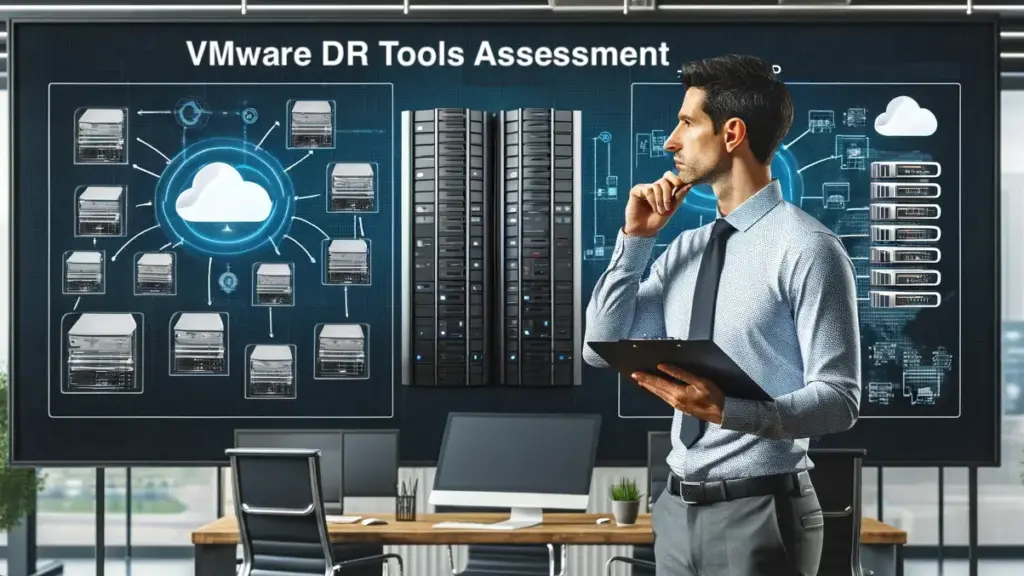
VMware DR Tools Assessment

The list of threats to data center operations never stops growing, and IT professionals must periodically perform a VMware DR Tools Assessment. During these assessments, they should evaluate tools to:

  1. Address new data center threats
  2. Improve Recovery Point and Recovery Time Objectives (RPO/RTO)
  3. Simplify recovery processes
  4. Reduce costs

Generally, there are three types of tools that IT relies on to meet its organization’s requirements:

  • Backup and Recovery
  • Array-based Replication
  • Infrastructure-wide Replication

These tools lay the foundation for a disaster recovery strategy. They directly impact RPO, RTO, and affordability.

Backup And RecoveryArray-Based ReplicationInfrastructure-Wide Replication
Holistic ProtectionGoodPoorExcellent
RTO AttainmentGoodExcellentExcellent
RPO AttainmentPoorPoorExcellent
Hypervisor TransitionGoodPoorExcellent
DR OperationsPoorPoorExcellent
Cost$$$$$$$$
Comparing VMware DR Strategies

Live Webinar and Demonstration: “Comparing VMware DR Strategies” — Register Now

Meeting Classic VMware DR Threats

It is critical during a VMware DR tools assessment that IT ensures they address the classic types of threats to a VMware environment, such as floods, tornadoes, and power outages, which persist alongside the more recent threat of ransomware. IT needs to look for ways to improve RPO/RTO, simplify the recovery process, and also look for opportunities to lower DR costs.

Backup and recovery solutions are considered the least expensive option but also the least seamless in terms of recovery. While most solutions can recover a few virtual machines (VMs) on backup appliances, these appliances are not designed for the long-term hosting of many VMs. Backup and recovery tools have improved their resiliency to ransomware, with some now offering automated remote site recovery, but most still can’t detect an attack, so prolonged recoveries are commonplace, even with excellent backup strategies.

The critical challenge for backup and recovery is the time between protection events, often failing to meet increasingly strict organizational RPOs. An “aggressive” strategy of four hours may not be sufficient to meet organizational service level agreements (SLA). The time it takes to reposition data on production servers means that backup and recovery often fail to meet most organizational RTOs. Once the total cost of backup infrastructure (software licensing, dedicated storage hardware, compute server requirements at the DR site) is evaluated, the theoretical cost advantage of backup and recovery often dissipates.

Array-based replication is relatively seamless in transporting data to a DR site, but the target array at the DR site must be nearly identical to the primary site’s array. Dedicated arrays also can’t host VMs, so the customer must equip and manage server infrastructure at the DR site. Like backup and recovery, array-based replication doesn’t capture details that are not on the actual array, such as network configurations and VM settings.

Array-based replication provides a much more frequent protection event capability than a backup but is myopically focused on its data. If all data, including boot and configuration files, are on a single dedicated array, then array-based replication meets most organizations’ RTO demands. However, if data is on boot drives, network hardware, or different types of dedicated storage arrays, IT must ensure consistency between them. This often places them outside of the RPO. Another concern is the high cost of buying dual dedicated arrays, which places the strategy outside the budget of most organizations.

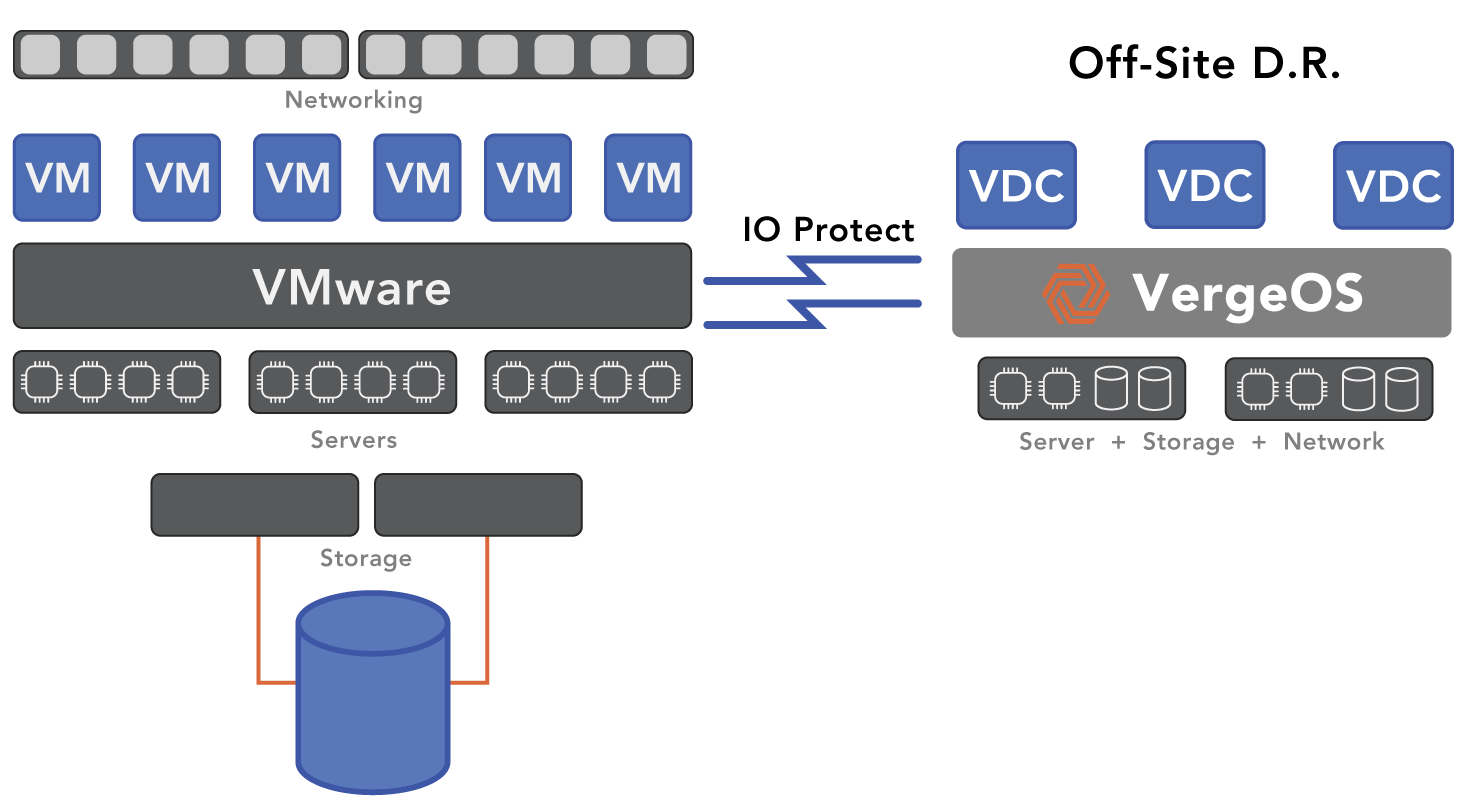
Infrastructure-wide replication encapsulates the entire infrastructure, capturing everything into a single object. It provides a complete, self-contained environment. The servers at the DR site can simultaneously run VMs and their data and network functionality such as firewalls and routing. Infrastructure replication, like VergeIO’s ioProtect, enables IT to create a turnkey pod easily deployed in the DR site. Since it is self-contained, there is no need to worry about consistency across networking and storage. Infrastructure replication meets and exceeds most organizations’ RPOs and RTOs. The consolidation also makes deployment extremely cost-effective.

Meeting New VMware DR Threats

VMware DR Tools Assessment

A critical part of a VMware DR tools assessment is making sure the tool can withstand new threats and use cases. While ransomware and natural disasters like fire, flood, and hurricanes remain top concerns, today, customers also want to ensure they are not locked into a particular hypervisor. Broadcom’s recent acquisition of VMware has shown IT professionals that licensing costs can increase quickly and dramatically. Broadcom’s delay tactics in providing renewal quotes only exacerbates this problem, leaving customers less time to transition. In addition to meeting the classic DR needs, modern VMware DR tools need to be able to help customers move to another hypervisor seamlessly at the click of a button.

These tools must provide proper backup and disaster recovery, continuously updating the DR environment while supporting the movement of VMs to an alternate hypervisor. Ensuring the secondary environment is current enables customers to verify VM functionality before a renewal surprise.

Backup and recovery solutions can provide some of this functionality, assuming they can restore “into” other hypervisors. However, most can’t. IT professionals must restore their VMs under the original hypervisor and manually convert them, often using a separate utility. The process is time-consuming and makes pre-disaster test verification challenging.

Array-based replication has almost no value in helping customers prepare for transitioning to other hypervisors since most alternative hypervisors can’t access VMware’s proprietary format.

Infrastructure-wide replication solutions may be the best suited for the “business” type of disaster, assuming they offer more than just one-time migration. For example, VergeIO’s ioProtect can continuously protect the VMware environment. IT logs ioProtect directly into vCenter and keeps copies updated quickly, thanks to change block tracking. Data is stored in the VMware format if IT needs it for a one-off recovery. When the “disaster” is a surprisingly more expensive renewal quote, customers can convert to the alternative hypervisor within seconds. The rapid transition makes testing DR and experimenting with a new hypervisor painless.
Conclusion

When performing a VMware DR tools assessment, backup and recovery is often considered the most cost-effective and manual of the available disaster recovery tools. IT must restore data to a new environment; that transfer takes time. Backup also may not protect all the extraneous files in the environment unless specifically pointed at them. Some solutions can help customers transition between hypervisors. Still, most can only restore a VM in its original format, requiring the customer to import the VM into the new environment manually.

Array-based replication is the most expensive option. Although it provides near-seamless replication between arrays, those arrays often must be identical. Additionally, any data or configuration files not on the array must be protected and recovered separately. Lastly, it does little to empower customers to move to or test another hypervisor.

Test Drive VergeOS Now

Infrastructure replication checks all the boxes. It provides cost-effective and simple recovery in classic disaster scenarios and, with the right migration capabilities, can assist customers when and if they need to move quickly to another hypervisor. It also provides a very high “first-try” success rate on both declared disasters and tests.

To learn more about infrastructure replication and how it compares to other disaster recovery strategies, join us for our live webinar, “Comparing VMware Disaster Recovery Strategies.”
Filed Under: Protection Tagged With: Disaster Recovery, ransomware, VMware

September 21, 2023 by George Crump

VMware is coming under ever-increasing scrutiny for its ransomware shortcomings, and now customers are considering a VMware exit for ransomware resiliency instead of just to reduce licensing costs. The heightened concerns come from increasingly sophisticated cyber threats, and recent VMware vulnerabilities have been part of the problem.

In conversations with numerous VMware users infected by a ransomware attack, they often recount tales of belated attack discoveries, followed by intensive recovery efforts that take weeks, if not months, to restore their systems entirely. VergeIO has identified key ransomware shortcomings in the VMware environment, and offers a viable means to address them effectively by exiting to VergeOS.

So, how can IT professionals break this cycle?

The Infrastructure-Wide Approach to Ransomware Resiliency

Click to Watch a Ransomware Recovery in Action

Ransomware resiliency revolves around more than backup software and hardware. If you have to count on backups to recover from a ransomware attack, you are in for a very long and painful process. Counting on a separate, third party backup process as VMware does, is why customers are considering a VMware exit for better ransomware resiliency, in addition to trying to reduce licensing costs.

A more comprehensive approach to ransomware resiliency is required, focusing on:

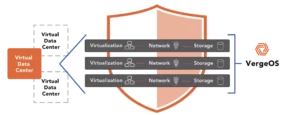
  1. Limiting Attack Surface: This means not all virtual machines (VMs) are exposed, creating barriers between them. The Virtual Data Center (VDC) technology by VergeOS mimics this concept, bundling VMs, storage, and network configurations within a group of applications, creating a “walled garden” to contain potential threats. By default, it is nearly impossible for a malware trigger file to move between VDCs.
  2. Prioritizing Frequent Data Protection: Regular backups won’t suffice. Ransomware can encrypt data faster than most backup schedules can accommodate. This ability to deliver rapid, frequent data protection is where VergeOS stands out with its IOclone-based snapshot technology. It ensures frequent, space-efficient, and impact-free data protection. VergeOS snapshots are independent copies rather than legacy snapshots that are a cascading tree of dependence. With VergeOS, customers can execute snapshots frequently with no disruption to performance.
  3. Immutable Data Storage: Traditional backups can still be compromised. VergeOS ensures that IOclone-based snapshots are immutable and safe from ransomware intrusions unless deliberately changed to read-write by an authenticated Administrator. Malware may launch within a single virtual data center, but it can’t spread beyond it, and it can’t infect immutable protected copies, which can easily be only a few minutes old.
  4. Timely Patch Application: VMware Administrators often need help to apply patching timely, potentially exposing vulnerabilities longer than organizations would like. VergeOS uses its VDC and snapshot technology to allow quick patch tests, ensuring smooth deployments without disruptions. IT Administrators can clone the entire VDC into a “Lab” VDC and test the patch impact against the entire data center without disruption to production.
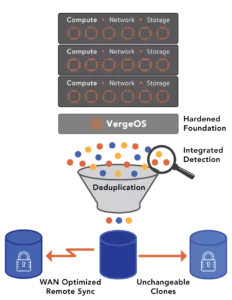
  5. Swift Ransomware Detection: Recognizing a breach early is crucial. VergeOS’ IOfortify technology swiftly detects potential threats, often within minutes, allowing for prompt action and containment. The recovery effort increases in complexity exponentially with each minute the attack goes undetected.
  6. Efficient Attack Victim Identification: Once contained, it’s vital to pinpoint affected VMs. VergeOS’ telemetry information, coupled with IOfortify timestamps, accurately indicates compromised systems for quick recovery. It enables you to focus on the few infected VMs instead of needing to scan every VM in the environment.
  7. Zero-Data Movement Recovery: VergeOS enables a near-instant recovery process, allowing IT Administrators to restore operations promptly without lengthy data transfer processes. There is no data movement. Bring up the most recent snapshot, scan for a potential trigger file, remove it if present, and launch the clone into production. There is no data movement.
  8. Detailed Forensics: Instead of hastily erasing infected datasets, VergeOS enables you to quarantine and retain them, offering valuable insights into the attack mechanisms and aiding with future prevention strategies.
  9. Robust Operating Environment: VergeOS stands out with its hardened operating environment, ensuring that its core remains unexploited, and in case of any breach, a quick restoration is possible.

Our newest white paper, Creating an Infrastructure-Wide Ransomware Resiliency Strategy, will enable you to create a strategy to help you recover from an attack within minutes and with no data loss —Download Now. Justify a VMware exit for ransomware resiliency in addition to reducing licensing costs.

Rethinking Infrastructure Choices with VergeIO

VMware exit for ransomware resiliency

VergeIO’s focus isn’t a mere reaction to the ransomware challenges IT faces; it’s a well-thought-out strategy integrated into the core code base from day one. It ensures a fortified operating environment. When seeking a VMware alternative, cost savings are essential but not exclusive. If, during the VMware Exit, you can improve your ransomware resiliency, it makes the decision both compelling and logical.

Converting your VMware environment is painless and risk-free. Schedule a technical whiteboard session; our experts will walk you through the process.

Read about how ransomware infiltrated MGM’s infrastructure on 9/15/2023 encrypting more than 100 ESXi servers.

Watch as we protect, detect, and recover a VM that is being attacked by ransomware.

Filed Under: Ransomware Tagged With: Alternative, ransomware, VMware

June 28, 2023 by Verge.IO

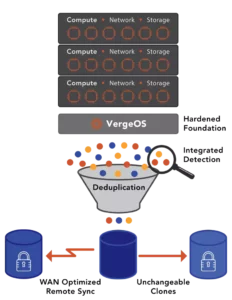
VergeIO, the Ultraconverged Infrastructure (UCI) company, introduced a groundbreaking solution for ransomware protection – IOfortify. This latest innovation combines robust security; unlimited, unchangeable clones; and rapid, complete recovery to fortify data integrity and provide users with true peace of mind. – Julian Lee, President TechnoPlanet

Read more…

Filed Under: News Tagged With: Disaster Recovery, ransomware

June 27, 2023 by George Crump

Once ransomware breaks through an organization’s defenses, time is of the essence, and IT must execute 5 steps to rapid ransomware recovery. The need for rapid recovery and minimal data loss was the top concern of 75% of the IT professionals responding to the survey we conducted during our recent webinar, “Creating a Holistic Ransomware Recovery Strategy,” now available on-demand.

There are 5 steps to rapid ransomware recovery with minimal data loss:

StepReason
Frequent ProtectionRansomware can strike at any moment, protection copies should be made, at least every few hours.
Long RetentionSome ransomware variants strike slowly to avoid detection. Recovery may require pulling data from multiple backup copies.
Rapid AlertingThe sooner you can detect you are under attack, the sooner you can stop the attack at its source and limit the damage
Mount Don’t RestoreTraditional restoration means copying data from an alternate storage medium, which takes time.
Practice, Practice, PracticeRansomware recovery is unlike any other. Find a safe way to “infect” your data center and practice.

Rapid Ransomware Recovery Step 1: Frequent Protection

While it may seem the most obvious of the 5 steps to ransomware recovery, it is missing from most response strategies. In an ideal ransomware protection scheme, protection events should occur every hour but at least every three hours. This necessary frequency of protection creates a challenge for many data protection approaches.

For example, most snapshot technologies, especially VMware’s built-in snapshots, will degrade performance significantly if the number of managed snapshots grows beyond a handful. However, even dedicated storage systems like all-flash arrays struggle when managing many snapshots. They may perform acceptably but can’t manage a sophisticated retention schedule. The intricacies of the snapshot metadata make deleting a snapshot, which is what a retention schedule does, egregiously slow. Because of its high metadata overhead, it takes the storage system time to “unwind” an intermixed snapshot, and its deletion means updating the metadata for all other snapshots. One result of this is that snapshots consume far more capacity than they should because they are so slow to give back the space used by old snapshots.

For these reasons, most organizations can’t tap into the full theoretical potential of ideal snapshot technology and, as a result, must count on backup and recovery solutions that significantly increase costs and slow recovery efforts.

Frequent Protection with VergeOS

VergeOS is different. At the core of VergeOS is global inline deduplication. Because VergeIO started with deduplication instead of bolting it on years after shipping a product, it delivers maximum data efficiency without impacting performance. Our IOclone capability leverages global deduplication to enable the creation of full clones of virtual machine data or even entire data centers in milliseconds. These clones are space efficient and independent of each other. You can have thousands of them without impacting performance. More importantly, you can delete them, even via a sophisticated retention schedule, in seconds, meaning any space they consume is instantly returned to the environment.

Rapid Ransomware Recovery Step 2: Long-Term Retention

Ransomware can take two attack vectors. The most common is, it will try to encrypt every file it can get to as soon as it breaks into the environment. The second attack vector is more sophisticated, slowly encrypting data to avoid detection. While the second vector is more sinister, most Bad Actors don’t have the patience to let the malware sit and slowly encrypt for months. They want the money now! Frankly, given the success rate of attacks once landing their malware payload, they don’t have to be sophisticated.

While the second attack vector is not as expected, it is wise to prepare for it. Long-term and granular data retention is the key to recovering from a slow-crawl ransomware attack. Again, because of performance concerns, snapshots are unsuitable for long-term retention in most cases. Backup software is excellent at the long-term recovery aspect but, because of the infrequency mentioned above, cannot provide a lot of granularity.

Solving the Retention Problem with VergeOS

Once again, VergeOS’ IOclone provides an ideal solution for long-term data retention, providing complete clones which are independent of each other. Retaining thousands of them doesn’t impact performance, and you can maintain as granular a history as you feel necessary. Getting rid of old files is another important step in limiting ransomware damage.

As mentioned, you can develop a sophisticated retention schedule to meet these requirements. For example, you can execute hourly clones and retain each for 24 hours. You can then execute a daily clone and retain that for seven days and a weekly clone that you retain for two months, and a monthly clone for a year. This type of schedule means a lot of deletion of older copies to reclaim space. It would cause significant performance problems for traditional snapshot techniques and take weeks to return the capacity reserved by those snapshots. IOclone has no performance impact, and reserved capacity is returned almost instantly.

Rapid Ransomware Recovery Step 3: Rapid Alerting

Knowing you are under attack is a critical part of 5 Steps to Rapid Ransomware Recovery because it addresses the other part of IT concerns, “with minimal data loss.” The sooner you know your environment is under attack, the sooner you can shut down the virtual machine under attack and limit the spread. The early warning also enables IT to better identify which protected copy they should turn to when starting their data recovery.

A few storage systems will provide an alert of a potential ransomware attack. Most of these will monitor for an increase in capacity utilization. The problem is that these alerting methods often miss an attack because capacity doesn’t necessarily grow. When malware works through your environment, it typically encrypts one file at a time, and during encrypting, those files will increase in size. After encryption, the file will be almost the same size as the unencrypted file. In other words, these methods will miss the attack. You’d much rather have a false positive than a missed attack.

IOfortify Delivers Reliable Attack Alerting

5 Steps to Rapid Ransomware Recovery

VergeOS’ IOfortify capability delivers reliable attack alerting by monitoring a change in deduplication ratios instead of changes in capacity utilization which is far more accurate. Encryption may not increase capacity utilization, but those files will look like new files to a deduplication algorithm. During our “Creating a Holistic Ransomware Recovery Strategy”, we demonstrated IOfortify, first identifying and alerting, then recovering a virtual machine whose data was actively being encrypted, in real time.

Rapid Ransomware Recovery Step 4: Mount, Don’t Restore

Mounting your recovery means pointing directly to your protected copy without having to move data. Restoring means copying the data from where it is back to the production volume, which can take dozens of minutes, if not hours, depending on the size of the volume and bandwidth of the network.

Again historically, the problem with directly mounting your recovery volume is how you maintain those copies. A traditional complete clone will consume too much capacity and take too long to create to be practical and violate the other above steps. A traditional snapshot still depends on the original volume; promoting it to production may mean a complete copy/restore.

Some backup solutions have an “instant recovery” solution. The problem with this method is that while you are mounting a volume, you are mounting it from a backup storage target which typically doesn’t have the performance or availability capabilities of production storage.

IOclone instant recovery with no performance impact

IOclone enables IT to point directly at a version of the virtual machine or data center before the ransomware attack. It is online instantly, and because of its independence, it does not need to be “rolled back” to production.

Rapid Ransomware Recovery Step 5: Practice

Ransomware recovery is unlike any other, so IT must practice the recovery process. The problem with practice is risking a “leak” of the practice into production.

Virtual Data Centers Make for Perfect Practice

5 Steps to Rapid Ransomware Recovery

VergeOS’ Virtual Data Center (VDC) capabilities enable IT to create a complete, secure copy of their entire data center and “infect” it with a ransomware simulator or an encryption program. Their isolation ensures the practice attack doesn’t “leak” into production. Verge.IO even has some customers that put their VDC, with anonymized data, out as a publicly addressable honeypot so they can test their attack response against a real foe.

Conclusion

The 5 Steps to Rapid Ransomware Recovery require preplanning, and they also require better infrastructure software. Because of the “bolt-on” approach to all features and protection capabilities, platforms like VMware can’t provide the same level of protection as VergeOS. The good news is you can transition from VMware to VergeOS seamlessly and at your own pace. You’ll have a more resilient environment and reduced costs by 50% or more. To learn more about using VergeOS as a VMware exit ramp, read our VMware Alternative page. You can also start using VergeOS as a Disaster Recovery solution, including for ransomware recovery, for VMware without migration using our IOprotect capability.

Watch Creating a Ransomware Response Strategy

This field is hidden when viewing the form
Name(Required)

VergeIO’s Inbox Respect Policy: We will send you no more than two e-mails per month

Filed Under: Ransomware Tagged With: Disaster Recovery, ransomware

June 20, 2023 by George Crump

Ransomware counts on Patch Tuesday to successfully infiltrate an organization. While there is nothing wrong with applying patches on Tuesday, it is which Tuesday the patch is applied that can open the door that ransomware plows through. Ideally, you want to apply the patch the next Tuesday after the release; doing so would eliminate the exploits that most ransomware and other cyber threats use to do their work.

The problem is organizations wait weeks or even months to apply patches. Why? Because the IT team needs to understand how the proposed patch will impact the rest of their environment. They don’t want to apply a patch that suddenly causes other currently working environments to fail.

Today’s infrastructure solutions must enable IT to vet and apply patches quickly and eliminate Patch Tuesday altogether. IT needs a solution that can address these patching challenges:

  1. Difficulty determining where the potential conflict is because of the number of vendors involved in delivering IT services.
  2. Difficulty in assembling and maintaining a lab environment to test patches.
  3. Difficulty rolling back a patch once it is deployed.
Ransomware Counts on Patch Tuesday

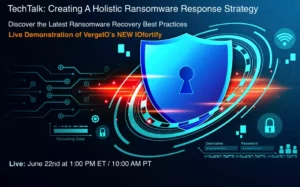
Eliminate Patch Tuesday and set yourself up for ransomware recovery success by attending our live TechTalk, “Creating a Ransomware Response Strategy,” this Thursday at 1:00 PM ET.

There are Too Many Vendors to Eliminate Patch Tuesday

One of the biggest challenges facing IT as they attempt to apply patches to prepare for the next ransomware attack is the complexity of the multi-vendor data center and this is why ransomware counts on patch Tuesday. While Hyperconverged Infrastructures (HCI) were supposed to make the multi-vendor data center easier to manage, they have the opposite effect. Traditional HCI is still a vertically layered stack of multiple software solutions. At a minimum, most HCI has software-defined storage (SDS), hypervisor (VMware/Hyper-V), software-defined networking, and software that protects the environment (backup and recovery).

Many environments are only one step down the software-defined path, running a legacy three-tier stack, virtualizing only compute. As a result, legacy data centers and even more “modern” HCI data centers are equally confusing when determining the impact of applying a patch.

Ultraconverged Infrastructure Simplifies Patch Reconciliation

VergeOS rotates the traditionally vertical IT stack into a tightly integrated linear plane that provides all infrastructure services (networking, hypervisor, storage, data protection) as a data center operating system within a singular software code base. We call this ultraconverged infrastructure (UCI), and it moves beyond legacy hyperconverged infrastructure to deliver greater efficiency and scalability at a significantly lower cost.

Reducing the IT stack to a singular, horizontal layer increases efficiency and scalability and simplifies the patching process. Updates for the entire infrastructure come from a single source, and because VergeOS is inherently highly-available, IT can apply patches and updates without disruption. VergeOS applies patches one node at a time, and workloads automatically move between nodes so that applications are unaffected.

You Need a Lab to Eliminate Patch Tuesday

Patches also come from operating systems and application vendors. Properly evaluating the impact of these patches is best done in a lab. IT organizations need a lab for patch testing and various other use cases. The problem is not just the cost to configure and maintain the lab but also making sure the lab has the same settings and data as the production environment. These requirements mean that most organizations don’t have a dedicated lab environment. When one is needed, they have to scramble to put something together. As a result, the lab is nothing like the production environment they are looking to simulate.

Virtual Data Centers: The Always Ready Lab

One of the critical capabilities of VergeOS is Virtual Data Centers (VDC). Virtual Data Centers are to physical data centers, what virtual machines (VM) are to physical servers, an encapsulation. Using another VergeOS capability, IOclone, IT professionals can, within milliseconds, create a space-efficient copy of their entire data center within.

Capturing the entire data center, including the data, networking configuration, storage policies, and application setups, is critical to ensuring that IT does patch verification against an exact replica of production. Since the copy is standalone and not dependent on the original, administrators can apply the patch without concern of impacting the production environment.

IT can implement a single VDC for its entire data center or subdivide it by application or workload. For example, a VergeOS administrator may create a VDC for Oracle, another for MS-SQL, and a “core” VDC for general-purpose VMs. Each VDC can be cloned hundreds of times, and those clones can be used as golden masters, backups, development, and patch verification.

IT Needs to Eliminate Patch Tuesdays AND Surprise Wednesdays

Even with the best testing, sometimes an errant patch slips through. Depending on the level of chaos it causes, IT may have to recover from the backup infrastructure completely. Recoveries from backup, especially large ones, are time-consuming, meaning IT may deal with the Wednesday surprise for the rest of the week. The problem is most infrastructure software is too inefficient to maintain its data protection points, typically traditional snapshots, for more than a few hours. As pointed out in this article, “VMware Storage Challenges,” this problem is especially apparent in VMware environments.

IOclone: Unlimited Clones and Retention

To make surprise Wednesdays less of a concern, IT needs the ability to retain backup copies for more than a few hours. Traditional backup software can meet this need, but the time and nuances in recovering an application with an errant patch are significant. IOclone has the entire state of the VM and the entire data center or workload. No rollback is needed; point to the last known good instance, and the application is running.

Get Ahead of Ransomware

Ransomware Counts on Patch Tuesday

Because ransomware counts on patch Tuesday, applying the latest patches is critical to staying ahead of ransomware. With VergeOS, IT can apply patches almost as soon as they are released without waiting for Tuesday. They can test application patches against a mirror image of their production environment. If an errant patch slips through, they can instantly point to the non-patched version.

Even with the improved patching capabilities within VergeOS, ransomware may still slip through because of user carelessness. Our IOfortify solution takes you the rest of the way by leveraging the hardened VergeOS, IOclone, and new detection capabilities to deliver rapid restoration from an attack. During our TechTalk, “Designing a Ransomware Response Strategy,” we will conduct a live demonstration of IOfortify in action. See if we can recover a VM under attack during the webinar.

Patch Comparison: Traditional Infrastructure Software vs. VergeOS

Rapid Patch RequirementTraditional Infrastructure SoftwareVergeOS
Determining Patch ImpactDifficult – Multiple vendors makes identifying potential conflicts time consumingEasy – One Vendor
Pre-deployment TestingDifficult – Hard to setup, maintain and pay for dedicated labEasy – Virtual Data Centers and Cloning can create “Instant labs.”
Patch RollbackHard – Recovering from a backup copy is very time consumingEasy – No rollback required, just point to pre-patched clone.

Filed Under: Blog, Ransomware Tagged With: dataprotection, ransomware

June 14, 2023 by George Crump

The best time for IT Professionals to start building a ransomware response checklist is now, before an attack occurs. There are several reasons for creating a checklist:

√ Successful Ransomware Response requires preparation.

√ Stress levels are high during an attack. You might forget a critical element in a rush to get everything back online.

√ A checklist will expose areas where you must practice and test.

√ A checklist provides a framework for comprehensive auditing.

Section One: Build a Ransomware Resilient Foundation

▢ Implement a Prevention Solution
The first step in building a ransomware response checklist is to have the foundational elements covered. The best response is the one you don’t have to conduct because the attack doesn’t get through. While no prevention solution is perfect, and you still need a response strategy, they are effective at preventing many types of attacks.

▢ Simplify Patching
Most patch releases sent to IT professionals today involve closing down potential security exploits. These patches should be applied upon release. The problem is most IT professionals are hesitant to apply patches to the environment because of downtime and the potential for unexpected impact of the patch. This is especially true of infrastructure software since an errant patch or downtime because of a patch can impact dozens of servers instead of just one.

Simplifying patching is a critical item when Building a Ransomware Response Checklist.

Another challenge is that most IT infrastructures are comprised of multiple pieces of software. Instead of a single, cohesive data center operating system (DCOS), IT must run layers of incompatible infrastructure software components, including networking software, virtualization software, storage software, and data protection software. Patches are applied to these layers when the respective vendor for each layer releases a service pack, which rarely coincides with when the vendors of the other layers release their patches.

Look for a vendor that takes a DCOS approach to infrastructure, which is not only critical to simplifying patching but also simplifies the entire ransomware response effort.

A DCOS should provide two deliverables in terms of patching. First, it should be able to simplify the foundational DCOS patching process by integrating the legacy IT stack into a single software element. Second, it should make the patching of guest operating systems and applications running inside VMs simpler by enabling zero-capacity and zero-performance impact clones so that IT can test the released patch for conflicts with other elements within the data center. If there is a problem with the patch, IT can roll back to the prior version, or if the patch works, roll the patched version into production.

▢ Harden the Operating Environment
An essential but often overlooked step is to harden the infrastructure software as much as possible. Suppose the ransomware can infect a part of the core infrastructure, like the hypervisor, the storage software, or the data protection software. The impact is widespread in that case, and recovery is far more complex.

Hardening the Data Center is a critical item when Building a Ransomware Response Checklist

While most mainstream OSs are not resilient to attack, you should ensure your core infrastructure software, like the hypervisor, storage, and networking software, are hardened. Look for infrastructure software that takes special developmental steps to make it act like firmware, loaded into RAM, and can be replaced easily from an unalterable good copy. Again, a DCOS makes these processes easier since only one software component needs to be hardened instead of three or four.

Section Two: Build a Ransomware Resilient Protection Strategy

▢ Increase Protection Frequency and Retention
Protecting data is an obvious inclusion in any attempt at building a ransomware response checklist. Most data centers run into three challenges when creating a ransomware-resilient data protection strategy:

  1. Protection events occur too infrequently to be meaningful.
  2. Protected copies aren’t retained long enough to outlive a prolonged attack.
  3. Too many protection solutions are used, making the process complex and expensive.
    A best practice for a successful ransomware response is to make sure you are capturing all data hourly. Snapshots, on paper, look ideal for this use case, but most solutions experience significant performance problems as the number of snapshots increases, limiting how long those snapshots can be retained.

▢ Consolidate Protection Tools
To get around the limitation of traditional snapshots, most organizations use at least four data protection tools to protect their environment. They may use a combination of hypervisor snapshots, storage system snapshots, replication software, application-level backup utilities (dumps), and enterprise backup software. Using all these applications makes the data protection process more expensive and complex, especially during a ransomware recovery effort. IT may be unsure which part of the process has the best known good copy.

Look for an infrastructure DCOS that enables you to consolidate, preferably down to one, the number of tools used for data protection. In essence, the DCOS will protect itself. It should provide the ability to protect data frequently and retain those protection events indefinitely without suffering performance degradation. It should enable you to restore the entire data center footprint, if need be, including network and storage configurations, with a single click. Lastly, it should enable affordable, high availability so data can be moved off-site and adhere to all aspects of the 3-2-1 rule.

Finding an alternative to traditional snapshots is a critical item when Building a Ransomware Response Checklist

▢ Consider a Snapshot Alternative
Traditional snapshot technology, standard in most storage systems and hypervisors, is ill-suited to meet these requirements. The metadata requirements to maintain a high frequency, long retention snapshot schedule is too great. It impacts performance and makes deleting old snapshots to free up capacity too time-consuming. Clones are a better option for performance and retention because they are independent copies, but without global inline deduplication, frequent clones and long retention will consume too much storage capacity and degrade performance too much to be practical.

Look for an infrastructure that combines the best benefits of both clones and snapshots by implementing DCOS-wide deduplication. If the deduplication technology is built into the core of the DCOS, then it will eliminate concerns about algorithmic performance overhead and capacity consumption while enabling the cloning of PBs of data in milliseconds.

Section Three: Build a Ransomware Resilient Detection Strategy

Alerting to a potential attack is a critical item when Building a Ransomware Response Checklist

▢ Detect Data Anomalies
Detection is a critical component of building a ransomware-resilient checklist. The sooner the DCOS can alert IT to an attack, the faster IT can stop and remedy the situation. Most ransomware attacks take two vectors after the malware finds its way into the environment. First, they start encrypting files as fast as possible, and second, the malware starts replicating itself to encrypt more files in parallel.

Again multiple detection tools are problematic. Look for a DCOS that can deliver in near real-time, a single source of alerting based on data change rates. In a globally deduplicated environment, the DCOS builds an alert off of an unexpected increase in capacity consumption.

▢ Preserve Forensic Data
When ransomware attacks, most IT professionals’ first reaction is to start the recovery response as quickly as possible. The problem with jumping right into recovery is that the process will likely destroy any forensic data available to determine how the attack entered the environment and how it spread. Both data points are crucial to future prevention efforts.

Instead, look for a DCOS that enables quick isolation of the current state. Again using a cloning type of technology powered by global inline deduplication enables these clones to be made in milliseconds without consuming too much capacity. It is also critical that this clone be independent and isolated.

▢ Create Ransomware Honeypots
Another detection strategy is to create Honeypots of the environment and expose them to attack, obviously anonymizing data in them. These honeypots can alert you of a potential wider threat and provide excellent practice for further hardening your data center. Honeypots typically have a lower false positive rate, when compared to most traditional intrusion-detection systems.

Look for a DCOS that can virtualize entire data centers in the same way that virtual machines virtualize servers. Then the DCOS can easily create honeypot data centers that are securely isolated from the production virtual data centers.

Section Four: Build a Rapid Recovery Strategy

▢ Mount the Recovery, Don’t Copy

When ransomware strikes, rapid recovery is critical. Depending on the severity of the attack, IT may need to recover a few VMs or an entire data center. Copying data from another snapshot or a backup process takes too much time. Again, clone the current state for forensic reasons, then start recovery. The key is to be able to mount, in place, the last known good copy of data. That mount still needs isolation so IT can scan it for any malware trigger files before returning it to production.

Look for a DCOS that can in-place mount a previous VM version or an entire data center. An in-place mount provides instant access to the data so IT can scan it to ensure there are no malware remnants and then provide user access.

How’s Your Checklist?

Building a Ransomware Response Checklist is only effective if you tick all the boxes. If your evaluation is missing a couple of marks, then consider attending VergeIO’s next TechTalk, “Creating a Ransomware Response Strategy,” with our CEO, Yan Ness, and SE Director, Aaron Reid. They will dive deep into the elements of this checklist and show you a live demo of our IOfortify solution for recovering from a ransomware attack.

Filed Under: Ransomware Tagged With: dataprotection, Disaster Recovery, DR, ransomware

  • « Go to Previous Page
  • Page 1
  • Page 2
  • Page 3
  • Go to Next Page »

855-855-8300

Get Started

  • Versions
  • Request Tour

VergeIO For

  • SAN Replacement
  • Solving Infrastructure Modernization Challenges
  • Artificial Intelligence
  • Hyperconverged
  • Server Room
  • Secure Research Computing

Product

  • Benefits
  • Documents
  • Architecture Overview
  • Use Cases
  • Videos

Company

  • Blog
  • Technical Documentation
  • Legal

© 2026 VergeIO. All Rights Reserved.