How array controllers, vSAN overhead and NSX drive up the server count for a midsize enterprise, and how VergeOS runs the same workloads on fewer servers.
Converged infrastructure lets an organization amortize the cost of compute, memory, and storage across a fleet of servers. Every server contributes all three resources to a shared pool, and every workload draws from that pool. That amortization matters more now than at any point in the last decade. Data center inflation is hitting organizations of every size, with server DRAM prices nearly doubling since late 2025 and flash capacity costs more than tripling in a year. Every core and every gigabyte of RAM in the data center needs to earn its keep.
Key Takeaways
- Modern array controllers are x86 servers, so a three-tier midsize enterprise runs eight servers before counting its network appliances.
- Legacy vSAN removes the array but claims host CPU and RAM for storage, and networking still requires NSX.
- VergeOS runs compute, storage and networking in one code base, so the same workloads run on five servers.
- Inline deduplication and support for servers up to ten years old stretch the RAM, flash and hardware the organization already owns.
Where Consolidation Stopped
Server virtualization is the best-known example of this amortization. VMware built its business on server utilization and consolidation, running dozens of workloads on a host that once ran one. The consolidation stopped at the storage tier. vSAN arrived years after vSphere, and its post-launch limitations kept many customers away. Those customers instead adopted three-tier architectures with dedicated all-flash arrays.
A dedicated all-flash array is the exact inverse of efficient utilization. Its controllers use RAM as cache, but their CPUs sit mostly idle, and applications in a typical data center never push the array close to its maximum performance. All-flash array vendors claim to be software companies, and they are. They ship a pair of servers prebuilt to deliver storage services, and customers pay for processors and memory that spend most of the day waiting.
Data center inflation makes that idle capacity expensive. This is the wrong time to buy more hardware, and it is certainly the wrong time to buy three times as many servers as you need and watch most of them sit idle.
Counting the Servers in a Midsize Enterprise
Consider a midsize enterprise running a traditional three-tier architecture. The organization needs six physical servers to run its applications. Storage adds two more. Today’s array controllers are standard x86 servers running the vendor’s storage software, so a dual-controller array raises the server count to eight before anyone counts the shelves that hold the media. Networking adds a collection of appliances, each one a server underneath, running routing, firewall, and VPN services. That is three sets of servers, each sized for its own peak and each running far below it most of the day.
Switch the same organization to legacy vSAN and the storage controllers go away, but the virtualization hosts have to grow. vSAN is a set of separate software packages hidden behind a single GUI, and each package claims host CPU and RAM. Broadcom documents both the CPU overhead vSAN places on every host and a per-host memory footprint that grows with capacity. The cores and memory vSAN consumes are resources applications cannot use, so the cluster needs more servers, or larger ones, to run the same workloads.
Most vSAN deployments also have very limited networking capabilities. Routing, firewall, and microsegmentation require NSX, which is another purchase, another cluster of management VMs, and another claim on host resources. vSAN moves the storage tax off a dedicated array and onto the hypervisor hosts. The midsize enterprise still pays it, now in extra cores and DIMMs bought at today’s memory prices.
Key Terms
How VergeOS Changes the Math
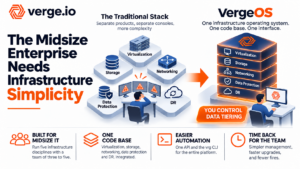
VergeOS makes a single set of servers work harder by integrating virtualization, storage, and networking into a unified infrastructure operating system. All three run in one codebase, so no separate products compete for host resources, and no infrastructure VMs need feeding. The first VM you create is yours.
Run the same midsize enterprise on VergeOS and the server count drops from eight or more servers to five. A single operating system that runs compute, storage, and networking in one codebase spends far less CPU and RAM on itself than a stack of separate products, so the workloads that needed six application servers run on five, and those five servers run the entire data center. VergeFS pools the drives inside those servers into shared storage, so you can remove the array controllers and shelves. Routing, firewall, and VPN run inside VergeOS virtual networking, so you can remove the network appliances and avoid buying NSX. Global inline deduplication reduces the data written to disk and the data held in RAM, stretching the flash and memory the organization already owns.
Instead of three sets of servers at a fraction of their capacity, the organization runs one smaller set of servers at high utilization, and every core and DIMM it paid for does work for its applications. VergeOS also supports almost any server built in the last ten years. Hosts coming out of vSAN service can stay in production, which removes hardware purchases from the exit plan, and the server freed by the consolidation becomes spare capacity for growth.
Server Count and vSAN Overhead at a Glance
| Three-Tier | Legacy vSAN | VergeOS | |
|---|---|---|---|
| Application servers | Six | Six, plus added hosts or RAM for vSAN overhead | Five, running the entire data center |
| Storage | Two more servers acting as dual array controllers, plus media shelves | Runs on the hosts and consumes their CPU and RAM | VergeFS, in the same code base as the hypervisor |
| Networking | Separate routing, firewall and VPN appliances | NSX, purchased separately | Included in VergeOS |
| Total servers | Eight, plus the network appliances | Six or more, plus NSX management VMs | Five, about 20% fewer than the six application servers alone |
Simpler Operations Follow the Economics
The unification into a single code base also delivers a step-function improvement in infrastructure management. Compute, storage and networking share one interface and one update cycle, which makes day-two operations simpler. IT generalists run the whole environment without separate storage and networking specialists, and a midsize team of three to five gets back the hours it used to spend coordinating separate compute, storage and network products.
Make the Servers You Own Do the Work
Data center inflation changes how a vSAN exit should be evaluated. The hypervisor license is the visible cost. The hidden cost is the CPU and memory consumed by storage and networking layers that each run as separate software on hosts you paid for, at a time when every DIMM costs nearly twice what it did a year ago. Moving to another architecture that splits the work across separate tiers repeats the same waste with a new vendor’s name on it. VergeOS puts compute, storage and networking on five servers, about 20% fewer than the six application servers alone, running at high utilization, and it lets the organization keep the hardware it already owns.
Frequently Asked Questions
How much CPU and RAM does vSAN consume?
Why count storage array controllers as servers?
Does VergeOS require NSX or separate network appliances?
Can VergeOS run on the servers our vSAN cluster uses today?
Broadcom documents a per-host CPU overhead for vSAN and a per-host memory footprint that grows with capacity. Those cores and that memory are unavailable to the applications running on the host, so vSAN clusters need more or larger servers for the same workloads.
Modern array controllers are standard x86 servers running the storage vendor’s software. A dual-controller array adds two servers to the data center, plus the shelves that hold the media.
VergeOS includes routing, firewall and VPN services in its built-in virtual networking, so the organization retires those appliances and skips the NSX purchase.
VergeOS supports almost any server built in the last ten years, so hosts coming out of vSAN service can stay in production and the exit plan avoids a hardware purchase.