• Skip to main content
  • Architecture
    • Overview
      Learn about VergeOS’ unique unfied architecture that integrates virtualization, storage, networking, AI, backup and DR into a single data center operating system
    • Infrastructure Wide Deduplication
      VergeOS transforms deduplication from a storage-only commodity into a native, infrastructure-wide capability that spans storage, virtualization, and networking, eliminating hidden resource taxes
    • VergeFS
      VergeFS is a distributed, high-performance global file system integrated into VergeOS, unifying storage across nodes, tiers, and workloads while eliminating the need for external SANs
    • VergeFabric
      VergeFabric is VergeOS’s integrated virtual networking layer, delivering high-speed, low-latency communication across nodes while eliminating the complexity of traditional network configurations.
    • Infrastructure Automation
      VergeOS integrates Packer, Terraform, and Ansible to deliver an end-to-end automation pipeline that eliminates infrastructure drift and enables predictable, scalable deployments.
    • VergeIQ
      Unlock secure, on-premises generative AI—natively integrated into VergeOS. With VergeIQ, your enterprise gains private AI capabilities without the complexity, cloud dependency, or token-based pricing.
  • Features
    • Virtual Data Centers
      A VergeOS Virtual Data Center (VDC) is a fully isolated, self-contained environment within a single VergeOS instance that includes its own compute, storage, networking, and management controls
    • High Availability
      VergeOS provides a unified, easy-to-manage infrastructure that ensures continuous high availability through automated failover, storage efficiency, clone-like snapshots, and simplified disaster recovery
    • ioClone
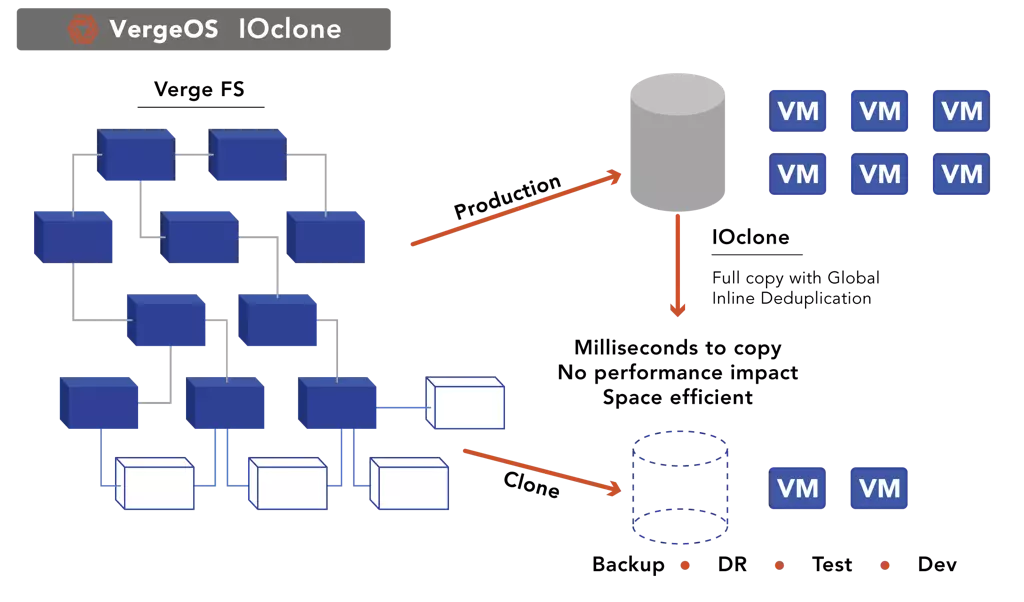
      ioClone utilizes global inline deduplication and a blockchain-inspired file system within VergeFS to create instant, independent, space-efficient, and immutable snapshots of individual VMs, volumes, or entire virtual data centers.
    • ioReplicate
      ioReplicate is a unified disaster-recovery solution that enables simple, cost-efficient DR testing and failover via three‑click recovery of entire Virtual Data Centers—including VMs, networking, and storage.
    • ioFortify
      ioFortify creates immutable, restorable VDC checkpoints and provides proactive ransomware detection with instant alerts for rapid recovery and response.
    • ioMigrate
      ioMigrate enables large-scale VMware migrations, automating the rehosting of hundreds of VMs (including networking settings) in seconds with minimal downtime by seamlessly transitioning entire VMware environments onto existing hardware stacks.
    • ioProtect
      ioProtect offers near-real-time replication of VMware VMs—including data, network, and compute configurations—to a remote disaster‑recovery site on existing hardware, slashing DR costs by over 60% while supporting seamless failover and testing in an efficient, turnkey VergeOS Infrastructure.
    • ioOptimize
      ioOptimize leverages AI and machine learning to seamlessly integrate new and old hardware and automatically migrate workloads from aging or failing servers.
    • ioGuardian
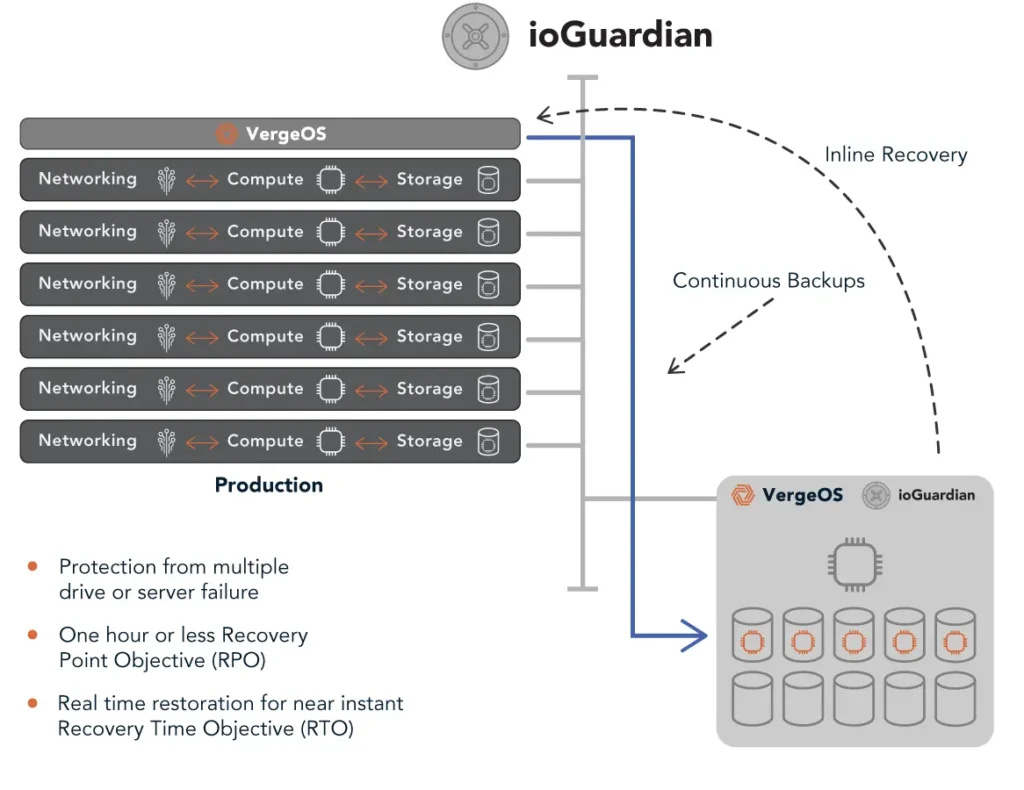
      ioGuardian is VergeIO’s built-in data protection and recovery capability, providing near-continuous backup and rapid VM recovery during multiple simultaneous drive or server failures.
  • IT Initiatives
    • VMware Alternative
      VergeOS offers seamless migration from VMware, enhancing performance and scalability by consolidating virtualization, storage, and networking into a single, efficient platform.
    • Hyperconverged Alternative
      VergeIO’s page introduces ultraconverged infrastructure (UCI) via VergeOS, which overcomes HCI limitations by supporting external storage, scaling compute and storage independently, using existing hardware, simplifying provisioning, boosting resiliency, and cutting licensing costs.
    • SAN Replacement / Storage Refresh
      VergeIO’s storage by replacing aging SAN/NAS systems within its ultraconverged infrastructure, enhancing security, scalability, and affordability.
    • Infrastructure Modernization
      Legacy infrastructure is fragmented, complex, and costly, built from disconnected components. VergeOS unifies virtualization, storage, networking, data protection, and AI into one platform, simplifying operations and reducing expenses.
    • Secure Research Computing
      VergeIO's Secure Research Computing solution combines speed, isolation, compliance, scalability, and resilience in a cohesive platform. It’s ideal for institutions needing segmented, compliant compute environments that are easy to deploy, manage, and recover.
    • Venues, Remote Offices, and Edge
      VergeOS delivers resiliency and centralized management across Edge, ROBO, and Venue environments. With one platform, IT can keep remote sites independent while managing them all from a single pane of glass.
    • Fight Data Center Inflation
      DRAM, SSD and server prices keep climbing. VergeOS uses as much as 50% less RAM per VM than VMware, runs on the servers you already own, and moves cold data to low-cost hard drives.
  • Blog
      • The Midsize Enterprise Needs Greater ResiliencyResiliency belongs in every VMware alternative evaluation for small IT teams. See how VergeOS keeps midsize enterprise workloads running through drive and server failures, locks snapshots against ransomware, and turns Patch Tuesday from a weekend maintenance window into a weekday task.
      • Edge Disaster Recovery: Keep Customer-Facing Locations OpenEdge disaster recovery for stores and venues. VergeOS runs a site on one server, recovers it locally from snapshots and fails it over to the core.
      • VMware Migration Testing Is Critical to Completing Your ExitVMware migration testing decides whether your exit finishes. VergeOS keeps the VMware image, takes instant snapshots and isolates each workload in a VDC.
    • View All Posts
  • Resources
    • Become a Partner
      Get repeatable sales and a platform built to simplify your customers’ infrastructure.
    • Technology Partners
      Learn about our technology and service partners who deliver VergeOS-powered solutions for cloud, VDI, and modern IT workloads.
    • White Papers
      Explore VergeIO’s white papers for practical insights on modernizing infrastructure. Each paper is written for IT pros who value clarity, performance, and ROI.
    • In The News
      See how VergeIO is making headlines as the leading VMware alternative. Industry analysts, press, and partners highlight our impact on modern infrastructure.
    • Press Releases
      Get the latest VergeOS press releases for news on product updates, customer wins, and strategic partnerships.
    • Case Studies
      See how organizations like yours replaced VMware, cut costs, and simplified IT with VergeOS. Real results, real environments—no fluff.
    • Webinars
      Explore VergeIO’s on-demand webinars to get straight-to-the-point demos and real-world infrastructure insights.
    • Documents
      Get quick, no-nonsense overviews of VergeOS capabilities with our datasheets—covering features, benefits, and technical specs in one place.
    • Videos
      Watch VergeIO videos for fast, focused walkthroughs of VergeOS features, customer success, and VMware migration strategies.
    • Technical Documentation
      Access in-depth VergeOS technical guides, configuration details, and step-by-step instructions for IT pros.
  • How to Buy
    • Schedule a Demo
      Seeing is believing, set up a call with one of our technical architects and see VergeOS in action.
    • Versions
      Discover VergeOS’s streamlined pricing and flexible deployment options—whether you bring your own hardware, choose a certified appliance, or run it on bare metal in the cloud.
    • Test Drive – No Hardware Required
      Explore VergeOS with VergeIO’s hands-on labs and gain real-world experience in VMware migration and data center resiliency—no hardware required
  • Company
    • About VergeIO
    • Support
      Get fast, expert help from VergeIO’s support team—focused on keeping your infrastructure running smoothly.
    • Careers
      Join VergeIO and help reshape the future of IT infrastructure. Explore open roles and growth opportunities.
  • 855-855-8300
  • Contact
  • Search
  • 855-855-8300
  • Contact
  • Search
  • Architecture
    • Overview
    • VergeFS
    • VergeFabric
    • Infrastructure Automation
    • VergeIQ
  • Features
    • Virtual Data Centers
    • High Availability
    • ioClone
    • ioReplicate
    • ioFortify
    • ioMigrate
    • ioProtect
    • ioOptimize
    • ioGuardian
  • IT Initiatives
    • VMware Alternative
    • Hyperconverged Alternative
    • SAN Replacement / Storage Refresh
    • Infrastructure Modernization
    • Secure Research Computing
    • Venues, Remote Offices, and Edge
    • Fight Data Center Inflation
  • Blog
  • Resources
    • Become a Partner
    • Technology Partners
    • White Papers
    • In The News
    • Press Releases
    • Case Studies
    • Webinars
    • Documents
    • Videos
    • Technical Documentation
  • How to Buy
    • Schedule a Demo
    • Versions
    • Test Drive – No Hardware Required
  • Company
    • About VergeIO
    • Support
    • Careers
×
  • Architecture
    • Overview
    • VergeFS
    • VergeFabric
    • Infrastructure Automation
    • VergeIQ
  • Features
    • Virtual Data Centers
    • High Availability
    • ioClone
    • ioReplicate
    • ioFortify
    • ioMigrate
    • ioProtect
    • ioOptimize
    • ioGuardian
  • IT Initiatives
    • VMware Alternative
    • Hyperconverged Alternative
    • SAN Replacement / Storage Refresh
    • Infrastructure Modernization
    • Secure Research Computing
    • Venues, Remote Offices, and Edge
    • Fight Data Center Inflation
  • Blog
  • Resources
    • Become a Partner
    • Technology Partners
    • White Papers
    • In The News
    • Press Releases
    • Case Studies
    • Webinars
    • Documents
    • Videos
    • Technical Documentation
  • How to Buy
    • Schedule a Demo
    • Versions
    • Test Drive – No Hardware Required
  • Company
    • About VergeIO
    • Support
    • Careers

snapshots

October 26, 2026 by George Crump

Edge disaster recovery means stores, venues and restaurants stay open through a failed drive, a ransomware attack or the loss of the local server. VergeOS 26.2 handles all of them.

Edge disaster recovery becomes urgent when the remote location serves customers directly. Entertainment venues, restaurants, retail stores, and customer service centers all share the same goal. Nobody standing at the counter should hear, “I’m sorry, our system is down,” or “the internet is out.” That sentence frustrates the customer and makes your brand look bad. VergeIO customers like Topgolf and Saratoga Casino run exactly these kinds of locations. In our on-demand webinar, VergeOS 26.2: Finish the VMware Exit, Dave Vincent showed how VergeOS keeps them serving customers through two very different kinds of failure: problems inside the site, and the loss of the site itself.

Key Takeaways
  • VergeOS runs a remote site on as few as one server, new in VergeOS 26.2, or on a small two-node HA cluster, with data protection built in so no local IT staff is required.
  • Drive failures, deleted files, corruption, and ransomware recover locally from VergeOS snapshots, and ioGuardian pulls missing blocks from the core when failures exceed the protection level.
  • Each site runs as a Virtual Data Center that replicates to the core on your schedule, so the core can run the entire site if the local servers go offline.

Edge Disaster Recovery Starts With Running Local

The main reason to keep servers at a remote location is to serve customers and keep operations running when the site is disconnected. If you are at Topgolf having fun, you want the fun to keep going when the internet connection drops. The problem with running local is that you probably can’t afford IT staff at each location. That means the infrastructure must be managed remotely, rely on automation, and provide local data protection and resiliency.

VergeOS meets this demand by running on as few as one server at a remote site, new in our 26.2 release. For local high availability, a small two-node HA cluster does the job. With no IT staff on site, these systems are exposed directly to the people using them, so VergeOS builds data protection and resiliency into the platform to guard against drive failures and accidental data deletion.

Running local keeps the store openRUNNING LOCALInternet + corelink downStore / venueVergeOS · 1 serverPOSInventoryGamesLink down. POS, inventory and games keep running.

Drive Failures

When a drive fails, VergeOS redirects reads and writes to the surviving redundant drives and the site keeps running. If the number of failed drives exceeds your protection level, for example two drives failing, VergeOS uses ioGuardian to transfer the needed blocks from the core data center to the venue or store. The only expense is the latency of moving those blocks across the wire. Customers keep checking out, and IT replaces the drives on its own schedule.

ioGuardian covers drive failuresDRIVE FAILURESCore data centersynchronized copy of the blocksioGuardianStore server · VergeOSPOSrunningInventoryrunningGamesrunningD1D2D3D4FAILEDFAILEDI/O reroutes to surviving drivesMissing blocks served from the coreTwo drives down. The VMs keep running.

Deleted Files, Corruption and Ransomware

If a user deletes a file or an application suffers corruption, VergeOS snapshots let you restore an individual file by mounting a snapshot as a drive to a virtual machine. Severe corruption or a ransomware attack calls for a bigger response, since ransomware is an infrastructure problem that reaches the VMs, the network and the configuration along with the data. VergeOS system snapshots restore the entire site locally, at local speed, without waiting on WAN bandwidth.

Follow our best practice: put each remote location in its own Virtual Data Center, and keep an attack contained to that site. Ransomware can’t creep up the wire into the core data center or spread to other remote sites.

Ransomware stays inside one VDCRANSOMWARE CONTAINEDStore A · VDCS1S2S3S4system snapshotsSite VMs + confighealthyencryptedrestored ✓Local restore from S4no wait on WAN bandwidthVDC isolation stops the spreadCore VDCcleanStore B VDCcleanOne site restored. Nothing else touched.

Edge Disaster Recovery When the Whole Site Goes Down

The second edge disaster recovery situation is the loss of the entire site. Single-server sites are especially vulnerable because there is nothing left to fail over to. The risk is a location that is technically open for business. Customers walk in the door, and the kitchen is open, but without the servers, nothing can be transacted.

VergeOS addresses this by establishing each remote location as a Virtual Data Center (VDC). A VDC encapsulates the entire remote data center into a single object, and VergeOS replicates that object to the core data center on a schedule you set. Each replication captures the site’s complete state, including data, network configuration, VM configurations, and storage settings, all consistent and in sync. The core holds everything it needs to run the remote site. VergeOS abstracts the hardware, so that VDC runs at the core even when the core uses different server, storage, and network hardware than the store.

The core runs the site when it failsVDC REPLICATION + FAILOVERStore usersRemote site · VDCPOSInventoryGamesdata · network · VM configs · storage settingsVDCreplicates onyour scheduleCore data centerSite VDC copystandby · in syncrunning at the corePOSInventoryGamesBGPThe core starts the site VDC and serves its users.
FailureVergeOS ResponseWhere Recovery Runs
One drive failsReads and writes move to surviving drivesLocal
Failures exceed protection levelioGuardian supplies missing blocks from the coreLocal, with blocks from the core
User deletes a fileSnapshot mounted as a drive to a VMLocal
Corruption or ransomwareSystem snapshot restores the whole siteLocal
Site servers go offlineReplicated VDC runs the site, BGP redirects trafficCore

See the Failover in the On-Demand Webinar

In the webinar, Dave used VergeOS’s built-in BGP routing to show the core copy of a remote location picking up the moment the remote servers went offline. The store keeps serving customers from the core, and IT can fix or replace the local hardware on its own schedule. Watch the on-demand webinar for the full session, or go straight to the Edge Site Recovery Demo. The VergeOS 26.2 datasheet covers single-server sites and the rest of the release. If you want to map this to your own locations, book a technical whiteboard session with our team.

BGP moves the store to the coreBGP FAILOVERCustomers + POSBGP reroutesStore serveronlineofflineCore · VDC copystandbyserving the siteStore stays opentransactions run from the core
On-Demand Webinar
VergeOS 26.2: Finish the VMware Exit
Aaron Richman and Dave Vincent demonstrate faster migration, Failover Clustering on VergeFS, and edge site recovery with BGP.
Watch Now
Key Terms
Edge Disaster Recovery
Protecting and restoring remote locations such as stores, venues and branch offices, where local IT staff is rare and downtime faces the customer.
Virtual Data Center (VDC)
A VergeOS object that holds an entire data center, including VMs, networking and storage settings, so it can be isolated, snapshotted and replicated as one unit.
ioGuardian
A VergeOS capability that repairs missing or corrupted blocks by retrieving them from a synchronized remote system, such as the core data center.
System Snapshot
A point-in-time copy of the complete VergeOS environment, used to roll back a whole site after corruption or a ransomware attack.
Frequently Asked Questions
Can VergeOS run a remote site on a single server?
Yes. VergeOS 26.2 adds support for single-server sites. Locations that want local high availability can run a two-node HA cluster instead.
What happens if two drives fail in a single-server site?
VergeOS uses ioGuardian to pull the blocks it needs from the core data center. The site keeps running, and the only cost is the latency of moving those blocks.
Does ransomware at one store reach the core data center?
With each remote location in its own Virtual Data Center, the attack stays isolated to that site. You restore the site locally from a VergeOS system snapshot.
What does the core need to run a failed remote site?
The core needs the replicated VDC, which holds the site’s data, network configuration, VM configurations and storage settings. The core hardware can differ from the hardware at the site.

Next Steps

The full webinar, the edge recovery demo and the datasheet are one click away.
On-Demand Webinar
Finish the VMware Exit
Aaron Richman and Dave Vincent demonstrate VergeOS 26.2, including edge site recovery.
Video Demo
Edge Site Recovery
Watch a remote site pick up at the core when its local servers go offline.
Datasheet
VergeOS 26.2
Faster VMware migration, Failover Clustering on VergeFS and single-server distributed data centers.

Filed Under: Edge Computing Tagged With: Disaster Recovery, Edge, ioGuardian, ransomware, ROBO, snapshots, VergeOS 26.2, virtual data center

October 20, 2026 by George Crump

VergeOS 26.2 moves the data faster. Snapshots and virtual data centers prove each workload runs before it goes into production.

VMware migration testing is one of the most important parts of selecting and moving to a VMware alternative. I mean the big migration, when you move everything into production. That is a different job from moving a few VMs during a proof of concept, which I covered in How to Create a VMware Migration Test. As we will show in our webinar, Finish the VMware Exit, the latest VergeOS release raises the bar for fully exiting VMware.

In our lab, transfer performance runs 2.2 times faster than VergeOS 26.1.8, so even large workloads complete their move. VergeFS now supports shared disks for Microsoft Failover Clustering. That means clustered applications like SQL Server and file services migrate too. These changes move data and applications into VergeOS, where you enjoy our simple server-based licensing model. You also get the operational simplicity of a unified codebase.

Key Takeaways
  • VergeOS stores the original VMware image and offers a snapshot when you create the VM, so a failed test sends you back to the original state without re-copying data.
  • VergeOS snapshots take less than a second, use almost no capacity, and stand independent of each other, so any snapshot can become the new source.
  • Placing each migrated workload in its own Virtual Data Center isolates VMware migration testing, caps CPU and GPU use, and lets many testers work in parallel.

Why VMware Migration Testing Decides the Exit

Completing the move to a VMware alternative is about more than getting data and applications from point A to point B. Everything has to work when it gets there. Migration capability belongs on the short list of requirements for any VMware alternative, but moving the data only proves the platform can receive it. VMware migration testing proves the applications run, which is critical, and VergeOS uniquely excels here.

Key Terms
VMware Migration Testing
Validating that each migrated workload runs correctly on the new platform before it goes into production.
Virtual Data Center (VDC)
The VergeOS implementation of multi-tenancy. A VDC holds VMs, networks, storage, and policies in an isolated environment that IT manages as one unit.
Independent Snapshot
A VergeOS snapshot with no dependency on other snapshots or the original source. Any snapshot can become the new source, and you can delete the rest.

Snapshots Make VMware Migration Testing Safe

VergeOS Keeps the Original VMware Image

After your VMware data set arrives on VergeOS, it stays in its original VMware format at first. VergeOS stores the VMware image. If something goes wrong in testing, you return to it without re-copying data from the VMware environment. Then, when you create that VM under VergeOS, it asks whether you want to create a snapshot. That gives you a second copy of the original state before the first test runs.

Snapshots Built for Aggressive Testing

Those snapshots let you test aggressively. You can take as many as you want. Each takes less than a second, with almost no capacity impact. VergeOS snapshots are also independent of each other and of the original source. For example, you can make snapshot 100 the new source and delete all the other snapshots. The same cleanup on a dedicated external array can take hours, or even days, to reclaim space.

Snapshots make VMware migration testing safeSNAPSHOTS · SAFE TESTINGVMware VMsource environmentVergeOSOriginal VMware imageKept on VergeFS. Revert without re-copying.VM created under VergeOSCreate a snapshot?Yes ✓SNAPSHOTS · UNDER A SECOND EACH#1#2#3#4#5#6#7…#99#100New sourceDelete the rest. No chain to unwind.CAPACITY IMPACTalmost none

Virtual Data Centers for VMware Migration Testing

The next way VergeOS excels is our Virtual Data Center (VDC) technology, our take on multi-tenancy. It is also the most distinctive and underused. Most customers use VDCs in production. Cloud service providers create a tenant for each client. Enterprises use VDCs to isolate mission-critical workloads from standard business workloads. That same isolation makes VDCs ideal for testing.

One Workload, One VDC

A testing best practice is to migrate by workload instead of one VM at a time. We suggest that each workload you migrate goes into its own VDC. That isolates it from the workloads you have already migrated, which ideally sit in their own VDCs. Now you can test the latest workload relentlessly without impacting other workloads. You can also control how much CPU and GPU a workload gets, so a runaway process can’t steal resources from workloads you have already certified and are now running in production on VergeOS.

One workload, one VDCONE WORKLOAD, ONE VDCVergeOSVDCProd ✓VDCProd ✓VDCProd ✓Test VDC · newest workloadVMVMVMtestCPUGPUA runaway process stops at its cap.Certified workloads keep their resources.

Mass VMware Migration Testing with VDC Snapshots

You can take VDCs a step further. First, migrate the workload into a VDC with all of its special network and configuration settings intact. Next, make five or ten snapshots of it. Then assign each one to a fellow IT staffer, or even an application stakeholder, for mass testing.

The IP addresses and other settings within each VDC can be the same. The VDC technology keeps them isolated, so testers work without IP address conflicts. If one tester breaks the application, the other testers keep working. If another tester creates the perfect configuration, you promote that version. Then you delete all the others, including the original.

Mass VMware migration testing with VDC snapshotsMASS TESTING · VDC SNAPSHOTSOrder app VDCmigrated workload · 10.0.0.105 SNAPSHOTSCopy 1Order app10.0.0.10ITCopy 2Order app10.0.0.10brokenDBACopy 3Order app10.0.0.10App ownerCopy 4Order app10.0.0.10ITCopy 5Order app10.0.0.10Stakeholderothers unaffectedbest configPromoted copyFive copies of one workload. Same IPs, no conflicts.

Prove the Cluster Before Cutover

This approach pays off most with clustered applications. Migrate a SQL Server failover cluster into its own VDC, snapshot it, and hand copies to the DBA team and the application owners. One tester shuts down a cluster node. That tester confirms the shared disk on VergeFS changes hands through SCSI-3 Persistent Reservations and the database comes back online. Another runs the month-end workload against the cluster. All of this happens before production depends on the cluster, giving application owners the confidence they need to approve cutover.

Prove the cluster before cutoverPROVE THE CLUSTERTest VDC · SQL Server clusterSQL Node 1ownerSQL Node 1shut down ✕SQL Node 2standbySQL Node 2new ownerVergeFS shared diskSCSI-3 Persistent ReservationsDatabase onlineFailover proven before production depends on it.

Add AI to Your VMware Migration Testing Team

With the GPU management built into VergeOS, you can even run a local AI LLM as part of the testing team. It puts the application through its paces alongside your staff and stakeholders. The model runs on your own GPUs inside its own VDC and works through test cases around the clock. Your application data stays inside your environment.

AI on the VMware migration testing teamAI ON THE TESTING TEAMTest VDCGPUlocal LLMMigratedappTEST CASES · AROUND THE CLOCK✓ Logins and permissions✓ Month-end batch run✓ Reports and integrations✓ Edge cases at 3:00 AMYour GPUs. Your data stays in your environment.
Live Webinar · October 22 · 12:00 PM CT
Finish the VMware Exit
Aaron Richman and Dave Vincent demonstrate faster migration, Failover Clustering on VergeFS, and VDCs for testing and protection.
Register

Finish the VMware Exit

From Tested to Production

The certified VDC becomes production. You put into service the environment your testers approved, with its VMs, network settings, and configuration. Nothing gets rebuilt or re-entered between the last test and go-live. When the next workload arrives, you start the process again in a new VDC. The production VDCs you already certified stay untouched.

From tested to productionFROM TESTED TO PRODUCTIONTestingProductionCertified VDCtests passed ✓Same VDC, same settings. Nothing rebuilt.

Parallel Testing Shortens the Exit

Testing is where most migration timelines slip. Parallel VMware migration testing changes that. When several testers and an AI model work against identical copies of the same workload, serial testing that delays cutover shrinks. Each workload reaches production sooner, the next one starts in its own VDC, and the last workloads leave VMware on a schedule you control instead of one the testing backlog sets.

Parallel testing shortens the exitPARALLEL TESTING SHORTENS THE EXITOne tester at a timecutoverParallel VMware migration testingtesters + AI model on identical VDC copiescutoverEach workload reaches production sooner.

See VergeOS 26.2 Live

VergeOS 26.2 moves the data faster and brings clustered applications across. Its snapshots and VDCs let you prove everything works once it arrives. The VergeOS 26.2 datasheet covers everything in the release. Leave No VM Behind explains how 26.2 moves the last workloads off VMware. Aaron Richman and Dave Vincent demonstrate it live on Thursday, October 22, 2026, at 12:00 PM CT. Register for Finish the VMware Exit, or schedule a technical whiteboard session to plan your own migration and testing approach.

Finish the VMware exitFINISH THE VMWARE EXITVMwareVergeOSClustered SQL Server included.LIVE DEMO · OCT 22 · 12:00 PM CT

VMware Migration Testing on VergeOS

Testing NeedWhat VergeOS Provides
Fall back to the originalStored VMware image plus a snapshot at VM creation
Many test iterationsSnapshots in under a second with almost no capacity impact
Keep the winner, drop the restIndependent snapshots, any one can become the new source
Protect production during testsOne VDC per workload with CPU and GPU limits
Parallel testersVDC snapshots per tester with the same IP addresses
Clustered applicationsFailover tests on VergeFS shared disks inside an isolated VDC
Go-liveThe certified VDC becomes production, with nothing rebuilt
Frequently Asked Questions
What is VMware migration testing?
It validates each migrated workload on the new platform before it goes into production. That covers application behavior, network configuration, and performance.
Can I return to the original VMware VM if a test fails?
Yes. VergeOS stores the VMware image and offers a snapshot when you create the VM. You return to the original state without re-copying data from VMware.
Why put each migrated workload in its own VDC?
A VDC isolates the workload from everything already in production and caps its CPU and GPU use. It also lets several testers work on copies with identical IP addresses and no conflicts.

Next Steps

The datasheet, the live demonstration and the first 26.2 blog are one click away.

Datasheet
VergeOS 26.2
Faster VMware migration, Failover Clustering on VergeFS and single-server distributed data centers.
Live Webinar · October 22
Finish the VMware Exit
Aaron Richman and Dave Vincent demonstrate the release. 12:00 PM CT.
Blog
Leave No VM Behind
How VergeOS 26.2 moves clustered SQL Server and the last workloads off VMware.

Filed Under: VMwareExit Tagged With: migration testing, snapshots, SQL Server, VergeOS 26.2, virtual data center, VMware, VMware exit, VMware migration

September 2, 2024 by George Crump

Register Now

Seasoned IT professionals frequently advise against using snapshots to protect VMs because of the limitations in the snapshot methodology common in today’s storage systems and software solutions. However, VergeOS has a unique approach, thanks to its integrated, cohesive operating environment that redefines the role of snapshots in data protection, making them the go-to option when administrators need to recover data.

The Challenges of Using Snapshots to Protect VMs

Despite their potential to address up to 90% of non-hardware-related recovery scenarios, snapshots are one of the most underutilized features in data protection. The core issue with today’s snapshot technologies lies in the widespread use of the redirect-on-write snapshot management method. While an improvement over the outdated copy-on-write technique, redirect-on-write still has significant challenges, particularly in modern data frameworks.

Each redirected write increases storage system overhead, which leads to noticeable performance degradation as the number of active snapshots grows. To counteract this, storage systems often require additional memory and processing power, which drives up costs. Software-based solutions, such as those provided by VMware, lack this flexibility, resulting in significant performance impacts even with a few active snapshots.

Additionally, redirect-on-write snapshots heavily depend on the integrity of preceding snapshots and the original volume. If any of these elements fail, the entire snapshot becomes unusable. This limitation directly conflicts with the 3-2-1 backup rule, which mandates maintaining three separate copies of data on two storage systems, with one copy off-site.

Common Use Cases and the Untapped Potential of Snapshots

Due to traditional snapshots’ inherent limitations, organizations often limit their use, primarily utilizing them to feed backup software. Typically, a snapshot is taken, backed up, and then deleted. This restricted use prevents snapshots from reaching their full potential in data protection.

If the limitations of snapshots could be overcome, they could significantly enhance an organization’s ability to recover from minor data loss events and major disasters.
Snapshots offer several key advantages:

  1. Speed: Snapshots can be created in milliseconds.
  2. Minimal Capacity Impact: Snapshots can be retained almost indefinitely with negligible storage impact.
  3. Instant Recovery: Since data remains on the device, recovery is almost immediate.

VergeOS and ioClone Make Using Snapshots to Protect VMs a Reality

To unlock the full potential of snapshots, the technology must overcome traditional limitations and align with the 3-2-1 backup rule by providing:

  • Independence
  • Zero Performance Impact
  • Transportability
  • Long-Term Retention
  • Single File Recovery

Using snapshots to protect VMs

VergeOS has redefined snapshot technology with its innovative approach powered by IOclone. Unlike traditional snapshots that rely on the outdated redirect-on-write method, VergeOS uses IOclone technology to create complete, independent copies of selected objects (entire instances, virtual data centers, or virtual machines). VergeOS’s integrated deduplication ensures that these snapshots are instantly optimized, making the snapshot process as fast, if not faster, than traditional methods while consuming less overall capacity. VergeOS makes using snapshots to protect VMs a viable part of any data protection strategy.

This approach means VergeOS snapshots are independent of other snapshots and the original object being snapshotted. Even if the primary object is deleted, you can mount the snapshot of that object and continue operations without interruption. Additionally, you can maintain as many active snapshots as needed and keep them for years without impacting performance.

Using snapshots to protect VMs

VergeOS’s ioGuardian, known for its real-time recovery capabilities, further enhances snapshot transportability. Because ioGuardian and VergeOS share the same deduplication algorithm, they work seamlessly together, allowing snapshots to be automatically pushed to the ioGuardian server for rapid updates and storage on a secondary in-data-center device. While most data centers back up once per night, VergeIO customers leveraging ioGuardian can create a full backup every hour without full backup capacity requirements.

These advanced snapshots, combined with VergeOS’s deduplication, also power ioReplicate for off-site data transfer. Independent snapshot schedules are supported on both ioGuardian and ioReplicate storage systems.

Finally, VergeOS snapshots provide robust single-file recovery capabilities. IT can easily mount a snapshot as a drive within a VM and copy the required file back to the production VM without any downtime. It’s a fast and straightforward process, but you don’t have to take our word for it. You can register for our latest hands-on lab to experience creating a VM, taking a snapshot, and recovering a file in action.

Conclusion

VergeOS transforms how organizations use snapshots to protect VMs by overcoming the limitations of traditional redirect-on-write snapshot technology. With features like IOclone, ioGuardian, and ioReplicate, VergeOS provides an independent, high-performing, and versatile snapshot solution ideal for using snapshots to protect VMs. This allows businesses to recover quickly from data loss events and ensures that their data protection strategies are robust and cost-effective.

If you are exploring a VMware alternative or planning a storage refresh, snapshots are just one of the many powerful features offered by VergeIO’s storage capabilities. VergeOS delivers a comprehensive suite of storage services integrated into VergeOS that are not only advanced but also highly cost-effective. Its integrated approach ensures that your infrastructure remains resilient, flexible, and ready to meet the demands of modern IT environments. Set up a whiteboard deep dive with me to learn how VergeOS can be your VMware Alternative or your next storage platform.

Book a Session

By integrating VergeOS into your IT infrastructure, you can maximize the benefits of snapshots and elevate your data protection to new heights while optimizing your storage strategy with a solution designed for the future.

Filed Under: Protection Tagged With: dataprotection, snapshots

January 31, 2023 by George Crump

While hyperconverged infrastructure (HCI) catches the attention of many IT professionals, the HCI Disaster Recovery problem, while seldom talked about, could be its greatest weakness. Proper HCI protection and disaster recovery typically require a separate infrastructure with its own software and hardware. This requirement complicates a critical process, creating a high risk of failure while dramatically increasing costs.

What is the HCI Disaster Recovery Problem

Part of the HCI Disaster Recovery problem is that most data protection solutions have to protect HCI architectures as traditional three-tier architectures. They back up through the hypervisor and to a separate storage system. That separate storage system is often scale-out in nature, so you have nodes backing up nodes.

Disaster recovery requires the same HCI configuration in the remote site as in the primary site. Also, the deduplication capabilities that most HCI vendors provide are bolt-on, which they deliver years after the HCI software first comes to market. As a result, it can’t deduplicate across HCI clusters. If the organization has multiple HCI clusters in one or more locations, it must transmit all the data to the disaster recovery site.

The HCI Disaster Recovery Problem Triples Inefficiency

HCI is incredibly inefficient. The inefficiency is the result of forcing customers to expand with like nodes. If all you need is more processing power, you can’t easily add more advanced CPUs or GPUs to the existing cluster. Even if you use the same processor type, you can’t buy nodes that are primarily processors; you must buy additional storage to match the other nodes in the cluster.

Backing up an HCI architecture, because conventional wisdom is to back up to a scale-out storage system, means you are doubling the inefficiency of the infrastructure. That scale-out backup storage suffers from the same inefficiency as scale-out HCI except in reverse. With scale-out backup storage, you are dragging along, and paying for, more processing power than you probably need just to get capacity.

Making sure an HCI architecture is protected from disaster triples its inefficiency. Forcing identical nodes in the disaster recovery site means that the HCI solution duplicates the same inefficiency at the disaster recovery site as in the primary location. Suppose you are replicating the backup infrastructure in addition to the HCI infrastructure because you don’t trust HCI replication. In that case, you are quadrupling the cost of data protection and disaster recovery costs.

The HCI Ransomware Recovery Problem

Ransomware is another form of disaster. It is unique in that the data center is still operational, but users and applications are not. HCI also has a ransomware recovery problem. HCI solutions do not harden their software. Since most are mostly Software Defined Storage (SDS) solutions that claim to be HCI, they run as a virtual machine (VM) within a hypervisor like VMware or Hyper-V. They are at the mercy of that hypervisor’s ransomware hardening.

Running storage as a VM castrates a vital line of ransomware defense, snapshots. Recovering quickly from a ransomware attack requires frequent, immutable snapshots. Given the latest ransomware attack profiles, IT must retain these snapshots for months. Storage running as a VM suffers from the same virtualization tax as other VMs. As a result, they can only keep a few snapshots before needing to expel them for performance reasons.

Solving the HCI Disaster Recovery Problem

Solving the HCI disaster recovery problem requires rethinking HCI. First, the IT stack (compute, storage, networking) needs to be integrated, not layers. At VergeIO, we call this rotating the stack, which removes the layers and creates a cohesive data center operating system (DCOS), VergeOS. It is a single piece of software, not dozens. We call it Ultraconverged Infrastructure. Next week we’ll be hosting a live webinar that compares HCI to UCI. Register here.

Solve The HCI Disaster Recovery problem with replication, snapshots and deduplication.
Solve The HCI Disaster Recovery Problem

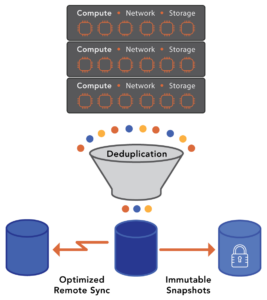
While we support external backup applications, VergeOS includes built-in data protection and replication capabilities. They, like everything else, are integrated into the core code, so they operate with minimal overhead. You can execute immutable snapshots frequently and retain those snapshots indefinitely without impacting performance.

VergeOS also supports different node types, so the disaster recovery site can use different hardware than the primary. Also, VergeOS supports global, inline deduplication so that if you are replicating from multiple sites to a central disaster recovery location, it only replicates the unique data from each site. With VergeOS, transfers are fast, and disaster recovery storage costs are negligible.

The HCI Disaster Recovery Problem Creates Compromise

Because of cost and complexity, many organizations compromise when establishing their disaster recovery site. The enforcement of like hardware doubles server acquisition costs, and the lack of efficient data storage can triple or more storage costs.

The most common compromise is using the backup infrastructure as the disaster recovery solution. Backup software can replicate and even deduplicate data, but when it stores that data on the remote site, it is in the backup software’s format. It isn’t operational. If there is a disaster, the organization must wait, potentially days or hours, for restore job completion before allowing access.

Using backup as the disaster recovery solution also makes testing and practicing the recovery process much more complicated and time-consuming. The result is less frequent testing and no practice. The reason most disaster recoveries fail is a lack of testing and experience.

Eliminating Disaster Recovery Compromise

VergeOS provides no-compromise disaster recovery. The costs at the disaster recovery site are easily controlled thanks to node flexibility and data deduplication. The data at the DR site is live and ready to instantiate at a moment’s notice.

Networking is also a source of disaster recovery failures. Misconfigurations, improper remapping, and incompatible hardware between locations can cause many problems. VergeOS integrates software-defined networking and alleviates these problems, ensuring that newly recovered data centers are easily accessible by users and applications.

Testing, thanks to our snapshot functionality, is also easy. Thanks to our Virtual Data Center (VDC) technology, a snapshot of an entire data center can be made in seconds. That snapshot can then be mounted for recovery testing purposes. Deduplication ensures that the only growth in capacity is changes made to the disaster recovery dataset while the test is executing.

Data protection and disaster recovery have been problematic since the dawn of the data center. Continuing to try the same old thing (replace backup software, replace backup storage, try to find a better replication solution, pray the network works) isn’t the answer. With VergeOS, we start at the source of the problem the production infrastructure itself.

Learn More:

  1. Register for our live webinar, “Beyond HCI — The Next Step in Data Center Infrastructure Evolution.” During the webinar, VergeIO’s Principal Systems Engineer, Aaron Reed, and I will compare HCI and UCI in-depth. I’m even going to talk Aaron into giving you a live demonstration of the solution of VergeOS in action.
  2. Subscribe to our Digital Learning Guide, “Does HCI Really Deliver?”
  3. Sign-up for a Test Drive – Try it yourself, and run our software in your labs.

Filed Under: Protection Tagged With: dataprotection, HCI, Hyperconverged, snapshots

855-855-8300

Get Started

  • Versions
  • Request Tour

VergeIO For

  • SAN Replacement
  • Solving Infrastructure Modernization Challenges
  • Artificial Intelligence
  • Hyperconverged
  • Server Room
  • Secure Research Computing

Product

  • Benefits
  • Documents
  • Architecture Overview
  • Use Cases
  • Videos

Company

  • Blog
  • Technical Documentation
  • Legal

© 2026 VergeIO. All Rights Reserved.