• Skip to main content
  • Architecture
    • Overview
      Learn about VergeOS’ unique unfied architecture that integrates virtualization, storage, networking, AI, backup and DR into a single data center operating system
    • Infrastructure Wide Deduplication
      VergeOS transforms deduplication from a storage-only commodity into a native, infrastructure-wide capability that spans storage, virtualization, and networking, eliminating hidden resource taxes
    • VergeFS
      VergeFS is a distributed, high-performance global file system integrated into VergeOS, unifying storage across nodes, tiers, and workloads while eliminating the need for external SANs
    • VergeFabric
      VergeFabric is VergeOS’s integrated virtual networking layer, delivering high-speed, low-latency communication across nodes while eliminating the complexity of traditional network configurations.
    • Infrastructure Automation
      VergeOS integrates Packer, Terraform, and Ansible to deliver an end-to-end automation pipeline that eliminates infrastructure drift and enables predictable, scalable deployments.
    • VergeIQ
      Unlock secure, on-premises generative AI—natively integrated into VergeOS. With VergeIQ, your enterprise gains private AI capabilities without the complexity, cloud dependency, or token-based pricing.
  • Features
    • Virtual Data Centers
      A VergeOS Virtual Data Center (VDC) is a fully isolated, self-contained environment within a single VergeOS instance that includes its own compute, storage, networking, and management controls
    • High Availability
      VergeOS provides a unified, easy-to-manage infrastructure that ensures continuous high availability through automated failover, storage efficiency, clone-like snapshots, and simplified disaster recovery
    • ioClone
      ioClone utilizes global inline deduplication and a blockchain-inspired file system within VergeFS to create instant, independent, space-efficient, and immutable snapshots of individual VMs, volumes, or entire virtual data centers.
    • ioReplicate
      ioReplicate is a unified disaster-recovery solution that enables simple, cost-efficient DR testing and failover via three‑click recovery of entire Virtual Data Centers—including VMs, networking, and storage.
    • ioFortify
      ioFortify creates immutable, restorable VDC checkpoints and provides proactive ransomware detection with instant alerts for rapid recovery and response.
    • ioMigrate
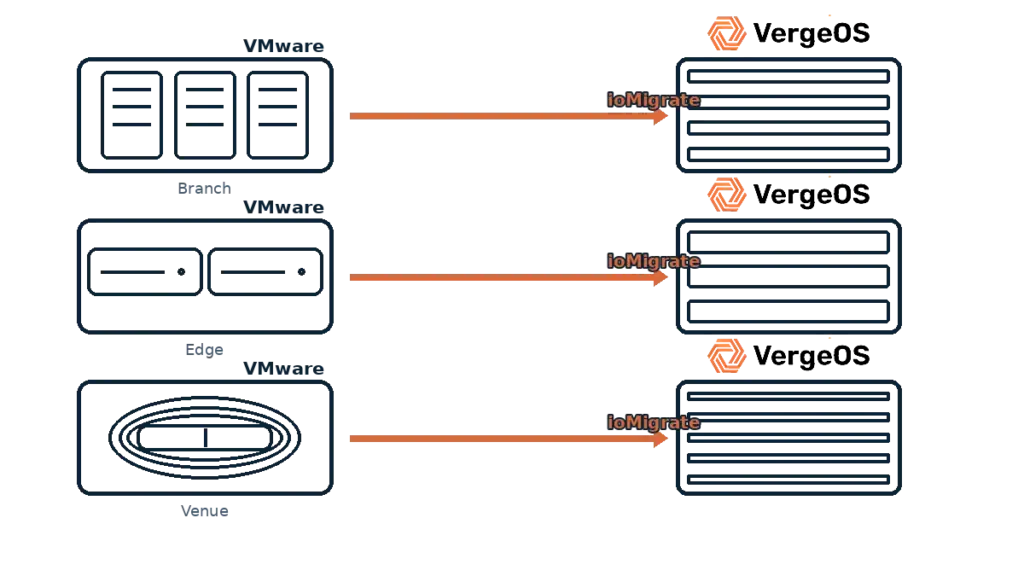
      ioMigrate enables large-scale VMware migrations, automating the rehosting of hundreds of VMs (including networking settings) in seconds with minimal downtime by seamlessly transitioning entire VMware environments onto existing hardware stacks.
    • ioProtect
      ioProtect offers near-real-time replication of VMware VMs—including data, network, and compute configurations—to a remote disaster‑recovery site on existing hardware, slashing DR costs by over 60% while supporting seamless failover and testing in an efficient, turnkey VergeOS Infrastructure.
    • ioOptimize
      ioOptimize leverages AI and machine learning to seamlessly integrate new and old hardware and automatically migrate workloads from aging or failing servers.
    • ioGuardian
      ioGuardian is VergeIO’s built-in data protection and recovery capability, providing near-continuous backup and rapid VM recovery during multiple simultaneous drive or server failures.
  • IT Initiatives
    • VMware Alternative
      VergeOS offers seamless migration from VMware, enhancing performance and scalability by consolidating virtualization, storage, and networking into a single, efficient platform.
    • Hyperconverged Alternative
      VergeIO’s page introduces ultraconverged infrastructure (UCI) via VergeOS, which overcomes HCI limitations by supporting external storage, scaling compute and storage independently, using existing hardware, simplifying provisioning, boosting resiliency, and cutting licensing costs.
    • SAN Replacement / Storage Refresh
      VergeIO’s storage by replacing aging SAN/NAS systems within its ultraconverged infrastructure, enhancing security, scalability, and affordability.
    • Infrastructure Modernization
      Legacy infrastructure is fragmented, complex, and costly, built from disconnected components. VergeOS unifies virtualization, storage, networking, data protection, and AI into one platform, simplifying operations and reducing expenses.
    • Secure Research Computing
      VergeIO's Secure Research Computing solution combines speed, isolation, compliance, scalability, and resilience in a cohesive platform. It’s ideal for institutions needing segmented, compliant compute environments that are easy to deploy, manage, and recover.
    • Venues, Remote Offices, and Edge
      VergeOS delivers resiliency and centralized management across Edge, ROBO, and Venue environments. With one platform, IT can keep remote sites independent while managing them all from a single pane of glass.
    • Fight Data Center Inflation
      DRAM, SSD and server prices keep climbing. VergeOS uses as much as 50% less RAM per VM than VMware, runs on the servers you already own, and moves cold data to low-cost hard drives.
  • Blog
      • The Midsize Enterprise Needs Infrastructure SimplicityInfrastructure simplicity matters most to midsize IT, where three to five generalists run virtualization, storage, networking, data protection and DR. Three-tier and HCI hide that complexity behind a GUI. VergeOS unifies all five in one code base with one interface.
      • The Midsize Enterprise Needs Greater ResiliencyResiliency belongs in every VMware alternative evaluation for small IT teams. See how VergeOS keeps midsize enterprise workloads running through drive and server failures, locks snapshots against ransomware, and turns Patch Tuesday from a weekend maintenance window into a weekday task.
      • Edge Disaster Recovery: Keep Customer-Facing Locations OpenEdge disaster recovery for stores and venues. VergeOS runs a site on one server, recovers it locally from snapshots and fails it over to the core.
    • View All Posts
  • Resources
    • Become a Partner
      Get repeatable sales and a platform built to simplify your customers’ infrastructure.
    • Technology Partners
      Learn about our technology and service partners who deliver VergeOS-powered solutions for cloud, VDI, and modern IT workloads.
    • White Papers
      Explore VergeIO’s white papers for practical insights on modernizing infrastructure. Each paper is written for IT pros who value clarity, performance, and ROI.
    • In The News
      See how VergeIO is making headlines as the leading VMware alternative. Industry analysts, press, and partners highlight our impact on modern infrastructure.
    • Press Releases
      Get the latest VergeOS press releases for news on product updates, customer wins, and strategic partnerships.
    • Case Studies
      See how organizations like yours replaced VMware, cut costs, and simplified IT with VergeOS. Real results, real environments—no fluff.
    • Webinars
      Explore VergeIO’s on-demand webinars to get straight-to-the-point demos and real-world infrastructure insights.
    • Documents
      Get quick, no-nonsense overviews of VergeOS capabilities with our datasheets—covering features, benefits, and technical specs in one place.
    • Videos
      Watch VergeIO videos for fast, focused walkthroughs of VergeOS features, customer success, and VMware migration strategies.
    • Technical Documentation
      Access in-depth VergeOS technical guides, configuration details, and step-by-step instructions for IT pros.
  • How to Buy
    • Schedule a Demo
      Seeing is believing, set up a call with one of our technical architects and see VergeOS in action.
    • Versions
      Discover VergeOS’s streamlined pricing and flexible deployment options—whether you bring your own hardware, choose a certified appliance, or run it on bare metal in the cloud.
    • Test Drive – No Hardware Required
      Explore VergeOS with VergeIO’s hands-on labs and gain real-world experience in VMware migration and data center resiliency—no hardware required
  • Company
    • About VergeIO
    • Support
      Get fast, expert help from VergeIO’s support team—focused on keeping your infrastructure running smoothly.
    • Careers
      Join VergeIO and help reshape the future of IT infrastructure. Explore open roles and growth opportunities.
  • 855-855-8300
  • Contact
  • Search
  • 855-855-8300
  • Contact
  • Search
  • Architecture
    • Overview
    • VergeFS
    • VergeFabric
    • Infrastructure Automation
    • VergeIQ
  • Features
    • Virtual Data Centers
    • High Availability
    • ioClone
    • ioReplicate
    • ioFortify
    • ioMigrate
    • ioProtect
    • ioOptimize
    • ioGuardian
  • IT Initiatives
    • VMware Alternative
    • Hyperconverged Alternative
    • SAN Replacement / Storage Refresh
    • Infrastructure Modernization
    • Secure Research Computing
    • Venues, Remote Offices, and Edge
    • Fight Data Center Inflation
  • Blog
  • Resources
    • Become a Partner
    • Technology Partners
    • White Papers
    • In The News
    • Press Releases
    • Case Studies
    • Webinars
    • Documents
    • Videos
    • Technical Documentation
  • How to Buy
    • Schedule a Demo
    • Versions
    • Test Drive – No Hardware Required
  • Company
    • About VergeIO
    • Support
    • Careers
×
  • Architecture
    • Overview
    • VergeFS
    • VergeFabric
    • Infrastructure Automation
    • VergeIQ
  • Features
    • Virtual Data Centers
    • High Availability
    • ioClone
    • ioReplicate
    • ioFortify
    • ioMigrate
    • ioProtect
    • ioOptimize
    • ioGuardian
  • IT Initiatives
    • VMware Alternative
    • Hyperconverged Alternative
    • SAN Replacement / Storage Refresh
    • Infrastructure Modernization
    • Secure Research Computing
    • Venues, Remote Offices, and Edge
    • Fight Data Center Inflation
  • Blog
  • Resources
    • Become a Partner
    • Technology Partners
    • White Papers
    • In The News
    • Press Releases
    • Case Studies
    • Webinars
    • Documents
    • Videos
    • Technical Documentation
  • How to Buy
    • Schedule a Demo
    • Versions
    • Test Drive – No Hardware Required
  • Company
    • About VergeIO
    • Support
    • Careers

ROBO

October 26, 2026 by George Crump

Edge disaster recovery means stores, venues and restaurants stay open through a failed drive, a ransomware attack or the loss of the local server. VergeOS 26.2 handles all of them.

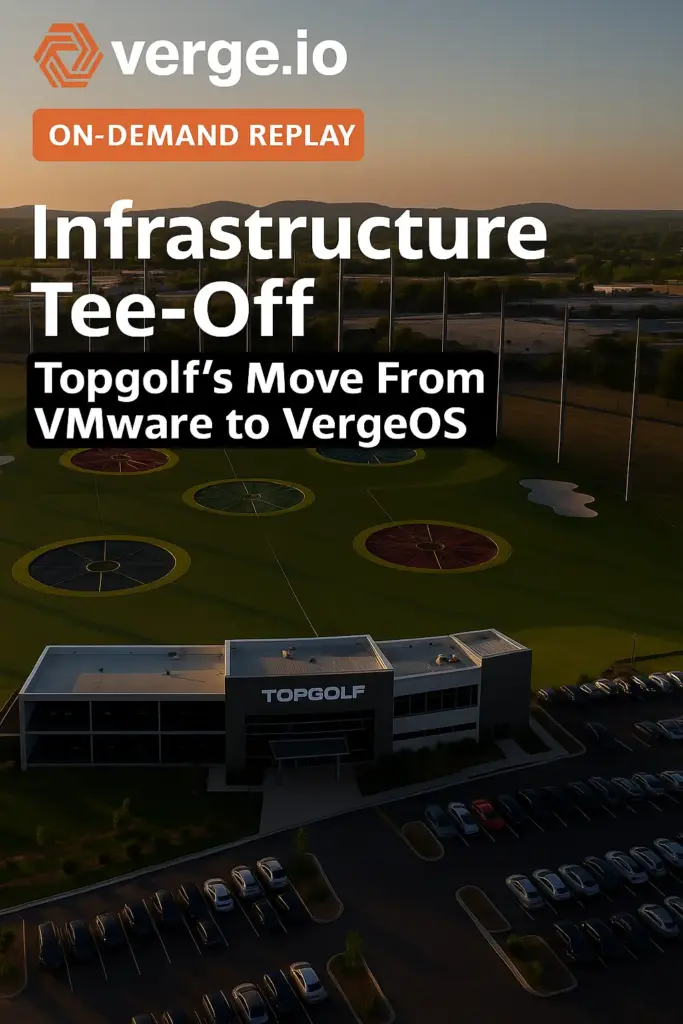
Edge disaster recovery becomes urgent when the remote location serves customers directly. Entertainment venues, restaurants, retail stores, and customer service centers all share the same goal. Nobody standing at the counter should hear, “I’m sorry, our system is down,” or “the internet is out.” That sentence frustrates the customer and makes your brand look bad. VergeIO customers like Topgolf and Saratoga Casino run exactly these kinds of locations. In our on-demand webinar, VergeOS 26.2: Finish the VMware Exit, Dave Vincent showed how VergeOS keeps them serving customers through two very different kinds of failure: problems inside the site, and the loss of the site itself.

Key Takeaways
  • VergeOS runs a remote site on as few as one server, new in VergeOS 26.2, or on a small two-node HA cluster, with data protection built in so no local IT staff is required.
  • Drive failures, deleted files, corruption, and ransomware recover locally from VergeOS snapshots, and ioGuardian pulls missing blocks from the core when failures exceed the protection level.
  • Each site runs as a Virtual Data Center that replicates to the core on your schedule, so the core can run the entire site if the local servers go offline.

Edge Disaster Recovery Starts With Running Local

The main reason to keep servers at a remote location is to serve customers and keep operations running when the site is disconnected. If you are at Topgolf having fun, you want the fun to keep going when the internet connection drops. The problem with running local is that you probably can’t afford IT staff at each location. That means the infrastructure must be managed remotely, rely on automation, and provide local data protection and resiliency.

VergeOS meets this demand by running on as few as one server at a remote site, new in our 26.2 release. For local high availability, a small two-node HA cluster does the job. With no IT staff on site, these systems are exposed directly to the people using them, so VergeOS builds data protection and resiliency into the platform to guard against drive failures and accidental data deletion.

Running local keeps the store openRUNNING LOCALInternet + corelink downStore / venueVergeOS · 1 serverPOSInventoryGamesLink down. POS, inventory and games keep running.

Drive Failures

When a drive fails, VergeOS redirects reads and writes to the surviving redundant drives and the site keeps running. If the number of failed drives exceeds your protection level, for example two drives failing, VergeOS uses ioGuardian to transfer the needed blocks from the core data center to the venue or store. The only expense is the latency of moving those blocks across the wire. Customers keep checking out, and IT replaces the drives on its own schedule.

ioGuardian covers drive failuresDRIVE FAILURESCore data centersynchronized copy of the blocksioGuardianStore server · VergeOSPOSrunningInventoryrunningGamesrunningD1D2D3D4FAILEDFAILEDI/O reroutes to surviving drivesMissing blocks served from the coreTwo drives down. The VMs keep running.

Deleted Files, Corruption and Ransomware

If a user deletes a file or an application suffers corruption, VergeOS snapshots let you restore an individual file by mounting a snapshot as a drive to a virtual machine. Severe corruption or a ransomware attack calls for a bigger response, since ransomware is an infrastructure problem that reaches the VMs, the network and the configuration along with the data. VergeOS system snapshots restore the entire site locally, at local speed, without waiting on WAN bandwidth.

Follow our best practice: put each remote location in its own Virtual Data Center, and keep an attack contained to that site. Ransomware can’t creep up the wire into the core data center or spread to other remote sites.

Ransomware stays inside one VDCRANSOMWARE CONTAINEDStore A · VDCS1S2S3S4system snapshotsSite VMs + confighealthyencryptedrestored ✓Local restore from S4no wait on WAN bandwidthVDC isolation stops the spreadCore VDCcleanStore B VDCcleanOne site restored. Nothing else touched.

Edge Disaster Recovery When the Whole Site Goes Down

The second edge disaster recovery situation is the loss of the entire site. Single-server sites are especially vulnerable because there is nothing left to fail over to. The risk is a location that is technically open for business. Customers walk in the door, and the kitchen is open, but without the servers, nothing can be transacted.

VergeOS addresses this by establishing each remote location as a Virtual Data Center (VDC). A VDC encapsulates the entire remote data center into a single object, and VergeOS replicates that object to the core data center on a schedule you set. Each replication captures the site’s complete state, including data, network configuration, VM configurations, and storage settings, all consistent and in sync. The core holds everything it needs to run the remote site. VergeOS abstracts the hardware, so that VDC runs at the core even when the core uses different server, storage, and network hardware than the store.

The core runs the site when it failsVDC REPLICATION + FAILOVERStore usersRemote site · VDCPOSInventoryGamesdata · network · VM configs · storage settingsVDCreplicates onyour scheduleCore data centerSite VDC copystandby · in syncrunning at the corePOSInventoryGamesBGPThe core starts the site VDC and serves its users.
FailureVergeOS ResponseWhere Recovery Runs
One drive failsReads and writes move to surviving drivesLocal
Failures exceed protection levelioGuardian supplies missing blocks from the coreLocal, with blocks from the core
User deletes a fileSnapshot mounted as a drive to a VMLocal
Corruption or ransomwareSystem snapshot restores the whole siteLocal
Site servers go offlineReplicated VDC runs the site, BGP redirects trafficCore

See the Failover in the On-Demand Webinar

In the webinar, Dave used VergeOS’s built-in BGP routing to show the core copy of a remote location picking up the moment the remote servers went offline. The store keeps serving customers from the core, and IT can fix or replace the local hardware on its own schedule. Watch the on-demand webinar for the full session, or go straight to the Edge Site Recovery Demo. The VergeOS 26.2 datasheet covers single-server sites and the rest of the release. If you want to map this to your own locations, book a technical whiteboard session with our team.

BGP moves the store to the coreBGP FAILOVERCustomers + POSBGP reroutesStore serveronlineofflineCore · VDC copystandbyserving the siteStore stays opentransactions run from the core
On-Demand Webinar
VergeOS 26.2: Finish the VMware Exit
Aaron Richman and Dave Vincent demonstrate faster migration, Failover Clustering on VergeFS, and edge site recovery with BGP.
Watch Now
Key Terms
Edge Disaster Recovery
Protecting and restoring remote locations such as stores, venues and branch offices, where local IT staff is rare and downtime faces the customer.
Virtual Data Center (VDC)
A VergeOS object that holds an entire data center, including VMs, networking and storage settings, so it can be isolated, snapshotted and replicated as one unit.
ioGuardian
A VergeOS capability that repairs missing or corrupted blocks by retrieving them from a synchronized remote system, such as the core data center.
System Snapshot
A point-in-time copy of the complete VergeOS environment, used to roll back a whole site after corruption or a ransomware attack.
Frequently Asked Questions
Can VergeOS run a remote site on a single server?
Yes. VergeOS 26.2 adds support for single-server sites. Locations that want local high availability can run a two-node HA cluster instead.
What happens if two drives fail in a single-server site?
VergeOS uses ioGuardian to pull the blocks it needs from the core data center. The site keeps running, and the only cost is the latency of moving those blocks.
Does ransomware at one store reach the core data center?
With each remote location in its own Virtual Data Center, the attack stays isolated to that site. You restore the site locally from a VergeOS system snapshot.
What does the core need to run a failed remote site?
The core needs the replicated VDC, which holds the site’s data, network configuration, VM configurations and storage settings. The core hardware can differ from the hardware at the site.

Next Steps

The full webinar, the edge recovery demo and the datasheet are one click away.
On-Demand Webinar
Finish the VMware Exit
Aaron Richman and Dave Vincent demonstrate VergeOS 26.2, including edge site recovery.
Video Demo
Edge Site Recovery
Watch a remote site pick up at the core when its local servers go offline.
Datasheet
VergeOS 26.2
Faster VMware migration, Failover Clustering on VergeFS and single-server distributed data centers.

Filed Under: Edge Computing Tagged With: Disaster Recovery, Edge, ioGuardian, ransomware, ROBO, snapshots, VergeOS 26.2, virtual data center

September 15, 2025 by George Crump

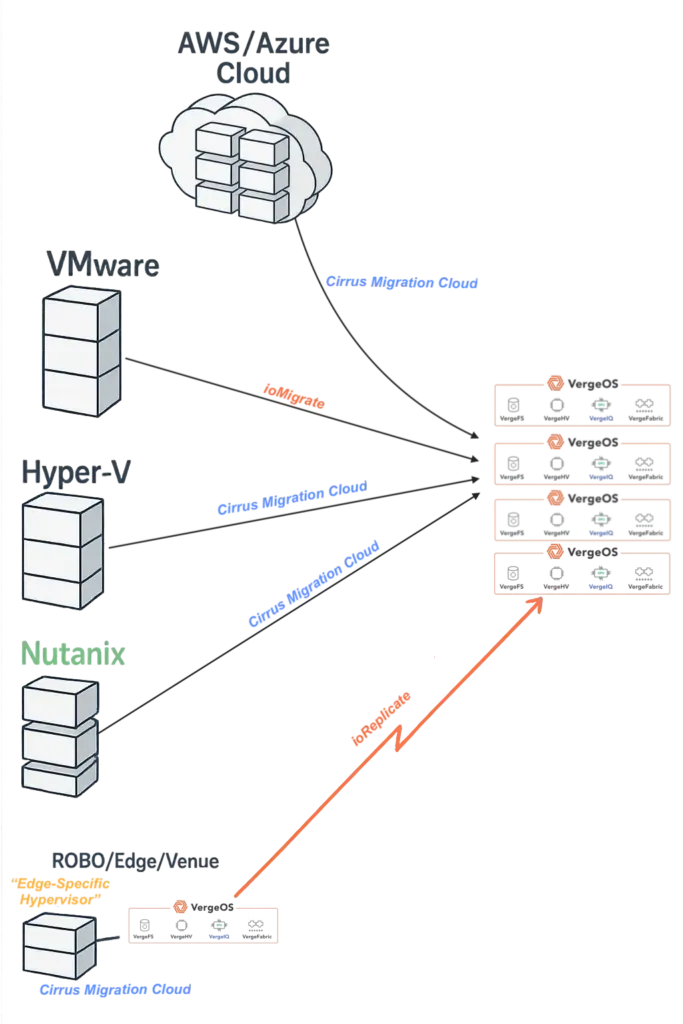
Ann Arbor, MI — September 16, 2025 — VergeIO, the leading VMware alternative, today announced a partnership with Cirrus Data Solutions (CDS), a leader in data mobility technology and services, to help enterprises eliminate infrastructure sprawl—the costly mix of multiple hypervisors, duplicate tools, and isolated stacks, that has crept into data centers. The collaboration combines Cirrus Data’s patented software-only data mobility technology with VergeOS, the industry’s only single-codebase infrastructure operating system for virtualization, storage, networking, and AI.

Sprawl has accelerated as organizations juggle VMware, Hyper-V, Nutanix, OpenStack, and public cloud IaaS. The result is higher licensing spend, fragmented operations, and slow recovery. VergeIO and Cirrus Data address both sides of the problem: a universal migration path that keeps production online and a unifying destination that consolidates platforms into one operating model.

  • Cirrus Data delivers zero downtime migrations for clustered applications. Its software-only solution can migrate from nearly any hypervisor, including VMware, Hyper-V, Nutanix AHV, Oracle Linux Virtualization Manager (OLVM), Proxmox, OpenStack, and others, in addition to the public cloud IaaS. Organizations can now automate the move of heterogeneous estates on schedule and without disruption.
  • VergeOS replaces stacked products with a single operating system covering virtualization, storage, networking, and AI. Per-server licensing, hardware portability, and deep abstraction extend hardware life and simplify operations across core, edge, ROBO (remote office/branch office), and Venues.

Review the VergeIO/Cirrus Data solution brief to learn more.

“Sprawl is the tax on indecision,” said Yan Ness, CEO of VergeIO. “Enterprises didn’t plan to run three hypervisors and a cloud sidecar, but that’s where the market led them. Our partnership with Cirrus Data gives IT a practical way out: move everything with minimal downtime and land on a single, cohesive platform.”

“Consolidation isn’t a one-off,” said Wayne Lam, CEO of Cirrus Data. “Our data mobility solutions give organizations an easy, automated way to securely migrate every acquisition or new business unit to VergeOS quickly, regardless of the starting platform. With Cirrus Data and VergeIO, organizations can prevent sprawl from returning and keep operations streamlined.”

According to analysis highlighted in VergeIO’s new white paper and solution brief, enterprises that consolidate into VergeOS with Cirrus Data can reduce three-year total cost of ownership by 50%+, achieve 12–18 month payback, and gain a platform ready for private AI without standing up separate clusters.

To learn more, register here for the VergeIO/Cirrus webinar on 9/25 at 1:00pm ET.


About VergeIO
VergeIO is the VMware alternative. Its ultraconverged infrastructure platform, VergeOS, integrates virtualization, storage, networking, and AI into a single operating system with unmatched simplicity and cost savings. Headquartered in Ann Arbor, Michigan, VergeIO helps enterprises, service providers, and public sector organizations consolidate infrastructure, extend hardware life, and prepare for the future of AI.

About Cirrus Data
Cirrus Data Solutions Inc. (CDS) is a leader in the block data mobility technology and services market for global enterprises. The company distributes its solutions through systems integrators, managed service providers, channel resellers, and partners. CDS is headquartered in Syosset, New York, with support centers in Dublin, Ireland, and Nanjing, China, with sales and support offices in Atlanta, Chicago, New York, Dallas, Denver, London, Melbourne, Munich, and Tampa. For more information, visit CDS online https://cirrusdata.com/cloud-migration-vergeio 


Media Contact:
Judy Smith
JPR for [email protected]
818-522-9673

Media Contact:
Julie McKenna
Cirrus Data
[email protected] 

Filed Under: Press Release Tagged With: AWS, Edge, IT infrastructure, Migration, ROBO, VMware

September 8, 2025 by George Crump

Storage challenges at distributed sites are inhibiting organizations that want to reduce reliance on the cloud and instead extend workloads into remote offices, retail sites, venues, and edge locations. Storage is the critical obstacle preventing these distributed sites from operating effectively.

IT was promised that all data could be centralized in the cloud, but the lack of independence and the high costs of storing and moving data make that approach impractical. What once lived in a data center or the cloud must now be delivered locally at dozens or hundreds of sites, each with tight limits on space, staff, and budget.

Register Now

These environments show varied workload needs: some sites need high-capacity storage for video, others require high performance for real-time tasks, and some demand intensive AI processing. Many sites have a mix of these needs, often with limited IT staff, rack space, and budgets. Balancing cost, performance, capacity, and manageability is essential.

The stakes are high. Availability expectations for remote locations often exceed those for the data center. Many are more than customer-facing—they are customer-touching, directly impacting the customer experience. Protection from hardware failure is essential, as is rapid recovery at another site or the data center in case of disaster.

Balancing Storage Demands at the Site

One of the storage challenges at distributed sites is balancing the performance and capacity needs, which can vary greatly. Some require high-performance storage for real-time tasks like point-of-sale, video analytics, or sensors. Others need high-capacity storage for surveillance videos, medical images, or records. Some sites face both demands. Without proper balance, workloads either stall due to latency or run out of space before meeting retention needs.

IT teams are forced to choose between costly, oversized storage that wastes resources and basic local disks lacking resilience. Direct-attached drives offer decent performance but risk disruptions if a drive or server fails. Hyperconverged solutions reduce risk but are costly and may impact performance. None provides the ideal balance of resilience and affordability.

How VergeOS Helps: VergeOS addresses these challenges by collapsing storage, compute, and networking into a single code base, delivering both performance and capacity in the smallest possible footprint. IT teams can size hardware to each site’s exact needs while still getting enterprise-class data services like global deduplication, snapshots, and replication. This unified approach gives small sites the same capabilities as large ones, without oversized appliances or fragile local disks.

Download our white paper: “A Comprehensive Guide to a VMware Exit for Multi-Site Organizations.“

Remote Site Storage Protection and Recovery Gaps

If performance and capacity are difficult to balance at remote sites, protecting the data stored there is even harder. Skilled IT professionals can get these sites backed up, but it is expensive because of WAN bandwidth requirements and high software costs.

Local snapshot capabilities could fix these issues, but low-end storage appliances often lack such features or require costly upgrades. Direct-attached storage has no snapshot option. Hyperconverged storage offers limited snapshots, which can impact performance. Hardware failures mean restoring from outdated backups, risking data loss or downtime at remote sites.

The recovery challenge is just as severe. Moving large amounts of data back across limited WAN bandwidth can take days. Outages from fiber cuts or local disruptions always occur at the worst possible time—such as in the middle of a long backup job. When the connection is restored, the job must start over, wasting time and leaving data exposed.

Testing disaster recovery across dozens or hundreds of sites is time-consuming and often overlooked. In many cases, the first time recovery procedures are attempted is during a real-life failure—when the pressure is highest and tolerance for mistakes is lowest.

How VergeOS Helps: VergeOS solves these issues by making data protection a built-in function, not an add-on. Instant, immutable snapshots and WAN-efficient replication are integrated into the platform, ensuring consistent recovery options across all sites. Organizations no longer depend on fragile appliance snapshots or expensive backup software. By unifying storage and protection in one system, VergeOS makes recovery faster, more predictable, and resilient even across limited WAN connections.

Remote Storage Operational Fragmentation

Organizations manage diverse storage solutions, which become even more complex at distributed sites. The core data center uses SAN and NAS, while edge and remote offices typically rely on direct-attached storage, hypervisor-based storage, and backup appliances. Each layer has different tools, update cycles, and licensing models.

Storage Challenges at Distributed Sites

The result is operational fragmentation. IT staff must jump between consoles to monitor health, provision capacity, and validate protection. Policies differ by vendor, features behave inconsistently, and vendors update on different schedules. Without a single source of truth, it becomes challenging to determine which sites meet data protection requirements, have adequate recovery points, or are drifting out of alignment.

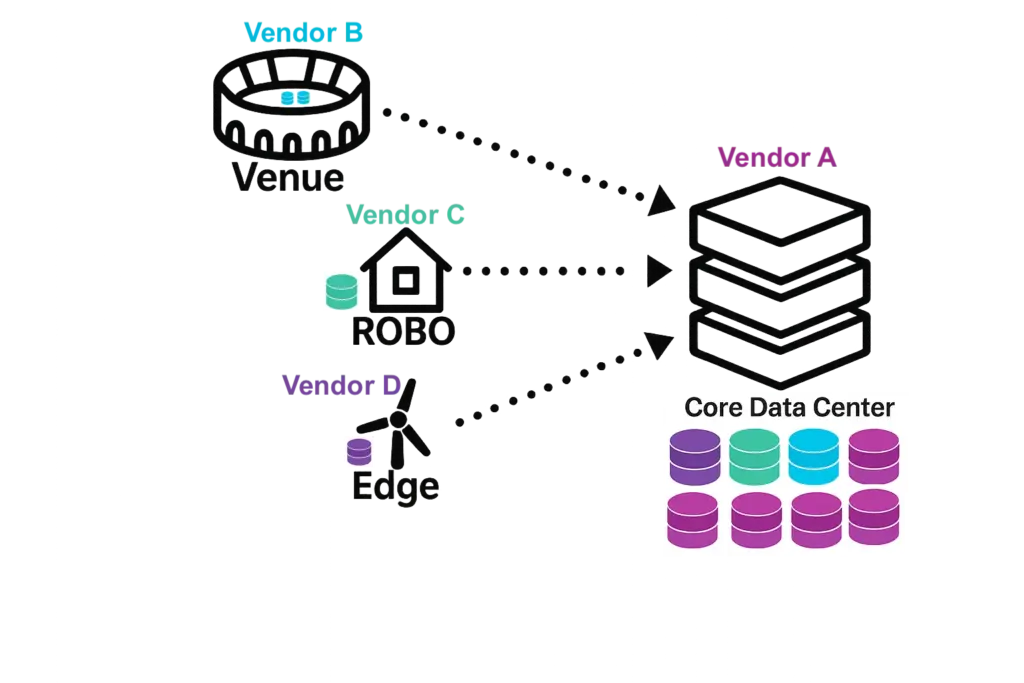
Another one of the top storage challenges at distributed sites is that storage features which appear similar, may work differently across platforms. Drive failure protection, replication, deduplication, encryption, and snapshots may all exist, but each behaves in its own way depending on the vendor, and they don’t understand each other. Vendor A can’t replicate to Vendor B, and Vendor C can’t leverage deduplication metadata from Vendor D. This inconsistency makes it nearly impossible to apply a single policy or rely on predictable results. These inconsistencies also exacerbate the IT skills gap.

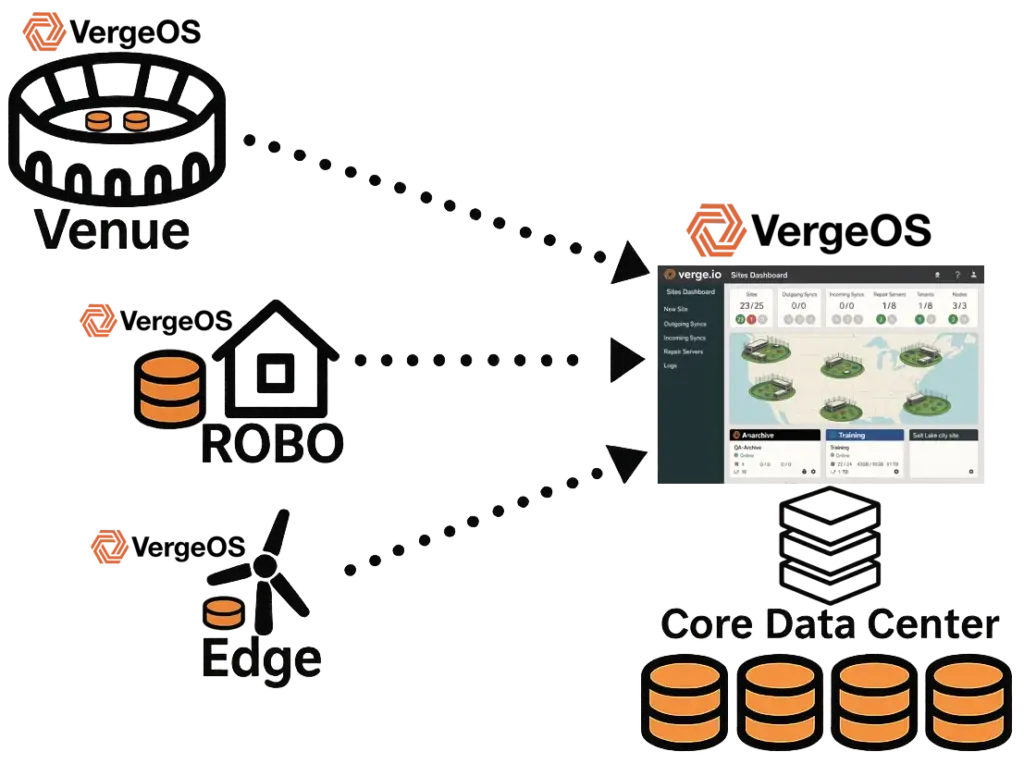
How VergeOS Helps: VergeOS replaces fragmented tools with a unified management plane and consistent features across every site. This eliminates silos and provides a single source of truth for monitoring, reporting, and compliance. It also eliminates inconsistency by applying global inline deduplication across the entire infrastructure—core, ROBO, edge, and venue locations. Deduplication is not siloed per vendor or appliance; identical blocks of data are recognized once, no matter where they originate. This reduces capacity requirements, improves replication efficiency across sites, and ensures all data management policies work consistently everywhere. Just as importantly, this same consistency extends to all features—snapshots, replication, encryption, and drive failure protection—so policies behave uniformly across every site.


The Path Forward: Unified Infrastructure Software

Solving the fragmentation issue requires more than incremental gains; the real challenge is architectural. Sites depend on diverse storage products, increasing complexity and risk. IT must unify infrastructure via a single software platform that offers storage, virtualization, and networking uniformly across multiple locations and supports diverse hardware.

A unified infrastructure platform eliminates storage challenges at distributed sites, such as the sprawl of consoles and feature sets. Replication, snapshots, deduplication, encryption, and drive failure protection all behave the same way whether they are deployed in the core data center, a regional office, or a small remote site. Policies can be defined once and applied everywhere, giving IT predictable outcomes.

This approach creates a single source of truth. Monitoring, reporting, and compliance data come from one system, giving IT visibility across the entire environment instead of forcing them to reconcile information from multiple consoles. With unified telemetry, trends are easier to spot, issues easier to diagnose, and compliance more straightforward to prove.

Operationally, benefits are immediate. IT teams spend less time managing incompatible tools and more on delivering value. Features work equally well at small and large sites—small sites get advanced capabilities without oversized appliances, and the core maintains resiliency without siloed complexity. Licensing and support are streamlined, avoiding duplication and waste from fragmentation.

Storage Challenges at Distributed Sites

Unified infrastructure software removes inconsistency, not choice. Teams can make per-site decisions on hardware, but standardizing the software layer across sites creates a resilient, easy-to-manage, scalable foundation. Architectural simplicity is essential for sustainable distributed infrastructure.

How VergeOS Helps: VergeOS delivers this architectural simplicity today via its ultraconverged infrastructure (UCI) design, which consolidates storage, virtualization, and networking into one tightly integrated code base. This ensures consistent features, policies, and management across every site—edge, ROBO, venue, and core—providing a unified foundation that scales without multiplying complexity.

Conclusion

Distributed sites are essential to modern operations, but traditional storage models were never built for environments with limited space, staff, and budgets. The result is a recurring cycle of over-provisioning, fragile local infrastructure, and operational silos that add cost and risk with every new site.

The solution to overcoming the storage challenges at distributed sites lies not in more point products but in a unified architectural approach. By consolidating storage, compute, networking, and data protection into one code base, VergeOS removes fragmentation and delivers consistent capabilities across every location. The result is simpler management, stronger resiliency, and predictable scalability.

Organizations that adopt this model can treat distributed sites as first-class citizens of the enterprise infrastructure—resilient, efficient, and prepared for the future.

Click here to learn more about VergeIO’s distributed sites solution.

Filed Under: Edge Computing Tagged With: Edge, ROBO, Storage

August 15, 2025 by George Crump

Organizations, from large retail chains to global entertainment brands, are starting to develop a multi-site VMware alternative strategy that can simplify operations, lower costs, and prepare for future workloads. Recent VMware licensing changes under Broadcom have driven many IT leaders to re-evaluate their entire infrastructure strategy, particularly for remote office/branch office (ROBO) and edge environments.

This post outlines how to build a sustainable multi-site VMware alternative strategy, the risks of replacing VMware with a point hypervisor, and what to look for in a platform that serves both edge and core data centers.

What is Multi-Site IT?

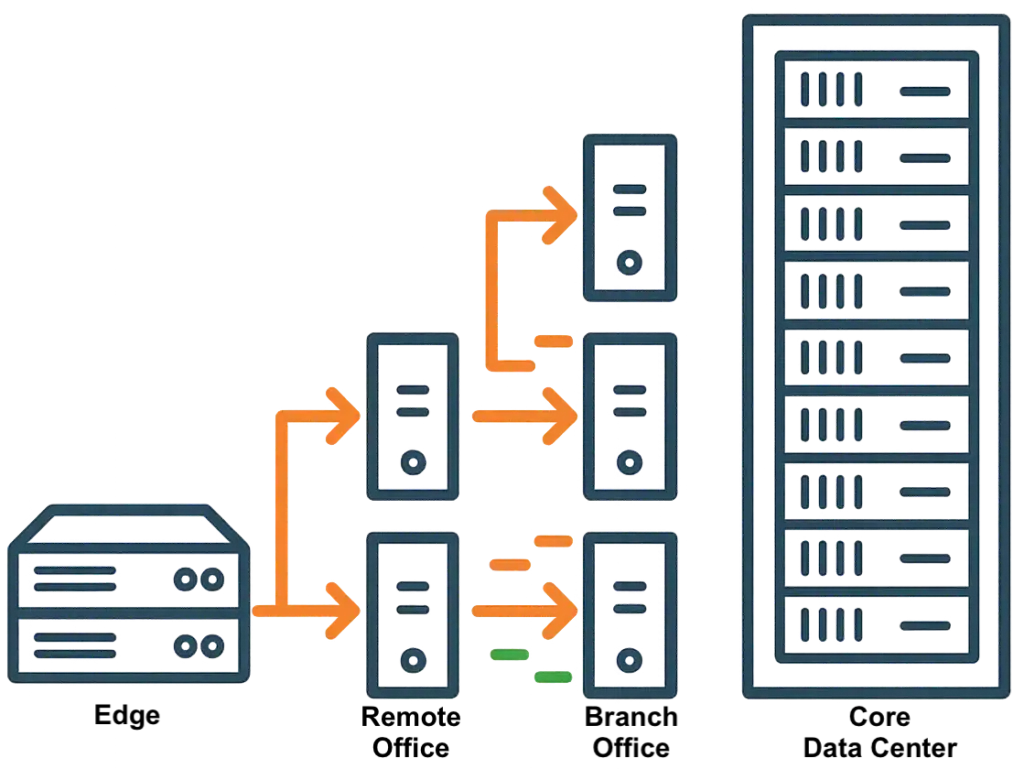
Multi-site IT refers to technology infrastructure that supports operations across multiple distinct locations under a single organization. These locations typically fall into three categories—branches, edge sites, and venues—each with unique requirements.

  • Branches are often smaller office locations or retail outlets that rely on centralized systems but still need local services for productivity.
  • Edge sites process data closer to where it’s generated, often to support real-time analytics or reduce latency, making them critical for workloads like AI inference, manufacturing control, or IoT.
  • Venues are specialized locations—such as entertainment centers, stadiums, or casinos—where local IT must support high volumes of customer interaction and transaction processing.
multi-site VMware alternative strategy

Across all three, core IT requirements include operational independence during WAN or cloud outages, centralized visibility and management, local performance for critical workloads, and integrated capabilities for networking, storage, and data protection.

Define Multi-Site VMware Alternative Requirements

Multi-site environments differ from centralized data centers. Before selecting a VMware alternative, define the following:

multi-site VMware alternative strategy
  • Operational Independence: Each site must operate without WAN or cloud connectivity. This protects mission-critical services like POS, manufacturing controls, and local databases during outages.
  • Remote Management: Centralized administration is vital. Choose a platform that allows monitoring, updates, and troubleshooting without on-site staff.
  • Consistent Architecture: The same software stack should work for both a two-node edge site and a 50-node core data center.
  • Hardware Flexibility: Avoid proprietary hardware requirements. Standard x86 support keeps sourcing flexible.
  • Built-in Resilience: Integrated backup, replication, and recovery eliminate the need for separate tools.

Is the Cloud a Multi-Site VMware Alternative?

Some will look to the cloud as a multi-site VMware alternative strategy. While attractive for scalability, it still depends on continuous connectivity. WAN disruptions can cut off site operations, leaving staff idle and customers frustrated. Over time, “renting” cloud infrastructure often costs more than owning on-premises systems, especially when you factor in ongoing bandwidth charges.

Evaluate Total Cost Impact

When creating a multi-site VMware alternative strategy, look beyond hypervisor licensing.

  • Software Licensing: Favor predictable per-node pricing that doesn’t penalize dense hardware.
  • Hardware Costs: Watch for enforced minimum node counts. Many sites operate well on two or three nodes.
  • Third-Party Tool Elimination: The right platform replaces backup, DR, and monitoring tools.
  • Operational Expenses: Fewer platforms mean less training and less time spent on maintenance.

What to Look For in a Multi-Site VMware Alternative

A practical multi-site VMware alternative strategy should deliver more than just virtualization:

  • Collapsed Stack: Integrate storage, virtualization, networking, and even client-consumable AI into one software platform.
  • Full Edge-to-Core Functionality: The same feature set should be available at small and large sites.
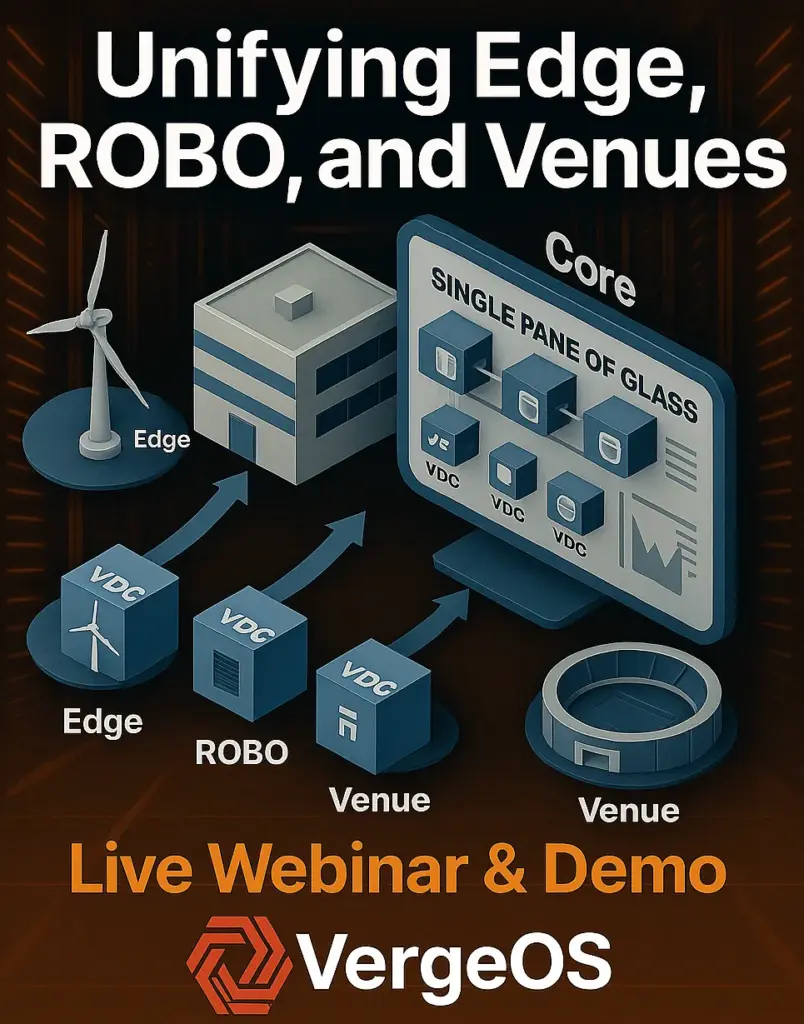
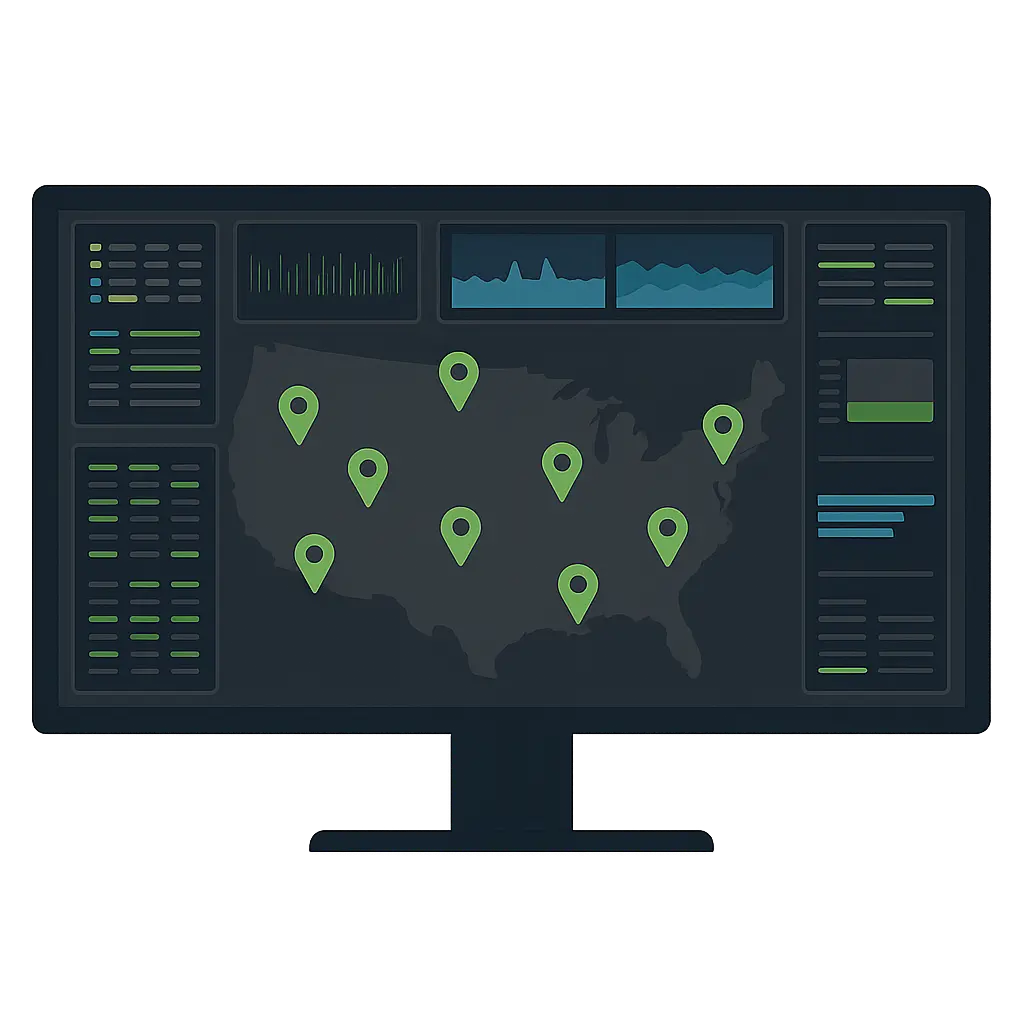
  • Centralized Visibility: A single-pane-of-glass interface for monitoring all sites.
  • Fleet Management: Automated, non-disruptive upgrades during limited maintenance windows; high-level GUI overview of the entire estate.
  • Advanced Networking: Integrated SDN for secure site-to-site connectivity, segmentation, and traffic optimization.
  • Integrated Data Protection: Built-in snapshots, replication, and backup workflows without third-party software.
  • AI Readiness: Support GPU workloads for AI at both the edge and the core.
  • Automation and Integration: Terraform and API-first design for IaC and DevOps workflows.
  • Migration Capabilities: Native tools for smooth VMware workload migration with minimal downtime.

Test the Multi-Site VMware Alternative in Real-World Conditions

Lab results can be misleading. Your evaluation should include:

  • Multi-Site Simulation: Replicate site configurations and WAN conditions.
  • Migration Testing: Validate performance, compatibility, and ease of workload migration.
  • Failure Testing: Confirm operations continue during outages.
  • Centralized Management Validation: Ensure remote monitoring and updates work across all sites.
  • Operational Workflow Testing: Verify backup, restore, and replication without additional tools.

Risks of Delaying or Choosing a Point Hypervisor

Delaying development of a multi-site VMware alternative strategy increases the risk of rising costs and unplanned disruptions. Simply swapping VMware for another hypervisor without rethinking the stack can lead to:

  • Ongoing dependence on multiple vendors
  • Complexity from integrating separate storage, networking, and backup solutions
  • Missed opportunities for cost savings and operational improvements

A Multi-Site VMware Alternative Example: VergeOS

VergeOS is one example of a platform built for distributed environments and can be the backbone of a multi-site VMware alternative strategy. It provides:

multi-site VMware alternative strategy
  • Single Software Stack: Virtualization, storage, networking, and data protection in one code base.
  • Sites Dashboard: Centralized, high-level management of hundreds of sites.
  • Integrated Migration (ioMigrate): VMware workload migration without separate tools.
  • Global Inline Deduplication: WAN-aware storage optimization.
  • Integrated AI (VergeIQ): AI-ready infrastructure for both edge and core.
  • Hardware Agnostic: Runs on standard x86 servers from multiple vendors.

For a real-world example, see Topgolf is Choosing VergeOS, where over 100 venues transitioned from VMware to VergeOS, reducing node counts, cutting costs, and simplifying operations.

Next Steps

If you’re creating a multi-site VMware alternative strategy:

  • Document current and future requirements
  • Identify opportunities to collapse and simplify your stack
  • Select a platform that delivers consistent capability from edge to core
  • Test under realistic operating conditions
  • Download our white paper: “A Comprehensive Guide to a VMware Exit for Multi-Site Organizations”

To hear directly from IT leaders who have done it, register for the Infrastructure Tee-Off Webinar, where Topgolf’s infrastructure team will discuss their migration from VMware to VergeOS. For more insights, read Rethinking ROBO and Edge from StorageSwiss.

Filed Under: Edge Computing Tagged With: Edge, ROBO

855-855-8300

Get Started

  • Versions
  • Request Tour

VergeIO For

  • SAN Replacement
  • Solving Infrastructure Modernization Challenges
  • Artificial Intelligence
  • Hyperconverged
  • Server Room
  • Secure Research Computing

Product

  • Benefits
  • Documents
  • Architecture Overview
  • Use Cases
  • Videos

Company

  • Blog
  • Technical Documentation
  • Legal

© 2026 VergeIO. All Rights Reserved.