• Skip to main content
  • Architecture
    • Overview
      Learn about VergeOS’ unique unfied architecture that integrates virtualization, storage, networking, AI, backup and DR into a single data center operating system
    • Infrastructure Wide Deduplication
      VergeOS transforms deduplication from a storage-only commodity into a native, infrastructure-wide capability that spans storage, virtualization, and networking, eliminating hidden resource taxes
    • VergeFS
      VergeFS is a distributed, high-performance global file system integrated into VergeOS, unifying storage across nodes, tiers, and workloads while eliminating the need for external SANs
    • VergeFabric
      VergeFabric is VergeOS’s integrated virtual networking layer, delivering high-speed, low-latency communication across nodes while eliminating the complexity of traditional network configurations.
    • Infrastructure Automation
      VergeOS integrates Packer, Terraform, and Ansible to deliver an end-to-end automation pipeline that eliminates infrastructure drift and enables predictable, scalable deployments.
    • VergeIQ
      Unlock secure, on-premises generative AI—natively integrated into VergeOS. With VergeIQ, your enterprise gains private AI capabilities without the complexity, cloud dependency, or token-based pricing.
  • Features
    • Virtual Data Centers
      A VergeOS Virtual Data Center (VDC) is a fully isolated, self-contained environment within a single VergeOS instance that includes its own compute, storage, networking, and management controls
    • High Availability
      VergeOS provides a unified, easy-to-manage infrastructure that ensures continuous high availability through automated failover, storage efficiency, clone-like snapshots, and simplified disaster recovery
    • ioClone
      ioClone utilizes global inline deduplication and a blockchain-inspired file system within VergeFS to create instant, independent, space-efficient, and immutable snapshots of individual VMs, volumes, or entire virtual data centers.
    • ioReplicate
      ioReplicate is a unified disaster-recovery solution that enables simple, cost-efficient DR testing and failover via three‑click recovery of entire Virtual Data Centers—including VMs, networking, and storage.
    • ioFortify
      ioFortify creates immutable, restorable VDC checkpoints and provides proactive ransomware detection with instant alerts for rapid recovery and response.
    • ioMigrate
      ioMigrate enables large-scale VMware migrations, automating the rehosting of hundreds of VMs (including networking settings) in seconds with minimal downtime by seamlessly transitioning entire VMware environments onto existing hardware stacks.
    • ioProtect
      ioProtect offers near-real-time replication of VMware VMs—including data, network, and compute configurations—to a remote disaster‑recovery site on existing hardware, slashing DR costs by over 60% while supporting seamless failover and testing in an efficient, turnkey VergeOS Infrastructure.
    • ioOptimize
      ioOptimize leverages AI and machine learning to seamlessly integrate new and old hardware and automatically migrate workloads from aging or failing servers.
    • ioGuardian
      ioGuardian is VergeIO’s built-in data protection and recovery capability, providing near-continuous backup and rapid VM recovery during multiple simultaneous drive or server failures.
  • IT Initiatives
    • VMware Alternative
      VergeOS offers seamless migration from VMware, enhancing performance and scalability by consolidating virtualization, storage, and networking into a single, efficient platform.
    • Hyperconverged Alternative
      VergeIO’s page introduces ultraconverged infrastructure (UCI) via VergeOS, which overcomes HCI limitations by supporting external storage, scaling compute and storage independently, using existing hardware, simplifying provisioning, boosting resiliency, and cutting licensing costs.
    • SAN Replacement / Storage Refresh
      VergeIO’s storage by replacing aging SAN/NAS systems within its ultraconverged infrastructure, enhancing security, scalability, and affordability.
    • Infrastructure Modernization
      Legacy infrastructure is fragmented, complex, and costly, built from disconnected components. VergeOS unifies virtualization, storage, networking, data protection, and AI into one platform, simplifying operations and reducing expenses.
    • Secure Research Computing
      VergeIO's Secure Research Computing solution combines speed, isolation, compliance, scalability, and resilience in a cohesive platform. It’s ideal for institutions needing segmented, compliant compute environments that are easy to deploy, manage, and recover.
    • Venues, Remote Offices, and Edge
      VergeOS delivers resiliency and centralized management across Edge, ROBO, and Venue environments. With one platform, IT can keep remote sites independent while managing them all from a single pane of glass.
  • Blog
      • Refurbished Hardware Made ResilientRefurbished hardware funds your VMware exit. VergeOS keeps it running through drive and server failures with RF2, RF3, and ioGuardian.
      • Storage Tiering is Not the Problem. Losing Control of It Is.Auto-tiering guesses which data is hot, and the guess costs money in both directions: flash held too long, or flash withheld too late. VergeOS puts storage tiering control back with the team running the workload, moving live VMs between tiers instantly, shrinking what the next flash refresh has to buy.
      • Multi-Tenant BackupMost teams treat the Virtual Data Center as a cloud-provider feature, but enterprises carry the same tenancy problem under different names: production and development, a subsidiary, a regulated department. VergeOS enforces that boundary at the infrastructure layer, and Veeam inherits it, tenant by tenant, each one its own VergeOS Manager.
    • View All Posts
  • Resources
    • Become a Partner
      Get repeatable sales and a platform built to simplify your customers’ infrastructure.
    • Technology Partners
      Learn about our technology and service partners who deliver VergeOS-powered solutions for cloud, VDI, and modern IT workloads.
    • White Papers
      Explore VergeIO’s white papers for practical insights on modernizing infrastructure. Each paper is written for IT pros who value clarity, performance, and ROI.
    • In The News
      See how VergeIO is making headlines as the leading VMware alternative. Industry analysts, press, and partners highlight our impact on modern infrastructure.
    • Press Releases
      Get the latest VergeOS press releases for news on product updates, customer wins, and strategic partnerships.
    • Case Studies
      See how organizations like yours replaced VMware, cut costs, and simplified IT with VergeOS. Real results, real environments—no fluff.
    • Webinars
      Explore VergeIO’s on-demand webinars to get straight-to-the-point demos and real-world infrastructure insights.
    • Documents
      Get quick, no-nonsense overviews of VergeOS capabilities with our datasheets—covering features, benefits, and technical specs in one place.
    • Videos
      Watch VergeIO videos for fast, focused walkthroughs of VergeOS features, customer success, and VMware migration strategies.
    • Technical Documentation
      Access in-depth VergeOS technical guides, configuration details, and step-by-step instructions for IT pros.
  • How to Buy
    • Schedule a Demo
      Seeing is believing, set up a call with one of our technical architects and see VergeOS in action.
    • Versions
      Discover VergeOS’s streamlined pricing and flexible deployment options—whether you bring your own hardware, choose a certified appliance, or run it on bare metal in the cloud.
    • Test Drive – No Hardware Required
      Explore VergeOS with VergeIO’s hands-on labs and gain real-world experience in VMware migration and data center resiliency—no hardware required
  • Company
    • About VergeIO
      Learn who we are, what drives us, and why IT leaders trust VergeIO to modernize and simplify infrastructure.
    • Support
      Get fast, expert help from VergeIO’s support team—focused on keeping your infrastructure running smoothly.
    • Careers
      Join VergeIO and help reshape the future of IT infrastructure. Explore open roles and growth opportunities.
  • 855-855-8300
  • Contact
  • Search
  • 855-855-8300
  • Contact
  • Search
  • Architecture
    • Overview
    • VergeFS
    • VergeFabric
    • Infrastructure Automation
    • VergeIQ
  • Features
    • Virtual Data Centers
    • High Availability
    • ioClone
    • ioReplicate
    • ioFortify
    • ioMigrate
    • ioProtect
    • ioOptimize
    • ioGuardian
  • IT Initiatives
    • VMware Alternative
    • Hyperconverged Alternative
    • SAN Replacement / Storage Refresh
    • Infrastructure Modernization
    • Virtual Desktop Infrastructure (VDI)
    • Secure Research Computing
    • Venues, Remote Offices, and Edge
  • Blog
  • Resources
    • Become a Partner
    • Technology Partners
    • White Papers
    • In The News
    • Press Releases
    • Case Studies
    • Webinars
    • Documents
    • Videos
    • Technical Documentation
  • How to Buy
    • Schedule a Demo
    • Versions
    • Test Drive – No Hardware Required
  • Company
    • About VergeIO
    • Support
    • Careers
×
  • Architecture
    • Overview
    • VergeFS
    • VergeFabric
    • Infrastructure Automation
    • VergeIQ
  • Features
    • Virtual Data Centers
    • High Availability
    • ioClone
    • ioReplicate
    • ioFortify
    • ioMigrate
    • ioProtect
    • ioOptimize
    • ioGuardian
  • IT Initiatives
    • VMware Alternative
    • Hyperconverged Alternative
    • SAN Replacement / Storage Refresh
    • Infrastructure Modernization
    • Virtual Desktop Infrastructure (VDI)
    • Secure Research Computing
    • Venues, Remote Offices, and Edge
  • Blog
  • Resources
    • Become a Partner
    • Technology Partners
    • White Papers
    • In The News
    • Press Releases
    • Case Studies
    • Webinars
    • Documents
    • Videos
    • Technical Documentation
  • How to Buy
    • Schedule a Demo
    • Versions
    • Test Drive – No Hardware Required
  • Company
    • About VergeIO
    • Support
    • Careers

data protection

September 17, 2026 by George Crump

Hardware fails whether it is new or refurbished. VergeOS turns drive and server failures into routine events, which makes refurbished hardware a practical way to fund the VMware exit.

Refurbished hardware makes financial sense for a VMware exit, but IT teams then ask, “What happens when a used drive or server fails?” Hypervisor license costs have skyrocketed over the past two years but hardware always costs more than the hypervisor license, and the 2026 memory and flash price spike has widened that gap. Many migration projects now stall at finance review. Reusing the servers already on the floor and adding refurbished drives brings the budget back within reach, provided the platform treats hardware failure as routine.

Key Takeaways
  • Every drive and server fails eventually, new or refurbished, so resiliency belongs in the software.
  • VergeOS keeps workloads running through drive and server failures, holds data online past the resiliency factor with ioGuardian, and recovers VMs and files from snapshots at no additional software cost.
  • The on-demand Premier Connects session shows each failure live, from a pulled drive to a full data center failover.

Why Refurbished Hardware Makes IT Nervous

Traditional Recovery PathDrive failsRAID rebuild startsSecond drive failsbefore the rebuild finishesArray goes offlineworkloads stopRestore from backupthe recovery clock starts

In a three-tier data center, the storage array protects blocks with RAID, and a second drive failure during a rebuild turns into a backup restore job with significant downtime. Legacy HCI moved storage into the servers and added workload restart, yet recovery still lives in a separate backup product on separate hardware, with its own license and its own console. In both designs, a failure that exceeds the protection level hands the problem to the backup team and starts the recovery clock.

Buying premium new hardware became the standard way to push that moment further out, which ties resiliency to a purchase order finance now keeps rejecting.

Resiliency and Protection for Refurbished Hardware

The Price of ResiliencyCostResiliencyRAID 5RF2RF3Longer retentionBubble size = performance impact

Resiliency keeps an application running with zero downtime and zero data loss when a component fails. Protection restores data after resiliency runs out. Every environment has a resiliency limit, and raising it costs money. RAID 5 costs the least, offers the least resiliency, and imposes the highest performance penalty. RF2 costs more with almost no performance impact, RF3 costs more again with none, and longer snapshot retention sits at the top of the scale.

VergeOS changes where that money goes. Each step up is a setting in the platform, so climbing the scale costs capacity instead of another software license. Refurbished drives make that capacity affordable. An organization can run RF3 with longer retention on the budget that once bought a smaller pool of new drives.

Saratoga Casino Holdings runs this model in production. The company moved to VergeOS on CXTEC® equal2new® refurbished servers and removed roughly $50,000 a year in Pure Storage array maintenance. Read the Saratoga Casino Holdings case study for the full story.

Resilient: Refurbished Hardware Keeps the Workload Running

VergeOS runs compute, storage, networking, and data protection in one code base. With RF2 or RF3 set per workload, a failed drive is invisible to the application. A server failure triggers an automatic restart of its workloads on the surviving nodes, with no operator in the loop. The age of the failed part makes no difference, so refurbished hardware delivers the same outcome as new hardware.

RF vs. RAID

RF vs. RAIDShare of raw capacityRAID 5Usable20-25%RAID 6Usable25-33%RF2Usable2nd copyGlobal inline dedup recovers most of the gapPerformanceNormalDrive failedRAID 5/6Parity penaltySevereRF2Almost noneNone

At first glance, RF2 looks like it doubles capacity consumption, since every block exists twice. The real gap is much smaller. RAID 5 gives up 20 to 25 percent of raw capacity to parity in a typical four or five drive group, and RAID 6 gives up 25 to 33 percent with two parity drives in a six to eight drive group. VergeOS global inline deduplication makes up for most of the difference. It works across every drive and server in the environment, so a block shared by many VMs is stored once.

Performance favors RF from the start. During normal production operations, RF2 has almost no performance impact, and it improves read performance, since VergeOS serves reads from multiple drives and servers. A failed drive leaves performance where it was, with the surviving copy answering every request. RAID 5 and RAID 6 pay a parity penalty on writes in normal operation, and the penalty grows sharply in a degraded state, when the array reconstructs data on every read and runs a rebuild at the same time. That degraded window is exactly where refurbished hardware puts the most pressure on a design, a point that has been characterized as storage recovery architecture mattering more than drive reliability.

Repairable: Data on Refurbished Hardware Stays Online Past the Limit

The hardest objection to refurbished hardware is a second failure before the first repair finishes. Two drives failing at once exceed RF2, and in most designs that means a restore. ioGuardian covers that window. A dedicated server, the ioGuardian target, delivers missing data segments to VMs in real time, so workloads keep running as the system repairs itself. The mechanics are covered in detail in Surviving Cascading Drive Failure.

▶
On-Demand Webinar · Premier Connects
Exit VMware to Resilient HCI
Aaron Richman and David Vincent fail drives, a server, and a full virtual data center live on VergeOS.
Watch Now →

Recoverable: Recovery From the Same Interface

Recovery Inside the PlatformVM volumeSnapshot 1Snapshot 2Snapshot 3Each ioClone snapshot is a standalone copyVirtual data centerVMs, network,storage settingsDR siterefurbishedhardwareThe whole environment fails over as one object

Some events have nothing to do with hardware, like an administrator deleting a VM or a user removing files. VergeOS snapshots use ioClone and behave as independent copies instead of a dependent chain, so retention is bounded by capacity. A deleted VM comes back instantly from a snapshot, and individual files recover through a hot plug drive attached to the running VM. Recovery works the same way on refurbished hardware as it does on new servers.

For a site-level event, a virtual data center encapsulates the VMs, networking, and storage settings, and it fails over to the DR site as one object. The DR site can run on refurbished hardware too.

How Each Design Handles Failure

FailureThree-TierLegacy HCIVergeOS
One driveRAID rebuild on the arrayHCI storage layerRF2 or RF3, workload unaffected
One serverHypervisor HA restartWorkload restartAutomatic restart on surviving nodes
Beyond the protection levelRestore from backup productRestore from backup productioGuardian keeps data online
Deleted VM or filesSeparate backup productSeparate backup productioClone snapshot, hot plug drive
Site lossArray replication plus runbooksReplication plus separate DR toolingVirtual data center failover
Protection software costSeparate licensesSeparate licensesIncluded in VergeOS
Key Terms
Resiliency factor (RF2, RF3)
The number of synchronous copies VergeOS keeps of each block, set per workload. RF2 survives one failure and RF3 survives two, on new or refurbished hardware.
ioGuardian
The VergeOS capability that delivers missing data segments to VMs in real time during multiple drive or server failures, using a dedicated server called the ioGuardian target.
ioClone
The VergeOS snapshot technology. Each snapshot behaves as an independent copy, so retention is bounded by capacity.
Virtual data center (VDC)
A single object that encapsulates VMs, networking, and storage settings, so the whole environment replicates and fails over together.

See Every Failure Now

The Premier Connects session, Exit VMware to Resilient HCI: Integrated Data Protection, Faster Recovery, and Built-In DR, walks through each stage in order. Aaron Richman, Field Evangelist, explains each feature, and David Vincent, Technical Evangelist, demonstrates it on a running VergeOS environment. The demos escalate from a pulled drive and a failed server to two failed drives, a deleted VM and files, and a full virtual data center failover. Watch the on-demand session to see how refurbished hardware made resilient changes the math on your VMware exit.

Frequently Asked Questions
Is refurbished hardware reliable enough for production?
Every drive and server fails eventually, new or refurbished. VergeOS plans for that failure with RF2 or RF3, ioGuardian, and snapshots, so production reliability comes from the platform instead of the age of the part.
What do these resiliency capabilities cost?
RF2 and RF3, ioGuardian, unlimited snapshots, instant recovery, and virtual data center failover come with VergeOS at no additional software cost.
Do I still need a backup product?
A backup product becomes optional, used for GUI-based single file recovery and long term archiving. VergeOS supports the backup platforms customers already run, including Veeam.

Next Steps

The on-demand session, the architecture behind it, and a customer running VergeOS on refurbished hardware are one click away.
On-Demand Webinar
Exit VMware to Resilient HCI
Live drive, server, and data center failures on VergeOS, from a pulled drive to VDC failover.
White Paper
Beyond the Hypervisor Swap
The VergeOS architecture in depth, including resiliency, recovery, and disaster recovery.
Case Study
Saratoga Casino Holdings
VergeOS on CXTEC® equal2new® refurbished servers, with Pure Storage array maintenance removed.

Filed Under: Storage, VMwareExit Tagged With: data protection, Disaster Recovery, ioGuardian, refurbished hardware, refurbished SSDs, RF3, VergeOS, VMware, VMware alternative, VMware exit

March 9, 2026 by George Crump

The ability to reduce RAM consumption may be the most important factor in choosing a VMware alternative in 2026. What started as a licensing decision after Broadcom’s acquisition has become an infrastructure economics decision. Organizations began evaluating replacements to escape licensing uncertainty. Then the Flash and Memory Supercycle hit.

Key Takeaways
The Memory and Flash Supercycle is driving DRAM prices up 171% YoY through 2027, NAND flash up 55–60% in a single quarter, and server deliveries delayed by months. VMware licensing changes from Broadcom compound the pressure.
Memory ballooning, transparent page sharing, and hypervisor swapping are reactive workarounds that manage scarcity after it occurs. None of them reduce total physical RAM requirements.
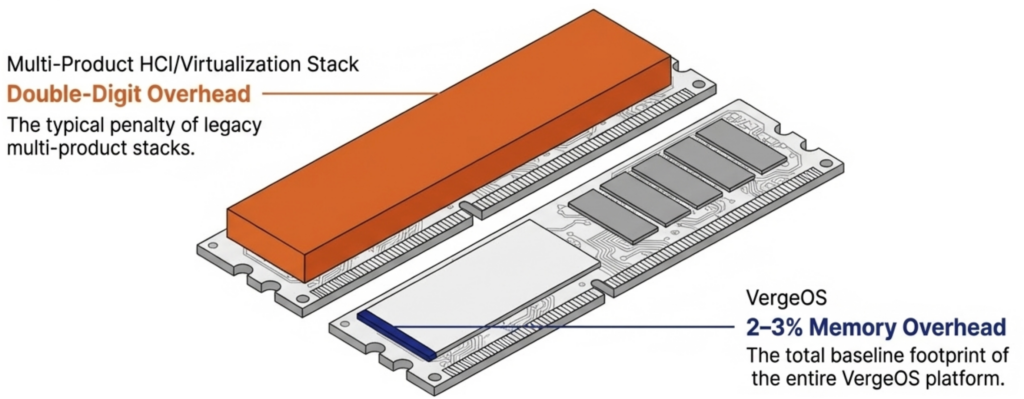
VergeOS integrates virtualization, storage, networking, and data protection into a single code base that runs at 2–3% memory overhead, compared to the double-digit percentages consumed by multi-product stacks.
Topgolf reduced server count by 50% per venue across 100+ locations. Alinsco Insurance migrated a mission-critical VxRail environment during business hours with zero downtime and gained memory headroom on the same hardware.
VergeOS runs safely on commodity NVMe drives, uses global inline deduplication to reduce flash capacity requirements, and delivers snapshot-driven local replication through ioGuardian that protects against multiple simultaneous drive failures without hardware RAID.
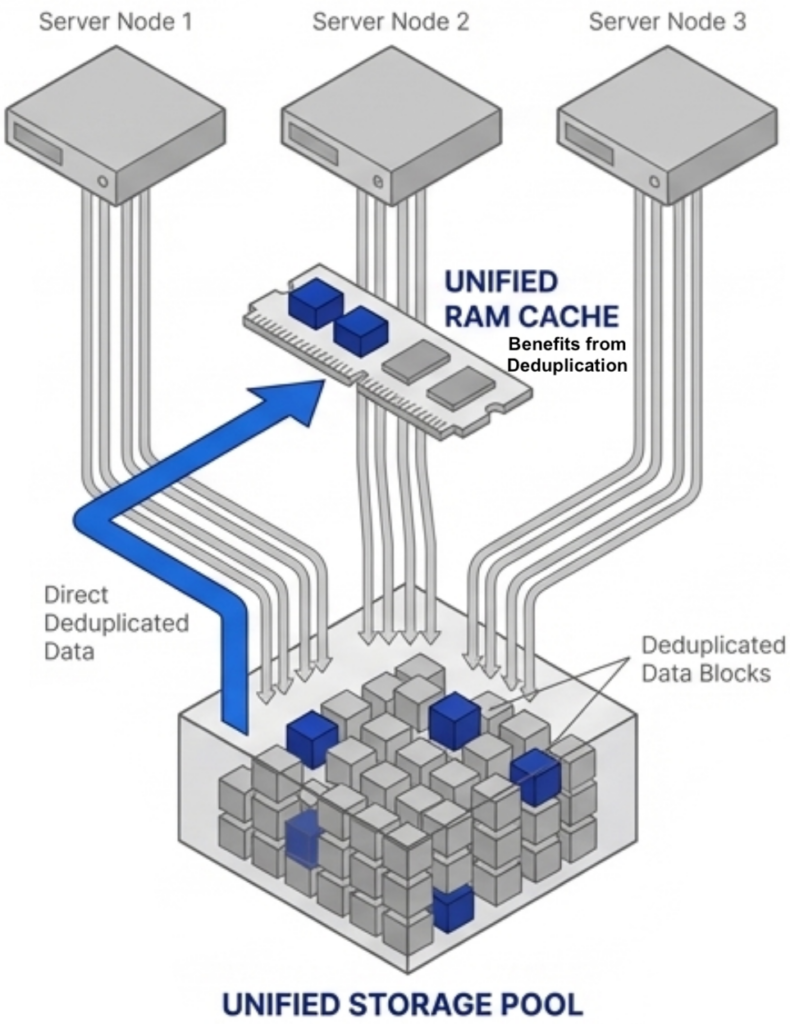
The platform’s global deduplicated cache operates across all VMs across all nodes, caching only unique data blocks from the already-deduplicated storage pool. This drives higher cache hit rates and fewer flash reads without wasting RAM on redundant cached data.

How a Hypervisor Can Reduce RAM ConsumptionDRAM prices are expected to increase 171% year-over-year through 2027. NAND flash contract prices jumped 55–60% in Q1 2026 alone. Server orders that once shipped in weeks now face multi-month delivery delays. The platform you choose now determines how much RAM, flash, and hardware you need for the next three to five years.
171%
Projected YoY DRAM price increase through 2027
55–60%
NAND flash contract price increase in Q1 2026
Months
Server delivery delays in categories that shipped in weeks

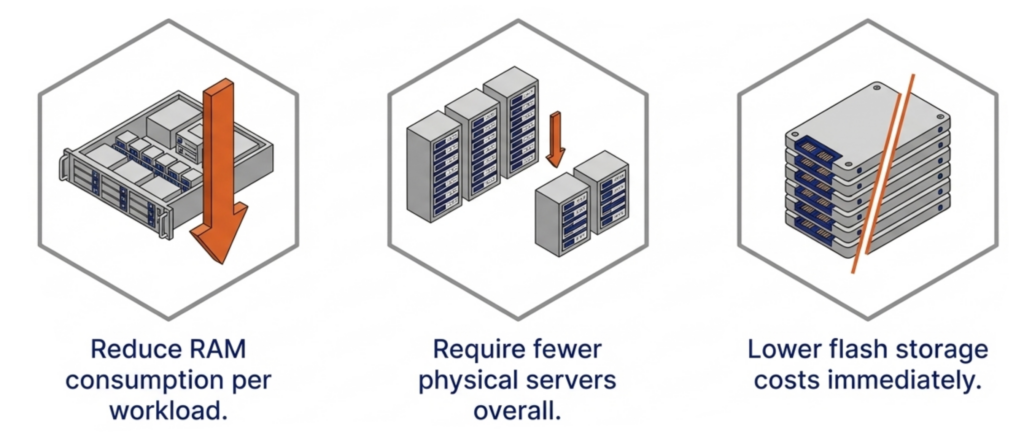
Finding a VMware alternative is still the primary mission. But the supercycle raises the bar. It is no longer enough to swap one hypervisor for another just because it costs less to license. The replacement must also reduce RAM consumption per workload, require fewer servers, and reduce flash storage costs. Any platform that relies on memory ballooning, transparent page sharing, or hypervisor swapping to manage RAM is using the same software tricks the industry has relied on for years. Those techniques react to memory pressure after it occurs. None of them reduce the total physical RAM your infrastructure actually requires.

Key Terms
Memory and Flash Supercycle

A sustained period of rising DRAM and NAND flash prices driven by AI infrastructure demand, DDR4 end-of-life, and constrained fabrication capacity. Industry analysts project tight supply through at least 2027.

Memory Ballooning

A hypervisor technique that uses a guest driver to reclaim unused RAM from idle VMs. Reactive by design, it fails under tight VM sizing and causes cascading performance degradation when multiple VMs spike simultaneously.

Transparent Page Sharing (TPS)

A memory deduplication technique that merges identical OS pages across VMs. Limited to identical pages, disabled by default in VMware since 2014 due to security concerns, and ineffective for application data.

Global Inline Deduplication

VergeOS technology that identifies and eliminates duplicate data blocks at the storage layer before they are written to flash. Reduces total flash capacity requirements, lowers write amplification to extend drive life, and feeds only unique blocks into the RAM cache.

Global Deduplicated Cache

A VergeOS RAM cache that operates across all VMs across all nodes and draws from the already-deduplicated storage pool. Holds only unique data blocks, increasing effective cache capacity and hit rates without the CPU overhead of a separate cache-level deduplication algorithm.

ioGuardian

VergeOS data availability technology that uses snapshot-driven local replication to protect against multiple simultaneous drive failures. Eliminates the need for hardware RAID controllers and delivers consistent performance during failures and rebuilds.

Commodity NVMe

Standard NVMe solid-state drives that cost significantly less than enterprise or server-class SSDs. VergeOS makes commodity drives production-safe through software-managed wear leveling, global deduplication to reduce writes, and ioGuardian replication to handle failures gracefully.

Our on-demand webinar goes deeper into each of these points. Watch Architecting for the Flash and Memory Supercycle to see how the platform decisions you make today determine your infrastructure costs for the next three to five years.

Start with an Efficient Code Base That Reduces RAM Consumption

The first question to ask any VMware alternative is how much RAM the platform itself consumes before a single VM even starts. VMware environments running vSphere, vSAN, vCenter, and NSX stack four separate products on every host. Each product reserves memory for its own management processes. Add external replication software and hardware RAID controllers, and the cumulative overhead climbs even further.

VergeOS takes a different architectural approach. It delivers a complete private cloud operating system that integrates virtualization, storage, networking, and data protection as services within a single code base. There is no separate storage product. There is no separate networking product. The platform is built with global deduplication, enabling synchronous replication without the typical capacity impact and delivering better, more consistent performance in production and during failures.

Memory usage comparison across virtualization platformsIt eliminates the need for hardware RAID controllers, which are also increasing in price because they consume RAM. VergeOS includes built-in data replication for disaster recovery, and its global inline deduplication reduces capacity costs at the disaster recovery site as well. The entire platform runs at 2–3% memory overhead. Compare that to the double-digit percentages consumed by multi-product virtualization stacks and HCI platforms that reserve tens of gigabytes per node before workloads even start.
A lower baseline means more RAM available for production workloads on the same hardware. During a supercycle, that difference translates directly into fewer servers needing to be purchased at inflated prices.

Use Existing Hardware and Reduce How Much You Need

Server reduction through VergeOS consolidationVergeOS installs on any x86 server from any manufacturer. Organizations migrating from VMware continue to run on the same physical servers they already own. There is no hardware forklift upgrade. No waiting six months for new server deliveries that keep getting pushed back as memory and flash shortages worsen. The servers, RAM, and SSDs already purchased and deployed remain in production.
Getting there does not require the purchase of a parallel environment or even a maintenance window. VergeOS supports node-by-node migration from VMware. Evacuate workloads from one host, install VergeOS on that host, migrate VMs onto the new platform, and repeat across the remaining hosts. Production continues running throughout the process. Alinsco Insurance completed this on a five-node VxRail cluster running a mission-critical insurance application that cannot tolerate downtime. The team migrated node by node during business hours with zero downtime. Critical web servers were moved at night out of an abundance of caution, but even those migrations produced no service interruption. During a supercycle, this approach eliminates the capital expense of purchasing a second set of servers to stand up alongside the existing environment.

On-Demand Webinar
Architecting for the Flash and Memory Supercycle

How the platform decisions you make today determine your infrastructure costs for the next three to five years.

Watch On-Demand →

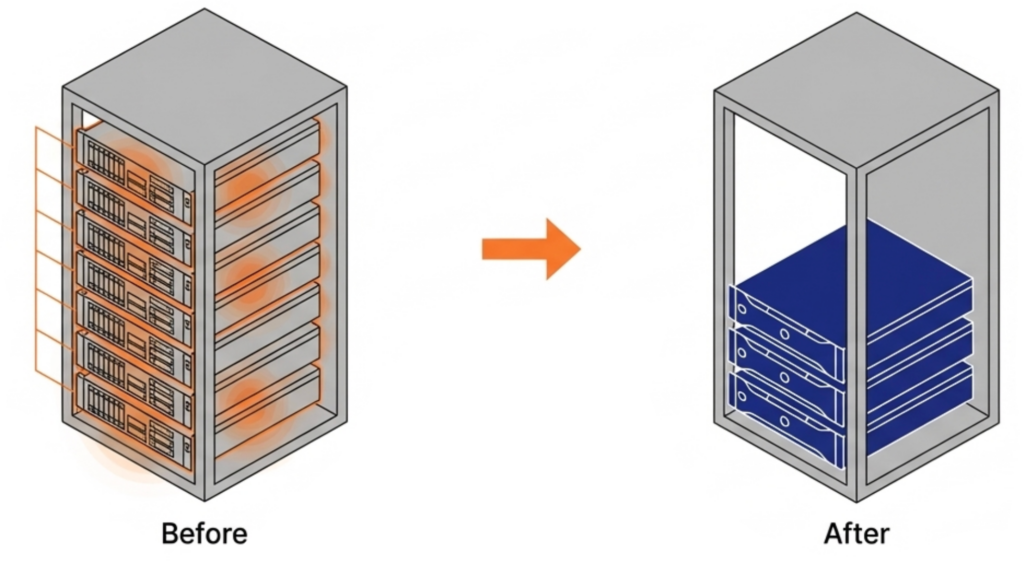
Because VergeOS consumes less RAM per host, organizations can increase VM density and consolidate to fewer servers. Topgolf, operating more than 100 venues globally, reduced each site from six-node VxRail clusters to three-node VergeOS clusters. That is a 50% server reduction per venue. Alinsco Insurance continued to run on the same VxRail hardware and internal SSDs after migration, and servers that felt constrained under VMware gained additional headroom under VergeOS.

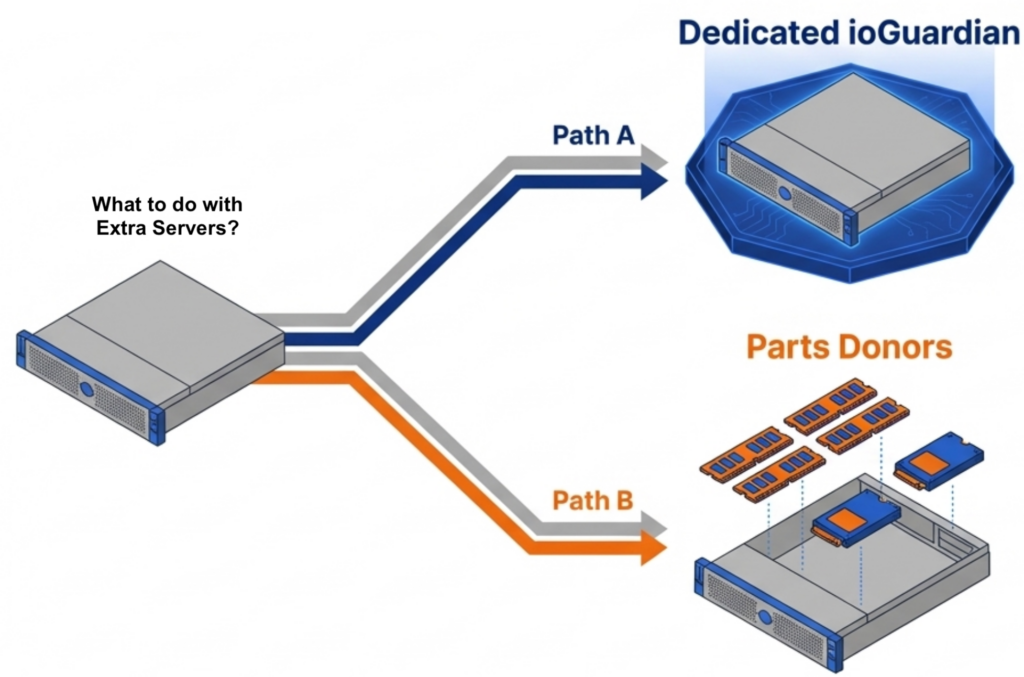
The freed servers create immediate value. One becomes a dedicated ioGuardian server, delivering N+2 or greater (N+X) data protection without purchasing new hardware or hardware RAID. The remaining servers become part donors. Pull the DRAM and NVMe drives and redistribute them across the active production nodes. VergeOS supports mixed node types and mixed node roles in the same cluster, so the redistribution does not require matching hardware specifications.

Freed servers from VergeOS consolidation become parts donors or ioGuardian nodesThe consolidation math works across an entire fleet. An organization running 100 six-node VMware clusters that consolidates to 100 three-node VergeOS clusters frees 300 servers for repurposing, retirement, or spare parts — during a supercycle where replacement hardware is both expensive and slow to ship.
Reduce Flash Costs with Commodity SSDs

The supercycle affects flash storage as well as memory. Enterprise and server-class SSDs carry steep price premiums that continue to climb alongside NAND contract prices. Commodity NVMe drives are rising in price, too. But the price gap between enterprise and commodity is widening, not narrowing, and commodity drives do seem to be more readily available. Organizations that can safely run on commodity flash pay less per terabyte today relative to enterprise alternatives than they did a year ago.

VergeOS runs safely on commodity SSDs. The platform’s storage engine manages I/O scheduling and wear management at the software layer, reducing dependence on the drive’s internal controller. Global inline deduplication reduces total writes to each drive, directly extending drive life. ioGuardian’s snapshot-driven local replication protects against multiple simultaneous drive failures without data loss or downtime, so that a commodity drive that wears out faster than an enterprise drive is replaced gracefully. No hardware RAID controller is required. The combination makes commodity flash a production-safe choice at a fraction of the cost of enterprise SSDs.

A Cache That Benefits from Deduplication

Unified RAM cache across VergeOS nodes drawing from deduplicated storage poolMost virtualization platforms cache storage data independently on each node. If ten nodes access the same data block, ten separate copies sit in ten separate caches. That wastes RAM on redundant data across the cluster.

VergeOS approaches caching differently. The platform performs global inline deduplication at the storage layer, so the storage pool contains only unique blocks. The RAM cache operates across all VMs across all nodes and draws from that already-deduplicated pool. The cache holds only unique data without running a separate deduplication algorithm inside the cache itself. More unique blocks fit in the same physical RAM, driving higher cache hit rates and fewer reads from flash.

An important factor in making this work across nodes is VergeOS’s optimized internode communication protocol, purpose-built for this use case and free from the overhead of chatty iSCSI or NFS protocols. We will explore the technical details of this architecture in an upcoming post. The takeaway for now: VergeOS does not waste RAM caching duplicate data.

The VMware Alternative Decision Just Got Bigger

The search for a VMware alternative is no longer just about licensing. The supercycle means the platform you choose determines your RAM consumption, your flash costs, your server count, and how long your existing hardware stays in production. Choose a platform that relies on the same memory tricks the industry has used for decades, and you inherit the same overhead during the most expensive hardware market in years. Choose a platform built to reduce RAM consumption from a single efficient code base with built-in data availability, and you start with less overhead, run on the servers you already own, and reduce how many you need going forward.

Frequently Asked Questions
What is the Memory and Flash Supercycle?
A sustained period of rising DRAM and NAND flash prices driven by AI infrastructure demand, DDR4 end-of-life, and constrained fabrication capacity. DRAM prices are expected to increase 171% year-over-year through 2027, and NAND flash contract prices jumped 55–60% in Q1 2026 alone. Server delivery times have extended to multi-month delays.
Why don’t memory ballooning and transparent page sharing solve the problem?
These are reactive techniques that manage memory pressure after it occurs. Memory ballooning reclaims unused RAM from idle VMs but fails under tight sizing. Transparent page sharing merges identical OS pages but has been disabled by default in VMware since 2014 due to security concerns. Neither technique reduces the total physical RAM your infrastructure requires.
How much RAM overhead does VergeOS consume?
The entire VergeOS platform — including virtualization, storage, networking, and data protection — runs at 2–3% memory overhead. Compare that to multi-product VMware stacks that consume double-digit percentages, or HCI platforms like Nutanix that reserve 24–32 GB per node for controller VMs before workloads start.
Can I migrate from VMware without buying new servers?
Yes. VergeOS installs on any x86 server from any manufacturer and supports node-by-node migration from VMware. Evacuate workloads from one host, install VergeOS, migrate VMs onto the new platform, and repeat. The servers, RAM, and SSDs you already own stay in production. Alinsco Insurance completed this on a five-node VxRail cluster during business hours with zero downtime.
How does VergeOS reduce the number of servers needed?
Lower platform overhead means more RAM is available for production workloads on each host, increasing VM density. Topgolf reduced each venue from six-node VxRail clusters to three-node VergeOS clusters — a 50% reduction in servers across more than 100 locations. Freed servers become parts donors or dedicated ioGuardian data protection nodes.
Is it safe to run commodity NVMe drives in production?
With VergeOS, yes. The storage engine manages I/O scheduling and wear management at the software layer. Global inline deduplication reduces total writes to each drive, extending drive life. ioGuardian’s snapshot-driven local replication protects against multiple simultaneous drive failures without hardware RAID, so a commodity drive that wears faster is replaced gracefully with no data loss or downtime.
How does VergeOS cache data differently from VMware or Nutanix?
Most platforms cache storage data independently on each node, meaning duplicate blocks are cached separately on every host. VergeOS performs global inline deduplication at the storage layer first, then the RAM cache draws from the already-deduplicated pool. The cache holds only unique blocks across all VMs across all nodes, using an optimized internode protocol instead of iSCSI or NFS. More unique data fits in the same physical RAM, driving higher cache hit rates.
What happens to servers freed up after consolidation?
One freed server becomes a dedicated ioGuardian node, delivering N+2 or greater data protection without a new hardware purchase and without hardware RAID. The remaining servers become parts donors — pull the DRAM and NVMe drives and redistribute them across active production nodes. VergeOS supports mixed node types and mixed node roles, so no matching hardware specifications are required.

Filed Under: Private Cloud Tagged With: Cache, data protection, Deduplication, FlashAndMemorySupercycle, Migration, Performance, servers, Storage, VergeOS, VMware, VMware alternative

855-855-8300

Get Started

  • Versions
  • Request Tour

VergeIO For

  • VMware Alternative
  • SAN Replacement
  • Solving Infrastructure Modernization Challenges
  • Artificial Intelligence
  • Hyperconverged
  • Server Room
  • Secure Research Computing

Product

  • Benefits
  • Documents
  • Architecture Overview
  • Use Cases
  • Videos

Company

  • About VergeIO
  • Blog
  • Technical Documentation
  • Legal

© 2026 VergeIO. All Rights Reserved.