• Skip to main content
  • Architecture
    • Overview
      Learn about VergeOS’ unique unfied architecture that integrates virtualization, storage, networking, AI, backup and DR into a single data center operating system
    • Infrastructure Wide Deduplication
      VergeOS transforms deduplication from a storage-only commodity into a native, infrastructure-wide capability that spans storage, virtualization, and networking, eliminating hidden resource taxes
    • VergeFS
      VergeFS is a distributed, high-performance global file system integrated into VergeOS, unifying storage across nodes, tiers, and workloads while eliminating the need for external SANs
    • VergeFabric
      VergeFabric is VergeOS’s integrated virtual networking layer, delivering high-speed, low-latency communication across nodes while eliminating the complexity of traditional network configurations.
    • Infrastructure Automation
      VergeOS integrates Packer, Terraform, and Ansible to deliver an end-to-end automation pipeline that eliminates infrastructure drift and enables predictable, scalable deployments.
    • VergeIQ
      Unlock secure, on-premises generative AI—natively integrated into VergeOS. With VergeIQ, your enterprise gains private AI capabilities without the complexity, cloud dependency, or token-based pricing.
  • Features
    • Virtual Data Centers
      A VergeOS Virtual Data Center (VDC) is a fully isolated, self-contained environment within a single VergeOS instance that includes its own compute, storage, networking, and management controls
    • High Availability
      VergeOS provides a unified, easy-to-manage infrastructure that ensures continuous high availability through automated failover, storage efficiency, clone-like snapshots, and simplified disaster recovery
    • ioClone
      ioClone utilizes global inline deduplication and a blockchain-inspired file system within VergeFS to create instant, independent, space-efficient, and immutable snapshots of individual VMs, volumes, or entire virtual data centers.
    • ioReplicate
      ioReplicate is a unified disaster-recovery solution that enables simple, cost-efficient DR testing and failover via three‑click recovery of entire Virtual Data Centers—including VMs, networking, and storage.
    • ioFortify
      ioFortify creates immutable, restorable VDC checkpoints and provides proactive ransomware detection with instant alerts for rapid recovery and response.
    • ioMigrate
      ioMigrate enables large-scale VMware migrations, automating the rehosting of hundreds of VMs (including networking settings) in seconds with minimal downtime by seamlessly transitioning entire VMware environments onto existing hardware stacks.
    • ioProtect
      ioProtect offers near-real-time replication of VMware VMs—including data, network, and compute configurations—to a remote disaster‑recovery site on existing hardware, slashing DR costs by over 60% while supporting seamless failover and testing in an efficient, turnkey VergeOS Infrastructure.
    • ioOptimize
      ioOptimize leverages AI and machine learning to seamlessly integrate new and old hardware and automatically migrate workloads from aging or failing servers.
    • ioGuardian
      ioGuardian is VergeIO’s built-in data protection and recovery capability, providing near-continuous backup and rapid VM recovery during multiple simultaneous drive or server failures.
  • IT Initiatives
    • VMware Alternative
      VergeOS offers seamless migration from VMware, enhancing performance and scalability by consolidating virtualization, storage, and networking into a single, efficient platform.
    • Hyperconverged Alternative
      VergeIO’s page introduces ultraconverged infrastructure (UCI) via VergeOS, which overcomes HCI limitations by supporting external storage, scaling compute and storage independently, using existing hardware, simplifying provisioning, boosting resiliency, and cutting licensing costs.
    • SAN Replacement / Storage Refresh
      VergeIO’s storage by replacing aging SAN/NAS systems within its ultraconverged infrastructure, enhancing security, scalability, and affordability.
    • Infrastructure Modernization
      Legacy infrastructure is fragmented, complex, and costly, built from disconnected components. VergeOS unifies virtualization, storage, networking, data protection, and AI into one platform, simplifying operations and reducing expenses.
    • Secure Research Computing
      VergeIO's Secure Research Computing solution combines speed, isolation, compliance, scalability, and resilience in a cohesive platform. It’s ideal for institutions needing segmented, compliant compute environments that are easy to deploy, manage, and recover.
    • Venues, Remote Offices, and Edge
      VergeOS delivers resiliency and centralized management across Edge, ROBO, and Venue environments. With one platform, IT can keep remote sites independent while managing them all from a single pane of glass.
  • Blog
      • Beyond the VMware Exit Consolidate Every Platform onto VergeOS with VeeamMost VMware alternatives only promise a home for vSphere workloads. With official VergeOS support in Veeam Backup & Replication 13.1, one restore job moves workloads from vSphere, Hyper-V, Nutanix AHV, AWS, Azure, GCP, and physical servers onto VergeOS. Consolidate onto VergeOS from every platform you run, and retire the rest.
      • The Maintenance Line You Can’t EscapeScott Bartgis stopped paying VMware maintenance and froze Saratoga Casino Holdings at version 7. The license type was never the problem. The renewal curve was. Here is what a VMware perpetual license buys you, what it costs to hold one unsupported in a regulated environment, and the terms that got him back under support.
      • Storage Tiering Without the Capacity TaxStorage tiering was never an array feature. It was a placement decision that lived where the intelligence sat. Lab measurements show a VergeOS tier change acknowledged in 1.3 seconds with the VM still running, and per-node licensing that decides who captures the data reduction: the customer or the vendor's meter.
    • View All Posts
  • Resources
    • Become a Partner
      Get repeatable sales and a platform built to simplify your customers’ infrastructure.
    • Technology Partners
      Learn about our technology and service partners who deliver VergeOS-powered solutions for cloud, VDI, and modern IT workloads.
    • White Papers
      Explore VergeIO’s white papers for practical insights on modernizing infrastructure. Each paper is written for IT pros who value clarity, performance, and ROI.
    • In The News
      See how VergeIO is making headlines as the leading VMware alternative. Industry analysts, press, and partners highlight our impact on modern infrastructure.
    • Press Releases
      Get the latest VergeOS press releases for news on product updates, customer wins, and strategic partnerships.
    • Case Studies
      See how organizations like yours replaced VMware, cut costs, and simplified IT with VergeOS. Real results, real environments—no fluff.
    • Webinars
      Explore VergeIO’s on-demand webinars to get straight-to-the-point demos and real-world infrastructure insights.
    • Documents
      Get quick, no-nonsense overviews of VergeOS capabilities with our datasheets—covering features, benefits, and technical specs in one place.
    • Videos
      Watch VergeIO videos for fast, focused walkthroughs of VergeOS features, customer success, and VMware migration strategies.
    • Technical Documentation
      Access in-depth VergeOS technical guides, configuration details, and step-by-step instructions for IT pros.
  • How to Buy
    • Schedule a Demo
      Seeing is believing, set up a call with one of our technical architects and see VergeOS in action.
    • Versions
      Discover VergeOS’s streamlined pricing and flexible deployment options—whether you bring your own hardware, choose a certified appliance, or run it on bare metal in the cloud.
    • Test Drive – No Hardware Required
      Explore VergeOS with VergeIO’s hands-on labs and gain real-world experience in VMware migration and data center resiliency—no hardware required
  • Company
    • About VergeIO
      Learn who we are, what drives us, and why IT leaders trust VergeIO to modernize and simplify infrastructure.
    • Support
      Get fast, expert help from VergeIO’s support team—focused on keeping your infrastructure running smoothly.
    • Careers
      Join VergeIO and help reshape the future of IT infrastructure. Explore open roles and growth opportunities.
  • 855-855-8300
  • Contact
  • Search
  • 855-855-8300
  • Contact
  • Search
  • Architecture
    • Overview
    • VergeFS
    • VergeFabric
    • Infrastructure Automation
    • VergeIQ
  • Features
    • Virtual Data Centers
    • High Availability
    • ioClone
    • ioReplicate
    • ioFortify
    • ioMigrate
    • ioProtect
    • ioOptimize
    • ioGuardian
  • IT Initiatives
    • VMware Alternative
    • Hyperconverged Alternative
    • SAN Replacement / Storage Refresh
    • Infrastructure Modernization
    • Virtual Desktop Infrastructure (VDI)
    • Secure Research Computing
    • Venues, Remote Offices, and Edge
  • Blog
  • Resources
    • Become a Partner
    • Technology Partners
    • White Papers
    • In The News
    • Press Releases
    • Case Studies
    • Webinars
    • Documents
    • Videos
    • Technical Documentation
  • How to Buy
    • Schedule a Demo
    • Versions
    • Test Drive – No Hardware Required
  • Company
    • About VergeIO
    • Support
    • Careers
×
  • Architecture
    • Overview
    • VergeFS
    • VergeFabric
    • Infrastructure Automation
    • VergeIQ
  • Features
    • Virtual Data Centers
    • High Availability
    • ioClone
    • ioReplicate
    • ioFortify
    • ioMigrate
    • ioProtect
    • ioOptimize
    • ioGuardian
  • IT Initiatives
    • VMware Alternative
    • Hyperconverged Alternative
    • SAN Replacement / Storage Refresh
    • Infrastructure Modernization
    • Virtual Desktop Infrastructure (VDI)
    • Secure Research Computing
    • Venues, Remote Offices, and Edge
  • Blog
  • Resources
    • Become a Partner
    • Technology Partners
    • White Papers
    • In The News
    • Press Releases
    • Case Studies
    • Webinars
    • Documents
    • Videos
    • Technical Documentation
  • How to Buy
    • Schedule a Demo
    • Versions
    • Test Drive – No Hardware Required
  • Company
    • About VergeIO
    • Support
    • Careers

HCI

July 9, 2024 by George Crump

Many IT professionals are considering alternatives to VMware to reduce licensing costs, but the sustainability benefits of efficient infrastructure software as it replaces VMware should not be overlooked. Infrastructure software that integrates storage services, server virtualization, and network services into a single code base can improve power and cooling costs, as well as resource utilization, to enable organizations to meet sustainability goals.

the sustainability benefits of efficient infrastructure software

By requiring less CPU overhead, these solutions can significantly increase processor efficiency, which enables more virtual machines (VMs) per server, thereby reducing the number of physical servers required. It also extends the operational life of servers. These benefits contribute to environmental sustainability and cost efficiency. An efficient infrastructure software solution can also eliminate vendor lock-in, ensure long-term hardware flexibility, replace dedicated all-flash storage arrays with server-class SSDs, and incorporate backup best practices into the core infrastructure software. Additionally, solutions can reduce power, cooling, data center footprint, and server acquisition costs.

Enhancing Server Performance and Reducing Physical Server Count

Integrating storage, virtualization, and network services into a unified software package can improve server performance. Such software can handle more workloads with fewer physical servers by optimizing resource allocation and management. This reduction in physical infrastructure leads to several sustainability benefits:

  1. Lower Energy Consumption: Fewer servers mean reduced energy requirements for operation and cooling, directly lowering the data center’s carbon footprint.
  2. Reduced E-Waste: Minimizing the number of physical servers significantly decreases the amount of electronic waste generated from obsolete hardware.
  3. Cost Savings: Lower energy consumption and reduced hardware needs translate to substantial cost savings in capital and operational expenditures.

Elimination of Vendor Lock-In with Efficient Infrastructure Software

Vendor lock-in has long been a challenge in enterprise IT environments, and it impacts the sustainability benefits of efficient infrastructure software. Traditional infrastructure solutions bind organizations to specific hardware vendors, limiting flexibility and driving up costs. An efficient infrastructure software solution mitigates this issue by providing hardware-agnostic capabilities:

  1. Freedom of Choice: Organizations can choose hardware based on performance, cost, and sustainability criteria rather than being constrained by vendor compatibility.
  2. Competitive Pricing: The ability to mix and match hardware from different vendors fosters a competitive market, driving down prices and encouraging innovation.
  3. Sustainability Through Longevity: Hardware-agnostic software can support older servers, extending their useful life and reducing the need for frequent hardware replacements.

Efficient Infrastructure Software Delivers Long-Term Hardware Flexibility

One of the significant sustainability benefits of an efficient infrastructure software solution is its support for long-term hardware flexibility. This capability allows organizations to extend the operational life of their servers well beyond the original warranties:

  1. Extended Lifespan: With the correct software optimizations, servers can remain functional and efficient for many years, delaying the need for new hardware.
  2. Reduced Resource Consumption: By prolonging the life of existing hardware, the demand for raw materials and energy associated with manufacturing new servers is minimized.
  3. Economic Efficiency: Extending hardware lifespan translates to reduced capital expenditure on new equipment and better return on investment for existing assets.

However, as servers age, the risk of hardware failure increases. To mitigate this risk, built-in server redundancy and seamless failover capabilities are essential. Efficient infrastructure software should include these features to ensure continuous operation if an older server fails. This built-in redundancy allows workloads to be automatically transferred to functioning servers without disruption, maintaining high availability and reliability. Such resilience ensures that the extended use of older hardware does not compromise the overall stability and performance of the IT environment.

Eliminating Dedicated All-Flash Storage Arrays

Traditional data centers rely on dedicated all-flash storage arrays to meet high-performance processing and storage demands. However, this approach can be resource-intensive and costly. By integrating storage services directly into the server infrastructure and utilizing server-class SSDs, organizations can achieve comparable, if not superior, performance with greater efficiency:

  1. Cost Efficiency: Server-class SSDs are typically more cost-effective than dedicated all-flash storage arrays, reducing initial investment and ongoing maintenance costs.
  2. Improved Resource Utilization: Integrating storage into server infrastructure optimizes the use of existing resources, enhancing overall efficiency.
  3. Environmental Impact: The production of server-class SSDs generally requires fewer resources than all-flash storage arrays, contributing to a smaller environmental footprint.
  4. Elimination of Separate Network Infrastructure: Efficient infrastructure software eliminates the need for a separate network infrastructure dedicated solely to storage traffic, such as Fibre Channel or iSCSI. By consolidating storage traffic over existing Ethernet networks, organizations can reduce complexity, lower costs, and decrease the physical footprint of networking hardware. This simplification also reduces power and cooling requirements, further enhancing the sustainability of the IT environment.

Integrating Backup Best Practices Into Efficient Infrastructure Software

Incorporating backup and data protection best practices directly into the core infrastructure software eliminates the need for separate data protection architectures. This integration offers several sustainability and efficiency benefits:

  1. Simplified Management: A unified approach to data protection streamlines management processes, reducing the need for additional hardware and administrative overhead.
  2. Enhanced Resiliency: Integrated backup solutions ensure that data is consistently protected and readily recoverable, minimizing downtime and data loss.
  3. Resource Optimization: By leveraging existing infrastructure for backup purposes, organizations can avoid the additional energy and material costs associated with dedicated backup systems.
  4. Elimination of Separate Storage Systems and Servers: The integration of the data protection architecture eliminates the need for separate storage systems to store backup data and separate servers to run the backup software. This consolidation reduces the overall hardware footprint, significantly saving space, power, and cooling costs.

The Requirements of Efficient Infrastructure Software

the sustainability benefits of efficient infrastructure software

Efficient infrastructure software must meet several essential requirements to support modern data centers effectively while promoting sustainability and cost-efficiency. These requirements include integrating essential components, multi-tenancy capabilities, data resiliency, high availability, and scalability.

  • Integration of Major Components: The software must integrate the three major components of the data center—storage services, virtualization software, and networking services—into a single piece of software.
  • Integrated Multi-Tenancy: The software should provide integrated multi-tenancy to eliminate the noisy neighbor problem and ensure fair resource distribution among different workloads.
  • Data Resiliency and High Availability It should integrate data resiliency and high-availability features for servers to protect against hardware failures and ensure continuous operation.
  • Scalability: The software must scale from as few as two servers to hundreds of servers, allowing it to meet a wide range of use cases from Remote Office/Branch Office (ROBO) setups all the way up to large Enterprise environments.

Conclusion

Verge.io’s VergeOS meets all the requirements for efficient infrastructure software and delivers on the sustainability benefits discussed. VergeOS integrates storage services, server virtualization, and networking services into a single, cohesive platform, ensuring seamless operation and high performance. Its built-in multi-tenancy eliminates the noisy neighbor problem, and its data resiliency and high-availability features protect against hardware failures.

In addition to these technical advantages, VergeOS offers significant cost savings. Its licensing model is per server instead of per core, enabling customers to purchase fewer, more CPU-dense servers. This approach reduces licensing costs and lowers the overall number of servers required, enhancing sustainability by reducing energy consumption and electronic waste. VergeOS is also software-based, which means you can use your existing hardware or purchase new servers from the vendor of your choice.

Organizations adopting VergeOS can achieve all the sustainability benefits while enjoying upfront savings compared to VMware. VergeOS’s ability to scale from two servers to 200 makes it versatile for various use cases, from small remote offices to large enterprise environments. By choosing VergeOS, organizations can meet their environmental goals and achieve long-term operational success.

Filed Under: Private Cloud Tagged With: HCI, IT infrastructure

June 18, 2024 by George Crump

BOSTON – June 18, 2024 – IT service provider Cloud Compliance Solutions, Inc. (CCSI) has upgraded its infrastructure with technology from Leostream Corporation, creator of the world-leading Leostream® Remote Desktop Access Platform, and VergeIO, the leading VMware alternative, resulting in significant cost savings, optimized hardware use, and enhanced operational efficiency, the companies announced today.

Founded in 2017, CCSI provides its clients with a complete suite of cloud-related IT and compliance services. As a single provider offering both critical services, CCSI delivers more accurate and cost-effective IT and compliance solutions that significantly reduce its clients’ operational and audit costs.

CCSI opted to replace VMware due to significant challenges, including affordability, scaling and performance for its multi-tenant platform that provides its clients Desktop as a Service (DaaS)/Next-Gen DaaS (NGDaaS), Infrastructure as a Service (IaaS) and Disaster Recovery as a Service (DRaaS). CCSI’s growth had surpassed VMware’s capabilities, and it needed an option that could support denser environments with more powerful servers. Strategically, CCSI had concerns about VMware’s new licensing costs and models that required substantial upfront commitments and the uncertain future of VMware Horizon.

The transition to VergeIO and Leostream has transformed CCSI’s service portfolio, enabling it to offer more robust and scalable services with superior DaaS/NGDaaS, IaaS and DRaaS. With CCSI competing with providers like AWS and Azure, the upgrade allows it to remain price-competitive and provide better service and support.

“VergeOSs multi-tenant virtual data center technology and Leostream’s virtual desktop platform have empowered CCSI to provide customers with fundamentally better performance and efficiency,” said Kelley Allen, CCSI CEO. “This project exemplifies CCSI’s commitment to innovation and customer satisfaction with high-quality, affordable, and reliable IT solutions.”

The phased upgrade began with DaaS/NGDaaS and Leostream for remote desktop services including resource allocation, access control, and policy enforcement. In addition to secure user profile management and support for nearly all end-user devices and display protocols,the combined solution delivered on its promise of increased performance: boot times have dropped to seconds instead of minutes.

Next, CCSI shifted its IaaS offerings to VergeIO to create multi-tenant virtual data centers (VDC), which allows customers to manage the VDC as if it were on-premises technology, with CCSI as backup IT support. While CCSI is a de-facto IT team for many customers with limited or no full-time IT staff, VergeIO’s VDC technology allows CCSI to attract new clients whose IT teams want more control over their infrastructure.

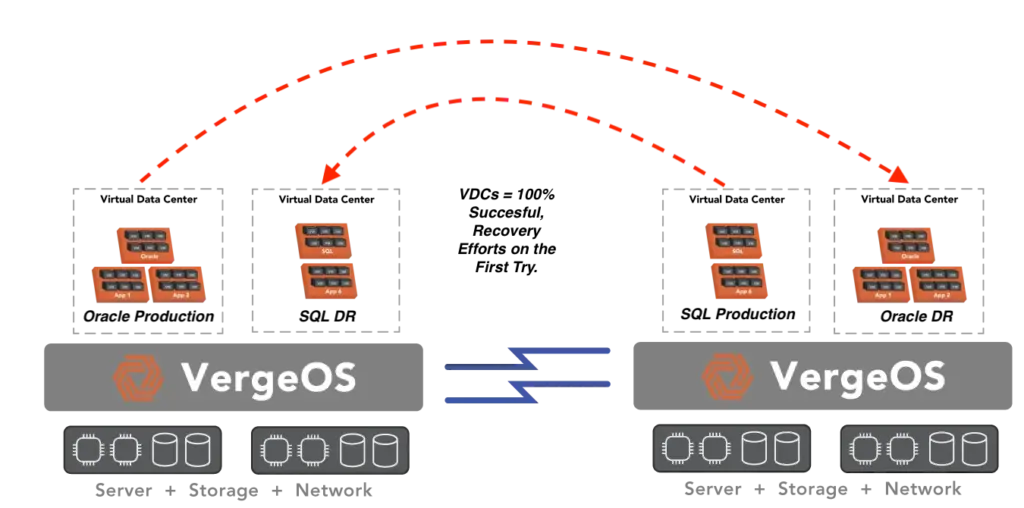
The third phase, also enabled by VergeIO, expanded and simplified CCSI’s DRaaS capability so customers with on-premises IT infrastructure can fail over to CCSI’s infrastructure in a disaster. VergeOS VDC technology seamlessly replicates all components to ensure a successful recovery in CCSI’s data center.

“When industry-leading IT experts like CCSI choose your product for their own internal use, and to deploy to customers, it is the highest possible endorsement,” said Karen Gondoly, Leostream CEO. “This joint infrastructure combining Leostream and VergeIO has been battle-tested in multiple enterprises and we believe it’s the strongest, most feature-rich alternative to VMware, ESXi, and Horizon available today.”

“CCSI’s new architecture will provide long-term cost savings, starting with reduced upfront license costs, maintaining its existing investment in hardware, and enabling more virtual machines and desktops per physical server,” said Yan Ness, CEO of VergeIO. “More importantly, this modernized desktop, infrastructure, and disaster recovery platform has expanded what the company is able to offer its own clients, to truly do more for less.”

If you’re considering a VMware exit, we have the perfect opportunity for you to talk to someone who has made the journey. CCSI is joining VergeIO and Leostream for a live conversation with IT professionals about their switch from VMware to VergeIO/Leostream software on June 27th at 1:00pm EST. Register Here.

The Leostream Remote Desktop Access Platform for hosted desktops and workstations offers a comprehensive solution for remote access to maintain productivity, control costs, and ensure security with strict authentication and authorization built on zero-trust concepts. Its connection management system eliminates clunky corporate VPNs with an ultra-efficient gateway that gives users access to only the specific resources they have permission to use, automatically, regardless of their location or device. The Leostream Platform shines even in environments that rely on complex, specialty applications like energy and science; large files such as media and entertainment; real-time performance like financial services; and bulletproof network security like government and defense.

About VergeIO

VergeIO is the leading VMware Alternative. Unlike hyperconverged infrastructure (HCI), its ultraconverged infrastructure (UCI) rotates the traditional IT stack (computing, storage, and networking) into an integrated data center operating environment, VergeOS. Its efficiency enables greater workload density using existing hardware while improving data resiliency. The result is dramatically lower costs, improved availability, and greatly simplified IT.

About Leostream
The Leostream Remote Desktop Access Platform embodies over 20 years of Leostream research and development in supporting customers with hosted desktop environments, including VDI, hybrid cloud, and high-performance display protocols. It provides the world’s most robust desktop connection management and remote access feature set, allowing today’s enterprises to choose the best-of-breed components to satisfy their complex security, cost, and flexibility needs while working with them as they evolve into tomorrow.

Leostream is a registered trademark of Leostream Corporation in the United States. All other trademarks are the property of their respective owners.

###

JPR Communications

Judy Smith

Filed Under: Press Release Tagged With: Alternative, DRaaS, HCI, IaaS, VMware

April 16, 2024 by George Crump

IT professionals often reject hyperconverged infrastructure (HCI) because they want to integrate HCI into their traditional three-tier architecture, and most HCI solutions can’t meet this requirement. HCI vendors also only focus on three tiers of the typical data center: networking, virtualization, and storage. However, a fourth tier is far too often overlooked: data availability and protection.

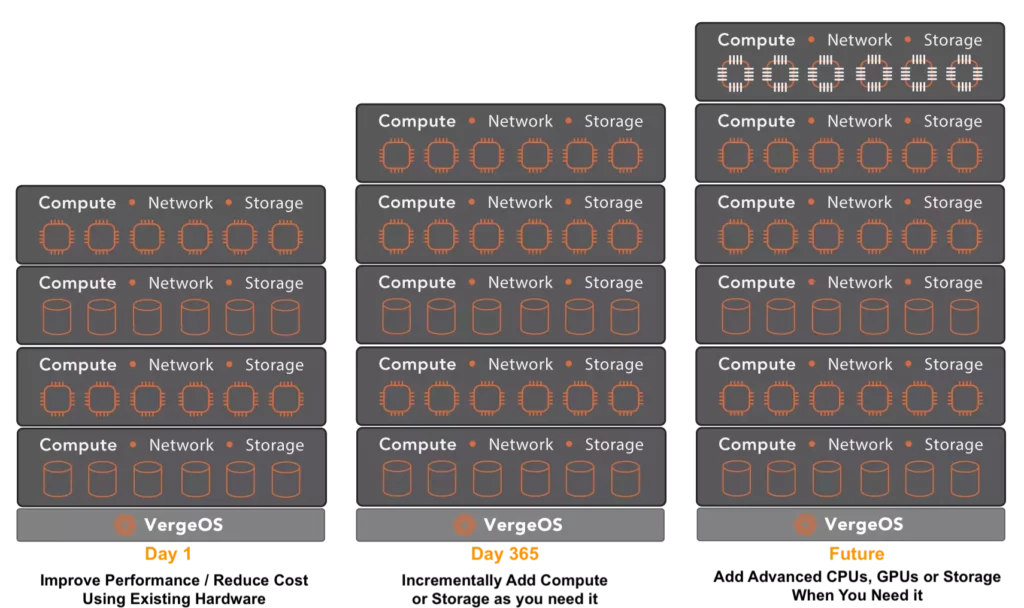
VergeOS’ Ultraconverged Infrastructure (UCI) can integrate into a customer’s traditional three-tier architecture. In this article, we will cover how VergeOS enables a more gradual onramp to UCI instead of a complete overhaul on day one and allows you to use components from each of your existing tiers.

UCI, an HCI Solution You Actually Want

Integrate HCI into a Three-Tier Architecture

The concept of HCI has merit. Take the data center tiers running on dedicated, vendor-provided hardware and reenable them as software, converging that software onto a single commodity server, liberating the organization from vendor lock-in and markups. The problem faced when IT attempts to integrate HCI into a traditional three-tier architecture is that HCI doesn’t truly converge anything. HCI stacks these tiers as software packages on top of each other, essentially recreating the same technology stack within a single server. It also forces them to exclude external SANs and existing servers.

UCI changes this by collapsing these stacks into a single, cohesive operating environment that is significantly more efficient. This elegant code base reduces overhead by as much as 30% while improving performance. The result is a VMware Alternative that is more portable, performs better, and provides improved data resilience.

UCI, an HCI Solution That Supports Fibre Channel SANs

One of the largest investments in the data center is the storage tier. If you have hundreds of thousands of dollars invested in a fibre-channel (FC) storage area network (SAN), you will want to integrate HCI into your traditional three-tier architecture so that you can continue to benefit from your significant investment. The problem is that most HCI solutions don’t support them. Because VergeIO owns all the code within VergeOS at a very deep level, we have taken the necessary steps to support fibre-channel-attached storage.

Click to Register

When using VergeIO and a FC SAN, you’ll need a physically local drive in each server to load VergeOS and store metadata, but the VM data can reside on the FC array. You’ll create a LUN as a virtual drive for each node that contributes to storage for the VergeOS instance. The VergeOS will manage and aggregate virtual drives into a pool that the VMs can use for data storage. VergeOS will also provide an additional layer of protection from hardware failure and add a deduplication capability. If your array already has deduplication, you can turn it off or leave it on; we’ve been unable to measure any noticeable performance impact.

In the future, when it is time to add additional capacity to the environment, you have options. First, you can continue to add capacity to your existing FC array, or you can take advantage of the 10X cost savings of using internal server class NVMe SSDs and/or HDDs. Also, as new storage technologies come to market, there is a much higher likelihood of them being supported sooner under VergeOS than waiting for the storage vendor to retrofit their designs to support them.

UCI, an HCI Solution That Supports Blade Servers

VergeOS is unique in that it can run a variety of different servers within the same instance. You can mix different server manufacturers, processor generations, and even processor manufacturers (Intel and AMD). You can also mix different server configurations. Some servers can be storage-heavy, and others can be processor-heavy.

Integrate HCI into a Three-Tier Architecture

Blade servers are processor-heavy nodes because they can only support a limited amount of internal storage. This makes blade servers problematic for IT professionals looking to integrate HCI into a traditional three-tier architecture. It forces them to reconsider the server strategy, which blade server customers are reluctant to do.

To incorporate a blade server into the VergeIO instance, you need to have either one internal drive store to boot VergeOS, or VergeOS also supports PXE booting, so an internal drive is not required. From there, the blade server can access its data from the shared pool of storage that VergeOS creates from the other nodes, or in the aforementioned FC SAN. In fact, if the blade server is FC equipped, it can “contribute” storage to the overall instance by assigning it a LUN as described above. Hosting storage does require slightly more RAM, so it is best to review the exact configuration with our technical architects.

As is the case with storage, VergeOS brings added flexibility for server expansion or refreshes. When it comes time to upgrade or expand your server infrastructure, you can continue to add blade servers or use standard 1U, 2U, or larger commodity servers of your choice.

UCI, an HCI Solution That Supports External Networks

Integrate HCI into a Three-Tier Architecture

VergeOS has a robust set of layer 2 and layer 3 networking functionality, but its use is optional. If you’ve invested in one of the market leaders for networking functionality, VergeOS can easily interoperate with them. As with the above, as time goes on, you can decide to use some of the network functionality built into VergeOS, saving you the cost of additional dedicated appliances, or you can continue to use your current vendor. To learn more about VergeOS, watch our Networking Fundamentals video.

UCI, an HCI Solution That Supports Third-Party Backup

VergeOS’ Data Availability Services combined with ioGuardian capabilities lessen IT’s dependency on the backup infrastructure for most recovery efforts, and many customers decide that is all the protection they need. VergeOS provides an in-guest agent that can quiesce when applying consistent snapshots. Still, some customers want to use third-party backup solutions to meet these requirements:

Copy of Last Resort

VergeOS can export the VMs’ raw files via an NFS mount point that almost any backup product can browse to meet compliance or vendor-independent data copy requirements to a different storage system, even tape.

File Level Restoration

As we show in this video, several types of file-level restoration can be done by leveraging VergeOS snapshots. Customers who want a centralized file-level recovery can install an in-guest agent from their backup software application into the virtual machines that are likely to require single-file recoveries.

Again, most customers find they can meet 100% of their data protection and recovery needs using VergeIO. Still, its support of third-party backup products enables IT to continue to use these solutions if required, or until they gain full confidence in VergOS’ capabilities.

Conclusion

Schedule a Technical Deep Dive on VergeOS

VergeOS’ Ultraconverged Infrastructure (UCI) effectively addresses the challenges of integrating HCI into a traditional three-tier architecture by supporting diverse hardware, including blade servers and FC SANs, and offering robust networking capabilities and data protection. As a versatile VMware alternative, VergeOS truly converges data center tiers into an efficient environment, allowing organizations to leverage existing investments and adapt to future technologies. This combination of compatibility, enhanced performance, and cost savings makes VergeOS’ UCI a very practical choice for modernizing IT infrastructure.

Filed Under: Storage Tagged With: HCI, Hyperconverged, UCI

January 20, 2024 by George Crump

Many IT Professionals disqualify Hyperconverged Infrastructure (HCI) as a VMware Alternative because they feel that overcoming HCI shortcomings is more expensive than continuing to use legacy three-tier architectures. These shortcomings are in areas where HCI was initially intended to excel: price, performance, scalability, and simplicity.

Overcoming HCI shortcomings led the VergeIO team to start from a clean slate and create the industry’s first UltraConverged Infrastructure (UCI) solution, VergeOS. It provides a superior, cost-effective alternative to HCI and the traditional three-tier infrastructure. Watch our on-demand webinar, “Beyond HCI” for a comparison of VergeOS’ UCI to the VMware and Nutanix HCI solutions.

In this article, we will explore the critical shortcomings of HCI, which lead IT planners to continue to leverage dedicated infrastructure, and how UCI overcomes them.


Can HCI Deliver Better CPU Performance?

The short answer is no. HCI can’t outperform the traditional three-tier architecture, which has dedicated hardware powering each tier. The reason is that HCI uses shared hardware to power at least four separate software packages, to deliver:


1) A package that contains the core operating system and the hypervisor.
2) A package that contains the storage software.
3) A package that contains the network software.
4) A package that contains the management software.

Each of these packages consumes CPU resources, and HCI’s lack of integration between them means it discards the potential gains in efficiency that combining them into a single code base would deliver. IT must install these packages as separate entities, making installation more complex. Then, once they are all installed and running and IT is ready to create a VM for the organization instead of for infrastructure, they’ve already lost as much as 20% of the CPU resources. To compensate, HCI requires the purchase of more powerful (and expensive) servers.

Another challenge is that as your application executes within the VM, it is probably running through much of the above stack. It uses the CPU to process requests from users. It is using storage IO to read and write data. It is using network resources to receive that input and deliver results. Finally, the VM’s health is reported to a management console in order to report on its health. Each transaction that the application executes is mired down in overhead.

The inefficiency of the code base forces HCI vendors into a predictable pattern of making customers buy turnkey hardware and software solutions from them, or buy new hardware using a strict hardware compatibility matrix. The required hardware must also be overpowered to compensate for the inefficiency, increasing costs.

UCI Delivers Near Bare Metal Performance

Can HCI Deliver Better CPU Performance

The fundamental difference between UCI and HCI is that UCI goes the extra step and eliminates the four separate software modules listed above. Instead, it integrates them into a cohesive code base, increasing resource efficiency. VergeIO typically uses less than 3-5% of CPU resources. The efficiency of resources also improves each VM transaction since no layers of code are involved in each request.

VergeIO customers consistently report measurable improvement in performance-demanding VMs and increased VM density while using existing hardware. Many VergeIO customers even report virtualizing formerly bare metal workloads and seeing a performance improvement.

Can HCI Deliver Better Storage Performance?

Concerns over storage performance are the number one reason customers will disqualify HCI in favor of dedicated three-tier architectures. Storage performance and storage scalability are very legitimate concerns for HCI vendors. First, most HCI vendors don’t use their own storage software. Often, they use an open-source solution like ZFS or CEPH, which were not designed for the unique requirements of providing storage services to a virtualized infrastructure. The solution remains convoluted even if they have their storage code.

Because of the lack of integration, HCI vendors have stumbled through implementing advanced drive failure protection and storage efficiency algorithms like deduplication. Adding these capabilities post-facto adds another layer to an already complex combination of software. For this reason, most vendors force customers to choose between storage efficiency and advanced drive redundancy.

Can HCI Deliver Better Storage Performance

UCI Delivers Better Storage Performance

The storage performance delivered by a UCI solution like VergeOS can outperform an HCI solution and a dedicated storage array while significantly reducing the storage cost. VergeOS correctly balances storage efficiency and storage performance. Its deep integration into the core software enables features like drive failure protection and global inline deduplication to work without adversely impacting performance.

Can HCI Deliver Better Scale?

By its very nature, HCI is scale-out, so scale should be an advantage, but once again, it falls short. Most HCI solutions require three servers (nodes) to start. It forces many small data centers to use two servers and a SAN or NAS. Many of these customers would benefit from a simple two-node solution that includes all the storage and networking functionality within those nodes.

HCI also doesn’t meet the scaling demands of enterprises. Most HCI solutions can only scale to eight nodes per instance before network traffic becomes challenging. They also have to buy similar nodes with each upgrade. If their needs change, they have to start an entirely separate instance of the HCI environment. As a result, many customers opt for the legacy three-tier architecture because each tier can be scaled independently of the other.

UCI Delivers Better Scale

Overcoming HCI shortcomings requires an infrastructure that is flexible and can adapt to the changing demands of the organization.

As we explain in our article “The Full Value of Scale”, a UCI solution like VergeOS delivers a three-dimensional scale. It can start with as few as two nodes, making it ideal for small data centers and remote offices, but it can also scale to hundreds of nodes to meet the needs of the most demanding enterprise. Nodes within the VergeOS instance can be different from each other. Customers can use nodes that provide balanced compute and storage, or mainly compute, or mostly storage, have GPUs installed, or any combination of the above.

Why is HCI More Expensive than Legacy Three Tier?

HCI should have a significant price advantage over legacy three-tier infrastructure. By definition, it is supposed to use off-the-shelf commodity servers, storage, and network hardware. However, this is seldom the case. Under the guise of “making it easy to install and support,” these vendors either require you to buy a turnkey hardware and software solution from them, require you to buy a specific configuration from one of their “certified” hardware vendors, or have a rigorous hardware compatibility list.

The inefficiency of layering virtualization software, storage software, and networking software as three separate software packages also drives up the cost of HCI. Customers must buy much more powerful nodes to support the additional overhead.

UCI Delivers Better TCO and ROI

Overcoming HCI shortcomings requires an infrastructure that can deliver the promise of reduced cost and simplified operations.

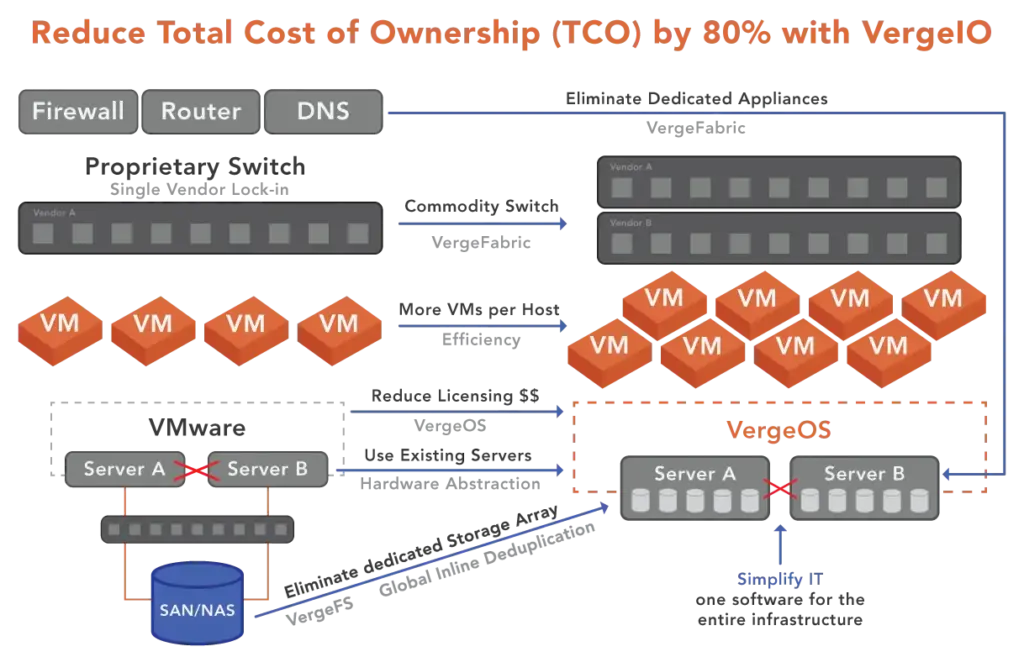
VergeOS’ tight integration of the hypervisor, storage, and networking software means customers can actually use off-the-shelf storage from whichever vendor they choose. This flexibility means there is no need to pay a premium for a so-called turnkey solution. Additionally, because VergeOS is licensed by the physical server, not the contents of that server, as you scale your environment, you can use quad-socket servers with massive core counts and not get crushed in licensing costs.

As we discuss in our article “The High Cost of Dedicated Storage”, VergeOS also dramatically lowers the cost of storage. You can use off-the-shelf server-class flash and hard disk drives, eliminating the 5X to 10X markup levied by dedicated storage array vendors.

The savings even follow through to the network. With VergeOS, you can use off-the-shelf commodity switches. When ready, you can replace dedicated network appliances like firewalls with VergeOS’ built-in L2 and L3 networking capabilities.

Conclusion

In conclusion, Hyperconverged Infrastructure (HCI) makes a poor foundation for an alternative to VMware, particularly in CPU performance, storage efficiency, scalability, and cost. Despite HCI’s initial promises of simplifying operations and reducing costs, it typically fails to meet these objectives due to its inherent inefficiencies.

Yet the cost and complexities of three-tier architectures remain. This has led to the development of VergeIO’s UltraConverged Infrastructure (UCI), which addresses HCI’s shortcomings as well as the three-tier challenges. VergeOS integrates infrastructure software modules into a single, cohesive codebase, enhancing performance and scalability while reducing costs. As such, it presents itself as a more viable solution for customers seeking a VMware alternative as well as for those seeking a simpler, more scalable data center infrastructure.

Learn More

  • Schedule a Technical Deep Dive on the UCI Architecture
  • Set up a Test Drive of VergeOS

Filed Under: HCI Tagged With: HCI, Hyperconverged, UCI

October 17, 2023 by George Crump

the impact of VMware's inefficiency

Licensing costs contribute to VMware’s total costs, but IT professionals almost always underestimate the impact of VMware’s inefficiency. They listed licensing costs as their primary concern in our recent survey. Still, other concerns, like required premature server and storage upgrades, lack of virtual machine density, and continual investments in backup infrastructure, highlight its inefficiency.

VMware’s inefficiency is brought on by years of plugging holes in the product through a never-ending series of bolt-on fixes, which often increases licensing costs and requires more hardware than necessary and more IT professionals to manage an increasingly complex environment. Even if VMware were to freeze its prices or even lower them, the ripple impact of its inefficiency makes a VMware exit to a more efficient alternative platform a wise strategy.

Understanding the Layers of Data Center Infrastructure

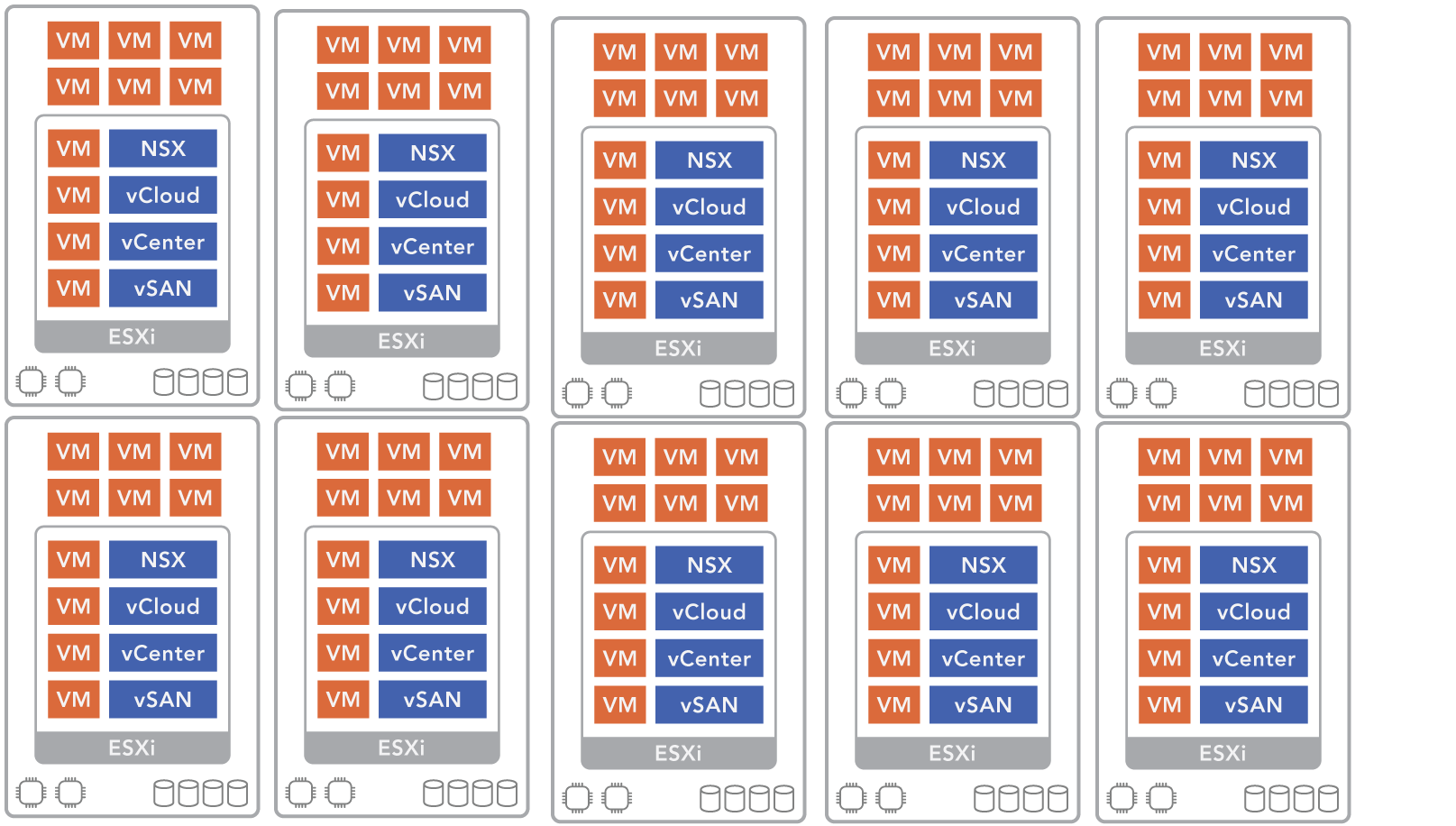
Most vendors divide the data center infrastructure into three layers. A hypervisor like VMware ESXi virtualizes the compute layer. A storage layer that in most medium to large-sized data centers is a dedicated storage array because of the shortcomings of virtualized storage products like VMware’s vSAN, and a networking layer that is built using proprietary networking hardware because of the expense of software-defined networking solutions like VMware’s NSX.

While it isn’t forgotten about, there is a fourth layer that is, for some reason, not included in the typical infrastructure discussion: backup and disaster recovery. In theory, with the right hypervisor software and storage capabilities, there should be no need for this to be a separate layer. Still, because of shortcomings, most organizations invest a large part of the IT budget into it.

The Impact of VMware’s Inefficient HCI

VMware started as a server virtualization and consolidation solution. Before VMware, each application ran on a dedicated server. VMware made it so IT could safely run multiple applications on a single server as virtual machines (VM). The idea behind hyperconverged infrastructure (HCI) is to extend that concept and eliminate the need for dedicated storage arrays and network appliances by moving the software that drives these dedicated appliances onto the same set of servers that VMware was using.

the impact of VMware's inefficiency

In the same way that VMware lowered costs by eliminating the need for a server for every application, HCI should lower costs by eliminating the need for a dedicated set of appliances for every aspect of storage and networking. The impact of VMware’s inefficiency means that most data centers have chosen not to use HCI and instead continue to use a legacy three-tier architecture. The problem is that most HCI vendors continue to use ESXi and run their storage or networking software as a virtual machine under ESXi, meaning they must navigate through the same VMware tax overhead as virtualized applications.

The result is HCI has not achieved the price advantages nor the operational simplicity that the original entrants into the market claimed. As a result, the legacy three-tier infrastructure is still the most common architecture in data centers.

HCI’s Inefficient Networking Problem

HCI also has an east-west inter-node network issue since storage and network operations must coordinate separately across all the cluster servers. Since each of these services is separate from the hypervisor, it triples the amount of inter-node communication, which limits scalability.

Because of the impact of VMware’s inefficiency, HCI networking limitations go beyond east-west traffic issues. In most cases, HCI vendors offer almost no additional network functionality besides what is embedded into the hypervisor. Or, in the case of VMware’s NSX, which is reasonably robust, it is not included as part of the hypervisor, and the add-on cost significantly increases the VMware license cost. In a recent blog, VMware suggested the best way to overcome its ransomware vulnerabilities was to deploy NSX, which, not coincidentally, almost triples the cost of the license.

VergeOS Eliminates the Layers

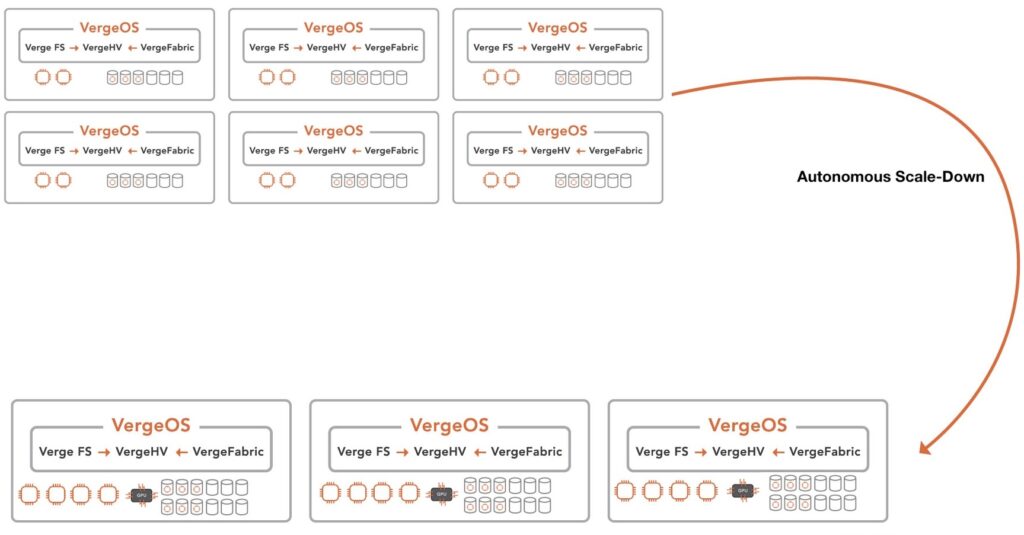
VergeIO is Ultraconverged Infrastructure; instead of re-creating the data center layers in software, VergeOS unifies them, including secure data protection, into a single code base that dramatically increases efficiency. Its efficiency lowers costs, enabling IT to do more with its existing resources while simplifying operations. Most customers can reduce physical server demand by 30% or more, which means running existing servers longer and ordering new servers less frequently.

VergeOS provides complete Layer 2 and Layer 3 network functionality, eliminating the concerns over east-west traffic contention and the need for separate network appliances. It also eases administration as network management becomes a seamless part of the data center infrastructure.

The Impact of VMware’s Inefficient Storage

Most HCI vendors are storage vendors in disguise. They make a storage software solution that can run as a VM within a hypervisor, typically VMware. These solutions, including vSAN, suffer from performance issues, partly because of vendors’ VMware performance tax and odd development choices.

Like HCI in general, storage, specifically in this architecture, should deliver rather significant cost savings and deliver better performance with the right architecture design. IT should be able to add capacity to their existing servers for a fraction of the cost of a “shelf upgrade” using a dedicated storage array. However, the impact of VMware’s inefficiency is felt most severely when HCI tries to provide storage performance and services comparable to a dedicated storage array.

In the survey above, we spoke to a customer looking to add about 300TBs of storage to their three-year-old All-Flash Array. HCI, if it had an efficient storage capability, should eliminate the AFA from consideration because the customer had several servers with twelve or more available storage expansion bays.

A 15.36TB NVMe SSD can be easily had for about $1,500. That means the customer can get 300TB of raw NVMe capacity, delivering well over one million IOPS for about $30,000, and insert them into the empty drive bays in their existing servers. When asked what it would cost to add 300TB of raw capacity to their Pure Storage array, they said at least 10X that cost.

As you can see, storage should be the area where HCI enjoys a significant price advantage, but again, like in other areas, it falls short:

  1. Since most HCI vendors are storage vendors, charging by the amount of capacity in use, the cost to add storage to HCI quickly rivals that of dedicated storage arrays.
  2. Most HCI solutions can’t add storage to available drive bays on just a few servers in the HCI instance. The capacity must be added to all the servers, or the customer must buy additional servers that match those in place.
  3. HCI inefficiencies mean the solutions can’t reach anything close to the performance potential of NVMe flash drives.
  4. Using storage services like deduplication, data protection, and snapshot retention times, further impacts storage and compute performance.

As an example of how storage services impact HCI’s efficiency, look no further than deduplication. While most HCI solutions support deduplication for capacity efficiency, in most cases, it is a bolt-on solution and not part of the original code base. VMware vSAN, for example, added deduplication years after it first appeared on the market. Nutanix’s deduplication appeared almost a decade after the product first shipped.

As a result, using deduplication from these vendors typically requires the addition of more powerful processors, additional memory, and, in some cases, changes to data protection strategies.

Limitations and compromises are the impact of implementing almost any storage feature as part of a virtualized environment:

  • Snapshots are limited to 32 total, and the best practice is not to have a snapshot that is older than a few days.
  • Data protection from media failure is complex and takes an undue toll on inter-node connectivity.
  • Replication for disaster recovery almost always requires a separate product.

VergeOS Supercharges HCI Storage Performance

Storage services are built into VergeOS and run as an equal citizen to the hypervisor instead of a subservient VM. Storage capacity can be inserted into nodes “post-facto” or storage-mostly nodes (a couple of processors and storage) can be added to the existing instance.

VergeOS provides a complete suite of storage services like deduplication, replication, and unlimited snapshots that can act as backups because they are more like clones, than traditional snapshot technology. Because storage is an equal citizen in VergeOS, our storage software is equally efficient and overcomes the challenges IT faces with VMware’s inefficient approach to storage. All these services can run without impacting performance, limiting their use, or forcing IT to make compromises elsewhere.

It is essential to highlight the VergeIO common sense licensing model. VergeOS is licensed by the physical server, not the number of processors, cores, amount of RAM, or storage capacity. In the above example, the customer can add 300TB of capacity with zero additional licensing charge.

The Impact of VMware’s Inefficient Data Protection

VMware also provides a very inefficient means of data protection, forcing all customers to create a separate backup and disaster recovery infrastructure. While it has basic protection from media failure and the ability, at an extra cost, to migrate VMs if a physical server fails, its snapshot capabilities are anemic at best. And their own best practices state, “Do not use VMware snapshots as backups.” For the most part, VMware’s snapshots are only used one at a time to provide data to a backup application and then quickly removed for fear of negative performance impact.

As a result, most customers implement separate backup software, which sends data to a separate backup storage area, which then must send it to another immutable backup storage area to protect against ransomware. These customers typically have a separate disaster recovery (DR) solution replicating data to a DR site. VMware’s inability to adequately protect itself is the cause of all of this additional investment in data protection.

The backup and recovery infrastructure becomes a separate cost and management point, often requiring specialized IT personnel. However, this additional investment does more than add to the total cost of VMware’s inefficiency. It complicates other tasks, such as patch upgrades.

For example, in our survey, we spoke to a VMware customer using HPE Zerto as a more powerful disaster recovery tool because of concerns about VMware’s ransomware vulnerabilities. There is an obvious cost concern with Zerto, but this customer’s current experience highlights a concern with the bolt-on approach caused by VMware’s inefficient approach to data protection.

In this case, the customer had a critical patch from VMware that closed a vulnerability in ESXi to a known ransomware exploit. However, they found that Zerto was not yet compatible with this latest release of VMware, and it would be at least three months before they were. The use of bolt-on technologies forces the customer into an awkward position. Do they deploy the VMware update and go without disaster recovery for three months, or do they keep disaster recovery working but put the organization at risk for a known ransomware exploit? While this situation does not increase the customer’s hard cost, the impact of VMware’s inefficiency certainly increases their mental overhead and anguish.

VergeOS is Secure and Resilient

Unlike VMware’s inefficient ransomware protection, VergeOS was built from the start to be a secure infrastructure software. The OS itself is hardened against attack. When combined with virtual data centers, immutable snapshots, and rapid alerting of encryption activity, customers can bounce back from ransomware threats in minutes with no data loss.

Conclusion

While licensing costs are a valid concern, the total cost of VMware’s inefficiency goes well beyond the surface. Inefficient HCI, storage, and data protection layers contribute significantly to operational complexity and expenses. VergeIO’s innovative approach with VergeOS offers a comprehensive solution that eliminates these inefficiencies, reducing costs, and simplifying operations. As data centers evolve, it’s essential to consider alternatives that optimize efficiency and empower IT professionals to do more with existing resources.

To learn more about how VergeOS can revolutionize your data center, watch our on-demand webinar as we discuss the results of our survey of almost 200 VMware customers and provide a live demonstration of VergeOS recovering from a ransomware attack.

Filed Under: VMwareExit Tagged With: Alternative, HCI, VMware

September 5, 2023 by George Crump

Hyperconverged Infrastructures (HCI) were supposed to ease IT professionals’ management burdens, but flaws in their design explain why HCI doesn’t simplify IT. These flaws have led HCI, which should be the one infrastructure for the enterprise, to be a niche solution for corner use cases within the data center. Instead of simplifying through convergence, HCI solutions from companies like VMware and Nutanix exacerbate complexity.

The HCI Flaws

  1. HCI Isn’t Scalable
  2. HCI Isn’t Flexible
  3. HCI Isn’t Secure

Because of these three flaws, complex and expensive three-tier architectures with dedicated storage arrays, restrictive compute tiers, and proprietary network switches continue to flourish despite their own challenges. Can HCI be fixed so it can finally deliver its full promise?

HCI Isn’t Scalable

How can an architecture like HCI that is scale out by design, not scale? It’s true, though; HCI can’t scale large, and it can’t scale small. Most HCI vendors force you to start with three nodes, making HCI impractical for Edge and small offices. The inability to scale small and scale large is one reason why HCI doesn’t simplify IT.

Lack of a unified code base is one reason Why HCI doesn't simplify IT
HCI Doesn’t Converge, It Squeezes

At the same time, most HCI solutions can’t scale beyond eight or so nodes without serious performance concerns. These performance concerns stem from the fact that HCI solutions don’t actually converge the three data center tiers (networking, computing, and storage). They are three separate software packages, often from three separate vendors. HCI squeezes the three separate software-based tiers onto a single server. Each of these tiers has different lanes of communication between the servers. As a result, internode communication is exponentially increased by a factor of three.

UCI Solves the HCI Scale Issue

Ultraconverged Infrastructure (UCI) solutions, like VergeOS, solve both aspects of the scale issue. It can scale small, and it can scale large. Instead of using a separate application for networking, another for compute, and still another for storage, UCI is a single piece of very efficient code.

Lack of a unified code base is one reason HCI doesn't simplify IT. UCI has a Unified Code Base
UCI Converges Networking, Compute, and Storage Into a Single Code Base

Thanks to UCI’s unification of the legacy IT stack into a single piece of software, there is only a need for a single lane of communication between nodes. The reduction in east-west traffic enables scaling beyond 200 nodes without significant network overhead. At the same time, the efficiency of the code base enables a two-node UCI environment to deliver the performance and cost-effectiveness that Edge and remote locations need. The common code base also means a unified GUI for simple administration and day-to-day operations. UCI simplifies IT by providing a single software package. It can support small offices and Edge locations while scaling to meet the needs of the primary data center.

HCI Isn’t Flexible

Another reason why HCI doesn’t simplify IT is that it restricts the type of nodes users can add to the cluster. The idea behind HCI is that as you add additional servers to the environment, you automatically scale each of the three data center tiers to support new applications or additional users. The reality is that most organizations don’t need or want to scale all three of these tiers simultaneously; sometimes, you only need additional computing power, and other times, you only need additional storage capacity.

While some HCI solutions can now add “storage-only” nodes, they compromise performance and place restrictions on data protection and efficiency. Practically speaking, most HCI solutions must use nearly identical nodes as they scale, or create an entirely separate instance with an entirely different node configuration. Each additional HCI instance further adds to data center fragmentation instead of converging it.

In some cases, vendors require customers to replace servers, even if they are only a few years old, to support the latest version of their software. This requirement is not optional with them; upgrading to the new hardware means replacing older hardware.

UCI Solves the Flexibility Issue

UCI simplifies IT by solving the flexibility issue. It allows a mixture of different nodes within the same instance. Within the instance, VergeOS can group like nodes together. Then IT can allocate some or all those resources to specific workloads. This flexible intelligence also means that customers don’t have to upgrade or replace hardware to run the latest version of the HCI software.

The efficiency of VergeOS enables customers to extract more serviceable life from aging servers while fully exploiting the capabilities of modern servers that are only a few months old. Servers within a single VergeOS instance can be from different decades, processor manufacturers, and storage types.

Lack of a flexible scale is another reason why HCI doesn't simplify IT. UCI delivers complete flexibility.

Nodes can also have different areas of focus. Some can be heavily weighted for computing power while using the storage from other nodes in the instance, and others can be heavily weighted for storage capacity or performance and provide that storage or performance to the rest of the instance.

HCI Isn’t Secure

The lack of a robust security strategy is another reason why HCI doesn’t simplify IT. Customers must fill data protection and ransomware resiliency gaps by using third-party applications and creating additional infrastructures. As a result, legacy HCI forces IT planners to look at threats like ransomware as a backup and recovery problem instead of as an infrastructure problem, which is what it really is.

After IT discovers a ransomware attack, the malware file must be found, stopped, and removed. Then, IT must methodically recover data. By only looking at ransomware as a data protection problem, the average downtime associated with a ransomware attack is typically measured in days and sometimes weeks.

UCI is Hardened and Secure

UCI simplifies IT by providing infrastructure-wide data protection and resiliency capabilities. First, VergeIO’s Virtual Data Centers (VDC), which encapsulate the entire data center, also shrink the attack surface available to ransomware. It is nearly impossible for a malware file infecting one VDC to cross over to another VDC.

Second, VergeOS’ snapshot capabilities are powered by IOclone, which provides independent, immutable copies. However, because VergeOS implements global inline deduplication at its core, clone/snapshot copies are also space efficient. Taking frequent immutable snapshots without impacting performance provides the second layer of defense against ransomware.

Third, VergeOS’ IOfortify provides early detection of a ransomware attack. With it, your notification comes minutes after an attack starts instead of coming from confused users hours later. This early detection, combined with frequent, immutable clones, means recovery occurs within minutes and with little to no data loss.

Finally, VergeOS operates as read-only firmware at its core and injects a copy of itself into each VDC. As a result, if a cyber-attack could ever get to the actual VergeOS operating environment, a known good copy at the core is available to replace it.

The Impact of HCI Complexity

The impact of HCI complexity and its limitations means that IT must use the legacy three-tier architecture. It is also why most IT professionals don’t think HCI can replace a SAN, even though it should be a better option for virtualized environments. While legacy three-tier architectures are more complicated and more expensive, they, through brute force, work through some of the issues mentioned above.

UCI fulfills and extends the potential of legacy HCI. Using a single code base allows IT to manage all aspects of infrastructure in a cohesive, straightforward manner. UCI has flexible scalability, extending to both large and small needs. UCI can mix nodes of different types, which enables true and long-lasting actual convergence. UCI’s integrated data protection capabilities eliminate the dependency on a separate data protection infrastructure. As a result, UCI delivers more widespread convergence than HCI, while delivering infrastructure-wide data resiliency.

To learn more about UCI and VergeIO, register to watch the VergeOS Architecture Deep Dive with our CTO and founder, Greg Campbell. You can also sign up for a virtual test drive and start running VergeOS in minutes.

Filed Under: HCI Tagged With: HCI, UCI

  • « Go to Previous Page
  • Page 1
  • Page 2
  • Page 3
  • Page 4
  • Page 5
  • Go to Next Page »

855-855-8300

Get Started

  • Versions
  • Request Tour

VergeIO For

  • VMware Alternative
  • SAN Replacement
  • Solving Infrastructure Modernization Challenges
  • Artificial Intelligence
  • Hyperconverged
  • Server Room
  • Secure Research Computing

Product

  • Benefits
  • Documents
  • Architecture Overview
  • Use Cases
  • Videos

Company

  • About VergeIO
  • Blog
  • Technical Documentation
  • Legal

© 2026 VergeIO. All Rights Reserved.