• Skip to main content
  • Architecture
    • Overview
      Learn about VergeOS’ unique unfied architecture that integrates virtualization, storage, networking, AI, backup and DR into a single data center operating system
    • Infrastructure Wide Deduplication
      VergeOS transforms deduplication from a storage-only commodity into a native, infrastructure-wide capability that spans storage, virtualization, and networking, eliminating hidden resource taxes
    • VergeFS
      VergeFS is a distributed, high-performance global file system integrated into VergeOS, unifying storage across nodes, tiers, and workloads while eliminating the need for external SANs
    • VergeFabric
      VergeFabric is VergeOS’s integrated virtual networking layer, delivering high-speed, low-latency communication across nodes while eliminating the complexity of traditional network configurations.
    • Infrastructure Automation
      VergeOS integrates Packer, Terraform, and Ansible to deliver an end-to-end automation pipeline that eliminates infrastructure drift and enables predictable, scalable deployments.
    • VergeIQ
      Unlock secure, on-premises generative AI—natively integrated into VergeOS. With VergeIQ, your enterprise gains private AI capabilities without the complexity, cloud dependency, or token-based pricing.
  • Features
    • Virtual Data Centers
      A VergeOS Virtual Data Center (VDC) is a fully isolated, self-contained environment within a single VergeOS instance that includes its own compute, storage, networking, and management controls
    • High Availability
      VergeOS provides a unified, easy-to-manage infrastructure that ensures continuous high availability through automated failover, storage efficiency, clone-like snapshots, and simplified disaster recovery
    • ioClone
      ioClone utilizes global inline deduplication and a blockchain-inspired file system within VergeFS to create instant, independent, space-efficient, and immutable snapshots of individual VMs, volumes, or entire virtual data centers.
    • ioReplicate
      ioReplicate is a unified disaster-recovery solution that enables simple, cost-efficient DR testing and failover via three‑click recovery of entire Virtual Data Centers—including VMs, networking, and storage.
    • ioFortify
      ioFortify creates immutable, restorable VDC checkpoints and provides proactive ransomware detection with instant alerts for rapid recovery and response.
    • ioMigrate
      ioMigrate enables large-scale VMware migrations, automating the rehosting of hundreds of VMs (including networking settings) in seconds with minimal downtime by seamlessly transitioning entire VMware environments onto existing hardware stacks.
    • ioProtect
      ioProtect offers near-real-time replication of VMware VMs—including data, network, and compute configurations—to a remote disaster‑recovery site on existing hardware, slashing DR costs by over 60% while supporting seamless failover and testing in an efficient, turnkey VergeOS Infrastructure.
    • ioOptimize
      ioOptimize leverages AI and machine learning to seamlessly integrate new and old hardware and automatically migrate workloads from aging or failing servers.
    • ioGuardian
      ioGuardian is VergeIO’s built-in data protection and recovery capability, providing near-continuous backup and rapid VM recovery during multiple simultaneous drive or server failures.
  • IT Initiatives
    • VMware Alternative
      VergeOS offers seamless migration from VMware, enhancing performance and scalability by consolidating virtualization, storage, and networking into a single, efficient platform.
    • Hyperconverged Alternative
      VergeIO’s page introduces ultraconverged infrastructure (UCI) via VergeOS, which overcomes HCI limitations by supporting external storage, scaling compute and storage independently, using existing hardware, simplifying provisioning, boosting resiliency, and cutting licensing costs.
    • SAN Replacement / Storage Refresh
      VergeIO’s storage by replacing aging SAN/NAS systems within its ultraconverged infrastructure, enhancing security, scalability, and affordability.
    • Infrastructure Modernization
      Legacy infrastructure is fragmented, complex, and costly, built from disconnected components. VergeOS unifies virtualization, storage, networking, data protection, and AI into one platform, simplifying operations and reducing expenses.
    • Secure Research Computing
      VergeIO's Secure Research Computing solution combines speed, isolation, compliance, scalability, and resilience in a cohesive platform. It’s ideal for institutions needing segmented, compliant compute environments that are easy to deploy, manage, and recover.
    • Venues, Remote Offices, and Edge
      VergeOS delivers resiliency and centralized management across Edge, ROBO, and Venue environments. With one platform, IT can keep remote sites independent while managing them all from a single pane of glass.
  • Blog
      • Could a 24 TB Hard Drive Replace a $10,000 SSD?A 24 TB hard drive costs about $56 per TB, and a 15.36 TB SSD costs over $700. See how VergeOS puts hard drives back to work inside HCI clusters.
      • Refurbished Hardware Made ResilientRefurbished hardware funds your VMware exit. VergeOS keeps it running through drive and server failures with RF2, RF3, and ioGuardian.
      • Storage Tiering is Not the Problem. Losing Control of It Is.Auto-tiering guesses which data is hot, and the guess costs money in both directions: flash held too long, or flash withheld too late. VergeOS puts storage tiering control back with the team running the workload, moving live VMs between tiers instantly, shrinking what the next flash refresh has to buy.
    • View All Posts
  • Resources
    • Become a Partner
      Get repeatable sales and a platform built to simplify your customers’ infrastructure.
    • Technology Partners
      Learn about our technology and service partners who deliver VergeOS-powered solutions for cloud, VDI, and modern IT workloads.
    • White Papers
      Explore VergeIO’s white papers for practical insights on modernizing infrastructure. Each paper is written for IT pros who value clarity, performance, and ROI.
    • In The News
      See how VergeIO is making headlines as the leading VMware alternative. Industry analysts, press, and partners highlight our impact on modern infrastructure.
    • Press Releases
      Get the latest VergeOS press releases for news on product updates, customer wins, and strategic partnerships.
    • Case Studies
      See how organizations like yours replaced VMware, cut costs, and simplified IT with VergeOS. Real results, real environments—no fluff.
    • Webinars
      Explore VergeIO’s on-demand webinars to get straight-to-the-point demos and real-world infrastructure insights.
    • Documents
      Get quick, no-nonsense overviews of VergeOS capabilities with our datasheets—covering features, benefits, and technical specs in one place.
    • Videos
      Watch VergeIO videos for fast, focused walkthroughs of VergeOS features, customer success, and VMware migration strategies.
    • Technical Documentation
      Access in-depth VergeOS technical guides, configuration details, and step-by-step instructions for IT pros.
  • How to Buy
    • Schedule a Demo
      Seeing is believing, set up a call with one of our technical architects and see VergeOS in action.
    • Versions
      Discover VergeOS’s streamlined pricing and flexible deployment options—whether you bring your own hardware, choose a certified appliance, or run it on bare metal in the cloud.
    • Test Drive – No Hardware Required
      Explore VergeOS with VergeIO’s hands-on labs and gain real-world experience in VMware migration and data center resiliency—no hardware required
  • Company
    • About VergeIO
    • Support
      Get fast, expert help from VergeIO’s support team—focused on keeping your infrastructure running smoothly.
    • Careers
      Join VergeIO and help reshape the future of IT infrastructure. Explore open roles and growth opportunities.
  • 855-855-8300
  • Contact
  • Search
  • 855-855-8300
  • Contact
  • Search
  • Architecture
    • Overview
    • VergeFS
    • VergeFabric
    • Infrastructure Automation
    • VergeIQ
  • Features
    • Virtual Data Centers
    • High Availability
    • ioClone
    • ioReplicate
    • ioFortify
    • ioMigrate
    • ioProtect
    • ioOptimize
    • ioGuardian
  • IT Initiatives
    • VMware Alternative
    • Hyperconverged Alternative
    • SAN Replacement / Storage Refresh
    • Infrastructure Modernization
    • Secure Research Computing
    • Venues, Remote Offices, and Edge
  • Blog
  • Resources
    • Become a Partner
    • Technology Partners
    • White Papers
    • In The News
    • Press Releases
    • Case Studies
    • Webinars
    • Documents
    • Videos
    • Technical Documentation
  • How to Buy
    • Schedule a Demo
    • Versions
    • Test Drive – No Hardware Required
  • Company
    • About VergeIO
    • Support
    • Careers
×
  • Architecture
    • Overview
    • VergeFS
    • VergeFabric
    • Infrastructure Automation
    • VergeIQ
  • Features
    • Virtual Data Centers
    • High Availability
    • ioClone
    • ioReplicate
    • ioFortify
    • ioMigrate
    • ioProtect
    • ioOptimize
    • ioGuardian
  • IT Initiatives
    • VMware Alternative
    • Hyperconverged Alternative
    • SAN Replacement / Storage Refresh
    • Infrastructure Modernization
    • Secure Research Computing
    • Venues, Remote Offices, and Edge
  • Blog
  • Resources
    • Become a Partner
    • Technology Partners
    • White Papers
    • In The News
    • Press Releases
    • Case Studies
    • Webinars
    • Documents
    • Videos
    • Technical Documentation
  • How to Buy
    • Schedule a Demo
    • Versions
    • Test Drive – No Hardware Required
  • Company
    • About VergeIO
    • Support
    • Careers

flash inflation

September 29, 2026 by George Crump

Flash now costs 12 to 14 times more per terabyte than a hard drive, and that gap changes how an HCI cluster gets built.

A 24 TB hard drive sells for about $1,350 today, and a 15.36 TB enterprise NVMe SSD sells for $10,850 or more, a gap wide enough to reopen a storage decision most IT teams considered closed years ago. Dave Vincent and I ran into it this month while pricing drives for our labs, where the SSD quote came in near $12,000 and the hard drive quote barely registered by comparison.

Key Takeaways
  • At September 2026 list prices, flash costs 12 to 14 times more per terabyte than a 24 TB hard drive.
  • All-flash HCI ties every terabyte of capacity growth to the most inflated component in the data center.
  • VergeOS runs hard drives and flash in one cluster, moves running VMs between them on command, and protects the hard drive tier with frequent snapshots and ioGuardian.

The Math Behind a $10,000 SSD

These are street prices, checked on September 28, 2026, that show the gap, and they move week to week right now.

DriveCapacityPriceCost per TB
Kioxia KCMYXRUG15T3 NVMe15.36 TB$10,850$706
Solidigm D7-PS1010 NVMe15.36 TB$12,500$814
WD Ultrastar DC HC580 SATA24 TB$1,350$56

The price of one 15.36 TB SSD buys eight 24 TB hard drives, 192 TB of raw capacity for the same money. VergeIO calls this data center inflation, hardware costs rising faster than IT budgets, driven by AI demand for memory and flash. Flash and memory prices climbed 70 to 95 percent through the first half of 2026, and AI buildouts absorb new fab capacity as fast as it comes online. I plan as if this pricing is permanent.

24 TB hard drive versus 15.36 TB SSD, cost per terabyte Kioxia 15.36 TB NVMe SSD at $706 per TB, Solidigm 15.36 TB NVMe SSD at $814 per TB, and a WD 24 TB hard drive at $56 per TB, based on street prices checked September 28, 2026. Cost per terabyte, street prices, September 28, 2026 $0 $200 $400 $600 $800 Kioxia 15.36 TB NVMe SSD: $10,850, or $706 per TB Kioxia 15.36 TB NVMe $10,850 per drive $706 Solidigm D7-PS1010 15.36 TB NVMe SSD: $12,500, or $814 per TB Solidigm 15.36 TB NVMe $12,500 per drive $814 WD Ultrastar DC HC580 24 TB hard drive: $1,350, or $56 per TB WD 24 TB hard drive $1,350 per drive $56 12 to 14 times less per terabyte
A 24 TB hard drive costs $56 per terabyte against $706 to $814 for a 15.36 TB NVMe SSD. Hover a bar for drive prices.

All-Flash HCI Turns a Media Choice into a Refresh Bill

Live Webinar · October 7 · 2:00 PM ET

How to use HCI and Hard Drives to Fight Data Center Inflation

George Crump and Dave Vincent move a running VM from flash to hard drives and back, live from Palo Alto.

Register Now

Every HCI platform sold today defaults to all-flash, a decision the platform made for the customer years ago, back when flash prices fell every quarter and the assumption looked safe. That default now means every terabyte added at refresh time pays the flash price, and capacity-based licensing charges a second time for the same terabyte.

Most workloads need far less performance than all-flash delivers. File shares, VDI profiles, dev and test environments, log retention and a large share of general-purpose VMs sit idle for most of the day. Hard drives are slower than flash, but they stay online, handle most of this work at a speed users accept and cost a fraction as much.

Aging All-Flash Array? Let the Refresh Replace It

An aging dedicated all-flash array faces the same price sheet at its next refresh. The array vendor buys NAND from the same fabs that supply every SSD in the table above, so the quote for new controllers or more capacity arrives with data center inflation already built in. Many arrays also add a per-terabyte software license on top of the hardware, which charges the inflated flash price a second time. For many IT teams, that refresh falls in the same year as a VMware renewal.

Use the refresh to replace the array and exit VMware in one project. VergeOS runs virtualization, storage and networking on standard x86 servers, so the next purchase buys off-the-shelf flash at server prices instead of flash sold through an array vendor. Global inline deduplication means you buy less of that flash, and the file shares, VM templates, aging VMs and snapshots that sit idle on the array today move to 24 TB hard drives at $56 per TB. The separate storage network and the array support contract go away with it. The Storage Refresh vs. Storage Inflation datasheet walks through the math.

Replacing an aging all-flash array and VMware hosts with VergeOS at refresh Animated diagram. Today, VMware hosts reach a dedicated all-flash array over a separate storage network, and the working set, file shares, VM templates, aging VMs and snapshots all pay the flash price. At refresh, VergeOS replaces the hosts and the array. The working set runs on off-the-shelf flash inside the servers, and everything else moves to 24 TB hard drives in the same cluster. Today At refresh, with VergeOS VMware hosts separate storage network Dedicated all-flash array Working set File shares VM templates Aging VMs and snapshots Every terabyte pays the flash price Replaced at refresh refresh VergeOS cluster ServerServerServer FlashFlashFlash 24 TB24 TB24 TB HDDHDDHDD Less flash, off the shelf. The rest at $56 per TB.
At refresh, VergeOS replaces the VMware hosts and the array. The working set runs on off-the-shelf flash inside the servers, and everything else moves to 24 TB hard drives.

Can a 24 TB Hard Drive Keep Up?

For most workloads, yes. Random-I/O databases still belong on flash, but for the rest of the data center the answer comes down to the platform in front of the drive. One of our customers ran a hosting business that sold both flash and spinning-disk capacity with VergeOS underneath. Their customers tested their workloads on hard drives, saw little difference, and kept moving more of them to disk. Dave Vincent saw the same result when he moved a live SQL workload from NVMe to spinning disk and commit latency stayed under a millisecond on both tiers.

VergeOS makes that result repeatable for any IT team. Global inline deduplication runs across every tier, so the cluster stores fewer blocks and more of the working set fits in cache. VergeOS caches data in RAM on the server running the VM, which VergeIO testing shows produces four to five times the cache hit rate of array-side caching. On the write side, VergeOS reorders and groups incoming writes into sequential runs before they reach the platter, the access pattern hard drives handle best.

How VergeOS makes a 24 TB hard drive tier keep up Animated diagram of the VergeOS I/O path. Reads are served from a RAM cache on the server running the VM. Random writes pass through global inline deduplication and are reordered and grouped into sequential runs before they reach the hard drive. VM any workload RAM cache on the server running the VM Reads served from RAM, 4 to 5 times the hit rate of array-side cache Random writes in Dedupe, reorder and group fewer blocks, longer runs Sequential runs out 24 TB hard drive Hard drives handle long sequential runs best. VergeOS shapes the write stream to match before it reaches the platter.
Reads come from RAM next to the VM. Writes arrive random and leave as sequential runs, the pattern a spinning drive handles best.

Afraid of Tiering? Select Tiering That Puts You in Control

Many IT teams steer clear of tiering, and automated tiering is the reason, after two decades of burning plenty of them. An auto-tiering algorithm samples activity, waits for a threshold and makes placement calls without knowing the business behind the workload. It is slow to spot cold data, it misses anything outside its sampling window, and it is slowest of all on the trip back to flash, usually right when users start to notice.

VergeOS puts the IT team in charge of placement instead. The people who run the workloads already know the business calendar, such as a tax application that is write-heavy through April 15 and read-heavy on April 16, and they need no algorithm to predict it. The IT team moves a running VM to the hard drive tier or back to flash on command, in either direction and with no maintenance window, and pins the workloads that must stay hot to a preferred tier. I covered why tiering itself was never the issue in Storage Tiering Is Not the Problem. Losing Control of It Is.

VergeOS moves a running VM between the flash tier and the hard drive tier on command Animated diagram. A running VM sits on the Tier 1 NVMe flash tier, moves down to the Tier 4 hard drive tier on command with the workload online, then moves back to flash the same way. Tier 1 NVMe flash Working set, random-I/O databases Tier 4 24 TB hard drives File shares, templates, aging VMs Move down on command Move back Running VM online the whole time Lab test: API acknowledged the move in 1.3 seconds. A 25 GB disk finished moving in 13 seconds.
The IT team decides placement. A running VM moves to the 24 TB hard drive tier and back on command, with no maintenance window.

Three Ways VergeOS Makes Hard Drives Safe to Use

Tiering under IT control. VergeOS supports six storage tiers inside one vSAN, with tiers 4 and 5 designed for high-capacity hard drives, and the IT team moves a running VM’s disk between tiers on command. In VergeIO lab testing, the API acknowledged the move in 1.3 seconds and a 25 GB disk finished moving in 13 seconds with the workload running. Be aggressive with it, moving a workload to hard drives and moving it back in seconds if someone complains two weeks later.

Frequent snapshots. VergeOS snapshots run on a schedule the IT team controls, hourly by default, which gives every VM on the hard drive tier recent recovery points inside the same system.

ioGuardian. Large drives raise a fair question about exposure during a rebuild. ioGuardian answers it by pulling missing or corrupted blocks from a synchronized remote VergeOS system after a failure that exceeds the cluster’s redundancy, such as multiple drive failures spread across nodes.

VergeOS licenses per server, so the money saved on hard drives and deduplication stays in the budget instead of feeding a capacity meter.

Key Terms

Data center inflation

Hardware costs rising faster than IT budgets, driven by AI demand for memory and flash.

Storage tier

A class of drives in the VergeOS vSAN, numbered 0 through 5, running from metadata NVMe to archival hard drives.

Preferred tier

The VergeOS setting that names the first-choice tier for a VM disk, used to keep critical workloads on flash.

ioGuardian

The VergeOS repair server that restores blocks from a synchronized remote system after a failure beyond redundancy tolerance.

All-Flash HCI and VergeOS Flash Plus Hard Drives

All-flash HCIVergeOS flash plus hard drives
Capacity cost at refreshFlash price for every TBFlash for the working set, $56 per TB for the rest
Workload placementEverything on flashIT team places each VM, moves it live
LicensingOften per TBPer server
Media mixFlash onlyFlash and hard drives in one cluster

See the Answer Live on October 7

Dave and I will answer the question in the title live from Palo Alto on Wednesday, October 7, at 2:00 PM ET, in How to use HCI and Hard Drives to Fight Data Center Inflation. Dave will move a running VM from flash to hard drives and back on camera, and I will walk through the refresh math for a real cluster, so register for the webinar.

Frequently Asked Questions

Can a 24 TB hard drive replace an SSD for every workload?

Random-I/O databases still belong on flash, and VergeOS lets you pin them to a preferred flash tier and place everything else on hard drives.

Does deduplication work on the hard drive tier?

VergeOS runs global inline deduplication across all six tiers, so the hard drive tier gets the same capacity savings as flash.

How long does it take to move a VM back to flash?

The move starts on command and runs with the VM online, and in lab testing small disks finish the trip back to flash in seconds.

Filed Under: Storage Tagged With: Deduplication, flash inflation, HCI, HCIandHDD, ioGuardian, Tiering

May 5, 2026 by George Crump

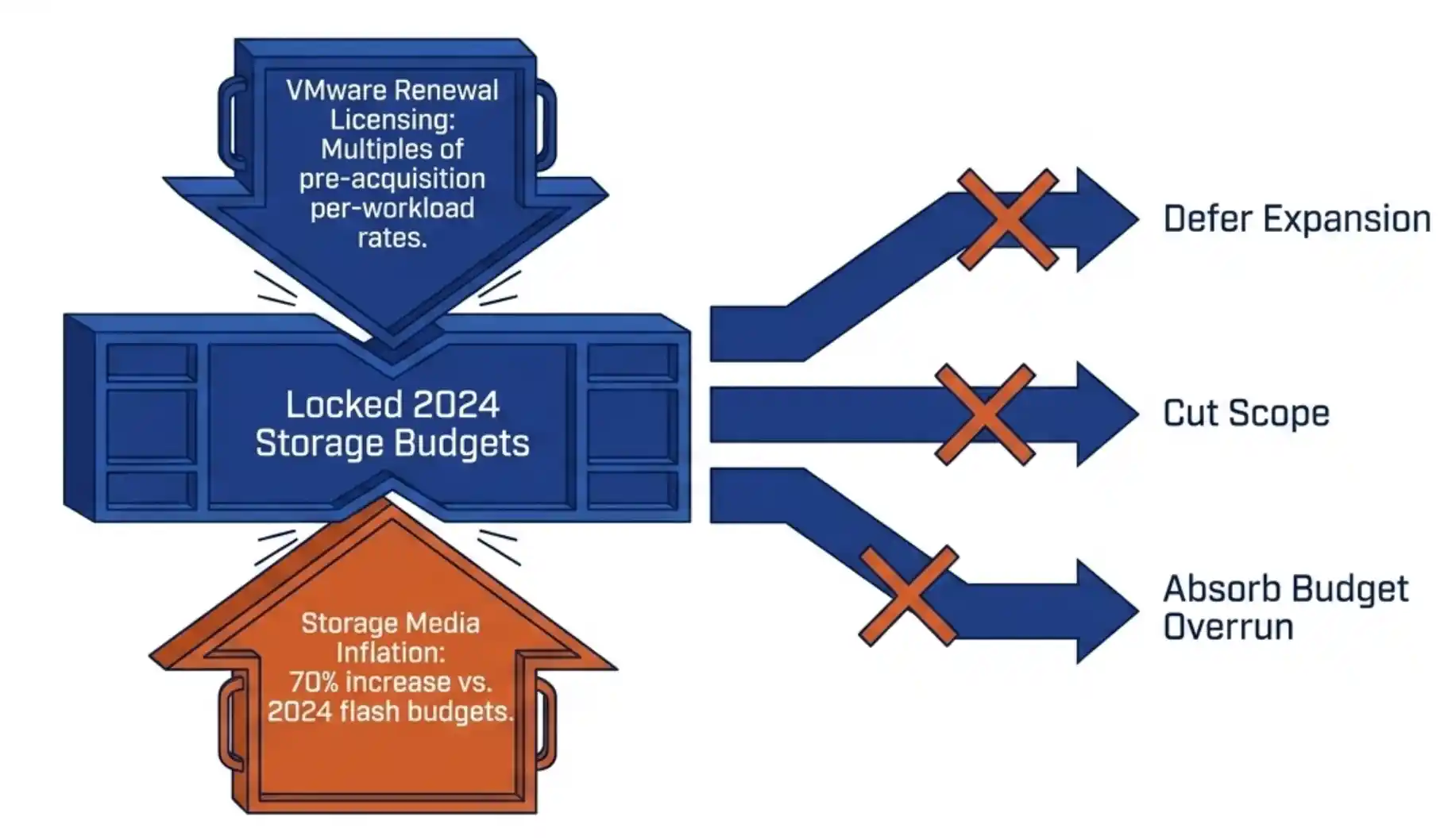
SAN refresh in trouble: 2026 flash inflation under-funds 2024 budgetsYour 2026 SAN refresh is in trouble. Flash inflation has pushed enterprise SSD prices up 70 percent. Refresh budgets locked in 2024 are now under-funded against current list pricing. The standard responses are to defer expansion, cut scope, or absorb the cost as a budget overrun. None of those options preserve the operational plan you set last year.
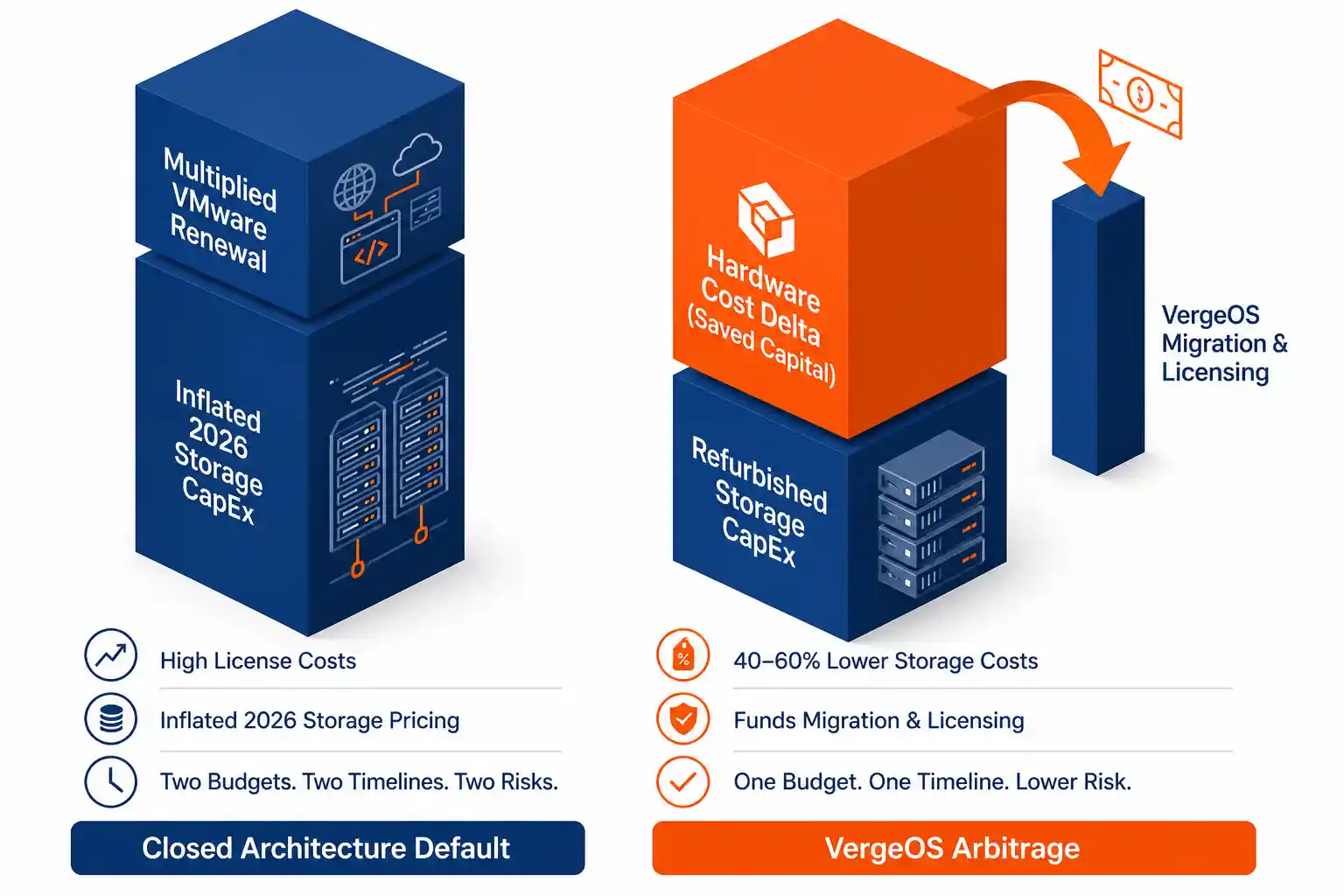
A fourth option exists. Capture the original capacity expansion at 40 to 60 percent of new flash list pricing using the secondary enterprise SSD market. Run that capacity on VergeOS instead of VMware. The hardware savings fund the platform exit. The SAN refresh costs less than it would have last year. The VMware exit pays for itself.

This is not two decisions. It is one decision executed once, with the savings stacking across both line items in the budget. The procurement framework and the architecture ship together, and the financial mechanism only works when both are deployed at the same time. This dynamic has been characterized as Broadcom’s best retention tool, since the same memory and flash supercycle that pushes refresh budgets underwater also makes the migration hardware harder to fund.

Key Takeaways
Refurbished enterprise SSDs sell at 40 to 60 percent below 2026 new flash list pricing, with 80 to 95 percent rated write life remaining at market entry.
The hardware cost delta on a SAN refresh covers the software and licensing line items of a VMware migration, converting a painful CapEx event into a near-neutral financial maneuver.
VergeOS synchronous replication with RF3 plus ioGuardian absorbs the failure rate of refurbished media without service interruption, validated by a documented customer event in which four of six hosts went down simultaneously with zero downtime and zero data loss.

Why the SAN Refresh and the VMware Exit Belong in the Same Decision

VergeOS arbitrage refresh stacks SAN and VMware exit savingsMost infrastructure teams treat their SAN refresh and their hypervisor strategy as separate problems. The SAN refresh is a procurement decision, owned by storage architects. The VMware exit is a platform decision, owned by virtualization leads and the CIO. The two budgets land in different fiscal lines, the two evaluation cycles run on different clocks, and the two vendor conversations rarely overlap.

That separation worked when storage and compute came from different vendors with different procurement paths. It does not work in 2026. VergeOS integrates storage, compute, networking, and virtualization into a single operating system. The SAN refresh and the platform exit run on the same code base, the same hardware substrate, and the same budget cycle. Treating them separately means buying two solutions where one will do.

The financial argument follows directly. A SAN refresh on VergeOS uses commodity x86 servers with refurbished enterprise SSDs at 40 to 60 percent below new flash list pricing. The capacity arrives at a fraction of the cost of a closed-architecture refresh. The hardware delta funds the VMware migration that the same cluster will host. The procurement decision and the platform decision compound into one financial outcome.

The Math: SAN Refresh Below 2025 Prices

The secondary enterprise SSD market is not a salvage market. Hyperscalers, MSPs, and Fortune 500 operators replace drives on rolling multi-year lease schedules, long before wear thresholds are met. Drives enter the secondary market with 80 to 95 percent of their rated write life remaining and 7,000 or more terabytes written endurance ratings intact. The supply is large, growing, and dominated by enterprise-grade media, not consumer drives.

The pricing math is direct. A 3.84TB enterprise SAS SSD sells new at $560 or more in current 2026 list pricing. The same drive, refurbished from a hyperscaler refresh cycle and qualified through a six-part procurement framework, sells at roughly $170. The delta is not 40 to 60 percent below 2026 list pricing. It is 40 to 60 percent below the inflated 2026 number, which means it lands competitively against what the same capacity would have cost new in 2024 or 2025.

40–60%
Cost reduction below 2026 new flash list pricing
80–95%
Rated write life remaining at secondary market entry
7,000+
Terabytes written endurance rating on enterprise refurbished

The procurement framework is the work. R2v3 supplier qualification confirms the drives came from a certified refurbisher with serialized inventory. NIST 800-88 sanitization certificates document compliant data destruction. Fraud detection verifies retail firmware against rebadged OEM drives. SMART diagnostics baseline the seven attributes that matter. Firmware validation confirms the drive runs vendor-released code. Stress testing proves the drive holds up under sustained workload. The framework is not optional. It is the difference between a SAN refresh strategy and a coin flip.

The Math: The Migration Pays for Itself

VMware renewal pricing has made the status quo untenable for a substantial portion of the installed base. Per-workload license pricing has climbed to multiples of pre-acquisition rates. The renewal conversation is no longer about a routine increase. It is about whether the platform is worth the new contract value at all.

The standard response is to evaluate alternatives, plan a migration, and request CapEx for the destination platform. The CapEx request is the problem. New compute, new storage, and new licensing all hit the budget in the same fiscal cycle, often in the same quarter. The financial picture looks like a one-time capital event piled on top of the existing operational baseline, and procurement defers the decision rather than absorb the impact.

The arbitrage play changes the picture. The VergeOS cluster pools existing flash with newly procured refurbished enterprise drives, creating a unified storage tier that runs at a fraction of standard hardware costs. The hardware cost delta on the SAN refresh creates the budget headroom that the VMware exit needs. The migration funds itself out of the savings on the storage line item. The CapEx request becomes a near-neutral request, or in many cases a net-positive one.

The financial mechanism only works when the SAN refresh and the VMware exit run on the same platform. Two separate vendors mean two separate budgets and two separate procurement cycles. One unified operating system collapses both decisions into one budget event with stacked savings.
Key Terms
Synchronous Replication

Storage architecture in which every block is written to multiple servers simultaneously. The write acknowledges only after all replicas land, eliminating the rebuild storms and parity-calculation windows that plague closed RAID architectures.

RF2 / RF3

VergeOS replication factors. RF2 keeps two synchronous copies and tolerates the loss of any one drive or host (N+1). RF3 keeps three synchronous copies and tolerates the simultaneous loss of any two drives or hosts (N+2). RF3 is the baseline for production workloads on refurbished media.

ioGuardian (N+X)

VergeOS active-service capability that absorbs concurrent failures beyond the base replication factor’s mathematical tolerance. Surviving replicas serve data at full performance during background re-replication, eliminating the secondary-failure window that turns a single hardware event into a service outage.

R2v3 Certification

The Responsible Recycling Standard, version 3, governs certified refurbishment and remarketing of electronic equipment. R2v3-certified suppliers maintain serialized inventory, documented sanitization processes, and verifiable provenance, which is the procurement floor for refurbished enterprise SSDs.

The Architectural Defense: Refurbished Media Becomes a Non-Event

The financial case is strong. The architectural objection is the question that stops most CFOs from approving the play. Refurbished drives carry a statistically higher failure probability than new drives, and the last thing any infrastructure team wants is a procurement decision that turns into a 2 a.m. outage. The right response to elevated drive failure probability is not avoidance. It is architecture that absorbs the elevated failure rate without service impact.

Live Webinar · May 7, 2026
Solve the Storage Crisis with Refurbished Enterprise Drives

George Crump and Aaron Richman walk the procurement framework, the architecture, and the migration sequencing in 45 minutes. Live Q&A included.

Register Now →

VergeOS protects data with synchronous replication, not RAID. Every block writes to multiple servers simultaneously. The write acknowledges only after all replicas land. There is no parity calculation, no rebuild process running across surviving spindles, no extended window where a single additional failure causes data loss. RF3 on VergeOS keeps three synchronous copies of every block across separate hosts, and the architecture mathematically tolerates the simultaneous loss of any two drives or hosts.

ioGuardian extends that tolerance further. The active-service capability keeps surviving replicas running at full performance during the re-replication window, eliminating the secondary-failure exposure that turns a single hardware event into a service outage on legacy systems. One VergeOS customer ran an RF2 cluster with ioGuardian protection across six servers. During a single incident, four of the six servers went down simultaneously. RF2 mathematically tolerates exactly one host failure. The math says the cluster should have suffered catastrophic data loss. The cluster experienced zero downtime and zero data loss. ioGuardian absorbed three concurrent failures beyond the base replication factor’s tolerance.

That magnitude of architectural over-engineering renders refurbished media failure rates irrelevant. A correlated batch failure across drives from the same lease cycle is the kind of event that would destroy a parity-based RAID set. On VergeOS with RF3 and ioGuardian, the same event is absorbed without service impact. The refurbished SSD strategy is not gambling on drive quality. It is deploying capacity in an architecture that does not depend on individual drive reliability.

SAN Refresh Comparison: Closed Architecture vs. VergeOS Arbitrage

 Closed Architecture RefreshVergeOS Arbitrage Refresh
Storage mediaNew flash, vendor-locked modulesRefurbished enterprise SSDs, commodity hardware
Pricing vs. 2025 list70 percent above 2025 listBelow 2025 list, competitive with 2024 pricing
Capacity expansion targetReduced to fit 2024 budgetOriginal target maintained
Failure protection modelParity-based RAID with rebuild stormsSynchronous replication with N+X ioGuardian
Hypervisor licensingVMware renewal at multi-fold increaseVergeOS integrated, no separate hypervisor cost
Migration fundingSeparate CapEx request, deferredFunded by hardware cost delta on the refresh

The Procurement Floor: How to Qualify Suppliers Without Gambling

The architectural defense answers the technical objection. The procurement objection is the practical one. How does a storage architect actually qualify suppliers without taking a position on every drive that arrives at the loading dock? The answer is the six-part intake framework, which converts refurbished SSD purchasing from a coin flip into a repeatable process.

The framework runs in sequence. R2v3 certification verifies the supplier’s chain of custody and serialized inventory. NIST 800-88 sanitization certificates confirm compliant data destruction on the drives entering the data center. Fraud detection verifies matching serials and retail firmware against rebadged OEM drives. SMART diagnostics baseline the seven attributes that matter for endurance and reliability. Firmware validation confirms the drives run vendor-released code, not modified or counterfeit firmware. Stress testing proves sustained-workload performance under realistic conditions.

The framework is the work. The savings are the reward. A SAN refresh built on this procurement floor delivers the cost advantage of the secondary market without importing the failure modes of the lower-tier suppliers, and it does so on a repeatable schedule that scales with the rest of the operational plan.

One Budget Cycle, Two Wins

Digital White Paper
Solve the Storage Crisis with Refurbished Enterprise Drives

The full framework. Fifteen sections covering the secondary market, the four risk categories, the six-part procurement funnel, and the VergeOS architecture that absorbs the residual risk.

Get the Paper →

The 2026 storage cost crisis is real. The VMware renewal pressure is real. The combination is what makes most infrastructure teams flinch and defer. The SAN refresh that pays for the VMware exit changes the financial calculation by stacking the savings rather than running them as separate decisions.

The procurement framework qualifies the drives. The architecture absorbs the risk. The cost delta funds the migration. The refresh costs less than it would have last year. The exit pays for itself. None of the three components work in isolation. All three deployed together produce a budget outcome that no other combination of vendors can match in the current supply environment.

The May 7 webinar walks through this play with real numbers. Register for the webinar.

Frequently Asked Questions
How much does a SAN refresh on VergeOS with refurbished enterprise SSDs cost compared to a new flash refresh in 2026?
Refurbished enterprise SSDs sell at 40 to 60 percent below 2026 new flash list pricing. A VergeOS refresh on commodity x86 servers with qualified refurbished SSDs runs at a fraction of the cost of a closed-architecture refresh. The exact savings depend on cluster size and capacity targets, but the math typically produces a hardware line item that lands below 2025 list pricing for the same capacity. The May 7 webinar walks through three cluster sizes with real numbers.
Are refurbished enterprise SSDs reliable enough for production workloads?
Refurbished enterprise SSDs from R2v3-certified suppliers carry 80 to 95 percent of their rated write life and ship with 7,000 or more terabytes written endurance ratings intact. They include power-loss protection, premium NAND binning, and the architectural features that consumer drives lack. The reliability case rests on two pillars: a six-part procurement framework that filters out fraud and OEM firmware lock, and an architecture that absorbs the residual failure rate without service interruption.
Can VergeOS pool existing legacy storage with newly procured refurbished SSDs?
Yes. VergeOS pools heterogeneous storage media seamlessly. Existing legacy flash continues serving production capacity alongside newly procured refurbished enterprise drives in the same cluster. The architecture treats hardware as commodity substrate, not as a procurement constraint. The flexibility is a critical part of the financial case for the VMware exit, since it eliminates the requirement to purchase 100 percent new storage as part of the migration.
Does the architectural strategy work with RF2, or does it require RF3?
RF3 is the baseline recommendation for production workloads on refurbished media. It tolerates the simultaneous loss of any two drives or hosts, and combined with ioGuardian it absorbs additional concurrent failures beyond the mathematical N+2 tolerance. RF2 with ioGuardian works for capacity-sensitive deployments and has a documented customer record of surviving four-of-six host failures with zero data loss. The choice depends on workload criticality and capacity targets.
What does the VMware migration look like operationally?
The VergeOS cluster runs alongside the VMware estate during the migration window. Workloads move in waves on a schedule the customer controls. The new platform absorbs production traffic as the old platform is decommissioned. The hardware cost delta from the SAN refresh provides the budget headroom for the licensing and migration services line items, which removes the financial barrier that defers most VMware exit decisions in the first place.

Filed Under: Storage Tagged With: flash inflation, ioGuardian, refurbished SSDs, RF3, SAN Refresh, secondary market, VergeOS, VMware exit

855-855-8300

Get Started

  • Versions
  • Request Tour

VergeIO For

  • VMware Alternative
  • SAN Replacement
  • Solving Infrastructure Modernization Challenges
  • Artificial Intelligence
  • Hyperconverged
  • Server Room
  • Secure Research Computing

Product

  • Benefits
  • Documents
  • Architecture Overview
  • Use Cases
  • Videos

Company

  • Blog
  • Technical Documentation
  • Legal

© 2026 VergeIO. All Rights Reserved.