• Skip to main content
  • Architecture
    • Overview
      Learn about VergeOS’ unique unfied architecture that integrates virtualization, storage, networking, AI, backup and DR into a single data center operating system
    • Infrastructure Wide Deduplication
      VergeOS transforms deduplication from a storage-only commodity into a native, infrastructure-wide capability that spans storage, virtualization, and networking, eliminating hidden resource taxes
    • VergeFS
      VergeFS is a distributed, high-performance global file system integrated into VergeOS, unifying storage across nodes, tiers, and workloads while eliminating the need for external SANs
    • VergeFabric
      VergeFabric is VergeOS’s integrated virtual networking layer, delivering high-speed, low-latency communication across nodes while eliminating the complexity of traditional network configurations.
    • Infrastructure Automation
      VergeOS integrates Packer, Terraform, and Ansible to deliver an end-to-end automation pipeline that eliminates infrastructure drift and enables predictable, scalable deployments.
    • VergeIQ
      Unlock secure, on-premises generative AI—natively integrated into VergeOS. With VergeIQ, your enterprise gains private AI capabilities without the complexity, cloud dependency, or token-based pricing.
  • Features
    • Virtual Data Centers
      A VergeOS Virtual Data Center (VDC) is a fully isolated, self-contained environment within a single VergeOS instance that includes its own compute, storage, networking, and management controls
    • High Availability
      VergeOS provides a unified, easy-to-manage infrastructure that ensures continuous high availability through automated failover, storage efficiency, clone-like snapshots, and simplified disaster recovery
    • ioClone
      ioClone utilizes global inline deduplication and a blockchain-inspired file system within VergeFS to create instant, independent, space-efficient, and immutable snapshots of individual VMs, volumes, or entire virtual data centers.
    • ioReplicate
      ioReplicate is a unified disaster-recovery solution that enables simple, cost-efficient DR testing and failover via three‑click recovery of entire Virtual Data Centers—including VMs, networking, and storage.
    • ioFortify
      ioFortify creates immutable, restorable VDC checkpoints and provides proactive ransomware detection with instant alerts for rapid recovery and response.
    • ioMigrate
      ioMigrate enables large-scale VMware migrations, automating the rehosting of hundreds of VMs (including networking settings) in seconds with minimal downtime by seamlessly transitioning entire VMware environments onto existing hardware stacks.
    • ioProtect
      ioProtect offers near-real-time replication of VMware VMs—including data, network, and compute configurations—to a remote disaster‑recovery site on existing hardware, slashing DR costs by over 60% while supporting seamless failover and testing in an efficient, turnkey VergeOS Infrastructure.
    • ioOptimize
      ioOptimize leverages AI and machine learning to seamlessly integrate new and old hardware and automatically migrate workloads from aging or failing servers.
    • ioGuardian
      ioGuardian is VergeIO’s built-in data protection and recovery capability, providing near-continuous backup and rapid VM recovery during multiple simultaneous drive or server failures.
  • IT Initiatives
    • VMware Alternative
      VergeOS offers seamless migration from VMware, enhancing performance and scalability by consolidating virtualization, storage, and networking into a single, efficient platform.
    • Hyperconverged Alternative
      VergeIO’s page introduces ultraconverged infrastructure (UCI) via VergeOS, which overcomes HCI limitations by supporting external storage, scaling compute and storage independently, using existing hardware, simplifying provisioning, boosting resiliency, and cutting licensing costs.
    • SAN Replacement / Storage Refresh
      VergeIO’s storage by replacing aging SAN/NAS systems within its ultraconverged infrastructure, enhancing security, scalability, and affordability.
    • Infrastructure Modernization
      Legacy infrastructure is fragmented, complex, and costly, built from disconnected components. VergeOS unifies virtualization, storage, networking, data protection, and AI into one platform, simplifying operations and reducing expenses.
    • Virtual Desktop Infrastructure (VDI)
      VergeOS for VDI delivers a faster, more affordable, and easier-to-manage alternative to traditional VDI setups—offering organizations the ability to scale securely with reduced overhead
    • Secure Research Computing
      VergeIO's Secure Research Computing solution combines speed, isolation, compliance, scalability, and resilience in a cohesive platform. It’s ideal for institutions needing segmented, compliant compute environments that are easy to deploy, manage, and recover.
    • Venues, Remote Offices, and Edge
      VergeOS delivers resiliency and centralized management across Edge, ROBO, and Venue environments. With one platform, IT can keep remote sites independent while managing them all from a single pane of glass.
  • Blog
      • Storage Tiering Without the Capacity TaxStorage tiering was never an array feature. It was a placement decision that lived where the intelligence sat. Lab measurements show a VergeOS tier change acknowledged in 1.3 seconds with the VM still running, and per-node licensing that decides who captures the data reduction: the customer or the vendor's meter.
      • A Pure Storage AlternativeA Pure Storage alternative rarely starts as a storage project. Saratoga Casino Holdings inherited mirrored Pure Storage arrays, Cisco UCS blades, and VMware from a partnership that wound down. Scott Bartgis took the decision back, chose his own nodes through CXTEC equal2new, and removed roughly $50,000 a year in array maintenance.
      • Legacy HCI Took Control of Your Data CenterLegacy HCI promised to simplify the data center, then set three clocks IT no longer controls: the renewal date, the hardware refresh, and the servers you are allowed to buy. This post breaks down how each clock got set, and how a single-codebase Private Cloud Operating System hands all three back.
    • View All Posts
  • Resources
    • Become a Partner
      Get repeatable sales and a platform built to simplify your customers’ infrastructure.
    • Technology Partners
      Learn about our technology and service partners who deliver VergeOS-powered solutions for cloud, VDI, and modern IT workloads.
    • White Papers
      Explore VergeIO’s white papers for practical insights on modernizing infrastructure. Each paper is written for IT pros who value clarity, performance, and ROI.
    • In The News
      See how VergeIO is making headlines as the leading VMware alternative. Industry analysts, press, and partners highlight our impact on modern infrastructure.
    • Press Releases
      Get the latest VergeOS press releases for news on product updates, customer wins, and strategic partnerships.
    • Case Studies
      See how organizations like yours replaced VMware, cut costs, and simplified IT with VergeOS. Real results, real environments—no fluff.
    • Webinars
      Explore VergeIO’s on-demand webinars to get straight-to-the-point demos and real-world infrastructure insights.
    • Documents
      Get quick, no-nonsense overviews of VergeOS capabilities with our datasheets—covering features, benefits, and technical specs in one place.
    • Videos
      Watch VergeIO videos for fast, focused walkthroughs of VergeOS features, customer success, and VMware migration strategies.
    • Technical Documentation
      Access in-depth VergeOS technical guides, configuration details, and step-by-step instructions for IT pros.
  • How to Buy
    • Schedule a Demo
      Seeing is believing, set up a call with one of our technical architects and see VergeOS in action.
    • Versions
      Discover VergeOS’s streamlined pricing and flexible deployment options—whether you bring your own hardware, choose a certified appliance, or run it on bare metal in the cloud.
    • Test Drive – No Hardware Required
      Explore VergeOS with VergeIO’s hands-on labs and gain real-world experience in VMware migration and data center resiliency—no hardware required
  • Company
    • About VergeIO
      Learn who we are, what drives us, and why IT leaders trust VergeIO to modernize and simplify infrastructure.
    • Support
      Get fast, expert help from VergeIO’s support team—focused on keeping your infrastructure running smoothly.
    • Careers
      Join VergeIO and help reshape the future of IT infrastructure. Explore open roles and growth opportunities.
  • 855-855-8300
  • Contact
  • Search
  • 855-855-8300
  • Contact
  • Search
  • Architecture
    • Overview
    • VergeFS
    • VergeFabric
    • Infrastructure Automation
    • VergeIQ
  • Features
    • Virtual Data Centers
    • High Availability
    • ioClone
    • ioReplicate
    • ioFortify
    • ioMigrate
    • ioProtect
    • ioOptimize
    • ioGuardian
  • IT Initiatives
    • VMware Alternative
    • Hyperconverged Alternative
    • SAN Replacement / Storage Refresh
    • Infrastructure Modernization
    • Virtual Desktop Infrastructure (VDI)
    • Secure Research Computing
    • Venues, Remote Offices, and Edge
  • Blog
  • Resources
    • Become a Partner
    • Technology Partners
    • White Papers
    • In The News
    • Press Releases
    • Case Studies
    • Webinars
    • Documents
    • Videos
    • Technical Documentation
  • How to Buy
    • Schedule a Demo
    • Versions
    • Test Drive – No Hardware Required
  • Company
    • About VergeIO
    • Support
    • Careers
×
  • Architecture
    • Overview
    • VergeFS
    • VergeFabric
    • Infrastructure Automation
    • VergeIQ
  • Features
    • Virtual Data Centers
    • High Availability
    • ioClone
    • ioReplicate
    • ioFortify
    • ioMigrate
    • ioProtect
    • ioOptimize
    • ioGuardian
  • IT Initiatives
    • VMware Alternative
    • Hyperconverged Alternative
    • SAN Replacement / Storage Refresh
    • Infrastructure Modernization
    • Virtual Desktop Infrastructure (VDI)
    • Secure Research Computing
    • Venues, Remote Offices, and Edge
  • Blog
  • Resources
    • Become a Partner
    • Technology Partners
    • White Papers
    • In The News
    • Press Releases
    • Case Studies
    • Webinars
    • Documents
    • Videos
    • Technical Documentation
  • How to Buy
    • Schedule a Demo
    • Versions
    • Test Drive – No Hardware Required
  • Company
    • About VergeIO
    • Support
    • Careers

Dave Vincent

August 12, 2026 by Dave Vincent

Technical Deep Dive and How To

Storage tiering is the capability that made arrays worth buying in the first place, and 2026 is the year it stopped being a purely technical subject. Flash repriced this year, and it did not reprice gently. DRAM contract prices rose 90 to 95 percent in a single quarter in early 2026. Enterprise NAND moved 70 to 75 percent in the same window.

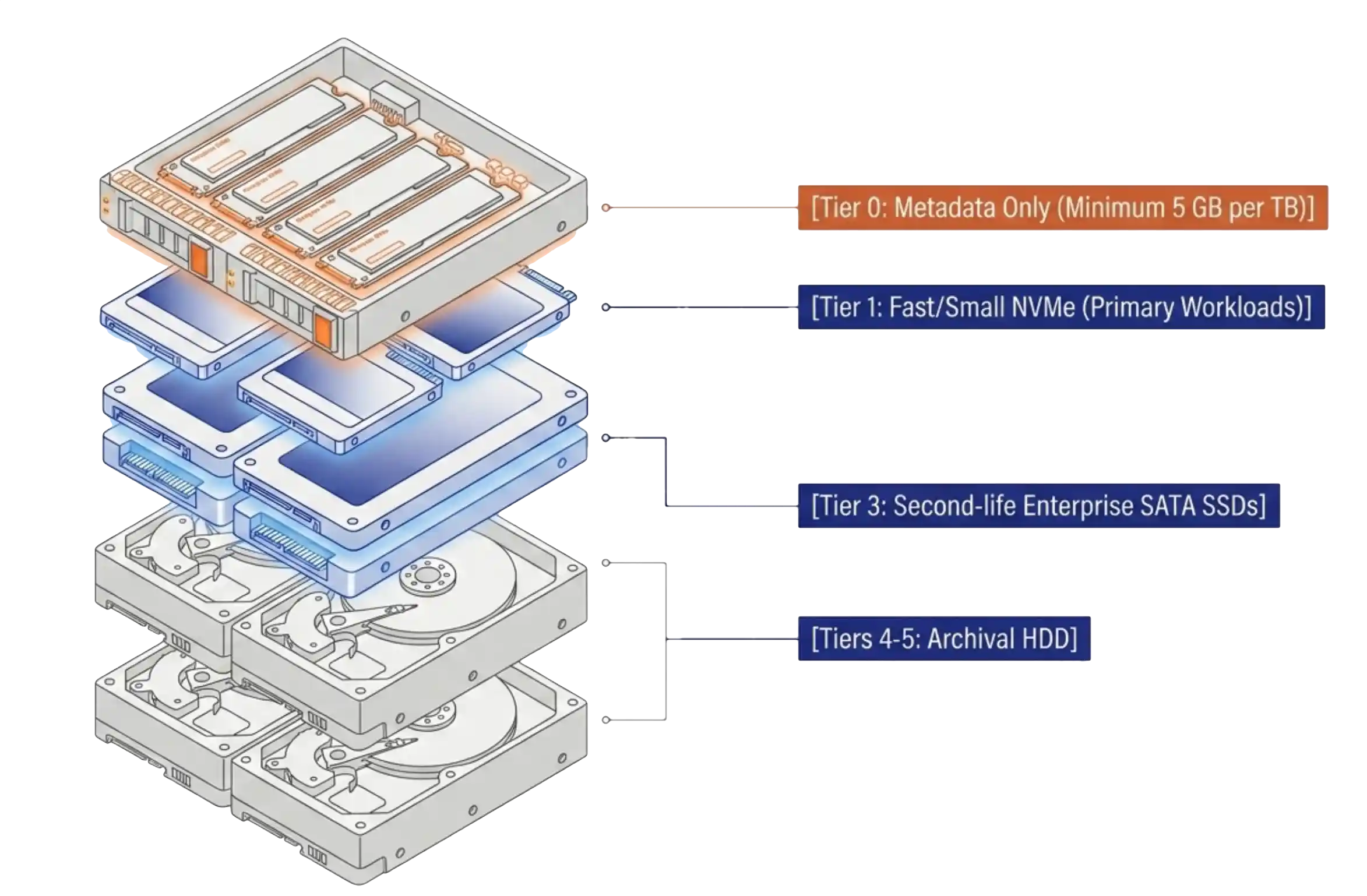
Storage tiering across NVMe and second-life SATA tiers in a VergeOS cluster

The cause sits entirely outside the enterprise data center. Hyperscalers building AI infrastructure walked into the component market with a budget that has no practical ceiling and bought the output of the storage industry. Nothing broke. The market simply reset around a new buyer, and the enterprise now sits behind that buyer in the allocation queue.

Buyers reached a conclusion about this on their own. In Omdia research commissioned by VergeIO, covering 400 North American IT professionals in May 2026, software-defined storage ranked first of eight technologies that non-users plan to invest in as a direct response to the shortage. It outranked every array architecture on the list. The reasoning behind that ranking is independence from the underlying hardware, which is a polite way of saying buyers want to stop asking a vendor for permission to purchase a drive.

Key Takeaways
  • Storage tiering is a data-placement decision rather than an array feature, and per-node licensing keeps it a technical decision instead of a financial one.
  • VergeOS exposes tier placement as one mutable field with an online migration behind it, so read tier, set tier, and create on tier are the only primitives a storage tiering policy needs.
  • Reclamation on a source tier is gated by the longest-lived snapshot still referencing the data, which makes retention schedules the real timeline for any capacity recovery plan.

That conclusion raises a fair technical objection. Storage tiering is the ability to put the transaction log on expensive media and the file server on inexpensive media, deliberately, and to change that decision later. Collapsing the array into the operating system to escape a capacity meter is a hollow win if storage tiering does not survive the move. It is a worse win if tiering survives and comes back as a different meter.

The measurements below come from a two-cluster VergeIO lab, and they answer the technical half of that objection. The commercial half is settled by the licensing model, and the two halves only matter together.

Scope note. Everything measured here comes from a VergeIO lab, not a production environment. Two three-node clusters, mixed media, a handful of test workloads, and a blast radius that ends at the lab bench. The commands, timings, and API behaviors are real and reproducible. The hardware choices are not a reference architecture. At least two of them, no Tier 0 on either cluster and a Tier 3 with drives on a single node, fail a production design review outright, and both appear in the fine print below. VergeOS hardware requirements call for enterprise-class drives and network cards in production, and the lab does not meet that bar on every tier. Read the storage tiering mechanics as transferable and the specific figures as illustrative.

Two classes of media, one cluster, one license

The lab’s second cluster mixes two classes of media on purpose, which makes it a useful place to watch storage tiering behave.

TierMediaDrivesRawUsable
1NVMe SSD3 × 256 GB768 GB356.04 GB
3SATA SSD, second-life enterprise3 × 800 GB2,400 GB1,115.77 GB

Tier 1 is fast and small. Tier 3 carries a little over three times the usable capacity on older, slower, second-hand drives. Fast where it matters and inexpensive where it does not is the entire value proposition of storage tiering, and nothing about this arrangement required a storage array.

The Tier 3 drives are the economically interesting ones. They are used enterprise SATA SSDs, the same category of hardware behind the CXTEC equal2new program that appeared in VergeIO’s August 4 announcement about Saratoga Casino Holdings. The comparison deserves a caveat. Saratoga bought professionally refurbished, warrantied servers to run a four-property gaming operation. The lab bought used parts with no warranty at all. What generalizes between the two is the platform economics, not the procurement decision.

Second-life enterprise storage is not inexpensive in absolute terms, and it has firmed up as the primary market tightened behind it. Relative to new flash it remains a bargain, and 2026 widened that gap sharply. Against DRAM at 90 to 95 percent and NAND at 70 to 75 percent in a single year, a used enterprise drive does not have to be cheap to be the obvious way to build a capacity tier. It only has to be less expensive than an alternative that just repriced.

The question that applies at both scales is whether the platform lets an organization use the less expensive media without charging for the privilege.

A license that meters raw physical capacity answers that question badly. Three second-hand 800 GB SATA drives meter identically to three new 800 GB NVMe drives. Same 2.4 TB raw, same bill, and the platform collects on hardware it had nothing to do with. Worse, a raw-capacity meter reads the physical drives before any data reduction happens, so every block the storage engine removes is a saving the vendor recaptures. That is the mechanism that pushes organizations back toward dedicated arrays, and it has been characterized as the case that storage licensing, not storage technology, is what broke hyperconverged infrastructure.

VergeOS licenses per node with every feature included, covering compute, storage, networking, and multi-tenancy in a single license tied to a System ID rather than to hardware (Licensing Overview, Transitioning from VMware). The drives are not a line item. The question stops being what an organization can afford to license and becomes what it can do with tiers.

How VergeOS storage tiering works

VergeOS vSAN organizes physical drives into six tiers, numbered 0 through 5. Tier assignment happens at the drive level, during installation or when drives get added. Tier 0 holds metadata only. Tiers 1 through 5 hold workload data, running from write-intensive NVMe at Tier 1 down to archival HDD at Tier 5 (VergeOS vSAN documentation).

VergeOS storage tiering, walked through in the UI and from the command line.

Three architectural properties matter more than the tier table itself.

Placement is derived, not looked up. Every block gets a SHA-1 content hash. That hash, run against per-tier device maps stored on Tier 0, deterministically derives where the block’s primary and redundant copies live. No central table records that block X sits on node Y, drive Z, and no controller sits in the write path. Reference counts are not stored persistently either. A background differential process called the vSAN Walk rebuilds them (vSAN Architecture and VergeFS). Reference counting explains a surprise in the fine print, so it is worth remembering.

Each tier is an independent failure and scaling domain. Every tier spans all storage-participating nodes, and redundancy is tracked per tier. A Tier 4 drive failure has no bearing on Tier 1 redundancy, and one tier scales without touching another.

Data placement stays with the administrator. VergeOS does not migrate data between tiers based on access patterns. No policy engine watches heat maps and demotes cold blocks at 2 a.m. Data stays on its provisioned tier until an administrator moves it, and the documentation flags this in a red warning box rather than burying it.

Predictable performance from administrator-controlled storage tiering in VergeOS

That reads like a missing feature to anyone who grew up on array auto-tiering. It is the most defensible design decision in the storage stack. Automated demotion is a policy someone else wrote for a workload that is not yours, and the failure mode arrives at month-end close, when the engine quietly moved the database overnight. The people in a building know things about their data that no access-recency algorithm infers. The documented reasons line up with that: predictable performance, capacity planning that reflects only what an administrator put on a tier, no background storage tiering engine consuming CPU and I/O, and cost modeling that holds still.

There is a fallback for provisioning safety. Every virtual disk carries a preferred tier, and when that exact tier does not exist, VergeOS selects the next less expensive tier, moving to a more expensive one only when no less expensive tier is available (Preferred Tier). Ask for Tier 3 on a system holding Tier 1 and Tier 4, and the disk lands on Tier 4. The system never refuses to provision, which is a safety feature and a trap in equal measure.

Automating placement from the command line

Administrator-controlled placement puts the work on the administrator. The useful discovery in the VergeIO lab is how small that work turns out to be, since tier placement is exposed as a single mutable field with an online migration behind it.

Every test below ran against a live VM on the lab’s second cluster. Snapshot first:

vrg -p homelab2 vm snapshot create test-ubuntu –name pre-tier-test-20260807-1554

Moving a running VM’s disk to a less expensive tier takes one command:

$ time vrg -p homelab2 vm drive update test-ubuntu OS –tier 3 ✓ Updated drive ‘OS’ tier 3 real 0m1.296s

The API acknowledged in 1.3 seconds. Block movement happened in the background, and within 13 seconds Tier 3 had grown by 2.32 GiB, the real thin-provisioned consumption of a 25 GiB disk. The VM stayed running throughout. No downtime, no guest awareness, no reboot.

Provisioning a new disk directly onto an inexpensive tier is also one command, and it hot-plugs into the running VM:

$ vrg -p homelab2 vm drive create test-ubuntu –name bulk-data –size 40GB –tier 3 ✓ Created drive ‘bulk-data’ (key: 13) size_gb 40.0 tier 3

Note the --tier flag. Leaving it off inherits the system default from System, System Settings, Default VM Drive Tier, which on a fresh system is not necessarily the right answer. Being explicit costs nothing.

Reading current placement needs no raw API call:

$ vrg -p homelab2 vm drive list test-ubuntu Key Name Media Interface Size (GB) Tier Enabled 6 OS disk virtio-scsi 25.0 1 Y

Read tier, set tier, create on tier. Three primitives, all non-destructive, all online, all scriptable. A storage tiering policy engine becomes a loop rather than a product.

The tags are the policy

The obvious first instinct is to match on VM names and demote anything called *-archive or *-backup. That instinct is wrong. Name patterns need an ordering, an escape hatch for the VM matching two patterns at once, and a naming convention everyone has to know and nobody can query. VergeOS already ships something better.

Desired placement lives in the platform as tags, and each run of the script reconciles reality to match. The script holds no state of its own. Three commands stand the whole thing up:

vrg tag category create –name storage-policy –single-selection –taggable-vms vrg tag create –name tier-1 –category storage-policy vrg tag create –name tier-3 –category storage-policy

Tagging a workload is one more:

vrg tag assign tier-3 vm my-fileserver

A tier-N tag on a VM means every disk on that VM belongs on tier N. Each run walks the tags in the category, then the VMs carrying each tag, then those VMs’ disks, comparing current placement against the tag and migrating whatever does not match. Reading the intended state back takes one command, and it works whether or not the script has ever run:

$ vrg -p homelab2 tag members tier-1 –type vm Key Type Resource Key Resource Name 1 vm 32

--single-selection on the category is the load-bearing flag. It makes the tags mutually exclusive. Assign tier-1 to a VM already carrying tier-3 and VergeOS silently drops tier-3. That behavior showed up during testing, where retagging one VM emptied the other tag’s member list with no unassign command issued.

One flag turns a pile of rules into a declarative system. A VM cannot hold two contradictory policies, so the conflict becomes impossible rather than merely detected. No precedence logic is needed, since there is never more than one answer. The policy stays queryable outside the script, through the platform’s own UI and API, by people who have never seen the code.

Tags deliberately move nothing on their own. A tag stays inert until the script runs, and untagged VMs are ignored completely, which makes the whole arrangement opt-in per workload rather than something that sweeps a cluster the first time anyone tries it. One caution applies: create tier-N tags only for tiers that exist on that system. Tag a VM tier-5 on a system with no Tier 5 and the script skips it with a warning. That is the right behavior, since the alternative is the preferred-tier fallback quietly placing data somewhere nobody chose.

The reconciler

The result is tier-policy.sh, dry run by default, with --apply to execute:

$ ./tier-policy.sh –profile homelab2 –apply [tier-policy/homelab2] starting (mode=APPLY, category=storage-policy) [tier-policy/homelab2] health gate passed (storage, alarms) [tier-policy/homelab2] tiers present: tier [email protected]%, tier [email protected]% [tier-policy/homelab2] test-ubuntu/OS: tier 1 -> 3 [PLANNED] [tier-policy/homelab2] scanned 1 tagged VM(s), 1 drive(s) need migration [tier-policy/homelab2] creating cloud snapshot ‘tier-policy-20260807-162850’ [tier-policy/homelab2] snapshot created [tier-policy/homelab2] MIGRATED test-ubuntu/OS: 1 -> 3 [tier-policy/homelab2] done: 1 migrated, 0 failed

Thirteen seconds end to end, covering health gate, snapshot, and migration, with the VM running throughout. A second run reports nothing to do, converged.

The gates are where the engineering went, and each one exists in response to something in the mechanics above. A health gate runs vrg doctor --check storage,alarms and aborts on any failure, since shuffling data across an unhealthy vSAN is a bad idea at any scale. A destination-tier existence check skips VMs loudly when a tag names a tier that does not exist, which prevents the preferred-tier fallback from placing archive data on whatever tier it finds. Silent success in the wrong place is worse than a refusal. A capacity gate refuses to migrate into a tier above 85 percent used, since throttling starts at 91 percent. A snapshot envelope takes a cloud snapshot before the first mutation and aborts the run when that snapshot fails.

Two problems cost a debugging cycle each, and both are worth knowing to anyone building something similar. vrg tag members returns an empty resource_name and populates only resource_key, so keys have to be resolved to names separately. And in bash, if ! cmd followed by rc=$? captures the status of the negation rather than the command, which turned a clean exit-10 connection error into a nonsensical “failed (exit 0)”. Run the command bare and capture $? on the next line. That second one is not VergeOS’s fault, and it is exactly the kind of defect that makes an unattended job lie to its owner at 2 a.m.

The script itself is beside the point. The point is that administrator-controlled placement is what makes automated placement tractable. The reconcile logic runs about sixty lines. Everything else is gates, error handling, and comments, which is what a script worth leaving in cron looks like. That ratio stays affordable for one reason. The underlying primitives are three clean commands rather than an API worth fighting. The policy ends up expressed in the platform’s own tagging system, in a language of the administrator’s choosing, on a schedule the administrator sets. The full script is available for download at the end of this post.

What placement below the meter buys

Data reduction accrues to the organization that paid for the drives. VergeOS runs global inline deduplication across the entire storage pool rather than per volume, per array, or per backup job. One metadata model spans the environment, so a block reduced on primary stays reduced downstream, with no boundary to cross and no rehydration on the way. Every implementation scoped to a volume or a job pays for the same block four times, on primary, in the backup, in the replica, and at the DR site.

A raw-capacity meter reads the physical drives and ignores all of it. The meter counts what an organization bought, not what its workloads believe they have, and the gap between those two numbers is the storage engine’s entire contribution. Under per-node licensing that gap belongs to the customer. Reduction ratios vary enormously by dataset, and any vendor quoting one without naming the workload behind it is selling a number rather than reporting one. The architectural point survives without a figure. Whatever the ratio turns out to be, the licensing model decides who captures it. The section below covers how to measure it on real data rather than trusting anyone’s headline.

Raw capacity is a poor proxy for delivered value, in both directions. Redundancy overhead measured consistently at roughly 2.15x across every tier in the VergeIO lab. The second cluster’s Tier 3 shows 2,400 GB raw against 1,115.77 GB usable. Its Tier 1 shows 768 GB raw against 356.04 GB usable. The primary cluster’s Tier 1 shows 6,000 GB raw against 2,791.65 GB usable. That is N+1, the default, keeping two copies of every block (redundancy models). N+2 runs closer to 3x.

That overhead is arithmetic rather than a licensing complaint, and it applies to VergeOS exactly as it applies to everyone else. Two copies of a block cost twice as much as one copy regardless of who wrote the storage engine. The narrower point concerns the metric. Raw capacity, the number a capacity meter counts, sits at roughly 2.15x what an administrator can provision against and a small fraction of what the workloads think they have. It overstates what is usable and understates what is served, which means it is not measuring storage at all. It is measuring drives.

Thin provisioning stops being a negotiation. The lab’s primary cluster reports 40,062 GB allocated against 2,791 GB usable, more than fourteen times its usable capacity in allocated virtual disk. That figure belongs to a lab bench, and a disciplined production environment should not run anywhere near it. The direction holds at any scale. Over-allocation is free under per-node licensing, and the documentation recommends provisioning generously rather than expanding later. On a capacity-metered platform, generous provisioning turns into a budget conversation with a procurement officer.

Mixed hardware becomes a design input rather than a liability. Storage tiering is what lets an administrator deliberately put the file server on second-life SATA and the database on NVMe, inside one cluster, under one license. The lab’s primary cluster currently holds two 12 TB HGST He12 drives and a 2 TB Micron SSD sitting unassigned, reported by the API at tier -1 with zero vSAN capacity. That is 26 TB of idle hardware available as Tier 4 and Tier 5 tomorrow at zero licensing cost. On a capacity-metered platform, adding 24 TB of raw HDD starts with a purchase order and a permission slip. The lab version of this is drives already on the shelf. The production version is the one Saratoga ran, where the same property means buying capacity on the open market instead of from a hypervisor vendor.

Failure domains stay separate. Each tier tracks redundancy independently, so a failure among the second-life Tier 3 SSDs cannot compromise Tier 1. That is what makes mixing media classes a calculated decision rather than a gamble. The blast radius of the less expensive hardware stays bounded by design, and bounded to the tier holding the lower-priority data.

This matters more in 2026 than it did in 2024. Eighty-three percent of the organizations in the Omdia study plan to run their arrays past historical utilization before refreshing. Extending hardware life, running fuller, and buying used are all rational responses to component pricing, and together they describe a market deliberately raising its own failure rate at the moment spare hardware became unaffordable. Tier-level failure isolation is one of the few answers to that condition that does not begin with buying something.

Key Terms
Storage tier
One of six drive groupings in the VergeOS vSAN storage tiering model, numbered 0 through 5, assigned at the drive level. Tier 0 holds metadata only. Tiers 1 through 5 hold workload data, running from write-intensive NVMe down to archival HDD.
Preferred tier
The tier a virtual disk requests. When that exact tier does not exist, VergeOS places the disk on the next less expensive tier, moving to a more expensive one only when no less expensive tier is available.
vSAN Walk
The background differential process that rebuilds block reference counts. Blocks reaching zero references wait roughly ten walks, about seventy seconds, before becoming eligible for reclamation.
Raw, usable, and logical capacity
Raw is the physical drive total and the number a capacity meter bills. Usable is what remains after redundancy, roughly raw divided by 2.15 at N+1. Logical is what the workloads believe they have after data reduction.

The fine print

Migrating off a tier does not return the capacity, and snapshot retention decides when it does. This is the finding that surprised the lab most, and the first explanation was wrong in a useful way.

Moving that 25 GiB disk from Tier 1 to Tier 3 grew Tier 3 by 2.32 GiB within seconds, and Tier 1 did not shrink at all. Eleven minutes of watching produced 41.2 GiB before and 41.2 GiB after. The vSAN Walk looked like the obvious culprit, and the documentation rules it out. Blocks reaching zero references wait roughly ten walks, about seventy seconds, before becoming eligible for reclamation. Eleven minutes is nine times that window.

The real gate is reference counting. A snapshot references blocks rather than copying them, and blocks referenced by a snapshot are retained after the live object stops pointing at them (vSAN Architecture and VergeFS). The count has to reach zero first, and it never did. That system carried a midnight system snapshot, hourly snapshots on a three-hour cycle, and a manual snapshot taken half an hour earlier, all still pointing at those blocks in their Tier 1 locations. The snapshot taken for safety before the migration is part of what stopped the space coming back. Taking it was still correct. It has a cost, and this is the cost.

The planning rule is sharper than patience. Reclamation on the source tier is gated by the longest-lived snapshot still referencing that data. Midnight snapshots on this cluster retain for three days, so evacuating a workload buys nothing measurable on Tier 1 until those age out. Anyone demoting data to relieve a full tier should read their retention schedule first, since that schedule is the actual timeline and it is measured in days.

A pleasant corollary follows from the same mechanism. Moving the disk back to Tier 1 was instantaneous and consumed no new Tier 1 capacity, for the same reason. The snapshots still held those blocks in place. Round-tripping costs almost nothing. One-way evacuation is the slow direction, and seasonal workloads that migrate down and back are the best fit for how this behaves.

Measure the reduction ratio from the API rather than a summary field. The authoritative per-tier numbers are used, physical bytes committed, and used_inflated, logical bytes stored, both in the storage_tiers table. Dividing one by the other produces the real reduction for that tier on real data, which is worth wiring into existing capacity reporting:

curl -ks -H “Authorization: Bearer $KEY” “$HOST/api/v4/storage_tiers?fields=all” \ | python3 -c ” import sys,json G=1024**3 for t in json.load(sys.stdin): u,ui=t.get(‘used’,0),t.get(‘used_inflated’,0) print(f\”tier {t[‘tier’]}: {u/G:.1f} GiB physical, {ui/G:.1f} GiB logical, {ui/u:.2f}x\”)”

Two cautions apply to the result. A lab estate full of VMs cloned from one golden template produces a flattering number that no production estate will match, so measure against real data before modeling with it. And do not add a compression multiplier on top of that ratio. VergeOS does not compress data at rest. Compression applies only during site-sync replication, to save WAN bandwidth between sites, and the number above already reflects everything happening locally.

Get the drive layout right at install, since both halves of it are painful to change later. Two rules carry most of the weight.

The first concerns Tier 0. It holds metadata only, explicitly not a cache, and no workload data. Sizing guidance is 5 GB per TB of usable storage minimum and 10 GB per TB recommended, on enterprise NVMe rated 3 DWPD or equivalent, with 30 percent free space maintained. Consumer NVMe is not supported for it in production. Neither lab cluster has a Tier 0 at all, so nothing here should be read as guidance on Tier 0 behavior under load. Tier 0 is normally configured at install time. The documented procedure for adding it afterward carries a hard warning that only qualified VergeOS engineers, or an administrator under direct support guidance, should perform it. Selected devices get formatted, and a wrong device path causes serious damage.

The second concerns homogeneity. All drives within a tier should match in type, capacity, and performance, and a tier can only use the capacity of its smallest drive, so one undersized drive silently caps the whole tier. Each node should also carry the same number of drives per tier. The lab’s primary cluster demonstrates the failure mode. A 2 TB Micron sits assigned to Tier 3 on exactly one node, Tier 3 does not appear in vrg storage list at all, and tier_count reads 1. A tier that cannot satisfy cross-node redundancy is not a tier anyone can use.

Know where the throttling cliffs sit. Below 91 percent is normal operation. Between 91 and 95 percent, low-space throttling adds 10ms of latency. At 96 percent and above, critical throttling adds 50ms (Diagnostics Toolkit). Target free space is 30 percent or more on Tier 0, 20 to 30 percent on Tiers 1 through 3, and 15 to 20 percent on Tiers 4 and 5. Any automated placement policy should treat those as hard gates rather than advice.

Second-life media needs a monitoring discipline, and one organization’s risk calculus is not another’s. Quality used enterprise drives are a legitimate way to build a capacity tier, and they arrive with less runway than new ones, so SMART and wear telemetry become something to watch rather than background noise. vrg doctor surfaces drive health as a first-class check, and running it on a schedule beats running it once suspicion sets in. Replacement planning matters too, since a swap requires the node in maintenance mode with only one repair running per tier at a time. Weigh the strategy against real consequences. A lab accepts older media on a capacity tier, since the worst realistic outcome there is a rebuilt test cluster. Put a customer-facing workload, a recovery point objective, and a support contract behind it and the acceptable age and condition of that hardware changes completely. That difference is precisely why Saratoga bought warrantied refurbished gear and a lab bench does not have to.

Three nodes and two VMs is not a load test. The lab’s second cluster ran two VMs during the tier migration, and both clusters sit under 27 percent tier utilization. What got measured is that migration is online and non-disruptive at that scale. What did not get measured is what a storage tiering migration does to latency on a busy cluster, what happens when fifty disks demote at once, and how the vSAN Walk behaves under sustained write pressure. Anyone planning bulk tier movement in production should assume those answers exist and go find them before trusting a 1.3-second acknowledgment to mean anything about their environment.

What this adds up to

Pick tiers explicitly at provisioning time, every time. The --tier flag costs six characters and saves a migration. The preferred-tier fallback places every disk somewhere, which is a safety feature and a footgun in equal measure. A disk nobody thought about lands on whatever the system default happens to be, and nobody notices until it becomes a performance ticket.

Automate the storage tiering decisions VergeOS deliberately leaves to the administrator. A tag category, four gates, and a reconcile loop produce declarative tier placement with logging and a snapshot envelope, all of it auditable, versionable, and owned by the organization running it. It took an afternoon and fits in one file. That is the compounding advantage of a platform with a clean CLI. Capabilities that otherwise wait on a vendor’s roadmap become things an administrator assembles, and the policy ends up living in the platform’s own tagging system rather than buried in code.

Model capacity in three numbers rather than one. Raw, usable at roughly raw divided by 2.15 at N+1, and logical at usable multiplied by a measured reduction ratio from real data. Each number answers a different question, and they are not interchangeable. Raw is what an organization bought and what a capacity meter bills. Usable is what an administrator can provision against once redundancy takes its cut. Logical is what the workloads believe they have. Bringing the wrong one to a capacity conversation produces an error of an order of magnitude in whichever direction is least convenient.

Saratoga’s $50,000 a year was never an array-maintenance line item in any meaningful sense. It was the price of keeping data placement inside a box that charged rent for the privilege. Storage tiering never needed to live in a dedicated array. It needed to live somewhere that was not metering the drives underneath it.

A lab cannot prove that at Saratoga’s scale, and it does not need to. What a lab proves is whether the mechanism is real before anyone bets a data center on it. Is the tier field genuinely just a field. Is the migration genuinely online. Does the efficiency genuinely accrue to the organization that bought the hardware. All three held up. The rest is a procurement decision made by people with more at stake, and the useful thing to carry into that decision is what the lab found. The inexpensive tier and the fast tier are the same system, under the same license, one command apart.

Download tier-policy.sh

The tag-driven storage tiering reconciler described above. 282 lines of bash, requiring vrg, python3 3.11 or later, and coreutils timeout. It runs as a dry run by default, with --apply to execute. Configuration instructions live in the header comment.

Download the script (.zip) tier-policy.sh · bash · dry run by default

Live Webinar · August 20

The Great Enterprise Storage Squeeze

Simon Robinson, Principal Analyst at Omdia, joins VergeIO on August 20 at 12:00 PM ET to walk through the study behind the numbers in this post, covering what 400 IT buyers reported about component pricing, refresh deferral, and where software-defined storage landed on their shortlists.

Register for the session

Raw-capacity metered licensing versus per-node licensing

 Raw-capacity metered licenseVergeOS per-node license
What the license countsPhysical drive capacity, before any data reductionNodes, tied to a System ID rather than hardware
Who captures data reductionThe vendor, since the meter reads the drivesThe customer, since the drives are not a line item
Adding a capacity tierA purchase order plus a licensing add-onAssign existing drives to a tier at no licensing cost
Mixing media classesConstrained by a vendor compatibility listMixed drive types, capacities, and server generations
Using quality used enterprise drivesMetered identically to new drives of the same sizeMetered not at all
Changing tier placementDepends on array capability and licensed capacity headroomOne command, online, with the workload running
Frequently Asked Questions
Does VergeOS storage tiering move data between tiers automatically based on access patterns?
No. Data stays on its provisioned tier until an administrator moves it. Automated demotion is a policy written by a vendor for a workload that is not yours, and the failure mode arrives when the engine demotes a dataset the night before someone needs it. Administrator-controlled storage tiering is a design decision rather than a gap, and the CLI makes automating it a short exercise.
Does moving a virtual disk between tiers require downtime?
No. The API acknowledged a tier change in 1.3 seconds in lab testing, block movement completed in the background within 13 seconds for a 25 GiB thin-provisioned disk, and the VM stayed running throughout with no guest awareness and no reboot.
Why did the source tier not free up space after migration?
Snapshots reference blocks rather than copying them, and referenced blocks are retained after the live object stops pointing at them. Reclamation waits for the reference count to reach zero, which means the longest-lived snapshot still referencing that data sets the timeline. Check retention schedules before planning capacity recovery around a migration.
Can VergeOS run on quality used enterprise hardware?
VergeOS runs on standard enterprise servers and supports mixing drive types, capacities, and server generations within its documented requirements. Enterprise-grade components are required. Consumer-grade disks and consumer or off-brand network cards are not supported, and any specific configuration should be validated before it appears on a quote.
What reduction ratio should an organization plan for?
Measure it rather than inherit it. The authoritative per-tier numbers are used and used_inflated in the storage_tiers table, and dividing one by the other produces the real ratio for real data. Lab estates built from cloned templates produce flattering numbers that heterogeneous production data will not match.

Filed Under: Storage Tagged With: Alternative, HCI, IT infrastructure, VMware

855-855-8300

Get Started

  • Versions
  • Request Tour

VergeIO For

  • VMware Alternative
  • SAN Replacement
  • Solving Infrastructure Modernization Challenges
  • Artificial Intelligence
  • Hyperconverged
  • Server Room
  • Secure Research Computing

Product

  • Benefits
  • Documents
  • Architecture Overview
  • Use Cases
  • Videos

Company

  • About VergeIO
  • Blog
  • Technical Documentation
  • Legal

© 2026 VergeIO. All Rights Reserved.