• Skip to main content
  • Architecture
    • Overview
      Learn about VergeOS’ unique unfied architecture that integrates virtualization, storage, networking, AI, backup and DR into a single data center operating system
    • Infrastructure Wide Deduplication
      VergeOS transforms deduplication from a storage-only commodity into a native, infrastructure-wide capability that spans storage, virtualization, and networking, eliminating hidden resource taxes
    • VergeFS
      VergeFS is a distributed, high-performance global file system integrated into VergeOS, unifying storage across nodes, tiers, and workloads while eliminating the need for external SANs
    • VergeFabric
      VergeFabric is VergeOS’s integrated virtual networking layer, delivering high-speed, low-latency communication across nodes while eliminating the complexity of traditional network configurations.
    • Infrastructure Automation
      VergeOS integrates Packer, Terraform, and Ansible to deliver an end-to-end automation pipeline that eliminates infrastructure drift and enables predictable, scalable deployments.
    • VergeIQ
      Unlock secure, on-premises generative AI—natively integrated into VergeOS. With VergeIQ, your enterprise gains private AI capabilities without the complexity, cloud dependency, or token-based pricing.
  • Features
    • Virtual Data Centers
      A VergeOS Virtual Data Center (VDC) is a fully isolated, self-contained environment within a single VergeOS instance that includes its own compute, storage, networking, and management controls
    • High Availability
      VergeOS provides a unified, easy-to-manage infrastructure that ensures continuous high availability through automated failover, storage efficiency, clone-like snapshots, and simplified disaster recovery
    • ioClone
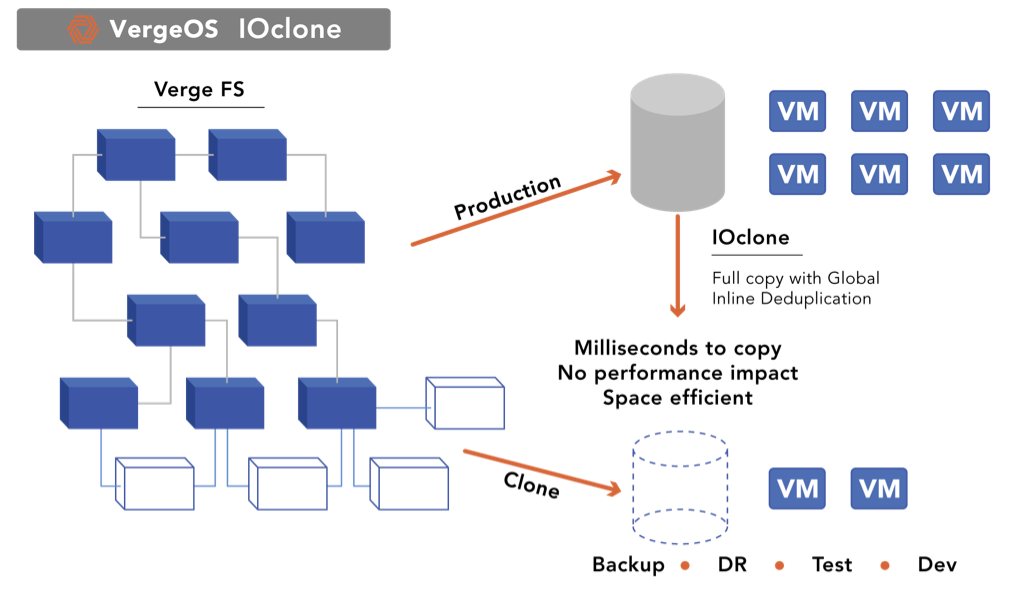
      ioClone utilizes global inline deduplication and a blockchain-inspired file system within VergeFS to create instant, independent, space-efficient, and immutable snapshots of individual VMs, volumes, or entire virtual data centers.
    • ioReplicate
      ioReplicate is a unified disaster-recovery solution that enables simple, cost-efficient DR testing and failover via three‑click recovery of entire Virtual Data Centers—including VMs, networking, and storage.
    • ioFortify
      ioFortify creates immutable, restorable VDC checkpoints and provides proactive ransomware detection with instant alerts for rapid recovery and response.
    • ioMigrate
      ioMigrate enables large-scale VMware migrations, automating the rehosting of hundreds of VMs (including networking settings) in seconds with minimal downtime by seamlessly transitioning entire VMware environments onto existing hardware stacks.
    • ioProtect
      ioProtect offers near-real-time replication of VMware VMs—including data, network, and compute configurations—to a remote disaster‑recovery site on existing hardware, slashing DR costs by over 60% while supporting seamless failover and testing in an efficient, turnkey VergeOS Infrastructure.
    • ioOptimize
      ioOptimize leverages AI and machine learning to seamlessly integrate new and old hardware and automatically migrate workloads from aging or failing servers.
    • ioGuardian
      ioGuardian is VergeIO’s built-in data protection and recovery capability, providing near-continuous backup and rapid VM recovery during multiple simultaneous drive or server failures.
  • IT Initiatives
    • VMware Alternative
      VergeOS offers seamless migration from VMware, enhancing performance and scalability by consolidating virtualization, storage, and networking into a single, efficient platform.
    • Hyperconverged Alternative
      VergeIO’s page introduces ultraconverged infrastructure (UCI) via VergeOS, which overcomes HCI limitations by supporting external storage, scaling compute and storage independently, using existing hardware, simplifying provisioning, boosting resiliency, and cutting licensing costs.
    • SAN Replacement / Storage Refresh
      VergeIO’s storage by replacing aging SAN/NAS systems within its ultraconverged infrastructure, enhancing security, scalability, and affordability.
    • Infrastructure Modernization
      Legacy infrastructure is fragmented, complex, and costly, built from disconnected components. VergeOS unifies virtualization, storage, networking, data protection, and AI into one platform, simplifying operations and reducing expenses.
    • Virtual Desktop Infrastructure (VDI)
      VergeOS for VDI delivers a faster, more affordable, and easier-to-manage alternative to traditional VDI setups—offering organizations the ability to scale securely with reduced overhead
    • Secure Research Computing
      VergeIO's Secure Research Computing solution combines speed, isolation, compliance, scalability, and resilience in a cohesive platform. It’s ideal for institutions needing segmented, compliant compute environments that are easy to deploy, manage, and recover.
    • Venues, Remote Offices, and Edge
      VergeOS delivers resiliency and centralized management across Edge, ROBO, and Venue environments. With one platform, IT can keep remote sites independent while managing them all from a single pane of glass.
  • Blog
      • VxRail Alternatives and VMware ExitsDell directs VxRail customers toward Dell Private Cloud, which reintroduces infrastructure complexity by requiring new servers and external storage arrays. VergeOS runs on existing VxRail hardware, consolidating VMware, vSAN, and networking into a single unified platform without requiring hardware replacement or storage migration projects.
      • Midsize Data Center AutomationMidsize data center automation delivers higher ROI than enterprise implementations but faces sustainability challenges. Small IT teams need automation more than large organizations, but struggle when infrastructure fragmentation forces constant code maintenance. Unified infrastructure makes automation durable by abstracting hardware complexity, enabling resource-constrained teams to sustain automated operations in the long term.
      • In-Place VMware ExitsVergeOS separates the VMware exit from the hardware refresh. Organizations keep their existing servers, add off-the-shelf SSDs, and migrate workloads incrementally. Licensing costs drop 65%. Storage costs drop 80%. Migration completes in weeks, not months. No forklift required.
    • View All Posts
  • Resources
    • Become a Partner
      Get repeatable sales and a platform built to simplify your customers’ infrastructure.
    • Technology Partners
      Learn about our technology and service partners who deliver VergeOS-powered solutions for cloud, VDI, and modern IT workloads.
    • White Papers
      Explore VergeIO’s white papers for practical insights on modernizing infrastructure. Each paper is written for IT pros who value clarity, performance, and ROI.
    • In The News
      See how VergeIO is making headlines as the leading VMware alternative. Industry analysts, press, and partners highlight our impact on modern infrastructure.
    • Press Releases
      Get the latest VergeOS press releases for news on product updates, customer wins, and strategic partnerships.
    • Case Studies
      See how organizations like yours replaced VMware, cut costs, and simplified IT with VergeOS. Real results, real environments—no fluff.
    • Webinars
      Explore VergeIO’s on-demand webinars to get straight-to-the-point demos and real-world infrastructure insights.
    • Documents
      Get quick, no-nonsense overviews of VergeOS capabilities with our datasheets—covering features, benefits, and technical specs in one place.
    • Videos
      Watch VergeIO videos for fast, focused walkthroughs of VergeOS features, customer success, and VMware migration strategies.
    • Technical Documentation
      Access in-depth VergeOS technical guides, configuration details, and step-by-step instructions for IT pros.
  • How to Buy
    • Schedule a Demo
      Seeing is beleiving, set up a call with one of our technical architects and see VergeOS in action.
    • Versions
      Discover VergeOS’s streamlined pricing and flexible deployment options—whether you bring your own hardware, choose a certified appliance, or run it on bare metal in the cloud.
    • Test Drive – No Hardware Required
      Explore VergeOS with VergeIO’s hands-on labs and gain real-world experience in VMware migration and data center resiliency—no hardware required
  • Company
    • About VergeIO
      Learn who we are, what drives us, and why IT leaders trust VergeIO to modernize and simplify infrastructure.
    • Support
      Get fast, expert help from VergeIO’s support team—focused on keeping your infrastructure running smoothly.
    • Careers
      Join VergeIO and help reshape the future of IT infrastructure. Explore open roles and growth opportunities.
  • 855-855-8300
  • Contact
  • Search
  • 855-855-8300
  • Contact
  • Search
  • Architecture
    • Overview
    • VergeFS
    • VergeFabric
    • Infrastructure Automation
    • VergeIQ
  • Features
    • Virtual Data Centers
    • High Availability
    • ioClone
    • ioReplicate
    • ioFortify
    • ioMigrate
    • ioProtect
    • ioOptimize
    • ioGuardian
  • IT Initiatives
    • VMware Alternative
    • Hyperconverged Alternative
    • SAN Replacement / Storage Refresh
    • Infrastructure Modernization
    • Virtual Desktop Infrastructure (VDI)
    • Secure Research Computing
    • Venues, Remote Offices, and Edge
  • Blog
  • Resources
    • Become a Partner
    • Technology Partners
    • White Papers
    • In The News
    • Press Releases
    • Case Studies
    • Webinars
    • Documents
    • Videos
    • Technical Documentation
  • How to Buy
    • Schedule a Demo
    • Versions
    • Test Drive – No Hardware Required
  • Company
    • About VergeIO
    • Support
    • Careers
×
  • Architecture
    • Overview
    • VergeFS
    • VergeFabric
    • Infrastructure Automation
    • VergeIQ
  • Features
    • Virtual Data Centers
    • High Availability
    • ioClone
    • ioReplicate
    • ioFortify
    • ioMigrate
    • ioProtect
    • ioOptimize
    • ioGuardian
  • IT Initiatives
    • VMware Alternative
    • Hyperconverged Alternative
    • SAN Replacement / Storage Refresh
    • Infrastructure Modernization
    • Virtual Desktop Infrastructure (VDI)
    • Secure Research Computing
    • Venues, Remote Offices, and Edge
  • Blog
  • Resources
    • Become a Partner
    • Technology Partners
    • White Papers
    • In The News
    • Press Releases
    • Case Studies
    • Webinars
    • Documents
    • Videos
    • Technical Documentation
  • How to Buy
    • Schedule a Demo
    • Versions
    • Test Drive – No Hardware Required
  • Company
    • About VergeIO
    • Support
    • Careers

George Crump

March 15, 2023 by George Crump

Replacing infrastructure is a serious project, and if you are looking for alternatives to VMware, you may be looking for advice on how to create a VMware migration test plan. You want to ensure that whatever platform you transition to can deliver the enterprise capabilities your organization needs, can scale to meet your future requirements and has the highest quality of technical support.

Creating a VMware Migration Test Environment

Because of the project’s seriousness, you’ll want to set up a test environment to ensure that whatever you convert to will be compatible with your applications, performs well, and is easy to operate. One of the more challenging aspects of creating a test environment is finding or acquiring hardware to load the software for the new platform. Suppose the vendor insists on a specific hardware type or configuration or insists on selling you new hardware. In that case, creating a test environment is even more challenging because you now have to wait for the vendor to send you the hardware and get it installed and configured.

If the potential new vendor offers to install everything for you or offers to have you test your software in their labs, turn it down. You are going to live with this investment for a long time. You need to have the confidence that you can install it.

VergeOS Makes Testing Easy

Creating an environment to test your VMware Migration Plan is easy with VergeOS. The software integrates the hypervisor, storage, and network into a common code base. Storage and networking are not standalone components, nor are they virtual machines of the hypervisor. They are equal citizens. The integration is critical because it allows you to run VergeOS on almost any combination of hardware as long as it meets our modest minimum requirements. The integration also means that on your existing production hardware, you will experience better overall performance, enabling you to increase virtual machine density and potentially forgo the next round of server upgrades.

Once you create the physical test environment, the next step is creating something that looks like your production environment. Our advice here is not to use test simulators. While those simulators make VergeOS look spectacular, your workload is not FIO and ioMeter. The best way to understand how the new platform will work with your workloads is to load the latest copy of your workloads on them. Restoring data that is a few weeks old won’t do the job.

VergeOS Enables Production Data Testing

VergeOS’ IOmigrate solution lets you move copies of your VMware virtual machines (VM) in near real-time. You can also update those copies with the latest changes almost instantly. The solution is so seamless that you can even move a group of users to a specific workload and let them run on VergeOS for a few hours or days to see how it works under real-world conditions. In most cases, because of the efficiency of the integration, they will experience better performance, even with less powerful hardware.

VMware Migration Test is easy with IOmigrate

We’ll show you a live demonstration of IOmigrate during our one-slide webinar, “Break Free from VMware.”

Scaling VMware Migration Test

Most data centers will continue to see growth in the number of applications they support and ever-increasing demands for more storage IO performance and capacity. Testing scale can be challenging, and many customers resort to using load testing tools to place additional load on the system while applications are running.

VergeOS Solves Scaling VMware Migration Test

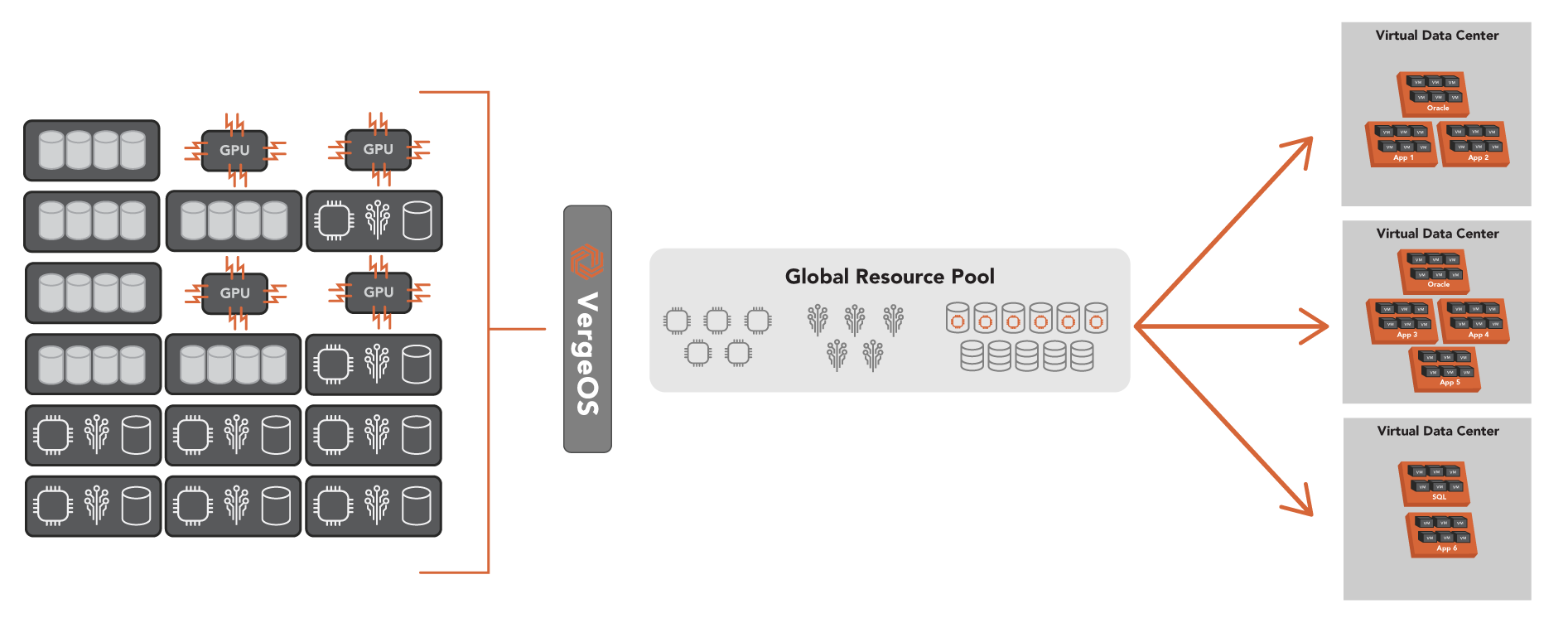
VergeOS has two capabilities that enable you to test how the environment will scale in the future accurately; virtual data centers and snapshots. In the same way that a virtual machine is an encapsulation of a server, a virtual data center is an encapsulation of an entire data center. It virtualizes all the aspects of a data center, including all the VMs, network settings, and storage configuration. Customers use these virtual data centers to segregate specific workloads and create tenants for customers or instances like testing, quality assurance, and development. You can read more about the power of Virtual Data Centers in our blog, “Beyond HCI.”

VDCs also have value in the testing process, thanks to our snapshots. You can snapshot an entire VDC. Imagine making instant copies of running workloads and assigning each instance to different users or automation. It is an accurate way to see how far you can scale the VergeOS environment.

A VMware Migration Test as Disaster Recovery

Most test environments are just that, test environments. You set them up, you run your tests, and you make your evaluation. But what if your test environment could do more?

VergeOS’ IOmigrate is so powerful that it can be a disaster recovery solution for your VMware environment. You can copy all your VMware virtual machines to VergeOS, even VMs you are not testing. The VMs you will test use our snapshot capabilities, so you can test those without interfering with your DR copy. IOmigrate is so powerful that you can make multiple copies of your VMs throughout the day to ensure you are always prepared.

In most cases, your test environment is not off-site, so that the test environment will be more suitable for protection against storage or server failure. Thanks to our immutable snapshot technology, it also makes an excellent ransomware protection and recovery solution. If you want to take that next step and replicate the test environment off-site, that is easy to set up with VergeOS.

Moving Your VMware Migration Test to Production

What if it all works? What if the test shows you can extend the life of existing hardware by another three or four years while also reducing software licensing costs? That is the fast ROI and low TCO promise of VergeOS. How do you cut over? If you’ve been following the steps above, you already have the latest version of your VMs on VergeOS, but they might need to be on the production hardware.

Our VDCs encapsulate the entire data center, and we can do a live migration of the entire data center in the same way VMware can migrate a VM. You can decommission one VMware server, join it to VergeOS, and shift VMs to that server freeing up other servers, which you can then decommission and join to VergeOS. Most of our customers can complete the conversion in less than a day, and if you want, VergeOS-certified IOintegrators can help you complete the task in record time.

Next Steps

  1. Demonstration: Join us live for a one-slide webinar and in-depth demonstration of a VMware to VergeOS migration.
  2. Read: About our VMware Exit Strategy program.
  3. Learn: How to Develop a VMware Exit Strategy. Build a complete plan using our tutorial series.

Filed Under: VMwareExit Tagged With: VMware

March 8, 2023 by George Crump

The impending Broadcom acquisition, ever-increasing prices, and stalled innovation have many customers wondering how to calculate the ROI of a VMware Exit. There are several factors to consider when calculating the return on investment of a VMware Exit:

the ROI of a VMware Exit
  • What is the cost difference in software?
  • What additional hardware is required?
  • How much effort is there in conversion?
  • Are there any other residual savings?

The Software ROI of a VMware Exit

The primary motivation for looking for a VMware alternative is saving money, and the software license cost is at the top of the list. VMware pricing is both expensive and is increasing. Many VMware customers indicate that their renewal price will increase, and they fear that the renewal rate will increase further once the Broadcom acquisition is complete.

VMware pricing is also complex. There are multiple modules to purchase, and there are classifications within those modules based on the number of CPUs and cores in each node within the cluster. The documentation on the VMware site about licensing is rather lengthy, and each separate module (VSAN, NSX, etc…) needs a separate license. Determining the exact price of a VMware license is a challenge partly because of this complexity and partly because it seems each customer gets a different price.

VergeOS, an Affordable VMware Alternative

Even before the price increases and uncertainty of the Broadcom acquisition, customers were flocking to VergeOS because of its efficiency and simplicity. The VergeOS pricing model is simple. It is per node, regardless of each node’s number of processors, cores, RAM, or storage capacity. It typically is less than half the price of VMware. VergeIO also has a five-year price lock option, so not only is there a fast ROI, but there is also the added benefit of pricing stability.

The Hardware Required for a VMware Exit

Many vendors require you to buy new hardware as you make your VMware exit, even if the servers supporting the current environment are more than up to the task. They may need more powerful hardware to run their hypervisor, or they may not support the hardware you are using today, especially if it is more than a few years old. Buying new hardware significantly increases the time it takes to realize an ROI.


Most infrastructure software (hypervisor, storage, and network) is inefficient. These solutions convert the stacks to software but layer them on top of each other instead of integrating them into a singular code base. The layering only increases their inefficiency and complexity.

VergeOS, A Model of Efficiency

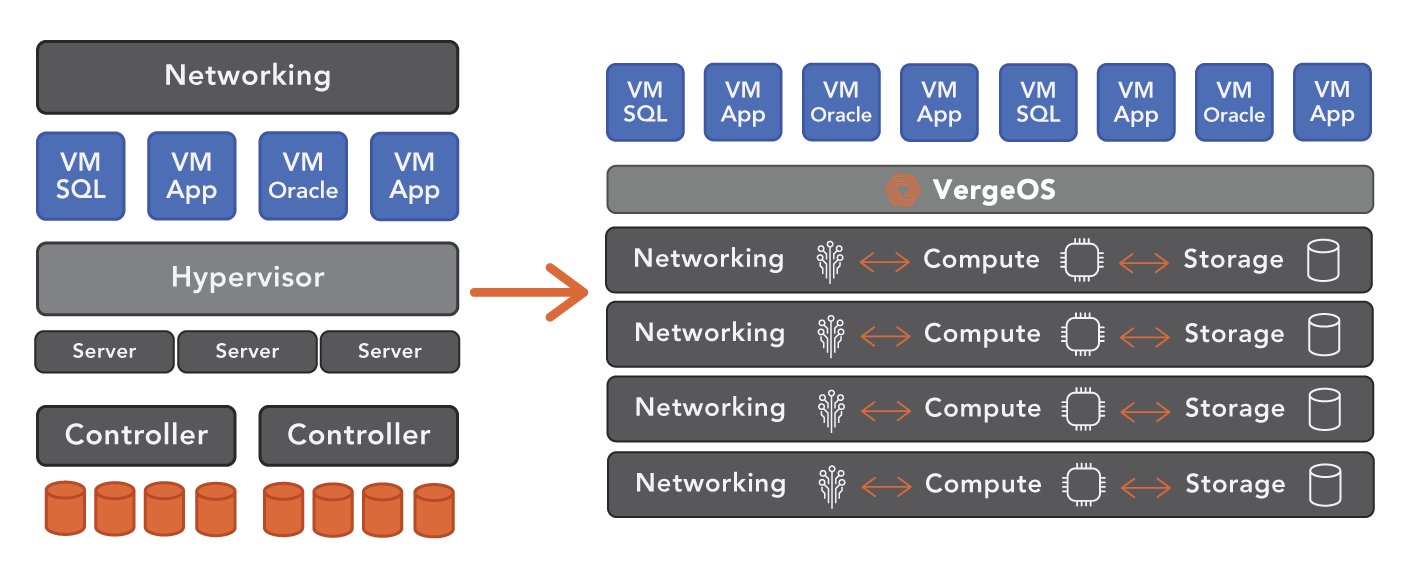
VergeOS completely integrates the infrastructure rotating it 90° into a single linear plane. The tight, efficient code base can abstract more performance and capacity from the existing server hardware. Once switching to VergeOS, most organizations can, using the same hardware, increase the number of workloads and even virtualize workloads previously deemed bare-metal-only.

the ROI of a VMware Exit

Leveraging the existing server hardware delivers a positive return on investment much faster than solutions that must replace the server hardware. Extending the life of the existing server hardware also means that the customer can delay the next round of server upgrades, further accelerating ROI.

The Effort of a VMware Exit

One of the most significant considerations when calculating the ROI of a VMware exit is how difficult it is to switch from VMware to the new platform. Also critical is determining what resources are required to do so with minimal time and disruption. While some alternative hypervisors have some form of VMware import, they require that you pause the VMware environment as you convert one VM at a time. Then you must keep VMware “paused” while testing the converted VMs and workloads. The process is slow and requires far too lengthy application outages.

VergeOS, Seamless Migration

VergeOS enables you to migrate your VMs from VMware while they are still running. Our IOmigrate capability leverages change block tracking (CBT) to update the VergeOS VMs incrementally. You can use this method to extensively test your VMs in the VergeIO environment until you are satisfied that everything will work as planned. Many customers will first use VergeIO as a disaster recovery option until they are ready to cut over to VergeOS completely.

the ROI of a VMware Exit

Please register for our one-slide webinar, which will include a live demonstration of a VMware to VergeOS migration. It is live on Thursday, March 16th, at 1:00 PM ET / 10:00 AM PT.

The Post VMware Exit – Experience

Another consideration when calculating the ROI of a VMware exit is what is the experience of operating post-VMware exit? Does the new infrastructure software include capabilities not available before? The reality is that most infrastructure alternatives are sold primarily on price rather than capabilities. These vendors scramble to market using unoptimized open-source code. As a result, the customer gains little in switching to the new platform.

VergeOS, A Superior Experience

VergeOS not only provides a dramatic reduction in costs, but it also provides superior value infrastructure capabilities. As stated above, the VergeOS can run more workloads on less hardware. It also can support mixed nodes, so you can support the needs of a variety of different workloads and can scale from one to one hundred nodes.

VergeOS also delivers a superior storage services portfolio, including:

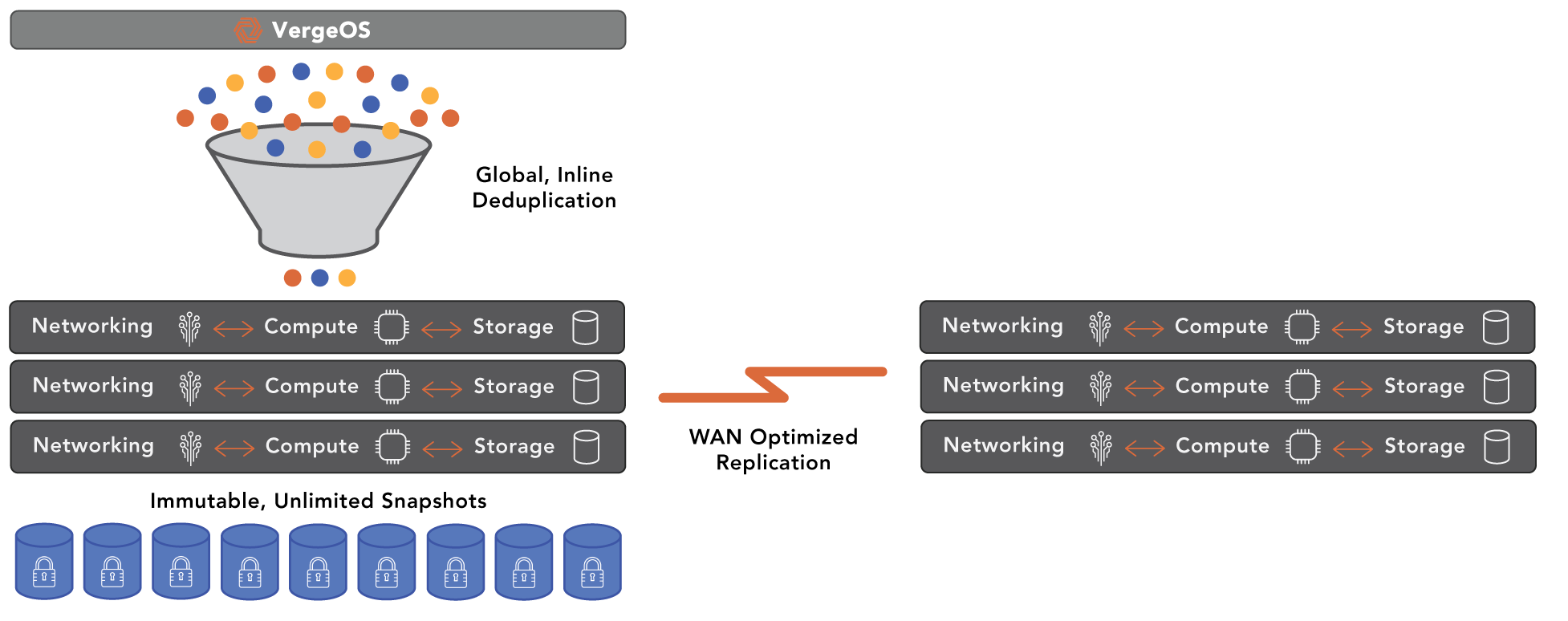
  • Global Inline Deduplication
  • Silent Corruption Detection & Correction
  • WAN Optimized Remote Synchronization
  • Storage Multi-Tiering
  • High Performance – up to one million IOPS per node
  • AES 256-bit encryption
  • Instant, Immutable, Unlimited Snapshots & Cloning

VMware, without the introduction of NSX, provides little networking functionality beyond a virtual switch. VergeOS includes a full complement of networking capabilities, including:

  • Layer 2 and 3 networking
  • Firewall and DNS servers
  • Network Address Translation & Port Address Translation (NAT/ PAT)
  • Quality of Service (QOS)
  • Static Routing
  • DHCP (Client and Server)
  • Authoritative DNS
  • Port Mirroring (North/South) & (East/West)

An Exit Worth Taking

VergeOS is not only a way out of the uncertainty of VMware. It is a superior platform for your data center. It will dramatically lower today’s costs, extend the life of existing hardware for years, and better position you to adopt and adapt to future technology. At the same time, you will experience a massively simplified IT operations experience that is even superior to the public cloud. With VergeOS the ROI of a VMware exit is quick and long-lasting.

Next Steps

  • Register for our webinar to see a live migration of a VMware environment into VergeOS.
  • Subscribe to our tutorial on developing a VMware Exit Strategy.
  • Schedule a technical whiteboard session
  • Download a copy of VergeOS

Filed Under: VMwareExit Tagged With: HCI, VMware

March 6, 2023 by George Crump

Seamless Migration Reduces VMware costs by more than 50%

Ann Arbor, Michigan – March 7th, 2023 — In response to ongoing frustration with VMware’s pricing policies and concerns over the impending Broadcom acquisition, VergeIO, the Ultraconverged Infrastructure company, today announced the immediate release of its VMware Exit Strategy. The program includes a competitive trade-in to VergeOS and a seamless migration solution powered by a new feature, IOmigrate. Customers can leverage existing hardware and reduce VMware costs by as much as 50%.

“We’ve been overwhelmed by customers calling in looking for an alternative to the escalating cost of VMware and general IT complexity, so today, we are releasing our VMware migration tool that provides a seamless migration solution to our hypervisor, network, and storage platform. We also know that IT is stretched thin, so we’ve partnered with leading integrators to provide a white-glove turnkey migration service,” said Yan Ness, CEO of VergeIO.

IOmigrate is built into the core VergeOS environment and leverages VMware’s change block tracking (CBT) technology to synchronize virtual machines with VergeOS VMs in near real-time. Customers can even use IOmigrate as a backup and disaster recovery solution while testing converted VMs. Because of the efficiency of VergeOS, customers will realize better performance and hardware utilization. As a result, they can increase the number of workloads while delaying hardware purchases, further reducing data center costs.

Storage services also benefit from migration. VergeOS includes global inline deduplication, unlimited, immutable snapshots, and two-factor authentication, further reducing costs and improving ransomware resiliency. Complete networking capabilities are part of VergeOS. It delivers full layer 2, layer 3, firewall, and DNS functionality.

VergeIO’s VMware Exit Strategy includes a partnership with IOintegrators, VergeIO’s certified reseller partners that are experts in VMware to VergeOS migrations. If the organization doesn’t have the time or resources to perform the migration, IOintegrators can complete the task quickly without impacting production applications. Once complete, the customer merely needs to verify the migration and activate the VergeOS cluster.

“We are excited to partner with VergeOS to enable our customers to exit from VMware and enjoy an environment that performs better, scales further, and is infinitely easier to manage. Using our white-glove service makes conversion simple and easy,” said Howie Evens, Vice-President of Dallas Digital Services.

Once activated, the customer has new capabilities that include

  • Mixed node support
  • Improved performance
  • Ransomware resilience
  • Scalability to over 100 nodes

IOmigrate and its related services are available now. For more details, go to VergeIO’s VMware Exit Strategy page and/or register to attend their webinar, where they will show IOmigrate converting a live VMware environment to VergeOS on March 16th at 1:00 PM ET and 10:00 AM PT. Register Now.

About VergeIO

VergeIO is the Ultraconverged Infrastructure (UCI) company. Unlike hyperconverged infrastructure (HCI), it rotates the traditional IT stack (compute, storage, and networking) into an integrated data center operating system, VergeOS. Its efficiency enables greater workload density on the same hardware with high levels of data resiliency. The result is dramatically lower costs and greatly simplified IT.

Filed Under: Press Release

February 28, 2023 by George Crump

How to Get Fast ROI on HCI Refreshes

Customers using hyperconverged infrastructures (HCI) are starting to deal with aging installations and are looking for a fast ROI on HCI refreshes. Vendors like Nutanix and VMware, with vSAN, are instituting dramatic increases in renewal prices. They also overemphasize the cloud and only focus on their largest customers. With infrastructure costs rising, customers are looking for an exit strategy that will lower upfront and long-term costs.

At the same time, there is a general frustration with the broken promises of the first wave of HCI. While it simplifies infrastructure, it does not come close to the goal of a private cloud. IT planners are looking for a solution that will lower operational costs, provide self-service IT, improve availability, and better protect against threats like ransomware. FAST ROI on HCI refreshes requires these capabilities and lower upfront and long-term costs.

The Cost to Save

The problem with HCI refreshes is that alternative solutions almost always require a substantial new investment in hardware. That new hardware either comes as a bundle with their software or new hardware with restrictive and expensive specifications. The only way you start to see a return on your investment is after those savings cover the cost of the new hardware. You must go into the negative before seeing a positive return on investment (ROI).

The reason for the new hardware requirement is the alternative HCI software is as inefficient as the old HCI software, and both require more processing power, memory, and storage performance than they should. The vendor is compensating for their inefficient code by making you spend extra on hardware.

Another reason for the new hardware requirement is the lack of compatibility or supportability of the existing hardware. Forcing customers into new hardware indicates that the developers did not properly abstract the software from the underlying hardware. Their code is too dependent on specific types of hardware.

Fast HCI ROI Requires Repurposing Hardware

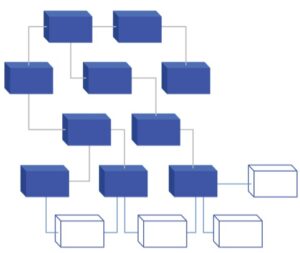
Ultraconverged Infrastructure (UCI) rotates the traditional three-tier data center architecture (virtualization, networking, and storage) into a single, linear software plane. VergeOS is a UCI solution that is so efficient that it can deliver better performance and workload density using the same physical hardware you have right now. As a result, your ROI starts working the day you install the software. There is no hardware acquisition cost to overcome. To learn more about how UCI read our article “Move Beyond HCI to UCI.”

Fast HCI ROI Requires Mixed Nodes

Suppose you need to add more nodes because the old system was at its performance or capacity limits. In that case, you can still leverage the existing nodes for other tasks, dramatically lowering additional spend. For example, add a set of nodes with more processing power if you need more processing. Suppose you need more IO performance; add a set of nodes with high-performance NVMe flash, or add a set of nodes with 20TB hard drives if you need more capacity. Make your current hardware work as hard as possible for as long as possible. The infrastructure software should enable you to add the minimal amount of hardware you need for its exact purpose while repurposing the existing hardware for everything else.

Fast HCI ROI requires mixed node support

VergeOS UCI can support mixed nodes, whereas most HCI solutions force you to create a separate infrastructure by node type. Mixed node support means you can complement the current hardware investment instead of replacing it. As new technology comes to market, you can add it, mixing it with older technology, ensuring that your infrastructure will run for decades instead of four to five years. UCI delivers not only fast ROI but also delivers long-lasting ROI.

Fast HCI ROI requires Global Inline Deduplication

One of the most expensive components of HCI is storage. While some HCI solutions have added deduplication, most can’t perform global inline deduplication. As a result, the feature often compromises performance, forcing customers to only use it on the flash tier or to buy more powerful processors and larger quantities of RAM. Again, these additional costs make it difficult to get fast ROI on HCI refreshes. The reason for this overhead is most HCI solutions add deduplication years after the initial product introduction. It is bolt-on and not part of the core code.

VergeOS provides global inline deduplication built into the core of the software. Its integration means the algorithm is highly efficient and has little impact on performance. Customers can deploy it without having to use high-performance drives or high-performance CPUs.

Fast HCI ROI requires More Than Data Protection

Since fast ROI on HCI refreshes counts on using older hardware, it also requires integrated data protection. Because of flat or even shrinking IT budgets, many organizations are looking to use hardware until it breaks or is not economical to repair. Because older hardware tends to fail more often than newer hardware, uninterrupted access to applications and data is critical. Backups are not enough—the time it takes to recover from even the best backup software solution is no longer acceptable.

VergeOS provides a rapid return to operations by moving an application from one node to another. It provides detailed telemetry information to help you proactively predict node failure. In these cases, you can move workloads to other nodes in the cluster with zero service interruption. If a node fails unexpectedly, instantiating the workloads on another node can happen quickly and automatically.

VergeOS also provides complete protection from drive failure and unlimited, immutable snapshots. You can retain snapshots for years and mount them instantly for rapid recovery. Combined with dual-factor authentication VergeOS provides ransomware resiliency. VergeIO’s replication capabilities leverage our global inline deduplication for WAN-efficient transfers. For example, if you are replicating several remote sites or hundreds of Edge locations, any data redundancy across those sites is only transferred once. The result is remote locations are fully protected faster, and less money is spent on WAN bandwidth.

Fast HCI ROI Requires UCI

Using UCI to get a fast ROI on HCI refreshes doesn’t mean starting over, and it is not a multi-month-long conversion project. Many of our customers start by removing a few nodes in their existing infrastructure and transferring virtual machines over to VergeOS. Migration is automatic, quick, and easy. These customers see improved performance and greater storage efficiencies. Then as they see the power and simplicity of VergeOS, they start migrating more workloads and transferring more nodes into our environment. With each transfer, costs go down, and operations become more effortless.

Other customers will buy two or three new nodes to host the VergeIO environment and start creating new workloads on it. Then gradually, they will start migrating other workloads and eventually migrate in the nodes from the old HCI cluster. Again, leveraging a diverse mix of nodes is vital to the process. Other customers will start using VergeOS as a disaster recovery target for their existing environment, lowering DR costs immediately and transitioning as it makes sense.

Next Steps

  • Demo – See a demonstration of a Hyper-V migration by our SE Director Aaron Reid.
  • Watch – A Replay of our One-Slide Webinar, “Comparing HCI Solutions,” where Aaron and I compare HCI to Nutanix and VMware vSAN.
  • Subscribe – to our HCI comparisons research notes, delivered to your inbox every two weeks.
  • Schedule a 20-minute technical whiteboard session to see how VergeOS can solve your infrastructure problems.

Filed Under: HCI Tagged With: Blog

February 26, 2023 by George Crump

Watch VergeIO’s SE Director, Aaron Reid, and CMO, George Crump, as they take you through a live VMware migration to VergeOS. See how easy VergeIO’s new IOmigrate capability is to use. Learn how to use VergeOS for VMware DR and Ransomware Resilience today, then switch to VergeOS to enjoy 50% savings and 100% simplification.

Available Now

Join us for the demonstration and see how you can convert from VMware and improve storage performance and resilience while simplifying your network.

See:

  • A live migration from VMware to VergeOS
  • How to use VergeOS as a Disaster Recovery site
  • How to simplify networking and make it more resilient

Filed Under: Past Webinar, Webinar Tagged With: VMware

February 21, 2023 by George Crump

IT needs to understand Edge Computing’s unique challenges, so they can make the right infrastructure design decisions. Treating Edge Computing as a smaller version of the data center will put data at risk, increase complexity and raise costs. There are critical differences between Edge Computing, Remote Office, Branch Office (ROBO), and Core Data Center use cases:

Data Center Edge ROBO Core
Serviceability Limited Accessibility Accessible Local
Management Remote Remote Local
Data Protection Replication On-Premises On-Premises
Footprint Shelf Closet Data Center
Power Constrained Available Plentiful
Comparing Edge, ROBO and Core Data Centers

Edge Computing vs. “The Edge”

Edge Computing is different from what is commonly referred to as “the Edge.” When we refer to “the Edge” we are referring to a data collector, like a sensor or a Wi-Fi Camera, even though they too have a small processor of some sort. Edge Computing is the consolidation of processing power that gathers data from a variety of these sensors, and processes that data. The goal is to either make real-time decisions, like an autonomous vehicle, or consolidate the collected data and send a subset back to a larger data center.

While collecting sensor data and acting on it covers a wide swath of Edge Computing use cases, there are others. It might also be a Point of Sale (POS) system that an organization with dozens or hundreds of retail locations. Other Edge Computing use cases are content delivery systems, video surveillance processing and storage, as well as dynamically adapting retail advertising.

In addition to real-time decision-making, Edge locations may also, even with today’s network capabilities, be bandwidth constrained. The need to make the decision locally is instant, compared with the seconds required to send data to another location and respond with a decision. In these cases, instant versus seconds makes a critical difference. It may also be that the bandwidth to the Edge Computing location isn’t reliable enough, or that the cost to transmit a large amount of data isn’t worth the expense.

Register for this week’s Virtual CxO Roundtable to get answers to all your Edge Computing and Private Cloud questions.

What Makes Edge Computing Unique?

Edge Computing is unique from the core data center and remote office branch office in three key areas:

  • Available Space
  • Serviceability
  • Data Protection

Edge Computing is Space Constrained

Edge Computing’s unique challenges include small footprint
A Complete Data Center in a Shoebox

The first of Edge Computing’s unique challenges is the physical space available to host the infrastructure. As we indicate in our table, the available data center floor space shrinks from a full-scale facility in core, to a closet in ROBO, to, at best, a shelf in Edge Computing use cases. In some situations, the “data center” is the space underneath the cash register.

The constraints placed on Edge Computing mean that whatever infrastructure you deploy at the Edge needs to run, efficiently, in that small footprint. The good news is the hardware to accomplish the feat is available. Mini-servers, like Intel NUCs (next unit of computing), can provide plenty of processing capabilities while consuming a few dozen watts of power. The problem is finding an efficient software operating environment for those servers.

Edge Computing is Hard to Service

The second of Edge Computing’s unique challenges is that it is hard to get to, physically and maybe remotely. The lack of accessibility makes Edge Computing hardware difficult to service if something goes wrong. Most locations are not in major cities. Sometimes they are “in the middle of nowhere” on purpose because that is where the sensors perform best. Other times they are small towns, hours away from major airports. The lack of accessibility and serviceability make redundancy and remote operations critical.

Edge Computing Needs Redundant Availability

Redundant Edge Computing is something that IT planners may overlook, but because of the lack of accessibility, continuous access becomes critical. If the Edge location goes down, sensor data and remote transactions can’t process. It can mean the loss of critical information that can’t be recreated, or the loss of revenue and unhappy customers.

What to look for:

Given the space efficiency of mini-servers, it makes sense to deploy two or three units, even if one has all the processing power that the location needs. Redundancy at the Edge means that the software platform responsible for running operations needs to seamlessly fail to the surviving servers without complex changes to networking. It also means that a replacement server must be easily preconfigured to automatically join to the surviving servers when it arrives at the location.

Edge Computing Needs Redundant Operations

The Edge Computing solution should also be easy to remotely manage and operate. While most solutions provide some form of monitoring capabilities, these are often “after-the-fact” products. An add-on product creates a single point of management failure, and the Edge location doesn’t know something is “listening”. Instead, IT planners should look for solutions where reporting is the responsibility of the Edge Computing solution. The edge software platform should send its telemetry data to multiple points, which eliminates the single point of failure.

Moreover, the remote capabilities should include more than remote monitoring. It is not uncommon for Edge Computing locations to number in the dozens, if not hundreds. Having to log in to each location to perform an update or change to a security setting is incredibly time-consuming and increases the chances of human error.

What to look for:

IT planners need to look for a solution that can perform operations like updates or setting changes, globally. Executing once instead of individually logging in to each server increases the efficiency of the IT staff and lowers the overall cost of the Edge Computing initiatives.

Edge Computing is Hard to Protect

The third of Edge Computing’s unique challenges is it has unique data protection needs. In numerous instances, the Edge creates unique data that can’t be recreated if lost due to hardware failure or site disaster. The challenge is because of the lack of available space and operational concerns. There is no room or administrative staff to support on-premises backup infrastructure.

The Problems with Protecting the Edge with the Public Cloud

Many organizations will consider protecting this data in the public cloud, but end up ruling it out because:

  1. The recurring costs to store dormant data are too expensive
  2. The data is needed at core data center for further processing
  3. There is too much Edge data and not enough bandwidth
  4. Disaster recovery from the Public Cloud to the edge is difficult

What to look for:

IT planners need to look for a solution that can leverage the extra redundancy within their Edge Computing design to facilitate a reasonable on-premises data protection strategy. While protecting data within the same infrastructure does not technically meet the 3-2-1 data protection rule, it gets close. If the Edge solution can also replicate data efficiently, then it does meet the requirements of the 3-2-1 rule. Global Inline Deduplication is a critical requirement so that redundant data is only sent once and replication jobs are complete in record time.

Edge Computing is NOT Remote Office Branch Office

Remote Office and Branch Office (ROBO) IT infrastructures are not the same as Edge Computing infrastructures. First, in most cases, they are significantly easier to get to. Second, there is available space, even if it is a server closet, for a more robust infrastructure that includes data protection.

ROBO infrastructures also tend to support a wider variety of workloads, including file sharing, and multiple business applications as well as core infrastructure utilities. They do, however, share the need for remote operations and can certainly benefit from many of the capabilities that infrastructure at the Edge requires.

Most IT vendors can’t span all three use cases with a single software solution. They may address the specific needs of each use case, but they do so with alternative solutions which require unique training for each one, patch monitoring and implementation as well as unique data protection.

What to look for:

IT Planners should look for an infrastructure solution that can span all three location types and add in the public cloud. Imagine the efficiency of running the same networking, storage, and hypervisor software throughout your sprawling infrastructure.

VergeOS, One and Done

VergeIO is an ultraconverged infrastructure (UCI) company. UCI differs from Hyperconverged Infrastructure (HCI) in that it rotates the traditional three-tier IT stack (networking, storage, and compute) onto a linear plane through a single piece of software that we call VergeOS. The result is an efficient data center operating system (DCOS) that can deliver more performance and run a greater variety of workloads on less physical hardware. If you are being asked to do “more with less,” VergeOS is your solution.

In one bootable operating system you eliminate the need for separate storage software, proprietary networking hardware, independent hypervisors, separate “cloud” functionality, data protection software, disaster recovery software, and multiple management interfaces. All of these functions are included in VergeOS’s single piece of software.

VergeOS is able to address all of Edge Computing’s unique challenges. It provides

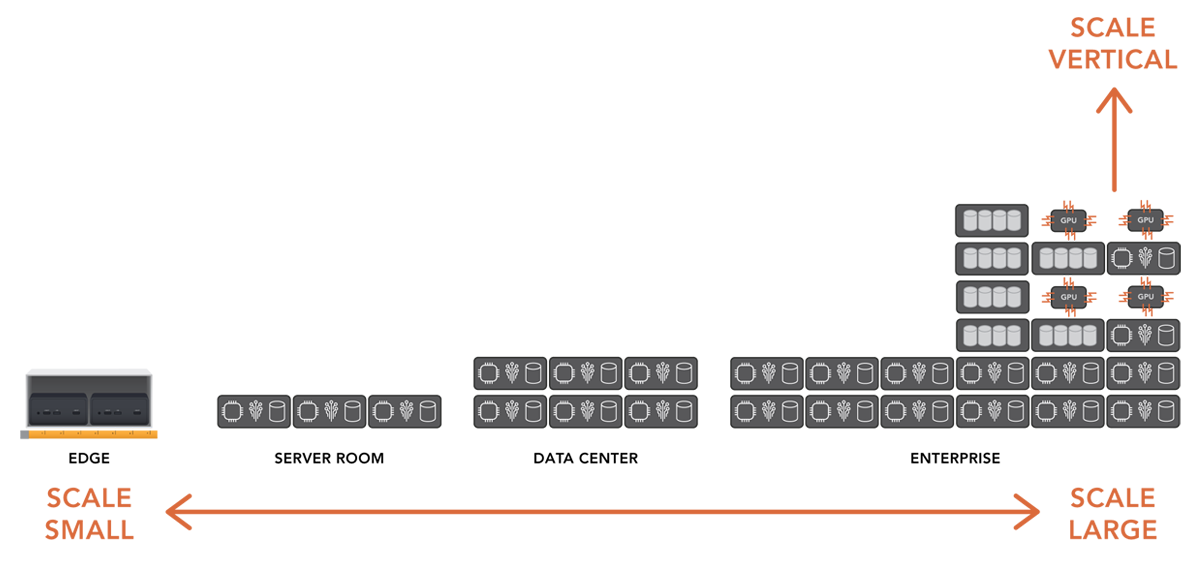
  • Downward scale to one or two nodes
  • Seamless redundancy, data protection and ransomware resiliency
  • A mesh-like management framework for monitoring and operations
  • upward scale for branch offices, core data centers and the cloud

With VergeOS, you don’t have to “go to” the cloud. You can “be the cloud.”

Next Steps

  • This week we are holding a Virtual CxO Roundtable on “Edge Computing and Private Cloud Infrastructures. We will answer questions about these two topics we’ve been collecting the last few weeks, and we’ll take questions live from our audience. If you have a question, you can submit it in the comments section below. Register
  • We also have a complete tutorial built on developing and Edge Computing Strategy. Subscribe to our Digital Learning Guide, “Creating an Edge Computing Strategy.”
  • Learn More:
    • VergeOS Atria, that enables you to Be the Cloud and Own the Edge
    • “The Three Requirements for Edge Computing“
    • “One Infrastructure for Edge and Core“

Filed Under: Edge Computing Tagged With: Blog, Edge

  • « Go to Previous Page
  • Page 1
  • Interim pages omitted …
  • Page 27
  • Page 28
  • Page 29
  • Page 30
  • Go to Next Page »

855-855-8300

Get Started

  • Versions
  • Request Tour

VergeIO For

  • VMware Alternative
  • SAN Replacement
  • Solving Infrastructure Modernization Challenges
  • Artificial Intelligence
  • Hyperconverged
  • Server Room
  • Secure Research Computing

Product

  • Benefits
  • Documents
  • Architecture Overview
  • Use Cases
  • Videos

Company

  • About VergeIO
  • Blog
  • Technical Documentation
  • Legal

© 2026 VergeIO. All Rights Reserved.