• Skip to main content
  • Architecture
    • Overview
      Learn about VergeOS’ unique unfied architecture that integrates virtualization, storage, networking, AI, backup and DR into a single data center operating system
    • Infrastructure Wide Deduplication
      VergeOS transforms deduplication from a storage-only commodity into a native, infrastructure-wide capability that spans storage, virtualization, and networking, eliminating hidden resource taxes
    • VergeFS
      VergeFS is a distributed, high-performance global file system integrated into VergeOS, unifying storage across nodes, tiers, and workloads while eliminating the need for external SANs
    • VergeFabric
      VergeFabric is VergeOS’s integrated virtual networking layer, delivering high-speed, low-latency communication across nodes while eliminating the complexity of traditional network configurations.
    • Infrastructure Automation
      VergeOS integrates Packer, Terraform, and Ansible to deliver an end-to-end automation pipeline that eliminates infrastructure drift and enables predictable, scalable deployments.
    • VergeIQ
      Unlock secure, on-premises generative AI—natively integrated into VergeOS. With VergeIQ, your enterprise gains private AI capabilities without the complexity, cloud dependency, or token-based pricing.
  • Features
    • Virtual Data Centers
      A VergeOS Virtual Data Center (VDC) is a fully isolated, self-contained environment within a single VergeOS instance that includes its own compute, storage, networking, and management controls
    • High Availability
      VergeOS provides a unified, easy-to-manage infrastructure that ensures continuous high availability through automated failover, storage efficiency, clone-like snapshots, and simplified disaster recovery
    • ioClone
      ioClone utilizes global inline deduplication and a blockchain-inspired file system within VergeFS to create instant, independent, space-efficient, and immutable snapshots of individual VMs, volumes, or entire virtual data centers.
    • ioReplicate
      ioReplicate is a unified disaster-recovery solution that enables simple, cost-efficient DR testing and failover via three‑click recovery of entire Virtual Data Centers—including VMs, networking, and storage.
    • ioFortify
      ioFortify creates immutable, restorable VDC checkpoints and provides proactive ransomware detection with instant alerts for rapid recovery and response.
    • ioMigrate
      ioMigrate enables large-scale VMware migrations, automating the rehosting of hundreds of VMs (including networking settings) in seconds with minimal downtime by seamlessly transitioning entire VMware environments onto existing hardware stacks.
    • ioProtect
      ioProtect offers near-real-time replication of VMware VMs—including data, network, and compute configurations—to a remote disaster‑recovery site on existing hardware, slashing DR costs by over 60% while supporting seamless failover and testing in an efficient, turnkey VergeOS Infrastructure.
    • ioOptimize
      ioOptimize leverages AI and machine learning to seamlessly integrate new and old hardware and automatically migrate workloads from aging or failing servers.
    • ioGuardian
      ioGuardian is VergeIO’s built-in data protection and recovery capability, providing near-continuous backup and rapid VM recovery during multiple simultaneous drive or server failures.
  • IT Initiatives
    • VMware Alternative
      VergeOS offers seamless migration from VMware, enhancing performance and scalability by consolidating virtualization, storage, and networking into a single, efficient platform.
    • Hyperconverged Alternative
      VergeIO’s page introduces ultraconverged infrastructure (UCI) via VergeOS, which overcomes HCI limitations by supporting external storage, scaling compute and storage independently, using existing hardware, simplifying provisioning, boosting resiliency, and cutting licensing costs.
    • SAN Replacement / Storage Refresh
      VergeIO’s storage by replacing aging SAN/NAS systems within its ultraconverged infrastructure, enhancing security, scalability, and affordability.
    • Infrastructure Modernization
      Legacy infrastructure is fragmented, complex, and costly, built from disconnected components. VergeOS unifies virtualization, storage, networking, data protection, and AI into one platform, simplifying operations and reducing expenses.
    • Virtual Desktop Infrastructure (VDI)
      VergeOS for VDI delivers a faster, more affordable, and easier-to-manage alternative to traditional VDI setups—offering organizations the ability to scale securely with reduced overhead
    • Secure Research Computing
      VergeIO's Secure Research Computing solution combines speed, isolation, compliance, scalability, and resilience in a cohesive platform. It’s ideal for institutions needing segmented, compliant compute environments that are easy to deploy, manage, and recover.
    • Venues, Remote Offices, and Edge
      VergeOS delivers resiliency and centralized management across Edge, ROBO, and Venue environments. With one platform, IT can keep remote sites independent while managing them all from a single pane of glass.
  • Blog
      • From Zero to RAG in a GPU Virtual WorkstationNVIDIA's RAG Application Toolkit turns a GPU virtual workstation into an AI development environment. VergeOS makes the infrastructure invisible.
      • GPU Infrastructure Without the ComplexityGPU infrastructure doesn't have to require GPU specialists. VergeOS delivers point-and-click MIG configuration, automated driver management, and NVIDIA joint support — so standard IT teams can run visual compute and AI development workloads on the infrastructure they already own.
      • Data Availability is Critical During the Memory SupercycleRising RAM and flash prices force organizations onto aging and refurbished hardware. Data availability determines whether those hardware failures are routine events or business-stopping emergencies. VergeOS delivers layered protection from the drive level through node-level redundancy to cross-site replication, all on the hardware you already own.
    • View All Posts
  • Resources
    • Become a Partner
      Get repeatable sales and a platform built to simplify your customers’ infrastructure.
    • Technology Partners
      Learn about our technology and service partners who deliver VergeOS-powered solutions for cloud, VDI, and modern IT workloads.
    • White Papers
      Explore VergeIO’s white papers for practical insights on modernizing infrastructure. Each paper is written for IT pros who value clarity, performance, and ROI.
    • In The News
      See how VergeIO is making headlines as the leading VMware alternative. Industry analysts, press, and partners highlight our impact on modern infrastructure.
    • Press Releases
      Get the latest VergeOS press releases for news on product updates, customer wins, and strategic partnerships.
    • Case Studies
      See how organizations like yours replaced VMware, cut costs, and simplified IT with VergeOS. Real results, real environments—no fluff.
    • Webinars
      Explore VergeIO’s on-demand webinars to get straight-to-the-point demos and real-world infrastructure insights.
    • Documents
      Get quick, no-nonsense overviews of VergeOS capabilities with our datasheets—covering features, benefits, and technical specs in one place.
    • Videos
      Watch VergeIO videos for fast, focused walkthroughs of VergeOS features, customer success, and VMware migration strategies.
    • Technical Documentation
      Access in-depth VergeOS technical guides, configuration details, and step-by-step instructions for IT pros.
  • How to Buy
    • Schedule a Demo
      Seeing is believing, set up a call with one of our technical architects and see VergeOS in action.
    • Versions
      Discover VergeOS’s streamlined pricing and flexible deployment options—whether you bring your own hardware, choose a certified appliance, or run it on bare metal in the cloud.
    • Test Drive – No Hardware Required
      Explore VergeOS with VergeIO’s hands-on labs and gain real-world experience in VMware migration and data center resiliency—no hardware required
  • Company
    • About VergeIO
      Learn who we are, what drives us, and why IT leaders trust VergeIO to modernize and simplify infrastructure.
    • Support
      Get fast, expert help from VergeIO’s support team—focused on keeping your infrastructure running smoothly.
    • Careers
      Join VergeIO and help reshape the future of IT infrastructure. Explore open roles and growth opportunities.
  • 855-855-8300
  • Contact
  • Search
  • 855-855-8300
  • Contact
  • Search
  • Architecture
    • Overview
    • VergeFS
    • VergeFabric
    • Infrastructure Automation
    • VergeIQ
  • Features
    • Virtual Data Centers
    • High Availability
    • ioClone
    • ioReplicate
    • ioFortify
    • ioMigrate
    • ioProtect
    • ioOptimize
    • ioGuardian
  • IT Initiatives
    • VMware Alternative
    • Hyperconverged Alternative
    • SAN Replacement / Storage Refresh
    • Infrastructure Modernization
    • Virtual Desktop Infrastructure (VDI)
    • Secure Research Computing
    • Venues, Remote Offices, and Edge
  • Blog
  • Resources
    • Become a Partner
    • Technology Partners
    • White Papers
    • In The News
    • Press Releases
    • Case Studies
    • Webinars
    • Documents
    • Videos
    • Technical Documentation
  • How to Buy
    • Schedule a Demo
    • Versions
    • Test Drive – No Hardware Required
  • Company
    • About VergeIO
    • Support
    • Careers
×
  • Architecture
    • Overview
    • VergeFS
    • VergeFabric
    • Infrastructure Automation
    • VergeIQ
  • Features
    • Virtual Data Centers
    • High Availability
    • ioClone
    • ioReplicate
    • ioFortify
    • ioMigrate
    • ioProtect
    • ioOptimize
    • ioGuardian
  • IT Initiatives
    • VMware Alternative
    • Hyperconverged Alternative
    • SAN Replacement / Storage Refresh
    • Infrastructure Modernization
    • Virtual Desktop Infrastructure (VDI)
    • Secure Research Computing
    • Venues, Remote Offices, and Edge
  • Blog
  • Resources
    • Become a Partner
    • Technology Partners
    • White Papers
    • In The News
    • Press Releases
    • Case Studies
    • Webinars
    • Documents
    • Videos
    • Technical Documentation
  • How to Buy
    • Schedule a Demo
    • Versions
    • Test Drive – No Hardware Required
  • Company
    • About VergeIO
    • Support
    • Careers

IT infrastructure

March 30, 2026 by George Crump

NVIDIA vGPU — VergeOS 26.1.3

GPU acceleration without the operational overhead

Every enterprise wants AI capabilities. Most organizations have proprietary data they do not, or legally cannot, send to cloud providers. Visual compute and AI development infrastructure keeps sensitive data on-premises while delivering the GPU acceleration that machine learning workloads demand. The challenge has never been the hardware — NVIDIA GPUs are widely available, and most organizations already own servers capable of running them. The challenge is operations.

VergeOS supports the full range of NVIDIA vGPU software products: NVIDIA RTX Virtual Workstation (vWS) for professional visualization and GPU-accelerated design applications, NVIDIA Virtual PC (vPC) for knowledge workers who need graphics-capable virtual desktops, and NVIDIA Virtual Applications (vApps) for hosted application delivery without dedicated workstation hardware. Each of these runs on VergeOS today, validated and jointly supported by both NVIDIA and VergeIO engineering teams.

Key Takeaways
  • Visual compute and AI development infrastructure keeps sensitive data on-premises while delivering GPU-accelerated performance without cloud dependency.
  • VergeOS eliminates the specialized expertise barrier by managing GPU resources through the same interface used for compute, storage, and networking.
  • NVIDIA introduced VergeOS as a supported vGPU platform, establishing joint support paths so both vendors stand behind your deployment.
  • MIG configuration in VergeOS is a point-and-click operation — no nvidia-smi, no command-line tools, no GPU specialists required.
  • Five deployment scenarios — VDI, inference, multi-tenant dev, edge AI, and analytics — are all accessible to standard IT teams today.

Visual compute and AI development deployments keep sensitive data on-premises while delivering the GPU acceleration that machine learning workloads demand. GPU infrastructure traditionally requires specialized expertise that most IT teams lack. Who manages the GPUs? What happens when driver updates break compatibility? How do you allocate GPU resources across competing workloads without constant manual intervention? These questions stop projects before they start.

Key Terms
Visual Compute and AI Development Infrastructure
GPU-accelerated computing deployed on-premises for engineering, design, simulation, and AI development workloads, keeping proprietary data inside the organization’s security boundary rather than sending it to public cloud providers.
NVIDIA vGPU
A software layer that enables multiple virtual machines to share a single physical GPU, with each VM receiving dedicated memory and its own full NVIDIA driver stack. Requires a software license from an NVIDIA-authorized partner.
MIG (Multi-Instance GPU)
Hardware-level GPU partitioning available on NVIDIA Ampere and Blackwell architecture GPUs. Divides a single GPU into isolated instances with dedicated compute engines, memory, and bandwidth — enforced in silicon, not software.
VergeOS
The private cloud operating system from VergeIO that unifies compute, storage, networking, and GPU management in a single platform. IT teams manage all infrastructure — including GPUs — through one interface.
NVIDIA Supported vGPU Platform
NVIDIA introduced VergeOS as a supported vGPU platform, meaning VergeOS meets NVIDIA’s technical requirements for enterprise GPU virtualization. Supported platforms receive joint support from both the platform vendor and NVIDIA engineering.
GPU Passthrough
A configuration that assigns an entire physical GPU exclusively to a single virtual machine. Delivers maximum performance but no sharing — one VM per GPU.

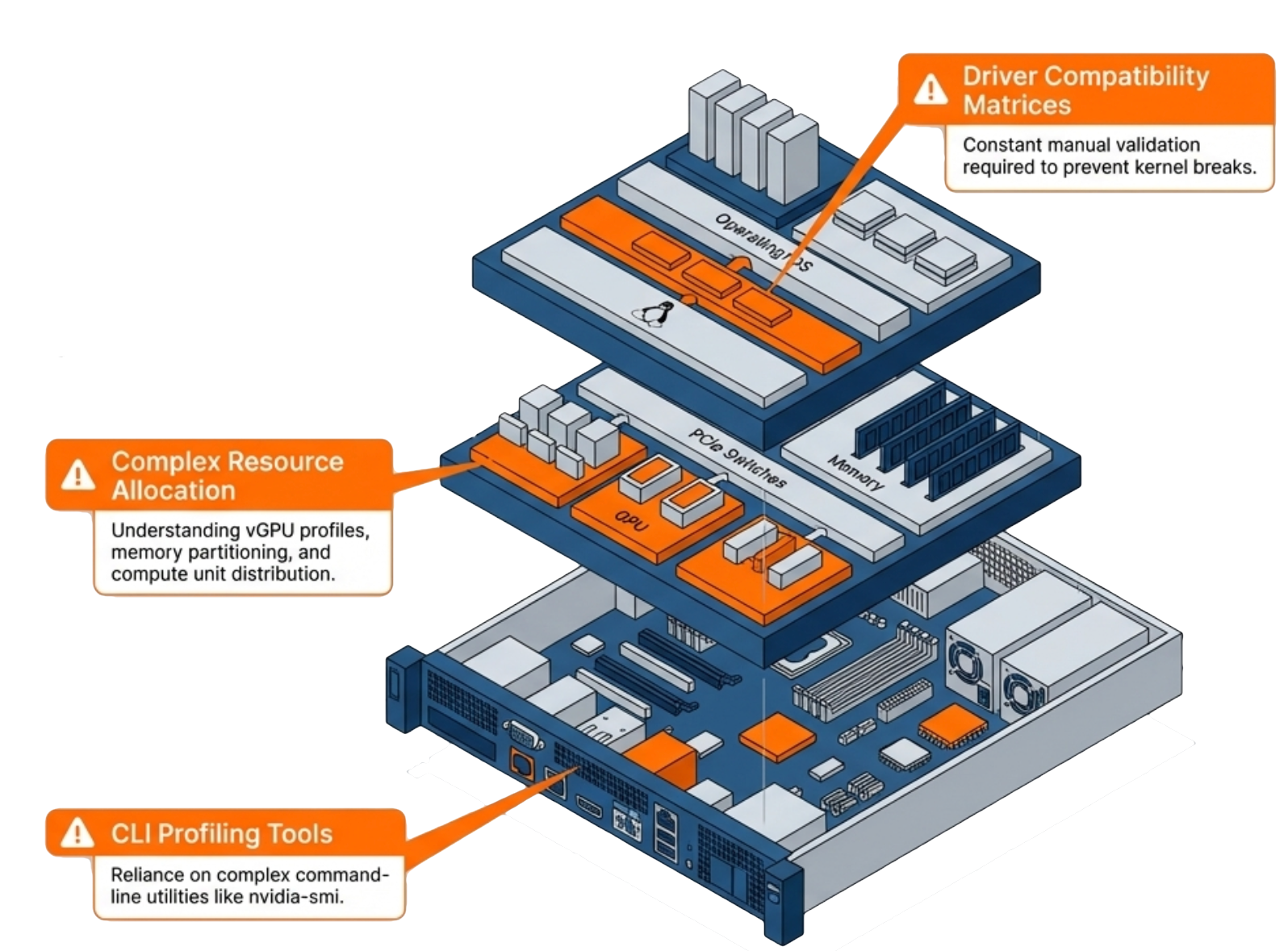
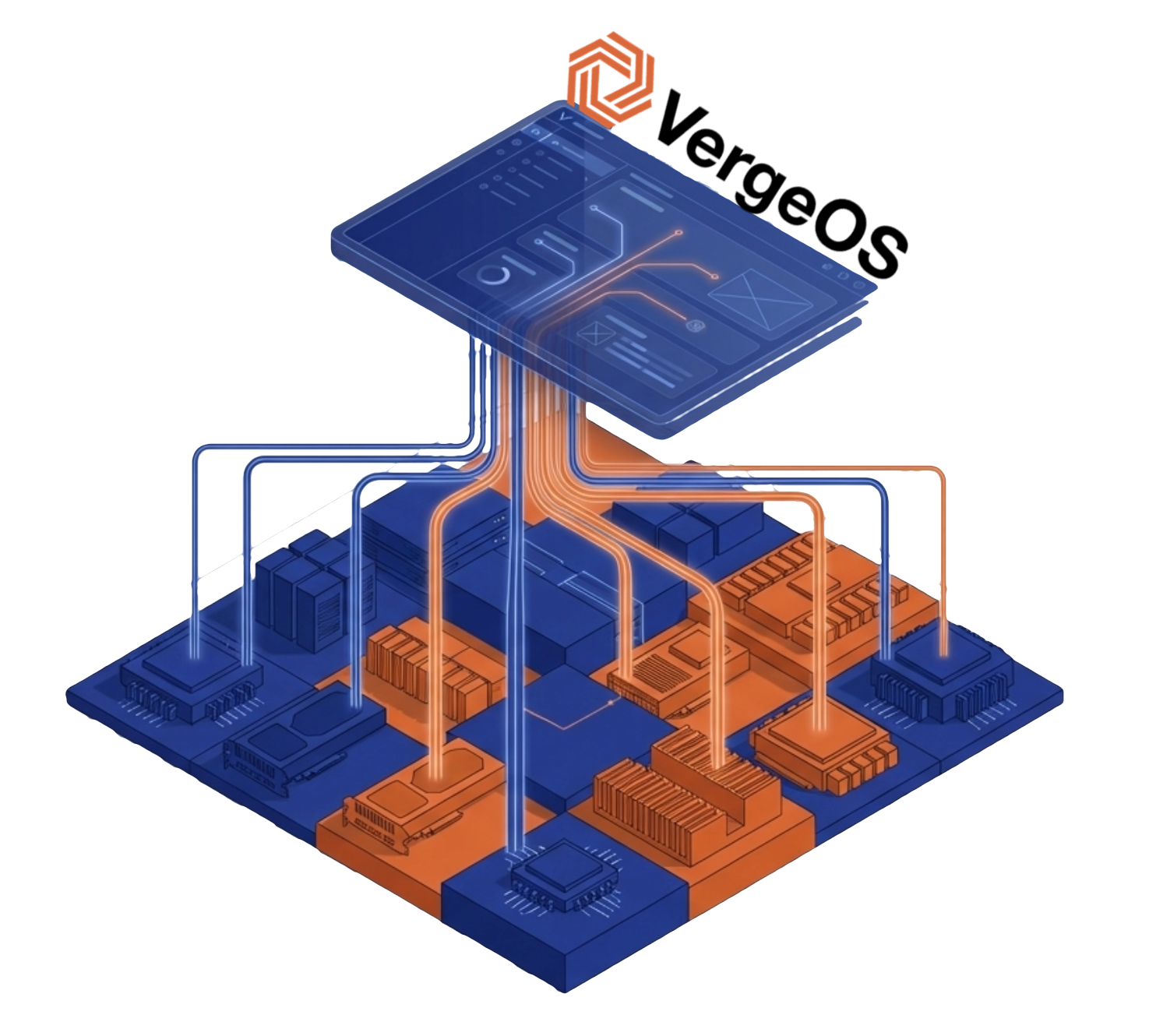
Driver management, resource allocation, Multi-Instance GPU configuration, and troubleshooting demand knowledge that sits outside the typical sysadmin skill set. Organizations either hire dedicated GPU specialists, engage expensive consultants, or avoid GPU workloads altogether. VergeOS changes that equation. The partnership with NVIDIA brings vGPU capabilities into the same unified management interface that IT teams already use for compute, storage, and networking. No separate tools. No specialized training. No operational friction.

Multi-Instance GPU: One GPU, Multiple Workloads

GPU management complexity without VergeOS

Not every workload needs a full GPU. A data scientist running inference tests does not require the same resources as a team training a large model. Traditional GPU allocation forces a choice: dedicate an entire GPU to a single workload or deal with the complexity of manual resource sharing.

NVIDIA Multi-Instance GPU (MIG) solves this problem by partitioning a single physical GPU into multiple isolated instances. Each instance gets dedicated memory and compute resources. Workloads running on separate MIG instances cannot interfere with each other, and each instance behaves like an independent GPU from the application’s perspective.

The catch: MIG configuration traditionally requires command-line expertise and careful planning. IT teams need to understand partition sizes, memory allocation, and how to reconfigure instances as workload requirements change. VergeOS automates MIG configuration through the same interface used for all other infrastructure management. Select the partition profile that matches your workload requirements, and VergeOS handles the rest. When requirements change, reconfigure without touching a command-line tool or GPU management utility.

What It Means That NVIDIA Introduced VergeOS as a Supported vGPU Platform

VergeOS unified GPU management interface

NVIDIA introducing VergeOS as a supported vGPU platform matters for one reason: support escalation paths. When something goes wrong with GPU workloads, enterprises need to know both vendors will stand behind the deployment. Joint support means IT teams can deploy vGPU workloads with confidence. If driver issues arise, both VergeOS and NVIDIA engineering teams collaborate on resolution. No finger-pointing. No gaps in coverage.

This designation also signals that NVIDIA’s technical teams have validated VergeOS as an enterprise-ready platform for GPU virtualization. NVIDIA does not introduce platforms lightly. Their enterprise customers expect validated, tested configurations, and NVIDIA’s reputation depends on partner platforms delivering consistent results. For full details on what this means for your deployment, see the official announcement.

Practical Applications for Visual Compute and AI Development

Visual compute and AI development use cases extend well beyond training large language models. Engineering simulation, scientific visualization, and inference workloads all benefit from GPU acceleration without requiring massive GPU clusters. These are five scenarios standard IT teams can deploy today without GPU specialists:

VDI with GPU acceleration gives knowledge workers access to applications that previously required dedicated workstations. NVIDIA RTX Virtual Workstation (vWS) delivers workstation-class GPU performance to engineers, designers, and scientists running visualization and simulation applications from centralized infrastructure. NVIDIA Virtual PC (vPC) extends graphics-capable virtual desktops to a broader user population connecting from standard endpoints.

Hosted application delivery brings GPU-accelerated applications to users without dedicated workstation hardware. NVIDIA Virtual Applications (vApps) delivers individual GPU-accelerated applications to any endpoint, giving organizations flexibility to extend specific tools — rendering software, simulation packages, AI development IDEs — without provisioning full virtual desktops.

AI inference at the edge processes data locally without sending it to external services. Manufacturing quality control, retail analytics, and healthcare imaging all benefit from on-premises GPU acceleration.

Multi-tenant AI development splits a single high-end GPU across multiple data science teams. Each team gets an isolated MIG instance with guaranteed resources. No contention, no noisy neighbor problems, and no need to purchase separate GPUs for each group.

Database acceleration uses GPUs for analytics workloads, dramatically reducing query times on large datasets. Business intelligence teams get faster insights without specialized database infrastructure.

NVIDIA and VergeOS GPU use cases

Getting Started

Organizations with existing VergeOS deployments can add GPU capabilities to their current infrastructure. Install supported NVIDIA GPUs in your servers, and VergeOS handles the rest — driver management, MIG configuration, resource allocation, and monitoring all from the same interface your team already operates. No separate management plane. No new interfaces to learn.

For organizations evaluating private cloud platforms, the NVIDIA partnership demonstrates the direction VergeOS is headed: an infrastructure layer that makes advanced capabilities accessible to standard IT operations. GPU management today, and whatever comes next tomorrow. The goal is consistent — eliminate the operational complexity that prevents organizations from using the infrastructure they already own. Visual compute and AI development infrastructure should not require specialized GPU staff.

Take a Test Drive Today — No hardware required.

See it live: join the GPU Virtualization Without the Complexity webinar on April 2nd at 1:00 PM ET for a live demonstration of MIG configuration, vGPU profiles, and one-time driver upload in a unified private cloud environment.

Explore the full platform details on the Abstracted GPU Infrastructure page, or read the official announcement.

?Frequently Asked Questions
What makes on-premises GPU infrastructure different from public cloud AI?
On-premises GPU infrastructure keeps all data, model weights, and inference outputs inside the organization’s security boundary. Public cloud AI routes sensitive data through third-party infrastructure, creating compliance risk for regulated industries and organizations with proprietary data. On-premises GPU-accelerated infrastructure delivers the same performance as cloud without the data sovereignty concerns.
Do we need to hire GPU specialists to run VergeOS with NVIDIA vGPU?
No. VergeOS manages driver deployment, MIG configuration, resource allocation, and GPU monitoring through the same interface IT teams already use for compute, storage, and networking. The platform abstracts GPU complexity so sysadmins who have never managed a GPU can deploy and operate vGPU workloads from day one.
What is MIG and why does it matter for multi-tenant AI deployments?
Multi-Instance GPU partitions a single physical GPU into isolated instances at the hardware level. Each instance gets dedicated compute engines, memory, and bandwidth. Because the isolation is enforced in silicon, workloads in one MIG instance cannot affect neighboring instances — no noisy neighbor effects, no contention. For multi-tenant environments, MIG provides the same guarantees as separate physical GPUs at a fraction of the cost.
What NVIDIA GPU hardware is supported with VergeOS today?
Currently validated data center GPUs include the A100, A30, A40, and L40 series in VergeOS 26.1.3. MIG vGPU functionality has been validated on the NVIDIA Blackwell RTX Pro 6000 Server Edition. NVIDIA vGPU software licenses are required for vGPU operation and are available through NVIDIA-authorized partners.
Where can I see VergeOS GPU management in action?
Register for the live webinar on April 2nd at 1:00 PM ET at GPU Virtualization Without the Complexity. The session covers pass-through, vGPU, and MIG configuration in a unified environment with a live demo. An on-demand replay will be available after the event.
What does it mean that NVIDIA introduced VergeOS as a supported vGPU platform?
NVIDIA introduced VergeOS as a supported vGPU platform, meaning VergeOS 26.1.3 appears on NVIDIA’s validated platform list as a supported configuration for enterprise GPU virtualization. When GPU issues arise, both VergeOS and NVIDIA engineering teams collaborate on resolution. IT teams get a clear support escalation path with no gaps between vendors. GPU support is additive — install supported NVIDIA GPUs into existing cluster nodes and VergeOS automatically detects and inventories the hardware.

Filed Under: AI Tagged With: GPU, IT infrastructure, NVIDIA - VergeOS AI Workstation Campaign, Private AI, vGPU

March 2, 2026 by George Crump

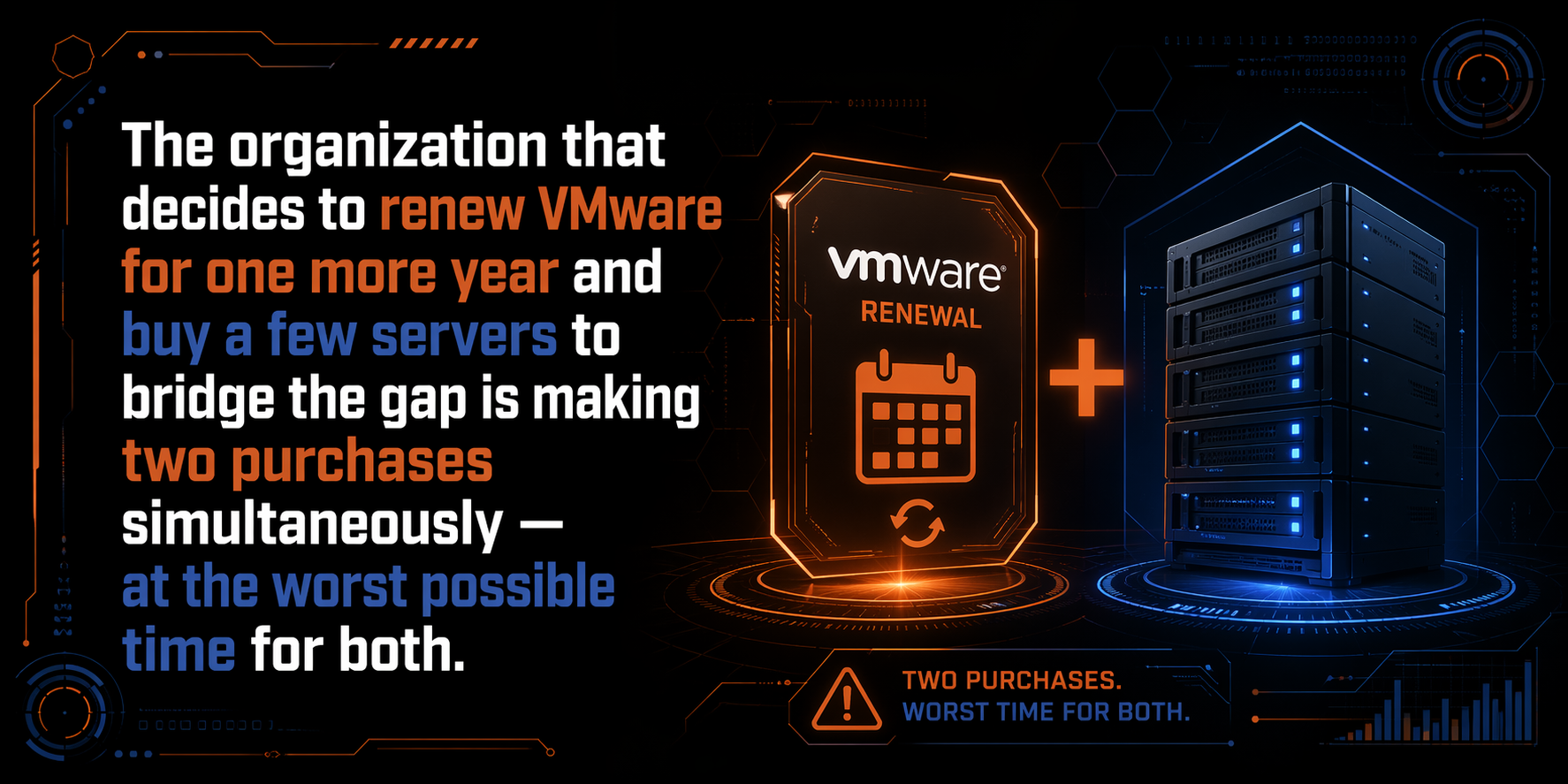
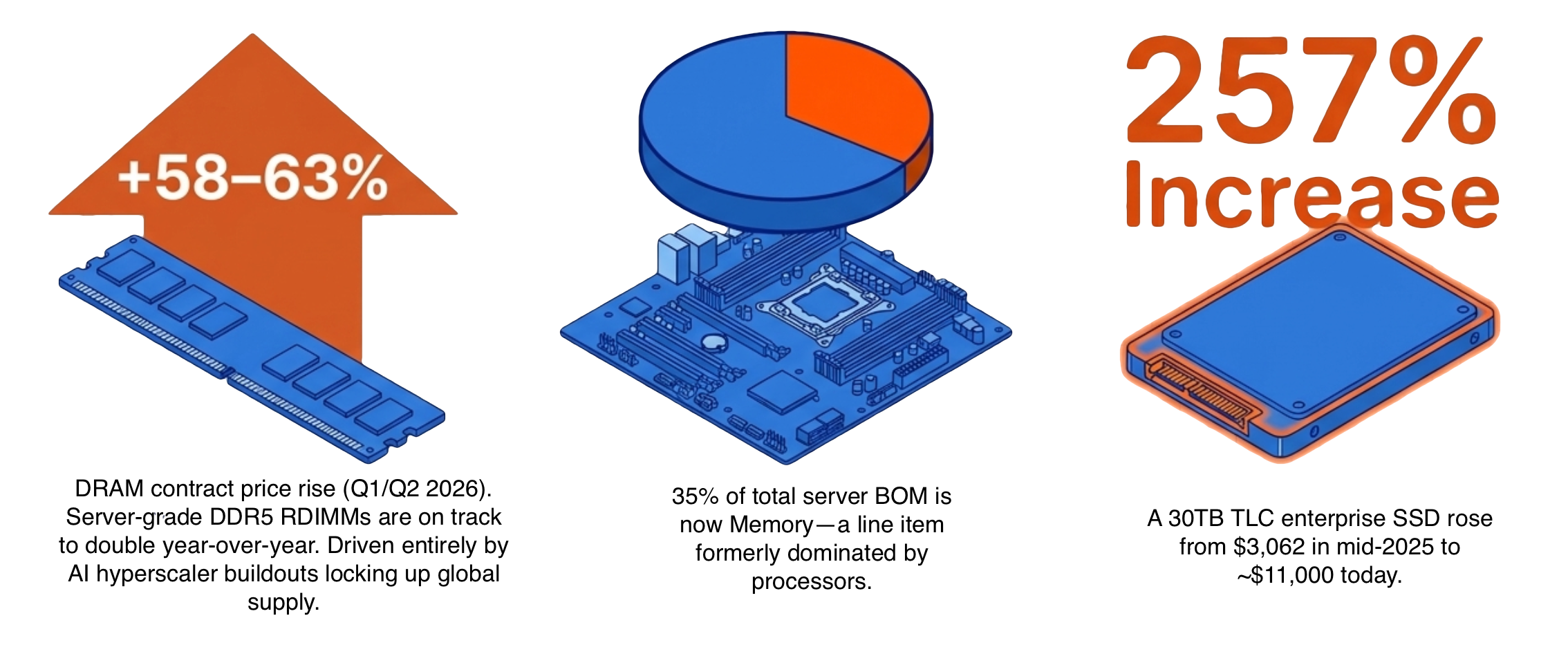
The supply of RAM and flash storage is not keeping up with demand. The shortage is driving prices higher and pushing delivery times out by months. According to an SK Hynix internal analysis, high prices and constrained supply are expected to continue through at least 2028. For IT planners already facing the rising cost of VMware licensing and looking for a VMware alternative, the timing is brutal. The solution is to consolidate VMs onto fewer hosts, but then IT needs to account for the hidden risk of VM Density, the blast radius.

Key Takeaways
  • RAM and flash supply constraints are expected to last through at least 2028. Reducing protection levels to offset rising prices puts data at risk during the period when that data is most valuable.
  • VM consolidation saves money but increases blast radius. When a dense host fails, it takes more VMs, more CPU, more memory, and more storage offline simultaneously than a traditional environment.
  • ioOptimize uses AI to proactively migrate workloads off degrading servers before failure and intelligently redistribute displaced VMs across surviving hosts based on actual resource demands.
  • RF2 mirrored redundancy and ioGuardian work together to extend protection from N+1 to N+2 without the performance overhead of RAID 6 or erasure coding.
  • Integrated replication and virtual data centers turn the DR site into an active protection layer, with cross-site ioGuardian recovery and full application stack failover in minutes.
  • RF3 triple mirroring, new in VergeOS 26.1, combined with ioGuardian delivers N+X availability where data remains accessible as long as one production server and the repair server are running.
  • VergeOS’s layered protection architecture scales with density, letting organizations capture the full cost savings of VM consolidation without accepting the availability risk that density traditionally creates.

If the risks of VM density can be contained or eliminated, the return on investment from increasing VM density is significant under normal market conditions. During a memory and flash supercycle, it becomes a strategic imperative.

Key Terms
  • Blast Radius — The scope of operational impact caused by a single failure event. In dense environments, one server going offline removes more VMs, CPU, memory, and storage from the cluster simultaneously.
  • VM Consolidation — The practice of running more virtual machines per physical host to reduce hardware costs, power, cooling, and data center footprint.
  • ioOptimize — VergeOS technology that uses AI and machine learning to balance workloads across mixed-generation servers, proactively migrate VMs off degrading hardware, and intelligently redistribute displaced VMs during failures.
  • RF2 Mirrored Redundancy — N+1 data protection that maintains two copies of every data block on separate fault domains. Provides fast rebuilds through direct block copies rather than parity reconstruction.
  • ioGuardian — A dedicated VergeOS instance that holds a protected third copy of data and provides inline VM recovery during failures. Extends protection from N+1 to N+2 without hosting production workloads.
  • RF3 Triple Mirroring — N+2 data protection new in VergeOS 26.1 that maintains three complete copies of every data block. Combined with ioGuardian, it delivers N+X availability.
  • N+X Availability — Protection level achieved by combining mirroring with an ioGuardian repair server. Data remains accessible as long as one production server and the repair server are running, without reaching for backups.
  • Virtual Data Centers — VergeOS technology that encapsulates entire application stacks for rapid failover to a remote site in minutes, without VM-by-VM configuration at the DR site.
  • Granular Replication — New in VergeOS 26.1, the ability to replicate specific workloads or data sets rather than replicating everything, reducing WAN bandwidth consumption and giving finer control over cross-site protection.

The ROI of VM Density

Every server removed from the environment eliminates its share of RAM, flash, power, cooling, licensing, and rack space costs. VergeOS customers who reduce server count by 25% do not just save on the servers themselves. They avoid purchasing RAM and NVMe drives for those servers at supercycle pricing. A four-server reduction in a 16-server cluster removes roughly 25% of the organization’s exposure to price increases in memory and flash in a single move.

VM density blast radius

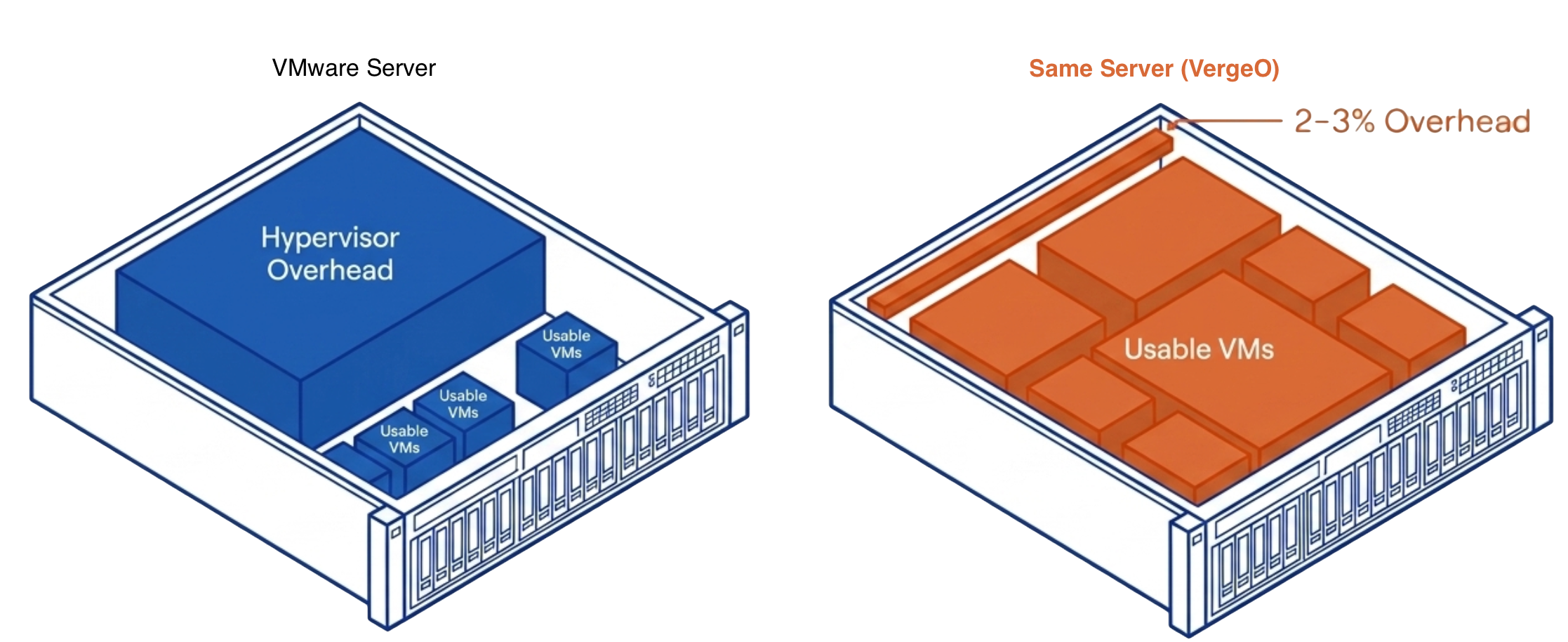
The 30% reduction in per-VM memory allotment compounds the savings. A VM that required 16GB of RAM under VMware runs on 11GB under VergeOS. Multiply that savings across hundreds of VMs, and the organization reclaims terabytes of RAM capacity that it no longer needs to purchase, license, or replace at inflated prices. That reclaimed capacity either extends the life of existing hardware or reduces the bill of materials on the next refresh.

The combined effect is fewer servers, less memory per VM, and commodity drives instead of vendor-priced components. Organizations that achieve this level of consolidation spend less on infrastructure during the supercycle while maintaining or increasing their total workload capacity. The ROI is clear. The question is whether the protection architecture can keep pace with the density. That is the blast radius problem.

The VM Density Blast Radius Problem

Higher VM density means more VMs per host and more storage capacity inside each host. With modern hardware, the odds of a server or SSD drive failure are low. The odds of a second or third simultaneous failure are even lower. The real concern is the blast radius, meaning how much of the operation a single failure impacts.

When a host running 40 VMs goes offline, it does not just remove drives from the storage pool. It removes 40 running workloads, along with their CPU, memory, and network connections. The surviving hosts absorb the displaced VMs on top of their existing workloads and any storage rebuild I/O. A workload spike on a dense host creates a ripple effect, forcing resource contention across the cluster and degrading performance for every VM, not just the one experiencing the spike.

Traditional infrastructure spreads this risk across more physical servers, with fewer VMs per server. VM density concentrates it. The savings from higher density are real, but only if the protection architecture accounts for the larger blast radius.

How VergeOS Protects VM Dense Environments

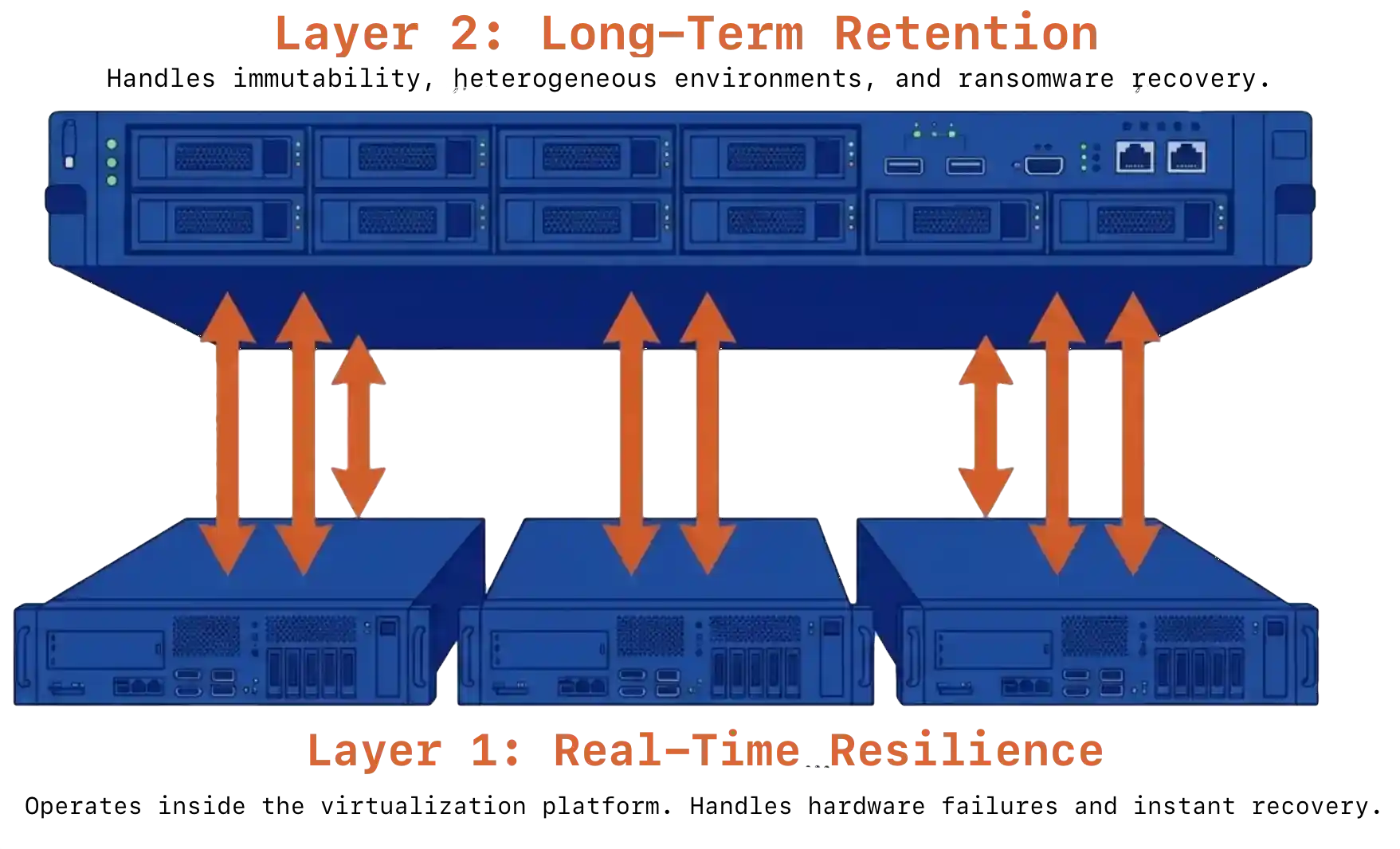
VergeOS addresses the VM density blast radius with a layered protection architecture. Each layer targets a different failure scenario, from early degradation warnings to complete site loss.

ioOptimize uses AI and machine learning to continuously monitor the health, performance, and capacity of every server in the environment. Its algorithms distribute workloads based on each server’s actual capabilities, assigning lighter tasks to aging hardware and directing demanding workloads to newer servers. This intelligent placement lets organizations run mixed-generation environments without prematurely retiring older servers. The scale-down capability goes further, consolidating VMs and storage onto denser configurations to reduce power, cooling, and physical footprint. The result is fewer servers doing more work, which directly reduces the hardware exposed to the memory and flash supercycle pricing.

VM density blast radius

ioOptimize also changes how the cluster responds to server failures. It monitors for early indicators of degradation and proactively migrates workloads off at-risk servers before a hard failure occurs. When a server does fail unexpectedly, ioOptimize evaluates the resource demands of each displaced VM and matches them against available capacity on the surviving hosts. Instead of dumping 40 VMs onto the nearest available server and creating a new hotspot, it distributes them based on actual CPU, memory, and I/O requirements. That intelligent redistribution keeps the blast radius contained and prevents a single failure from cascading into a cluster-wide performance problem.

RF2 Mirrored Redundancy keeps two copies of every data block on separate fault domains. When a drive or server fails, the surviving copy handles all requests without degrading performance. Rebuilds are fast because the process copies intact blocks directly from the surviving mirror rather than reconstructing data from parity calculations.

VM density blast radius

ioGuardian maintains a protected third copy of data on a separate VergeOS instance that can provide inline recovery of VMs. The ioGuardian server does not host production workloads. Its dedicated role is to feed missing data blocks back to the production environment during failures, keeping production hosts focused on running VMs rather than diverting resources to data reconstruction. This extends protection from N+1 to N+2 without adding the performance overhead of RAID 6 or erasure coding.

ioReplicate sends both production data and ioGuardian data to a remote site. If the primary site’s ioGuardian instance fails at the same time as a production failure, the ioGuardian at the DR site can still perform inline recovery to the production cluster at the primary site. This cross-site protection layer covers failure scenarios that no single-site architecture can address.

Virtual Data Centers make recovery at the remote site straightforward when the primary site fails completely. Entire application stacks restart at the DR site in minutes, not hours. The encapsulation of full workload environments means the DR site does not need to be configured VM by VM.

VergeOS 26.1 Strengthens the Protection Stack

RF3 Triple Mirroring, new in VergeOS 26.1, provides N+2 availability for organizations that demand maximum protection. Three complete copies of every data block mean two simultaneous failures cause zero data loss and near-zero performance impact. When combined with ioGuardian, RF3 enables the environment to reach N+X availability, where data remains accessible as long as one production server and the repair server are running.

VergeOS 26.1 increases replication performance by 2x, cutting the time required to synchronize data between sites. Faster replication narrows the window where the DR site lags behind the primary, reducing the amount of data at risk during a site-level failure.

Version 26.1 also introduces granular replication, allowing IT planners to replicate specific workloads or data sets rather than replicating everything. This precision reduces bandwidth consumption on the WAN link and gives organizations finer control over which data gets the highest level of cross-site protection.

Density Without the Risk

VM density reduces hardware costs, shrinks the data center footprint, and frees budget for strategic initiatives. The risk is that traditional protection methods were designed for environments with fewer VMs per host and less data per server. As density increases, the blast radius of each failure grows.

VergeOS addresses this with a layered protection architecture that scales with density. ioOptimize keeps workloads balanced and migrates VMs off failing servers before they crash. RF2 handles single failures with no performance impact. ioGuardian extends protection to N+2 with a dedicated repair path that does not compete with production workloads. Integrated replication and virtual data centers add cross-site recovery that activates in minutes. Now with 26.1, RF3 combined with ioGuardian delivers N+X availability for environments where any downtime is unacceptable.

The result is an infrastructure that captures the full cost savings of VM density without accepting the availability risk that density traditionally creates.

Why does VM consolidation increase risk?

Packing more VMs onto fewer hosts means each server failure takes more workloads offline at once. The surviving hosts absorb those displaced VMs on top of their existing workloads and any storage rebuild I/O, creating resource contention that can degrade performance across the entire cluster.

How does ioOptimize prevent failures from cascading?

ioOptimize monitors every server for early signs of degradation and proactively migrates workloads before a hard failure occurs. When a server does fail, it evaluates the resource demands of each displaced VM and distributes them across surviving hosts based on actual CPU, memory, and I/O capacity rather than dumping them onto the nearest available server.

What is the difference between RF2 and RF3?

RF2 keeps two copies of every data block and provides N+1 protection, sustaining one device failure without data loss. RF3 keeps three copies and provides N+2 protection, sustaining two simultaneous failures. RF3 is new in VergeOS 26.1 and is designed for organizations that demand maximum availability.

How does ioGuardian extend protection beyond RF2 or RF3?

ioGuardian maintains a protected copy of data on a separate VergeOS instance that does not host production workloads. During failures, it feeds missing data blocks back to the production environment in real time. Combined with RF2 it delivers N+2 protection. Combined with RF3 it delivers N+X availability, where data stays accessible as long as one production server and the repair server are running.

Can ioGuardian work across sites?

Yes. Integrated replication sends both production data and ioGuardian data to a remote site. If the primary site’s ioGuardian fails at the same time as a production failure, the ioGuardian at the DR site can still perform inline recovery to the primary production cluster over the WAN.

What happens if the primary site fails completely?

Virtual data centers encapsulate entire application stacks for failover at the remote site. The DR site does not need VM-by-VM configuration. Full workload environments restart in minutes, not hours.

How long will RAM and flash prices stay elevated?

According to SK Hynix internal analysis, commodity DRAM supply is projected to remain constrained through at least 2028. Multiple industry analysts expect high prices and tight supply to persist until new fabrication facilities reach volume production.

How does VergeOS reduce exposure to the memory supercycle?

VergeOS’s single-codebase architecture reduces physical server count by up to 25% and per-VM memory allotment by 30%. Its ultraconverged design supports commodity NVMe drives and standard memory instead of vendor-specific components with inflated pricing. Fewer servers consuming less memory per VM means less hardware exposed to supercycle pricing.

What is granular replication?

New in VergeOS 26.1, granular replication lets IT planners replicate specific workloads or data sets to a remote site rather than replicating everything. This reduces WAN bandwidth consumption and gives organizations finer control over which data receives the highest level of cross-site protection.

Frequently Asked Questions
  • Why does VM consolidation increase risk? — Packing more VMs onto fewer hosts means each server failure takes more workloads offline at once. The surviving hosts absorb those displaced VMs on top of their existing workloads and any storage rebuild I/O, creating resource contention that can degrade performance across the entire cluster.
  • How does ioOptimize prevent failures from cascading? — ioOptimize monitors every server for early signs of degradation and proactively migrates workloads before a hard failure occurs. When a server does fail, it evaluates the resource demands of each displaced VM and distributes them across surviving hosts based on actual CPU, memory, and I/O capacity rather than dumping them onto the nearest available server.
  • What is the difference between RF2 and RF3? — RF2 keeps two copies of every data block and provides N+1 protection, sustaining one device failure without data loss. RF3 keeps three copies and provides N+2 protection, sustaining two simultaneous failures. RF3 is new in VergeOS 26.1 and is designed for organizations that demand maximum availability.
  • How does ioGuardian extend protection beyond RF2 or RF3? — ioGuardian maintains a protected copy of data on a separate VergeOS instance that does not host production workloads. During failures, it feeds missing data blocks back to the production environment in real time. Combined with RF2 it delivers N+2 protection. Combined with RF3 it delivers N+X availability, where data stays accessible as long as one production server and the repair server are running.
  • Can ioGuardian work across sites? — Yes. Integrated replication sends both production data and ioGuardian data to a remote site. If the primary site’s ioGuardian fails at the same time as a production failure, the ioGuardian at the DR site can still perform inline recovery to the primary production cluster over the WAN.
  • What happens if the primary site fails completely? — Virtual data centers encapsulate entire application stacks for failover at the remote site. The DR site does not need VM-by-VM configuration. Full workload environments restart in minutes, not hours.
  • How long will RAM and flash prices stay elevated? — According to SK Hynix internal analysis, commodity DRAM supply is projected to remain constrained through at least 2028. Multiple industry analysts expect high prices and tight supply to persist until new fabrication facilities reach volume production.
  • How does VergeOS reduce exposure to the memory supercycle? — VergeOS’s single-codebase architecture reduces physical server count by up to 25% and per-VM memory allotment by 30%. Its ultraconverged design supports commodity NVMe drives and standard memory instead of vendor-specific components with inflated pricing. Fewer servers consuming less memory per VM means less hardware exposed to supercycle pricing.
  • What is granular replication? — New in VergeOS 26.1, granular replication lets IT planners replicate specific workloads or data sets to a remote site rather than replicating everything. This reduces WAN bandwidth consumption and gives organizations finer control over which data receives the highest level of cross-site protection.

Filed Under: Protection Tagged With: dataprotection, Disaster Recovery, IT infrastructure

February 2, 2026 by George Crump

The conventional wisdom is to move from VMware to an alternative hypervisor, but should organizations move from VMware to private cloud instead? VMware licensing pressure affects enterprises of all sizes. The default response swaps hypervisor vendors. The better response evaluates whether private cloud infrastructure actually addresses the operational and economic problems driving VMware’s exit, especially given the second crisis of rising RAM and flash prices.

Key Takeaways
  • VMware exits should evaluate private cloud infrastructure, not just alternative hypervisors. Hypervisor swaps address licensing costs but preserve fragmented infrastructure complexity.
  • Private cloud extends abstraction to the entire infrastructure. Compute, storage, networking, and data protection consolidate into one platform with a single control plane.
  • Four servers is minimum viable scale. Private cloud platforms like VergeOS require at least two nodes for production, but four nodes provide comfortable headroom and scale naturally to hundreds.
  • Hardware retention changes the economics. VergeOS runs on existing x86 servers without vendor restrictions, dropping capital requirements to near zero for organizations with serviceable hardware.
  • Efficiency improvements reduce server requirements. Platform-level caching and 3X to 4X deduplication increase VM density, allowing organizations to run more workloads on fewer servers.
  • Two private cloud models operate differently. Orchestrated platforms (Dell Private Cloud) coordinate separate products through automation. Integrated platforms (VergeOS) consolidate functions into one operating system.
  • Growth happens without architectural changes. Adding nodes extends capacity automatically without redesigning storage arrays, SAN fabrics, or backup infrastructure.
  • Private cloud addresses the operational problem. Hypervisor swaps address licensing problems. Organizations should choose based on which problem costs more.

VMware exits create an opportunity to consolidate infrastructure rather than just swap hypervisor vendors. For organizations running four or more servers, this consolidation path delivers better outcomes than replacing the hypervisor alone. The question is not which hypervisor to choose. The question is whether you rebuild the same fragmented architecture with a different hypervisor or move to a private cloud infrastructure that actually simplifies operations.

from VMware to private cloud
Key Terms
Private Cloud
Infrastructure architecture that extends abstraction beyond compute to include software-defined storage, virtualized networking, and infrastructure-aware data protection managed through a single control plane.
Virtualization
Technology that abstracts physical servers into virtual machines using a hypervisor, but leaves storage, networking, and data protection as separate traditional infrastructure components.
Orchestrated Private Cloud
Private cloud architecture that coordinates separate products (compute servers, storage arrays, hypervisors) through automation layers. Each component retains its own lifecycle and management requirements.
Integrated Private Cloud
Private cloud architecture that consolidates compute, storage, networking, and data protection as native capabilities of a single operating system without separate products requiring coordination.
Hardware Abstraction
Platform capability that treats physical servers as pooled capacity resources rather than individual systems, enabling workload distribution and hardware refresh without migration projects.
Platform-Level Caching
Caching mechanism that operates at the infrastructure platform level rather than within individual VMs, reducing per-VM RAM requirements and participating in global deduplication.
Control Plane
The management layer that governs infrastructure operations. Fragmented control planes require coordinating multiple products. Unified control planes manage all infrastructure functions through one system.
Software-Defined Storage
Storage architecture that distributes data across cluster nodes through software rather than requiring external storage arrays, eliminating separate storage refresh cycles and SAN fabric dependencies.

Virtualization vs. Private Cloud: Understanding the Difference

from VMware to private cloud

The distinction between virtualization and private cloud determines your operational model for the next decade. Virtualization abstracts servers. A hypervisor carves physical servers into virtual machines. Storage remains external, networking remains physical, and data protection requires separate products. Teams manage virtualization, but everything else stays traditional.

Private cloud extends abstraction to the entire infrastructure. Compute becomes virtualized. Storage becomes software-defined. Networking becomes virtualized. Data protection becomes infrastructure-aware. Hardware resources pool into a capacity managed through a single control plane.

The architectural difference matters for teams of any size. Virtualization creates expertise silos. Someone manages the hypervisor. Someone manages storage. Someone handles networking. Someone maintains backup infrastructure. Organizations with small teams spread individuals across multiple domains. Organizations with large teams build specialized groups that require coordination. The operational burden compounds as infrastructure grows.

from VMware to private cloud

Private cloud consolidates these domains into one operational model. Teams provision workloads by allocating resources from a shared pool rather than coordinating across products. Data protection happens through platform policies rather than a separate backup infrastructure. Capacity expansion means adding servers rather than evaluating whether storage arrays can handle additional load. The consolidation reduces operational overhead regardless of team size.

Three Servers to Three Hundred: Private Cloud Scales Across the Range

Private cloud deployments start small and scale naturally. Organizations evaluating private cloud wonder about the minimum viable scale. The answer depends on platform architecture rather than organization size.

Private cloud platforms like VergeOS require at least two nodes for production deployments. Three nodes provide better fault tolerance. Four nodes create comfortable capacity headroom for growth. VergeOS efficiency enables growth well beyond four servers within a single instance. Small organizations start at this scale and remain there. Large enterprises start pilot deployments at this scale before expanding to hundreds of nodes.

The operational model remains constant as scale increases. Teams managing four nodes use the same interface, same procedures, and same troubleshooting approach as teams managing four hundred nodes. Operational knowledge compounds rather than fragments. Skills developed at a small scale remain valuable at a large scale. The platform handles workload distribution, data placement, and failure recovery automatically, regardless of node count.

Private Cloud Hardware Retention Changes the Economics

Most VMware alternatives assume a hardware refresh accompanies a hypervisor change. You buy new servers, deploy the new platform, migrate workloads, and decommission old hardware. Capital requirements double during migration. The financial burden delays projects or forces compromises in capacity. RAM and flash storage prices compound the problem.

Private cloud platforms supporting broad hardware compatibility change the economic equation. VergeOS runs on commodity x86 servers without vendor restrictions. Organizations install the platform on existing servers and continue using that hardware as the software layer modernizes. Capital requirements drop to near zero for organizations with serviceable hardware.

Hardware abstraction protects existing investments and creates procurement flexibility. Refresh decisions focus on capacity requirements and price performance rather than vendor certification matrices. Organizations buy hardware based on economics rather than platform mandates. The separation between software value and hardware cost clarifies total cost of ownership in ways vendor-locked platforms cannot match.

Private Cloud Efficiency Improvements

Efficiency gains determine whether the private cloud justifies the migration effort. Private cloud platforms deliver efficiency improvements that hypervisor swaps alone cannot match. VergeOS customers increase VM density per physical host compared to their previous VMware deployments. The improvement comes from how the platform manages resources, not just how it schedules workloads.

VergeOS includes platform-level caching that reduces VM-level RAM allocation requirements. Traditional virtualization requires each VM to carry its own cache allocation. Platforms must over-provision RAM to account for caching overhead across all VMs.

VergeOS handles caching at the platform level, so each VM requires less RAM but maintains performance. Platform-level caching participates in VergeOS global inline deduplication, making it 3X to 4X more effective.

The practical result is that the same physical servers support more VMs running on a private cloud platform than they did running traditional virtualization. Organizations need fewer servers than they planned. Teams that planned six-node deployments find four nodes sufficient. Teams running four nodes now have the capacity headroom they lacked before.

from VMware to private cloud

Processor requirements also decline. VergeOS integrates virtualization, storage, and networking into a single codebase. The integration eliminates the overhead of coordinating separate products. Traditional virtualization stacks dedicate CPU cycles to managing relationships between the hypervisor, storage arrays, and network infrastructure. Private cloud platforms reclaim those cycles for actual workloads.

Scaling Without Architectural Changes

Organizations evaluating private cloud need platforms that support growth trajectories. Three servers today become six servers next year. Six servers become twelve servers over three years. Platforms must accommodate growth without architectural changes or migration projects.

Private cloud platforms handle growth naturally. You add nodes to the system. Platforms automatically redistribute workloads, extend storage capacity, and increase network bandwidth.

There is no storage array that must be refreshed separately from servers. There is no SAN fabric to redesign. There is no separate backup infrastructure to scale independently. Growth means adding capacity rather than coordinating procurement across multiple products.

Large enterprises benefit from the same model. Adding 100 servers uses the same process as adding 1 server. The platform scales linearly without introducing new operational patterns or management tools. Complexity remains constant as capacity grows.

Not All Private Clouds Are the Same

Understanding the architectural distinction between private cloud models prevents costly platform selection errors. The term “private cloud” gets applied to architectures that operate very differently. Learn more about the different types of Private Cloud in our upcoming webinar and demonstration.

Orchestrated Private Clouds

Orchestrated private clouds coordinate separate products through automation layers. Dell Private Cloud, its alternative to VxRail, exemplifies this approach. Platforms combine external storage arrays, separate hypervisors, and automation tooling to make disparate components act as one system.

Orchestration works until system interdependencies fail. Storage upgrades happen independently from compute refreshes. Hypervisor patches follow different schedules than storage firmware. Failures cascade across product boundaries. Automation masks complexity rather than eliminating it. Coordination overhead accumulates over time. The orchestrated model collapses under its own weight as scale increases.

Private Cloud Operating System

Private Cloud Operating Systems consolidate infrastructure functions into one platform. VergeOS represents this approach. Compute, storage, networking, and data protection run as native capabilities of a single operating platform.

There are no separate products to coordinate. The integration allows organizations to migrate from VMware quickly and gradually expand into full private cloud capabilities. You start by replacing the hypervisor. You end up with a consolidated infrastructure that runs on fewer servers and is less complex. Integration delivers durability that orchestration cannot match.

The architectural difference determines operational reality. Orchestrated platforms require teams to understand and manage multiple products. Private Cloud Operating Systems consolidate operational knowledge into one system. Small teams eliminate expertise silos. Large teams reduce coordination overhead between specialized groups.

When to Make the Move

VMware licensing pressure creates the immediate forcing function. Organizations must decide whether to swap hypervisors or consolidate infrastructure. Several indicators suggest that private cloud delivers better outcomes than hypervisor replacement alone.

Your team manages multiple infrastructure silos. Storage teams operate independently from virtualization teams. Network teams coordinate separately. Backup teams run their own infrastructure. The coordination overhead consumes time and creates friction. Private cloud consolidates these silos into one operational model.

Hardware refresh cycles never align. Storage refreshes happen on different timelines than server refreshes. Network infrastructure updates independently. You coordinate procurement across multiple product families rather than managing one platform lifecycle. Private cloud unifies refresh cycles into platform expansion events.

Troubleshooting crosses product boundaries. Performance problems require investigating compute utilization, storage array metrics, network bandwidth, and hypervisor scheduling separately. You coordinate across vendor support organizations. Private cloud troubleshoots within one system with unified diagnostics.

Capacity planning requires multi-product coordination. You evaluate whether storage arrays can support additional load before adding compute capacity. You assess network bandwidth separately from storage performance. Private cloud treats capacity as pooled resources allocated through platform policies.

Migration projects consume months rather than days. Moving from one hypervisor to another requires extensive planning, compatibility testing, and risk mitigation. Private cloud platforms supporting broad hardware compatibility run on existing servers. Migration timelines compress from months to weeks.

Efficiency improvements could avoid hardware purchases. RAM and flash prices make capacity expansions expensive. Platform-level caching and deduplication reduce resource requirements per VM. Organizations avoid server purchases through efficiency gains rather than capital expenditure.

The Path Forward

The VMware disruption creates space for organizations to modernize infrastructure in ways that were not previously feasible. The change can be incremental, swapping VMware for another hypervisor and keeping everything else the same. Or the change can be structural, consolidating infrastructure into a platform that actually reduces complexity.

For organizations running four or more servers, private cloud delivers what virtualization promised but never quite achieved. One platform replaces multiple products. One interface replaces multiple management tools. One operational model replaces coordinated complexity. Hardware investments remain protected. Efficiency improves. Costs drop.

The question is not which hypervisor to choose next. The question is whether your infrastructure requirements demand architectural consolidation or just license renegotiation. Private cloud addresses the operational problem. Hypervisor swaps address the licensing problem. Choose based on which problem actually costs your organization more.

Frequently Asked Questions
Why is four servers the minimum for private cloud?

Private cloud platforms like VergeOS require at least two nodes for production deployments to provide fault tolerance. Three nodes improve resilience. Four nodes create comfortable capacity headroom for growth and maintain full operational capability during hardware maintenance or failures.

Can I run VergeOS on my existing VMware hardware?

Yes. VergeOS runs on commodity x86 servers without vendor restrictions. Organizations install the platform on existing servers and continue using that hardware as the software layer modernizes. Capital requirements drop to near zero for organizations with serviceable hardware.

What’s the difference between orchestrated and integrated private cloud?

Orchestrated private clouds (like Dell Private Cloud) coordinate separate products through automation layers. Each component retains its own lifecycle and management requirements. Integrated private clouds (like VergeOS) consolidate compute, storage, networking, and data protection as native capabilities of a single operating system without separate products.

How does platform-level caching reduce VM RAM requirements?

Traditional virtualization requires each VM to carry its own cache allocation. VergeOS handles caching at the platform level, so each VM requires less RAM but maintains performance. Platform-level caching also participates in global inline deduplication, making it 3X to 4X more effective than VM-level caching.

Will I need fewer servers than I currently run with VMware?

Organizations moving to VergeOS discover they need fewer servers than planned. Teams that planned six-node deployments find four nodes sufficient. Teams running four nodes gain capacity headroom they lacked before. The efficiency comes from platform-level caching, deduplication, and eliminating coordination overhead between separate products.

Does private cloud work for large enterprises or just SMEs?

Private cloud works across the range. Small organizations start at four nodes and remain there. Large enterprises start pilot deployments at four nodes before expanding to hundreds. The operational model remains constant as scale increases. Teams managing four nodes use the same interface and procedures as teams managing four hundred nodes.

How long does migration from VMware to VergeOS take?

Private cloud platforms supporting broad hardware compatibility run on existing servers. Migration timelines compress from months to weeks. VergeOS runs on current hardware, eliminating the need to purchase parallel infrastructure, deploy new platforms, and coordinate forklift migrations.

When should I choose private cloud over hypervisor replacement?

Choose private cloud over hypervisor replacement if your team manages multiple infrastructure silos, hardware refresh cycles never align, troubleshooting crosses product boundaries, capacity planning requires multi-product coordination, or efficiency improvements could avoid hardware purchases. Private cloud addresses operational problems. Hypervisor swaps address licensing problems.

Is four servers the minimum for private cloud?

No. Private cloud platforms like VergeOS require at least two nodes for production deployments to provide fault tolerance. Three nodes improve resilience. Four nodes create comfortable capacity headroom for growth and maintain full operational capability during hardware maintenance or failures.

Can I run VergeOS on my existing VMware hardware?

Yes. VergeOS runs on commodity x86 servers without vendor restrictions. Organizations install the platform on existing servers and continue using that hardware as the software layer modernizes. Capital requirements drop to near zero for organizations with serviceable hardware.

What’s the difference between an orchestrated and an integrated private cloud?

Orchestrated private clouds (such as Dell Private Cloud) integrate separate products through automation layers. Each component retains its own lifecycle and management requirements. Integrated private clouds (such as VergeOS) consolidate compute, storage, networking, and data protection as native capabilities within a single operating system, without separate products.

How does platform-level caching reduce VM RAM requirements?

Traditional virtualization requires each VM to carry its own cache allocation. VergeOS handles caching at the platform level, so each VM requires less RAM but maintains performance. Platform-level caching also participates in global inline deduplication, making it 3X to 4X more effective than VM-level caching.

Will I need fewer servers than I currently run with VMware?

Organizations moving to VergeOS discover they need fewer servers than planned. Teams that planned six-node deployments find four nodes sufficient. Teams running four nodes regain the capacity headroom they previously lacked. The efficiency comes from platform-level caching, deduplication, and the elimination of coordination overhead between separate products.

Does private cloud work for large enterprises or just SMEs?

Private cloud works across the range. Small organizations start at four nodes and remain there. Large enterprises start pilot deployments at four nodes before expanding to hundreds. The operational model remains constant as scale increases. Teams managing four nodes use the same interface and procedures as teams managing four hundred nodes.

How long does migration from VMware to VergeOS take?

Private cloud platforms supporting broad hardware compatibility run on existing servers. Migration timelines compress from months to weeks. VergeOS runs on current hardware, eliminating the need to purchase parallel infrastructure, deploy new platforms, and coordinate forklift migrations.

When should I choose a private cloud over a hypervisor replacement?

Choose private cloud over hypervisor replacement if your team manages multiple infrastructure silos, hardware refresh cycles never align, troubleshooting crosses product boundaries, capacity planning requires multi-product coordination, or efficiency improvements could avoid hardware purchases. Private cloud addresses operational problems. Hypervisor swaps address licensing problems.

Filed Under: Private Cloud Tagged With: Alternative, IT infrastructure, VMware

January 19, 2026 by George Crump

As organizations evaluate VMware alternatives, most focus on finding a replacement hypervisor, when they may be better served by selecting a Private Cloud OS. The hypervisor-only focus means you are swapping VMware for Hyper-V, Proxmox, or Nutanix AHV. However, the issue is not what you swap, but what you keep: the high cost of external all-flash arrays, proprietary network switches and appliances, brittle data and disaster recovery processes, complex operational models, and infrastructure costs spiraling out of control.

Simply swapping the hypervisor only solves one problem. It does not solve the broader infrastructure problem that is costing you 5X more than hypervisor licensing.

Key Takeaways
  • Hypervisor swaps solve one problem: Replacing VMware with another hypervisor preserves expensive storage arrays, proprietary networking, brittle backup processes, and complex operational models that cost 5X more than hypervisor licensing.
  • Private cloud virtualizes the entire data center: Compute, storage, networking, and data protection all become software-defined resources managed as one system rather than separate products.
  • VMware never delivered a true private cloud: ESXi, vSAN, and NSX remained separate products with distinct lifecycles, management interfaces, failure domains, and licensing fees.
  • Two private cloud models exist: Orchestration coordinates separate products through automation; a Private Cloud OS treats all infrastructure functions as native capabilities of a single operating system.
  • Orchestration hides complexity; abstraction eliminates it: Orchestrated platforms require teams to understand multiple products. A Private Cloud OS flattens the learning curve to one system.
  • Hardware relationships invert: Orchestrated platforms enforce hardware requirements. A Private Cloud OS abstracts hardware entirely, letting teams use what they already own.
  • VergeOS represents the Private Cloud OS model: One system, one interface, one upgrade path. Organizations have migrated from VMware during business hours with zero downtime while keeping existing hardware.

Hypervisor Swap as a Catalyst for Private Cloud

The VMware disruption creates a decision point that goes beyond simply swapping hypervisors. Organizations can replace one hypervisor with another, or reconsider whether server virtualization alone meets their needs. The alternative is private cloud—not as a marketing term, but as an architectural shift that virtualizes the entire data center rather than just the servers.

The term “private cloud” gets applied to two fundamentally different architectures. One stitches together separate products with automation. The other runs as a unified operating system that abstracts hardware entirely. The difference determines what you actually operate, what breaks, and what happens when you need to grow.

Understanding this distinction matters because it shapes every operational decision that follows. And selecting the right architecture moves you away from the complexity of individual server virtualization, proprietary networking, and dedicated all-flash arrays.

Key Terms
  • Private Cloud — An architecture that virtualizes the entire data center—compute, storage, networking, and data protection—presenting infrastructure as abstracted resources rather than physical devices.
  • Private Cloud OS — A unified operating system that treats all infrastructure functions as native capabilities, managing hardware directly without separate products or integration layers.
  • Orchestration Model — A private cloud architecture that coordinates separate products (hypervisor, storage, networking) through automation, hiding complexity rather than eliminating it.
  • Software Defined Data Center (SDDC) — A data center where compute, storage, networking, and security are virtualized and delivered as software-defined services. Often used interchangeably with private cloud.
  • Infrastructure Abstraction — The principle of treating hardware as pooled capacity that can be allocated to workloads without teams managing individual devices or products.
  • Hypervisor — Software that virtualizes servers, allowing a physical machine to run multiple virtual machines. Examples include VMware ESXi, Microsoft Hyper-V, Proxmox, and Nutanix AHV.
  • AFA Tax — The premium organizations pay when purchasing external all-flash arrays compared to using internal server storage, often inflating infrastructure costs without proportional performance gains.
  • Failure Domain — The boundary within which a hardware or software failure affects workloads. Orchestrated platforms have multiple failure domains; a Private Cloud OS unifies them.

Why is Private Cloud Different Than Virtualization?

Virtualization abstracts one thing: servers. A hypervisor takes a physical server and carves it into multiple virtual machines. Each VM believes it has dedicated hardware. The hypervisor manages the illusion. This was transformative when VMware popularized it two decades ago, but it addressed only one layer of the data center.

Storage remained physical. Networking remained physical. Data protection requires separate products. Teams virtualized servers while everything else stayed the same. The result was a data center with one virtualized layer surrounded by traditional infrastructure.

Private cloud extends virtualization to the entire data center:

  • Compute becomes virtualized.
  • Storage becomes software-defined.
  • Networking becomes a commodity.
  • Data protection becomes infrastructure-aware.
  • Hardware becomes abstracted.

Everything operates as software-defined resources rather than physical devices. Some call this a Software Defined Data Center (SDDC). Others call it infrastructure abstraction. The principle is the same: treat the entire data center the way virtualization treats servers, and then present these resources as completely abstracted virtual data centers.

This distinction explains why VMware alone never delivered a private cloud. ESXi virtualized servers. vSAN attempted to virtualize storage. NSX attempted to virtualize networking. But these remained separate products with distinct lifecycles, management interfaces, failure domains, and licensing fees. Assembling them created something that looked like a private cloud but operated as three products bolted together.

A true private cloud virtualizes infrastructure holistically. The abstraction happens at the data center level, not the server level. Teams manage capacity and workloads, not products and devices.

The case for private cloud over server virtualization comes down to operational reality. Server virtualization requires teams to manage virtual machines, physical storage arrays, physical network switches, and separate backup products. Each domain has its own interface, upgrade cycle, and failure modes. Skills fragment across specialties. Troubleshooting crosses boundaries. Growth requires purchasing and integrating multiple products.

Private cloud consolidates these domains into one operational model. Provisioning a workload means allocating resources from a shared pool, not coordinating across products. Protecting data means configuring policies in one place, not managing separate backup infrastructure. Expanding capacity means adding hardware, not evaluating whether your storage array can handle additional load. The efficiency gains compound over time as teams operate on a single platform rather than five systems.

Why Hasn’t Private Cloud Taken Off?

If private cloud delivers operational simplicity and cost efficiency, why do most data centers still run server virtualization surrounded by traditional infrastructure?

Three forces held the private cloud back:

VMware’s dominance created inertia. For two decades, VMware defined how organizations thought about infrastructure. Teams built skills around VMware certifications. Vendors built ecosystems around VMware compatibility. The operational model of hypervisor plus storage array plus network switches became the default, not because it was optimal, but because VMware made it familiar. Organizations accepted complexity as normal because they had never experienced an alternative.

Incumbent vendors profit from fragmentation. Dell, HPE, NetApp, and Cisco built businesses selling separate compute, storage, and networking products. True private cloud threatens that model by collapsing multiple product sales into one platform purchase. These vendors responded by rebranding existing portfolios as “private cloud” through orchestration layers rather than building unified architectures. The result was marketing that promised a private cloud, all while still preserving the multi-product status quo.

Public cloud distracted the market. As private cloud architectures matured, AWS, Azure, and Google Cloud captured executive attention. The narrative shifted from “How do we build a better data center?” to “Why build a data center at all?” Investment in on-premises infrastructure slowed. Organizations that might have adopted private cloud platforms, instead migrated workloads to public cloud, assuming on-premises infrastructure would eventually disappear.

That assumption proved wrong for most enterprises. Data gravity, compliance requirements, latency constraints, and unpredictable cloud costs are bringing workloads back on-premises. Organizations now face a different question: what should the data center look like when public cloud is no longer the answer?

The answer is not a return to the old model. VMware’s acquisition by Broadcom disrupted the status quo. Licensing changes and pricing uncertainty forced organizations to evaluate alternatives they had long ignored. The same disruption that created pain also created an opening for private cloud architectures that deliver on the original promise of infrastructure simplicity.

Examining the Private Cloud Models

The Orchestration Model

Most private cloud platforms follow an orchestration model. They start with separate products and coordinate them through automation. Hypervisors come from one vendor. Storage comes from another vendor or product family. Networking from another. Each component retains its own lifecycle, management interface, and failure domain.

The “private cloud” in this model is the automation layer that sits above these components. It provides a unified interface for provisioning and monitoring. It coordinates firmware updates across products. It attempts to present a single experience, even though multiple systems operate beneath it.

Dell Private Cloud follows this approach. So do most VMware-based private cloud deployments. Nutanix began as a converged platform but still treats storage and compute as separable layers with distinct operational characteristics.

The orchestration model has advantages. It allows vendors to assemble private clouds from existing product portfolios. It gives customers the flexibility to swap components if a vendor relationship changes. It builds on established products with mature ecosystems.

The disadvantages become apparent in daily operations. When something fails, troubleshooting spans multiple products. When upgrades arrive, teams coordinate across lifecycles. As capacity grows, new hardware must meet each layer’s requirements independently. The automation hides complexity rather than eliminating it.

The Operating System Model

A Private Cloud OS takes a different approach. Instead of coordinating separate products, it treats all infrastructure functions as native capabilities of a single operating system. The fractured infrastructure of the orchestrated model makes automation harder to implement and less durable. The Private Cloud OS model enables automation to deliver on its promise of saving time.

The Private Cloud OS Model

Compute virtualization runs as an OS function. Storage runs as an OS function. Networking runs as an OS function. Data protection runs as an OS function. No separate products exist. No integration layer exists. The OS manages hardware directly and presents infrastructure as abstracted resources.

VergeOS follows this model. Hardware becomes capacity. Servers contribute CPU cycles, memory, and storage media to a shared pool. The OS allocates those resources to workloads without requiring teams to manage separate storage arrays, configure SAN fabrics, or coordinate hypervisor lifecycles with storage lifecycles.

The operating system model changes what teams actually operate. Instead of managing five products that pretend to be one platform, teams manage one platform that delivers five capabilities. Upgrades roll through the environment as a single operation. Failures are isolated within a virtual data center rather than cascading across product boundaries. Growth means mixing in hardware resources, not decommissioning one set of products for another.

Why the Distinction Matters

The difference between orchestration and abstraction determines three operational realities.

Operational overhead changes significantly. Orchestrated platforms require teams to understand each underlying product. Storage behaves differently from compute. Networking has its own operational model. Troubleshooting requires knowledge of how products interact. A Private Cloud OS flattens this learning curve. Teams learn one system. Troubleshooting happens in one place. Operational knowledge compounds rather than fragments.

Private Cloud OS Operating Model

Failure domains behave differently. In an orchestrated environment, a storage array failure affects workloads differently than a hypervisor failure. Teams must understand failure modes across products and plan recovery accordingly. A Private Cloud OS unifies failure domains. The OS treats hardware failures as resource loss and automatically redistributes workloads without requiring teams to understand which product failed or why.

Hardware relationships invert. Orchestrated platforms often enforce hardware requirements. Storage arrays need specific drives. Hypervisors need certified servers. Networking only supports one vendor’s switches. Each product constrains hardware choice. A Private Cloud OS abstracts hardware entirely. It consumes whatever resources servers provide. Teams use hardware they already own, extend environments with hardware they choose, and avoid forced refresh cycles dictated by product certification matrices.

Testing for the Right Model

Three questions reveal whether a private cloud platform follows the orchestration model or the operating system model.

The Private Cloud OS Test

First, how many products are you actually operating? Count the management interfaces. Count the upgrade procedures. Count the support contracts. If the answer is greater than 1, you are operating in an orchestrated environment, regardless of how unified the marketing appears.

Second, what happens when you need to upgrade? Orchestrated platforms require coordination. Storage upgrades happen separately from hypervisor upgrades. Firmware updates cascade across products in a defined sequence. A Private Cloud OS upgrade is performed as a single non-disruptive, rolling operation.

Third, can you use hardware you already own? Orchestrated platforms impose constraints. Servers must meet certification requirements. Storage media must match array specifications. A Private Cloud OS consumes hardware as resources. If it has CPU, memory, and storage, it contributes to the pool.

VergeOS as a Private Cloud

A Private Cloud OS

VergeOS represents the Private Cloud OS model in production. It delivers compute virtualization, software-defined storage, networking, and data protection as native functions of a single operating system. No external storage arrays. No separate networking products. No bolt-on backup solutions. The entire infrastructure stack runs as a single system with a single interface, a single upgrade path, and a single support relationship.

The architecture treats hardware as abstracted capacity. Servers contribute CPU, memory, and storage media to a shared resource pool. The OS distributes workloads across available resources and automatically handles hardware failures. Teams add capacity by adding servers—any servers—without evaluating compatibility matrices or coordinating across product lifecycles.

This design delivers measurable operational differences. Organizations running VergeOS report support response times measured in minutes rather than hours. Upgrades are complete and rolling, with no maintenance windows. Recovery scenarios that required coordination across multiple products now execute rapidly, from a single interface.

The VMware exit path illustrates the practical difference. Organizations like Alinsco Insurance, Topgolf, and Girtz Industries migrated from VMware on VxRail to VergeOS during business hours with zero downtime. They kept running on existing hardware. Performance improved on the same servers. The migration replaced VMware, vSAN, and their backup infrastructure in a single transition rather than requiring separate projects for each layer. They went from server virtualization to an on-premises private cloud OS.

VergeOS also changes the cost structure. Without external storage arrays, organizations avoid the AFA tax that inflates infrastructure spending. Without proprietary networking requirements, teams use commodity switches. Without separate backup products, licensing costs consolidate. The savings extend beyond VMware licensing to the entire infrastructure stack.

For organizations evaluating VMware alternatives, VergeOS reframes the decision. The question shifts from “which hypervisor replaces VMware?” to “does replacing the hypervisor alone solve the problem?” Most VMware alternatives only change the dashboard. If the answer involves keeping expensive storage arrays, proprietary networking, and fragmented operations, a hypervisor swap preserves the cost structure that created pressure in the first place. A Private Cloud OS like VergeOS eliminates it.

Frequently Asked Questions

What is the difference between a hypervisor and a Private Cloud OS?

A hypervisor virtualizes servers only. A Private Cloud OS virtualizes the entire data center—compute, storage, networking, and data protection—as native functions of a single operating system. The hypervisor addresses one layer; the Private Cloud OS addresses all layers.

Why doesn’t swapping hypervisors solve the VMware cost problem?

Hypervisor licensing represents a fraction of total infrastructure cost. External storage arrays, proprietary networking, separate backup products, and operational complexity cost 5X more than the hypervisor. Swapping hypervisors preserves these costs. A Private Cloud OS eliminates them.

Why didn’t VMware deliver a true private cloud?

VMware’s approach kept ESXi, vSAN, and NSX as separate products with distinct lifecycles, management interfaces, failure domains, and licensing fees. Assembling them created something that looked like private cloud but operated as three products bolted together rather than a unified system.

What is the orchestration model for private cloud?

The orchestration model starts with separate products—hypervisors, storage arrays, networking—and coordinates them through automation. The automation layer provides a unified interface but the underlying products retain separate lifecycles, failure domains, and operational requirements. Dell Private Cloud follows this approach.

How does a Private Cloud OS handle hardware differently?

A Private Cloud OS abstracts hardware entirely. Servers contribute CPU, memory, and storage to a shared pool. The OS allocates resources to workloads without requiring teams to manage separate arrays, evaluate compatibility matrices, or coordinate product lifecycles. Teams use hardware they already own.

Can I migrate from VMware to a Private Cloud OS without downtime?

Yes. Organizations like Alinsco Insurance, Topgolf, and Girtz Industries migrated from VMware to VergeOS during business hours with zero downtime. They continued running on existing hardware, and in many cases performance improved on the same servers.

How do I know if a platform is a true Private Cloud OS or an orchestrated product?

Apply three tests. First, count how many products you are actually operating—management interfaces, upgrade procedures, support contracts. Second, ask what happens when you upgrade. Third, ask whether you can use hardware you already own. If answers involve coordination, multiple lifecycles, or hardware constraints, you are evaluating an orchestrated platform.

What cost savings does a Private Cloud OS deliver beyond hypervisor licensing?

Without external storage arrays, organizations avoid the AFA tax. Without proprietary networking requirements, teams use commodity switches. Without separate backup products, licensing costs consolidate. Without forced hardware refresh cycles, capital expenditures decrease. The savings extend across the entire infrastructure stack.

What is the difference between a hypervisor and a Private Cloud OS?

A hypervisor virtualizes servers only. A Private Cloud OS virtualizes the entire data center—compute, storage, networking, and data protection—as native functions of a single operating system. The hypervisor addresses one layer; the Private Cloud OS addresses all layers.

Why doesn’t swapping hypervisors solve the VMware cost problem?

Hypervisor licensing represents a fraction of total infrastructure cost. External storage arrays, proprietary networking, separate backup products, and operational complexity cost 5X more than the hypervisor. Swapping hypervisors preserves these costs. A Private Cloud OS eliminates them.

Why didn’t VMware deliver a true private cloud?

VMware’s approach kept ESXi, vSAN, and NSX as separate products with distinct lifecycles, management interfaces, failure domains, and licensing fees. Assembling them created something that looked like private cloud but operated as three products bolted together rather than a unified system.

What is the orchestration model for private cloud?

The orchestration model starts with separate products—hypervisors, storage arrays, networking—and coordinates them through automation. The automation layer provides a unified interface but the underlying products retain separate lifecycles, failure domains, and operational requirements. Dell Private Cloud follows this approach.

How does a Private Cloud OS handle hardware differently?

A Private Cloud OS abstracts hardware entirely. Servers contribute CPU, memory, and storage to a shared pool. The OS allocates resources to workloads without requiring teams to manage separate arrays, evaluate compatibility matrices, or coordinate product lifecycles. Teams use hardware they already own.

Can I migrate from VMware to a Private Cloud OS without downtime?

Yes. Organizations like Alinsco Insurance, Topgolf, and Girtz Industries migrated from VMware to VergeOS during business hours with zero downtime. They continued running on existing hardware, and in many cases performance improved on the same servers.

How do I know if a platform is a true Private Cloud OS or an orchestrated product?

Apply three tests. First, count how many products you are actually operating—management interfaces, upgrade procedures, support contracts. Second, ask what happens when you upgrade. Third, ask whether you can use hardware you already own. If answers involve coordination, multiple lifecycles, or hardware constraints, you are evaluating an orchestrated platform.

What cost savings does a Private Cloud OS deliver beyond hypervisor licensing?

Without external storage arrays, organizations avoid the AFA tax. Without proprietary networking requirements, teams use commodity switches. Without separate backup products, licensing costs consolidate. Without forced hardware refresh cycles, capital expenditures decrease. The savings extend across the entire infrastructure stack.

Filed Under: Private Cloud Tagged With: Alternative, IT infrastructure, VMware

January 7, 2026 by George Crump

Organizations looking for VxRail alternatives and VMware Exits face a forced reset after Dell announced that VxRail customers should transition toward Dell Private Cloud. What Dell once positioned as a stable, long-term private cloud foundation, they now position as a transitional platform with a stated end of life. VxRail customers now face two gaps simultaneously. The first is finding an alternative to VMware. The second is finding an alternative to vSAN.

Key Takeaways
  • VxRail customers face a dual challenge: Finding alternatives to both VMware and vSAN after Dell announced the transition to Dell Private Cloud.
  • Dell Private Cloud disaggregates infrastructure: Requires new servers, external storage arrays (PowerStore), and coordination across multiple product lifecycles.
  • No immediate VMware exit: Dell Private Cloud currently supports only VMware as a hypervisor, with Nutanix AHV and Red Hat OpenShift coming later.
  • VergeOS runs on existing VxRail hardware: Organizations can preserve hardware investments by deploying VergeOS on current VxRail servers and internal SSDs.
  • Software substitution vs. infrastructure rebuild: VergeOS consolidates VMware, vSAN, networking, and data protection into one platform, treating the exit as a software decision rather than a forklift upgrade.
  • Different architectural philosophies: Dell Private Cloud manages complexity across multiple products; VergeOS eliminates complexity through architectural consolidation.

The question most teams now face is whether Dell Private Cloud is the right landing zone, or whether a less disruptive path exists that avoids turning a software decision into a full infrastructure rebuild.

Key Terms
  • VxRail — Dell’s VMware-exclusive hyperconverged infrastructure appliance that integrated vSAN storage with Dell PowerEdge servers. Now being phased out in favor of Dell Private Cloud.
  • Dell Private Cloud — Dell’s strategic replacement for VxRail, featuring a disaggregated architecture built from Dell servers, external Dell storage platforms (PowerStore/PowerFlex), and Dell lifecycle automation delivered through APEX frameworks.
  • vSAN (VMware vSAN) — VMware’s software-defined storage solution that creates a distributed storage layer across server-attached drives. Previously the storage foundation of VxRail systems.
  • VergeOS — An infrastructure operating system that integrates compute virtualization, distributed storage, networking, and data protection into a single control plane, eliminating the need for external storage arrays or separate hypervisors.
  • Disaggregated Architecture — An infrastructure model where compute, storage, and virtualization layers exist as separate, independently managed products that require coordination across multiple lifecycles and control planes.
  • Infrastructure Operating System — A unified software platform that manages all infrastructure functions—compute, storage, networking, data protection—through a single control plane with one lifecycle and operational model.
  • Hardware Reuse — The ability to continue using existing server hardware with new software platforms, preserving capital investment and avoiding forced refresh cycles during platform transitions.

The original VxRail promise

VMware vSAN promised simplicity, but many DIY deployments struggled with performance consistency, lifecycle coordination, and accountability for support. VxRail addressed those gaps by delivering a pre-engineered vSAN stack on Dell PowerEdge servers, validated as a complete system and backed by Dell support.

That experience came at a cost. To compensate for vSAN’s sensitivity to latency and contention, Dell over-provisions VxRail configurations. Dell added extra CPU, additional memory, and higher-performance storage media to deliver more consistent performance. This approach worked—it reduced operational risk and delivered something close to a private cloud experience—but many of the economic advantages of converged infrastructure disappeared. Organizations gave up hardware choice, accepted higher costs, and lost the flexibility that made converged infrastructure attractive in the first place.

 VxRail alternatives and VMware Exits

Many organizations accepted that tradeoff. Predictability mattered more than theoretical efficiency. Vendor accountability mattered more than component choice.

The VxRail promise began to unravel after VMware changed ownership. Broadcom’s licensing model, pricing structure, and product direction introduced cost volatility and long-term uncertainty. VxRail customers started looking for an exit, and Dell recognized it needed to provide an alternative. That alternative is Dell Private Cloud, a platform intended to recreate a private cloud experience by coordinating across multiple products rather than a single integrated stack.

Dell Private Cloud as a VxRail alternative?

Dell Private Cloud is Dell’s strategic answer for customers looking for VxRail alternatives and VMware Exits. Rather than a tightly integrated, VMware-only appliance, Dell positions its Private Cloud as a vendor-coordinated private cloud stack built from Dell servers, Dell storage platforms, and Dell lifecycle automation. It shifts Dell’s private cloud strategy away from a single engineered system toward a disaggregated model in which Dell assembles and manages compute, storage, and the virtualization layer as separate components rather than as a single delivered product.

 VxRail alternatives and VMware Exits

At the center of Dell Private Cloud sits Dell’s Automation Platform, delivered through APEX-oriented tooling and consumption models. Dell uses this platform to standardize design, deployment, firmware alignment, and ongoing lifecycle operations across multiple infrastructure components. Hypervisor choice forms a core part of the positioning. Dell presents Dell Private Cloud as hypervisor-flexible, allowing customers to select VMware or other cloud operating systems as Dell develops support for them.

The intent is straightforward. Dell wants to preserve the private cloud experience that VxRail customers expected, while removing VMware exclusivity and reasserting Dell’s role as the primary server and storage vendor. Instead of co-engineering an appliance with VMware, Dell now coordinates multiple software and hardware layers under its own operational framework.

For existing customers looking for VxRail alternatives and VMware Exits, this shift introduces a different set of tradeoffs. It changes the scope and complexity of what was previously a contained platform decision. In practice, three challenges emerge.

The hypervisor problem

Dell positions Dell Private Cloud as hypervisor-agnostic, but that flexibility depends on Dell-developed templates, validation work, and operational tooling. At present, ironically, VMware is the only fully supported hypervisor. Nutanix AHV and Red Hat OpenShift will arrive next, but availability and maturity lag behind the messaging.

The practical result is that Dell Private Cloud will eventually be a VxRail alternative for VMware exit. It functions as a continuation strategy, offering the promise of future options. Even when those alternatives arrive, they introduce new tradeoffs. Nutanix AHV often costs as much as VMware once teams fully license and support it. OpenShift represents a different operating model, with a steeper learning curve and a focus that extends beyond traditional virtualization.

For VxRail customers seeking relief from VMware pricing and licensing pressure, Dell Private Cloud delays resolution rather than providing it.

The server problem

VxRail systems are Dell PowerEdge servers configured with additional CPU and memory to support vSAN. From a technical perspective, little prevents these systems from continuing to run virtualized workloads on a different platform.

Dell has not stated that existing VxRail hardware qualifies for Dell Private Cloud. Documentation emphasizes new deployments and new configurations. VxRail customers evaluating Dell Private Cloud should assume new servers will be included in their plans.

This shift matters because it converts a software decision into a capital event. Customers who invested heavily in VxRail hardware to stabilize vSAN now face the prospect of retiring usable assets simply to exit VMware.

The storage problem

For customers looking for VxRail alternatives and VMware exits, storage becomes the most disruptive element when exploring Dell Private Cloud. Dell’s direction is explicit. Dell expects customers to move away from converged storage and adopt external Dell storage platforms, with PowerStore positioned as the primary option. vSAN no longer fits the architecture.

 VxRail alternatives and VMware Exits

For VxRail customers, this creates three consequences. First, the internal SSDs in their servers become stranded assets. Second, organizations must purchase a new external storage system. This external storage system is likely an all-flash array, which exposes the organization to the AFA tax. Third, teams must adopt a new storage architecture and operational model.

The combination of unused capacity, new capital expense, and new skills creates friction that is difficult to justify. Organizations already purchased, deployed, and operated storage. Dell Private Cloud renders it unusable in pursuit of a different business objective.

VergeOS as a VMware exit for VxRail customers

VergeOS approaches the VxRail alternative, and VMware Exit challenges from a different direction. Instead of replacing vSAN with an external storage system and replacing VMware with another hypervisor, VergeOS replaces the appliance model itself with a single infrastructure operating system.

VergeOS integrates compute virtualization, distributed storage, networking, and data protection into a single control plane. Storage remains local to the servers but operates as a distributed system rather than through vSAN. No external array exists. No SAN layer exists. No separate storage lifecycle exists.

You can listen to multiple former VxRail customers, such as Alinsco Insurance and Topgolf, who have already validated the move to VergeOS. These organizations used VergeOS as their VMware and vSAN exit strategy without forcing an immediate hardware refresh. The critical difference is scope. The VMware exit with VergeOS does not require rebuilding storage, introducing a new SAN platform, or re-architecting the data center. Some environments continue running on existing VxRail servers and internal SSDs for years. Others added new servers gradually as capacity or performance requirements justified it. The result was a faster exit timeline, lower capital outlay, and a simpler operational model.

This matters because it collapses two migrations into one. Teams do not need to migrate off vSAN before migrating off VMware. VergeOS removes both dependencies simultaneously without introducing a new one. Hardware evolution becomes optional and incremental rather than mandatory and front-loaded.

Operationally, VergeOS behaves like an infrastructure operating system. Upgrades roll through the system non-disruptively. The platform supports mixed hardware generations by design. Storage policies, snapshots, replication, and recovery function as native capabilities rather than bolt-on features. Teams manage a single system rather than coordinating multiple products.

For organizations that adopted VxRail to reduce operational risk, this is the central point. VergeOS preserves the original goal of simplicity while improving flexibility and cost control. It delivers a private cloud experience without forcing customers to overbuy hardware, replace storage, or relearn their environment.

The Two Paths VxRail alternatives present

Dell Private Cloud and VergeOS represent fundamentally different answers to the VxRail alternatives, and VMware’s exit paradox. VxRail customers need to exit VMware and vSAN without incurring significant business disruption. Dell Private Cloud disaggregates what VxRail unified, requiring new servers, external storage arrays, and coordination across multiple product lifecycles. VergeOS consolidates VMware, vSAN, networking, and data protection into a single platform that runs on existing hardware, treating the VMware exit as a software replacement rather than an infrastructure rebuild.

CriteriaDell Private CloudVergeOS
Hardware UseNew capital requiredExisting assets preserved
New Storage HardwareStrongly ReccomendedNot required
Lifecycle ModelComplex, multi-productIntegrated
Operational SimplicityMore interfacesSingle interface
Growth ModelFront-loadedIncremental

The decision comes down to whether VxRail customers want to preserve their original objective or abandon it. Organizations willing to trade simplicity for vendor relationships will find Dell Private Cloud familiar. Organizations that want to protect their hardware investment, avoid storage migration projects, and reduce long-term operational burden will find that VergeOS fully delivers on the original VxRail promise.

Frequently Asked Questions

Does Dell Private Cloud provide a VMware exit today?

No. Dell Private Cloud currently supports only VMware as a fully validated hypervisor. Nutanix AHV and Red Hat OpenShift support is in development but not yet available. For organizations seeking immediate relief from VMware licensing costs, Dell Private Cloud functions as a continuation strategy rather than an exit path.

Can I use my existing VxRail hardware with Dell Private Cloud?

Dell has not stated that existing VxRail hardware qualifies for Dell Private Cloud. Documentation emphasizes new deployments and new server configurations. VxRail customers evaluating Dell Private Cloud should plan for new server purchases as part of the transition.

What happens to my vSAN storage investment with Dell Private Cloud?

Dell Private Cloud moves away from converged storage architectures. Dell expects customers to adopt external Dell storage platforms, primarily PowerStore. This means internal SSDs in VxRail servers become stranded assets, requiring organizations to purchase new external storage systems and adopt new storage operational models.

Can VergeOS run on existing VxRail hardware?

Yes. VergeOS runs directly on existing VxRail servers and continues to use internal SSDs for distributed storage. Organizations like Alinsco Insurance and Topgolf have validated this approach, preserving their hardware investments for years while exiting both VMware and vSAN simultaneously.

How does VergeOS handle storage differently than Dell Private Cloud?

VergeOS keeps storage local to the servers as a distributed system managed by the same control plane that governs compute and networking. There is no external array, no SAN layer, and no separate storage lifecycle. Dell Private Cloud requires external storage arrays (PowerStore or PowerFlex) with independent lifecycles and management systems.

What is the migration scope difference between the two platforms?

Dell Private Cloud requires standing up new infrastructure with new servers, external storage, and a new hypervisor (when alternatives become available). VergeOS collapses the VMware and vSAN exit into one software substitution that runs on existing hardware, eliminating separate storage migration projects and hardware refresh requirements.

Which platform reduces operational complexity more?

Dell Private Cloud coordinates complexity across multiple products—servers, storage arrays, hypervisors—each with separate lifecycles and management interfaces. VergeOS eliminates complexity at the architectural level by consolidating all infrastructure functions into one platform with one control plane, one upgrade path, and one operational model.

Does Dell Private Cloud provide a VMware exit today?

No. Dell Private Cloud currently supports only VMware as a fully validated hypervisor. Nutanix AHV and Red Hat OpenShift support is in development but not yet available. For organizations seeking immediate relief from VMware licensing costs, Dell Private Cloud functions as a continuation strategy rather than an exit path.

Can I use my existing VxRail hardware with Dell Private Cloud?

Dell has not stated that existing VxRail hardware qualifies for Dell Private Cloud. Documentation emphasizes new deployments and new server configurations. VxRail customers evaluating Dell Private Cloud should plan for new server purchases as part of the transition.

What happens to my vSAN storage investment with Dell Private Cloud?

Dell Private Cloud moves away from converged storage architectures. Dell expects customers to adopt external Dell storage platforms, primarily PowerStore. This means internal SSDs in VxRail servers become stranded assets, requiring organizations to purchase new external storage systems and adopt new storage operational models.

Can VergeOS run on existing VxRail hardware?

Yes. VergeOS runs directly on existing VxRail servers and continues to use internal SSDs for distributed storage. Organizations like Alinsco Insurance and Topgolf have validated this approach, preserving their hardware investments for years while exiting both VMware and vSAN simultaneously.

How does VergeOS handle storage differently than Dell Private Cloud?

VergeOS keeps storage local to the servers as a distributed system managed by the same control plane that governs compute and networking. There is no external array, no SAN layer, and no separate storage lifecycle. Dell Private Cloud requires external storage arrays (PowerStore or PowerFlex) with independent lifecycles and management systems.

What is the migration scope difference between the two platforms?

Dell Private Cloud requires standing up new infrastructure with new servers, external storage, and a new hypervisor (when alternatives become available). VergeOS collapses the VMware and vSAN exit into one software substitution that runs on existing hardware, eliminating separate storage migration projects and hardware refresh requirements.

Which platform reduces operational complexity more?

Dell Private Cloud coordinates complexity across multiple products—servers, storage arrays, hypervisors—each with separate lifecycles and management interfaces. VergeOS eliminates complexity at the architectural level by consolidating all infrastructure functions into one platform with one control plane, one upgrade path, and one operational model.

Filed Under: Private Cloud Tagged With: Alternative, Hyperconverged, IT infrastructure, VMware, VxRail

December 30, 2025 by George Crump

Midsize data center automation faces a critical paradox: small IT teams need it more than enterprises but struggle to sustain it. Teams managing a dozen or so servers face the same availability and response expectations as large enterprises, but with a fraction of the staff. A team of two or three spans virtualization, storage, networking, security, and data protection, making automation not just valuable but essential for survival.

Key Takeaways

Small IT teams need automation more than enterprises but struggle to sustain it due to infrastructure fragmentation. Teams of one or two manage all infrastructure disciplines with enterprise-level expectations but fraction of the staff. Automation ROI exceeds large organizations because each automated task multiplies individual capacity across multiple responsibilities, but separate systems for compute, storage, networking, and data protection each introduce their own APIs and lifecycle rules that force constant code maintenance.

Unified infrastructure enables durable automation by collapsing infrastructure behavior into a single operating model. Automation interacts with consistent operational patterns rather than individual hardware platforms where servers, storage, and networking can be added, replaced, or moved without automation rewrites. Hardware lifecycle changes happen beneath the automation layer, making code survive decades instead of breaking every 3-5 year refresh cycle. Small teams reduce maintenance time from 15-20% to under 5% while gaining hardware flexibility across any commodity equipment.

VMware exit creates natural timing to establish automation foundation through unified infrastructure. Organizations already facing migration disruption can combine hypervisor replacement and infrastructure simplification in one transition rather than sequential projects requiring separate automation redesigns. Implementation succeeds through incremental approaches where automating the next infrastructure task by default builds patterns that compound over time, typically recovering 10-15 hours weekly for resource-constrained teams.

The automation ROI for midsize environments exceeds that of large enterprises because each spans more disciplines, where automation delivers greater operational value than in organizations with specialized teams. When one person manages everything, every automated task multiplies capacity in ways that specialized teams cannot appreciate.

Automation delivers critical operational benefits for resource-constrained teams:

Midsize data center automation benefits Small IT Teams
  • Consistency reduces drift and limits human error across all infrastructure disciplines
  • Faster IT response times without increased operational risk
  • Knowledge embedded in workflows rather than residing in individuals
  • Reclaimed capacity redirected from reactive work toward planning and validation
  • Skills transfer accelerates as new staff follow established automation patterns

Consistency is the most immediate benefit, where tasks run the same way every time, reducing drift, shortening recovery, and limiting human error while improving IT responsiveness without increasing risk as provisioning, recovery, patching, and change execution happen faster through defined workflows instead of ad hoc steps.

Key Terms & Concepts

Infrastructure Fragmentation: The condition where separate systems for compute, storage, networking, and data protection each expose different APIs and lifecycle rules. Creates automation barriers because code complexity grows exponentially with each infrastructure layer, requiring constant rewrites when components change.

Unified Infrastructure Platform: An infrastructure-wide operating system integrating storage, compute, and networking into single operational model with one API. Enables automation to interact with consistent patterns rather than individual hardware platforms where components can be added, replaced, or moved without automation rewrites.

Infrastructure Operating System Abstraction: Architectural approach that moves infrastructure behavior into software layer rather than exposing hardware-specific details. Allows Terraform, Ansible, and Packer code to remain stable across hardware generations, eliminating the 3-5 year rewrite cycles that fragmented infrastructure forces.

Automation Durability: The ability of infrastructure-as-code to survive hardware refresh cycles and vendor changes without requiring rewrites. Achieved through platform abstraction that shields automation from hardware-specific details, enabling code to function identically across decades of infrastructure changes.


Why Infrastructure Fragmentation Blocks Automation for Small IT Teams

Midsize data center automation benefits Small IT Teams

Automation is more accessible than many assume, as most automation tools are free or very low-cost. The real investment is time rather than licensing, and cost rarely blocks adoption. What blocks successful implementation is the inability to ensure that time spent building automation yields durable results due to infrastructure fragmentation.

The classic three tier architecture means that:

  • Separate APIs for compute, storage, networking, and data protection layers
  • Code complexity grows exponentially with each infrastructure layer
  • Scripts require complete rewrites when infrastructure components change
  • Integration maintenance becomes an operational burden rather than an automation benefit
Midsize data center automation benefits Small IT Teams

When automation requires assembling multiple tools, stitching together fragile integrations, and rewriting scripts every time infrastructure changes, teams abandon it. Not because automation is unnecessary, but because it becomes another operational burden, and unlike enterprises, small IT teams cannot justify dedicating personnel to developing and maintaining infrastructure automation code whenever something in the environment changes.

For automation to succeed and deliver value in resource-constrained environments, it must survive change. That requirement forces IT teams toward one of two practical paths, from which everything else about automation flows.

Two Paths to Sustainable Automation for Small Teams

Path One: Strict Hardware Standardization

This approach limits vendors and even specific system models, so automation only interacts with a narrow, predictable set of hardware behaviors. The appeal is immediate where reduced complexity comes from predictable hardware behavior, automation targets a narrow, well-understood hardware set, and fewer integration points require management and maintenance.

Midsize data center automation

However, the disadvantages become apparent over time as vendors change product lines and discontinue models, while systems reach end-of-life and require replacement. Firmware behavior shifts between hardware generations, new capabilities from other vendors cannot be adopted, and rigid constraints block progress or force exceptions that break automation discipline.

Strict hardware standardization works initially, but as soon as a new infrastructure component is added or replaced, automation breaks. In practice, this approach is challenging to maintain because vendors evolve, systems retire, and business needs change faster than standardization policies can adapt.

Path Two: Infrastructure Abstraction

Midsize data center automation

An infrastructure-wide operating system abstracts the control plane from hardware, moving infrastructure behavior into the software layer where automation interacts with a consistent operational model rather than individual hardware platforms. This approach allows servers, storage, and networking to be added, replaced, or moved without automation rewrites while hardware lifecycle changes happen beneath the automation and control layers. The consistent operational interface persists across infrastructure evolution, enabling teams to focus on business logic rather than hardware integration while automation remains stable for years across hardware generations.

The trade-off is straightforward: infrastructure abstraction requires adopting a new platform, which represents an architectural change, an initial migration from existing fragmented infrastructure, and a learning curve for the new operational model. For small IT teams, this path is the only one that holds up over time because fragmented infrastructure breaks automation regardless of initial standardization efforts. Hardware changes are inevitable, while platform abstraction makes those changes irrelevant to automation code.

How Infrastructure Abstraction Enables Automation

Automation becomes fragile when it depends on the details of individual components. Separate systems for compute, storage, networking, and data protection each bring their own interfaces, behaviors, and lifecycle rules, where every difference becomes something automation must account for. Over time, automation grows more complex than the operations it was meant to simplify.

Midsize data center automation

Unified infrastructure changes the dynamics by collapsing infrastructure behavior into a single operating system. Automation no longer targets individual devices or vendors; instead, it targets the platform, where provisioning, protection, recovery, and lifecycle operations follow the same patterns regardless of underlying hardware. This reduces code volume through a single API interaction, limited integration points that eliminate entire failure classes, and eliminates conditional branches, replacing brittle hardware-specific logic. Hardware changes become transparent to automation workflows while skills transfer faster through a consistent operational model.

The Automation Benefits for Small IT

For small IT teams, this consistency matters more than feature depth because it reduces the amount of code required, limits the number of integration points, and removes entire classes of failure. Automation becomes predictable instead of brittle.

This approach also aligns with how hardware actually changes in smaller environments where servers are added incrementally, storage is refreshed on different cycles, and networking evolves. With unified infrastructure, those changes happen beneath the automation layer, where existing workflows continue to run because the operational interface stays the same.

Organizations seeking to build end-to-end automation chains find that unified platforms eliminate the integration complexity that prevents resource-constrained teams from sustaining automation in the long term. In practice, unified infrastructure is the only way for midsize data centers to realize the full benefits of automation because the time required to build, test, and maintain automation across fragmented systems becomes impractical for limited staff. Automation either stalls or is abandoned because the maintenance burden exceeds the time savings. Unified infrastructure removes that barrier and makes automation sustainable rather than aspirational.

AspectFragmented InfrastructureUnified Infrastructure
Maintenance BurdenRewrites every 3-5 years per hardware refreshMinimal. Code survives hardware changes
Small Team Time15-20% maintaining compatibility<5% maintenance time
Hardware FlexibilityLocked into specific vendors/modelsAny commodity hardware works
Multi-Site AutomationSeparate code per locationSame code everywhere
Skills Transfer3-6 months learning curve2-4 weeks to productivity
5-Year ROIMaintenance exceeds savingsPositive ROI compounds within weeks

Implementation Strategy for Small IT Team Automation

Midsize data center automation

The VMware exit presents an excellent opportunity to reevaluate infrastructure architecture, as organizations already face disruption and change. That first step may focus on exiting VMware licensing costs, but choosing unified infrastructure lays the foundation for future hardware flexibility, durable automation routines, and significantly reduced operational costs. The migration window creates natural alignment between hypervisor replacement and infrastructure simplification, enabling both to occur in a single transition rather than as sequential projects.

Starting automation in people-constrained environments requires practical approaches that deliver value incrementally rather than demanding large upfront projects. The most effective strategy is to automate the next infrastructure task by default, regardless of whether you expect to perform it once or repeatedly, shifting automation from a future initiative to a present habit while building familiarity with tools through immediate operational context.

Do What’s Next

Starting with the next workflow rather than the highest-impact builds confidence. It creates reusable patterns that compound over time, where each automated task reduces future manual effort and accelerates subsequent automation. Capturing automation in version control transforms it into organizational knowledge rather than individual expertise, enabling new team members to follow established patterns and become productive faster without mastering every manual process.

Automation improves through regular practice rather than theoretical planning, where each automated task reinforces understanding and turns automation into an operational habit rather than a special project. Modern AI tools accelerate this process by generating initial Terraform modules, Ansible roles, and Packer templates quickly. At the same time, teams refine these drafts through review and testing, accelerating adoption without sacrificing quality.

For resource-constrained teams, incremental automation on a unified infrastructure delivers sustainable results, whereas large automation projects on fragmented infrastructure often fail.

Real-World Impact: Small Team Automation ROI

Organizations with limited IT staff report measurable automation benefits when infrastructure supports rather than resists automation efforts. Teams typically recover 10-15 hours weekly through automated provisioning, patching, and recovery workflows, which redirect that reclaimed time toward planning, validation, and capability improvement rather than repetitive manual tasks.

Midsize data center automation

Configuration drift elimination through automated enforcement prevents systems from diverging over time, while troubleshooting accelerates because systems behave predictably across production, test, and recovery environments. New team members become productive in weeks rather than months by following established automation patterns that embed operational knowledge in code rather than leaving it solely in individuals, reducing key-person dependency.

Infrastructure provisioning drops from hours to minutes through automated workflows while emergency response follows tested procedures rather than improvisation, reducing errors during high-pressure situations. The automation ROI calculation for midsize environments differs from enterprises because each automated task multiplies individual capacity rather than incrementally improving specialized team efficiency. When one person manages everything, automation becomes a force multiplier rather than a marginal improvement.

Conclusion: Making Small IT Team Automation Sustainable

Automation is not something midsize data centers adopt after reaching scale, but is required early to operate with limited staff and high response expectations. It is also what enables them to achieve scale. Manual processes leave no margin for error, while automating a fragmented architecture quickly consumes more time than it saves.

Unified infrastructure platforms make automation practical for small IT teams by abstracting the infrastructure control plane from hardware into software. Automation becomes durable, skills transfer faster, and operations remain consistent despite hardware changes.

The choice is not whether to automate, but whether to automate on infrastructure that supports or resists automation efforts. Resource-constrained teams cannot afford the ongoing maintenance burden that fragmented infrastructure imposes on automation frameworks. For small IT teams, automation is not an enterprise privilege but an operational requirement. Unified infrastructure makes that requirement achievable rather than aspirational.

Ready to explore midsize data center automation? Schedule a consultation with our automation experts to discuss how unified infrastructure eliminates fragmentation barriers and makes sustainable automation achievable for resource-constrained teams.

Frequently Asked Questions

Why is automation more important for midsize data centers than large enterprises?

Small IT teams managing midsize data centers face the same availability and response expectations as large enterprises but with a fraction of the staff. A team of one or two spans virtualization, storage, networking, security, and data protection where every automated task multiplies individual capacity across multiple disciplines. Automation ROI exceeds enterprise implementations because each automated workflow reclaims hours that would otherwise consume the entire team’s capacity, often determining whether teams stay ahead of operations or remain stuck reacting to them.

What prevents small teams from sustaining automation long-term?

Infrastructure fragmentation is the primary barrier where separate systems for compute, storage, networking, and data protection each introduce their own APIs, behaviors, and lifecycle rules. Code complexity grows exponentially with each infrastructure layer while scripts require complete rewrites when components change. Unlike enterprises, midsize data centers cannot justify dedicating personnel to maintain infrastructure automation code every time something in the environment changes, causing automation efforts to be abandoned when maintenance burden exceeds time savings.

Does standardizing on one vendor eliminate automation maintenance problems?

No. Vendors operate product lines as independent platforms with incompatible APIs where refreshing from one storage array model to another within the same vendor requires nearly as extensive automation rewrites as switching vendors entirely. Hardware standardization reduces initial complexity but breaks when vendors change product lines, systems reach end-of-life, or business needs require different capabilities. In practice, strict hardware standardization is difficult to maintain because vendors evolve, systems retire, and infrastructure needs change faster than standardization policies can adapt.

How does unified infrastructure make automation sustainable for small teams?

Unified infrastructure abstracts the control plane from hardware by integrating storage, compute, and networking into a single operating system with one API. Automation interacts with consistent operational models rather than individual hardware platforms where servers, storage, and networking can be added, replaced, or moved without automation rewrites. Hardware lifecycle changes happen beneath the automation layer, reducing maintenance time from 15-20% to under 5% of team capacity while enabling any commodity hardware to work without code changes.

Why is VMware exit a good time to establish automation foundation?

Organizations already face disruption and change during VMware migration where the window creates natural alignment between hypervisor replacement and infrastructure simplification. Traditional approaches treat these as sequential projects requiring two separate automation redesigns over 3-5 years. Choosing unified infrastructure during VMware exit combines both transitions into one project, laying foundation for future hardware flexibility, durable automation routines, and significantly reduced operational costs while avoiding duplicate disruption.

How should small teams start automation without overwhelming limited resources?

The most effective strategy is automating the next infrastructure task by default regardless of whether you expect to perform it once or repeatedly. Starting with the easiest workflow rather than highest impact builds confidence while creating reusable patterns that compound over time. Capturing automation in version control transforms it into organizational knowledge rather than individual expertise, enabling new team members to become productive in weeks rather than months. Modern AI tools accelerate adoption by generating initial Terraform modules and Ansible roles that teams refine through review and testing.

What ROI can small teams expect from sustainable automation?

Organizations with limited IT staff typically recover 10-15 hours weekly through automated provisioning, patching, and recovery workflows where that reclaimed time redirects toward planning, validation, and capability improvement. Configuration drift elimination through automated enforcement prevents systems from diverging over time while troubleshooting accelerates because systems behave predictably. Infrastructure provisioning drops from hours to minutes through automated workflows while emergency response follows tested procedures rather than improvisation, reducing errors during high-pressure situations.

Can existing automation transfer to unified infrastructure or does it require starting over?

Migration requires rewriting automation because the architectural model changes from managing separate storage arrays, network switches, and hypervisors to referencing integrated infrastructure services. However, this is a one-time rewrite that eliminates future refresh-driven maintenance entirely. The code simplifies because it no longer needs vendor detection logic, firmware version checks, or generation-specific conditionals. The automation investment becomes durable across decades of hardware refresh rather than requiring updates every 3-5 years when infrastructure components change.

Why is automation more important for midsize data centers than large enterprises?

Small IT teams managing midsize data centers face the same availability and response expectations as large enterprises but with a fraction of the staff. A team of one or two spans virtualization, storage, networking, security, and data protection where every automated task multiplies individual capacity across multiple disciplines. Automation ROI exceeds enterprise implementations because each automated workflow reclaims hours that would otherwise consume the entire team’s capacity, often determining whether teams stay ahead of operations or remain stuck reacting to them.

What prevents small IT teams from sustaining automation long-term?

Infrastructure fragmentation is the primary barrier where separate systems for compute, storage, networking, and data protection each introduce their own APIs, behaviors, and lifecycle rules. Code complexity grows exponentially with each infrastructure layer, while scripts require complete rewrites when components change. Unlike enterprises, midsize data centers cannot justify dedicating personnel to maintain infrastructure automation code whenever something in the environment changes, leading to automation efforts being abandoned when the maintenance burden exceeds the time savings.

Does standardizing on one IT vendor eliminate automation maintenance problems?

No. Vendors operate product lines as independent platforms with incompatible APIs where refreshing from one storage array model to another within the same vendor requires nearly as extensive automation rewrites as switching vendors entirely. Hardware standardization reduces initial complexity but breaks when vendors change product lines, systems reach end-of-life, or business needs require different capabilities. In practice, strict hardware standardization is difficult to maintain because vendors evolve, systems retire, and infrastructure needs change faster than standardization policies can adapt.

How does unified infrastructure make automation sustainable for small teams?

Unified infrastructure abstracts the control plane from hardware by integrating storage, compute, and networking into a single operating system with one API. Automation interacts with consistent operational models rather than individual hardware platforms where servers, storage, and networking can be added, replaced, or moved without automation rewrites. Hardware lifecycle changes happen beneath the automation layer, reducing maintenance time from 15-20% to under 5% of team capacity while enabling any commodity hardware to work without code changes.

Why is VMware exit a good time to establish automation foundation?

Organizations already face disruption and change during VMware migration where the window creates natural alignment between hypervisor replacement and infrastructure simplification. Traditional approaches treat these as sequential projects requiring two separate automation redesigns over 3-5 years. Choosing unified infrastructure during VMware exit combines both transitions into one project, laying foundation for future hardware flexibility, durable automation routines, and significantly reduced operational costs while avoiding duplicate disruption.

How should small teams start automation without overwhelming limited resources?

The most effective strategy is automating the next infrastructure task by default regardless of whether you expect to perform it once or repeatedly. Starting with the easiest workflow rather than highest impact builds confidence while creating reusable patterns that compound over time. Capturing automation in version control transforms it into organizational knowledge rather than individual expertise, enabling new team members to become productive in weeks rather than months. Modern AI tools accelerate adoption by generating initial Terraform modules and Ansible roles that teams refine through review and testing.

What ROI can small teams expect from sustainable automation?

Organizations with limited IT staff typically recover 10-15 hours weekly through automated provisioning, patching, and recovery workflows where that reclaimed time redirects toward planning, validation, and capability improvement. Configuration drift elimination through automated enforcement prevents systems from diverging over time while troubleshooting accelerates because systems behave predictably. Infrastructure provisioning drops from hours to minutes through automated workflows while emergency response follows tested procedures rather than improvisation, reducing errors during high-pressure situations.

Can existing automation transfer to unified infrastructure or does it require starting over?

Migration requires rewriting automation because the architectural model changes from managing separate storage arrays, network switches, and hypervisors to referencing integrated infrastructure services. However, this is a one-time rewrite that eliminates future refresh-driven maintenance entirely. The code simplifies because it no longer needs vendor detection logic, firmware version checks, or generation-specific conditionals. The automation investment becomes durable across decades of hardware refresh rather than requiring updates every 3-5 years when infrastructure components change.

Filed Under: Automation Tagged With: Alternative, Infrastructure as Code, IT infrastructure, VMware

  • Page 1
  • Page 2
  • Page 3
  • Interim pages omitted …
  • Page 5
  • Go to Next Page »

855-855-8300

Get Started

  • Versions
  • Request Tour

VergeIO For

  • VMware Alternative
  • SAN Replacement
  • Solving Infrastructure Modernization Challenges
  • Artificial Intelligence
  • Hyperconverged
  • Server Room
  • Secure Research Computing

Product

  • Benefits
  • Documents
  • Architecture Overview
  • Use Cases
  • Videos

Company

  • About VergeIO
  • Blog
  • Technical Documentation
  • Legal

© 2026 VergeIO. All Rights Reserved.