• Skip to main content
  • Architecture
    • Overview
      Learn about VergeOS’ unique unfied architecture that integrates virtualization, storage, networking, AI, backup and DR into a single data center operating system
    • Infrastructure Wide Deduplication
      VergeOS transforms deduplication from a storage-only commodity into a native, infrastructure-wide capability that spans storage, virtualization, and networking, eliminating hidden resource taxes
    • VergeFS
      VergeFS is a distributed, high-performance global file system integrated into VergeOS, unifying storage across nodes, tiers, and workloads while eliminating the need for external SANs
    • VergeFabric
      VergeFabric is VergeOS’s integrated virtual networking layer, delivering high-speed, low-latency communication across nodes while eliminating the complexity of traditional network configurations.
    • Infrastructure Automation
      VergeOS integrates Packer, Terraform, and Ansible to deliver an end-to-end automation pipeline that eliminates infrastructure drift and enables predictable, scalable deployments.
    • VergeIQ
      Unlock secure, on-premises generative AI—natively integrated into VergeOS. With VergeIQ, your enterprise gains private AI capabilities without the complexity, cloud dependency, or token-based pricing.
  • Features
    • Virtual Data Centers
      A VergeOS Virtual Data Center (VDC) is a fully isolated, self-contained environment within a single VergeOS instance that includes its own compute, storage, networking, and management controls
    • High Availability
      VergeOS provides a unified, easy-to-manage infrastructure that ensures continuous high availability through automated failover, storage efficiency, clone-like snapshots, and simplified disaster recovery
    • ioClone
      ioClone utilizes global inline deduplication and a blockchain-inspired file system within VergeFS to create instant, independent, space-efficient, and immutable snapshots of individual VMs, volumes, or entire virtual data centers.
    • ioReplicate
      ioReplicate is a unified disaster-recovery solution that enables simple, cost-efficient DR testing and failover via three‑click recovery of entire Virtual Data Centers—including VMs, networking, and storage.
    • ioFortify
      ioFortify creates immutable, restorable VDC checkpoints and provides proactive ransomware detection with instant alerts for rapid recovery and response.
    • ioMigrate
      ioMigrate enables large-scale VMware migrations, automating the rehosting of hundreds of VMs (including networking settings) in seconds with minimal downtime by seamlessly transitioning entire VMware environments onto existing hardware stacks.
    • ioProtect
      ioProtect offers near-real-time replication of VMware VMs—including data, network, and compute configurations—to a remote disaster‑recovery site on existing hardware, slashing DR costs by over 60% while supporting seamless failover and testing in an efficient, turnkey VergeOS Infrastructure.
    • ioOptimize
      ioOptimize leverages AI and machine learning to seamlessly integrate new and old hardware and automatically migrate workloads from aging or failing servers.
    • ioGuardian
      ioGuardian is VergeIO’s built-in data protection and recovery capability, providing near-continuous backup and rapid VM recovery during multiple simultaneous drive or server failures.
  • IT Initiatives
    • VMware Alternative
      VergeOS offers seamless migration from VMware, enhancing performance and scalability by consolidating virtualization, storage, and networking into a single, efficient platform.
    • Hyperconverged Alternative
      VergeIO’s page introduces ultraconverged infrastructure (UCI) via VergeOS, which overcomes HCI limitations by supporting external storage, scaling compute and storage independently, using existing hardware, simplifying provisioning, boosting resiliency, and cutting licensing costs.
    • SAN Replacement / Storage Refresh
      VergeIO’s storage by replacing aging SAN/NAS systems within its ultraconverged infrastructure, enhancing security, scalability, and affordability.
    • Infrastructure Modernization
      Legacy infrastructure is fragmented, complex, and costly, built from disconnected components. VergeOS unifies virtualization, storage, networking, data protection, and AI into one platform, simplifying operations and reducing expenses.
    • Secure Research Computing
      VergeIO's Secure Research Computing solution combines speed, isolation, compliance, scalability, and resilience in a cohesive platform. It’s ideal for institutions needing segmented, compliant compute environments that are easy to deploy, manage, and recover.
    • Venues, Remote Offices, and Edge
      VergeOS delivers resiliency and centralized management across Edge, ROBO, and Venue environments. With one platform, IT can keep remote sites independent while managing them all from a single pane of glass.
    • Fight Data Center Inflation
      DRAM, SSD and server prices keep climbing. VergeOS uses as much as 50% less RAM per VM than VMware, runs on the servers you already own, and moves cold data to low-cost hard drives.
  • Blog
      • The Midsize Enterprise Needs Infrastructure SimplicityInfrastructure simplicity matters most to midsize IT, where three to five generalists run virtualization, storage, networking, data protection and DR. Three-tier and HCI hide that complexity behind a GUI. VergeOS unifies all five in one code base with one interface.
      • The Midsize Enterprise Needs Greater ResiliencyResiliency belongs in every VMware alternative evaluation for small IT teams. See how VergeOS keeps midsize enterprise workloads running through drive and server failures, locks snapshots against ransomware, and turns Patch Tuesday from a weekend maintenance window into a weekday task.
      • Edge Disaster Recovery: Keep Customer-Facing Locations OpenEdge disaster recovery for stores and venues. VergeOS runs a site on one server, recovers it locally from snapshots and fails it over to the core.
    • View All Posts
  • Resources
    • Become a Partner
      Get repeatable sales and a platform built to simplify your customers’ infrastructure.
    • Technology Partners
      Learn about our technology and service partners who deliver VergeOS-powered solutions for cloud, VDI, and modern IT workloads.
    • White Papers
      Explore VergeIO’s white papers for practical insights on modernizing infrastructure. Each paper is written for IT pros who value clarity, performance, and ROI.
    • In The News
      See how VergeIO is making headlines as the leading VMware alternative. Industry analysts, press, and partners highlight our impact on modern infrastructure.
    • Press Releases
      Get the latest VergeOS press releases for news on product updates, customer wins, and strategic partnerships.
    • Case Studies
      See how organizations like yours replaced VMware, cut costs, and simplified IT with VergeOS. Real results, real environments—no fluff.
    • Webinars
      Explore VergeIO’s on-demand webinars to get straight-to-the-point demos and real-world infrastructure insights.
    • Documents
      Get quick, no-nonsense overviews of VergeOS capabilities with our datasheets—covering features, benefits, and technical specs in one place.
    • Videos
      Watch VergeIO videos for fast, focused walkthroughs of VergeOS features, customer success, and VMware migration strategies.
    • Technical Documentation
      Access in-depth VergeOS technical guides, configuration details, and step-by-step instructions for IT pros.
  • How to Buy
    • Schedule a Demo
      Seeing is believing, set up a call with one of our technical architects and see VergeOS in action.
    • Versions
      Discover VergeOS’s streamlined pricing and flexible deployment options—whether you bring your own hardware, choose a certified appliance, or run it on bare metal in the cloud.
    • Test Drive – No Hardware Required
      Explore VergeOS with VergeIO’s hands-on labs and gain real-world experience in VMware migration and data center resiliency—no hardware required
  • Company
    • About VergeIO
    • Support
      Get fast, expert help from VergeIO’s support team—focused on keeping your infrastructure running smoothly.
    • Careers
      Join VergeIO and help reshape the future of IT infrastructure. Explore open roles and growth opportunities.
  • 855-855-8300
  • Contact
  • Search
  • 855-855-8300
  • Contact
  • Search
  • Architecture
    • Overview
    • VergeFS
    • VergeFabric
    • Infrastructure Automation
    • VergeIQ
  • Features
    • Virtual Data Centers
    • High Availability
    • ioClone
    • ioReplicate
    • ioFortify
    • ioMigrate
    • ioProtect
    • ioOptimize
    • ioGuardian
  • IT Initiatives
    • VMware Alternative
    • Hyperconverged Alternative
    • SAN Replacement / Storage Refresh
    • Infrastructure Modernization
    • Secure Research Computing
    • Venues, Remote Offices, and Edge
    • Fight Data Center Inflation
  • Blog
  • Resources
    • Become a Partner
    • Technology Partners
    • White Papers
    • In The News
    • Press Releases
    • Case Studies
    • Webinars
    • Documents
    • Videos
    • Technical Documentation
  • How to Buy
    • Schedule a Demo
    • Versions
    • Test Drive – No Hardware Required
  • Company
    • About VergeIO
    • Support
    • Careers
×
  • Architecture
    • Overview
    • VergeFS
    • VergeFabric
    • Infrastructure Automation
    • VergeIQ
  • Features
    • Virtual Data Centers
    • High Availability
    • ioClone
    • ioReplicate
    • ioFortify
    • ioMigrate
    • ioProtect
    • ioOptimize
    • ioGuardian
  • IT Initiatives
    • VMware Alternative
    • Hyperconverged Alternative
    • SAN Replacement / Storage Refresh
    • Infrastructure Modernization
    • Secure Research Computing
    • Venues, Remote Offices, and Edge
    • Fight Data Center Inflation
  • Blog
  • Resources
    • Become a Partner
    • Technology Partners
    • White Papers
    • In The News
    • Press Releases
    • Case Studies
    • Webinars
    • Documents
    • Videos
    • Technical Documentation
  • How to Buy
    • Schedule a Demo
    • Versions
    • Test Drive – No Hardware Required
  • Company
    • About VergeIO
    • Support
    • Careers

George Crump

May 26, 2026 by George Crump

Live webinars produce one piece of data no white paper captures cleanly. That data is the audience poll. On May 20, the first poll on Kubernetes Without the VMware Tax asked attendees how their team runs Kubernetes in production today. Roughly half answered the same way. Kubernetes is still in the evaluation column, not yet running in production.
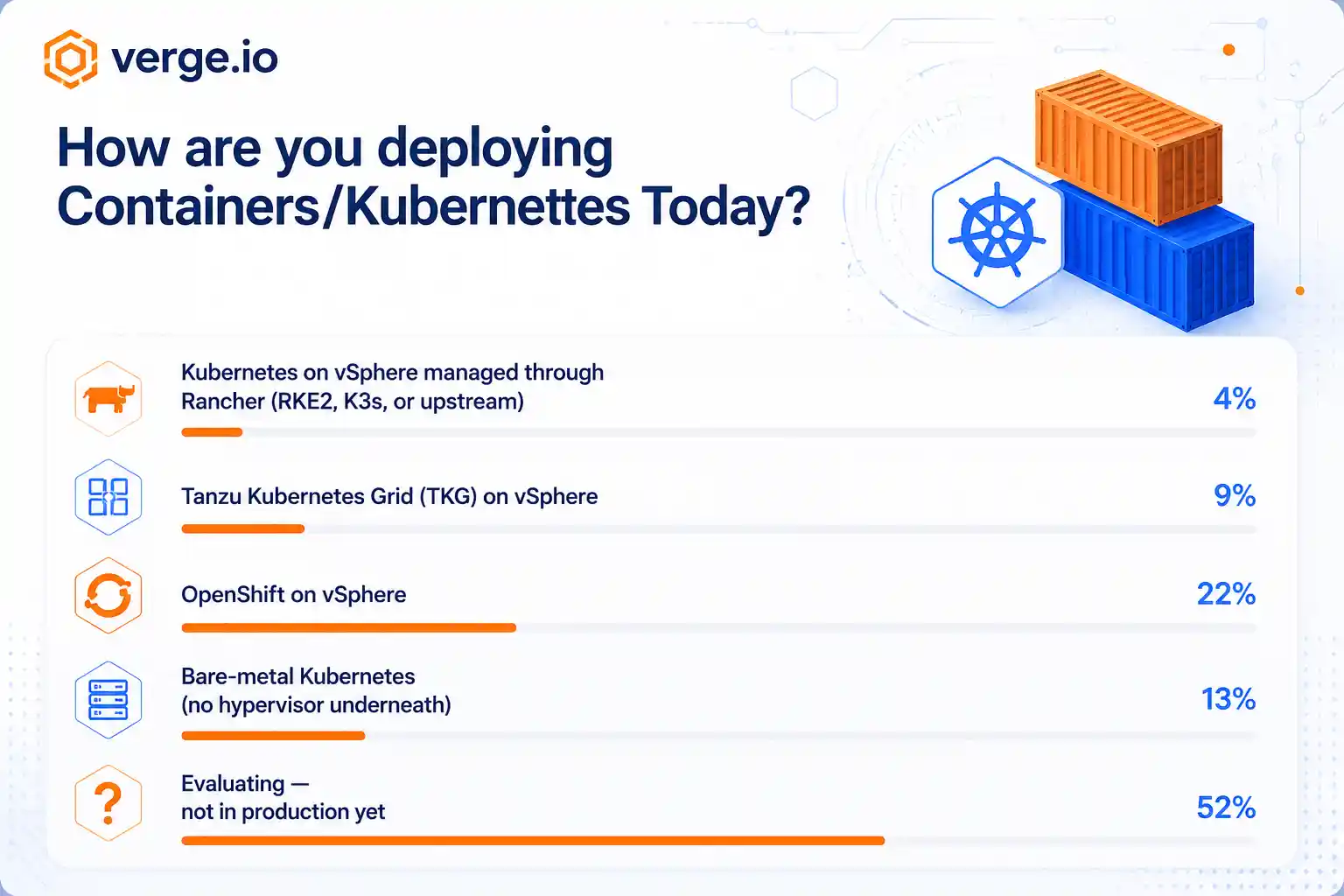
May 20 webinar poll results showing roughly half of attendees still evaluating Kubernetes

The trade press paints a picture of every enterprise running Kubernetes for years, and the poll told a different story. For a team in that evaluating column, the exit from VMware has become the new priority. The real question is whether the team can evaluate Kubernetes and exit VMware at the same time.

The argument is straightforward. The platform underneath the Kubernetes layer decides more of the long-run operations math than the distribution does. The full architectural case lives in Collapsing the Kubernetes Stack, the long-form companion paper to this post, and the dollar math gets walked separately in The Kubernetes VMware Exit Math, Explained. Pick the platform last, and the distribution choice locks in the storage layer, the snapshot policy, and the vendor count. Pick it first, and the distribution choice becomes a distribution choice.

Key Takeaways
  • Pick the platform first. Exiting VMware to a platform that understands containers answers the foundation question and the distribution question inside the same project.
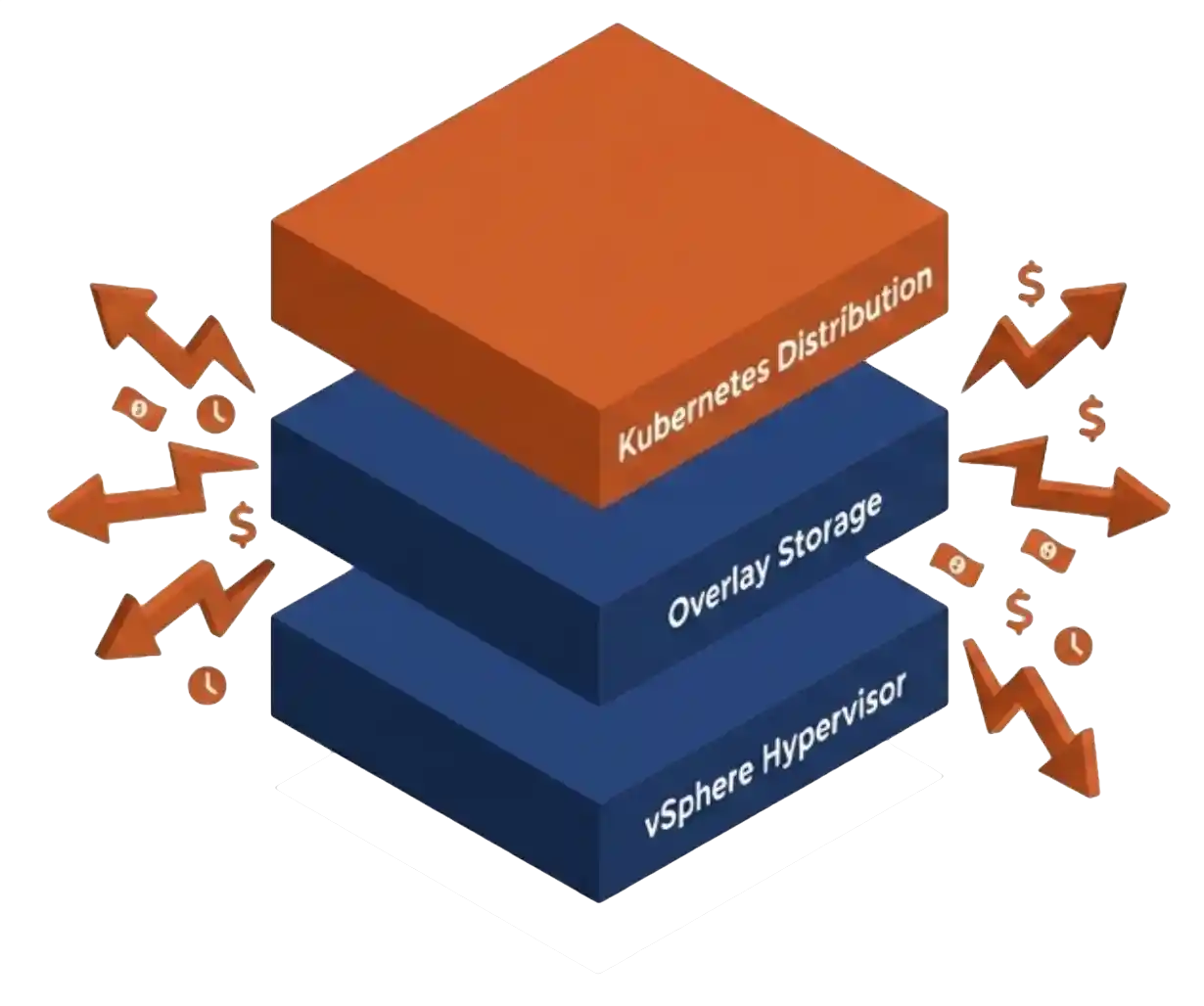
  • Running Kubernetes on a hypervisor not designed for container workloads adds a translation tax in storage, networking, and lifecycle, and that tax compounds at every renewal.
  • VergeOS publishes three Helm charts from a single Cluster Repository on GitHub, ships persistent volumes natively from the same storage that runs the VMs, and presents both workload types through Rancher. One platform, one support contract, two workload types.

Does the environment need Kubernetes?

The hardest question for a team evaluating Kubernetes is not which distribution to pick. The hardest question is whether the environment needs Kubernetes at all. Plenty of environments need Kubernetes for the right reasons. Plenty of others do not, and the honest answer matters more than the marketing.

The honest answer in the room on May 20 came from David Zarzycki, the engineer who did most of the work on the VergeOS Kubernetes integration. His phrasing was the right one. Is your environment complex enough to warrant the complexity of running Kubernetes at all?

Kubernetes earns its keep when applications change frequently, when teams ship daily, when multi-tenancy is real, when GPU scheduling matters, and when developer self-service is a stated requirement. A two-tier ERP application with a six-month release cycle does not need Kubernetes. A microservices platform with twenty deploy events per day does. Most production environments have both kinds of workloads sitting side by side, and that mix is exactly why the foundation question matters more than the distribution question.

A clean example of a Kubernetes-shaped workload looks like a retail analytics platform that ingests several million transaction events per hour, runs a dozen microservices scaling independently against the event stream, and ships code multiple times a day with feature flags and blue-green rollouts. Storage demand spikes during peak hours. Compute demand spikes around marketing campaigns. The engineering team treats every service as independently deployable. That workload pattern is what Kubernetes was built for, and the platform underneath has to keep up with it. The two-tier ERP application sitting next to that platform does not need any of that machinery, and asking Kubernetes to run it is the wrong tool for the wrong job.

Key Terms
Foundational Platform
The compute, storage, and networking substrate underneath the Kubernetes cluster. A true foundational platform combines hypervisor, storage system, network fabric, and container orchestration on a single code base, with one management plane and one support contract for both VM and container workloads. The foundational platform sets the operational ceiling for everything running on top of it.
Kubernetes distribution
A packaged version of upstream Kubernetes with vendor support, lifecycle tools, and sometimes additional CRDs. Examples include Tanzu Kubernetes Grid, Red Hat OpenShift, SUSE Rancher Prime, and upstream RKE2 or K3s.
Cluster Repository
A registered Helm chart source that Rancher can pull from. VergeOS publishes a single Cluster Repository on the verge-io GitHub. One Rancher registration brings the node driver and pins the three platform charts (CSI, Cloud Controller, Cluster Autoscaler) to verified upstream versions.
Overlay storage
A separate storage system layered on top of the hypervisor storage to give Kubernetes pods persistent volumes. Longhorn, Portworx, OpenEBS, and Rook/Ceph are common examples. The deeper case for treating Kubernetes persistent storage as an architectural coordination problem sits in the analyst piece on StorageSwiss. Overlay storage is the classic indicator the underlying platform does not natively support container workloads.
Translation tax
The operational and architectural cost of bridging between a Kubernetes layer and a hypervisor layer not built together. Shows up as duplicate snapshot policies, separate networking control planes, two backup systems, and three support contracts.

The foundation question, not the distribution question

Kubernetes evaluations almost always start with the distribution shortlist. The standard candidates are Tanzu, OpenShift, Rancher Prime with RKE2 or K3s, and upstream Kubernetes on bare metal. Tanzu’s long goodbye makes that grading harder for any team still committed to vSphere. Each shortlist gets graded against developer experience, ecosystem depth, support contracts, and price. The platform underneath the cluster nodes is a separate conversation. The hypervisor, the storage layer, and the network fabric get graded last, if at all.
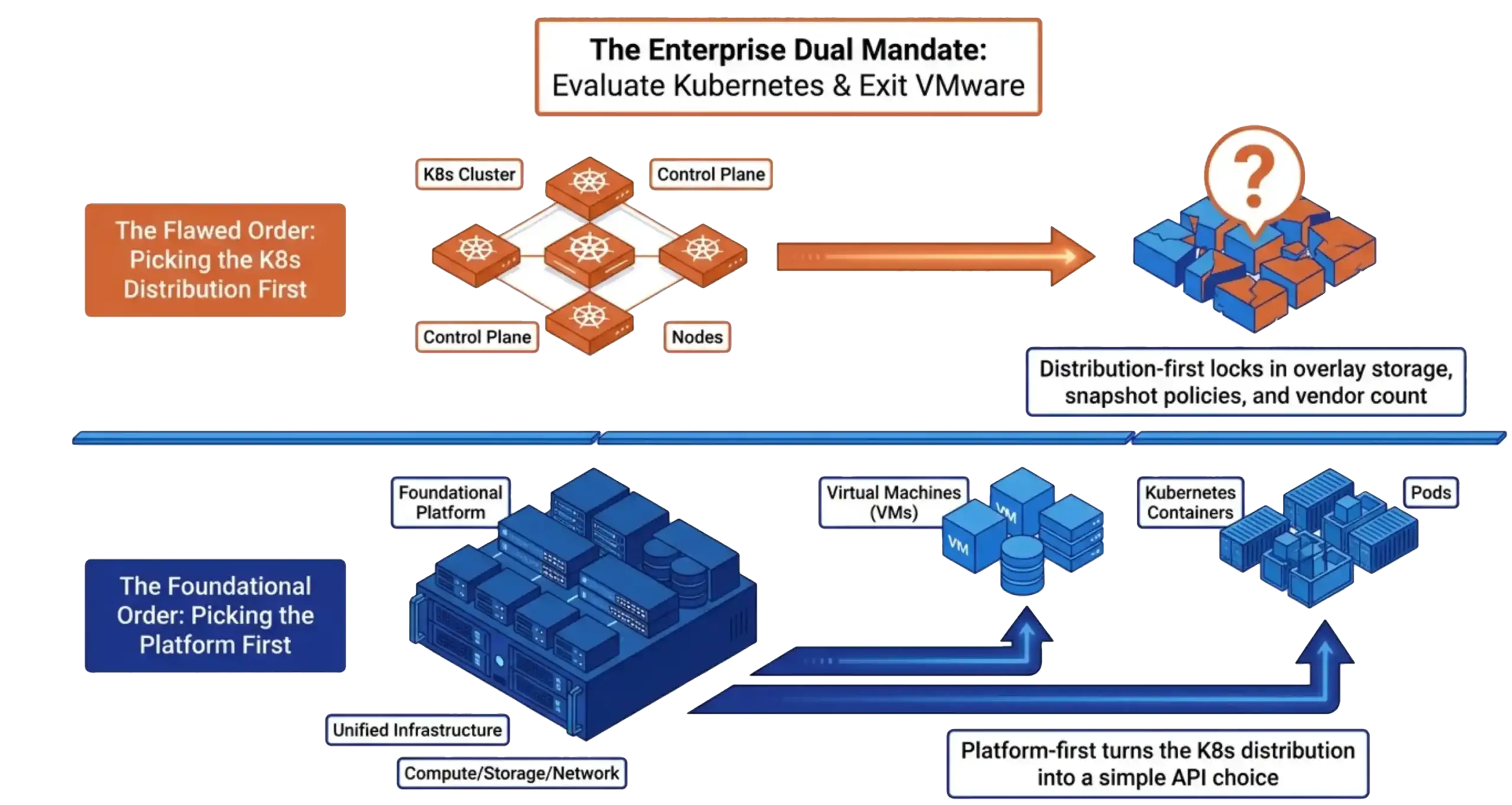
The dual mandate of running VMs and Kubernetes containers on a single integrated platform

That order is backward. The platform underneath decides how persistent volumes get carved, how cluster nodes scale, how snapshot and replication policies coordinate across VMs and pods, and how many vendor support contracts the operations team carries forever. The Kubernetes distribution determines which API the developer interacts with. Both matter, and the platform decides more.

The reason the order keeps getting reversed is that the distribution choice is louder. There are conferences for Tanzu and conferences for OpenShift. There is no conference for “the platform underneath.” Teams evaluating Kubernetes hear the loudest voices first and rank the platform later. The five-year math punishes that order.

The platform question reduces to a simple test. Count the support contracts the operations team will carry once the evaluation is over. Count the snapshot engines. Count the storage systems. Count the network control planes. Every number greater than one in that list is a translation tax line item. Every one of those line items comes from picking the distribution first and letting the distribution dictate the platform.

What changes when the platform underneath is integrated
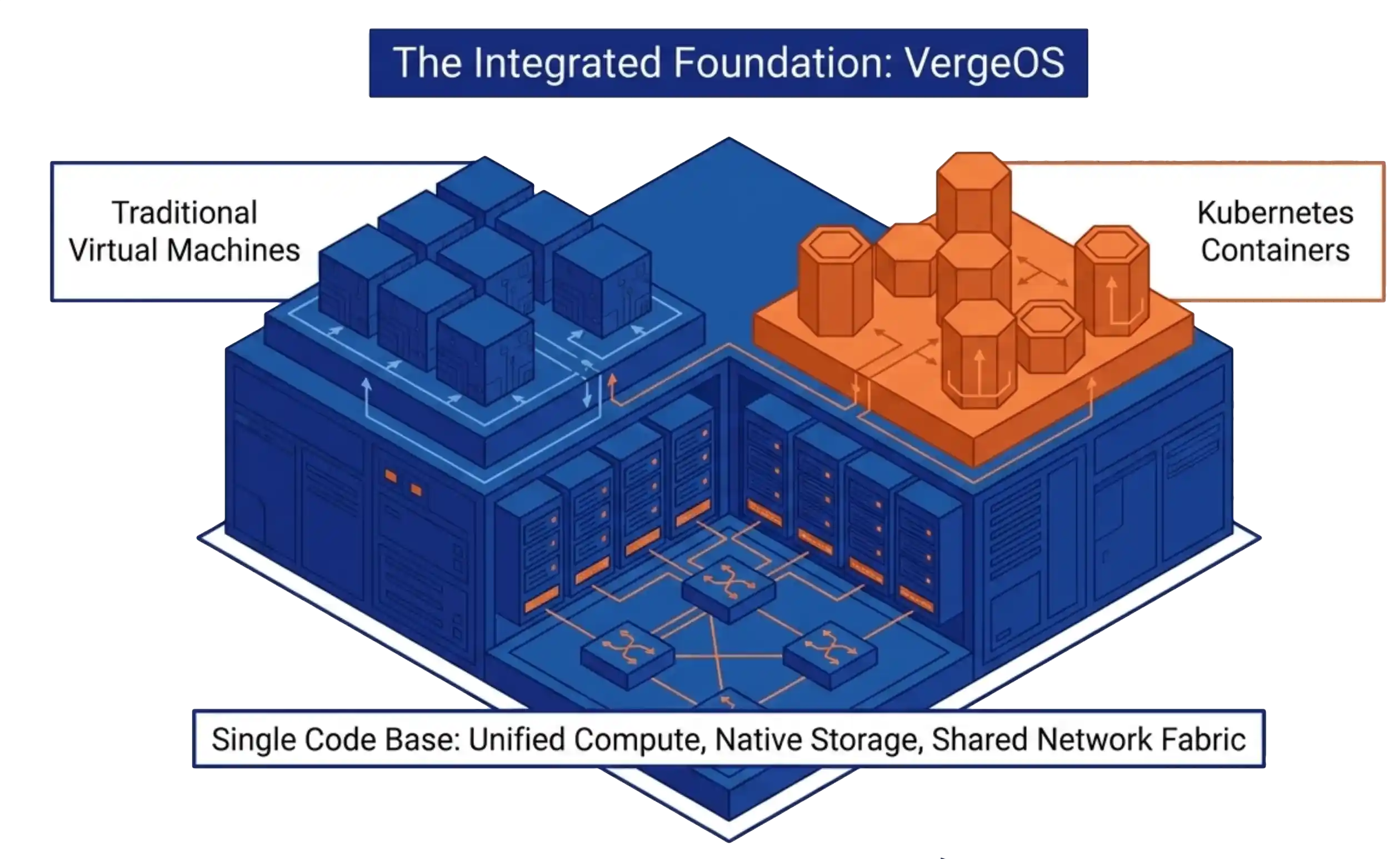
VergeOS as a unified foundation for both VMs and Kubernetes containers

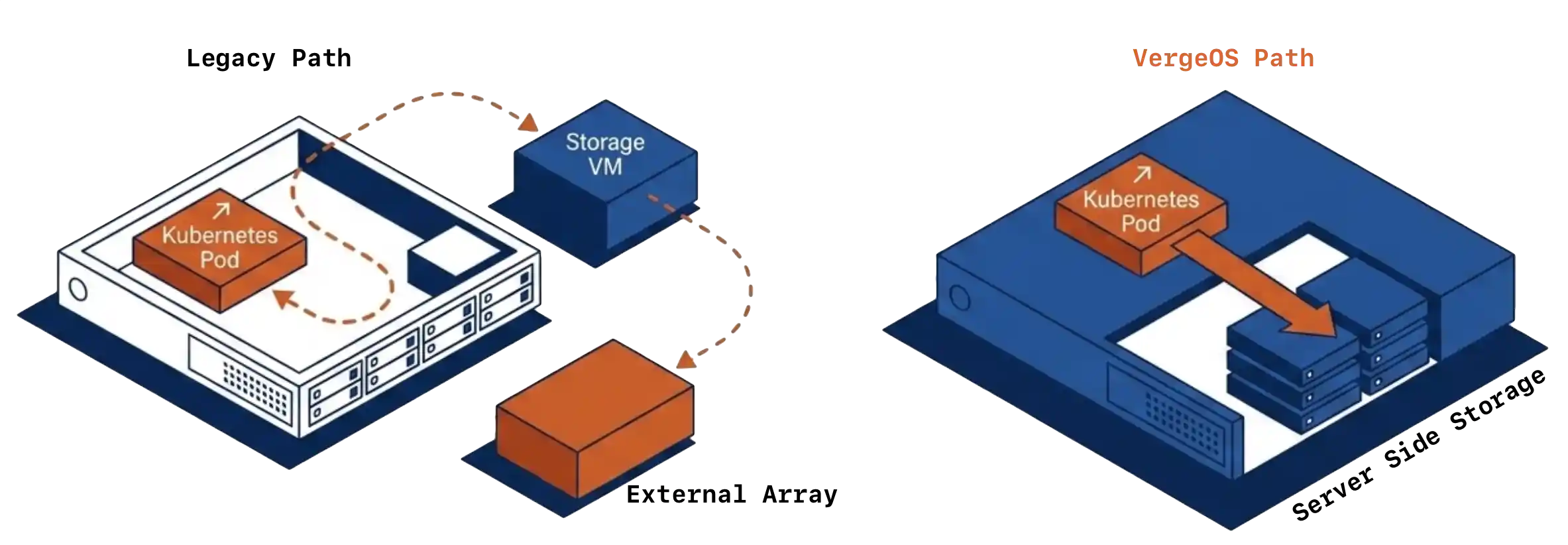
VergeOS treats VMs and Kubernetes containers as workloads on the same code base. The hypervisor, the storage layer, the network fabric, and the Kubernetes integration share one platform. Three Helm charts pulled from one Cluster Repository on the verge-io GitHub. A CSI driver provisions persistent volumes from VergeFS directly, with no overlay storage layer between the pod and the disk. A Cloud Controller Manager handles networking and node lifecycle events through the standard Kubernetes interface. A Cluster Autoscaler handles node-count management through the same upstream project every other distribution uses.

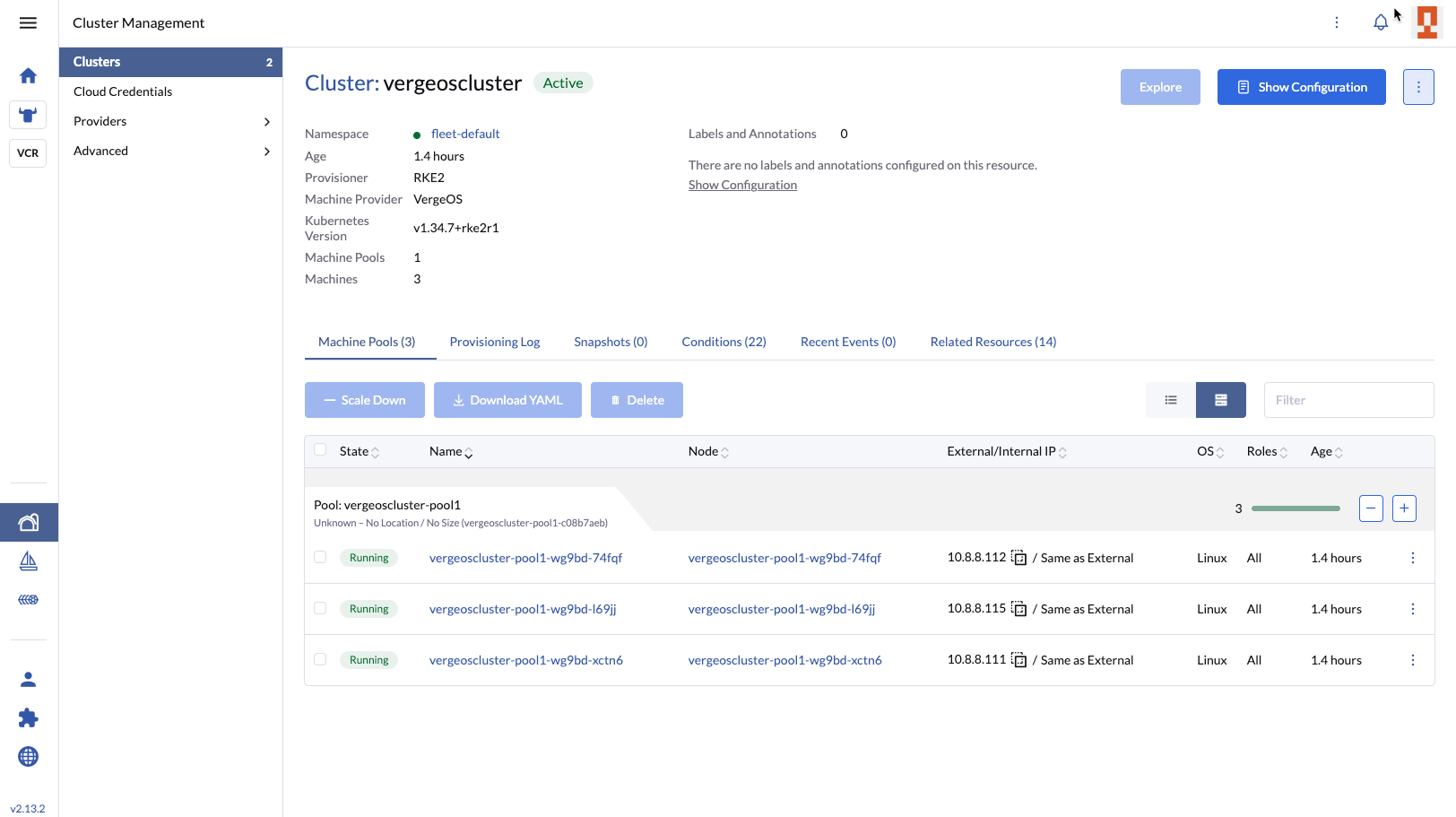
What that means in practice. Rancher remains the management plane the operations team already knows. The cluster object stays standard. The persistent volume comes off the same storage fabric the VMs use, with no Longhorn to license and no Portworx contract to manage. The Kubernetes distribution is whichever flavor Rancher provisions, usually RKE2 or K3s, both upstream. The platform underneath handles the rest, on the same code base it uses to run the VM side of the house. The Kubernetes Without the VMware Tax datasheet lays the architecture diagram and the deployment flow side by side for teams that want the one-page reference.

The typical vSphere Kubernetes stack vs an integrated platform

Capability Typical vSphere Kubernetes Stack VergeOS
Hypervisor licensing VCF subscription, per-core pricing Included in the platform
Kubernetes distribution Tanzu, OpenShift, or Rancher Prime, separate contract RKE2 or K3s via Rancher, no separate licensing
Persistent volumes (CSI) Vendor CSI driver, overlay storage often required (Longhorn, Portworx) Native VergeOS CSI driver, no overlay storage
Networking and load balancing Vendor CNI plus separate load-balancer contract Cloud Controller Manager via standard Kubernetes interface
Snapshot and replication Two policy engines, one for VMs, one for K8s One snapshot and replication engine, both workload types
Vendor support contracts Three or more One
Cluster create time (May 20 live demo) Variable, often 15 to 20 minutes Six minutes, on a lightweight lab system

Why Rancher?

VergeOS works with any Kubernetes distribution that runs on standard upstream nodes. The integration is upstream by design, three Helm charts and a node driver, no fork and no proprietary kernel extension. A team already running OpenShift or Tanzu can keep that distribution and put VergeOS underneath it.

A team that has not committed to a distribution yet should start with Rancher. The reasoning is practical. Rancher carries the lightest commercial weight of the major management planes, with no separate licensing layer attached to RKE2 or K3s. The node driver integration is the cleanest path to a working cluster on VergeOS. The cluster lifecycle, upgrade, and visibility story all sit in one console the operations team learns quickly. Standing up a first cluster on Rancher takes minutes, and the resulting cluster is upstream Kubernetes. No fork, no proprietary distribution to retrain against, and no vendor exit story to plan for later.

Production proof, named on the live call

Two customers got named on the May 20 webinar, and both are cleared for public use. NGAMING / Nesine in Turkey runs a regulated sports-betting platform on VergeOS, with over 180 Kubernetes nodes carrying live transaction workload. The same production validation appears in the VergeIO Kubernetes general availability announcement.
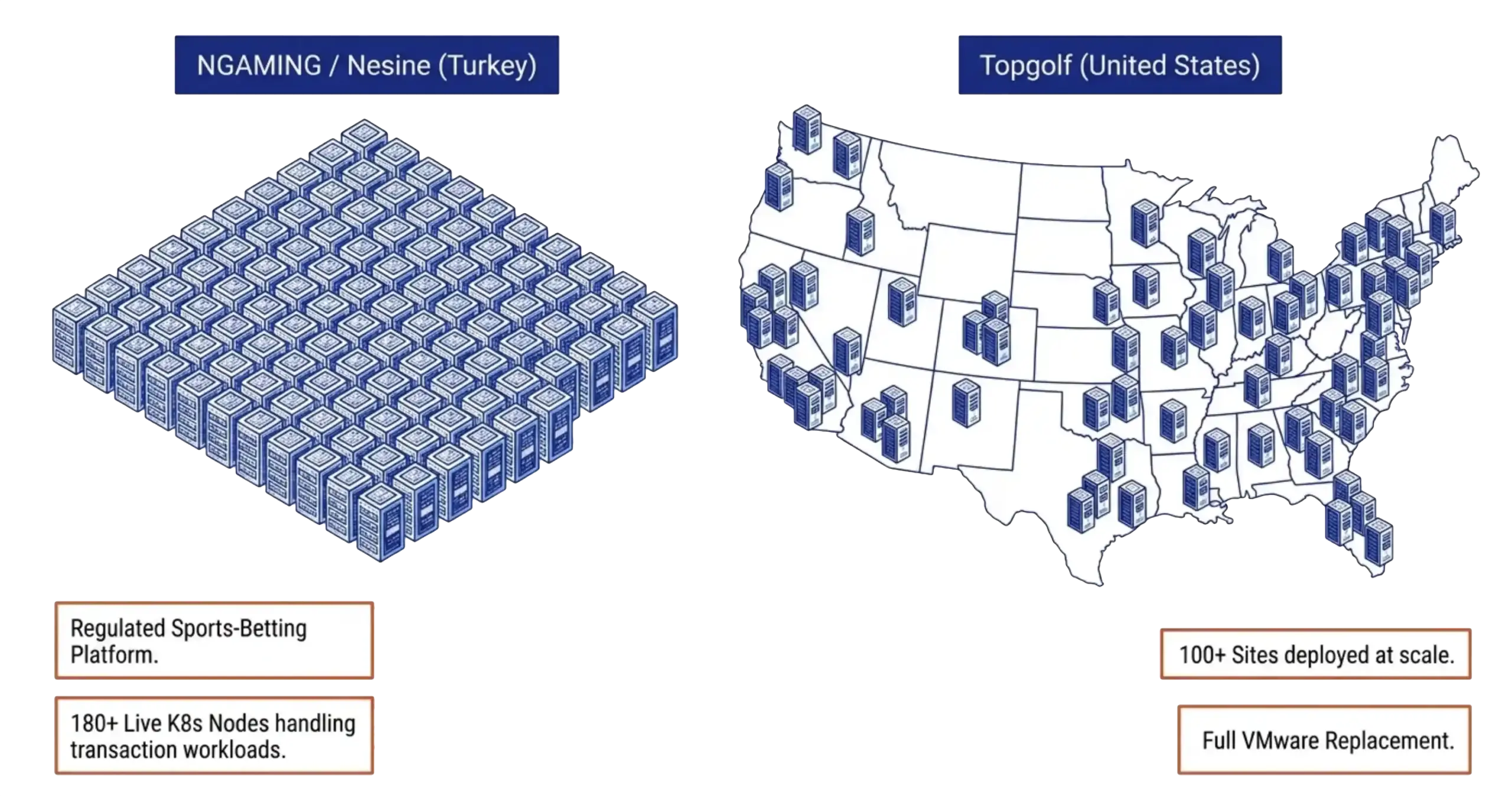
Production VergeOS Kubernetes deployments at NGAMING / Nesine and Topgolf

Their feedback in the rollout was that the engineering response cycle felt like having a software development shop on call, even across time zones. That kind of feedback is rare, and it came up for one reason. The engineers who wrote the VergeOS SDKs are the same engineers who wrote the Kubernetes integration. Same team, same code base, same release cadence.

Topgolf is the second name. Over a hundred VergeOS sites across the United States, replacing VMware. The reason Topgolf gave for choosing VergeOS was not the platform alone. It was the platform plus the partnership, agile enough to respond at scale and capable enough to run the full environment. Both customers are evidence that the integrated-platform argument scales from a 180-node Kubernetes cluster in Turkey to a hundred-site VMware replacement in the United States, on the same code base.

How to start evaluating Kubernetes the right way

The clean path for a team evaluating Kubernetes from a standing start looks like this. Stand up VergeOS as the platform. Register the verge-io Cluster Repository in Rancher. Provision a test cluster through the Rancher UI. Run workloads on it. Cluster creation took six minutes on the live demo, on a lightweight home-lab system with two cores and four gigabytes of RAM per node. Production environments run faster. The three Helm charts come from the same repository. The persistent volumes come from VergeOS storage. The Rancher cluster object behaves exactly the way it would on any other Rancher node driver.

Keep going on Kubernetes Without the VMware Tax

The webinar walks the live demo on real hardware. The white paper walks the full architectural argument.

Watch the on-demand webinar
Read the white paper

From there the distribution question becomes which flavor of upstream Kubernetes Rancher provisions for the team, with RKE2, K3s, or upstream Kubernetes as the practical options. The platform decision is already made. The vendor count is one. The migration question other teams are still working through does not show up at all. There is nothing to migrate from. The team that picks the platform first gets to keep the evaluation focused on the part that matters, which is whether Kubernetes fits the workload, not whether the storage layer fits the Kubernetes distribution.

The fastest way to validate the foundation argument against a specific environment is a 30-minute architecture overview with one of the engineers who built the integration. Aaron Richman, Field Evangelist at VergeIO and one of the presenters on the May 20 webinar, runs these sessions directly. The agenda is the team’s environment, the workloads under consideration, and the path from the current VMware footprint to a VergeOS deployment that handles VMs and Kubernetes on one platform. No slide deck. The session works against a real environment. Book a session and the conversation starts where the webinar left off.

Why this matters to a team still evaluating Kubernetes

The CloudBolt CII study and the most recent CNCF surveys both show the same pattern. Teams deploying Kubernetes on top of a hypervisor not designed for container workloads spend more on storage, more on vendor support, and more on operations than teams picking an integrated platform from the start.

The gap widens at every renewal. Most evaluations get the order wrong, and the reason is consistent. The distribution choice is louder, and the platform choice shapes the next five years.

The teams in the evaluating column during the May 20 webinar still have a chance to get this order right. The teams that have already moved are working through the migration version of the same question. The order matters more than the urgency.

Frequently Asked Questions
We are not running Kubernetes yet. Do we still need to think about a platform like VergeOS now?
Yes. The platform underneath the cluster decides storage, networking, snapshot policy, and vendor count. Picking the platform after the distribution locks in choices harder to reverse than the distribution decision itself.
Can VergeOS run alongside our existing VMware environment during evaluation?
Yes. VergeOS runs on standard x86 hardware and supports parallel deployment. Most evaluations stand up a VergeOS cluster on dedicated hardware, run the Kubernetes workload on it, and migrate VMs over on the team’s timeline.
Which Kubernetes distribution does VergeOS provision?
Rancher provisions the distribution. The default Rancher choices are RKE2 and K3s, both upstream Kubernetes. VergeOS does not fork or modify the distribution. The three platform Helm charts (CSI, Cloud Controller, Cluster Autoscaler) work with the upstream cluster.
Do we have to commit to Rancher to use VergeOS Kubernetes support?
Rancher is the supported management plane today. The Helm charts themselves are upstream and run on any Kubernetes cluster the operations team chooses to manage with kubectl. Rancher is the recommended path for three reasons. UI continuity for operations, node driver integration, and the full cluster lifecycle story in one place.
What happens to our existing VMs when we add Kubernetes workloads?
VMs and Kubernetes containers run on the same VergeOS code base. The same storage. The same networking. The same snapshot and replication policies. The operations team manages one platform, one console, one support contract.
How long does a real production cluster take to provision?
On the May 20 live demo, a three-node RKE2 cluster came up in six minutes on a lightweight home-lab system. Production environments with proper resource allocation typically come up faster. The time is dominated by Rancher provisioning the cluster runtime on the VMs, not by VergeOS provisioning the VMs themselves.

Next steps

The Collapsing the Kubernetes Stack white paper, the Kubernetes Without the VMware Tax datasheet, and the on-demand recording of the May 20 webinar all live in the Kubernetes Without the VMware Tax research center. The fastest way to validate the foundation argument is on your own hardware, with your own workloads. Take a Test Drive Today and provision a Kubernetes cluster through Rancher on VergeOS the same way David showed live.
Filed Under: Private Cloud Tagged With: Container Platform, Kubernetes, Kubernetes Evaluation, Rancher, RKE2, VergeOS, VMware alternative

May 18, 2026 by George Crump

See how VergeOS turns NVIDIA vGPU 20 deployment into a point-and-click operation, with pass-through, vGPU, and MIG partitions configured through the same interface IT teams already use for compute, storage, and networking.

Filed Under: Videos

May 16, 2026 by George Crump

Six weeks ago our team sat down with NVIDIA to walk through the vGPU 20 release and what it means in combination with VergeOS. The questions we expected before the webinar and the questions arriving now no longer match. That gap is the most interesting data point coming out of the last six weeks. If you missed it, you can watch it on-demand now or review the presentation. No registration is required for either.

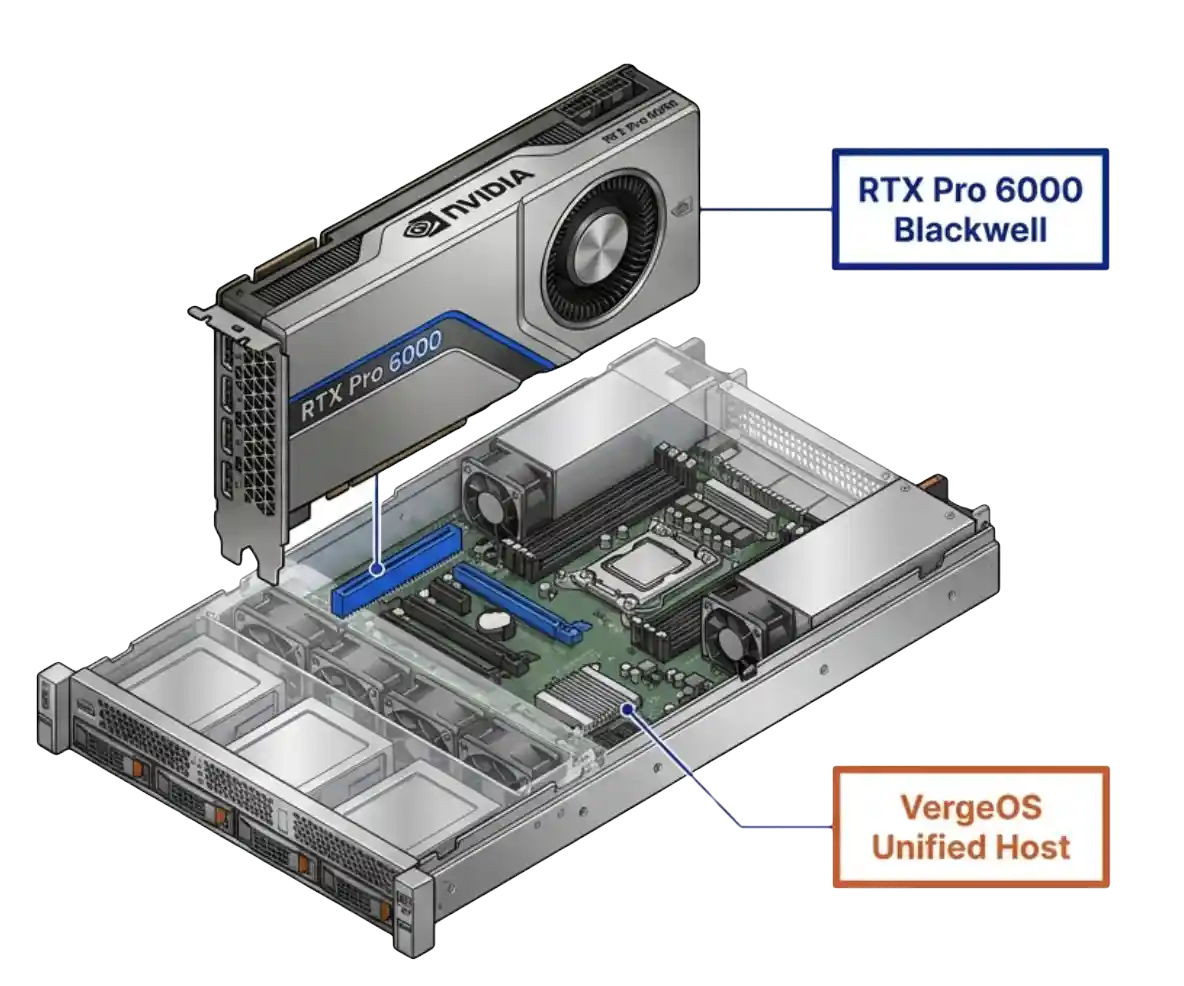
vGPU 20 VergeOS deployment plan reviewed by an IT director

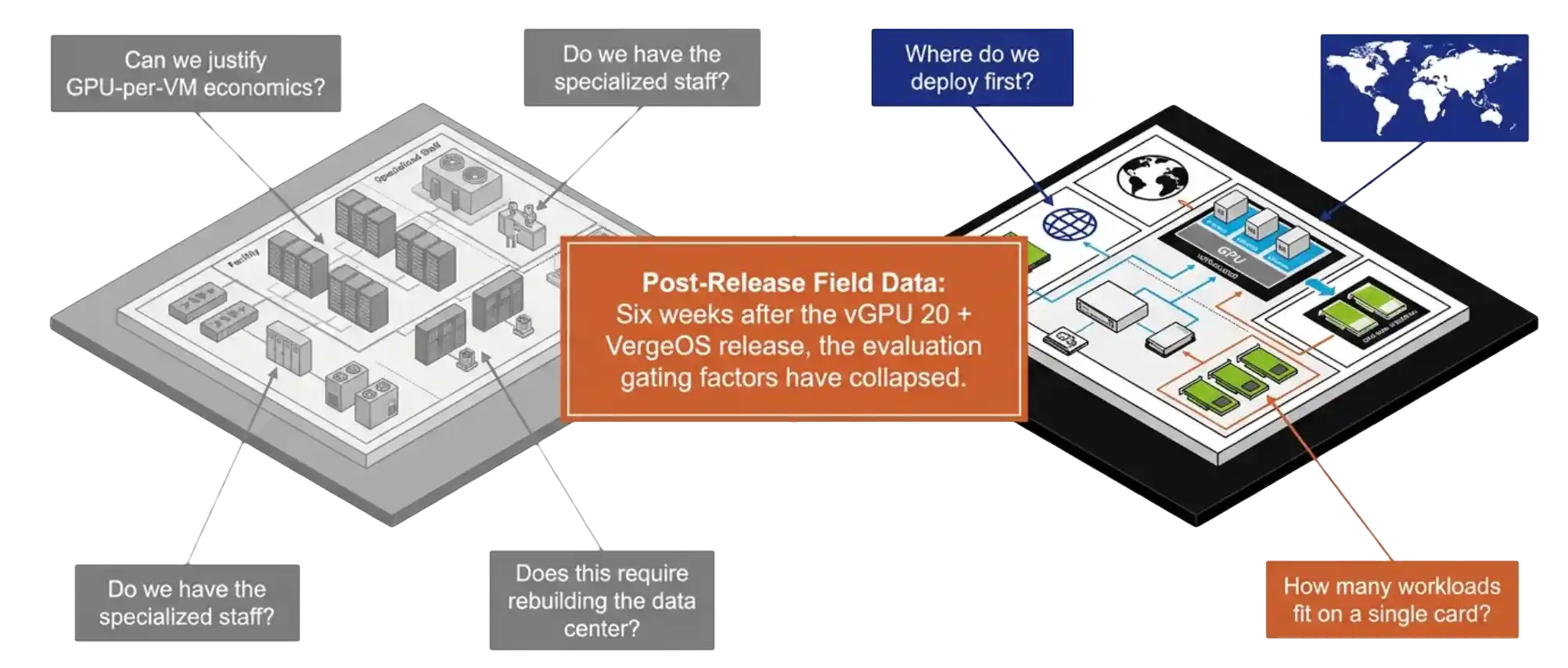
The audience that registered for the session was the audience we expected. IT directors, infrastructure architects, virtualization admins. The framing they brought was the framing the GPU virtualization market has carried for the last decade. The first question was whether the budget could absorb GPU-per-VM economics. The second was whether existing staff could run it. The third was whether deployment required rebuilding the data center.

Six weeks of follow-up conversations have replaced that framing with something narrower and more practical. Teams want to know where to deploy first. That shift is the entire point of the vGPU 20 plus VergeOS release, and it deserves a longer look at what changed in the platform to produce it.

Key Takeaways
  • vGPU 20 is the first NVIDIA release with engineered VergeOS support and bidirectional escalation between the two engineering teams.
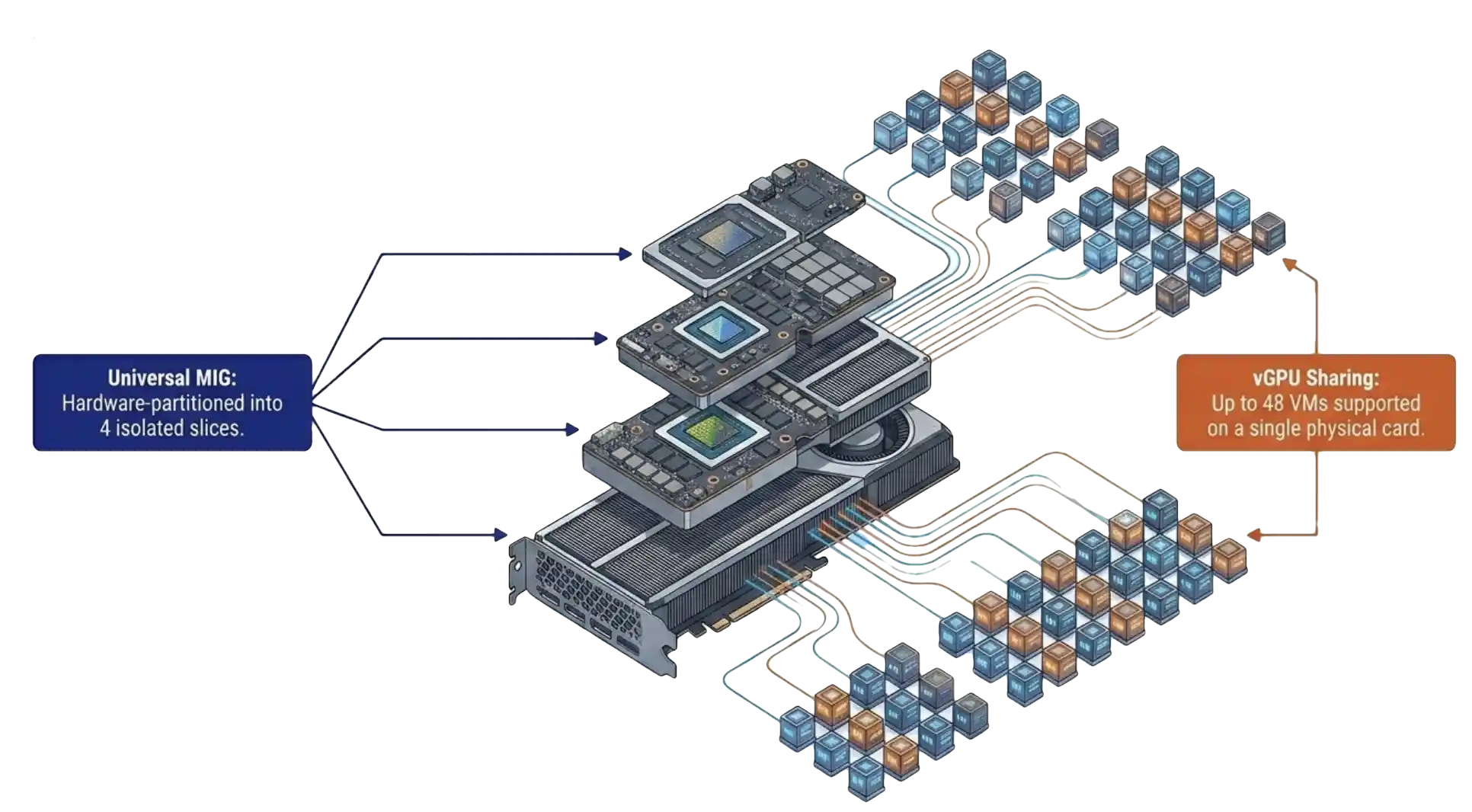
  • RTX Pro 6000 Blackwell is the first data center GPU to combine universal MIG with vGPU in a single SKU, supporting up to four hardware-isolated slices and up to 48 VMs per card.
  • Pass-through, vGPU, and MIG run through one VergeOS form with no CLI required.
  • One driver upload produces the guest ISO automatically, which VergeOS attaches at VM boot.
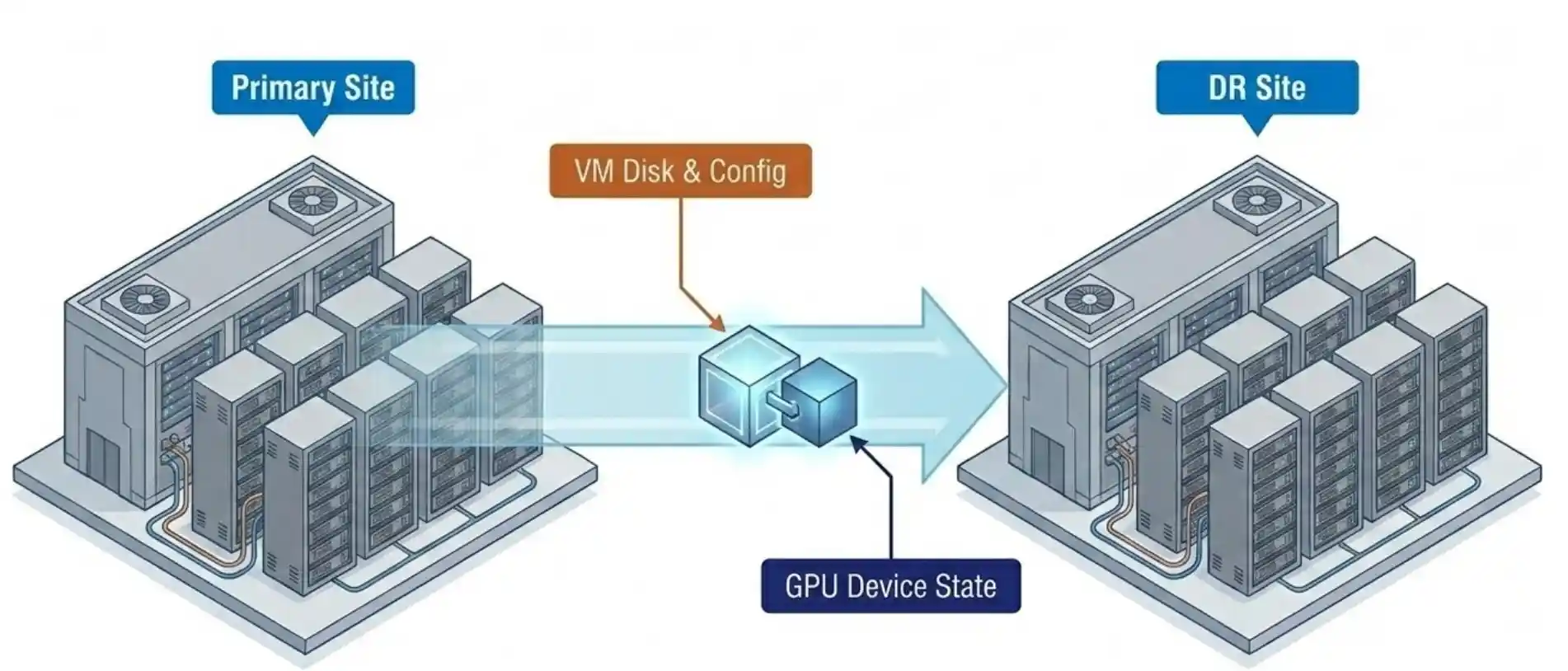
  • Snapshot and replication carry the GPU device configuration with the VM, so DR inherits GPU state.
  • The trial license covers 128 seats for 90 days from the NVIDIA licensing portal.

The vGPU 20 and VergeOS Integration That Aged Well

The first thing the webinar covered was the integration story itself. NVIDIA released vGPU 20 with official VergeOS support as a host platform. The detail that matters is not the support statement. The detail is the engineering relationship behind it.

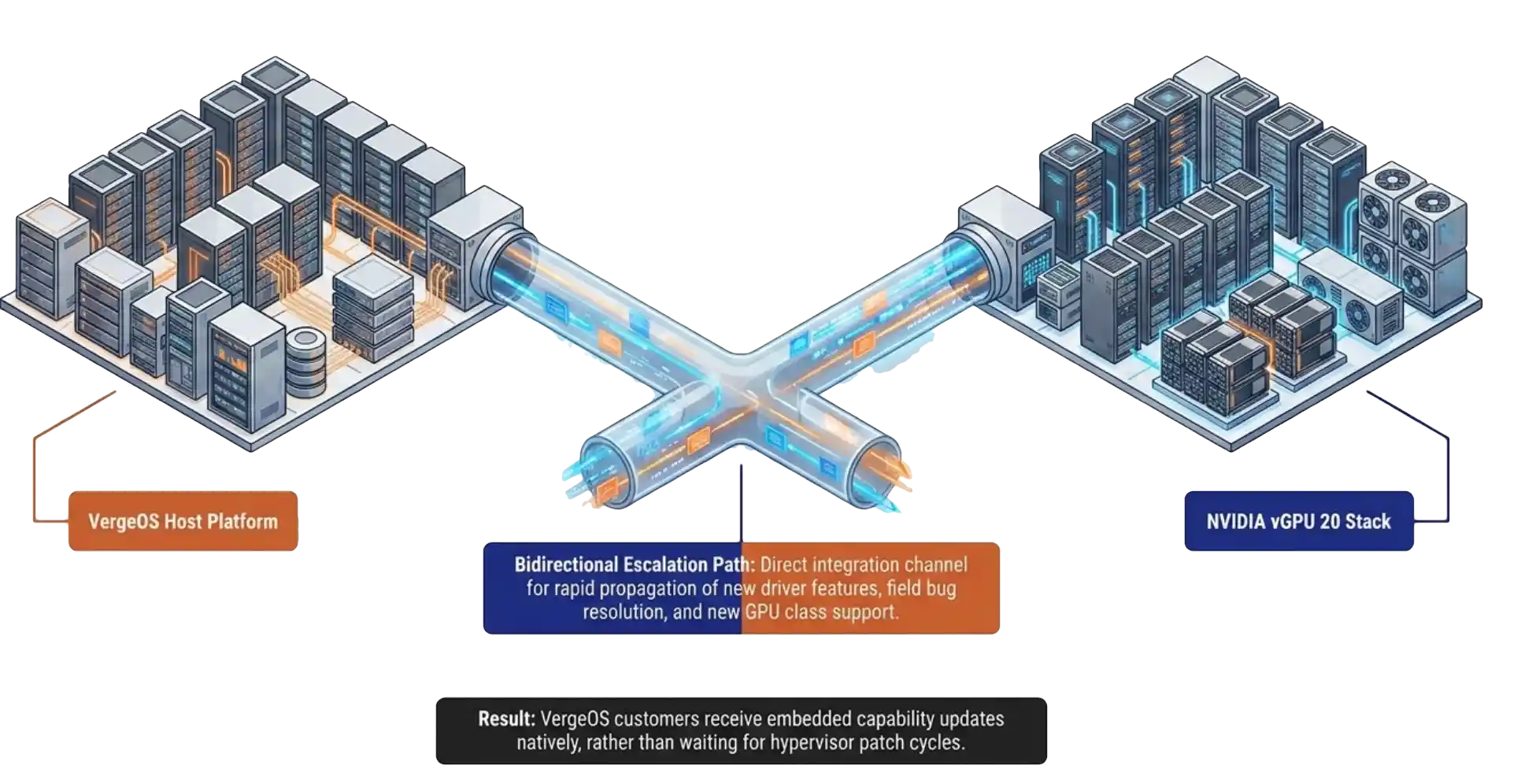
NVIDIA vGPU 20 driver stack integrated with the VergeOS host platform

NVIDIA and VergeIO now share dual-direction escalation paths. New driver features and new GPU classes move into VergeOS faster than they moved into the platforms that came before. Six weeks of feature requests have already run through that channel. The integration is not a logo on a slide. It is an active engineering relationship with named contacts on both sides.

That structural change is the part of the announcement that has aged the best in the field. Customers who picked VergeOS as a host two years ago for unrelated reasons now find themselves on the receiving end of features they did not pay for in their original evaluation.

RTX Pro 6000 Blackwell: The vGPU 20 Hardware Foundation

The RTX Pro 6000 Blackwell is the first data center GPU to combine universal MIG with vGPU in a single SKU. That one sentence is the entire technical story for vGPU 20 hardware. Universal MIG means the card partitions itself into up to four hardware-isolated slices, and each slice runs both compute and graphics workloads through vGPU. The arithmetic stops at 48 VMs on a single card, with hardware-allocated frame buffer and hardware-allocated compute.

RTX Pro 6000 Blackwell partitioned into MIG slices on VergeOS

The noisy neighbor argument that has haunted GPU virtualization for a decade no longer applies on this hardware. Latency-sensitive workloads, inference at the edge, and interactive design sessions finally have a deterministic GPU model. The frame buffer is reserved at the silicon layer. The compute slice is reserved at the silicon layer. Both allocations are guaranteed by the chip, not by the hypervisor scheduler. VergeOS surfaces these slices through the standard vGPU 20 configuration form, so the silicon-level isolation is available without specialist tools.

That last point matters more than the seat count. The teams asking sharper questions in the last three weeks are the teams that read the spec sheet, ran the math, and recognized that the underlying isolation model has changed. A hardware-reserved 1/4-slice on a single Blackwell card outperforms most full GPUs from two generations ago in determinism, which is the metric inference and interactive workloads care about.

Key Terms
MIG (Multi-Instance GPU)
Hardware partitioning that divides a single physical GPU into isolated slices, each with reserved frame buffer and compute. Allocation happens at the silicon layer rather than through software scheduling.
vGPU
NVIDIA’s software-driven sharing model that allows multiple VMs to share a physical GPU or a MIG slice through a guest driver.
Pass-through
Direct assignment of an entire physical GPU to a single VM with no sharing layer. The simplest model, used for workloads that need an entire card.
Heterogeneous Profiles
Running AI inference, knowledge-worker VDI, and CAD or visualization workloads on the same physical GPU at the same time, each with its own profile.
Frame Buffer
The GPU memory allocated to a workload. Hardware-reserved under MIG, software-allocated under classic vGPU.

vGPU 20 in VergeOS: Three Modes, One Form, No CLI

The vGPU 20 configuration model in VergeOS landed hardest with the audience. Pass-through, vGPU, and MIG all run through the same VergeOS form. The form replaces the CLI, the vendor-specific manager, and the second tool that other platforms ship with. The admin who configures a pass-through GPU configures a MIG slice the same way. GPU virtualization takes three forms with different tradeoffs in flexibility and isolation, and a single configuration model removes the operational tax of running all three.

VergeOS administrative form showing pass-through, vGPU, and MIG configuration on a single screen

Paul Hodges ran the live MIG configuration demo during the session. The reaction in the chat was the reaction we have been hearing in every follow-up call. The point-and-click form removed the specialist requirement from the buying decision.

That observation has held. The teams moving fastest in the last six weeks are the teams that opened those calls with a sentence we used to hear in every GPU conversation. We do not have GPU expertise on staff. Those are the same teams that have deployed first. The form removed the gating factor. The engineers who would have spent a quarter learning a vendor-specific GPU management tool spent an afternoon learning a VergeOS form and moved on.

One Upload, DR-Aware Deployment

The vGPU 20 deployment model in VergeOS is the second piece that has produced unexpected follow-up. Upload the NVIDIA driver bundle and the client config token once. VergeOS generates the guest driver ISO. The ISO attaches to the VM on first boot. There are no portal round-trips, and the manual driver install per guest disappears. The driver and license token live with the VM lifecycle, not outside it.

VergeOS automated workflow building a guest driver ISO and replicating GPU state to the DR site

Snapshot and replication carry the GPU device configuration with the VM. That detail did not appear on the original webinar slide titled “what is new.” It came out during an audience question. Six weeks later, that single point has moved to the top of the evaluation list for almost every team past the initial demo.

A DR site that inherits the GPU assignment with the VM removes one of the longest-standing operational gaps in GPU virtualization. The traditional answer to “what happens to GPU workloads at the DR site” has been a runbook full of manual reassignment steps. The VergeOS answer is that the GPU assignment is part of the VM record, replicated alongside the disk and configuration. Failover carries it.

Old GPU Virtualization vs vGPU 20 + VergeOS

Capability Traditional GPU Virtualization vGPU 20 + VergeOS
Configuration interface Multiple tools, CLI required Single VergeOS form, no CLI
Driver deployment Portal trip per guest, manual install One upload, ISO auto-generated and attached at boot
Frame buffer isolation Software best-effort Hardware-reserved via MIG
Mixed workload on one card Limited or unsupported AI, VDI, and CAD concurrent on one card
DR with GPU state Manual runbook reassignment Snapshot and replication carry the GPU configuration
Specialist staff required Yes No
Trial license Varies by vendor and SKU 128 seats, 90 days, NVIDIA portal

Read the Full White Paper

GPU Virtualization Without the Complexity covers the full architecture, the validated hardware list, and the five deployment scenarios behind the field observations in this post.

View the White Paper

No registration required.

Visit the GPU Research Center

The full campaign resource library in one place: the on-demand webinar, the presentation deck, the white paper, and the analyst commentary published across StorageSwiss, VMblog, and Blocks and Files.

Explore the Hub

The Cost Conversation Has Flipped

Technical Whiteboard Session

Book a 30-minute working session to map vGPU 20 plus VergeOS against your environment.


The cost conversation has flipped. Six weeks ago the first question from every IT director on a GPU call was a variant of “we cannot justify a GPU per VM.” That question has not arrived once in the last three weeks of follow-up calls. The question now is the inverse. How many more workloads can we put on this single card.

Once a team sees a single RTX Pro 6000 Blackwell run AI inference, twenty knowledge-worker desktops, and a handful of CAD seats concurrently, the cost-per-workload math becomes the easy answer. Three projects, three budget lines, three vendor evaluations collapse into one platform decision. That collapse is what has compressed the deployment timeline.

Paul Hodges, VergeIO’s Field CTO on the webinar, put it cleanly during Q&A. Once customers see VergeOS working with NVIDIA the conversation shifts from “can we afford to do this” to “when do we start.” Six weeks of field calls have proved that the moment an IT director sees MIG configured through a point-and-click form, that observation is accurate.

The mixed-workload use case is the conversation that closes the loop. AI strategy, VDI refresh, and CAD modernization stop being three separate budgets in three separate quarters. They become one platform decision evaluated on one card.

What To Do Next

Teams ready to put this in front of their own workloads have a 128-seat, 90-day trial license available through the NVIDIA licensing portal. Pair the trial with a VergeOS test drive and the full configuration model is on screen inside an afternoon. The fastest path to validating the field observations in this post is to recreate them on a single card.

The next six weeks will produce more data. Our prediction, based on the pattern of the first six, is that the mixed-workload pilot becomes the standard first deployment shape. The teams running AI inference against a single MIG slice today will be running VDI and CAD against the same card next quarter. That is the architecture vGPU 20 plus VergeOS was built for.

Frequently Asked Questions
Does MIG eliminate noisy neighbor in every scenario?
MIG eliminates noisy neighbor for frame buffer and GPU compute, the two resources that produced the most disruption in shared GPU deployments. PCIe and host CPU contention are separate considerations, handled by the VergeOS scheduler at the host layer.
Can VMs sharing a single GPU live on different hosts?
No. The vGPU and MIG models require the VMs sharing a card to run on the host that owns the card. VergeOS placement policies handle host affinity automatically.
Does VergeOS support over-provisioning of vRAM on the GPU?
No. vRAM allocation is one-to-one with the profile. The frame buffer reservation is the foundation of the deterministic latency model, and over-provisioning would break it.
Is the RTX Pro 4500 Blackwell supported under vGPU 20 with VergeOS?
Yes. The same driver set covers the 4500 Blackwell. The MIG and vGPU configuration model in VergeOS is identical across both cards.
Does VergeOS expose an API for GPU configuration automation?
Yes. The same configuration available through the form is available through the VergeOS API, which integrates with Terraform and other infrastructure-as-code workflows.
How do I get the 128-seat trial license?
NVIDIA provides a 128-seat license valid for 90 days through its licensing portal. Pair it with a VergeOS evaluation to see the configuration model end to end.

Filed Under: GPU Tagged With: blackwell, field-report, gpu-virtualization, mig, nvidia, vGPU, vgpu-20

May 12, 2026 by George Crump

VergeOS adds CSI, Cloud Controller Manager, Cluster Autoscaler, and Rancher node driver as native Helm charts, changing the Kubernetes VMware exit math by collapsing three licensing taxes into one platform decision.

VergeIO this week announced general availability of Kubernetes support in VergeOS, and the release changes the Kubernetes VMware exit math for IT. It ships as four Helm charts on the verge-io GitHub repository, distributed as an integrated layer that delegates storage, networking, autoscaling, and node provisioning to the VergeOS API. The full announcement sits on the verge.io press release page.

VergeOS Rancher Kubernetes cluster architecture that resets the VMware exit math with CSI driver, Cloud Controller Manager, Cluster Autoscaler, and Rancher node driver

This release changes the Kubernetes VMware exit math for IT teams. Those teams pay three separate vendors to do one job. They pay Broadcom for vSphere licensing on the cluster nodes. They pay a Kubernetes distribution fee to Tanzu, OpenShift, or Rancher Prime. Many pay a third bill for overlay storage like Longhorn or Portworx, since vSphere storage policies do not extend cleanly into Kubernetes without commercial Tanzu add-ons.

The companion datasheet walks IT through what each tax costs in operational time, not just in licensing spend. The argument is direct. Most VMware exits in flight today swap the hypervisor and leave the rest of the orchestrated stack in place. That move trims the licensing line and preserves the coordination cost across compute, storage, and the Kubernetes management plane for another three budget cycles.

Key Takeaways
  • VergeOS ships native Kubernetes support as four Helm charts on the verge-io GitHub repository. Rancher remains the management plane.
  • VMware shops running Kubernetes pay three separate licensing taxes for the same workload, and the coordination cost across them runs higher than the licensing line.
  • A hypervisor swap addresses one tax. The Private Cloud OS pattern collapses all three into a single platform contract.
  • The integration was validated in production with NGAMING and Nesine, the design partner from Türkiye’s digital entertainment and gaming sector.
  • CNCF 2025 reported Kubernetes production adoption at 82%, the highest in the survey’s history. Stateful workloads are now the majority case.

The Three Taxes Behind the Kubernetes VMware Exit Math

The first tax is vSphere itself. Broadcom moved the model from perpetual licensing to subscription in late 2023. The April 2025 minimum license purchase climbed from 16 cores to 72 cores, forcing smaller VMware customers to pay for capacity that did not match their workload. Reports of price increases between 150% and over 1,000% are well documented for customers caught by the 72-core floor.

Three-Tax Stack diagram of the Kubernetes VMware exit math: vSphere licensing, Kubernetes distribution licensing, and overlay storage licensing layered on the same workload

The second tax is the Kubernetes distribution. Tanzu Kubernetes Grid, OpenShift, and Rancher Prime all charge against the same nodes that already pay for vSphere. The fee scales independently of the platform underneath. It renews on its own calendar with its own support relationship and its own integration matrix.

The third tax is overlay storage. vSphere does not project storage policies cleanly into Kubernetes without commercial Tanzu add-ons. Teams adopt Longhorn, Portworx, OpenEBS, or Rook. The overlay layer runs as a duplicate of the underlying vSAN, doubling the metadata, doubling the snapshot tooling, and doubling the management overhead. The CSI calls land on the overlay, the overlay translates to vSAN, and the team owns the contract between them.

All three taxes feed into the VMware exit math IT operations inherits when procurement signs three contracts. The licensing line is the visible cost. The coordination across compute, storage, and the Kubernetes management plane is the cost procurement does not see.

Key Terms
CSI Driver
Container Storage Interface, the standard bridge between Kubernetes and a storage platform. The VergeOS CSI driver delegates storage operations directly to the VergeOS API.
Cloud Controller Manager
Integrates VergeOS VMs as first-class Kubernetes nodes, populating provider IDs, instance metadata, and IP addresses, with native LoadBalancer service provisioning through VergeOS VNet NAT rules.
Cluster Autoscaler
Adjusts node pool size based on pending pod resource requests. Calls Rancher to provision or retire VergeOS VMs through the node driver.
Rancher Node Driver
Provisions VMs through Rancher with the same flow used for vSphere clusters. Clones a template, injects SSH keys via cloud-init, attaches networks, and powers on.

What VergeOS Kubernetes Support Looks Like

VergeIO is not introducing a Kubernetes distribution. The support layer assumes customers already run a distribution they trust. RKE2, K3s, vanilla upstream, and vendor distributions all work. The four Helm charts deliver the contracts Kubernetes needs from a platform underneath.

VergeOS Kubernetes support architecture that collapses the VMware exit math through the CSI driver, Cloud Controller Manager, Cluster Autoscaler, and Rancher node driver delegating to the VergeOS API

The CSI driver supports two backends. The NAS backend serves EXT4 volumes over NFS for ReadWriteMany access. The block backend hotplugs vSAN block drives directly to VergeOS VMs for ReadWriteOnce access. A persistent volume snapshot becomes a vSAN snapshot, so stateful workloads share the same DR and replication infrastructure that protects production VMs.

The Cloud Controller Manager populates node metadata and handles LoadBalancer service provisioning through VergeOS VNet NAT rules. Most clusters do not need MetalLB or an external load balancer. The Rancher node driver and UI extension finish the picture. An operator who provisions Rancher clusters on vSphere provisions Rancher clusters on VergeOS with the same flow. Rancher stays as the management plane the team already uses, which shifts the Kubernetes VMware exit math in the operator’s favor before the migration starts.

Live Webinar · May 20, 1 PM ET
See Kubernetes Support in Action
VergeIO Principal Engineer David Zarzycki provisions a Kubernetes cluster on VergeOS through Rancher live on the call.
Register

Comparison: Conventional Stack vs. VergeOS

 Conventional StackVergeOS
HypervisorVMware vSphere ESXiVergeHV
Distributed storagevSAN, dedicated SAN/NASVergeFS
Kubernetes distributionTKG, OpenShift, Rancher PrimeCustomer’s existing choice
Management planeTanzu Mission Control, RancherRancher continues
K8s storagevSphere CSI plus overlayNative VergeOS CSI
LoadBalancerNSX Adv LB, MetalLB, F5Cloud Controller Manager
Snapshot scopePer VM, per overlay, fragmentedPer VDC or per PV, single platform

Why the Kubernetes VMware Exit Math Matters to IT

The real VMware exit math is not in the licensing line. It is in the coordination time IT teams pay across three vendors. Procurement signs three contracts on three renewal calendars. Operations runs three upgrade matrices. Support escalations route to three vendors, and the integrations between them sit in nobody’s contract.

CloudBolt’s January 2026 survey of 302 enterprise IT decision-makers found 86% actively reducing their VMware footprint. Only 4% reported a full migration. The mass exodus is not happening. The slow unwind is, and the projects in flight are the ones that matter for the next three budget cycles.

The CNCF 2025 survey put Kubernetes production adoption at 82%, the highest in the survey’s history. The 2024 report found 74% of organizations use containers for stateful applications in production. Stateful workloads are now the majority case, and the upstream Kubernetes specification does not provide the data protection semantics those workloads need. They get those semantics from the storage substrate underneath.

The argument from VergeIO is direct. The right exit from VMware-plus-Kubernetes is a Private Cloud OS, not another hypervisor. Collapsing the three taxes into one platform changes the Kubernetes VMware exit math for IT. The migration runs through Rancher, with workloads moving on the customer’s timeline.

Frequently Asked Questions
Does VergeOS replace Rancher?
No. Rancher stays as the management plane. VergeOS adds itself as a new substrate underneath Rancher with the same provisioning flow used for vSphere clusters.
Is there a separate license for the Kubernetes support layer?
No. The four Helm charts ship inside the standard VergeOS license, which is priced per physical server. Not per core, not per socket, not by capacity.
What happens to existing TKG clusters during migration?
They keep operating. New clusters land on VergeOS through Rancher. Existing TKG clusters stay on vSphere for the duration of the migration. Workloads move on the customer’s timeline.
Does the CSI driver support both block and file workloads?
Yes. The NAS backend handles ReadWriteMany access patterns over NFS. The block backend handles ReadWriteOnce access by hotplugging vSAN block drives directly to VergeOS VMs.
Where can I read the full announcement?
The complete press release is at verge.io/press-release/vergeio-delivers-kubernetes-support. The full asset collection sits in the Research Center.

Next Steps

The full announcement, the architectural argument, the technical overview, the live demonstration, and the verge-io Helm chart repository are one click away.

Press Release
VergeIO Delivers Kubernetes Support
The full announcement covering the four-component release and the production validation with NGAMING and Nesine.
White Paper
Collapsing the Kubernetes Stack
14-minute long-form architectural argument. Three-Tax Model, the four-Helm-chart support layer, stateful K8s data resilience.
Datasheet
Kubernetes Without the VMware Tax
Technical overview with three customer scenarios, before/after architecture, deployment flow, and the evaluation framework.
Live Webinar · May 20
See Kubernetes Support in Action
David Zarzycki provisions a Kubernetes cluster on VergeOS through Rancher live on the call. 1:00 PM ET.
Research Center
Complete Resource Collection
The full set of research, briefings, and assets behind this announcement. White paper, datasheet, webinar, and more.
GitHub Repository
verge-io Helm Charts
The four Helm charts behind the Kubernetes support layer. CSI driver, Cloud Controller Manager, Cluster Autoscaler, and Rancher node driver.

Filed Under: Private Cloud

May 11, 2026 by George Crump

VergeOS adds CSI driver, Cloud Controller Manager, Cluster Autoscaler, and Rancher node driver — letting VMware shops running Kubernetes retire vSphere licensing, distribution licensing, and overlay storage in a single platform decision.

For Immediate Release
VergeOS Rancher Kubernetes cluster architecture

ANN ARBOR, Mich. — May 12, 2026 — VergeIO, the Private Cloud Operating System company, today announced general availability of Kubernetes support in VergeOS. The release adds a CSI storage driver, Cloud Controller Manager, Cluster Autoscaler, and Rancher node driver with UI extension, all distributed as Helm charts from the verge-io repository on GitHub. Together, the components let VMware customers running Kubernetes collapse three separate licensing taxes — vSphere, a Kubernetes distribution, and overlay storage — into a single platform.

VMware shops running Kubernetes today pay three separate vendors to do one job. They pay Broadcom for vSphere licensing to host cluster nodes. They pay a Kubernetes distribution tax — Tanzu, OpenShift, or Rancher Prime. Many pay a third tax for overlay storage like Longhorn or Portworx because vSphere storage policies do not extend cleanly into Kubernetes without commercial Tanzu add-ons. VergeOS now handles all three layers natively. Rancher remains the management plane customers already use. Workloads move on the customer’s timeline.

Support, Not a Distribution

VergeIO is not introducing a Kubernetes distribution. The support layer assumes customers already run a distribution they trust — RKE2, K3s, vanilla upstream, or a vendor distribution — and provides the platform underneath. Four components ship in this release:

  • CSI Driver — delegates storage operations directly to the VergeOS API, so persistent volumes participate in the full VergeFS feature set including inline deduplication, multi-tier placement, and integrated snapshots.
  • Cloud Controller Manager — integrates VergeOS VMs as first-class Kubernetes nodes, automatically populating provider IDs, instance metadata, and IP addresses, with native VNet-based LoadBalancer services on the near term roadmap.
  • Rancher Node Driver — provisions, manages, and autoscales Kubernetes clusters on VergeOS through Rancher. The Docker Machine driver clones VM templates, injects SSH keys via cloud-init, configures CPU and memory, attaches networks, and powers on. Node pools scale up and down automatically based on pending pod resource requests, executed against VergeOS compute capacity.
  • Rancher UI Extension — surfaces VergeOS-specific cloud credential and machine configuration forms inside the Rancher UI. Operators get the same provisioning experience for VergeOS clusters as for vSphere, with no context switch and no separate tool.

Customers shouldn’t have to rebuild their applications to leave VMware — and once they leave, they shouldn’t be locked in again. With Rancher on VergeOS, the workloads move, and they stay portable.

— Jason Yaeger, SVP of Product and Engineering, VergeIO

Validated in Production

Design Partner · Production Validation

NGAMING, the group that brings together Türkiye’s leading brands in the digital entertainment and gaming sector — including NESINE, Atyarisi.com, and Liderform — served as the design partner during the development process. The Nesine engineering team worked in close collaboration with VergeIO during the MVP phase to successfully validate the CSI Driver, Cloud Controller Manager, and Rancher Node Driver against real production workloads. Nesine has approved the Kubernetes support layer for use in its production environment.

Three Customer Situations

Kubernetes support in VergeOS addresses three distinct VMware-customer situations.

Situation 01

Rancher Inside vSphere

Customers running Rancher to manage Kubernetes clusters inside vSphere can keep their Rancher control plane unchanged and replace the substrate underneath. Application teams see no change in their day-to-day Kubernetes operations. Platform teams see the vSphere renewal disappear.

Situation 02

Tanzu Kubernetes Grid Customers

Customers running Tanzu Kubernetes Grid facing Broadcom roadmap uncertainty and bundled licensing pressure can run new clusters on VergeOS while existing TKG clusters continue to operate. Rancher manages both for the duration of the migration. Workloads move on the customer’s timeline — stateless services first, stateful workloads after the new platform validates under real load.

Situation 03

Bare-Metal Kubernetes

Customers running Kubernetes directly on bare metal can add hypervisor benefits — live migration, integrated DR, and a shared snapshot model — without changing their Kubernetes operations workflow. RKE2 and K3s clusters provisioned on VergeOS gain VM-level isolation and unified storage policy across containerized and traditional workloads.

Go Deeper

The full architectural argument, technical overview, live demonstration, and complete research collection live behind four destinations:

White Paper
Collapsing the Kubernetes Stack
The 14-minute long-form architectural argument. The Three-Tax Model, the four-Helm-chart Kubernetes support layer, three customer situations, and stateful Kubernetes data resilience.
Get the Paper
Datasheet
Kubernetes Without the VMware Tax
Technical overview with the three customer scenarios, before/after architecture, the four-step deployment flow, production validation, evaluation framework, and FAQ.
View the Datasheet
Live Webinar · May 20
See Kubernetes Support in Action
VergeIO Principal Engineer David Zarzycki provisions a Kubernetes cluster on VergeOS through Rancher live on the call. May 20, 2026 at 1:00 PM ET.
Register Now
Research Center
Kubernetes Without the VMware Tax
The campaign’s research-backed resource collection. White paper, datasheet, webinar registration, and the work behind every claim in this announcement.
Visit the Center

Availability

Generally Available Now

All four components are generally available now and downloadable as Helm charts from the verge-io repository on GitHub.

About VergeIO

VergeIO is the Private Cloud Operating System company, headquartered in Ann Arbor, Michigan. Its platform, VergeOS, collapses virtualization, storage, networking, and data protection into a single integrated software stack running on commodity hardware. VergeOS is a leading VMware alternative, recognized by DCIG as a Top 5 VMware Alternative across both the SME and SLED categories. The company has grown annual recurring revenue more than 80 percent year over year and serves enterprise, public sector, and service provider customers worldwide. Learn more at www.verge.io.

Media Contact

Judy Smith
JPR Communications for VergeIO
[email protected]
818-522-9673

###

Filed Under: Press Release

May 11, 2026 by George Crump

Refurbished enterprise SSDs carry four supplier-side risks. VergeOS turns each one from a procurement objection into a manageable variable. Here is the risk-by-risk catalog.

The cost case for refurbished enterprise SSDs is settled. Drives leaving hyperscale and Fortune 500 fleets typically carry eighty to ninety-five percent of rated write life remaining at forty to sixty percent below new-drive pricing, against a memory and flash market where prices are not coming back down. The objection that survives is not economic. It is risk.

Key Takeaways
  • Tampered SMART data, OEM firmware lock, and residual data are caught at admission or in continuous monitoring. The drives never reach a production workload undetected.
  • Batch failure correlation is absorbed by the architecture. RF2 holds one drive loss, RF3 holds two, and ioGuardian holds anything beyond by streaming missing blocks inline.
  • The platform layer turns the cost-versus-risk question into a procurement decision rather than a faith-based purchase.
AI Generated Audio
rather listen?
VergeIO · How Software Secures Refurbished Enterprise SSDs

Four supplier-side failure modes account for almost every story of a refurbished purchase gone wrong: tampered SMART data, OEM firmware lock, residual data, and batch failure correlation. The platform layer underneath the drives decides whether those four modes are manageable variables or cluster-ending events. VergeOS turns each one into a manageable variable. Three of the four are caught at admission or in continuous monitoring. The fourth is absorbed at the architecture level when the early-warning systems missed something.

In our recent webinar, Solve the Storage Crisis with Refurbished Drives, we walked through this framework at altitude. The white paper covers it in depth. This blog sits between the two as a procurement-side reference for the IT planner who has accepted the cost case and now needs to know what the platform actually does about each risk before signing the purchase order.

4 of 4Supplier-side refurb risks the platform addresses
7SMART attributes monitored continuously
24 hrIntake stress workload that exposes tampering

Risk 1: Tampered SMART Data

The first refurb risk is tampered SMART data. Less-reputable refurbishers reset the SMART counters or reflash the controller to make a drive report low write totals, low power-on hours, and high remaining wear life. A drive bought as twenty percent used arrives looking pristine. The wear catches up under load. Customers find out three months in, after the drive has been a production member of the storage pool. The detection mechanism has to operate at intake, not at the first failure.

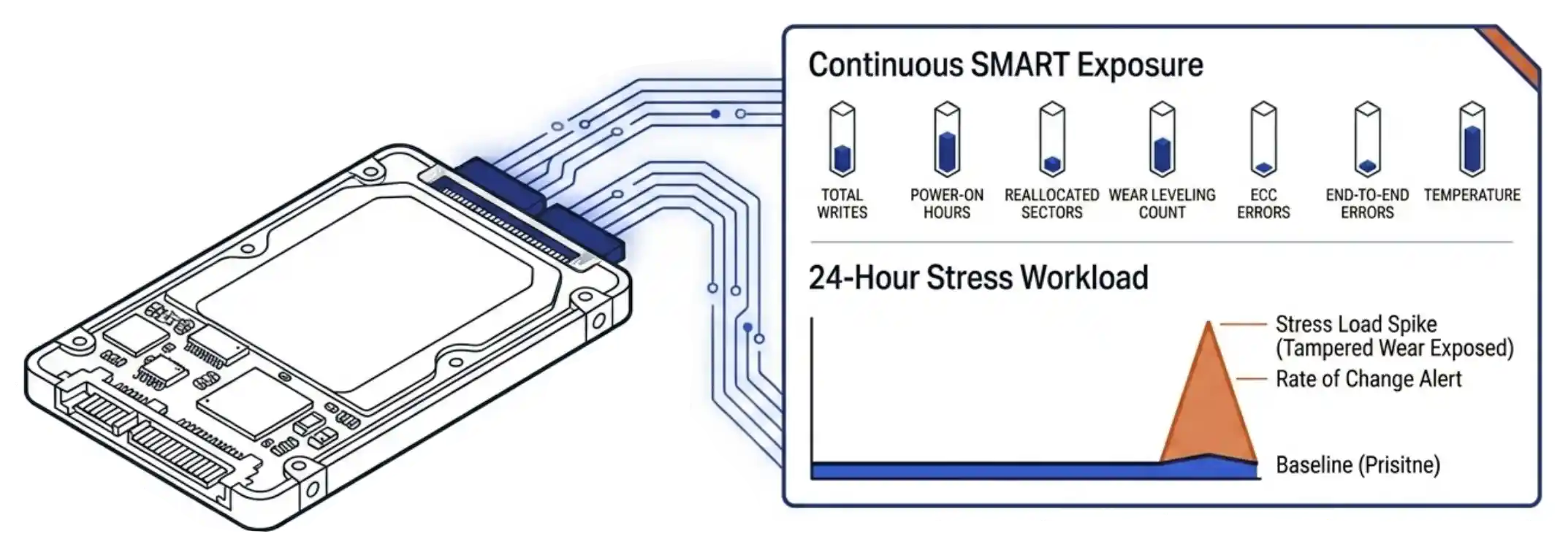
VergeOS continuous SMART telemetry exposure across the storage poolVergeOS exposes the seven primary SMART attributes on every drive in the cluster in real time: total writes, power-on hours, reallocated sectors, wear leveling count, ECC errors, end-to-end errors, and temperature. The exposure is continuous, not on-demand. A drive that arrives reporting twenty percent used wear gets watched against its reported state from the moment it joins the pool. Tampered drives reveal themselves quickly when actual write activity moves the counters faster than the reported state would predict. VergeOS alerting can be setup to warn you of signs of this behavior without you having to check in on every drive every day.
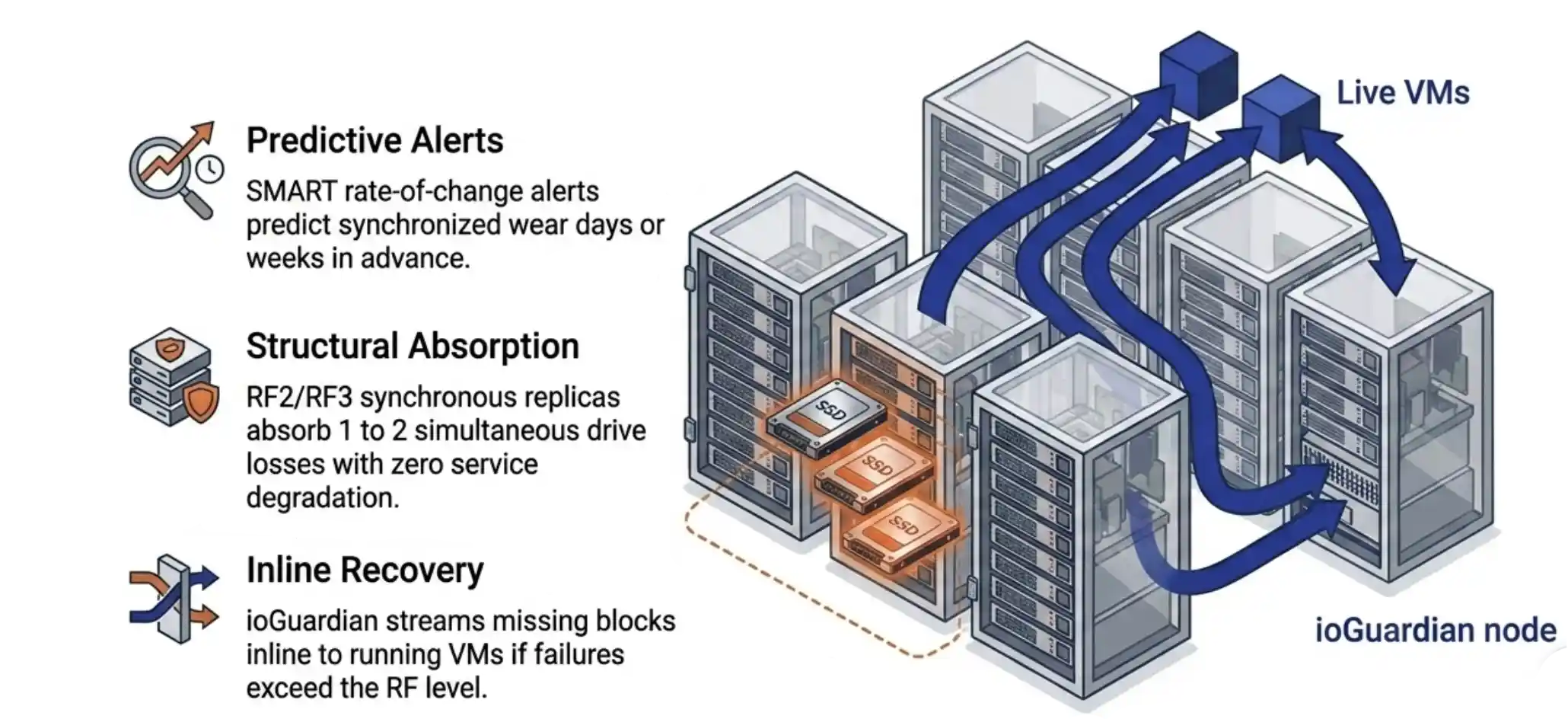
The platform supports an intake protocol that compounds the detection. A twenty-four-hour stress workload writes against the drive at near-saturation and lets the subscription model watch the rate of change. A rate-of-change alert that fires when wear advances ten points within ten days catches tampered drives within the burn-in window. The drive goes back before any tenant data touches it.

Risk 2: OEM Firmware Lock

The second refurb risk is OEM firmware lock. Some major server vendors flash their drives with firmware that refuses to operate in any chassis other than the original vendor’s hardware. The drive looks normal on the procurement spec sheet. Once the drive arrives and gets inserted, the controller refuses to mount. A buyer who orders a hundred locked drives discovers the problem at the deployment stage and now has a procurement dispute and a deployment delay.

VergeOS reads and reports the controller firmware signature at admission. Firmware-locked drives surface immediately and the platform refuses to add them to the pool. The procurement report goes back to the buyer with the drive serials, the firmware identifiers, and the supplier reference. The drives go back under warranty. The deployment continues with the drives that admitted cleanly. No production workload was ever at risk.

The architectural answer behind the admission check matters as much as the check itself. VergeOS accepts any qualified NVMe or SATA drive from any manufacturer. A buyer who hits an OEM firmware lock has alternatives. The platform is not tied to a single drive ecosystem, so the procurement reset is a matter of warranty exchange and re-order, not a forced rebuild of the storage strategy. Hardware flexibility is what makes the lock detection actionable.

Key Terms
Drive Admission
VergeOS’s controlled process for adding a drive to the storage pool. The platform reads SMART attributes, verifies firmware compatibility, initializes the drive’s data layout, and registers it under the file system before any tenant data is written.
SMART Subscription
A platform-defined rule that fires alerts when a drive’s reported state crosses a threshold or changes at a defined rate. Catches drives whose claimed condition does not survive contact with real workload.
VergeFS
The VergeOS file system. Mediates all block access through its own metadata layer, which means raw drive content is not accessible to tenants regardless of what was on the drive before admission.

Risk 3: Residual Data

The third refurb risk is residual data. Blancco research on used SSDs entering the secondary market finds that forty-two percent retain recoverable content from a prior owner and fifteen percent contain personally identifiable information. The risk is compliance-driven as much as security-driven. A regulated buyer who deploys a refurbished drive that turns out to hold prior-owner PII has a reporting obligation under most data-protection regimes. The primary control is supplier-side. The platform-side controls compound the supplier-side discipline.

The supplier-side primary control is NIST 800-88 sanitization at the Purge level on every drive before resale. A buyer who only buys from suppliers documenting per-drive NIST 800-88 has handled the residual-data risk at the source. R2v3-certified refurbishers perform this step as part of their operating standard. The buyer who skips this discipline has skipped the most important risk control in the refurbished SSD procurement framework.

The platform-side controls behave as a second layer. VergeFS mediates every block access through its own metadata layer, so any residual content on a drive is not addressable through tenant operations. The drive’s prior data is overwritten by normal file system activity as the pool fills. The admission process formats the drive into the pool’s metadata structure before tenant workloads land on it. The drive is never raw-accessible by anything other than the file system itself.

Risk 4: Batch Failure Correlation

The fourth refurb risk is batch failure correlation. Drives that shipped together, ran the same workload, and hit the same wear curve at the same time fail in a correlated pattern. The risk is true of new media. It is more pronounced in refurbished media, where the wear distribution is tighter than a fresh procurement order. A cluster running ten drives from the same batch is running ten drives that age together and fail together.

VergeOS rate-of-change SMART alerts catching batch failure correlation across same-batch drivesThe platform handles correlated batch failure on three levels. The rate-of-change SMART subscription fires when multiple drives in a batch show wear advancing in synchronized patterns, giving the IT operator days or weeks of warning. RF2 (two synchronous replicas) absorbs the loss of any one drive without service degradation. RF3 (three synchronous replicas) absorbs two. The choice between RF2 and RF3 is a capacity question, and most customers run RF2 once they understand the layer above it.

The layer above RF2 and RF3 is ioGuardian. The platform holds a complete asynchronous copy of the cluster on a separate node and streams missing blocks inline when a failure exceeds the configured RF level. Concurrent loss of multiple drives or even multiple servers becomes a continued-service event rather than a recovery event.

The cost advantage of refurbished enterprise SSDs is real. The four supplier-side risks are also real. The platform underneath the drives decides whether the second cancels the first. VergeOS turns each risk into a manageable procurement variable. The buyer keeps the savings. The platform handles what the supplier alone cannot.

VergeIO On-Demand Webinar
The Refurbished SSD Framework

George Crump and Aaron Richman walk the secondary-market case, the procurement framework, and the architectural model that makes refurbished enterprise drives a procurement decision rather than a courage test.

Watch the Recording →
VergeIO White Paper
Solve the Storage Crisis with Refurbished Enterprise Drives

The full architecture case, the procurement framework at depth, the four risk categories, the synchronous replication model, the SMART monitoring loop, and the five-gate decision path.

Get the Paper →

Refurb Risk Treatment: Naive Platform vs VergeOS

RiskNaive PlatformVergeOS
Tampered SMARTDetected after deployment, sometimes after failureContinuous SMART exposure plus 24-hour intake stress workload plus rate-of-change alerts
OEM firmware lockDiscovered when the drive refuses to mountFirmware signature reported at admission, drive blocked from pool
Residual dataBuyer-dependent, raw blocks may be tenant-accessibleVergeFS mediates all block access, supplier NIST 800-88 enforced upstream
Batch failure correlationCluster-ending event during rebuild stormRate-of-change alerts plus RF2 / RF3 plus ioGuardian inline recovery
Frequently Asked Questions
What does VergeOS actually do when a refurbished drive arrives at the cluster?
The platform admission process inspects the drive’s controller firmware, reads the seven primary SMART attributes, formats the drive into the pool’s metadata structure, and registers it under VergeFS. Drives that report incompatible firmware or anomalous initial SMART state are blocked from admission. Drives that admit cleanly are continuously monitored from that point forward.
Can VergeOS detect tampered SMART data on a refurbished drive?
Yes. VergeOS exposes the seven primary SMART attributes continuously and supports subscription rules that alert on absolute thresholds and rate of change. A drive whose reported wear state advances faster than the supplier-claimed initial state would predict triggers the alert. A twenty-four-hour intake stress workload accelerates the detection.
How does VergeOS handle residual data from a previous drive owner?
The primary control is supplier-side: NIST 800-88 Purge-level sanitization documented per drive. R2v3-certified refurbishers perform this step as standard practice. The platform layer adds a second defense. VergeFS mediates all block access through its own metadata layer, so residual content on a drive is not addressable through tenant operations and gets overwritten by normal file system activity.
What is the platform’s response to a batch of drives all failing at once?
RF2 (two synchronous replicas) absorbs the loss of any one drive in the cluster without service degradation. RF3 (three synchronous replicas) absorbs two. ioGuardian extends the protection model beyond the RF level by streaming missing blocks inline to running VMs as the VMs request them. Rate-of-change SMART subscriptions catch correlated wear patterns across a batch days or weeks before the failures actually occur.
Can I use refurbished enterprise SSDs with VergeOS today?
Yes. VergeOS supports any qualified NVMe or SATA drive from any manufacturer. The admission process, the continuous monitoring layer, and the RF plus ioGuardian architecture are present in current shipping VergeOS releases. The procurement-side framework for qualifying a refurbished supplier sits in the campaign’s white paper and the on-demand webinar.

Filed Under: Storage

  • « Go to Previous Page
  • Page 1
  • Interim pages omitted …
  • Page 5
  • Page 6
  • Page 7
  • Page 8
  • Page 9
  • Interim pages omitted …
  • Page 40
  • Go to Next Page »

855-855-8300

Get Started

  • Versions
  • Request Tour

VergeIO For

  • SAN Replacement
  • Solving Infrastructure Modernization Challenges
  • Artificial Intelligence
  • Hyperconverged
  • Server Room
  • Secure Research Computing

Product

  • Benefits
  • Documents
  • Architecture Overview
  • Use Cases
  • Videos

Company

  • Blog
  • Technical Documentation
  • Legal

© 2026 VergeIO. All Rights Reserved.