• Skip to main content
  • Architecture
    • Overview
      Learn about VergeOS’ unique unfied architecture that integrates virtualization, storage, networking, AI, backup and DR into a single data center operating system
    • Infrastructure Wide Deduplication
      VergeOS transforms deduplication from a storage-only commodity into a native, infrastructure-wide capability that spans storage, virtualization, and networking, eliminating hidden resource taxes
    • VergeFS
      VergeFS is a distributed, high-performance global file system integrated into VergeOS, unifying storage across nodes, tiers, and workloads while eliminating the need for external SANs
    • VergeFabric
      VergeFabric is VergeOS’s integrated virtual networking layer, delivering high-speed, low-latency communication across nodes while eliminating the complexity of traditional network configurations.
    • Infrastructure Automation
      VergeOS integrates Packer, Terraform, and Ansible to deliver an end-to-end automation pipeline that eliminates infrastructure drift and enables predictable, scalable deployments.
    • VergeIQ
      Unlock secure, on-premises generative AI—natively integrated into VergeOS. With VergeIQ, your enterprise gains private AI capabilities without the complexity, cloud dependency, or token-based pricing.
  • Features
    • Virtual Data Centers
      A VergeOS Virtual Data Center (VDC) is a fully isolated, self-contained environment within a single VergeOS instance that includes its own compute, storage, networking, and management controls
    • High Availability
      VergeOS provides a unified, easy-to-manage infrastructure that ensures continuous high availability through automated failover, storage efficiency, clone-like snapshots, and simplified disaster recovery
    • ioClone
      ioClone utilizes global inline deduplication and a blockchain-inspired file system within VergeFS to create instant, independent, space-efficient, and immutable snapshots of individual VMs, volumes, or entire virtual data centers.
    • ioReplicate
      ioReplicate is a unified disaster-recovery solution that enables simple, cost-efficient DR testing and failover via three‑click recovery of entire Virtual Data Centers—including VMs, networking, and storage.
    • ioFortify
      ioFortify creates immutable, restorable VDC checkpoints and provides proactive ransomware detection with instant alerts for rapid recovery and response.
    • ioMigrate
      ioMigrate enables large-scale VMware migrations, automating the rehosting of hundreds of VMs (including networking settings) in seconds with minimal downtime by seamlessly transitioning entire VMware environments onto existing hardware stacks.
    • ioProtect
      ioProtect offers near-real-time replication of VMware VMs—including data, network, and compute configurations—to a remote disaster‑recovery site on existing hardware, slashing DR costs by over 60% while supporting seamless failover and testing in an efficient, turnkey VergeOS Infrastructure.
    • ioOptimize
      ioOptimize leverages AI and machine learning to seamlessly integrate new and old hardware and automatically migrate workloads from aging or failing servers.
    • ioGuardian
      ioGuardian is VergeIO’s built-in data protection and recovery capability, providing near-continuous backup and rapid VM recovery during multiple simultaneous drive or server failures.
  • IT Initiatives
    • VMware Alternative
      VergeOS offers seamless migration from VMware, enhancing performance and scalability by consolidating virtualization, storage, and networking into a single, efficient platform.
    • Hyperconverged Alternative
      VergeIO’s page introduces ultraconverged infrastructure (UCI) via VergeOS, which overcomes HCI limitations by supporting external storage, scaling compute and storage independently, using existing hardware, simplifying provisioning, boosting resiliency, and cutting licensing costs.
    • SAN Replacement / Storage Refresh
      VergeIO’s storage by replacing aging SAN/NAS systems within its ultraconverged infrastructure, enhancing security, scalability, and affordability.
    • Infrastructure Modernization
      Legacy infrastructure is fragmented, complex, and costly, built from disconnected components. VergeOS unifies virtualization, storage, networking, data protection, and AI into one platform, simplifying operations and reducing expenses.
    • Secure Research Computing
      VergeIO's Secure Research Computing solution combines speed, isolation, compliance, scalability, and resilience in a cohesive platform. It’s ideal for institutions needing segmented, compliant compute environments that are easy to deploy, manage, and recover.
    • Venues, Remote Offices, and Edge
      VergeOS delivers resiliency and centralized management across Edge, ROBO, and Venue environments. With one platform, IT can keep remote sites independent while managing them all from a single pane of glass.
    • Fight Data Center Inflation
      DRAM, SSD and server prices keep climbing. VergeOS uses as much as 50% less RAM per VM than VMware, runs on the servers you already own, and moves cold data to low-cost hard drives.
  • Blog
      • The CPU and Memory Economics of vSANvSAN overhead takes host CPU and RAM from your apps. See how VergeOS runs a midsize data center on five servers instead of eight.
      • Comparing vSAN ESA to VergeFSvSAN ESA runs only on certified NVMe, deduplicates after the write, and charges per VM for remote replication. VergeFS uses NVMe, SAS, SATA, QLC and hard drives, deduplicates inline, and replicates whole virtual data centers at no extra cost. Here is how the two compare before your VCF 9 decision.
      • The Midsize Enterprise Needs Infrastructure SimplicityInfrastructure simplicity matters most to midsize IT, where three to five generalists run virtualization, storage, networking, data protection and DR. Three-tier and HCI hide that complexity behind a GUI. VergeOS unifies all five in one code base with one interface.
    • View All Posts
  • Resources
    • Become a Partner
      Get repeatable sales and a platform built to simplify your customers’ infrastructure.
    • Technology Partners
      Learn about our technology and service partners who deliver VergeOS-powered solutions for cloud, VDI, and modern IT workloads.
    • White Papers
      Explore VergeIO’s white papers for practical insights on modernizing infrastructure. Each paper is written for IT pros who value clarity, performance, and ROI.
    • In The News
      See how VergeIO is making headlines as the leading VMware alternative. Industry analysts, press, and partners highlight our impact on modern infrastructure.
    • Press Releases
      Get the latest VergeOS press releases for news on product updates, customer wins, and strategic partnerships.
    • Case Studies
      See how organizations like yours replaced VMware, cut costs, and simplified IT with VergeOS. Real results, real environments—no fluff.
    • Webinars
      Explore VergeIO’s on-demand webinars to get straight-to-the-point demos and real-world infrastructure insights.
    • Documents
      Get quick, no-nonsense overviews of VergeOS capabilities with our datasheets—covering features, benefits, and technical specs in one place.
    • Videos
      Watch VergeIO videos for fast, focused walkthroughs of VergeOS features, customer success, and VMware migration strategies.
    • Technical Documentation
      Access in-depth VergeOS technical guides, configuration details, and step-by-step instructions for IT pros.
  • How to Buy
    • Schedule a Demo
      Seeing is believing, set up a call with one of our technical architects and see VergeOS in action.
    • Versions
      Discover VergeOS’s streamlined pricing and flexible deployment options—whether you bring your own hardware, choose a certified appliance, or run it on bare metal in the cloud.
    • Test Drive – No Hardware Required
      Explore VergeOS with VergeIO’s hands-on labs and gain real-world experience in VMware migration and data center resiliency—no hardware required
  • Company
    • About VergeIO
    • Support
      Get fast, expert help from VergeIO’s support team—focused on keeping your infrastructure running smoothly.
    • Careers
      Join VergeIO and help reshape the future of IT infrastructure. Explore open roles and growth opportunities.
  • 855-855-8300
  • Contact
  • Search
  • 855-855-8300
  • Contact
  • Search
  • Architecture
    • Overview
    • VergeFS
    • VergeFabric
    • Infrastructure Automation
    • VergeIQ
  • Features
    • Virtual Data Centers
    • High Availability
    • ioClone
    • ioReplicate
    • ioFortify
    • ioMigrate
    • ioProtect
    • ioOptimize
    • ioGuardian
  • IT Initiatives
    • VMware Alternative
    • Hyperconverged Alternative
    • SAN Replacement / Storage Refresh
    • Infrastructure Modernization
    • Secure Research Computing
    • Venues, Remote Offices, and Edge
    • Fight Data Center Inflation
  • Blog
  • Resources
    • Become a Partner
    • Technology Partners
    • White Papers
    • In The News
    • Press Releases
    • Case Studies
    • Webinars
    • Documents
    • Videos
    • Technical Documentation
  • How to Buy
    • Schedule a Demo
    • Versions
    • Test Drive – No Hardware Required
  • Company
    • About VergeIO
    • Support
    • Careers
×
  • Architecture
    • Overview
    • VergeFS
    • VergeFabric
    • Infrastructure Automation
    • VergeIQ
  • Features
    • Virtual Data Centers
    • High Availability
    • ioClone
    • ioReplicate
    • ioFortify
    • ioMigrate
    • ioProtect
    • ioOptimize
    • ioGuardian
  • IT Initiatives
    • VMware Alternative
    • Hyperconverged Alternative
    • SAN Replacement / Storage Refresh
    • Infrastructure Modernization
    • Secure Research Computing
    • Venues, Remote Offices, and Edge
    • Fight Data Center Inflation
  • Blog
  • Resources
    • Become a Partner
    • Technology Partners
    • White Papers
    • In The News
    • Press Releases
    • Case Studies
    • Webinars
    • Documents
    • Videos
    • Technical Documentation
  • How to Buy
    • Schedule a Demo
    • Versions
    • Test Drive – No Hardware Required
  • Company
    • About VergeIO
    • Support
    • Careers

VMware

July 11, 2023 by George Crump

Because Hyperconverged Infrastructure (HCI) and Software Defined Storage (SDS) have failed to live up to their promises, most IT leaders assume there is nothing they can do about the high cost of dedicated storage. A recent IDC study indicated that over 50% of IT planners ready for a storage refresh consider HCI, but they rule it out the majority of the time. As a result, three-tier architectures continue to be the default architecture for most data centers.

The Problem with Dedicated Storage Architectures

Dedicated storage architectures, either a storage area network (SAN) or a network-attached storage (NAS) system, are expensive to purchase, maintain and refresh. The primary problem is the software that drives the storage products. It is laden with features that are inefficiently implemented. As the product matures, additional features are often “tacked on,” making them even more inefficient.
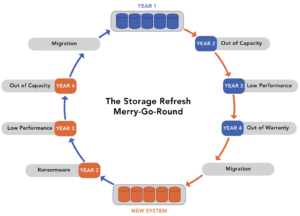
The High Cost of Dedicated Storage

These inefficiencies mean that vendors must configure the storage hardware that comes with their storage software in such a way that it can mask all of its inefficiencies. This compensation dramatically increases the total solution’s cost significantly as the customer must pay for the additional computing power and memory. These inefficiencies also lead to the inexplicably short life span of storage infrastructure. It forces customers to go through a costly refresh cycle every four to five years and make costly upgrades or deploy additional storage silos as new workloads come online.

Software Defined Storage is Still a Dedicated Storage Architecture

Software Defined Storage (SDS) has the same problem as dedicated storage architectures. The software is often inefficient; you must still buy hardware and dedicate it to storage. Most SDS solutions make you buy new hardware to go with their software. They can not take advantage of your existing hardware investment.

Dedicated Storage Shouldn’t Exist

Beyond compensating for the inefficiencies of dedicated storage hardware and SDS, the reality is that the storage software that drives dedicated arrays and NAS systems, runs on the same server type that you would run a hypervisor or any other application on. That server has built-in networking, and in most cases, it has 24 or more bays for storage media. The same applies to most network hardware. They are servers running a specific application.

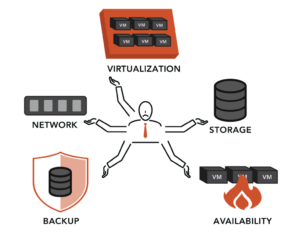
Buying multiple servers to do different things when in actuality, one server armed with efficient software could do it all, dramatically increases CAPEX and OPEX. The cost to manage and maintain this stack of at least three different servers is untenable. The result is a complex environment that requires storage, virtualization, and networking specialists, instead of a single IT generalist, which further raises costs. Converging these three separate software stacks is the impetus behind Hyperconverged Infrastructure (HCI).

Why HCI Didn’t End Dedicated Storage Architectures

2010 when HCI first came to market, it seemed like it was a sign of the end for dedicated storage architectures, but that never materialized. Over a decade after the first HCI solutions appeared, dedicated storage architectures are more prevalent than ever. Industry pundits like Chris Mellor label HCI a “niche market.” How could such an obvious choice for consolidating storage, virtualization, and networking, both hardware and software, not take over the market?

The first problem with HCI solutions is they didn’t converge anything. Yes, the storage and virtualization software, and in rare cases, the network software, run on the same server hardware. However, each software package has an entirely different code base and does not know that the other packages exist. There are no gains in management efficiencies as a result.

Each of the three (at least) code bases within HCI is also very inefficient because it was initially designed to run on dedicated hardware, not share hardware resources with other modules. Finally, in most cases, the storage and network software run as virtual machines within the hypervisor construct.

These realities result in HCI being deemed a good solution for medium-sized businesses. Still, as these infrastructures scale to address the demand of larger businesses and enterprises, inefficiency is stacked on top of inefficiency, making effective utilization of the available resources a significant problem. None of the HCI vendors went to work on the core HCI challenges:

  1. Storage and network operations must be equal citizens with virtualization, not run as VMs.
  2. An HCI cluster’s east-west traffic (node-to-node communications) is significant and must be specifically optimized.
  3. Optimizing operational efficiency and simplifying administration requires a unified code base, not three code bases from three different vendors that are glued together by a management interface.
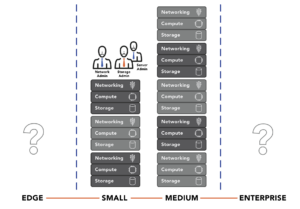
The High Cost of Dedicated Storage

There is also an economic problem with HCI infrastructures. In theory, running the entire infrastructure stack on one tier instead of three tiers should be less expensive. However, HCI is almost always the same price as or more expensive than the three-tiered architectures it attempts to replace. These HCI designs require even more powerful servers with even more memory and there are still three separate licenses (storage, virtualization, and networking) that must be paid for and bundled into the solution. The final straw is that most HCI solutions require you to purchase new hardware, and often, conveniently, from the HCI vendor, further increasing the price.

The result is that HCI has no operational savings or economic advantages over the traditional three-tier model.

Ultraconverged Infrastructure Eliminates the High Cost of Dedicated Storage

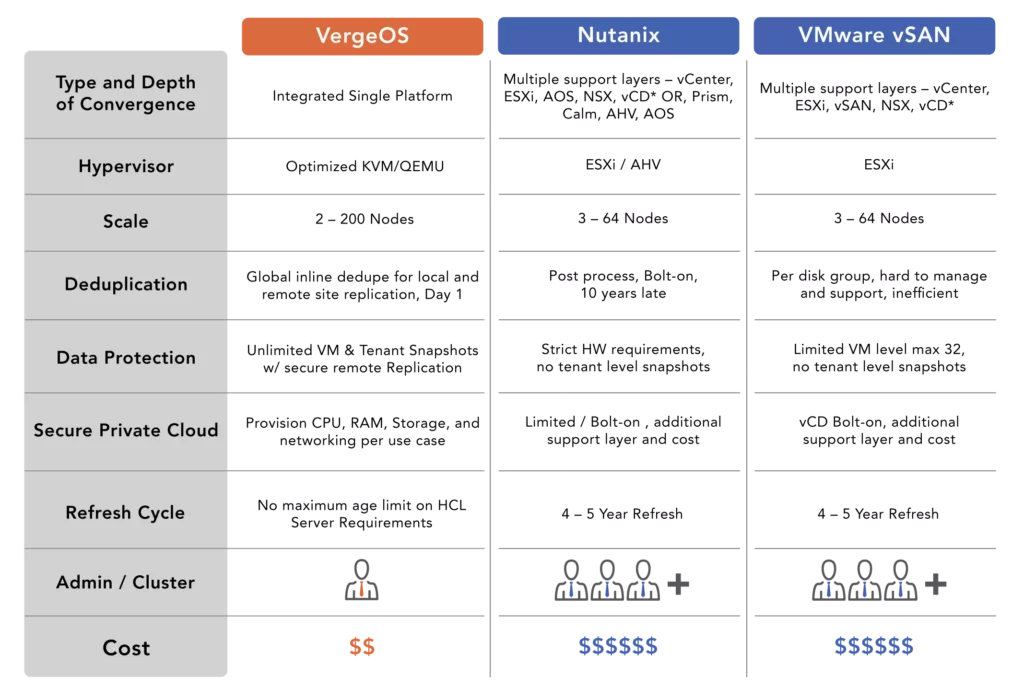
VergeIO’s Ultraconverged Infrastructure (UCI) eliminates the high cost of dedicated storage by overcoming the shortcomings of SDS and HCI. VergeOS is written from scratch to combine virtualization, storage services, and layer 2 and layer 3 network functionality into a single unified code base. With VergeOS, storage, and networking are equal citizens to the hypervisor, not servants. The result is a solution that is a fraction of the code size as other solutions but provides superior features. VergeOS is typically 50% less expensive than the equivalent VMware licenses which usually include all the functionality of its add-on packages like vSAN, NSX, and vCloud Director.

VergeOS can run on just about any server hardware built within the last six years, and it will deliver better performance and longevity from that existing hardware. This hardware flexibility enables you to leverage your existing servers and enjoy additional cost savings instead of being forced into buying new servers and spending more money.

Regarding storage, VergeOS uses drives installed in the same servers running the virtualization and networking functions. Our efficiency ensures that all three functions run at top performance and do not require additional processing power or memory. The VergeOS license is not capacity based; it is priced per node so that IT can put as much capacity as possible in each node. Adding drives to an existing server instead of buying a dedicated storage system is an order of magnitude less expensive.

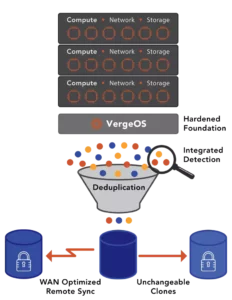
Global Inline Deduplication is built into the very core of VergeOS and has been from day one. It was not an afterthought added years later. The result is deduplication has no impact on performance. Since deduplication is integrated into the core of VergeOS, it drives many of our advanced features like IOclone, our answer to snapshots, IOprotect for disaster recovery, and IOfortify, our solution for rapid ransomware recovery. Again, all of these features are built into the core of the VergeOS software, not add-on modules.
Many potential customers are reaching out to us as a no-compromise alternative to VMware. Still, the compelling capabilities of VergeOS mean many others reach out to us as part of a NAS or SAN refresh project because the savings we can provide over the high cost of dedicated storage are even more significant than the savings we can provide versus VMware alone. Then add the operational savings of a truly converged infrastructure, and you’ll see why we have incredibly high customer satisfaction.
Filed Under: Storage Tagged With: Alternative, VMware

July 6, 2023 by George Crump

As part of considering an alternative, IT professionals should consider VMware’s cost of doing nothing. In other words, what is the cost of staying with VMware instead of exploring an alternative solution? This analysis goes beyond pricing, which is already increasing and changing to charging by core. We’ll assume, for now, that the cost will remain the same and explore other aspects of staying with VMware.

VMware’s Cost of Doing Nothing About Efficiency

Even before you examine the complexity of the VMware stack, ESXi, vSAN, and NSX, you’ll see that ESXi is inefficient. It creates a measurable virtualization tax that forces data centers to buy more powerful servers than they should have to, and even decide not to virtualize some workloads, relegating them to bare metal only. VMware’s inefficiency also forces IT professionals to refresh servers sooner than they should have to, even though the current servers have years of serviceable life.

This requirement for ever increasingly more powerful servers raises the cost of the physical assets as well as VMware licensing costs. Not one to miss out on an opportunity, VMware is switching to core-based licensing so that as you buy those more powerful servers with more cores, you will be forced to pay more for your software. VMware benefits from its inefficiency.

VMware’s Cost of Doing Nothing About Flexibility

VMware has a stringent hardware compatibility list (HCL) which limits your options as you expand your use of the solution in the future. While you can create multiple clusters within the data center to support different types of processors, enabling a VM to share assets across those clusters is difficult.

The rigid HCL and the difficulty in mixing a few servers from different manufacturers into the same VMware instance increase the cost of staying with VMware. Many customers buy their servers all at once and don’t intermix them. The problem is that after three or four years of use, the customer needs to add one or two more servers to keep up with growth. Those same servers may not be available. The customer needs to buy enough additional servers to create a new cluster. Then they must migrate and dedicate specific virtual machines to that cluster and its resources, since it can’t borrow resources from another cluster.

VMware’s Cost of Doing Nothing About Snapshots

VMware’s limitations on snapshots are legendary. They can only support 32 snapshots per virtual disk, but they only recommend two or three for performance reasons. They also recommend not maintaining a snapshot for more than 72 hours.

VMware does have excellent integration with third-party backup applications, but if three snapshots impact performance, that backup application needs to complete its backup very quickly and execute the housekeeping necessary to delete the snapshot. The problem is that now IT must count on the backup application for almost every recovery effort, which means a time-consuming process of restoring data instead of an instant “pointing” to data.

Customers now have an increased cost of a secondary backup application plus they need to spend extra money on a high-performance backup storage target. They could also buy a dedicated storage array to benefit from snapshot technology, which is yet another expensive option and typically has snapshot limitations of its own.

VMware Cost of Doing Nothing About Deduplication

VMware deduplication is a two-stage process and is not inline. The ingest tier should comprise high-performance and highly durable flash drives. As the data destages from this tier, it is deduplicated. There is a cost associated with these drives, a performance overhead in moving data a second time, and the obvious impact of running the deduplication algorithm. The two-stage approach also means that reading deduplication is done from slower drives as that data goes through the same deduplication algorithm during the read, impacting read performance.

The Cost of Doing Nothing Adds up

Whether the Broadcom acquisition happens or not, staying with VMware is expensive. VMware is already moving customers to a new per-core licensing model. You need to buy more server hardware than you should, and inflexibility makes it challenging to maximize the server investment and gradually add to it. Lastly, features like snapshots and deduplication, which are supposed to save money, force IT to spend more.

Most VMware Alternatives Can’t Solve the Problem

It seems like the door for VMware alternatives to start grabbing VMware customers is wide open, but most are not very successful at it. First, most alternative solutions force customers to replace their current server offering with new servers certified to run their hypervisor. Unless IT is ready to replace the servers and VMware, this makes the cost of a VMware alternative far more expensive than they were initially planning.

The second problem is most VMware alternative solutions aren’t any more efficient or flexible than VMware; they’re just cheaper. While saving money is essential, it is often just one of the priorities when an organization considers a platform switch.

Lastly, most VMware alternative solutions don’t have anything close to feature parity with VMware, or their features have the same shortcomings as VMware. A good example is found in networking. Most VMware alternatives have nothing that compares to VMware’s NSX, and if the organization needs that functionality, they have to go out and buy another application.

VergeOS Less Expensive, Flexible, and Feature Superiority

VMware Exit - VMware's Cost of Doing Nothing

When compared to VMware, VergeOS will cut your infrastructure software costs in half, at least. It also runs on your existing server hardware. Not only will it run on that hardware it will run more efficiently. You will see better per-virtual machine performance and improved virtual machine density. Most customers can delay or even cancel their next round of server purchases. VergeOS provides superior features to VMware, including:

  • IOclone – a powerful alternative to snapshots
  • IOfortify – redefined ransomware resiliency
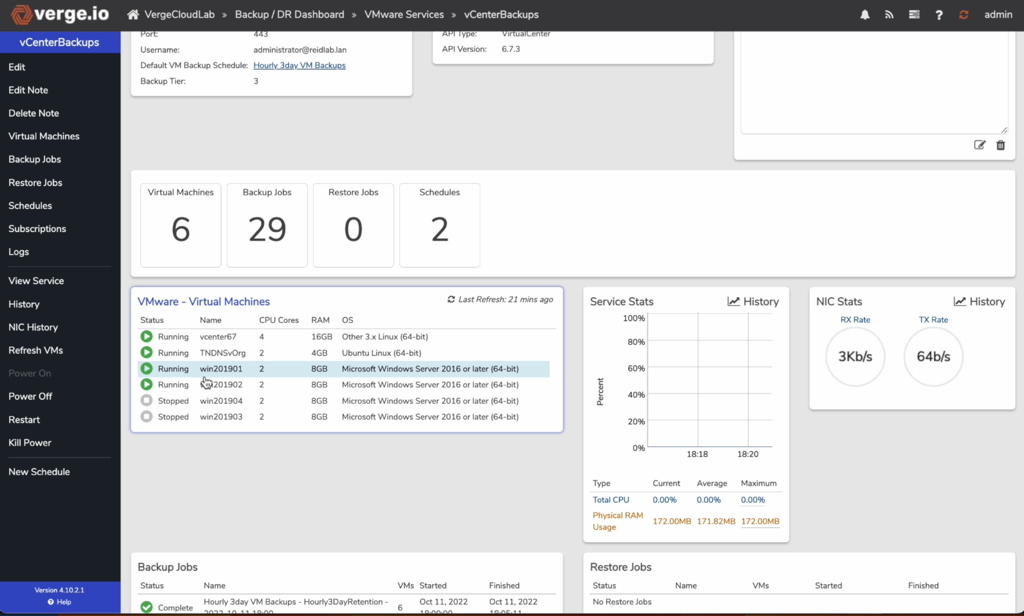
  • IOprotect – WAN-aware replication that enables you to first migrate to VergeOS by creating a disaster recovery solution for VMware.

We also provide native global inline deduplication and robust software-defined networking, including complete layer 2 and 3 functionality. Most importantly, all of these capabilities are integrated into the same efficient code base and included in the product’s price. Watch our “VergeOS Networking Fundamentals” video for a deep dive into VergeOS’ networking capabilities.

Lastly, we charge by node, not by processor or core. We enable you to buy powerful servers with as many cores and storage capacity as needed. You can then add them seamlessly to the existing VergeOS environment and use them to their full potential.

Next Steps

  • Take a Test Drive – Take VergeOS for a spin. We’ll use our virtual data center technology to create your own instance of VergeOS. You can create virtual machines, learn the GUI, and test applications in it.
  • Get a Personalized Demo – Sign up for a live demonstration and see the flexibility of VergeOS in action.
  • Watch our One-Slide Webinar and learn how to break free from VMware. See a live migration from VMware to VergeOS.

Filed Under: Virtualization Tagged With: Alternative, VMware

May 10, 2023 by George Crump

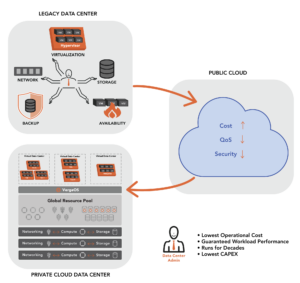
If you are frustrated with VMware’s high prices, exorbitant renewal fees, stalled innovation, and declining support, you may be looking at the Public Cloud as a VMware alternative. Public Cloud providers like Amazon AWS, Microsoft Azure, and Google Cloud have their use cases. Still, as we’ve seen in the recent rash of cloud repatriation moves, the Cloud is not necessarily the ideal solution for all use cases.

The first question is, “Does the Public Cloud meet the requirements of a VMware Alternative?”

Requirements for a VMware Alternative:

  • Have a lower upfront cost
  • Lower long-term costs
  • Provide superior performance and capabilities
  • Offer world-class support

This blog will explore how the Public Cloud stands up to these requirements.

The Upfront Costs of the Public Cloud

Upfront costs are an area where most analysts suggest that the Public Cloud has an advantage over VMware and other VMware alternative solutions. But does it? In the VMware alternative use case, you already have the hardware! The bigger question is, can the potential VMware alternative use your hardware? In most cases, the answer is “no” or “not very well,” so in those cases, the Public Cloud has an upfront cost advantage because you only have to pay the first month’s “rent” for the hardware and software you need.

VergeOS is an Ultraconverged Infrastructure that rotates the traditional IT stack (hypervisor, storage, and network) into a linear plane and a single software code base. This integration is essential because it creates a data center operating system that is 50% or more efficient than legacy, fragmented solutions. Unlike traditional Hyperconverged Infrastructure (HCI), VergeOS can run on existing hardware and deliver more capacity and performance. See our HCI to UCI comparison page for more details.

The Long-Term Costs of the Public Cloud

An area where the Public Cloud as a VMware alternative does not fare well is in the long-term cost calculation. The repeated monthly rental of the same infrastructure adds up quickly, which is why we see a rash in Public Cloud departures. The Public Cloud is ideal for short-term projects that you will spin up quickly and then tear down after getting the answers you need or validating a concept. It is not ideal for long-term, relatively static environments that will run for years, even decades.

Most customers we speak to looking for a VMware replacement have been running their VMware infrastructure for five years or more. The servers that support that environment are typically three to five years old. Even if you are very judicious about cloud resource utilization (which most people don’t have the time for), over five years, you will spend significantly more for the cost of renting that compute from the Public Cloud versus owning it outright, especially in the VMware or VMware alternative use case.

VergeIO has a long-term cost advantage over the Public Cloud, VMware, and VMware alternatives, thanks again to the extreme efficiency of VergeOS. Our software allows you to extend the life of IT infrastructure further than you ever thought possible. Many VergeOS customers are running on servers and storage that are over six years old.

The Performance of the Public Cloud

In theory, the performance of the Public Cloud should be an advantage when IT Professionals consider it a VMware alternative. If you need more processing power, rent more processors; if you don’t, deactivate them. This theory may hold if your application is scalable across multiple processors and cores. Most applications are not that threaded, and throwing more processing power at them doesn’t help. Additionally, performance isn’t just about processor performance. In most cases, the bottleneck is either poor application code or storage I/O performance.

Storage performance is an area where the Public Cloud struggles. High performance is costly and often far more challenging to configure. The built-in capabilities of the Public Cloud, especially in terms of storage, are so weak that there are dozens of products from third-party software developers that organizations need to sift through to try to fill the gaps.

VergeIO’s approach directly integrates a complete suite of storage services into VergeOS. Storage is an equal citizen alongside the hypervisor and network capabilities. The storage capabilities of VergeOS are so powerful that many companies begin their VMware Exit Strategy by selecting VergeOS instead of going through yet another SAN replacement.

World Class Support

The Public Cloud as a VMware Alternative

The quality of support from both VMware and the Public Cloud varies wildly. With VergeIO, all customers, regardless of size, experience high-quality support with quick resolution to your questions. VergeIO also provides customers with a world-class support experience. We know that VergeOS doesn’t live in a vacuum, and we go above and beyond, even helping customers resolve issues with non-VergeOS-related challenges. Quality support is easy to claim but harder to deliver. Take our product for a test drive, experience our support firsthand, or speak with our customers.

How to Start Your VMware Exit

VergeOS is usually 50% less than the price of VMware, and it leverages your existing hardware so you can benefit from those savings almost immediately. Our efficiency will extend the life of your current hardware, further increasing your savings. Finally, the operating system delivers better performance, data protection, and greatly simplified operations.

You can start by scheduling a test drive. Using our Virtual Data Center technology, we create a virtual environment. Within minutes you’ll be up and running without having to deploy hardware.

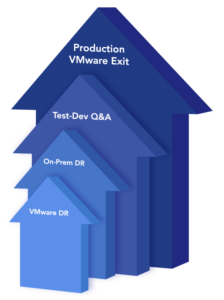
Your next step might be using VergeOS as a disaster recovery copy of your VMware environment. If you have a few different servers, you can load our software on them and create a complete VMware disaster recovery plan without a substantial financial outlay. This option allows you to take an inexpensive extended use of our solution while adding value to and reducing the cost of your current infrastructure.

While using VergeOS as a VMware DR solution, you might also want to use your VergeOS infrastructure for new workloads. Then when you’re ready, you can use our DR technology to move your VMware environment to VergeOS seamlessly. Again, transition at your pace, knowing we will be there every step of the way.

Filed Under: Private Cloud Tagged With: AWS, Azure, Public Cloud, UCI, VMware

April 11, 2023 by George Crump

Understanding VMware DR components allows IT professionals to dramatically reduce spending without compromising recoverability. There are four main components to a VMware disaster recovery (DR) strategy:

Understanding VMware DR Components
  1. Storage
  2. Compute
  3. Network
  4. Replication Software

The products you select for each of these components impact how much that component will cost and has a ripple effect on the other components in terms of cost and choices. The total of these parts impacts the complexity of your DR strategy and the likelihood of a successful recovery.

To learn more about VMware DR, join us for tomorrow’s Whiteboard Wednesday session, “VMware Disaster and Ransomware Recovery—The Three NEW Best Practices,” at 1:00 PM ET / 10:00 AM PT.

Understanding VMware DR Storage

Understanding VMware DR components requires knowing what type of storage will be in place at the DR site. It represents one of the best opportunities to reduce DR costs. To copy data to the remote DR site, customers often use array-based replication, which typically requires another storage system from the same vendor at the DR site. Customers are forced to pay a premium for a rarely used storage system. Furthermore, since most storage vendors have given up on auto-tiering, the customer cannot use lower-cost hard disk drives at the DR site and then move the workloads to flash storage when a disaster occurs.

Reducing the cost of DR storage requires two capabilities. First, the ability to replicate directly from the VMware environment instead of using the array. Second it must support multiple types of media. Replicating directly from the VMware environment instead of using the array provides a much tighter integration into VMware, enabling a complete copy of data at the DR site. It also enables replicating to a commodity server with drives installed instead of a dedicated storage array. The ability to support multiple types of storage media, flash drives, and hard disk drives, for example, enables IT to take advantage of the fact that hard drive capacity is 8X less expensive than the equivalent flash capacity. The storage system must provide the ability to quickly move the most performance-dependent workloads to a flash tier during disaster recovery testing or an actual disaster.

Understanding VMware DR Compute

Understanding VMware DR components requires knowing the compute requirements at the DR site during a disaster. IT must ensure the DR site can support operations during a disaster. IT no longer has the luxury of ordering hardware on demand because supply chain issues continue to plague the industry. Your DR plan can’t be held up because servers are on backorder for three weeks or more. As a result, the server performance at the DR site must match the server performance at production, at least for the workloads that will be recovered at the DR site.

Reducing the cost of DR Compute requires running more virtual machines on less hardware without impacting performance. VMware is too weighed down by all its add-ons and lack of integration between them. IT needs to eliminate as much of the virtualization tax as possible by using a more efficient hypervisor at the DR site. An alternative VMware hypervisor that is 50% more efficient means a 50% reduction in server costs at the DR site.

Understanding VMware DR Networking

Buying a second set of network hardware for the DR site has the same problem as buying a second storage system; it is expensive. An alternative is to use “dumb switches” and software-defined networking (SDN) capabilities. The issue is the SDN software is often so expensive that its costs all but eliminates the savings of buying “dumb switches.” This high cost is especially true with VMware’s NSX. VMware’s SDN software can add $10,000 or more to the cost of each node in the DR site. Lastly, SDN creates another layer, similar to managing a separate physical network layer. Understanding VMware DR components includes knowing the operational implications of each component selected.

What about Replication Software?

As stated above, many VMware DR strategies depend on array-based replication. While it is sometimes included “free” with the array, it also has the added cost of a second storage system from the same vendor. In most cases, array-based replication is “blind” to the fact that VMware is running on top of it and may not capture all the configuration data. It certainly will not capture all the networking configuration information.

Customers may also use a dedicated replication solution that integrates with VMware. While these solutions capture the VMware environment well, they are costly and don’t help reduce DR storage or network costs.

A Holistic Approach to VMware DR

The fact that there are four components to a VMware DR strategy is the problem. IT must purchase each component and manually stitch them together to work. The coordination between all the components, ensuring all the data and configurations are captured, is critical to the strategy’s success.

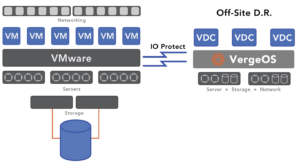
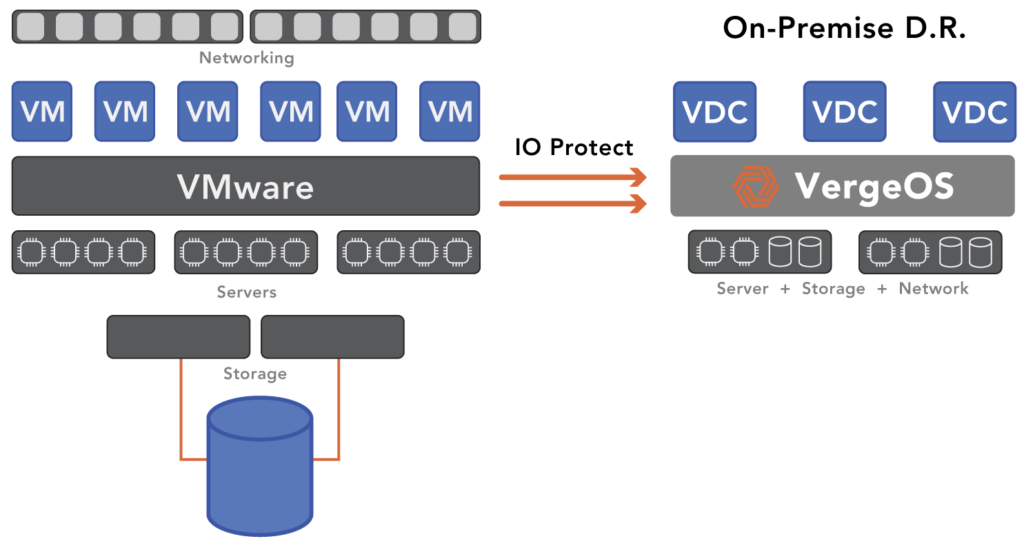
VergeIO’s IOprotect simplifies and reduces VMware DR costs. It makes understanding VMware DR components easy because it reduces the “components” to one. IOprotect is part of VergeOS, an ultraconverged infrastructure (UCI) that integrates networking, compute, storage, and data protection into a single operating environment. It is one piece of software, not four or five.

Understanding VMware DR Components

With IOprotect, you can replicate your existing three-tier or hyperconverged infrastructure (HCI) to a single VergeOS environment. It seamlessly connects to your VMware environment and captures all the information you need for a successful disaster recovery strategy. You can also consolidate all your DR computing, storage, and networking requirements into as few as two servers plus a few “dumb switches” at your DR site. If you require more capacity or compute resources, add more nodes, but you won’t need to add many nodes because our customers consistently find they can run more workloads on less hardware. VergeOS is more efficient than VMware. They also require less storage capacity thanks to our high-performance global inline deduplication.

Testing your DR strategy is easy with VergeOS. Our Virtual Data Center (VDC) technology allows you to create a space-efficient, isolated clone of your replicated site. You can test and practice your DR skills while protecting your production VMware environment.

A DR Strategy with a Production Future

Understanding VMware DR Components

IOprotect is just the beginning. Using IOprotect for VMware DR extensively tests all VergeOS capabilities while your VMware environment is under license. You will likely reduce your VMware expenses by more than 60% during that time. Then when it is time to renew VMware in production, and you have to deal with the new, more expensive VMware pricing policies, you have an exit strategy, tested and ready for deployment. Now your cost savings increase even more, as does your operational simplicity.

Filed Under: Protection Tagged With: dataprotection, Disaster Recovery, DR, VMware

April 6, 2023 by George Crump

preparing VMware for minor disasters

IT professionals often plan for major disasters like floods, fires, and hurricanes, impacting their VMware environment, but they also need to spend time preparing VMware for minor disasters. Unlike a major disaster, a minor disaster typically doesn’t require the organization to resume data center operations at a remote disaster recovery (DR) site. Minor disasters include a VMware node failure, storage system failure, a ransomware attack, or an application bug that causes an application outage or data corruption. From the perspective of the IT team, minor disasters are just as painful to work through.

During next week’s Whiteboard Wednesday session, one of our agenda items is preparing for and recovering from minor and major disasters. Our panel of experts will take you through real-world examples of how customers have dealt with these situations.

Users Have No Patience for Minor Disasters

Part of preparing VMware for minor disasters is understanding user expectations. During a major disaster, users tend to be more patient since they can see that the building is underwater, on fire, or shut down for some reason. They also may be dealing with regional issues that are impacting them personally.

During a minor disaster, the IT team does not get the same benefit of user patience. Users are at work or unaware of why they can’t access their data, so they complain quickly and loudly. Even during a ransomware attack, all the lights are on in the data center, so users demand to be up and running. As a result, minor disasters need a particular type of attention. IT needs to restore operations quickly, without much, if any, data loss.

Options for Dealing with Minor VMware Disasters

If a minor disaster occurs, there are typically three available options:

  1. Fail operations at the DR site and treat the minor disaster like a major disaster. They will then fail that application or data set to the remote site.
  2. Resolving the disaster using traditional data protection techniques like backup or snapshots.
  3. Have an on-premises mirror of your entire infrastructure, storage, networking, and compute available for failover.

Treating Minor VMware Disasters as major Disasters

Moving operations to the remote disaster recovery site is the first option when preparing VMware for minor disasters. The remote DR site should have all the components needed to support the application or data set you need to shift to it. IT is treating the minor disaster as if it were major. However, it also creates some additional challenges. First, you must calculate the time it will take to transfer operations and account for any additional outage while the transfer occurs. The chances of data loss are also higher since most organizations don’t update their DR site as frequently as they may protect their primary site.

Second, you must account for enabling your users to connect to the remote site. Unlike a major disaster, some of their applications and data are still available in the core data center. Is the network set up correctly to support this hybrid access?

Third, you need to account for transferring back to the primary site once the problem has been resolved. It will take at least the same time to move an application back into production as it did to move it out. For the most part, this shift was unnecessary since the primary data center was still operational. The data center didn’t have the resources and planning to rapidly recover through a minor VMware disaster.

Treating Minor VMware Disasters as Backup Events

The next option for preparing VMware for minor disasters is to treat it as something the backup process can work through. While all organizations should do backups as frequently as possible, the reality is that organizations only perform backups once daily. The lack of frequency often stems from backup software or hardware limitations. Some organizations may perform two or three backups daily, but there are usually hours of gaps between protection events. Even backups every three to four hours will result in too much data loss for a minor VMware disaster.

Some organizations will supplement the backup process with storage system snapshots. These snapshots enable more granular data protection. Still, most organizations don’t execute snapshots frequently enough to provide any real value in recovery for fear of the performance impact of retaining more than a dozen snapshots. Moreover, with a deep catalog of snapshots, customers frequently have problems finding a suitable snapshot for recovery.

The issue with using the backup process to prepare VMware for minor disasters is the time it takes to recover the data and the amount of data likely to be lost. Even so-called “instant-recovery” options available from some backup software vendors take more than 30 minutes to execute and, because of backup infrequency, result in hours of data loss. Also, if the minor disaster is a storage system failure, all the snapshots are lost, and there is no destination for backup recovery.

Treating minor Disaster as an HA Problem

Many data centers have a small group of applications designated as mission-critical. These applications will often have a mirrored set of resources to ensure high availability (HA) and complete invulnerability to a minor disaster. The difficulty of using HA when preparing VMware for a minor disaster is its extremely high cost, which makes it almost impossible to include a broad section of the organization’s data and applications. Not only does IT have to double the server, network, and storage hardware investment, but it also has to pay for additional software licenses like VMware or storage software. Most organizations provide no discount for the secondary installation, even though it will sit idle most of the time.

The real-time protection of most HA solutions leaves the protected copy vulnerable to the same failure, like a ransomware attack. In addition, the HA solution typically doesn’t translate into a viable off-site solution for major disasters. The result is extra cost and operations effort.

Another Option: Solving the VMware Minor Disaster Problem with IOprotect

VergeIO’s IOprotect capability provides much of the functionality of the HA option at a price lower than the backup option. It can also be the foundation of your remote DR site, consolidating all disaster recovery within a single piece of software. With IOprotect, preparing for and recovering from major and minor disasters is much more straightforward and cost-effective.

preparing VMware for minor disasters with IOprotect

Since IOprotect is built-in to VergeOS, it gains the same software efficiencies, which means it can run more workloads on less hardware. That means your secondary minor can run on fewer nodes and use commodity storage internal to the server, avoiding the cost of a second SAN. Many customers use older-generation servers, enabling them to establish a standby environment for a fraction of the production price. IOprotect is priced for the use case and is up to 80% less expensive than VMware.

Once the minor disaster recovery environment is established, customers can use IOprotect to replicate an instance to the DR site, which also benefits from the same efficiency and lowers the cost of preparing for a major disaster. Organizations can use IOprotect just for protection from major disasters, but its cost-effectiveness makes protecting against minor disasters simple and affordable. It executes near-realtime data protection, making immutable, space-efficient snapshot copies of production data locally and then replicating it to a remote DR site.

No matter the failure, VergeOS with IOprotect enables rapid recovery. It is a complete disaster recovery solution, not just storage. All capabilities, storage, networking, and computing are available on the second minor and third remote DR instances. It also lays the groundwork for a VMware Exit if you decide to reduce costs further and increase the capabilities of the production environment. With VergeOS, you can lower your infrastructure costs by more than 70% and extend its life by years.

Filed Under: Protection Tagged With: DR, VMware

March 30, 2023 by George Crump

Most of the questions in a recent event we did with Truth In IT were about comparing VMware to VergeOS. There were so many we couldn’t answer them all during the session. Since we think these are questions that even IT professionals who didn’t attend the event will ask, we’ve assembled a blog answering them. If you missed the event, you can watch the on-demand version here.

In addition to comparing VMware to VergeOS questions, there were plenty of questions related to resiliency, ransomware protection, and scalability. We will get to all those questions in a future blog.

The top comparing VMware to VergeOS questions were:

comparing VMware to VergeOS
Watch the VergeOS Deep Dive
  1. Is VergeOS a complete replacement for VMware?
  2. How do you migrate from VMware to VergeOS?
  3. Is using VergeOS easier than using VMware?
  4. Is VergeOS better for smaller organizations than VMware?
  5. Is VergeOS suitable for large data centers?
  6. How does VergeOS’ performance compare to VMware’s?
  7. How does VergeIO’s support compare to VMware’s?

Before we answer the questions, let’s see how VergeOS compares to VMware.

Comparing VMware to VergeOS as a Data Center Platform

About five years ago, VMware’s VMworld event theme was “Software Defined Data Center. (SDDC)” The company wanted to move beyond software-defining a server with their hypervisor toward software-defining storage (vSAN) and the network (NSX). Organizations that embrace an SDDC concept can use whatever hardware they wish to meet their needs. If they become dissatisfied with a software vendor, like VMware, they can switch without being forced to replace hardware. The customer is in control.

At VergeIO, we agree with the premise of SDDC but disagree with VMware’s execution. Instead of creating a tightly integrated data center operating system, they, through acquisition, created a stack of software packages that IT must manage separately. They were building a hyperconverged infrastructure (HCI). The problem with HCI is that while the architecture bundles the data center’s three primary components (compute, network, storage), they, are still three separate entities. Where the old three-tier stack (Network-Hypervisor-SAN) was physically separated, HCI is logically separated. This physical or logical separation leads to continued complexity and lack of efficiency. It doesn’t solve anything.

VergeOS integrates into a single code base, networking, server virtualization, and storage. We call it Ultraconverged Infrastructure (UCI). One data center operating system is easier to manage and is far more efficient than one that operates as a series of interconnected parts. As a result, customers get better performance and scalability from the existing hardware.

Comparing VMware to VergeOS highlights the core difference is how the development teams craft their solutions. Do you stack a bunch of separate software packages together and try to hide their separation through a common interface, or do you provide all the functionality through a single interface? One leads to inefficient use of hardware and expensive, complicated licensing agreements. The other leads to very efficient hardware use and a simple, inexpensive licensing model.

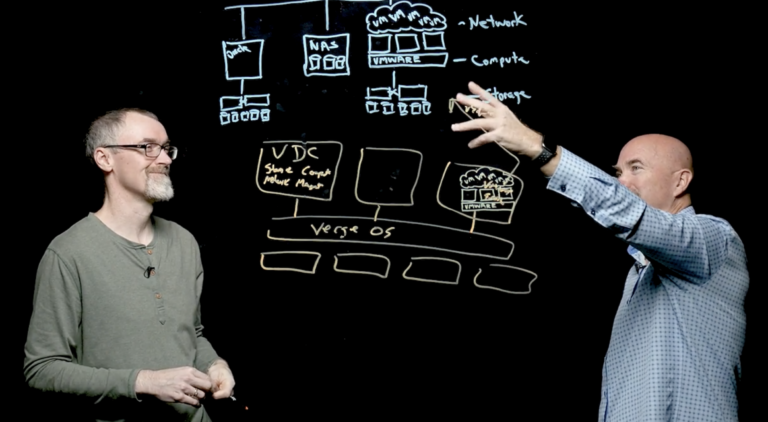
To learn more about the VergeOS architecture, watch this deep-dive LightBoard video of with CTO and founder, Greg Campbell.

Is VergeOS a Complete Replacement for VMware?

Yes, but you don’t have to flip the switch on day one and throw out VMware. Most customers move to VergeOS gradually. They start with a proof of concept, which is usually up and running in less than an hour, then move to use our IOprotect solution to reduce their disaster recovery costs. After that, VergeOS now has a copy of all the data, so they may start using VergeOS for test-dev, QA, or reporting. Next, they may start putting new workloads into the environment and then finally start moving production workloads. The result is a seamless transition that goes at a pace you define.

If you want to learn how to enhance your VMware DR strategy while lowering costs, register for our interactive virtual whiteboard session, live on April 12th.

How do You Migrate from VMware to VergeOS

comparing VMware to VergeOS

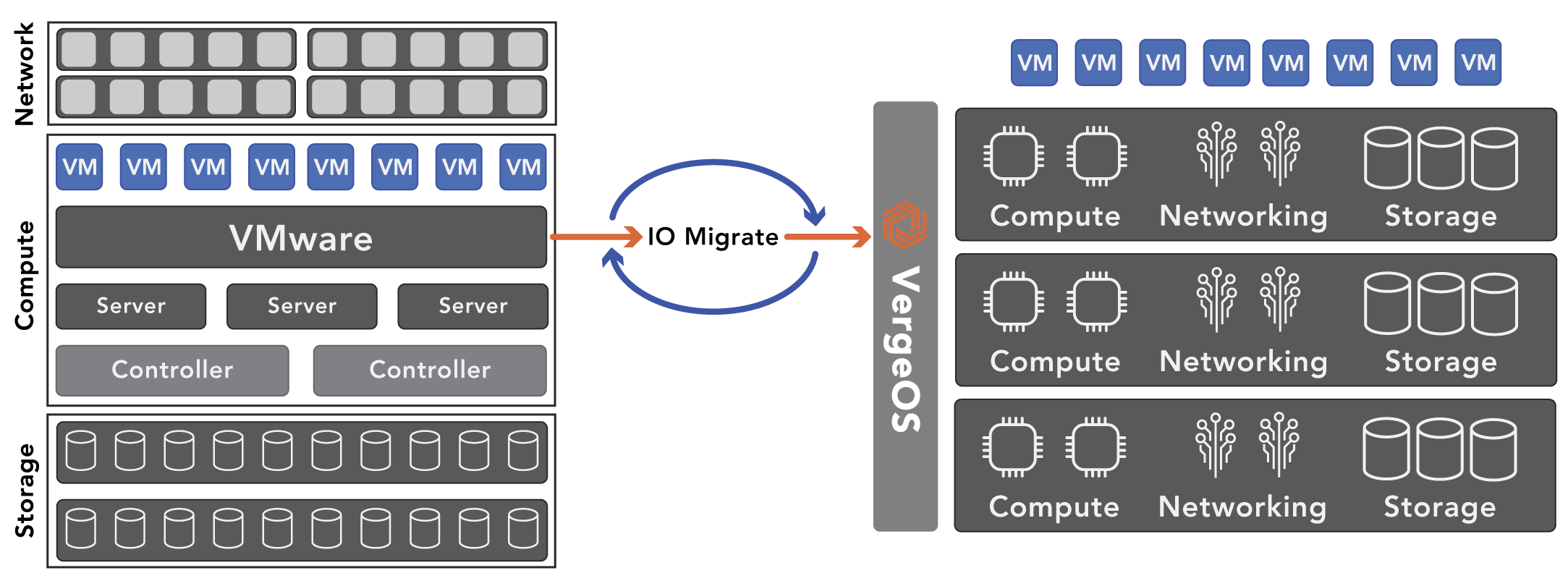
Comparing VMware to VergeOS requires migration, and our IOmigrate capability makes that seamless. Once you install VergeOS on a couple of nodes, you can point it at the VMware cluster, and you’ll see all the virtual machines (VM) in our interface. At that point, you can select some or all of the virtual machines and import them into the VergeOS environment. Once the VMs are running under VergeOS, take a snapshot of them, which protects the original copy, then you can stress-test it to your heart’s content without fear of data loss. Our snapshots are space efficient, immutable, and don’t impact performance, so you can take as many as you want and retain them indefinitely.

comparing VMware to VergeOS

Sign up for our Digital Learning Guide and learn how to create a VMware Exit Strategy.

Comparing VMware to VergeOS Ease of Use

It is easy for any vendor to claim that their solution is easier to use than another solution. To compare VMware to VergeOS regarding ease of use, I’ll relay what our customers tell us. Most tell us they can get the proof of concept going in an hour. The move to using us as a DR target and the move to production is seamless because it is all the same software.

Operationally the common theme is “it just works” and “I go for weeks without even touching it.” They all rave about the ease of implementing patches and software updates. That is the value of one software to drive the entire data center. The user interface is very easy to interact with while still enabling very advanced capabilities.

Is VergeOS Suitable for Small Organizations

Small Organizations, or what we call the server room use case, embrace the idea of VergeOS for several reasons. First, you can easily start with two nodes, loaded with storage, and, in many cases, address all your needs for virtualization, storage, and networking. Small data centers or server rooms often also mean small IT teams. One data center operating system that controls all functions makes day-to-day operations easy. VergeOS is also inexpensive. We don’t charge by cores, memory, or even storage capacity. The software is priced per node, so two or three licenses are all you need for a typical server room deployment.

Is VergeOS Suitable for Large Data Centers

VergeOS’ suitability for small organizations doesn’t mean it isn’t suitable for large organizations. We have customers with over one hundred nodes in a single instance of VergeOS. Those customers typically manage thousands of virtual machines and multiple petabytes of capacity. They also enjoy and benefit from the ease of use and cost savings of VergeOS.

Comparing VMware to VergeOS Performance

The efficiency of VergeOS helps both large and small data center customers. We are often installed on the same hardware that used to run VMware. Customers find the VergeOS environment performs much better than VMware. The improvement in performance means they can virtualize more workloads on fewer servers, delay the planned purchase of new servers, and run servers for years longer than expected. They can also virtualize some workloads that they thought must run on bare metal.

Comparing VMware to VergeOS Support

It is hard to compare support between the two companies. We hear from customers switching to VergeOS that the quality of VMware support is declining, especially for smaller customers. I speak to customers every week who are astounded by the quality of our technical support and amazed at how far the team will go to help them fix problems that don’t have anything to do with VergeOS.

Conclusion

Comparing VMware to VergeOS shines a light on the efficiency of our software. Our developers continue to invest in ensuring the software runs at its most optimal level, gets the most out of the available hardware resources, and presents its power in the simplest form possible. The result is a drastic reduction in infrastructure costs and dramatic increases in operational efficiency. This craftsmanship is immediately apparent when you install the software and is why so many customers are switching from VMware and Hyper-V to VergeOS.

Next Steps

Try It: Register to download an evaluation copy of the software.

Watch: A LightBoard Video of our CTO discussing the VergeOS architecture.

Learn: How to Create a VMware Exit Strategy with our Digital Learning Guide

Register: For our next Whiteboard Wednesday, VMware Disaster and Ransomware Recovery—The Three NEW Best Practices

Filed Under: Virtualization Tagged With: Disaster Recovery, Migration, VMware

  • « Go to Previous Page
  • Page 1
  • Interim pages omitted …
  • Page 12
  • Page 13
  • Page 14
  • Page 15
  • Page 16
  • Go to Next Page »

855-855-8300

Get Started

  • Versions
  • Request Tour

VergeIO For

  • SAN Replacement
  • Solving Infrastructure Modernization Challenges
  • Artificial Intelligence
  • Hyperconverged
  • Server Room
  • Secure Research Computing

Product

  • Benefits
  • Documents
  • Architecture Overview
  • Use Cases
  • Videos

Company

  • Blog
  • Technical Documentation
  • Legal

© 2026 VergeIO. All Rights Reserved.