• Skip to main content
  • Architecture
    • Overview
      Learn about VergeOS’ unique unfied architecture that integrates virtualization, storage, networking, AI, backup and DR into a single data center operating system
    • Infrastructure Wide Deduplication
      VergeOS transforms deduplication from a storage-only commodity into a native, infrastructure-wide capability that spans storage, virtualization, and networking, eliminating hidden resource taxes
    • VergeFS
      VergeFS is a distributed, high-performance global file system integrated into VergeOS, unifying storage across nodes, tiers, and workloads while eliminating the need for external SANs
    • VergeFabric
      VergeFabric is VergeOS’s integrated virtual networking layer, delivering high-speed, low-latency communication across nodes while eliminating the complexity of traditional network configurations.
    • Infrastructure Automation
      VergeOS integrates Packer, Terraform, and Ansible to deliver an end-to-end automation pipeline that eliminates infrastructure drift and enables predictable, scalable deployments.
    • VergeIQ
      Unlock secure, on-premises generative AI—natively integrated into VergeOS. With VergeIQ, your enterprise gains private AI capabilities without the complexity, cloud dependency, or token-based pricing.
  • Features
    • Virtual Data Centers
      A VergeOS Virtual Data Center (VDC) is a fully isolated, self-contained environment within a single VergeOS instance that includes its own compute, storage, networking, and management controls
    • High Availability
      VergeOS provides a unified, easy-to-manage infrastructure that ensures continuous high availability through automated failover, storage efficiency, clone-like snapshots, and simplified disaster recovery
    • ioClone
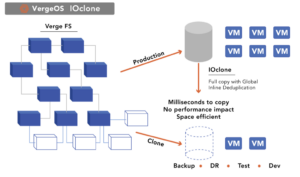
      ioClone utilizes global inline deduplication and a blockchain-inspired file system within VergeFS to create instant, independent, space-efficient, and immutable snapshots of individual VMs, volumes, or entire virtual data centers.
    • ioReplicate
      ioReplicate is a unified disaster-recovery solution that enables simple, cost-efficient DR testing and failover via three‑click recovery of entire Virtual Data Centers—including VMs, networking, and storage.
    • ioFortify
      ioFortify creates immutable, restorable VDC checkpoints and provides proactive ransomware detection with instant alerts for rapid recovery and response.
    • ioMigrate
      ioMigrate enables large-scale VMware migrations, automating the rehosting of hundreds of VMs (including networking settings) in seconds with minimal downtime by seamlessly transitioning entire VMware environments onto existing hardware stacks.
    • ioProtect
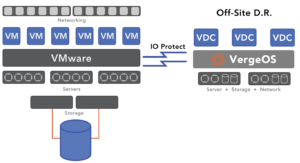
      ioProtect offers near-real-time replication of VMware VMs—including data, network, and compute configurations—to a remote disaster‑recovery site on existing hardware, slashing DR costs by over 60% while supporting seamless failover and testing in an efficient, turnkey VergeOS Infrastructure.
    • ioOptimize
      ioOptimize leverages AI and machine learning to seamlessly integrate new and old hardware and automatically migrate workloads from aging or failing servers.
    • ioGuardian
      ioGuardian is VergeIO’s built-in data protection and recovery capability, providing near-continuous backup and rapid VM recovery during multiple simultaneous drive or server failures.
  • IT Initiatives
    • VMware Alternative
      VergeOS offers seamless migration from VMware, enhancing performance and scalability by consolidating virtualization, storage, and networking into a single, efficient platform.
    • Hyperconverged Alternative
      VergeIO’s page introduces ultraconverged infrastructure (UCI) via VergeOS, which overcomes HCI limitations by supporting external storage, scaling compute and storage independently, using existing hardware, simplifying provisioning, boosting resiliency, and cutting licensing costs.
    • SAN Replacement / Storage Refresh
      VergeIO’s storage by replacing aging SAN/NAS systems within its ultraconverged infrastructure, enhancing security, scalability, and affordability.
    • Infrastructure Modernization
      Legacy infrastructure is fragmented, complex, and costly, built from disconnected components. VergeOS unifies virtualization, storage, networking, data protection, and AI into one platform, simplifying operations and reducing expenses.
    • Virtual Desktop Infrastructure (VDI)
      VergeOS for VDI delivers a faster, more affordable, and easier-to-manage alternative to traditional VDI setups—offering organizations the ability to scale securely with reduced overhead
    • Secure Research Computing
      VergeIO's Secure Research Computing solution combines speed, isolation, compliance, scalability, and resilience in a cohesive platform. It’s ideal for institutions needing segmented, compliant compute environments that are easy to deploy, manage, and recover.
    • Venues, Remote Offices, and Edge
      VergeOS delivers resiliency and centralized management across Edge, ROBO, and Venue environments. With one platform, IT can keep remote sites independent while managing them all from a single pane of glass.
  • Blog
      • In-Place VMware ExitsVergeOS separates the VMware exit from the hardware refresh. Organizations keep their existing servers, add off-the-shelf SSDs, and migrate workloads incrementally. Licensing costs drop 65%. Storage costs drop 80%. Migration completes in weeks, not months. No forklift required.
      • Storage Refreshes Break AutomationStorage refreshes break automation because new arrays introduce incompatible APIs and changed endpoints. Organizations refreshing storage must rewrite Terraform modules and Ansible playbooks, even if they are staying within the same vendor. VergeOS unified infrastructure eliminates the need for automation rewrites entirely.
      • Abstracted Infrastructure Saves AutomationInfrastructure automation fails when hardware differences between production and DR sites force separate code paths. Abstracted infrastructure eliminates these variables by presenting consistent interfaces regardless of underlying equipment. Organizations gain automation that works identically across all environments, enabling reliable disaster recovery and portable infrastructure-as-code.
    • View All Posts
  • Resources
    • Become a Partner
      Get repeatable sales and a platform built to simplify your customers’ infrastructure.
    • Technology Partners
      Learn about our technology and service partners who deliver VergeOS-powered solutions for cloud, VDI, and modern IT workloads.
    • White Papers
      Explore VergeIO’s white papers for practical insights on modernizing infrastructure. Each paper is written for IT pros who value clarity, performance, and ROI.
    • In The News
      See how VergeIO is making headlines as the leading VMware alternative. Industry analysts, press, and partners highlight our impact on modern infrastructure.
    • Press Releases
      Get the latest VergeOS press releases for news on product updates, customer wins, and strategic partnerships.
    • Case Studies
      See how organizations like yours replaced VMware, cut costs, and simplified IT with VergeOS. Real results, real environments—no fluff.
    • Webinars
      Explore VergeIO’s on-demand webinars to get straight-to-the-point demos and real-world infrastructure insights.
    • Documents
      Get quick, no-nonsense overviews of VergeOS capabilities with our datasheets—covering features, benefits, and technical specs in one place.
    • Videos
      Watch VergeIO videos for fast, focused walkthroughs of VergeOS features, customer success, and VMware migration strategies.
    • Technical Documentation
      Access in-depth VergeOS technical guides, configuration details, and step-by-step instructions for IT pros.
  • How to Buy
    • Schedule a Demo
      Seeing is beleiving, set up a call with one of our technical architects and see VergeOS in action.
    • Versions
      Discover VergeOS’s streamlined pricing and flexible deployment options—whether you bring your own hardware, choose a certified appliance, or run it on bare metal in the cloud.
    • Test Drive – No Hardware Required
      Explore VergeOS with VergeIO’s hands-on labs and gain real-world experience in VMware migration and data center resiliency—no hardware required
  • Company
    • About VergeIO
      Learn who we are, what drives us, and why IT leaders trust VergeIO to modernize and simplify infrastructure.
    • Support
      Get fast, expert help from VergeIO’s support team—focused on keeping your infrastructure running smoothly.
    • Careers
      Join VergeIO and help reshape the future of IT infrastructure. Explore open roles and growth opportunities.
  • 855-855-8300
  • Contact
  • Search
  • 855-855-8300
  • Contact
  • Search
  • Architecture
    • Overview
    • VergeFS
    • VergeFabric
    • Infrastructure Automation
    • VergeIQ
  • Features
    • Virtual Data Centers
    • High Availability
    • ioClone
    • ioReplicate
    • ioFortify
    • ioMigrate
    • ioProtect
    • ioOptimize
    • ioGuardian
  • IT Initiatives
    • VMware Alternative
    • Hyperconverged Alternative
    • SAN Replacement / Storage Refresh
    • Infrastructure Modernization
    • Virtual Desktop Infrastructure (VDI)
    • Secure Research Computing
    • Venues, Remote Offices, and Edge
  • Blog
  • Resources
    • Become a Partner
    • Technology Partners
    • White Papers
    • In The News
    • Press Releases
    • Case Studies
    • Webinars
    • Documents
    • Videos
    • Technical Documentation
  • How to Buy
    • Schedule a Demo
    • Versions
    • Test Drive – No Hardware Required
  • Company
    • About VergeIO
    • Support
    • Careers
×
  • Architecture
    • Overview
    • VergeFS
    • VergeFabric
    • Infrastructure Automation
    • VergeIQ
  • Features
    • Virtual Data Centers
    • High Availability
    • ioClone
    • ioReplicate
    • ioFortify
    • ioMigrate
    • ioProtect
    • ioOptimize
    • ioGuardian
  • IT Initiatives
    • VMware Alternative
    • Hyperconverged Alternative
    • SAN Replacement / Storage Refresh
    • Infrastructure Modernization
    • Virtual Desktop Infrastructure (VDI)
    • Secure Research Computing
    • Venues, Remote Offices, and Edge
  • Blog
  • Resources
    • Become a Partner
    • Technology Partners
    • White Papers
    • In The News
    • Press Releases
    • Case Studies
    • Webinars
    • Documents
    • Videos
    • Technical Documentation
  • How to Buy
    • Schedule a Demo
    • Versions
    • Test Drive – No Hardware Required
  • Company
    • About VergeIO
    • Support
    • Careers

VMware

March 25, 2023 by George Crump

Disasters and Ransomware attacks continue to increase in number and severity. Get Prepared!

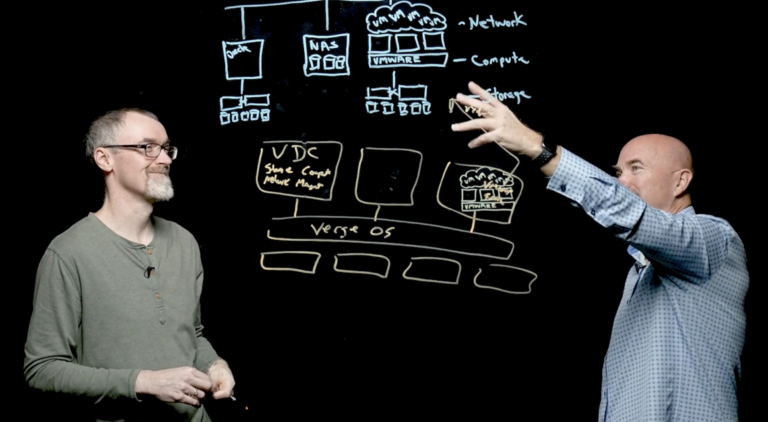
Join VergeIO’s Director of Development, Paul Hodges, Jeffrey Campbell, Customer Success Manager, and George Crump, CMO, as they map out three new best practices for rapidly recovering from a ransomware attack using our virtual whiteboard technology.

LEARN:

The Three New Best Practices for VMware and Ransomware Disaster Recovery:

  1. Prepare for Server, Data and Site Disasters
  2. Focus on Applications not Just Data
  3. Continuously Drive Down Costs

The team will also discuss how VergeIO customers have used VergeOS to recover from disasters and ransomware attacks without disrupting the business.

Event Details: Live on Wednesday, April 12th
1:00 pm ET / 10:00 am PT

About Our Speakers

  • Paul Hodges has been with VergeIO since its inception and is one of the company’s lead developers. His team is responsible for making a recovery from disaster or ransomware attacks as seamless as possible.
  • Jeffrey Campbell runs VergeIO’s Customer Success team and has first-hand experience helping customers recover from disasters and ransomware attacks.
  • George Crump before joining VergeIO, was an IT Analyst for 15 years and spent five years leading TechTarget’s SearchStorage and SearchDisasterRecovery workshops, training IT professionals worldwide to develop fully functioning disaster recovery plans.

Filed Under: Past Webinar, Webinar Tagged With: VMware

March 22, 2023 by George Crump

Don’t Make these VMware Exit Mistakes

The industry is full of advice on things you should do when considering a VMware alternative, but did you know there are four don’ts of a VMware exit? Accepting a vendor’s excuse for why you must do these “don’ts” can lead to higher costs, unsuccessful conversion, and a premature infrastructure refresh.

The Four Don’ts of a VMware Exit are:

  1. Don’t Focus on the Price
  2. Don’t Buy or Borrow Hardware
  3. Don’t Run a Proof of Concept
  4. Don’t Validate with Creampuff Use Cases

1. Don’t Focus on the Price of a VMware Exit

Of course, you should look at the price of the potential VMware alternative. Our suggestion, though, is don’t look solely at the price but also to ensure the product will take you forward in terms of capabilities. The solution should be less expensive than VMware and deliver measurably better efficiency, performance, scalability, and data protection capabilities. Make sure you look at both the return on investment and the total cost of ownership as part of your VMware Exit.

2. Don’t Buy New Hardware when you Exit VMware

The Four Don'ts of a VMware Exit. Don't buy new hardware!
Buying New Hardware Increases
the Cost of a VMware Exit

The second don’t of a VMware exit relates to hardware. If the VMware alternative you are considering can’t run on your existing hardware, stop looking and move to the next candidate. You bought into the software-defined data center (SDDC) for this exact scenario, so you can switch software solutions while continuing to use your current hardware assets. Forcing you to buy new hardware means the potential new vendor takes shortcuts and depends on specific hardware features or capabilities. Not only does this mean a higher upfront cost it also means you are guaranteed to face future infrastructure refreshes.

3. Don’t Run a Proof of Concept when you Exit VMware

Not running a proof of concept (POC) may sound a little crazy, and we do not suggest you skip testing the potential VMware alternative. A proof of concept is not enough. The third don’t of a VMware exit acknowledges you can’t, in 30 days, test every aspect of a new platform that you hope will replace a platform you have been running for over a decade!

Run a proof of concept but then look for a use case where you can use the product for months and stress the potential solution through its paces. And look for a vendor that is patient enough for you to run just this use case for a few months.

4. Don’t Validate with a Creampuff Use Case

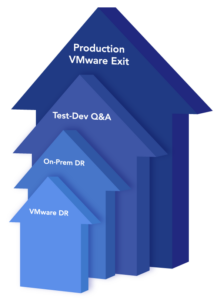
The workloads you will run in the environment after the proof of concept begin the validation phase of the potential VMware alternative. The fourth and final don’ts of a VMware exit is not to validate with “creampuff” use cases. These are use cases that won’t stress the new environment. Nobody cares if they fail, and creampuff use cases won’t force you to test the quality of technical support. Indeed, it is OK to have a few creampuff use cases when you start the validation phase, but as you progress into the heat of the phase, look to run a process or workload critical to the enterprise without impacting day-to-day operations.

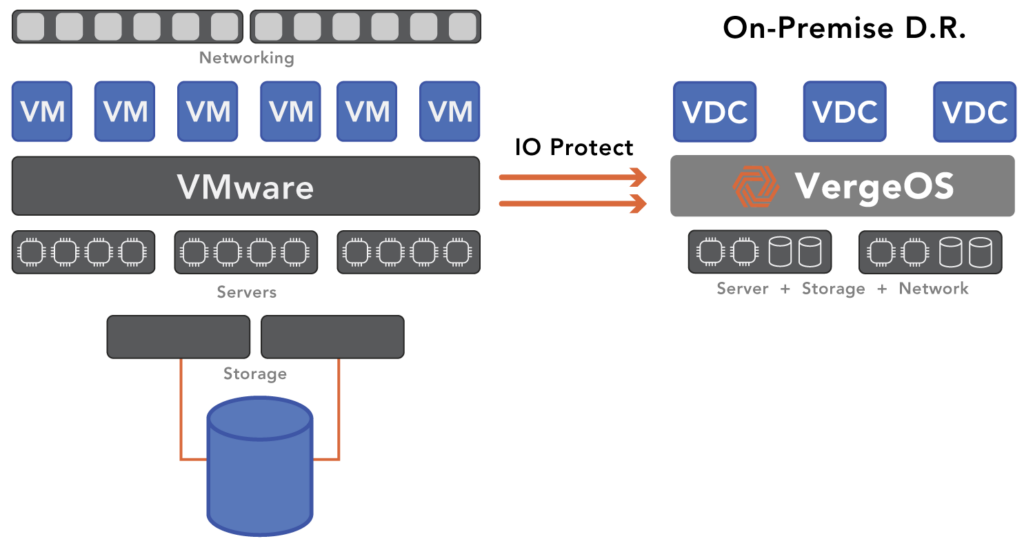
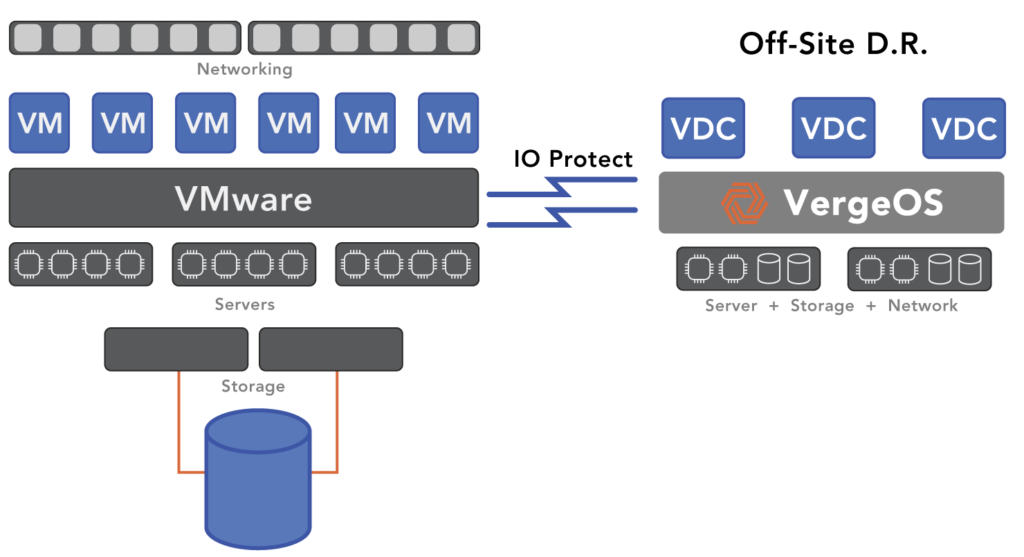
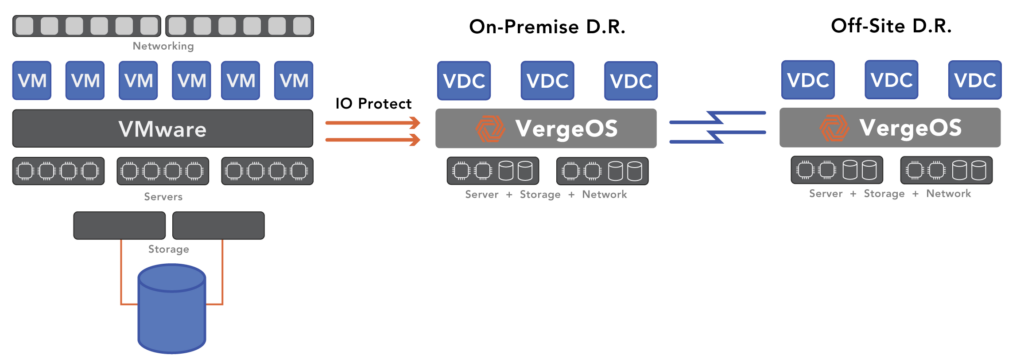
An ideal use case is disaster recovery (DR). It is critical to the organization, but if something goes wrong, it won’t impact day-to-day operations. DR also puts a significant load on the potential alternative. It has to receive all the data from your VMware environment continuously. Then when you perform DR tests, you are running entire instances of your workloads with the latest copies of data. DR stresses each element of a potential VMware alternative, including storage and networking. If the solution can pass the DR test both in terms of functionality and usability, you’ve gone a long way toward validating it for replacing VMware in production.

VergeOS Does Enable a Seamless VMware Exit

VergeOS is less expensive than VMware and other VMware Alternatives. Most of our customers find it reduces their licensing costs by more than 50%. These cost savings do not come at the expense of capabilities. VergeOS delivers better performance and capabilities than VMware while also being more resilient and easier to manage.

VergeOS runs on your existing hardware and breathes new life into your existing hardware, enabling you to consolidate more workloads on fewer nodes. Running more workloads on the same hardware significantly reduces total ownership costs. VergeOS’ hardware flexibility makes VergeOS easy to run through a proof of concept, enabling you to move quickly into the validation phase. Provide VergeIO with two or three spare servers, install the software, migrate a few workloads, and begin testing. Most customers can start their POCs within an hour of downloading the software.

The Four Don'ts of a VMware Exit
IOmigrate provides a Seamless VMware Exit to VergeOS

The cost-effectiveness of VergeOS makes it realistic to run the validation phase for months before committing fully to it. And you don’t have to run creampuff use cases! VergeOS has integrated capabilities to enable you to use the solution as a disaster recovery site for your VMware environment. Not only does this give you the ability to run the software in a stressful environment it also enables you to experience the VergeOS cost savings almost immediately. Most of our customers find they can reduce the licensing costs of their DR site by more than 60% and include more workloads in the DR process, all without requiring additional hardware.

Next Steps

  • Watch: One-Slide Webinar and Demonstration of a VMware Migration
  • Read: Our Digital Learning Guide, “How to Develop a VMware Strategy”
  • Schedule: A technical whiteboard session personalized for your environment

Filed Under: VMwareExit Tagged With: Alternative, ROI, VMware

March 15, 2023 by George Crump

Replacing infrastructure is a serious project, and if you are looking for alternatives to VMware, you may be looking for advice on how to create a VMware migration test plan. You want to ensure that whatever platform you transition to can deliver the enterprise capabilities your organization needs, can scale to meet your future requirements and has the highest quality of technical support.

Creating a VMware Migration Test Environment

Because of the project’s seriousness, you’ll want to set up a test environment to ensure that whatever you convert to will be compatible with your applications, performs well, and is easy to operate. One of the more challenging aspects of creating a test environment is finding or acquiring hardware to load the software for the new platform. Suppose the vendor insists on a specific hardware type or configuration or insists on selling you new hardware. In that case, creating a test environment is even more challenging because you now have to wait for the vendor to send you the hardware and get it installed and configured.

If the potential new vendor offers to install everything for you or offers to have you test your software in their labs, turn it down. You are going to live with this investment for a long time. You need to have the confidence that you can install it.

VergeOS Makes Testing Easy

Creating an environment to test your VMware Migration Plan is easy with VergeOS. The software integrates the hypervisor, storage, and network into a common code base. Storage and networking are not standalone components, nor are they virtual machines of the hypervisor. They are equal citizens. The integration is critical because it allows you to run VergeOS on almost any combination of hardware as long as it meets our modest minimum requirements. The integration also means that on your existing production hardware, you will experience better overall performance, enabling you to increase virtual machine density and potentially forgo the next round of server upgrades.

Once you create the physical test environment, the next step is creating something that looks like your production environment. Our advice here is not to use test simulators. While those simulators make VergeOS look spectacular, your workload is not FIO and ioMeter. The best way to understand how the new platform will work with your workloads is to load the latest copy of your workloads on them. Restoring data that is a few weeks old won’t do the job.

VergeOS Enables Production Data Testing

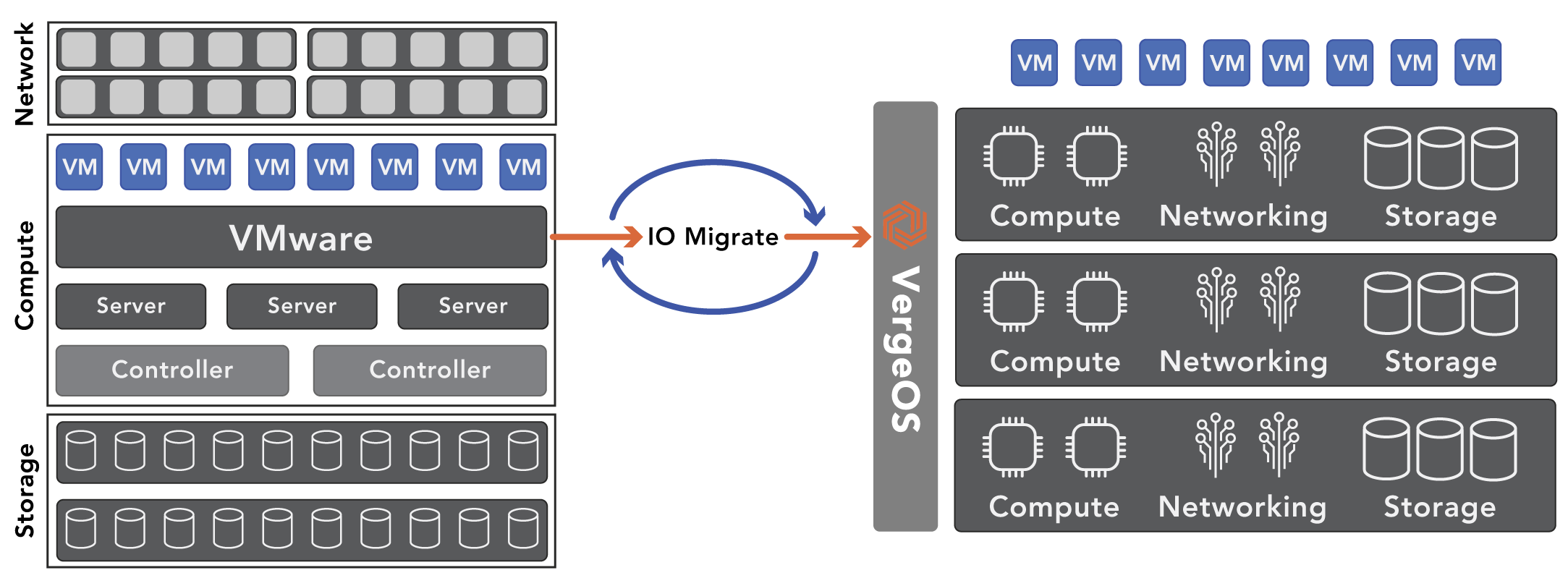
VergeOS’ IOmigrate solution lets you move copies of your VMware virtual machines (VM) in near real-time. You can also update those copies with the latest changes almost instantly. The solution is so seamless that you can even move a group of users to a specific workload and let them run on VergeOS for a few hours or days to see how it works under real-world conditions. In most cases, because of the efficiency of the integration, they will experience better performance, even with less powerful hardware.

VMware Migration Test is easy with IOmigrate

We’ll show you a live demonstration of IOmigrate during our one-slide webinar, “Break Free from VMware.”

Scaling VMware Migration Test

Most data centers will continue to see growth in the number of applications they support and ever-increasing demands for more storage IO performance and capacity. Testing scale can be challenging, and many customers resort to using load testing tools to place additional load on the system while applications are running.

VergeOS Solves Scaling VMware Migration Test

VergeOS has two capabilities that enable you to test how the environment will scale in the future accurately; virtual data centers and snapshots. In the same way that a virtual machine is an encapsulation of a server, a virtual data center is an encapsulation of an entire data center. It virtualizes all the aspects of a data center, including all the VMs, network settings, and storage configuration. Customers use these virtual data centers to segregate specific workloads and create tenants for customers or instances like testing, quality assurance, and development. You can read more about the power of Virtual Data Centers in our blog, “Beyond HCI.”

VDCs also have value in the testing process, thanks to our snapshots. You can snapshot an entire VDC. Imagine making instant copies of running workloads and assigning each instance to different users or automation. It is an accurate way to see how far you can scale the VergeOS environment.

A VMware Migration Test as Disaster Recovery

Most test environments are just that, test environments. You set them up, you run your tests, and you make your evaluation. But what if your test environment could do more?

VergeOS’ IOmigrate is so powerful that it can be a disaster recovery solution for your VMware environment. You can copy all your VMware virtual machines to VergeOS, even VMs you are not testing. The VMs you will test use our snapshot capabilities, so you can test those without interfering with your DR copy. IOmigrate is so powerful that you can make multiple copies of your VMs throughout the day to ensure you are always prepared.

In most cases, your test environment is not off-site, so that the test environment will be more suitable for protection against storage or server failure. Thanks to our immutable snapshot technology, it also makes an excellent ransomware protection and recovery solution. If you want to take that next step and replicate the test environment off-site, that is easy to set up with VergeOS.

Moving Your VMware Migration Test to Production

What if it all works? What if the test shows you can extend the life of existing hardware by another three or four years while also reducing software licensing costs? That is the fast ROI and low TCO promise of VergeOS. How do you cut over? If you’ve been following the steps above, you already have the latest version of your VMs on VergeOS, but they might need to be on the production hardware.

Our VDCs encapsulate the entire data center, and we can do a live migration of the entire data center in the same way VMware can migrate a VM. You can decommission one VMware server, join it to VergeOS, and shift VMs to that server freeing up other servers, which you can then decommission and join to VergeOS. Most of our customers can complete the conversion in less than a day, and if you want, VergeOS-certified IOintegrators can help you complete the task in record time.

Next Steps

  1. Demonstration: Join us live for a one-slide webinar and in-depth demonstration of a VMware to VergeOS migration.
  2. Read: About our VMware Exit Strategy program.
  3. Learn: How to Develop a VMware Exit Strategy. Build a complete plan using our tutorial series.

Filed Under: VMwareExit Tagged With: VMware

March 8, 2023 by George Crump

The impending Broadcom acquisition, ever-increasing prices, and stalled innovation have many customers wondering how to calculate the ROI of a VMware Exit. There are several factors to consider when calculating the return on investment of a VMware Exit:

the ROI of a VMware Exit
  • What is the cost difference in software?
  • What additional hardware is required?
  • How much effort is there in conversion?
  • Are there any other residual savings?

The Software ROI of a VMware Exit

The primary motivation for looking for a VMware alternative is saving money, and the software license cost is at the top of the list. VMware pricing is both expensive and is increasing. Many VMware customers indicate that their renewal price will increase, and they fear that the renewal rate will increase further once the Broadcom acquisition is complete.

VMware pricing is also complex. There are multiple modules to purchase, and there are classifications within those modules based on the number of CPUs and cores in each node within the cluster. The documentation on the VMware site about licensing is rather lengthy, and each separate module (VSAN, NSX, etc…) needs a separate license. Determining the exact price of a VMware license is a challenge partly because of this complexity and partly because it seems each customer gets a different price.

VergeOS, an Affordable VMware Alternative

Even before the price increases and uncertainty of the Broadcom acquisition, customers were flocking to VergeOS because of its efficiency and simplicity. The VergeOS pricing model is simple. It is per node, regardless of each node’s number of processors, cores, RAM, or storage capacity. It typically is less than half the price of VMware. VergeIO also has a five-year price lock option, so not only is there a fast ROI, but there is also the added benefit of pricing stability.

The Hardware Required for a VMware Exit

Many vendors require you to buy new hardware as you make your VMware exit, even if the servers supporting the current environment are more than up to the task. They may need more powerful hardware to run their hypervisor, or they may not support the hardware you are using today, especially if it is more than a few years old. Buying new hardware significantly increases the time it takes to realize an ROI.


Most infrastructure software (hypervisor, storage, and network) is inefficient. These solutions convert the stacks to software but layer them on top of each other instead of integrating them into a singular code base. The layering only increases their inefficiency and complexity.

VergeOS, A Model of Efficiency

VergeOS completely integrates the infrastructure rotating it 90° into a single linear plane. The tight, efficient code base can abstract more performance and capacity from the existing server hardware. Once switching to VergeOS, most organizations can, using the same hardware, increase the number of workloads and even virtualize workloads previously deemed bare-metal-only.

the ROI of a VMware Exit

Leveraging the existing server hardware delivers a positive return on investment much faster than solutions that must replace the server hardware. Extending the life of the existing server hardware also means that the customer can delay the next round of server upgrades, further accelerating ROI.

The Effort of a VMware Exit

One of the most significant considerations when calculating the ROI of a VMware exit is how difficult it is to switch from VMware to the new platform. Also critical is determining what resources are required to do so with minimal time and disruption. While some alternative hypervisors have some form of VMware import, they require that you pause the VMware environment as you convert one VM at a time. Then you must keep VMware “paused” while testing the converted VMs and workloads. The process is slow and requires far too lengthy application outages.

VergeOS, Seamless Migration

VergeOS enables you to migrate your VMs from VMware while they are still running. Our IOmigrate capability leverages change block tracking (CBT) to update the VergeOS VMs incrementally. You can use this method to extensively test your VMs in the VergeIO environment until you are satisfied that everything will work as planned. Many customers will first use VergeIO as a disaster recovery option until they are ready to cut over to VergeOS completely.

the ROI of a VMware Exit

Please register for our one-slide webinar, which will include a live demonstration of a VMware to VergeOS migration. It is live on Thursday, March 16th, at 1:00 PM ET / 10:00 AM PT.

The Post VMware Exit – Experience

Another consideration when calculating the ROI of a VMware exit is what is the experience of operating post-VMware exit? Does the new infrastructure software include capabilities not available before? The reality is that most infrastructure alternatives are sold primarily on price rather than capabilities. These vendors scramble to market using unoptimized open-source code. As a result, the customer gains little in switching to the new platform.

VergeOS, A Superior Experience

VergeOS not only provides a dramatic reduction in costs, but it also provides superior value infrastructure capabilities. As stated above, the VergeOS can run more workloads on less hardware. It also can support mixed nodes, so you can support the needs of a variety of different workloads and can scale from one to one hundred nodes.

VergeOS also delivers a superior storage services portfolio, including:

  • Global Inline Deduplication
  • Silent Corruption Detection & Correction
  • WAN Optimized Remote Synchronization
  • Storage Multi-Tiering
  • High Performance – up to one million IOPS per node
  • AES 256-bit encryption
  • Instant, Immutable, Unlimited Snapshots & Cloning

VMware, without the introduction of NSX, provides little networking functionality beyond a virtual switch. VergeOS includes a full complement of networking capabilities, including:

  • Layer 2 and 3 networking
  • Firewall and DNS servers
  • Network Address Translation & Port Address Translation (NAT/ PAT)
  • Quality of Service (QOS)
  • Static Routing
  • DHCP (Client and Server)
  • Authoritative DNS
  • Port Mirroring (North/South) & (East/West)

An Exit Worth Taking

VergeOS is not only a way out of the uncertainty of VMware. It is a superior platform for your data center. It will dramatically lower today’s costs, extend the life of existing hardware for years, and better position you to adopt and adapt to future technology. At the same time, you will experience a massively simplified IT operations experience that is even superior to the public cloud. With VergeOS the ROI of a VMware exit is quick and long-lasting.

Next Steps

  • Register for our webinar to see a live migration of a VMware environment into VergeOS.
  • Subscribe to our tutorial on developing a VMware Exit Strategy.
  • Schedule a technical whiteboard session
  • Download a copy of VergeOS

Filed Under: VMwareExit Tagged With: HCI, VMware

February 26, 2023 by George Crump

Watch VergeIO’s SE Director, Aaron Reid, and CMO, George Crump, as they take you through a live VMware migration to VergeOS. See how easy VergeIO’s new IOmigrate capability is to use. Learn how to use VergeOS for VMware DR and Ransomware Resilience today, then switch to VergeOS to enjoy 50% savings and 100% simplification.

Available Now

Join us for the demonstration and see how you can convert from VMware and improve storage performance and resilience while simplifying your network.

See:

  • A live migration from VMware to VergeOS
  • How to use VergeOS as a Disaster Recovery site
  • How to simplify networking and make it more resilient

Filed Under: Past Webinar, Webinar Tagged With: VMware

January 25, 2023 by George Crump

For data centers, realizing the full value of scale requires a single infrastructure that can scale in multiple dimensions and address multiple use cases. Customers today can select a legacy, single-dimension, scale-out strategy like hyperconverged infrastructure (HCI). However, they then experience scale-out sprawl because they need a scale-out architecture for production applications, a scale-out architecture for unstructured data, and a scale-out architecture for data protection. These designs will never enable customers to benefit from the full value of scale.

As we discussed in our on-demand webinar, “How to Eliminate the Data Center Scale Problem,”, the solution is a single infrastructure, not multiple infrastructures. That infrastructure must scale in all three dimensions, not just “out.” It also must allow incremental adoption because most organizations won’t “clean sweep” their data centers.

The Full Value of Scaling Large Instead of Out

While hyperconverged infrastructure (HCI) vendors claim to scale out, most customers find that they, for technical or practical reasons, can only “scale medium.” Despite claiming to converge virtualization, networking, and storage, most HCI solutions are software-defined storage (SDS) running as a virtual machine (VM). They are stacking the three tiers (compute, storage, networking) instead of converging them.

The Full Value of Scale: Delivering the Enterprise

For virtualization, these products typically force you to pay separately for a third-party hypervisor like VMware ESXi, or bundle an open-source version, with little to no optimization. When it comes to networking, most HCI solutions provide little to no functionality and instead rely on the often limited capabilities of the hypervisor. The result of borrowing and bundling code creates a burden on the infrastructure, which worsens as IT adds additional nodes. IT professionals refer to this overhead as the virtualization tax. As a result, most HCI infrastructures only support one workload and don’t typically scale that architecture beyond six to eight nodes.

Ultraconverged Infrastructure (UCI), instead of stacking layers of code on top of each other within each node, rotates the stack into a single layer, creating a cohesive piece of data center operating software. VergeOS, for example, is a UCI solution architected so that virtualization, networking services, and storage services are all integrated, almost eliminating the virtualization tax. UCI’s efficiency can scale to hundreds of nodes without wasting resources so that even the largest enterprise can consolidate all their workloads onto a single infrastructure.

Scaling large helps organizations realize the full value of scale by enabling organizations to keep the same infrastructure no matter how many new workloads the organization needs to support. It simplifies IT operations and dramatically lowers IT cost.

The Full Value of Scale: Delivering The Edge

The Full Value of Scale: Delivering the Edge

Only some organizations need massive scale, and even enterprises that do will have Edge locations and branch offices that need localized IT resources. Scaling small is a more significant challenge than scaling large. Mid-size data centers and branch offices often have a smaller IT team, sometimes a team of one. Edge locations are hard to get to and have an IT team of zero. In all cases, space is often limited, but high availability is often a mandate.

The “scale medium” HCI solutions often require three nodes. Overcoming the overhead caused by the virtualization tax requires that those nodes have powerful processors and high-performance storage, even though compute and storage performance requirements are modest. Mid-range processors and a mixture of flash and hard disk drives will meet the requirements of many of these environments. The legacy HCI node-similarity requirement forces customers into using high-end processors and flash-only configurations. The result is that HCI becomes very expensive for Server Rooms and Edge Computing.

UCI can scale small. IT can create a cluster with only one or two small nodes for high availability (H/A). The efficiency of VergeOS enables Edge Computing, especially when IT planners couple it with two mini-servers like Intel’s Next Unit of Computing (NUC). In the space of a shoebox, you can deliver Edge Computing power and consume less than 12 watts, and delivers more than enough performance for multiple workloads.

The Full Value of Scale: Delivering for Mid-sized data centers

For the Server Room use case, VergeOS can use two or three low-end to midrange servers, enabling you to consolidate all your workloads onto one infrastructure, eliminating dozens of extraneous software packages and processes.

Scaling small helps organizations realize the full value of scale by reducing the cost and complexity of managing Edge Compute. It also enables mid-sized data centers to keep pace with larger organizations even though they have much smaller IT teams. Whether you have hundreds of Edge data collection points or are an IT team of one, VergeOS can solve your virtualization, storage, networking, and data protection challenges.

The Value of Scaling Vertical

Vertically scaling your infrastructure is one of the essential requirements to realizing the full value of scale, but it is often lacking from HCI solutions. Most HCI solutions require that each additional node added to the cluster has similar processing power, IOPS performance, and storage capacity as the existing nodes. While it is true that some HCI vendors have a concept of a capacity node, that node often comes with ramifications. One vendor, for example, suggests turning off deduplication if you add a set of capacity nodes, which means you will need even more of them.

The Full Value of Scale: Delivering Workload Consolidation

Node similarity leads IT professionals only to use HCI for one specific workload. UCI is different in that it can support multiple nodes within the data center operating system (DCOS). A single environment can contain nodes with different processing capabilities from different manufacturers. It can even mix in nodes with Graphics Processing Units (GPU). Nodes can be storage performance focused with NVMe flash, and other nodes can be capacity focused with high-density but low-cost hard disk drives.

The mixture of nodes does not increase complexity. IT can organize nodes by their capabilities into specific clusters. The clusters are then seen through our Global Resource Pool. Using our Virtual Data Center (VDC) technology, an IT administrator can dedicate certain cluster types to particular VDCs, or the capabilities of a cluster can be made universally available to all VDCs. This is all easily done through the VergeOS dashboard.

A VDCs can be created for each workload type or set of workloads with a common resource requirement. For example, suppose you have a mission-critical performance-demanding application. In that case, the infrastructure must deliver consistent, high-performance; you can dedicate the resources from a specific high-performance storage cluster (NVMe Flash) to that VDC. The VDC can even be nested so that you can have a production instance, a development instance, and a QA instance of that application. Our deduplication and snapshots make this nesting practical because they eliminate redundant data.

The vertical dimension also helps organizations realize the full value of scale by doing something they may have thought impossible, complete workload consolidation. When looking at workload or even storage consolidation, IT planners worry about workload integrity, ensuring the workload will get the performance or capacity it needs when needed. With UCI, you can mix nodes and add specific resources for specific workloads ensuring consistent performance and happy users.

The Full Value of Scale: Deep

Scaling Deep is another dimension data centers need to extract the full value of scale. It ensures existing resources are almost entirely utilized before adding more nodes. While scaling large is vital, you only want to scale as large as you must and no further.

Scaling deep requires ensuring the vendor optimizes the software for the hardware it is managing. Delivering optimization while maintaining hardware abstraction requires very talented developers. It also needs to provide features like deduplication to ensure capacity efficiency. These optimizations require that the UCI vendor own the code and can get into the low levels of the software to make those optimizations. Vendors who borrow an off-the-shelf or open-source hypervisor don’t own the code to make the improvements if they want.

VergeIO’s developers have taken talent and ownership to an extreme. VergeIO not only owns the code and has very talented developers, and we created a specific programming language and development environment to get around the limitations of traditional programming stacks. It enables us to remain agile, even 12 years into the product’s maturity.

Scaling deeps helps organizations realize the full value of scale so they can slow the growth of IT spending. Most HCI solutions are less than 10% utilized, but these vendors continue to force their customers to add additional nodes to cover the virtualization tax.

How to Get from Many to One

Clearly, scale-out is not enough; data centers need the multi-dimensional scale that UCI provides. The vision of UCI is compelling, one data center operating system that replaces dozens of others while driving down the cost and complexity of IT.

Starting is simple, identify one workload whose infrastructure needs refreshing. Maybe it’s time to replace a SAN or NAS, or you are considering HCI and are looking for a more cost-effective and scalable alternative. Maybe you are a member of a small IT team with a small data center and are looking to simplify everything. Or You have an Edge Strategy that has stalled or never got off the ground.

You can also get an in-depth education into the VergeOS architecture with our Digital Learning Guide, “Understanding the VergeOS Architecture.“

All of these are great places to start with VergeIO. Want to learn how UCI can map into your infrastructure plans? Schedule a meeting with one of our technical specialists today.

Filed Under: HCI Tagged With: HCI, Hyperconverged, scale-out, VMware

  • « Go to Previous Page
  • Page 1
  • Interim pages omitted …
  • Page 11
  • Page 12
  • Page 13

855-855-8300

Get Started

  • Versions
  • Request Tour

VergeIO For

  • VMware Alternative
  • SAN Replacement
  • Solving Infrastructure Modernization Challenges
  • Artificial Intelligence
  • Hyperconverged
  • Server Room
  • Secure Research Computing

Product

  • Benefits
  • Documents
  • Architecture Overview
  • Use Cases
  • Videos

Company

  • About VergeIO
  • Blog
  • Technical Documentation
  • Legal

© 2025 VergeIO. All Rights Reserved.