• Skip to main content
  • Architecture
    • Overview
      Learn about VergeOS’ unique unfied architecture that integrates virtualization, storage, networking, AI, backup and DR into a single data center operating system
    • Infrastructure Wide Deduplication
      VergeOS transforms deduplication from a storage-only commodity into a native, infrastructure-wide capability that spans storage, virtualization, and networking, eliminating hidden resource taxes
    • VergeFS
      VergeFS is a distributed, high-performance global file system integrated into VergeOS, unifying storage across nodes, tiers, and workloads while eliminating the need for external SANs
    • VergeFabric
      VergeFabric is VergeOS’s integrated virtual networking layer, delivering high-speed, low-latency communication across nodes while eliminating the complexity of traditional network configurations.
    • Infrastructure Automation
      VergeOS integrates Packer, Terraform, and Ansible to deliver an end-to-end automation pipeline that eliminates infrastructure drift and enables predictable, scalable deployments.
    • VergeIQ
      Unlock secure, on-premises generative AI—natively integrated into VergeOS. With VergeIQ, your enterprise gains private AI capabilities without the complexity, cloud dependency, or token-based pricing.
  • Features
    • Virtual Data Centers
      A VergeOS Virtual Data Center (VDC) is a fully isolated, self-contained environment within a single VergeOS instance that includes its own compute, storage, networking, and management controls
    • High Availability
      VergeOS provides a unified, easy-to-manage infrastructure that ensures continuous high availability through automated failover, storage efficiency, clone-like snapshots, and simplified disaster recovery
    • ioClone
      ioClone utilizes global inline deduplication and a blockchain-inspired file system within VergeFS to create instant, independent, space-efficient, and immutable snapshots of individual VMs, volumes, or entire virtual data centers.
    • ioReplicate
      ioReplicate is a unified disaster-recovery solution that enables simple, cost-efficient DR testing and failover via three‑click recovery of entire Virtual Data Centers—including VMs, networking, and storage.
    • ioFortify
      ioFortify creates immutable, restorable VDC checkpoints and provides proactive ransomware detection with instant alerts for rapid recovery and response.
    • ioMigrate
      ioMigrate enables large-scale VMware migrations, automating the rehosting of hundreds of VMs (including networking settings) in seconds with minimal downtime by seamlessly transitioning entire VMware environments onto existing hardware stacks.
    • ioProtect
      ioProtect offers near-real-time replication of VMware VMs—including data, network, and compute configurations—to a remote disaster‑recovery site on existing hardware, slashing DR costs by over 60% while supporting seamless failover and testing in an efficient, turnkey VergeOS Infrastructure.
    • ioOptimize
      ioOptimize leverages AI and machine learning to seamlessly integrate new and old hardware and automatically migrate workloads from aging or failing servers.
    • ioGuardian
      ioGuardian is VergeIO’s built-in data protection and recovery capability, providing near-continuous backup and rapid VM recovery during multiple simultaneous drive or server failures.
  • IT Initiatives
    • VMware Alternative
      VergeOS offers seamless migration from VMware, enhancing performance and scalability by consolidating virtualization, storage, and networking into a single, efficient platform.
    • Hyperconverged Alternative
      VergeIO’s page introduces ultraconverged infrastructure (UCI) via VergeOS, which overcomes HCI limitations by supporting external storage, scaling compute and storage independently, using existing hardware, simplifying provisioning, boosting resiliency, and cutting licensing costs.
    • SAN Replacement / Storage Refresh
      VergeIO’s storage by replacing aging SAN/NAS systems within its ultraconverged infrastructure, enhancing security, scalability, and affordability.
    • Infrastructure Modernization
      Legacy infrastructure is fragmented, complex, and costly, built from disconnected components. VergeOS unifies virtualization, storage, networking, data protection, and AI into one platform, simplifying operations and reducing expenses.
    • Virtual Desktop Infrastructure (VDI)
      VergeOS for VDI delivers a faster, more affordable, and easier-to-manage alternative to traditional VDI setups—offering organizations the ability to scale securely with reduced overhead
    • Secure Research Computing
      VergeIO's Secure Research Computing solution combines speed, isolation, compliance, scalability, and resilience in a cohesive platform. It’s ideal for institutions needing segmented, compliant compute environments that are easy to deploy, manage, and recover.
    • Venues, Remote Offices, and Edge
      VergeOS delivers resiliency and centralized management across Edge, ROBO, and Venue environments. With one platform, IT can keep remote sites independent while managing them all from a single pane of glass.
  • Blog
      • How a Hypervisor Can Reduce RAM ConsumptionThe Memory and Flash Supercycle raised the bar on what a VMware alternative must deliver. The right hypervisor does not just cost less to license — it must reduce RAM consumption per host, require fewer servers, and lower flash storage costs.
      • The Hidden Risk of VM Density: The Blast RadiusIncreasing VM density cuts hardware costs and shrinks the data center footprint. The tradeoff is a larger blast radius when a server fails. VergeOS addresses the blast radius concern with layered protection from ioOptimize, RF2, ioGuardian, and RF3 that scales with density.
      • ROI from Disaster RecoveryOrganizations can generate ROI from disaster recovery by putting DR infrastructure to active use. VergeOS turns idle standby capacity into an asset for testing, peak load management, and workload recovery while improving recovery readiness.
    • View All Posts
  • Resources
    • Become a Partner
      Get repeatable sales and a platform built to simplify your customers’ infrastructure.
    • Technology Partners
      Learn about our technology and service partners who deliver VergeOS-powered solutions for cloud, VDI, and modern IT workloads.
    • White Papers
      Explore VergeIO’s white papers for practical insights on modernizing infrastructure. Each paper is written for IT pros who value clarity, performance, and ROI.
    • In The News
      See how VergeIO is making headlines as the leading VMware alternative. Industry analysts, press, and partners highlight our impact on modern infrastructure.
    • Press Releases
      Get the latest VergeOS press releases for news on product updates, customer wins, and strategic partnerships.
    • Case Studies
      See how organizations like yours replaced VMware, cut costs, and simplified IT with VergeOS. Real results, real environments—no fluff.
    • Webinars
      Explore VergeIO’s on-demand webinars to get straight-to-the-point demos and real-world infrastructure insights.
    • Documents
      Get quick, no-nonsense overviews of VergeOS capabilities with our datasheets—covering features, benefits, and technical specs in one place.
    • Videos
      Watch VergeIO videos for fast, focused walkthroughs of VergeOS features, customer success, and VMware migration strategies.
    • Technical Documentation
      Access in-depth VergeOS technical guides, configuration details, and step-by-step instructions for IT pros.
  • How to Buy
    • Schedule a Demo
      Seeing is believing, set up a call with one of our technical architects and see VergeOS in action.
    • Versions
      Discover VergeOS’s streamlined pricing and flexible deployment options—whether you bring your own hardware, choose a certified appliance, or run it on bare metal in the cloud.
    • Test Drive – No Hardware Required
      Explore VergeOS with VergeIO’s hands-on labs and gain real-world experience in VMware migration and data center resiliency—no hardware required
  • Company
    • About VergeIO
      Learn who we are, what drives us, and why IT leaders trust VergeIO to modernize and simplify infrastructure.
    • Support
      Get fast, expert help from VergeIO’s support team—focused on keeping your infrastructure running smoothly.
    • Careers
      Join VergeIO and help reshape the future of IT infrastructure. Explore open roles and growth opportunities.
  • 855-855-8300
  • Contact
  • Search
  • 855-855-8300
  • Contact
  • Search
  • Architecture
    • Overview
    • VergeFS
    • VergeFabric
    • Infrastructure Automation
    • VergeIQ
  • Features
    • Virtual Data Centers
    • High Availability
    • ioClone
    • ioReplicate
    • ioFortify
    • ioMigrate
    • ioProtect
    • ioOptimize
    • ioGuardian
  • IT Initiatives
    • VMware Alternative
    • Hyperconverged Alternative
    • SAN Replacement / Storage Refresh
    • Infrastructure Modernization
    • Virtual Desktop Infrastructure (VDI)
    • Secure Research Computing
    • Venues, Remote Offices, and Edge
  • Blog
  • Resources
    • Become a Partner
    • Technology Partners
    • White Papers
    • In The News
    • Press Releases
    • Case Studies
    • Webinars
    • Documents
    • Videos
    • Technical Documentation
  • How to Buy
    • Schedule a Demo
    • Versions
    • Test Drive – No Hardware Required
  • Company
    • About VergeIO
    • Support
    • Careers
×
  • Architecture
    • Overview
    • VergeFS
    • VergeFabric
    • Infrastructure Automation
    • VergeIQ
  • Features
    • Virtual Data Centers
    • High Availability
    • ioClone
    • ioReplicate
    • ioFortify
    • ioMigrate
    • ioProtect
    • ioOptimize
    • ioGuardian
  • IT Initiatives
    • VMware Alternative
    • Hyperconverged Alternative
    • SAN Replacement / Storage Refresh
    • Infrastructure Modernization
    • Virtual Desktop Infrastructure (VDI)
    • Secure Research Computing
    • Venues, Remote Offices, and Edge
  • Blog
  • Resources
    • Become a Partner
    • Technology Partners
    • White Papers
    • In The News
    • Press Releases
    • Case Studies
    • Webinars
    • Documents
    • Videos
    • Technical Documentation
  • How to Buy
    • Schedule a Demo
    • Versions
    • Test Drive – No Hardware Required
  • Company
    • About VergeIO
    • Support
    • Careers

servers

March 9, 2026 by George Crump

The ability to reduce RAM consumption may be the most important factor in choosing a VMware alternative in 2026. What started as a licensing decision after Broadcom’s acquisition has become an infrastructure economics decision. Organizations began evaluating replacements to escape licensing uncertainty. Then the Flash and Memory Supercycle hit.

Key Takeaways
  • The Memory and Flash Supercycle is driving DRAM prices up 171% YoY through 2027, NAND flash up 55–60% in a single quarter, and server deliveries delayed by months. VMware licensing changes from Broadcom compound the pressure.
  • Memory ballooning, transparent page sharing, and hypervisor swapping are reactive workarounds that manage scarcity after it occurs. None of them reduce total physical RAM requirements.
  • VergeOS integrates virtualization, storage, networking, and data protection into a single code base that runs at 2–3% memory overhead, compared to the double-digit percentages consumed by multi-product stacks.
  • Topgolf reduced server count by 50% per venue across 100+ locations. Alinsco Insurance migrated a mission-critical VxRail environment during business hours with zero downtime and gained memory headroom on the same hardware.
  • VergeOS runs safely on commodity NVMe drives, uses global inline deduplication to reduce flash capacity requirements, and delivers snapshot-driven local replication through ioGuardian that protects against multiple simultaneous drive failures without hardware RAID.
  • The platform’s global deduplicated cache operates across all VMs across all nodes, caching only unique data blocks from the already-deduplicated storage pool. This drives higher cache hit rates and fewer flash reads without wasting RAM on redundant cached data.

DRAM prices are expected to increase 171% year-over-year through 2027. NAND flash contract prices jumped 55–60% in Q1 2026 alone. Server orders that once shipped in weeks now face multi-month delivery delays. The platform you choose now determines how much RAM, flash, and hardware you need for the next three to five years.
How a Hypervisor Can Reduce RAM Consumption

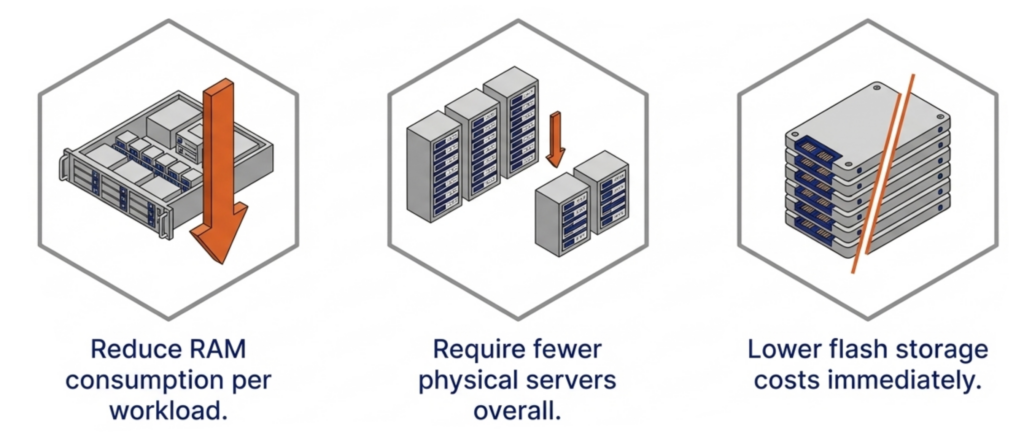
Finding a VMware alternative is still the primary mission. But the supercycle raises the bar. It is no longer enough to swap one hypervisor for another just because it costs less to license. The replacement must also reduce RAM consumption per workload, require fewer servers, and reduce flash storage costs. Any platform that relies on memory ballooning, transparent page sharing, or hypervisor swapping to manage RAM is using the same software tricks the industry has relied on for years. Those techniques react to memory pressure after it occurs. None of them reduce the total physical RAM your infrastructure actually requires.

Key Terms
  • Memory and Flash Supercycle — A sustained period of rising DRAM and NAND flash prices driven by AI infrastructure demand, DDR4 end-of-life, and constrained fabrication capacity. Industry analysts project tight supply through at least 2027.
  • Memory Ballooning — A hypervisor technique that uses a guest driver to reclaim unused RAM from idle VMs. Reactive by design, it fails under tight VM sizing and causes cascading performance degradation when multiple VMs spike simultaneously.
  • Transparent Page Sharing (TPS) — A memory deduplication technique that merges identical OS pages across VMs. Limited to identical pages, disabled by default in VMware since 2014 due to security concerns, and ineffective for application data.
  • Global Inline Deduplication — VergeOS technology that identifies and eliminates duplicate data blocks at the storage layer before they are written to flash. Reduces total flash capacity requirements, lowers write amplification to extend drive life, and feeds only unique blocks into the RAM cache.
  • Global Deduplicated Cache — A VergeOS RAM cache that operates across all VMs across all nodes and draws from the already-deduplicated storage pool. Holds only unique data blocks, increasing effective cache capacity and hit rates without the CPU overhead of a separate cache-level deduplication algorithm.
  • ioGuardian — VergeOS data availability technology that uses snapshot-driven local replication to protect against multiple simultaneous drive failures. Eliminates the need for hardware RAID controllers and delivers consistent performance during failures and rebuilds.
  • Commodity NVMe — Standard NVMe solid-state drives that cost significantly less than enterprise or server-class SSDs. VergeOS makes commodity drives production-safe through software-managed wear leveling, global deduplication to reduce writes, and ioGuardian replication to handle failures gracefully.

We are hosting a live webinar on March 12 that goes deeper into each of these points. Register for Architecting for the Flash and Memory Supercycle to see how the platform decisions you make today determine your infrastructure costs for the next three to five years.

Start with an Efficient Code Base That Reduces RAM Consumption
How a Hypervisor Can Reduce RAM Consumption

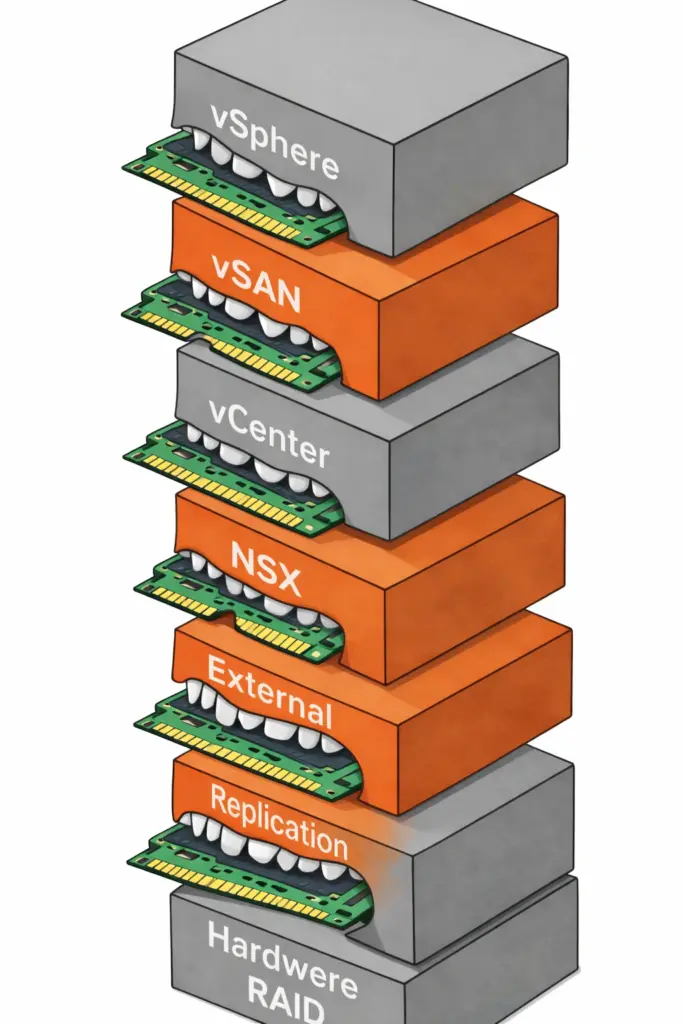
The first question to ask any VMware alternative is how much RAM the platform itself consumes before a single VM even starts. VMware environments running vSphere, vSAN, vCenter, and NSX stack four separate products on every host. Each product reserves memory for its own management processes. Add external replication software and hardware RAID controllers, and the cumulative overhead climbs even further.

VergeOS takes a different architectural approach. It delivers a complete private cloud operating system that integrates virtualization, storage, networking, and data protection as services within a single code base. There is no separate storage product. There is no separate networking product. The platform is built with global deduplication, enabling synchronous replication without the typical capacity impact and delivering better, more consistent performance in production and during failures.
How a Hypervisor Can Reduce RAM Consumption

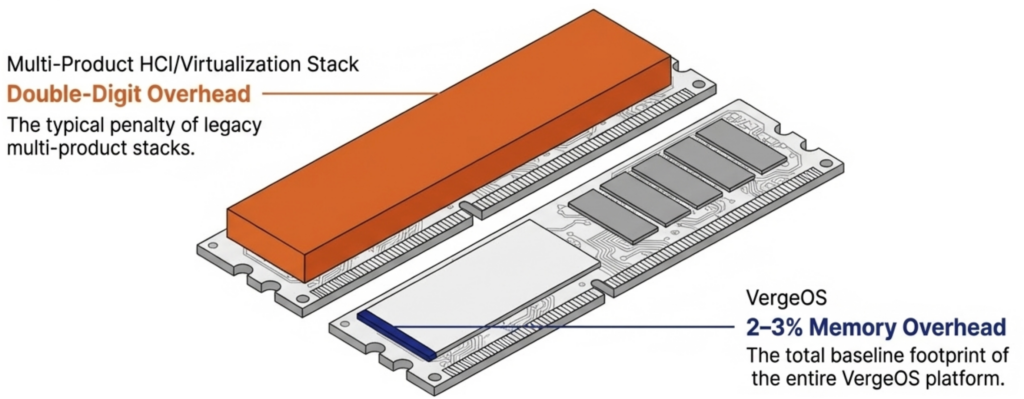
It eliminates the need for hardware RAID controllers, which are also increasing in price because they consume RAM. VergeOS includes built-in data replication for disaster recovery, and its global inline deduplication reduces capacity costs at the disaster recovery site as well. The entire platform runs at 2–3% memory overhead. Compare that to the double-digit percentages consumed by multi-product virtualization stacks and HCI platforms that reserve tens of gigabytes per node before workloads even start.

A lower baseline means more RAM available for production workloads on the same hardware. During a supercycle, that difference translates directly into fewer servers needing to be purchased at inflated prices.

Use Existing Hardware and Reduce How Much You Need
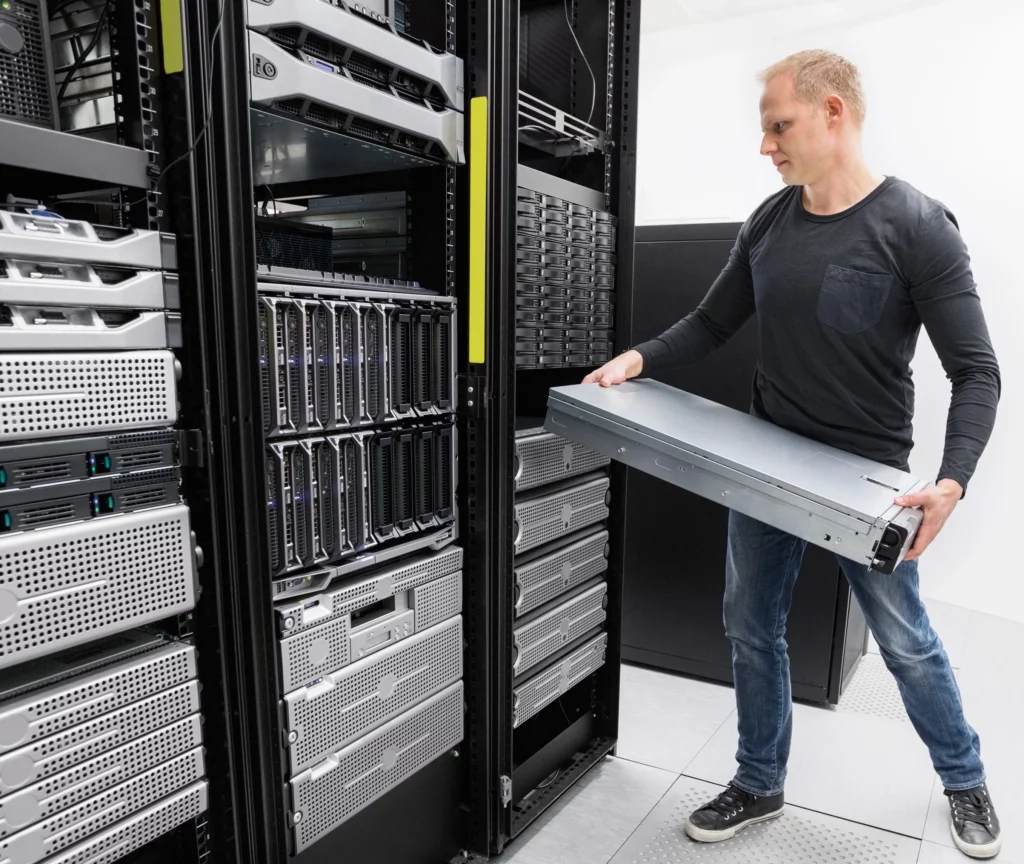
VergeOS installs on any x86 server from any manufacturer. Organizations migrating from VMware continue to run on the same physical servers they already own. There is no hardware forklift upgrade. No waiting six months for new server deliveries that keep getting pushed back as memory and flash shortages worsen. The servers, RAM, and SSDs already purchased and deployed remain in production.

Getting there does not require the purchase of a parallel environment or even a maintenance window. VergeOS supports node-by-node migration from VMware. Evacuate workloads from one host, install VergeOS on that host, migrate VMs onto the new platform, and repeat across the remaining hosts. Production continues running throughout the process. Alinsco Insurance completed this on a five-node VxRail cluster running a mission-critical insurance application that cannot tolerate downtime. The team migrated node by node during business hours with zero downtime. Critical web servers were moved at night out of an abundance of caution, but even those migrations produced no service interruption. During a supercycle, this approach eliminates the capital expense of purchasing a second set of servers to stand up alongside the existing environment.

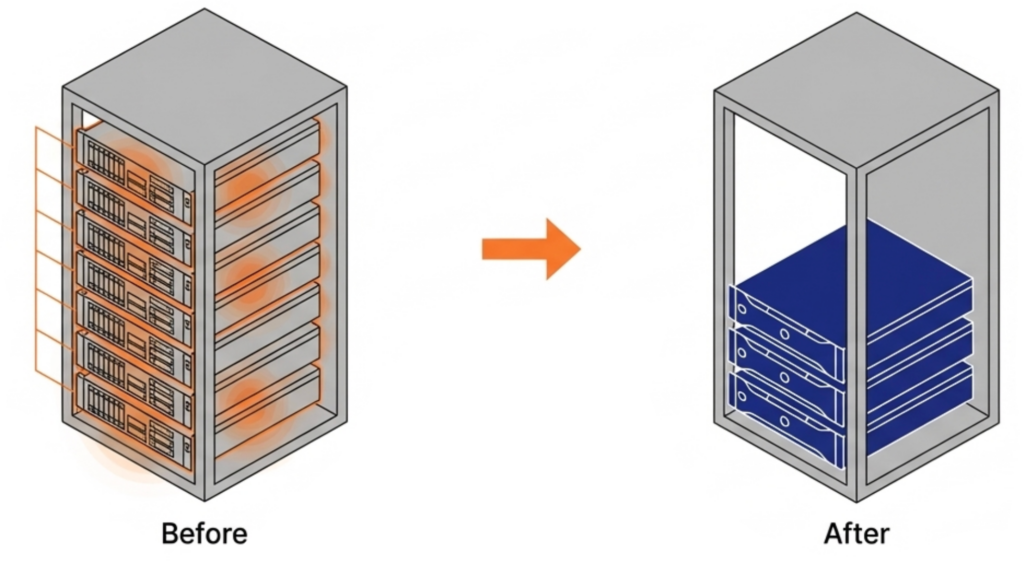
Because VergeOS consumes less RAM per host, organizations can increase VM density and consolidate to fewer servers. Topgolf, operating more than 100 venues globally, reduced each site from six-node VxRail clusters to three-node VergeOS clusters. That is a 50% server reduction per venue. Alinsco Insurance continued to run on the same VxRail hardware and internal SSDs after migration, and servers that felt constrained under VMware gained additional headroom under VergeOS.

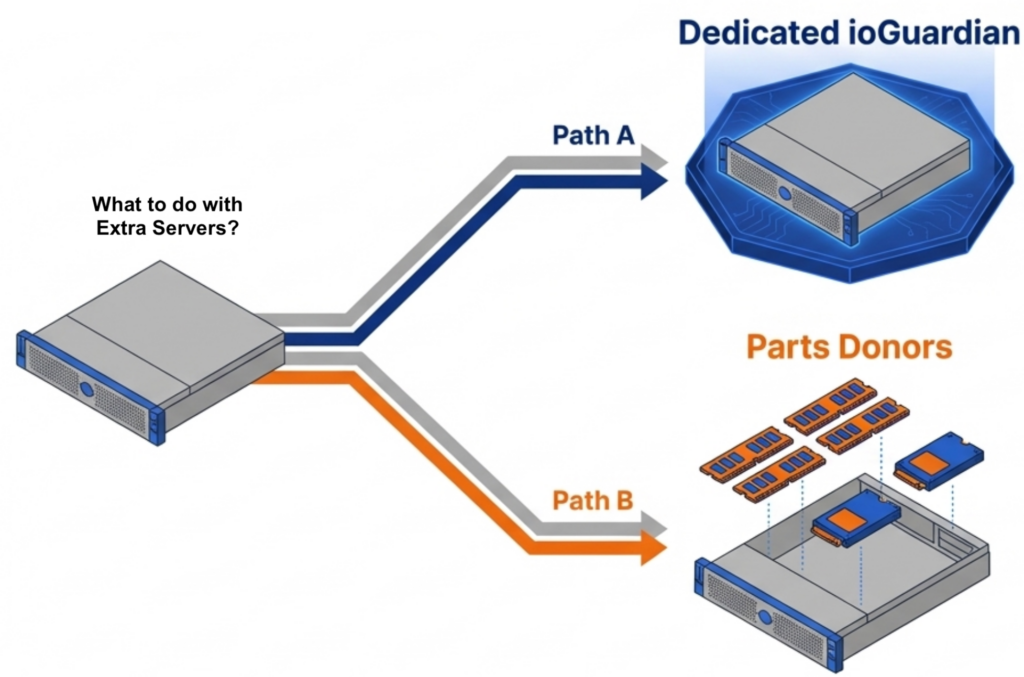
The freed servers create immediate value. One becomes a dedicated ioGuardian server, delivering N+2 or greater (N+X) data protection without purchasing new hardware or hardware RAID. The remaining servers become part donors. Pull the DRAM and NVMe drives and redistribute them across the active production nodes. VergeOS supports mixed node types and mixed node roles in the same cluster, so the redistribution does not require matching hardware specifications.
Reduce Flash Costs with Commodity SSDs

The supercycle affects flash storage as well as memory. Enterprise and server-class SSDs carry steep price premiums that continue to climb alongside NAND contract prices. Commodity NVMe drives are rising in price, too. But the price gap between enterprise and commodity is widening, not narrowing, and commodity drives do seem to be more readily available. Organizations that can safely run on commodity flash pay less per terabyte today relative to enterprise alternatives than they did a year ago.
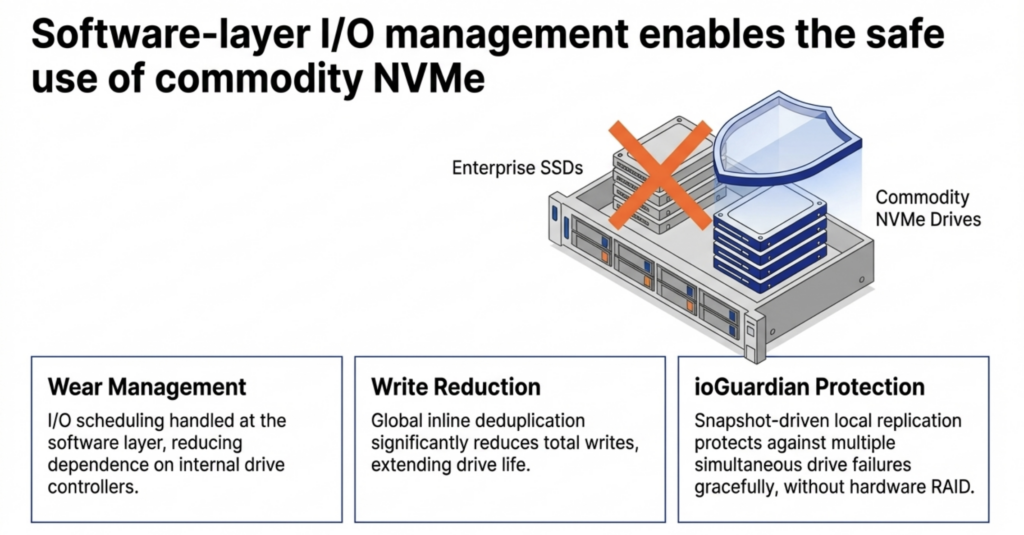
VergeOS runs safely on commodity SSDs. The platform’s storage engine manages I/O scheduling and wear management at the software layer, reducing dependence on the drive’s internal controller. Global inline deduplication reduces total writes to each drive, directly extending drive life. ioGuardian’s snapshot-driven local replication protects against multiple simultaneous drive failures without data loss or downtime, so that a commodity drive that wears out faster than an enterprise drive is replaced gracefully. No hardware RAID controller is required. The combination makes commodity flash a production-safe choice at a fraction of the cost of enterprise SSDs.

A Cache That Benefits from Deduplication

Most virtualization platforms cache storage data independently on each node. If ten nodes access the same data block, ten separate copies sit in ten separate caches. That wastes RAM on redundant data across the cluster.
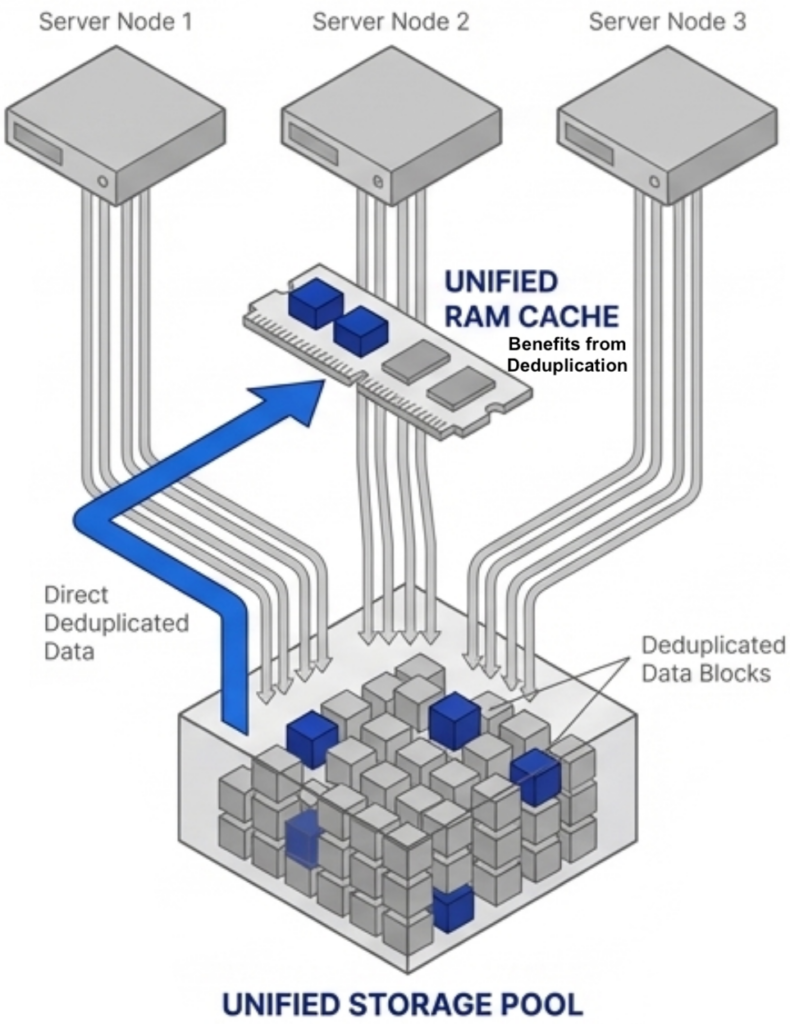
VergeOS approaches caching differently. The platform performs global inline deduplication at the storage layer, so the storage pool contains only unique blocks. The RAM cache operates across all VMs across all nodes and draws from that already-deduplicated pool. The cache holds only unique data without running a separate deduplication algorithm inside the cache itself. More unique blocks fit in the same physical RAM, driving higher cache hit rates and fewer reads from flash.

An important factor in making this work across nodes is VergeOS’s optimized internode communication protocol, purpose-built for this use case and free from the overhead of chatty iSCSI or NFS protocols. We will explore the technical details of this architecture in an upcoming post. The takeaway for now: VergeOS does not waste RAM caching duplicate data.

The VMware Alternative Decision Just Got Bigger

The search for a VMware alternative is no longer just about licensing. The supercycle means the platform you choose determines your RAM consumption, your flash costs, your server count, and how long your existing hardware stays in production. Choose a platform that relies on the same memory tricks the industry has used for decades, and you inherit the same overhead during the most expensive hardware market in years. Choose a platform built to reduce RAM consumption from a single efficient code base with built-in data availability, and you start with less overhead, run on the servers you already own, and reduce how many you need going forward.

Frequently Asked Questions
  • What is the Flash and Memory Supercycle? — A sustained period of rising DRAM and NAND flash prices driven by AI infrastructure demand, DDR4 end-of-life, and constrained fabrication capacity. DRAM prices are expected to increase 171% year-over-year through 2027, and NAND flash contract prices jumped 55–60% in Q1 2026 alone. Server delivery times have extended to multi-month delays.
  • Why don’t memory ballooning and transparent page sharing solve the problem? — These are reactive techniques that manage memory pressure after it occurs. Memory ballooning reclaims unused RAM from idle VMs but fails under tight sizing. Transparent page sharing merges identical OS pages but has been disabled by default in VMware since 2014 due to security concerns. Neither technique reduces the total physical RAM your infrastructure requires.
  • How much RAM overhead does VergeOS consume? — The entire VergeOS platform — including virtualization, storage, networking, and data protection — runs at 2–3% memory overhead. Compare that to multi-product VMware stacks that consume double-digit percentages, or HCI platforms like Nutanix that reserve 24–32 GB per node for controller VMs before workloads start.
  • Can I migrate from VMware without buying new servers? — Yes. VergeOS installs on any x86 server from any manufacturer and supports node-by-node migration from VMware. Evacuate workloads from one host, install VergeOS, migrate VMs onto the new platform, and repeat. The servers, RAM, and SSDs you already own stay in production. Alinsco Insurance completed this on a five-node VxRail cluster during business hours with zero downtime.
  • How does VergeOS reduce the number of servers needed? — Lower platform overhead means more RAM available for production workloads on each host, which increases VM density. Topgolf reduced each venue from six-node VxRail clusters to three-node VergeOS clusters — a 50% server reduction across more than 100 locations. Freed servers become parts donors or dedicated ioGuardian data protection nodes.
  • Is it safe to run commodity NVMe drives in production? — With VergeOS, yes. The storage engine manages I/O scheduling and wear management at the software layer. Global inline deduplication reduces total writes to each drive, extending drive life. ioGuardian’s snapshot-driven local replication protects against multiple simultaneous drive failures without hardware RAID, so a commodity drive that wears faster is replaced gracefully with no data loss or downtime.
  • How does VergeOS cache data differently from VMware or Nutanix? — Most platforms cache storage data independently on each node, meaning duplicate blocks are cached separately on every host. VergeOS performs global inline deduplication at the storage layer first, then the RAM cache draws from the already-deduplicated pool. The cache holds only unique blocks across all VMs across all nodes, using an optimized internode protocol instead of iSCSI or NFS. More unique data fits in the same physical RAM, driving higher cache hit rates.
  • What happens to servers freed up after consolidation? — One freed server becomes a dedicated ioGuardian node, delivering N+2 or greater data protection without a new hardware purchase and without hardware RAID. The remaining servers become parts donors — pull the DRAM and NVMe drives and redistribute them across active production nodes. VergeOS supports mixed node types and mixed node roles, so no matching hardware specifications are required.
What is the Memory and Flash Supercycle?

A sustained period of rising DRAM and NAND flash prices driven by AI infrastructure demand, DDR4 end-of-life, and constrained fabrication capacity. DRAM prices are expected to increase 171% year-over-year through 2027, and NAND flash contract prices jumped 55–60% in Q1 2026 alone. Server delivery times have extended to multi-month delays.

Why don’t memory ballooning and transparent page sharing solve the problem?

These are reactive techniques that manage memory pressure after it occurs. Memory ballooning reclaims unused RAM from idle VMs but fails under tight sizing. Transparent page sharing merges identical OS pages but has been disabled by default in VMware since 2014 due to security concerns. Neither technique reduces the total physical RAM your infrastructure requires.

How much RAM overhead does VergeOS consume?

The entire VergeOS platform — including virtualization, storage, networking, and data protection — runs at 2–3% memory overhead. Compare that to multi-product VMware stacks that consume double-digit percentages, or HCI platforms like Nutanix that reserve 24–32 GB per node for controller VMs before workloads start.

Can I migrate from VMware without buying new servers?

Yes. VergeOS installs on any x86 server from any manufacturer and supports node-by-node migration from VMware. Evacuate workloads from one host, install VergeOS, migrate VMs onto the new platform, and repeat. The servers, RAM, and SSDs you already own stay in production. Alinsco Insurance completed this on a five-node VxRail cluster during business hours with zero downtime.

How does VergeOS reduce the number of servers needed?

Lower platform overhead means more RAM is available for production workloads on each host, increasing VM density. Topgolf reduced each venue from six-node VxRail clusters to three-node VergeOS clusters — a 50% reduction in servers across more than 100 locations. Freed servers become parts donors or dedicated ioGuardian data protection nodes.

Is it safe to run commodity NVMe drives in production?

With VergeOS, yes. The storage engine manages I/O scheduling and wear management at the software layer. Global inline deduplication reduces total writes to each drive, extending drive life. ioGuardian’s snapshot-driven local replication protects against multiple simultaneous drive failures without hardware RAID, so a commodity drive that wears faster is replaced gracefully with no data loss or downtime.

How does VergeOS cache data differently from VMware or Nutanix?

Most platforms cache storage data independently on each node, meaning duplicate blocks are cached separately on every host. VergeOS performs global inline deduplication at the storage layer first, then the RAM cache draws from the already-deduplicated pool. The cache holds only unique blocks across all VMs across all nodes, using an optimized internode protocol instead of iSCSI or NFS. More unique data fits in the same physical RAM, driving higher cache hit rates.

What happens to servers freed up after consolidation?

One freed server becomes a dedicated ioGuardian node, delivering N+2 or greater data protection without a new hardware purchase and without hardware RAID. The remaining servers become parts donors — pull the DRAM and NVMe drives and redistribute them across active production nodes. VergeOS supports mixed node types and mixed node roles, so no matching hardware specifications are required.

Filed Under: Private Cloud Tagged With: Cache, data protection, Deduplication, FlashAndMemorySupercycle, Migration, Performance, servers, Storage, VergeOS, VMware, VMware alternative

October 4, 2023 by George Crump

According to our recent survey, one of the requirements of any VMware alternative is to exit VMware without a server refresh. IT leaders are driving this requirement for three primary reasons:

  1. VMware’s latest versions force decommissioning server hardware long before it has outlived its applicable service.
  2. The quality and performance of server hardware built within the last five years suggest that it can reliably support workloads for up to ten years.
  3. Delaying or eliminating server refreshes is a great way to contend with flat budgets.

Why, then, does VMware require customers to upgrade to go through a server refresh so they can run the latest versions of their software? Why also do most VMware alternatives force you to buy prepackaged hardware bundles? The answers come down to efficiency and hardware dependency. Infrastructure software vendors with bloated code and strict server hardware requirements are forcing you into a lifetime of premature server refreshes.

Efficiency Eliminates Server Refreshes

Skip the heavy lifting, exit VMware without a server refresh

Vendors force you into server refreshes to hide the inefficiencies in their code and the lack of foresight in design. Most infrastructure software is an assortment of different software applications, often from different vendors, that they attempt to “glue” together through a common management GUI.

VMware, for example, uses ESXi for the hypervisor, vSAN for the storage software, and NSX for the networking software. Each application has a different code base and overlapping code, which compounds VMware’s already significant virtualization tax.

As a result, there is a lot of redundant code and metadata in the infrastructure software and extra communication overhead to keep these separate applications in sync. The lack of integration between these applications creates significant overhead that impacts server performance and scalability.

Traditional Three-Tier Architectures don’t fare much better. Customers still face four to five-year refreshes for servers, plus they now add a separate refresh cycle for storage. There is also the unnecessarily high cost of a dedicated storage array.

Ransomware Makes It Worse

Our server also highlighted a significant concern about ransomware, and customers are constantly looking for solutions to give them an edge against the ever-evolving threat of having all of their data encrypted. In response, vendors constantly release patches to close down vulnerabilities in their code, releasing new software (for a fee) that keeps their older software safer. For example, VMware promotes NSX to help better protect ESXi. Instead of starting with secure infrastructure as a software core, they are bolting on potential fixes, which further impact performance and force customers into premature server refreshes.


According to our recent survey of almost 200 VMware customers, using existing hardware and improving ransomware protection were two of their top requirements for a VMware alternative. Join us for our live webinar tomorrow at 1:00 PM ET to learn the study results and see a live recovery from a ransomware attack. Register Now


Bundles Don’t Eliminate Server Refreshes

To hide continual software bloat, some vendors create predefined server bundles. These bundles use the latest processing power, which depends on specific CPU chip capabilities and fast NVMe flash drives to hide inefficiency, but they don’t eliminate server refreshes. They make server refreshes even more challenging. The customer still needs to refresh servers to provide enough power to compensate for the bloated software, but now they can only get that hardware from one or a tiny list of certified vendors. IT teams need to look no further than vSAN-Ready Nodes or Nutanix’s very restrictive hardware compatibility list as examples.

Turnkey HCI Makes it Worse

The turnkey bundle approach also makes a VMware Exit less appealing. Vendors that force the customer to buy new hardware as they are exiting VMware increase the costs of the exit dramatically. They also make installation more difficult because, at least for a while, the new hardware and the old must co-exist in the same data center.

VergeIO Eliminates Premature Server Refreshes

VergeIO unifies networking, virtualization, and storage software into a single software code base, eliminating the redundances common in other solutions. It also eliminates the extra and unnecessary lines of communication between the services, enabling a more scalable infrastructure.


Breathes New Life Into Existing Servers

VergeOS does more than leverage existing hardware; its efficiency gives it a new lease on life. Our customers typically can increase overall virtual machine density and improve the performance of I/O intensive applications without resorting to an expensive dedicated storage array. Most VergeIO customers find they can delay or even eliminate the subsequent several server upgrades. When it does come time to add new servers to the infrastructure, add whatever brand and type of servers you’d like. VergeOS enables you to mix different server types within the same VergeOS instance.

Run Servers Until They Break

There is a common saying, “sweating the asset,” which means getting more than the typical four years from server and storage hardware. VergeOS enables customers to run the asset until it breaks permanently. Customers can do this because the entire infrastructure is redundant; VergeOS transitions VMs to surviving servers if a server fails. There is no extra charge for high availability (HA); VergeOS includes HA and all other features in every product edition. VergeIO has production customers running servers over six years old with no complaints about performance or fear of hardware failure. Those servers can co-exist with servers a few months old within the same instance. VergeOS eliminates server refreshes while maintaining availability.

Ransomware Resilient from Day One

Ransomware resiliency is not an afterthought with VergeOS. As we discuss in our paper, “Creating an Infrastructure-Wide Ransomware Resiliency Strategy,” it is built into the core of our Utraconverged Infrastructure (UCI) platform. Our multi-layered, infrastructure-wide ransomware protection strategy includes the following:

  1. Virtual Data Centers (VDC) that enable customers to shrink the attack surface
  2. IOclone, which provides frequent, immutable snapshots without impacting performance
  3. IOfortify, which provides rapid detection of a potential attack and a hardened operating environment that acts as firmware, eliminating the potential of platform-level exploits.

Conclusion – Skip The Server Refresh

Exiting VMware without undergoing a server refresh is crucial for organizations looking to maximize their IT infrastructure efficiency and cost-effectiveness. VMware’s insistence on frequent server hardware upgrades and the challenges posed by ransomware threats have left many IT leaders seeking alternatives. However, most alternatives require new hardware and enforce restrictive hardware compatibility lists.

VergeIO enables you to exit VMware using your existing hardware, extracting more life from it while not compromising features or data resiliency.

Filed Under: VMwareExit Tagged With: servers, VMware

855-855-8300

Get Started

  • Versions
  • Request Tour

VergeIO For

  • VMware Alternative
  • SAN Replacement
  • Solving Infrastructure Modernization Challenges
  • Artificial Intelligence
  • Hyperconverged
  • Server Room
  • Secure Research Computing

Product

  • Benefits
  • Documents
  • Architecture Overview
  • Use Cases
  • Videos

Company

  • About VergeIO
  • Blog
  • Technical Documentation
  • Legal

© 2026 VergeIO. All Rights Reserved.