• Skip to main content
  • Architecture
    • Overview
      Learn about VergeOS’ unique unfied architecture that integrates virtualization, storage, networking, AI, backup and DR into a single data center operating system
    • Infrastructure Wide Deduplication
      VergeOS transforms deduplication from a storage-only commodity into a native, infrastructure-wide capability that spans storage, virtualization, and networking, eliminating hidden resource taxes
    • VergeFS
      VergeFS is a distributed, high-performance global file system integrated into VergeOS, unifying storage across nodes, tiers, and workloads while eliminating the need for external SANs
    • VergeFabric
      VergeFabric is VergeOS’s integrated virtual networking layer, delivering high-speed, low-latency communication across nodes while eliminating the complexity of traditional network configurations.
    • Infrastructure Automation
      VergeOS integrates Packer, Terraform, and Ansible to deliver an end-to-end automation pipeline that eliminates infrastructure drift and enables predictable, scalable deployments.
    • VergeIQ
      Unlock secure, on-premises generative AI—natively integrated into VergeOS. With VergeIQ, your enterprise gains private AI capabilities without the complexity, cloud dependency, or token-based pricing.
  • Features
    • Virtual Data Centers
      A VergeOS Virtual Data Center (VDC) is a fully isolated, self-contained environment within a single VergeOS instance that includes its own compute, storage, networking, and management controls
    • High Availability
      VergeOS provides a unified, easy-to-manage infrastructure that ensures continuous high availability through automated failover, storage efficiency, clone-like snapshots, and simplified disaster recovery
    • ioClone
      ioClone utilizes global inline deduplication and a blockchain-inspired file system within VergeFS to create instant, independent, space-efficient, and immutable snapshots of individual VMs, volumes, or entire virtual data centers.
    • ioReplicate
      ioReplicate is a unified disaster-recovery solution that enables simple, cost-efficient DR testing and failover via three‑click recovery of entire Virtual Data Centers—including VMs, networking, and storage.
    • ioFortify
      ioFortify creates immutable, restorable VDC checkpoints and provides proactive ransomware detection with instant alerts for rapid recovery and response.
    • ioMigrate
      ioMigrate enables large-scale VMware migrations, automating the rehosting of hundreds of VMs (including networking settings) in seconds with minimal downtime by seamlessly transitioning entire VMware environments onto existing hardware stacks.
    • ioProtect
      ioProtect offers near-real-time replication of VMware VMs—including data, network, and compute configurations—to a remote disaster‑recovery site on existing hardware, slashing DR costs by over 60% while supporting seamless failover and testing in an efficient, turnkey VergeOS Infrastructure.
    • ioOptimize
      ioOptimize leverages AI and machine learning to seamlessly integrate new and old hardware and automatically migrate workloads from aging or failing servers.
    • ioGuardian
      ioGuardian is VergeIO’s built-in data protection and recovery capability, providing near-continuous backup and rapid VM recovery during multiple simultaneous drive or server failures.
  • IT Initiatives
    • VMware Alternative
      VergeOS offers seamless migration from VMware, enhancing performance and scalability by consolidating virtualization, storage, and networking into a single, efficient platform.
    • Hyperconverged Alternative
      VergeIO’s page introduces ultraconverged infrastructure (UCI) via VergeOS, which overcomes HCI limitations by supporting external storage, scaling compute and storage independently, using existing hardware, simplifying provisioning, boosting resiliency, and cutting licensing costs.
    • SAN Replacement / Storage Refresh
      VergeIO’s storage by replacing aging SAN/NAS systems within its ultraconverged infrastructure, enhancing security, scalability, and affordability.
    • Infrastructure Modernization
      Legacy infrastructure is fragmented, complex, and costly, built from disconnected components. VergeOS unifies virtualization, storage, networking, data protection, and AI into one platform, simplifying operations and reducing expenses.
    • Virtual Desktop Infrastructure (VDI)
      VergeOS for VDI delivers a faster, more affordable, and easier-to-manage alternative to traditional VDI setups—offering organizations the ability to scale securely with reduced overhead
    • Secure Research Computing
      VergeIO's Secure Research Computing solution combines speed, isolation, compliance, scalability, and resilience in a cohesive platform. It’s ideal for institutions needing segmented, compliant compute environments that are easy to deploy, manage, and recover.
    • Venues, Remote Offices, and Edge
      VergeOS delivers resiliency and centralized management across Edge, ROBO, and Venue environments. With one platform, IT can keep remote sites independent while managing them all from a single pane of glass.
  • Blog
      • A Pure Storage AlternativeA Pure Storage alternative rarely starts as a storage project. Saratoga Casino Holdings inherited mirrored Pure Storage arrays, Cisco UCS blades, and VMware from a partnership that wound down. Scott Bartgis took the decision back, chose his own nodes through CXTEC equal2new, and removed roughly $50,000 a year in array maintenance.
      • Legacy HCI Took Control of Your Data CenterLegacy HCI promised to simplify the data center, then set three clocks IT no longer controls: the renewal date, the hardware refresh, and the servers you are allowed to buy. This post breaks down how each clock got set, and how a single-codebase Private Cloud Operating System hands all three back.
      • Why Are VMware Executives Joining VergeIO?Zia Yusuf, VMware's former ecosystem chief, invested in VergeIO and joined its board, the second VMware leader in weeks after CTO Kit Colbert. One built the partner engine, the other set the technology. Both reached the same verdict: leaving VMware means moving to a private cloud operating system.
    • View All Posts
  • Resources
    • Become a Partner
      Get repeatable sales and a platform built to simplify your customers’ infrastructure.
    • Technology Partners
      Learn about our technology and service partners who deliver VergeOS-powered solutions for cloud, VDI, and modern IT workloads.
    • White Papers
      Explore VergeIO’s white papers for practical insights on modernizing infrastructure. Each paper is written for IT pros who value clarity, performance, and ROI.
    • In The News
      See how VergeIO is making headlines as the leading VMware alternative. Industry analysts, press, and partners highlight our impact on modern infrastructure.
    • Press Releases
      Get the latest VergeOS press releases for news on product updates, customer wins, and strategic partnerships.
    • Case Studies
      See how organizations like yours replaced VMware, cut costs, and simplified IT with VergeOS. Real results, real environments—no fluff.
    • Webinars
      Explore VergeIO’s on-demand webinars to get straight-to-the-point demos and real-world infrastructure insights.
    • Documents
      Get quick, no-nonsense overviews of VergeOS capabilities with our datasheets—covering features, benefits, and technical specs in one place.
    • Videos
      Watch VergeIO videos for fast, focused walkthroughs of VergeOS features, customer success, and VMware migration strategies.
    • Technical Documentation
      Access in-depth VergeOS technical guides, configuration details, and step-by-step instructions for IT pros.
  • How to Buy
    • Schedule a Demo
      Seeing is believing, set up a call with one of our technical architects and see VergeOS in action.
    • Versions
      Discover VergeOS’s streamlined pricing and flexible deployment options—whether you bring your own hardware, choose a certified appliance, or run it on bare metal in the cloud.
    • Test Drive – No Hardware Required
      Explore VergeOS with VergeIO’s hands-on labs and gain real-world experience in VMware migration and data center resiliency—no hardware required
  • Company
    • About VergeIO
      Learn who we are, what drives us, and why IT leaders trust VergeIO to modernize and simplify infrastructure.
    • Support
      Get fast, expert help from VergeIO’s support team—focused on keeping your infrastructure running smoothly.
    • Careers
      Join VergeIO and help reshape the future of IT infrastructure. Explore open roles and growth opportunities.
  • 855-855-8300
  • Contact
  • Search
  • 855-855-8300
  • Contact
  • Search
  • Architecture
    • Overview
    • VergeFS
    • VergeFabric
    • Infrastructure Automation
    • VergeIQ
  • Features
    • Virtual Data Centers
    • High Availability
    • ioClone
    • ioReplicate
    • ioFortify
    • ioMigrate
    • ioProtect
    • ioOptimize
    • ioGuardian
  • IT Initiatives
    • VMware Alternative
    • Hyperconverged Alternative
    • SAN Replacement / Storage Refresh
    • Infrastructure Modernization
    • Virtual Desktop Infrastructure (VDI)
    • Secure Research Computing
    • Venues, Remote Offices, and Edge
  • Blog
  • Resources
    • Become a Partner
    • Technology Partners
    • White Papers
    • In The News
    • Press Releases
    • Case Studies
    • Webinars
    • Documents
    • Videos
    • Technical Documentation
  • How to Buy
    • Schedule a Demo
    • Versions
    • Test Drive – No Hardware Required
  • Company
    • About VergeIO
    • Support
    • Careers
×
  • Architecture
    • Overview
    • VergeFS
    • VergeFabric
    • Infrastructure Automation
    • VergeIQ
  • Features
    • Virtual Data Centers
    • High Availability
    • ioClone
    • ioReplicate
    • ioFortify
    • ioMigrate
    • ioProtect
    • ioOptimize
    • ioGuardian
  • IT Initiatives
    • VMware Alternative
    • Hyperconverged Alternative
    • SAN Replacement / Storage Refresh
    • Infrastructure Modernization
    • Virtual Desktop Infrastructure (VDI)
    • Secure Research Computing
    • Venues, Remote Offices, and Edge
  • Blog
  • Resources
    • Become a Partner
    • Technology Partners
    • White Papers
    • In The News
    • Press Releases
    • Case Studies
    • Webinars
    • Documents
    • Videos
    • Technical Documentation
  • How to Buy
    • Schedule a Demo
    • Versions
    • Test Drive – No Hardware Required
  • Company
    • About VergeIO
    • Support
    • Careers

George Crump

April 25, 2023 by George Crump

Ann Arbor, Mich, April 25th, 2023 — VergeIO, the Ultraconverged Infrastructure (UCI) company, today announced the launch of IOclone, a new solution that solves the virtualization snapshot problem facing users today. VMware and other virtualized environments suffer from highly inefficient snapshots and because of performance concerns, customers can only maintain a few active snapshots. This level of retention is insufficient for adequate data protection. With IOclone, customers can now leverage the built-in global data deduplication capabilities of VergeOS to create complete clones of virtual machines (VM) within milliseconds, regardless of VM size. Each clone is immutable and space efficient, initially consuming no additional capacity.

Hypervisors without the powerful capabilities of IOclone require customers to use expensive array-based snapshots or integrate with backup software solutions, forcing customers into an expensive and complicated multi-step solution for data protection. By comparison, IOclone is a single-step process tightly integrated into VergeOS. Once IT sets up a cloning policy, snapshots happen regularly without administrative intervention.

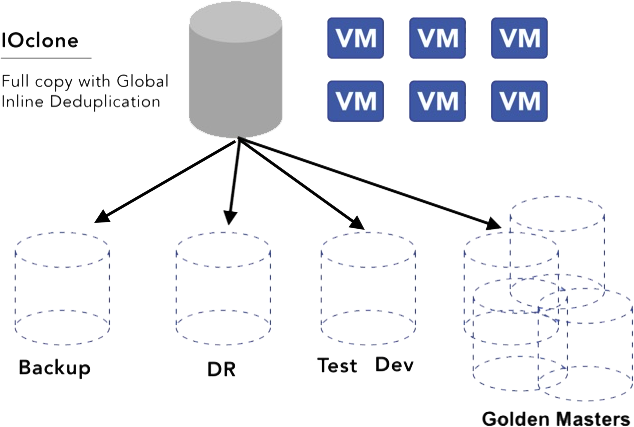
Now customers can create and maintain thousands of space-efficient copies of virtual machines or even virtual data centers without impacting performance. Both the original production instance and clones perform at the full performance of the infrastructure. Clones are instantly available for use in testing, QA, and development purposes, or customers can create “golden masters” and spawn hundreds or even thousands of VMs or virtual data centers (VDCs) from the original, again without impacting performance.

“Both clones and snapshots typically have some overhead in the capacity they consume and the processing required to use them. Clones typically have to make a copy of all of the metadata information, which means the cloning process takes some time upfront, but then they are ready to use and independent. Snapshots trade up front processing time and instead show performance degradation when in use or during clean-up,” said Greg Campbell, VergeIO founder and CTO. “IOclone delivers the best of both. Because our deduplication is part of the metadata in our filesystem, we get all the performance and independence benefits of cloning without their upfront overhead.”

Customers can execute IOclone on the virtual machine, the volume, or an entire virtual data center (VDC). In the same way that a virtual machine is an encapsulation of a server, a VDC clone is an encapsulation of the entire data center. It includes all the VMs within the data center and all the storage and networking policies, delivering near-instant recovery. 

IOclone does not require specialized storage controllers or storage data processing units. Thanks to the efficiency of VergeOS, it works with off-the-shelf servers using commodity flash and hard disk drives within the VergeOS environment. It is integrated into VergeOS and is available now at no additional charge to VergeOS customers. Customers looking to migrate off VMware can leverage VergeIO’s IOprotect and benefit from the immutable limitless protection of IOclone.

To learn more about IOclone, join VergeIO for “TechTalk, A Deep Dive into Virtual Infrastructure File Systems.” Live on May 4th at 1:00 PM ET / 10:00 AM PT. 

About VergeIO

VergeIO is the Ultraconverged Infrastructure (UCI) company. Unlike hyperconverged infrastructure (HCI), it rotates the traditional IT stack (compute, storage, and networking) into an integrated data center operating system, VergeOS. Its efficiency enables greater workload density on the same hardware with high levels of data resiliency. The result is dramatically lower costs and greatly simplified IT.

Filed Under: Press Release Tagged With: dataprotection, IOclone

April 25, 2023 by George Crump

snapshots or clones for data protection

Most storage solutions will provide IT professionals with either snapshots or clones for data protection, but are the differences between the two functions significant enough to make it part of your selection criteria? Like all things in IT, the answer depends.  In this case, it depends on if and how your vendor implemented the two technologies. 

Register now to join us live on May 4th for technical deep dive into virtual infrastructure file systems and see a live demonstration of IOprotect.

What Are Snapshots?

Deciding if snapshots or clones are best for data protection first requires understanding how the two technologies work. First, let’s look at snapshots. Most storage solutions, be they a filesystem or block storage, have a metadata layer that points to where each data segment resides. A snapshot makes a copy of those pointers at a specific time and then sets those blocks pointing to a read-only mode until it expires. 

Snapshot Update Methods

There are two methods for updating a read-only segment because of a snapshot.  The first method is a copy-on-write process. When a user or application attempts to update or change an existing segment, the storage solution copies the old segment to a new location and allows the new data to occupy the original segment. The storage solution then updates the snapshot metadata with the old segment’s new location. 

The second snapshot update method is “redirect on write”. Using this method, the storage system will write the modified data to a new location and update the metadata of the “production view” of the data. It does not need to update the “snapshot view” of the data. 

Both of these methods limit the scalability of snapshots because multiple writes and multiple changes to metadata need to occur. Also, many storage systems use separate metadata trees to manage each snapshot. As the number of snapshots increases and the depth of those snapshots (snapshots of snapshots), the complexity of managing and updating the metadata wears on system performance.  As a result, where the snapshot is occurring within the hypervisor, on the same hardware as the hypervisor (software-defined storage running as a virtual machine), or on dedicated storage hardware, there are limits to how many snapshots the storage solution can maintain. 

The complexity shows itself by degrading overall system performance. Storage systems with legacy snapshot technology require:

  • Limitations to number of copies retained
  • High-end processors in the storage servers
  • Dedicated data processing units (DPUs)
  • Days to remove old snapshots

What Are Clones?

Clones are copies of existing segments. They are more standalone, and updating a clone does not require the same metadata overhead as snapshots. The independence of a clone means that they don’t suffer from performance degradation as snapshots regardless of how many there are or how long they are retained. Clones don’t need either of the sophisticated update methods that snapshots require.

The Downside to Clones

The typical downside to clones is that they are either complete copies of the original volume or deduplicated copies. A full copy, means that data must traverse the internals of the storage infrastructure, travel across the network to the hypervisor, and back down the network again to the storage system. 

Some hypervisors have initiated capabilities to eliminate traversing the network, saving time. Still, most cloning functions must process data through the internals of the storage solution twice, even if that solution has a deduplication feature. With deduplication, the resulting clone may not consume any additional capacity, but the time to create that copy is still significant, especially if the volume is of any measurable size. It is best not to use the applications while the storage solution clones it. As a result, most organizations don’t use cloning as part of their data protection strategy. 

IOclone — The Best of Clones and Snapshots

As we’ve discussed, clones and snapshots typically have some overhead in the capacity they consume and the processing required to use them. Clones typically have to make a copy of all of the metadata information, which means the cloning process takes some time upfront, but then they are ready to use and independent. Snapshots don’t have the upfront processing time and, as a result, are ready for use almost instantly. However, they show performance degradation as the number of snapshots increases when used or during snapshot clean-up routines. 

IOclone is a capability of the VergeOS operating system that combines the best of clones and snapshots into a single solution. Since global inline deduplication is part of the metadata in VergeOS, IOclone, copies are similar to snapshots. Regardless of capacity, it can create clones of VMs, volumes, or entire virtual data centers in milliseconds. At the same time, IOclone-created copies have the stand-alone performance of independent clones without initially consuming additional capacity footprint.

With IOclone, IT doesn’t have to choose between snapshots or clones for data protection. This capability within VergeOS can retain hundreds, even thousands of copies of VMs, volumes, or entire Virtual Data Centers (VDC) without negatively impacting performance or capacity consumption.

Learn More

  • Register for our live TechTalk: Deep Dive on Virtual Infrastructure File Systems
  • Subscribe to our eBook: “Designing a Resilient Infrastructure“
  • Review our IOclone Datasheet

snapshots or clones for data protection

Conclusion

IOclone is also part of our IOprotect solution, which enables you to start a VMware Exit by first using VergeOS as a disaster recovery solution. Most customers find IOprotect reduces the cost of disaster recovery by more than 50% without adding additional hardware. It provides a complete recovery environment, converging disaster recovery so that data, applications, and the processing power to recover are all available from a small cluster of nodes. 

As your confidence in VergeOS grows, you can use it for your production environment. The tightly integrated VergeOS architecture delivers more efficient performance, increasing workload density on less physical hardware. Once your conversion is complete, you’ll lower costs by as much as 80% and enjoy an actively developed data center operating system with unparalleled support.

snapshots or clones for data protection

Filed Under: Storage Tagged With: dataprotection

April 20, 2023 by George Crump

VergeOS can provide complete layer 2 and layer 3 functionality! This video shows you how to tap into the full potential of VergeOS’ networking capabilities. Our latest LightBoard video features CEO Yan Ness and Director of Product Development Paul Hodges, taking you through VergeOS Networking Fundamentals.

Filed Under: Videos Tagged With: networking, VergeOS

April 18, 2023 by George Crump

VMware Scale Comparisons to VergeOS

During our “InBrief” Event with Truth In IT, one of the most frequently asked questions was about VMware scale comparisons. This series of questions moved beyond the more general Comparing VMware to VergeOS and focused specifically on how VergeOS handles the demands of scale compared to VMware.

To learn more about VergeOS’ scaling capabilities, watch our on-demand webinar “How to Eliminate the Data Center Scale Problem.”

Understanding VMware Scale Methods

Before making any VMware scale comparisons, you must understand its scaling methodology. How VMware scales depends mainly on the infrastructure on which it resides. Most VMware environments use the classic three-tier architecture with physical network switches, servers, and a separate storage system. Most organizations have one primary switch and server vendor, although a few alternate brands may be in use. However, the storage tier, especially as the environment scales, typically has multiple storage systems for different virtual machine (VM) types or use cases.

A less popular alternative is the classic hyperconverged infrastructure (HCI) which loads software-defined networking (SDN) and software-defined storage (SDS) software onto the same nodes as VMware ESXi. In most cases, the SDN and SDS software run as VMs and are subject to ESXi capabilities. As a result, the organization still has a three-tier architecture. It is just that those tiers are now logical instead of physical. This logical representation of the three-tier architecture is why the classic three-tier architecture remains so prevalent.

These two infrastructures impact the scalability of VMware. VMware claims to support 96 nodes per ESXi cluster in the classic three-tier architecture, but only 64 nodes within its HCI cluster because of limitations within the vSAN cluster.

Understanding VergeOS Scale Methods

VergeOS is an ultraconverged infrastructure (UCI). Similar to HCI, it does not use an external storage array. Unlike HCI’s use of separate SDN and SDS software inside the hypervisor, UCI integrates the networking and storage functionality into the hypervisor. This critical difference significantly improves the ability to scale the infrastructure, especially when you compare UCI to HCI. There is no technical limit on the number of nodes VergeOS support, and there is no case of “diminishing returns” as you scale. We have customers in production with over 60 active nodes in a single VergeOS instance.

VMware Scale Comparisons to VergeOS means explaining ultraconverged infrastructure
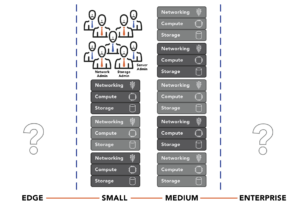
Comparing three-tier architecture to ultraconverged infrastructure

Subscribe to our Digital Learning Guide (DLG), “Understanding the VergeOS Architecture,” for a deep dive into our ultraconverged infrastructure. Our DLGs are white papers delivered in weekly bite-sized chunks.

Comparing VergeOS to VMware Scale

When making VMware scale comparisons, there are two aspects to remember. First, what are the technical limitations of scalability, and second, what are the ramifications of scaling the cluster on resource utilization and organizational flexibility?

VergeOS’ Technical Scale is Better Than VMware Scale

VergeOS is superior in raw node count versus VMware, enabling large enterprises to meet even the most demanding processing and storage performance requirements. Again, we have production customers with over 60 nodes, hundreds of virtual data centers, and thousands of virtual machines. These customers have been running VergeOS at this level of scale for years. VergeOS customers also don’t need to worry about scaling complexity. With VergeOS, there is only one software package, not three or more.

VergeOS’ Efficient Scale is Better Than VMware Scale

VMware scale comparisons to VergeOS should also include how efficiently the infrastructure scales. While raw node count may be critical for some data centers, most organizations seek more efficiency and flexibility in how the VMware alternative scales. Efficient scale means only adding additional nodes after the existing nodes’ resources have been used to their full potential. An efficient infrastructure can deliver more performance from fewer nodes, which lowers both capital and operational costs.

The comparison of efficient scale is where VergeOS has a clear and more practical advantage. We repeatedly have VMware customers moving to our platform and are seeing better performance from their applications even though it runs on the same hardware. The lack of efficiency is why many customers who originally consider HCI end up selecting a classic three-tier architecture. UCI delivers the efficiency they need.

As a result, customers can add even more workloads to the environment without purchasing additional hardware. In some cases, they have been able to delay new server purchases for years, thanks to the implementation of VergeOS. The efficiency results from integrating the networking and storage components and, frankly, just better execution of the code. Our efficiency means that while customers can scale further with VergeOS, they won’t have to scale as often.

VMware Scale Comparisons to VergeOS must include range of scale
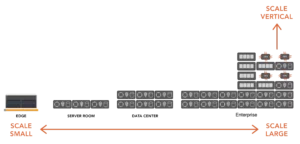
VergeOS can scale small for the Edge and large for the Enterprise. Each node is used to its full potential.

VergeOS’ Flexible Scale is Better Than VMware Scale

VMware scale comparisons to VergeOS must also include how flexible it is to scale the cluster. Most customers will want to start small and add nodes as workloads and organizational growth demand it. Instead, most customers will grow their environment over time. During that time, their needs will change, and so will technology. The first dozen or so nodes they start with may only be available after the time they add their fiftieth node.

With VMware, you must create an entirely separate cluster if you add different servers with different configurations, like an AMD processor instead of an Intel processor. While there is a common management interface, plenty of functions need to be set separately. HCI Storage is a good example. It is locked to the cluster and can’t be shared across clusters.

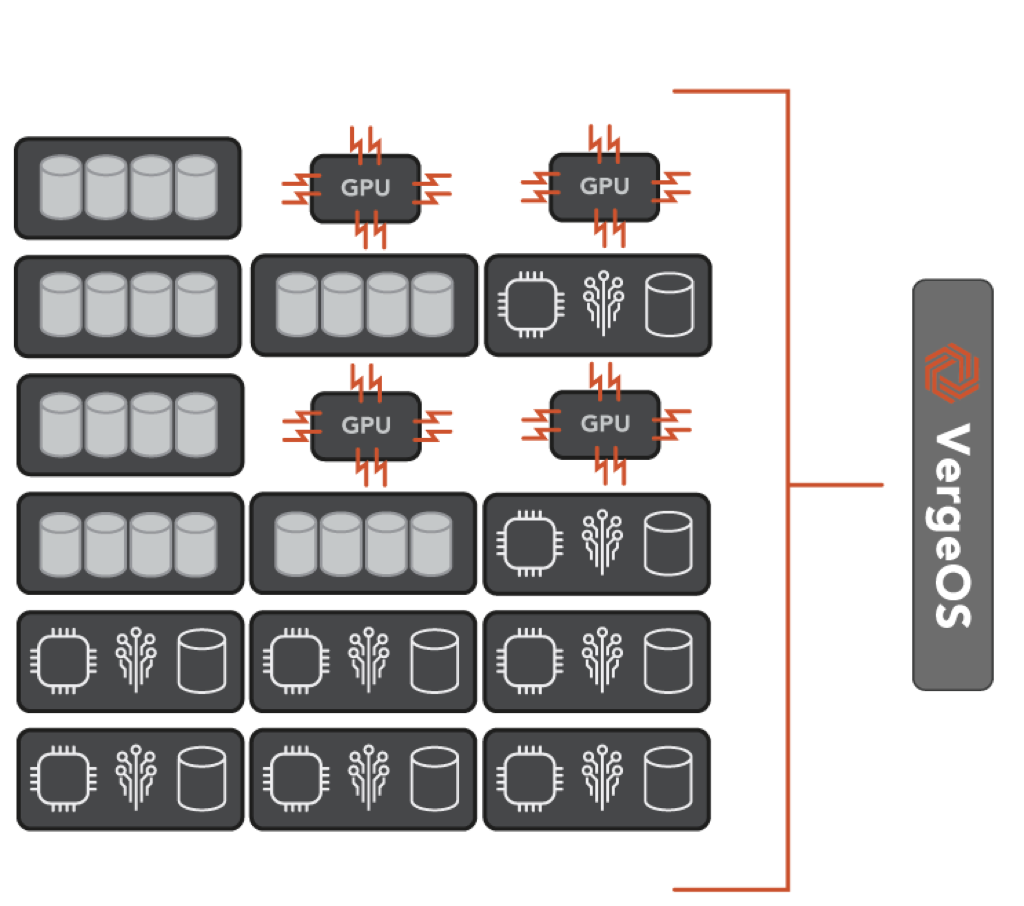
With VergeOS, IT can bring in servers of vastly different configurations, different processors, different storage media types, and even with GPUs. They are all managed by a single VergeOS environment. Resources can be isolated to a single virtual data center or distributed across multiple virtual data centers.

VergeOS’ flexibility means that the software can adapt to the organization’s needs and integrate new hardware innovations. IT can use VergeOS for mainstream applications with modest performance requirements, then add high-performance nodes with GPUs and NVMe flash or high-capacity nodes for file sharing and backup. Each of these different hardware configuration types is still managed within the same VergeOS instance.

VMware Scale Comparisons to VergeOS must include flexible scale
Flexible Scale – A Single VergeOS instance can manage nodes of vastly different types

Conclusion

VMware scale comparisons to VergeOS will show how superior VergeOS is in all the ways IT measures scalability. It is affordable for small data centers and enables them to deliver more performance on less hardware while also providing robust networking functionality. Enterprises can support various workloads thanks to VergeOS’ ability to mix nodes and use Virtual Data Centers. There is no technical limit on how many nodes, VergeOS supports, but its efficiency means you will require less than VMware.

It is also important to remember that VergeOS is a complete offering and requires no compromises versus VMware. It provides robust data protection, massive capacity scalability, and almost bare-metal performance of virtualized applications. VergeOS’ storage capabilities are so powerful that many customers switch to VergeOS as part of a SAN replacement project.

VMware Scale Comparisons to VergeOS must include enterprise storage features
VergeOS provides a complete enterprise feature set like global inline deduplication, immutable snapshots, and WAN-optimized replication

Filed Under: VMwareExit Tagged With: Alternative, Blog, scale-out, Virtualization

April 11, 2023 by George Crump

Understanding VMware DR components allows IT professionals to dramatically reduce spending without compromising recoverability. There are four main components to a VMware disaster recovery (DR) strategy:

Understanding VMware DR Components
  1. Storage
  2. Compute
  3. Network
  4. Replication Software

The products you select for each of these components impact how much that component will cost and has a ripple effect on the other components in terms of cost and choices. The total of these parts impacts the complexity of your DR strategy and the likelihood of a successful recovery.

To learn more about VMware DR, join us for tomorrow’s Whiteboard Wednesday session, “VMware Disaster and Ransomware Recovery—The Three NEW Best Practices,” at 1:00 PM ET / 10:00 AM PT.

Understanding VMware DR Storage

Understanding VMware DR components requires knowing what type of storage will be in place at the DR site. It represents one of the best opportunities to reduce DR costs. To copy data to the remote DR site, customers often use array-based replication, which typically requires another storage system from the same vendor at the DR site. Customers are forced to pay a premium for a rarely used storage system. Furthermore, since most storage vendors have given up on auto-tiering, the customer cannot use lower-cost hard disk drives at the DR site and then move the workloads to flash storage when a disaster occurs.

Reducing the cost of DR storage requires two capabilities. First, the ability to replicate directly from the VMware environment instead of using the array. Second it must support multiple types of media. Replicating directly from the VMware environment instead of using the array provides a much tighter integration into VMware, enabling a complete copy of data at the DR site. It also enables replicating to a commodity server with drives installed instead of a dedicated storage array. The ability to support multiple types of storage media, flash drives, and hard disk drives, for example, enables IT to take advantage of the fact that hard drive capacity is 8X less expensive than the equivalent flash capacity. The storage system must provide the ability to quickly move the most performance-dependent workloads to a flash tier during disaster recovery testing or an actual disaster.

Understanding VMware DR Compute

Understanding VMware DR components requires knowing the compute requirements at the DR site during a disaster. IT must ensure the DR site can support operations during a disaster. IT no longer has the luxury of ordering hardware on demand because supply chain issues continue to plague the industry. Your DR plan can’t be held up because servers are on backorder for three weeks or more. As a result, the server performance at the DR site must match the server performance at production, at least for the workloads that will be recovered at the DR site.

Reducing the cost of DR Compute requires running more virtual machines on less hardware without impacting performance. VMware is too weighed down by all its add-ons and lack of integration between them. IT needs to eliminate as much of the virtualization tax as possible by using a more efficient hypervisor at the DR site. An alternative VMware hypervisor that is 50% more efficient means a 50% reduction in server costs at the DR site.

Understanding VMware DR Networking

Buying a second set of network hardware for the DR site has the same problem as buying a second storage system; it is expensive. An alternative is to use “dumb switches” and software-defined networking (SDN) capabilities. The issue is the SDN software is often so expensive that its costs all but eliminates the savings of buying “dumb switches.” This high cost is especially true with VMware’s NSX. VMware’s SDN software can add $10,000 or more to the cost of each node in the DR site. Lastly, SDN creates another layer, similar to managing a separate physical network layer. Understanding VMware DR components includes knowing the operational implications of each component selected.

What about Replication Software?

As stated above, many VMware DR strategies depend on array-based replication. While it is sometimes included “free” with the array, it also has the added cost of a second storage system from the same vendor. In most cases, array-based replication is “blind” to the fact that VMware is running on top of it and may not capture all the configuration data. It certainly will not capture all the networking configuration information.

Customers may also use a dedicated replication solution that integrates with VMware. While these solutions capture the VMware environment well, they are costly and don’t help reduce DR storage or network costs.

A Holistic Approach to VMware DR

The fact that there are four components to a VMware DR strategy is the problem. IT must purchase each component and manually stitch them together to work. The coordination between all the components, ensuring all the data and configurations are captured, is critical to the strategy’s success.

VergeIO’s IOprotect simplifies and reduces VMware DR costs. It makes understanding VMware DR components easy because it reduces the “components” to one. IOprotect is part of VergeOS, an ultraconverged infrastructure (UCI) that integrates networking, compute, storage, and data protection into a single operating environment. It is one piece of software, not four or five.

Understanding VMware DR Components

With IOprotect, you can replicate your existing three-tier or hyperconverged infrastructure (HCI) to a single VergeOS environment. It seamlessly connects to your VMware environment and captures all the information you need for a successful disaster recovery strategy. You can also consolidate all your DR computing, storage, and networking requirements into as few as two servers plus a few “dumb switches” at your DR site. If you require more capacity or compute resources, add more nodes, but you won’t need to add many nodes because our customers consistently find they can run more workloads on less hardware. VergeOS is more efficient than VMware. They also require less storage capacity thanks to our high-performance global inline deduplication.

Testing your DR strategy is easy with VergeOS. Our Virtual Data Center (VDC) technology allows you to create a space-efficient, isolated clone of your replicated site. You can test and practice your DR skills while protecting your production VMware environment.

A DR Strategy with a Production Future

Understanding VMware DR Components

IOprotect is just the beginning. Using IOprotect for VMware DR extensively tests all VergeOS capabilities while your VMware environment is under license. You will likely reduce your VMware expenses by more than 60% during that time. Then when it is time to renew VMware in production, and you have to deal with the new, more expensive VMware pricing policies, you have an exit strategy, tested and ready for deployment. Now your cost savings increase even more, as does your operational simplicity.

Filed Under: Protection Tagged With: dataprotection, Disaster Recovery, DR, VMware

April 6, 2023 by George Crump

preparing VMware for minor disasters

IT professionals often plan for major disasters like floods, fires, and hurricanes, impacting their VMware environment, but they also need to spend time preparing VMware for minor disasters. Unlike a major disaster, a minor disaster typically doesn’t require the organization to resume data center operations at a remote disaster recovery (DR) site. Minor disasters include a VMware node failure, storage system failure, a ransomware attack, or an application bug that causes an application outage or data corruption. From the perspective of the IT team, minor disasters are just as painful to work through.

During next week’s Whiteboard Wednesday session, one of our agenda items is preparing for and recovering from minor and major disasters. Our panel of experts will take you through real-world examples of how customers have dealt with these situations.

Users Have No Patience for Minor Disasters

Part of preparing VMware for minor disasters is understanding user expectations. During a major disaster, users tend to be more patient since they can see that the building is underwater, on fire, or shut down for some reason. They also may be dealing with regional issues that are impacting them personally.

During a minor disaster, the IT team does not get the same benefit of user patience. Users are at work or unaware of why they can’t access their data, so they complain quickly and loudly. Even during a ransomware attack, all the lights are on in the data center, so users demand to be up and running. As a result, minor disasters need a particular type of attention. IT needs to restore operations quickly, without much, if any, data loss.

Options for Dealing with Minor VMware Disasters

If a minor disaster occurs, there are typically three available options:

  1. Fail operations at the DR site and treat the minor disaster like a major disaster. They will then fail that application or data set to the remote site.
  2. Resolving the disaster using traditional data protection techniques like backup or snapshots.
  3. Have an on-premises mirror of your entire infrastructure, storage, networking, and compute available for failover.

Treating Minor VMware Disasters as major Disasters

Moving operations to the remote disaster recovery site is the first option when preparing VMware for minor disasters. The remote DR site should have all the components needed to support the application or data set you need to shift to it. IT is treating the minor disaster as if it were major. However, it also creates some additional challenges. First, you must calculate the time it will take to transfer operations and account for any additional outage while the transfer occurs. The chances of data loss are also higher since most organizations don’t update their DR site as frequently as they may protect their primary site.

Second, you must account for enabling your users to connect to the remote site. Unlike a major disaster, some of their applications and data are still available in the core data center. Is the network set up correctly to support this hybrid access?

Third, you need to account for transferring back to the primary site once the problem has been resolved. It will take at least the same time to move an application back into production as it did to move it out. For the most part, this shift was unnecessary since the primary data center was still operational. The data center didn’t have the resources and planning to rapidly recover through a minor VMware disaster.

Treating Minor VMware Disasters as Backup Events

The next option for preparing VMware for minor disasters is to treat it as something the backup process can work through. While all organizations should do backups as frequently as possible, the reality is that organizations only perform backups once daily. The lack of frequency often stems from backup software or hardware limitations. Some organizations may perform two or three backups daily, but there are usually hours of gaps between protection events. Even backups every three to four hours will result in too much data loss for a minor VMware disaster.

Some organizations will supplement the backup process with storage system snapshots. These snapshots enable more granular data protection. Still, most organizations don’t execute snapshots frequently enough to provide any real value in recovery for fear of the performance impact of retaining more than a dozen snapshots. Moreover, with a deep catalog of snapshots, customers frequently have problems finding a suitable snapshot for recovery.

The issue with using the backup process to prepare VMware for minor disasters is the time it takes to recover the data and the amount of data likely to be lost. Even so-called “instant-recovery” options available from some backup software vendors take more than 30 minutes to execute and, because of backup infrequency, result in hours of data loss. Also, if the minor disaster is a storage system failure, all the snapshots are lost, and there is no destination for backup recovery.

Treating minor Disaster as an HA Problem

Many data centers have a small group of applications designated as mission-critical. These applications will often have a mirrored set of resources to ensure high availability (HA) and complete invulnerability to a minor disaster. The difficulty of using HA when preparing VMware for a minor disaster is its extremely high cost, which makes it almost impossible to include a broad section of the organization’s data and applications. Not only does IT have to double the server, network, and storage hardware investment, but it also has to pay for additional software licenses like VMware or storage software. Most organizations provide no discount for the secondary installation, even though it will sit idle most of the time.

The real-time protection of most HA solutions leaves the protected copy vulnerable to the same failure, like a ransomware attack. In addition, the HA solution typically doesn’t translate into a viable off-site solution for major disasters. The result is extra cost and operations effort.

Another Option: Solving the VMware Minor Disaster Problem with IOprotect

VergeIO’s IOprotect capability provides much of the functionality of the HA option at a price lower than the backup option. It can also be the foundation of your remote DR site, consolidating all disaster recovery within a single piece of software. With IOprotect, preparing for and recovering from major and minor disasters is much more straightforward and cost-effective.

preparing VMware for minor disasters with IOprotect

Since IOprotect is built-in to VergeOS, it gains the same software efficiencies, which means it can run more workloads on less hardware. That means your secondary minor can run on fewer nodes and use commodity storage internal to the server, avoiding the cost of a second SAN. Many customers use older-generation servers, enabling them to establish a standby environment for a fraction of the production price. IOprotect is priced for the use case and is up to 80% less expensive than VMware.

Once the minor disaster recovery environment is established, customers can use IOprotect to replicate an instance to the DR site, which also benefits from the same efficiency and lowers the cost of preparing for a major disaster. Organizations can use IOprotect just for protection from major disasters, but its cost-effectiveness makes protecting against minor disasters simple and affordable. It executes near-realtime data protection, making immutable, space-efficient snapshot copies of production data locally and then replicating it to a remote DR site.

No matter the failure, VergeOS with IOprotect enables rapid recovery. It is a complete disaster recovery solution, not just storage. All capabilities, storage, networking, and computing are available on the second minor and third remote DR instances. It also lays the groundwork for a VMware Exit if you decide to reduce costs further and increase the capabilities of the production environment. With VergeOS, you can lower your infrastructure costs by more than 70% and extend its life by years.

Filed Under: Protection Tagged With: DR, VMware

  • « Go to Previous Page
  • Page 1
  • Interim pages omitted …
  • Page 32
  • Page 33
  • Page 34
  • Page 35
  • Page 36
  • Page 37
  • Go to Next Page »

855-855-8300

Get Started

  • Versions
  • Request Tour

VergeIO For

  • VMware Alternative
  • SAN Replacement
  • Solving Infrastructure Modernization Challenges
  • Artificial Intelligence
  • Hyperconverged
  • Server Room
  • Secure Research Computing

Product

  • Benefits
  • Documents
  • Architecture Overview
  • Use Cases
  • Videos

Company

  • About VergeIO
  • Blog
  • Technical Documentation
  • Legal

© 2026 VergeIO. All Rights Reserved.