• Skip to main content
  • Architecture
    • Overview
      Learn about VergeOS’ unique unfied architecture that integrates virtualization, storage, networking, AI, backup and DR into a single data center operating system
    • Infrastructure Wide Deduplication
      VergeOS transforms deduplication from a storage-only commodity into a native, infrastructure-wide capability that spans storage, virtualization, and networking, eliminating hidden resource taxes
    • VergeFS
      VergeFS is a distributed, high-performance global file system integrated into VergeOS, unifying storage across nodes, tiers, and workloads while eliminating the need for external SANs
    • VergeFabric
      VergeFabric is VergeOS’s integrated virtual networking layer, delivering high-speed, low-latency communication across nodes while eliminating the complexity of traditional network configurations.
    • Infrastructure Automation
      VergeOS integrates Packer, Terraform, and Ansible to deliver an end-to-end automation pipeline that eliminates infrastructure drift and enables predictable, scalable deployments.
    • VergeIQ
      Unlock secure, on-premises generative AI—natively integrated into VergeOS. With VergeIQ, your enterprise gains private AI capabilities without the complexity, cloud dependency, or token-based pricing.
  • Features
    • Virtual Data Centers
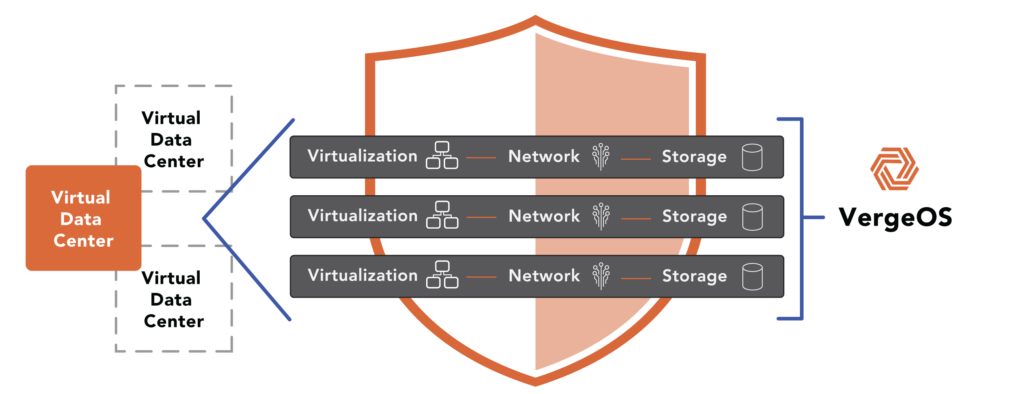
      A VergeOS Virtual Data Center (VDC) is a fully isolated, self-contained environment within a single VergeOS instance that includes its own compute, storage, networking, and management controls
    • High Availability
      VergeOS provides a unified, easy-to-manage infrastructure that ensures continuous high availability through automated failover, storage efficiency, clone-like snapshots, and simplified disaster recovery
    • ioClone
      ioClone utilizes global inline deduplication and a blockchain-inspired file system within VergeFS to create instant, independent, space-efficient, and immutable snapshots of individual VMs, volumes, or entire virtual data centers.
    • ioReplicate
      ioReplicate is a unified disaster-recovery solution that enables simple, cost-efficient DR testing and failover via three‑click recovery of entire Virtual Data Centers—including VMs, networking, and storage.
    • ioFortify
      ioFortify creates immutable, restorable VDC checkpoints and provides proactive ransomware detection with instant alerts for rapid recovery and response.
    • ioMigrate
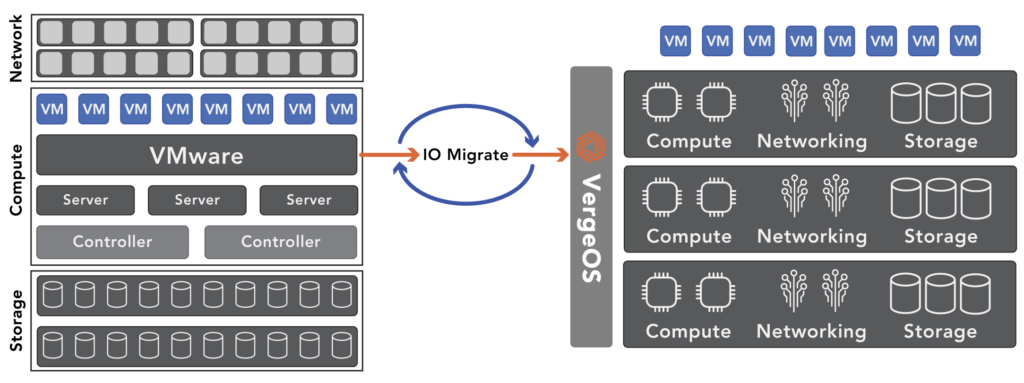
      ioMigrate enables large-scale VMware migrations, automating the rehosting of hundreds of VMs (including networking settings) in seconds with minimal downtime by seamlessly transitioning entire VMware environments onto existing hardware stacks.
    • ioProtect
      ioProtect offers near-real-time replication of VMware VMs—including data, network, and compute configurations—to a remote disaster‑recovery site on existing hardware, slashing DR costs by over 60% while supporting seamless failover and testing in an efficient, turnkey VergeOS Infrastructure.
    • ioOptimize
      ioOptimize leverages AI and machine learning to seamlessly integrate new and old hardware and automatically migrate workloads from aging or failing servers.
    • ioGuardian
      ioGuardian is VergeIO’s built-in data protection and recovery capability, providing near-continuous backup and rapid VM recovery during multiple simultaneous drive or server failures.
  • IT Initiatives
    • VMware Alternative
      VergeOS offers seamless migration from VMware, enhancing performance and scalability by consolidating virtualization, storage, and networking into a single, efficient platform.
    • Hyperconverged Alternative
      VergeIO’s page introduces ultraconverged infrastructure (UCI) via VergeOS, which overcomes HCI limitations by supporting external storage, scaling compute and storage independently, using existing hardware, simplifying provisioning, boosting resiliency, and cutting licensing costs.
    • SAN Replacement / Storage Refresh
      VergeIO’s storage by replacing aging SAN/NAS systems within its ultraconverged infrastructure, enhancing security, scalability, and affordability.
    • Infrastructure Modernization
      Legacy infrastructure is fragmented, complex, and costly, built from disconnected components. VergeOS unifies virtualization, storage, networking, data protection, and AI into one platform, simplifying operations and reducing expenses.
    • Virtual Desktop Infrastructure (VDI)
      VergeOS for VDI delivers a faster, more affordable, and easier-to-manage alternative to traditional VDI setups—offering organizations the ability to scale securely with reduced overhead
    • Secure Research Computing
      VergeIO's Secure Research Computing solution combines speed, isolation, compliance, scalability, and resilience in a cohesive platform. It’s ideal for institutions needing segmented, compliant compute environments that are easy to deploy, manage, and recover.
    • Venues, Remote Offices, and Edge
      VergeOS delivers resiliency and centralized management across Edge, ROBO, and Venue environments. With one platform, IT can keep remote sites independent while managing them all from a single pane of glass.
  • Blog
      • Storage Refreshes Break AutomationStorage refreshes break automation because new arrays introduce incompatible APIs and changed endpoints. Organizations refreshing storage must rewrite Terraform modules and Ansible playbooks, even if they are staying within the same vendor. VergeOS unified infrastructure eliminates the need for automation rewrites entirely.
      • Abstracted Infrastructure Saves Automation**40-Word Excerpt:** Infrastructure automation fails when hardware differences between production and DR sites force separate code paths. Abstracted infrastructure eliminates these variables by presenting consistent interfaces regardless of underlying equipment. Organizations gain automation that works identically across all environments, enabling reliable disaster recovery and portable infrastructure-as-code.
      • Fragmented Infrastructure Breaks AutomationTraditional virtualization stacks force complexity into automation pipelines. Packer requires multiple image variants. Terraform modules fill with conditional logic. Ansible roles need hardware detection for every cluster. VergeOS changes this by abstracting services from hardware, giving teams one API and consistent behavior across environments. Automation becomes predictable, not brittle.
    • View All Posts
  • Resources
    • Become a Partner
      Get repeatable sales and a platform built to simplify your customers’ infrastructure.
    • Technology Partners
      Learn about our technology and service partners who deliver VergeOS-powered solutions for cloud, VDI, and modern IT workloads.
    • White Papers
      Explore VergeIO’s white papers for practical insights on modernizing infrastructure. Each paper is written for IT pros who value clarity, performance, and ROI.
    • In The News
      See how VergeIO is making headlines as the leading VMware alternative. Industry analysts, press, and partners highlight our impact on modern infrastructure.
    • Press Releases
      Get the latest VergeOS press releases for news on product updates, customer wins, and strategic partnerships.
    • Case Studies
      See how organizations like yours replaced VMware, cut costs, and simplified IT with VergeOS. Real results, real environments—no fluff.
    • Webinars
      Explore VergeIO’s on-demand webinars to get straight-to-the-point demos and real-world infrastructure insights.
    • Documents
      Get quick, no-nonsense overviews of VergeOS capabilities with our datasheets—covering features, benefits, and technical specs in one place.
    • Videos
      Watch VergeIO videos for fast, focused walkthroughs of VergeOS features, customer success, and VMware migration strategies.
    • Technical Documentation
      Access in-depth VergeOS technical guides, configuration details, and step-by-step instructions for IT pros.
  • How to Buy
    • Schedule a Demo
      Seeing is beleiving, set up a call with one of our technical architects and see VergeOS in action.
    • Versions
      Discover VergeOS’s streamlined pricing and flexible deployment options—whether you bring your own hardware, choose a certified appliance, or run it on bare metal in the cloud.
    • Test Drive – No Hardware Required
      Explore VergeOS with VergeIO’s hands-on labs and gain real-world experience in VMware migration and data center resiliency—no hardware required
  • Company
    • About VergeIO
      Learn who we are, what drives us, and why IT leaders trust VergeIO to modernize and simplify infrastructure.
    • Support
      Get fast, expert help from VergeIO’s support team—focused on keeping your infrastructure running smoothly.
    • Careers
      Join VergeIO and help reshape the future of IT infrastructure. Explore open roles and growth opportunities.
  • 855-855-8300
  • Contact
  • Search
  • 855-855-8300
  • Contact
  • Search
  • Architecture
    • Overview
    • VergeFS
    • VergeFabric
    • Infrastructure Automation
    • VergeIQ
  • Features
    • Virtual Data Centers
    • High Availability
    • ioClone
    • ioReplicate
    • ioFortify
    • ioMigrate
    • ioProtect
    • ioOptimize
    • ioGuardian
  • IT Initiatives
    • VMware Alternative
    • Hyperconverged Alternative
    • SAN Replacement / Storage Refresh
    • Infrastructure Modernization
    • Virtual Desktop Infrastructure (VDI)
    • Secure Research Computing
    • Venues, Remote Offices, and Edge
  • Blog
  • Resources
    • Become a Partner
    • Technology Partners
    • White Papers
    • In The News
    • Press Releases
    • Case Studies
    • Webinars
    • Documents
    • Videos
    • Technical Documentation
  • How to Buy
    • Schedule a Demo
    • Versions
    • Test Drive – No Hardware Required
  • Company
    • About VergeIO
    • Support
    • Careers
×
  • Architecture
    • Overview
    • VergeFS
    • VergeFabric
    • Infrastructure Automation
    • VergeIQ
  • Features
    • Virtual Data Centers
    • High Availability
    • ioClone
    • ioReplicate
    • ioFortify
    • ioMigrate
    • ioProtect
    • ioOptimize
    • ioGuardian
  • IT Initiatives
    • VMware Alternative
    • Hyperconverged Alternative
    • SAN Replacement / Storage Refresh
    • Infrastructure Modernization
    • Virtual Desktop Infrastructure (VDI)
    • Secure Research Computing
    • Venues, Remote Offices, and Edge
  • Blog
  • Resources
    • Become a Partner
    • Technology Partners
    • White Papers
    • In The News
    • Press Releases
    • Case Studies
    • Webinars
    • Documents
    • Videos
    • Technical Documentation
  • How to Buy
    • Schedule a Demo
    • Versions
    • Test Drive – No Hardware Required
  • Company
    • About VergeIO
    • Support
    • Careers

Alternative

November 28, 2023 by George Crump

developing a VMware exit plan

The recent acquisition of VMware by Broadcom and the cold reality of this week’s layoffs make developing a VMware exit plan the new top priority for IT professionals. However, transitioning to a new virtualization platform can be a daunting task. With careful planning and execution and working with vendors with a long track record of helping organizations make this transition, the risks of conversion can be minimized.

A VMware Exit Migration Plan

Below is a quick overview of how to migrate from VMware to an alternative virtualization platform. For a more detailed plan, please download our definitive guide to exiting VMware, “A Step-By-Step VMware Migration Process.”

  1. Evaluate Alternatives: The first step in developing a VMware exit plan is to research the business and technological aspects of potential alternatives. Consider licensing models. Does the vendor’s practice of charging by CPU, core, or storage capacity punish you for using advanced hardware? Also, make sure you have at least feature parity in terms of performance, data protection, and resilience. Read our article “Comparing VMware to VergeOS,” to learn how VergeOS compares to VMware.
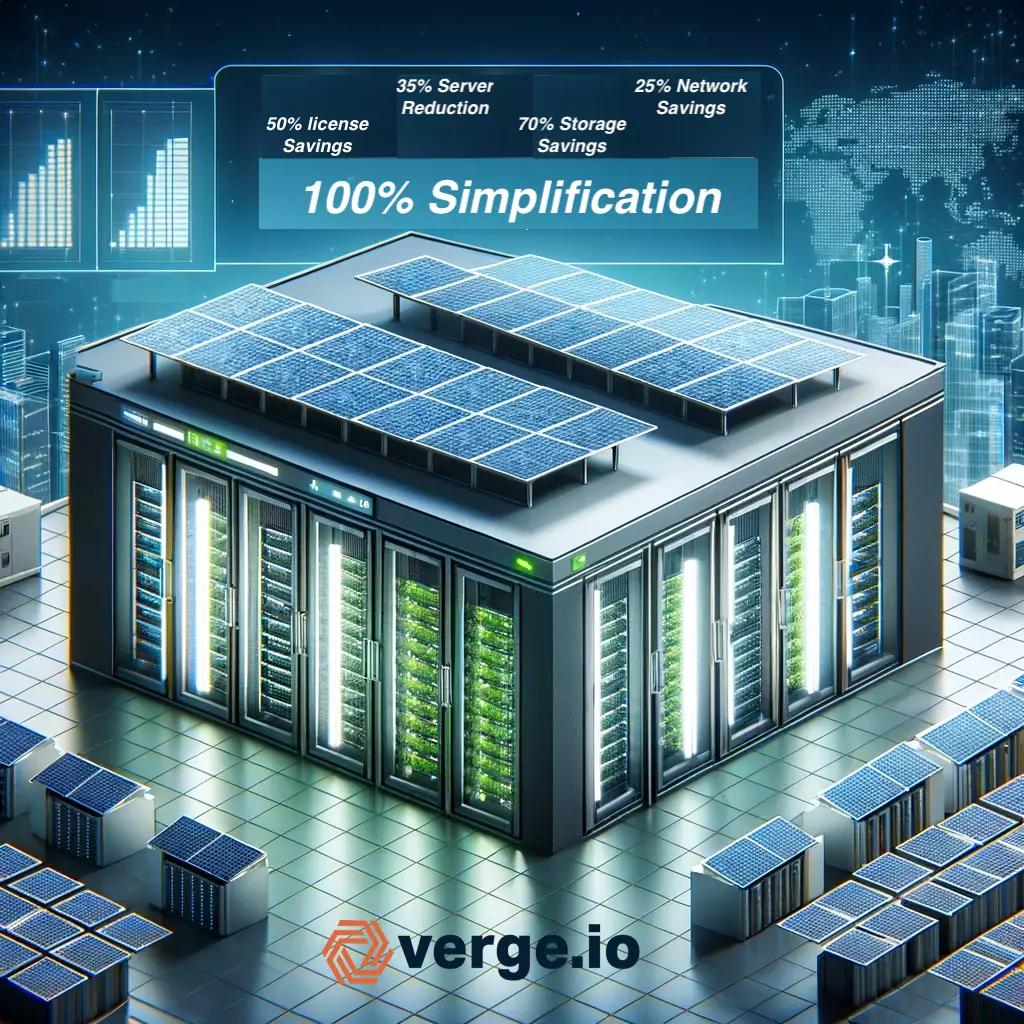
  2. Cost-Benefit Analysis: Undertake a thorough analysis of costs versus benefits, including licensing, maintenance, operational costs, and potential savings. Explore the potential to eliminate other software applications like backup, replication, and ransomware recovery. At a minimum, you should be looking for a 50% savings on licensing, decreasing the need for future hardware purchases and simplifying operations. Read our article “VMware Alternative Cost-Benefit Analysis,” to learn how VergeOS can reduce infrastructure costs now and in the future.
  3. Plan the Migration: Another imporant aspect of developing a VMware exit plan is creating a detailed migration plan encompassing timelines, resources, risk management, and stakeholder involvement. You are busy. Is the vendor willing to provide assistance and manage the migration for you? To watch a migration in real-time, watch our on-demand webinar.
  4. Prepare the Infrastructure: Ensure hardware and networking compatibility with the new software. Does the vendor have a strict hardware compatibility list that will force you to buy new hardware instead of leveraging your current investment? VergeOS doesn’t require new hardware, or even a restrictive hardware compatability list (HCL). Instead, we have a modest set of minimum requirements.
  5. Conduct Training: Training the IT staff on the new software and updating operational documentation is also a key step in developing a VMware exit plan. How long will it take to learn the new software and be comfortable performing day-to-day operations? Want to see how easy it is to learn VergeOS? Register for a virtual self-guided test drive.
  6. Test Migration Process: Start with a pilot migration and monitor performance. Can you migrate everything and keep the migrated virtual machines (VM) in sync as you start a pilot test of a few VMs? Continuously updating migration targets enables you to expand the test environment as you verify compatibility.
  7. Test Failure Scenarios: An often overlooked part of developing a VMware exit plan is making sure, as part of the testing, you test failure conditions, including failed network connections, servers, and storage media. Can the alternative self-heal? Does it provide adequate, built-in, data protection and recovery capabilities?
  8. Full-Scale Migration: A full-scale migration shouldn’t be necessary if the alternative can continually update migrated VMs from the VMware environment. Migration should be gradual and risk-free, testing one step at a time.
  9. Post-Migration Testing: Post-migration testing should also be unnecessary if the solution enables the gradual migration process as described in steps 6 and 7. You will want to confirm functionality and performance under full load in the new environment. A more efficient alternative should free up resources and enable you to cancel your next hardware refresh.
  10. Transition Support and Maintenance: Establish new support arrangements and maintenance procedures. Make sure the vendor is able to provide 24/7 support and allows for human-to-human communication.
  11. Decommission Old Environment: Decommission VMware and cancel any related licenses or contracts. The moment you’ve been waiting for, lower those licensing costs and free yourself from the acquisition chaos. You should save 50% or more on licensing and increase your total return on investment (ROI) by as much as 80% thanks to more efficient resource utilization.
  12. Review and Optimize: Conduct a post-migration review and continually monitor for optimization opportunities. A robust infrastructure solution should eliminate the need for most of the VMware ecosystem. Gradually replace these components to further improve ROI.
  13. Document and Communicate Changes: The final piece of developing a VMware exit plan is to update all documentation and inform impacted parties. Users should see no change in day-to-day, except for performance improvements and better data protection.

Conclusion

developing a VMware exit plan

The acquisition of VMware by Broadcom and the resulting organizational changes have brought to the forefront the necessity for IT professionals to develop a comprehensive VMware exit plan. Transitioning to a new virtualization platform can be streamlined with planning, analysis, and collaboration with experienced vendors.

The outlined steps, ranging from evaluating alternatives to documenting and communicating changes, provide a structured pathway for a smooth transition. By leveraging platforms like VergeOS, organizations can look forward to significant cost savings, enhanced performance, and simplified operations. Remember, the ultimate goal is not just to replace VMware, but to elevate your organization’s virtualization capabilities to a new level of efficiency and effectiveness.

Free, Personalized VMware Migration Strategy

Schedule a 15-minute call with one of our experts so we can capture the information we need to create a free, customized VMware Exit plan for your organization.

You’ll get a professional report detailing a customized process by which you can exit VMware. It will also provide a cost-benefit analysis showing how much you can reduce upfront and long-term data center costs by exiting VMware.

Do you think the ensuing chaos of Broadcom’s acquisition of VMware is overrated? Check out this article.

Filed Under: VMwareExit Tagged With: Alternative, VMware

November 20, 2023 by George Crump

a VMware alternative cost-benefit analysis

One of the more critical steps when exiting VMware is performing a VMware alternative cost-benefit analysis. Every VMware alternative should have a lower license cost, but they should also have additional benefits that lower the total cost of ownership upfront and in the future. You can download our step-by-step guide to a risk-free VMware migration here.

VMware Cost-Benefit Analysis – The Cost of Inefficiency

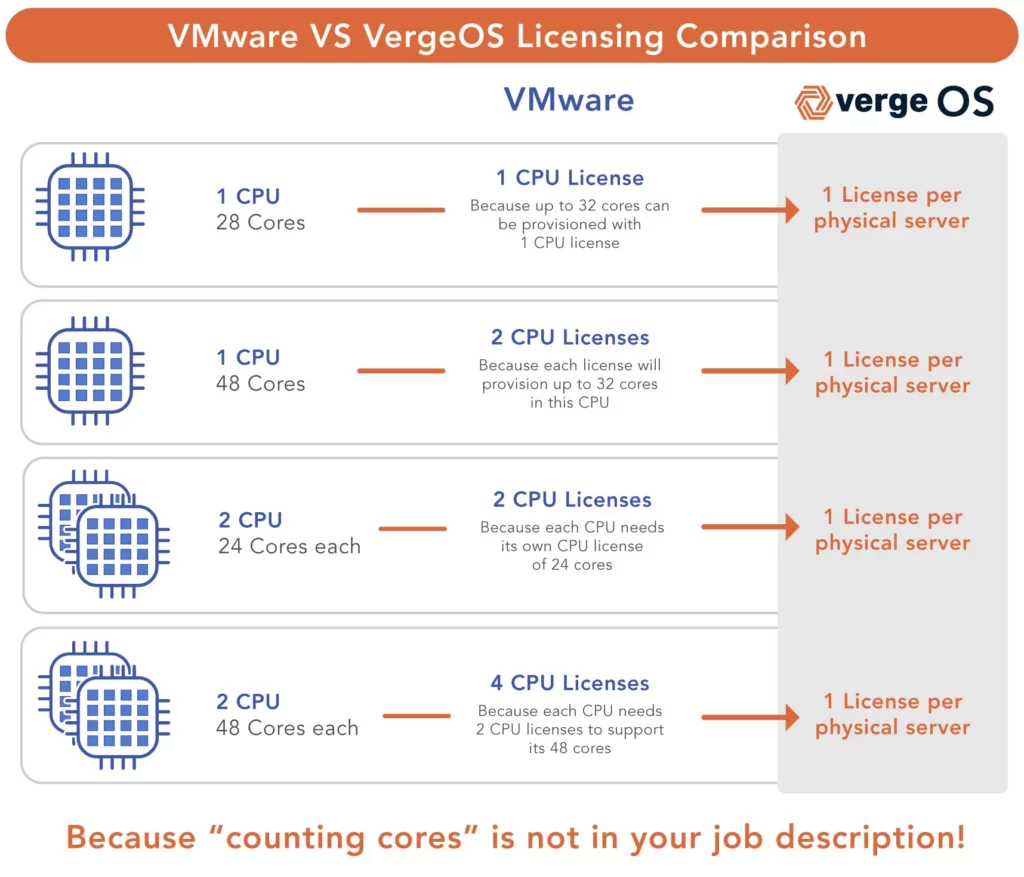
Licensing is at the heart of a VMware alternative cost-benefit analysis. Today, VMware charges by the number of CPUs; if your CPU has more than 32 cores, you’ll need multiple licenses per CPU. It is widely assumed that VMware licensing will shift to a per-core subscription model after the Broadcom acquisition.

a VMware alternative cost-benefit analysis

By charging extra for high-core count CPUs or per core, VMware penalizes you for investing in Intel’s next-generation CPU, which can reduce data center footprint and cooling costs. As a result, many customers will purposely select less capable servers to keep VMware licensing costs in check.


Most VMware alternatives don’t fare much better in terms of licensing. While they may be less expensive than VMware, they also tend to charge per physical CPU, core, or the amount of RAM. Others charge by storage capacity because they are really storage software, not an alternative infrastructure software solution.

Another component of VMware alternative cost-benefit analysis is the cost of server replacement. VMware, especially in the latest release, is requiring decommissioning of servers that are less than five years old, forcing server refreshes before the server has reached the end of its life. There is a cost associated with VMware’s lack of efficient server utilization. Some organizations have bare-metal workloads that they don’t feel confident virtualizing because of the overhead of the VMware hypervisor. Many organizations, because of VMware’s inefficient code base, can’t stack as many virtual machines (VM) per ESXi host as they would like.

Once again, most VMware alternatives don’t fare much better. While many are KVM-based, they haven’t done the optimization work required to operate smoothly. In most cases, these solutions have tried to hide KVM’s complexity behind a pretty GUI; they’ve actually done little optimization of KVM itself, if any. These VMWare alternatives suffer from similar performance inefficiencies and can’t help customers virtualize bare metal workloads or increase VM densities.

The other challenge with most VMware alternatives is that they require that you buy new hardware, either from them directly or from a “certified vendor.” In either case, you can’t leverage the hardware you already have, which is unfortunate because, with an efficient infrastructure software solution, customers can get years of additional life expectancy from their existing servers.

VergeOS Savings Go Beyond Licensing

VergeOS licenses are about 30% to 60% less expensive than the VMware offering. It is licensed by the physical server, not the number of CPUs, cores, amount of RAM, or storage capacity. A VMware alternative cost-benefit analysis must be about more than licensing costs. VergeOS, because it is Ultraconverged Infrastructure (UCI), includes a full complement of virtualization, networking, and storage capabilities in a single unified code base highly optimized for performance and scale.

The efficiency of the UCI architecture enables customers to increase VM density and virtualize formerly bare-metal workloads while using existing hardware. VergeIO is a pure software company; we don’t sell hardware, have a certified vendor list, or even have a hardware compatibility list (HCL). Instead, we have a modest set of minimum requirements. Most customers use their existing servers, freeing up compute resources by 35% to 40% while still seeing performance improvements. As a result, they can delay the next round of server purchases, which increases the potential cost savings to 75% or more.

When the time does come to invest in new server hardware, the VergeIO licensing model empowers customers to invest in multi-processor, massive core-count servers with as much storage capacity as they want. Investing in more powerful servers means more VMs per host, a reduction in data center footprint, and a reduction in power and cooling costs.

VMware Cost-Benefit Analysis – Storage

One of the great mysteries of the data center is “Why does storage cost so much?” The storage cost was one of the top concerns expressed by VMware Customers in our recent survey (licensing was number one). You can access all of the report details here. As a result, storage is a key component of a VMware alternative cost-benefit analysis. Dedicated storage arrays are 10X to 20X the cost per TB of server-based capacity. They also require a separate management process and often a separate team to manage them.

a VMware alternative cost-benefit analysis

Simple math indicates that this should not be the case. A 15.3TB NVMe Flash Drive is less than $1,500, meaning it should cost about $30,000 for 300TBs of high-performance flash storage capable of delivering hundreds of thousands of IOPS, but the cost of a dedicated storage array is many times that.

Vendors will tell you that it is so you can enjoy data services like deduplication, drive failure protection, snapshots, and data replication. But these services, as they offer them, are also full of compromise and raise the cost of the physical hardware required to deliver the performance and capacity the organization needs.

For example, the deduplication algorithm many storage solutions use requires significant processing power and RAM. Advanced RAID algorithms like Erasure Coding are complex to implement in a scale-out design and also suffer from slow drive recovery times. Most snapshot technologies are limited to the number that can be active and depend on each other, making them ill-suited for backup, disaster recovery, and ransomware protection.

The shortcomings of data services only add to the cost of a typical storage system and do not provide the full potential of any of its alleged, costly capabilities.

Hyperconverged infrastructure was supposed to resolve the issues creating high storage costs but has fallen woefully short. These solutions are not much less expensive than dedicated storage arrays and require more performance compromises. They suffer from the overhead associated with data services, and customers must overcompensate by investing in additional processing power, RAM, and storage performance/capacity.

Most VMware alternatives don’t invest much development time in optimizing the storage software. In most cases, they use ZFS or something similar. The problem is that these storage solutions aren’t optimized for running in a virtual environment, and as such, don’t deliver the performance or data services that customers need. They also suffer from the same, and in some cases, worse overhead than the HCI solutions mentioned above.

VergeOS Lowers Storage Costs Without Compromises

VergeOS’ Ultraconverged Infrastructure approach means that storage and networking execute as equal citizens to the hypervisor. As a result, VergeOS delivers high-performance, efficient capacity utilization thanks to global inline deduplication and enterprise-class data services that don’t impact performance. VergeOS’ storage services enable you to use server-class SSDs and HDDs without compromise.

Eliminating the additional cost associated with dedicated storage arrays or HCI storage can move your infrastructure savings to 75% or more. For example, we recently worked with a customer who purchased a 30TB Dell/EMC AFA system for $60k. With VergeOS, they could purchase 600TBs of capacity for that $60K and expect significantly better performance. That’s 20X the capacity for the same purchase price. Using the optimized VergeOS environment, all reads are serviced by locally attached NVMe SSDs. Instead of going across a storage network, data is read directly from the NVMe interface.

The storage components within the VergeOS code provide complete data services. Its global inline deduplication delivers an average 5:1 or better data efficiencies without requiring massive processing power or RAM capacities. Our IOclone powered snapshots behave more like complete clones, but thanks to global inline deduplication, they take milliseconds to create, are space efficient, and don’t impact performance. Each snapshot is independent. Snapshots taken before it or even the primary dataset itself can be removed, and their removal won’t impact the current snapshot.

The independence of VergeOS snapshots makes them viable backup copies. Combined with WAN-aware replication, most customers find the data protection capabilities within VergeOS to be superior to the capabilities of their current backup software. While most customers will initially leverage VergeOS’ capability to support third-party backup solutions, many customers eventually let their backup software license expire and decommission their backup storage, confidently relying solely on VergeOS, increasing the cost savings to 85% or more.

Conclusion: A New Horizon in Cost-Effective Virtualization

In conclusion, a VMware alternative cost-benefit analysis shows that VergeOS makes a compelling case for organizations seeking to optimize their virtualization strategies. Traditional VMware environments come with significant costs and limitations, especially concerning licensing, server utilization, and storage expenses. These constraints strain budgets and hinder operational efficiency and technological advancement.

Most VMware alternatives are built from open-source software without much additional development investment besides a GUI. The limitations of unoptimized hypervisor software, virtualization ignorant storage software, and limited networking capabilities make any potential cost savings irrelevant. These solutions follow the same tired licensing models of VMware, charging by processor, core, amount of RAM, or storage capacity. Further, they require the purchase of new hardware.

Alternatives like VergeOS offer a refreshing contrast, addressing key pain points in licensing, server utilization, and storage management. With its single unified code base, the Ultraconverged Infrastructure (UCI) model of VergeOS presents a more cost-effective and performance-optimized solution. Its licensing structure, focused on the physical server rather than individual components, provides substantial cost savings. At the same time, the ability to increase VM density and leverage existing hardware further enhances its value proposition.

Storage costs, often a significant concern in data centers, are notably reduced with VergeOS. VergeOS eliminates the need for dedicated storage arrays or complex HCI solutions by integrating storage and networking as equal components alongside the hypervisor. Its innovative approach to data services, including global inline deduplication and efficient snapshot management, ensures high performance without the usual compromises.

VergeOS stands out as a viable and highly beneficial alternative for organizations looking to move away from VMware’s costly and restrictive model. By embracing this new horizon in virtualization, businesses can expect immediate cost reductions and long-term operational efficiencies, laying a solid foundation for future growth and technological innovation.

Filed Under: VMwareExit Tagged With: Alternative, ROI, VMware

November 14, 2023 by Aaron Richman

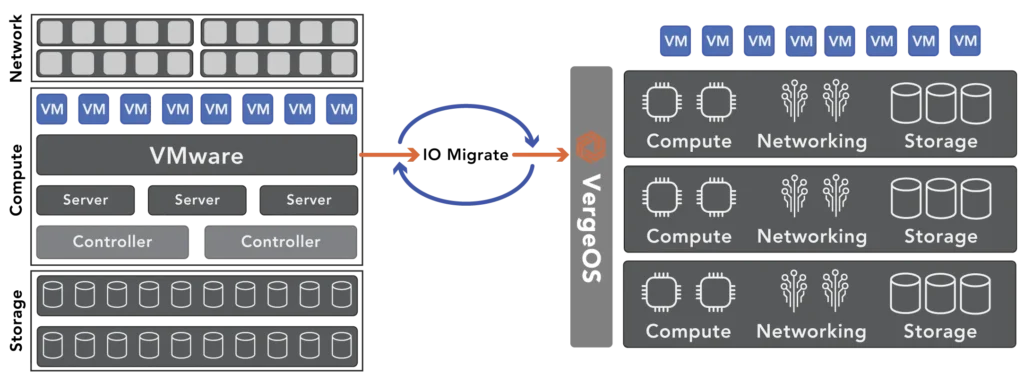
Ann Arbor, Mich, November 14, 2023 — Today, VergeIO, a top-tier VMware alternative, unveils its risk-free VMware conversion services. Powered by IOmigrate , VergeIO ensures a frictionless transition of VMware virtual machines to VergeOS with just a few clicks. In light of Broadcom’s pending acquisition of VMware and growing user concerns about the state of the virtualization software and the company behind it – ranging from rising licensing costs, ransomware vulnerabilities, and diminishing quality of support, VergeIO is stepping up, offering complimentary professional services for VMware customers seeking an exit.

VergeOS’ IOmigrate is the epitome of user-friendly. It allows IT professionals to log into the VMware ecosystem swiftly, view available VMs, select desired VMs for migration, and within moments, these VMs are able to operate under VergeOS. The transition is almost invisible to users in daily operations, yet they enjoy enhanced performance and improved data resiliency, even when leveraging existing hardware.

The VergeIO Customer Success team complements IOmigrate. They offer a comprehensive migration plan encompassing application sequencing, meticulous testing, optimization, and final deployment. Furthermore, they arm customers with VergeOS’ robust data protection, readying them against potential threats, be it disasters or ransomware attacks.

VergeIO’s training module ensures a quick learning curve for VMware administrators. Typically, IT administrators become proficient with VergeOS in merely a few hours. Additionally, the team assists clients in phasing out superfluous applications now integrated into VergeOS.

Yan Ness, CEO of VergeIO, commented, “VergeOS isn’t just about cost-saving, though it’s notably 50% less expensive than VMware and slashes infrastructure costs by 75% or more. VergeOS streamlines IT Operations, simplifies compliance, provides superior ransomware protection, simplifies moving workloads, rapidly scales, and more. Our devoted Customer Success team consistently assists VMware clients through the entire conversion journey, from strategizing to implementing. With the looming changes at Broadcom, we’re waiving fees for this service, aiding customers in a smooth and timely transition.”

With IOmigrate and the added advantage of professional migration assistance, now is the opportune moment to devise your VMware Exit strategy. Watch our on-demand webinar, “How to Exit VMware Step By Step,” where VergeIO experts address the top five migration questions and demonstrate a real-time VMware to VergeOS shift. All attendees will also receive a copy of VergeIO’s State of the VMware Customer.“

About VergeIO: 

VergeIO is the Ultraconverged Infrastructure (UCI) company. Unlike hyperconverged infrastructure (HCI), it rotates the traditional IT stack (compute, storage, and networking) into an integrated data center operating system, VergeOS. Its efficiency enables greater workload density on the same hardware with high levels of data resiliency. The result is dramatically lower costs and greatly simplified IT.
Media Contact:
Judy Smith, JPR Communications
818-522-9673
[email protected]

Filed Under: Press Release Tagged With: Alternative, VMware

November 10, 2023 by Verge.IO

A recently conducted survey of hundreds of VMware customers sheds light on growing concerns they have about the state of the virtualization software and the company behind it – ranging from rising licensing costs, ransomware vulnerabilities and a diminishing quality of support.

Read more…

Filed Under: News Tagged With: Alternative, VMware

November 10, 2023 by Verge.IO

A recently conducted survey of hundreds of VMware, Inc.‘s customers sheds light on growing concerns they have about the state of the virtualization software and the company behind it – ranging from rising licensing costs, ransomware vulnerabilities and a diminishing quality of support.

Read More…

Filed Under: News Tagged With: Alternative, VMware

November 10, 2023 by Verge.IO

VMware customers have growing concerns about the state of the virtualization software and the company behind it – ranging from rising licensing costs, ransomware vulnerabilities and a diminishing quality of support, according to VergeIO.

Read more…

Filed Under: News Tagged With: Alternative, VMware

  • « Go to Previous Page
  • Page 1
  • Interim pages omitted …
  • Page 6
  • Page 7
  • Page 8
  • Page 9
  • Page 10
  • Go to Next Page »

855-855-8300

Get Started

  • Versions
  • Request Tour

VergeIO For

  • VMware Alternative
  • SAN Replacement
  • Solving Infrastructure Modernization Challenges
  • Artificial Intelligence
  • Hyperconverged
  • Server Room
  • Secure Research Computing

Product

  • Benefits
  • Documents
  • Architecture Overview
  • Use Cases
  • Videos

Company

  • About VergeIO
  • Blog
  • Technical Documentation
  • Legal

© 2025 VergeIO. All Rights Reserved.