• Skip to main content
  • Architecture
    • Overview
      Learn about VergeOS’ unique unfied architecture that integrates virtualization, storage, networking, AI, backup and DR into a single data center operating system
    • Infrastructure Wide Deduplication
      VergeOS transforms deduplication from a storage-only commodity into a native, infrastructure-wide capability that spans storage, virtualization, and networking, eliminating hidden resource taxes
    • VergeFS
      VergeFS is a distributed, high-performance global file system integrated into VergeOS, unifying storage across nodes, tiers, and workloads while eliminating the need for external SANs
    • VergeFabric
      VergeFabric is VergeOS’s integrated virtual networking layer, delivering high-speed, low-latency communication across nodes while eliminating the complexity of traditional network configurations.
    • Infrastructure Automation
      VergeOS integrates Packer, Terraform, and Ansible to deliver an end-to-end automation pipeline that eliminates infrastructure drift and enables predictable, scalable deployments.
    • VergeIQ
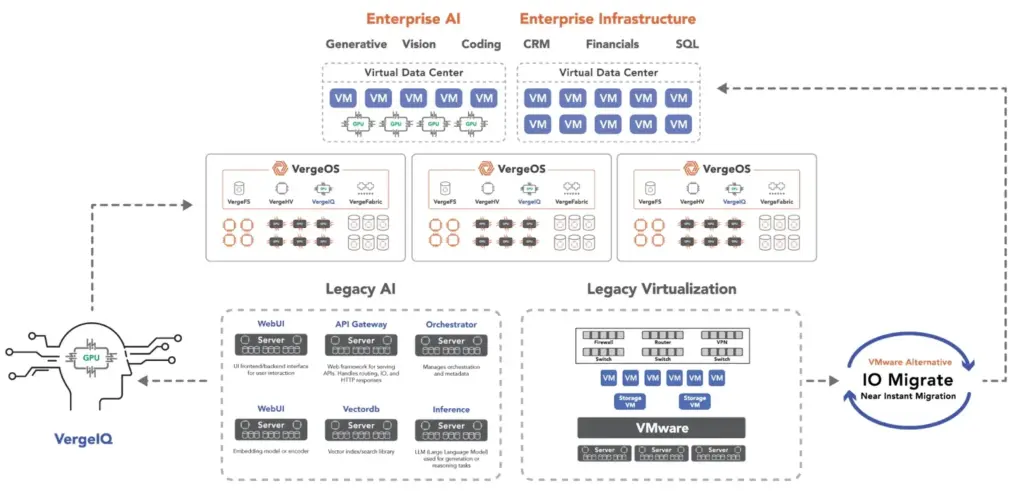
      Unlock secure, on-premises generative AI—natively integrated into VergeOS. With VergeIQ, your enterprise gains private AI capabilities without the complexity, cloud dependency, or token-based pricing.
  • Features
    • Virtual Data Centers
      A VergeOS Virtual Data Center (VDC) is a fully isolated, self-contained environment within a single VergeOS instance that includes its own compute, storage, networking, and management controls
    • High Availability
      VergeOS provides a unified, easy-to-manage infrastructure that ensures continuous high availability through automated failover, storage efficiency, clone-like snapshots, and simplified disaster recovery
    • ioClone
      ioClone utilizes global inline deduplication and a blockchain-inspired file system within VergeFS to create instant, independent, space-efficient, and immutable snapshots of individual VMs, volumes, or entire virtual data centers.
    • ioReplicate
      ioReplicate is a unified disaster-recovery solution that enables simple, cost-efficient DR testing and failover via three‑click recovery of entire Virtual Data Centers—including VMs, networking, and storage.
    • ioFortify
      ioFortify creates immutable, restorable VDC checkpoints and provides proactive ransomware detection with instant alerts for rapid recovery and response.
    • ioMigrate
      ioMigrate enables large-scale VMware migrations, automating the rehosting of hundreds of VMs (including networking settings) in seconds with minimal downtime by seamlessly transitioning entire VMware environments onto existing hardware stacks.
    • ioProtect
      ioProtect offers near-real-time replication of VMware VMs—including data, network, and compute configurations—to a remote disaster‑recovery site on existing hardware, slashing DR costs by over 60% while supporting seamless failover and testing in an efficient, turnkey VergeOS Infrastructure.
    • ioOptimize
      ioOptimize leverages AI and machine learning to seamlessly integrate new and old hardware and automatically migrate workloads from aging or failing servers.
    • ioGuardian
      ioGuardian is VergeIO’s built-in data protection and recovery capability, providing near-continuous backup and rapid VM recovery during multiple simultaneous drive or server failures.
  • IT Initiatives
    • VMware Alternative
      VergeOS offers seamless migration from VMware, enhancing performance and scalability by consolidating virtualization, storage, and networking into a single, efficient platform.
    • Hyperconverged Alternative
      VergeIO’s page introduces ultraconverged infrastructure (UCI) via VergeOS, which overcomes HCI limitations by supporting external storage, scaling compute and storage independently, using existing hardware, simplifying provisioning, boosting resiliency, and cutting licensing costs.
    • SAN Replacement / Storage Refresh
      VergeIO’s storage by replacing aging SAN/NAS systems within its ultraconverged infrastructure, enhancing security, scalability, and affordability.
    • Infrastructure Modernization
      Legacy infrastructure is fragmented, complex, and costly, built from disconnected components. VergeOS unifies virtualization, storage, networking, data protection, and AI into one platform, simplifying operations and reducing expenses.
    • Virtual Desktop Infrastructure (VDI)
      VergeOS for VDI delivers a faster, more affordable, and easier-to-manage alternative to traditional VDI setups—offering organizations the ability to scale securely with reduced overhead
    • Secure Research Computing
      VergeIO's Secure Research Computing solution combines speed, isolation, compliance, scalability, and resilience in a cohesive platform. It’s ideal for institutions needing segmented, compliant compute environments that are easy to deploy, manage, and recover.
    • Venues, Remote Offices, and Edge
      VergeOS delivers resiliency and centralized management across Edge, ROBO, and Venue environments. With one platform, IT can keep remote sites independent while managing them all from a single pane of glass.
  • Blog
      • How an AI-Powered VMware Alternative WorksAn AI-powered VMware alternative now runs in production. Verge CLI gives VergeOS three parts, a command-line interface, an MCP server, and agent skills, so an AI assistant operates compute, storage, networking, and data protection through one API in plain language. See how it works and why one code base changes the result.
      • Refurbished SSD TelemetryMost refurbished SSD suppliers are reputable, but a reset wear number still worries buyers. Refurbished SSD telemetry settles it. VergeOS measures every drive against its thresholds, flags a worn drive before it fails, and replaces it with the cluster online. Continuous monitoring plus redundancy keeps mislabeled media from costing data.
      • The Value of an Integrated VMware AlternativeNearly every VMware alternative claims to be integrated, but three very different architectures hide behind that word. A hypervisor swap, hyperconverged infrastructure, and ultra-converged infrastructure each carry different costs and operational consequences. The value of an integrated VMware alternative comes down to one question most buyers never ask: how integrated is the code itself?
    • View All Posts
  • Resources
    • Become a Partner
      Get repeatable sales and a platform built to simplify your customers’ infrastructure.
    • Technology Partners
      Learn about our technology and service partners who deliver VergeOS-powered solutions for cloud, VDI, and modern IT workloads.
    • White Papers
      Explore VergeIO’s white papers for practical insights on modernizing infrastructure. Each paper is written for IT pros who value clarity, performance, and ROI.
    • In The News
      See how VergeIO is making headlines as the leading VMware alternative. Industry analysts, press, and partners highlight our impact on modern infrastructure.
    • Press Releases
      Get the latest VergeOS press releases for news on product updates, customer wins, and strategic partnerships.
    • Case Studies
      See how organizations like yours replaced VMware, cut costs, and simplified IT with VergeOS. Real results, real environments—no fluff.
    • Webinars
      Explore VergeIO’s on-demand webinars to get straight-to-the-point demos and real-world infrastructure insights.
    • Documents
      Get quick, no-nonsense overviews of VergeOS capabilities with our datasheets—covering features, benefits, and technical specs in one place.
    • Videos
      Watch VergeIO videos for fast, focused walkthroughs of VergeOS features, customer success, and VMware migration strategies.
    • Technical Documentation
      Access in-depth VergeOS technical guides, configuration details, and step-by-step instructions for IT pros.
  • How to Buy
    • Schedule a Demo
      Seeing is believing, set up a call with one of our technical architects and see VergeOS in action.
    • Versions
      Discover VergeOS’s streamlined pricing and flexible deployment options—whether you bring your own hardware, choose a certified appliance, or run it on bare metal in the cloud.
    • Test Drive – No Hardware Required
      Explore VergeOS with VergeIO’s hands-on labs and gain real-world experience in VMware migration and data center resiliency—no hardware required
  • Company
    • About VergeIO
      Learn who we are, what drives us, and why IT leaders trust VergeIO to modernize and simplify infrastructure.
    • Support
      Get fast, expert help from VergeIO’s support team—focused on keeping your infrastructure running smoothly.
    • Careers
      Join VergeIO and help reshape the future of IT infrastructure. Explore open roles and growth opportunities.
  • 855-855-8300
  • Contact
  • Search
  • 855-855-8300
  • Contact
  • Search
  • Architecture
    • Overview
    • VergeFS
    • VergeFabric
    • Infrastructure Automation
    • VergeIQ
  • Features
    • Virtual Data Centers
    • High Availability
    • ioClone
    • ioReplicate
    • ioFortify
    • ioMigrate
    • ioProtect
    • ioOptimize
    • ioGuardian
  • IT Initiatives
    • VMware Alternative
    • Hyperconverged Alternative
    • SAN Replacement / Storage Refresh
    • Infrastructure Modernization
    • Virtual Desktop Infrastructure (VDI)
    • Secure Research Computing
    • Venues, Remote Offices, and Edge
  • Blog
  • Resources
    • Become a Partner
    • Technology Partners
    • White Papers
    • In The News
    • Press Releases
    • Case Studies
    • Webinars
    • Documents
    • Videos
    • Technical Documentation
  • How to Buy
    • Schedule a Demo
    • Versions
    • Test Drive – No Hardware Required
  • Company
    • About VergeIO
    • Support
    • Careers
×
  • Architecture
    • Overview
    • VergeFS
    • VergeFabric
    • Infrastructure Automation
    • VergeIQ
  • Features
    • Virtual Data Centers
    • High Availability
    • ioClone
    • ioReplicate
    • ioFortify
    • ioMigrate
    • ioProtect
    • ioOptimize
    • ioGuardian
  • IT Initiatives
    • VMware Alternative
    • Hyperconverged Alternative
    • SAN Replacement / Storage Refresh
    • Infrastructure Modernization
    • Virtual Desktop Infrastructure (VDI)
    • Secure Research Computing
    • Venues, Remote Offices, and Edge
  • Blog
  • Resources
    • Become a Partner
    • Technology Partners
    • White Papers
    • In The News
    • Press Releases
    • Case Studies
    • Webinars
    • Documents
    • Videos
    • Technical Documentation
  • How to Buy
    • Schedule a Demo
    • Versions
    • Test Drive – No Hardware Required
  • Company
    • About VergeIO
    • Support
    • Careers

AI

June 3, 2026 by George Crump

To be more than a hypervisor swap, IT professionals need to look for an AI-ready VMware alternative. The Broadcom acquisition has rewritten the economics of virtualization, and many IT teams are still trying to escape renewal costs that no longer justify the value received.

Treating the VMware exit as a single-platform replacement project is a mistake, especially since the next infrastructure decision is already taking shape around AI. That decision arrives faster than most teams expect, and the platform selected during the VMware exit determines whether private AI becomes practical or prohibitively expensive.

An AI-ready VMware alternative now has to pass two tests. The platform has to replace VMware without forcing an application redesign, and it has to support the AI workloads that will land in the data center next.

Key Takeaways
  • An AI-ready VMware alternative has to pass two tests: replace the platform today and run AI workloads tomorrow.
  • A platform that solves virtualization but not AI forces a second infrastructure decision a year or two later.
  • Test AI readiness on existing hardware before committing to a replacement.

Why an AI-Ready VMware Alternative Matters Now

Many organizations begin their AI journey with public services. That approach removes the need to purchase infrastructure, hire specialists, or learn new operational models. The problem is that most successful AI projects eventually encounter limits that are difficult to solve from outside the organization.
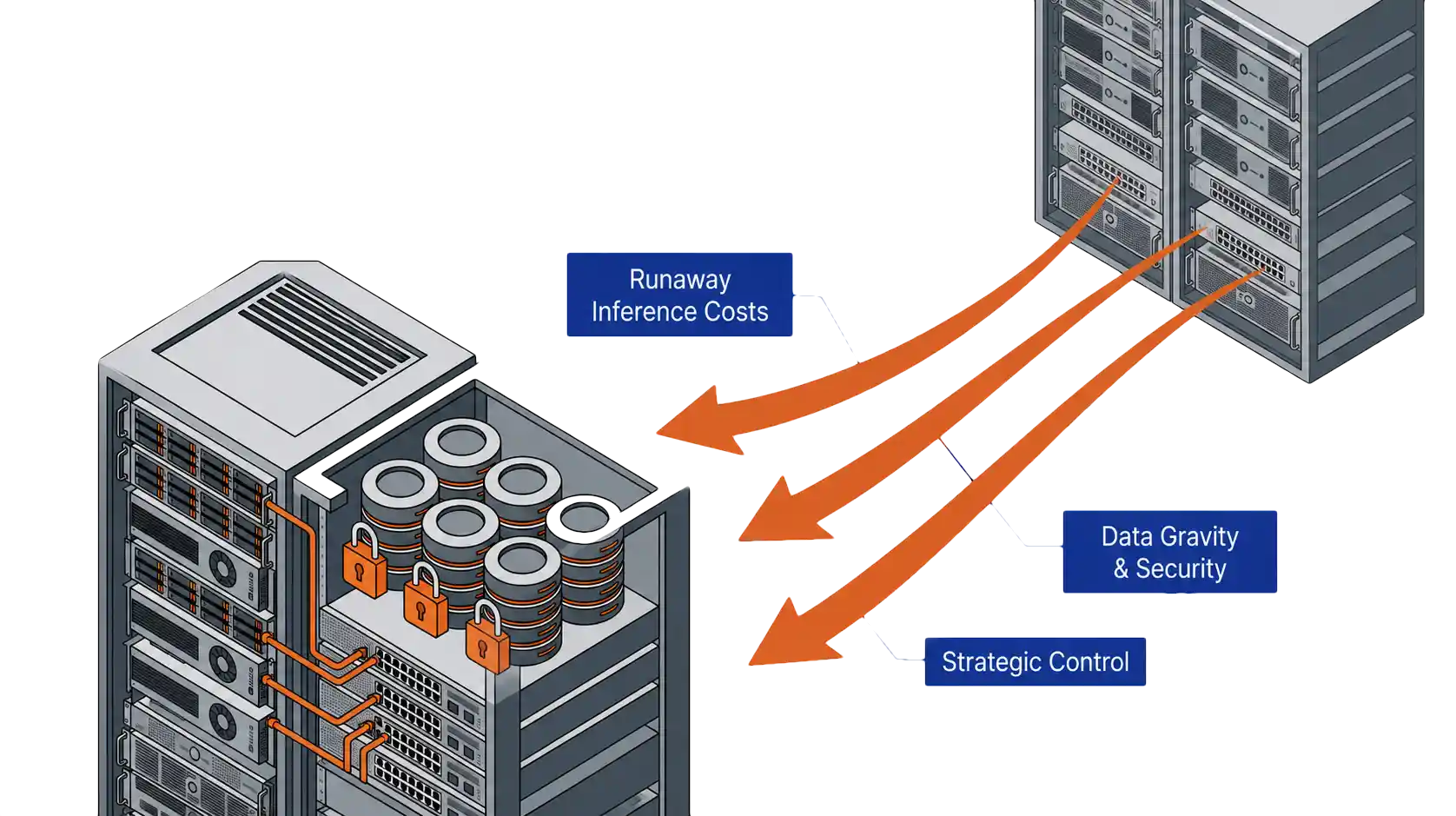
Why an AI-ready VMware alternative matters: cost, data gravity, and strategic control

Cost

Public AI platforms charge for every interaction (Token Costs). A handful of occasional questions costs little, and an assistant used by hundreds of employees, a document analysis platform processing millions of records, or a customer-facing application serving thousands of daily requests creates a very different economic picture. Recurring inference costs grow faster than expected, and at some point, owning the infrastructure costs less than renting for every transaction.

Data Gravity

The most valuable AI systems depend on internal documents, customer records, operational procedures, financial data, and institutional knowledge. Moving that data into external AI environments introduces governance, compliance, security, and operational concerns. The more valuable the data, the stronger the incentive to keep the AI system close to the source.

Strategic Control

AI is rapidly becoming part of an organization’s competitive advantage. When customer service workflows, software development assistance, and decision support systems depend entirely on external providers, pricing changes, model updates, and availability decisions remain outside the organization’s control.

Not every AI workload belongs in the data center, and public AI services continue to play an important role. Most organizations will identify a set of AI workloads that cost less, are governed more cleanly, and operate more strategically on their own infrastructure. The platform selected during the VMware exit is also the foundation for those workloads. An AI-ready VMware alternative pulls both jobs together from day one.

Key Terms
Private Cloud Operating System (PCOS)
A single integrated codebase for compute, storage, networking, protection, and AI. Different from hyperconverged platforms that wrap separate products behind one management GUI.
NVIDIA vGPU 20
NVIDIA’s virtual GPU release for the 2026 generation of accelerators. Lets a single physical GPU host multiple virtual machine workloads.
Multi-Instance GPU (MIG)
A partitioning technology that splits a physical GPU into independent slices, each with its own memory and compute. Different workloads share one accelerator without contending for resources.
VergeIQ
VergeIO’s integrated AI runtime. Runs private language models, retrieval-augmented generation applications, document analysis systems, and AI assistants on the same cluster that hosts virtual machines and containers.
Retrieval-Augmented Generation (RAG)
An AI pattern that pulls relevant content from a private document store at query time and feeds it to a language model. Keeps proprietary data inside the organization and improves answer accuracy.

What to Look For in an AI-Ready VMware Alternative

Most organizations begin their VMware evaluation with a familiar checklist. Those requirements remain important. The first job of any VMware alternative is replacing the platform that already runs the business.

Virtualization baseline: the five requirements of an AI-ready VMware alternative

Migration Simplicity

Existing VMware workloads should move without application redesign, operating system changes, or lengthy conversion projects. The migration process should preserve virtual machines, networking, and storage configurations and minimize downtime. Less time rebuilding workloads means faster realization of savings.

Feature Parity

High availability, live migration, snapshots, distributed resource management, virtual networking, and integrated storage services need to operate as mature production capabilities, not features that require workarounds to reach the same outcome.

Stronger Protection

A VMware migration is the opportunity to improve recovery capabilities, not duplicate them. Native replication, immutable snapshots, ransomware detection, rapid recovery workflows, and integrated disaster recovery all belong in the evaluation.

Live Webinar · June 11
Beyond the Hypervisor Swap

Greg Campbell and former VMware CTO Kit Colbert walk through the VergeOS 2026 architecture and how one platform handles VMs, containers, GPUs, and AI services.

Register Now

Operational Simplicity

Many organizations left VMware over more than licensing. They also became frustrated with a virtualization stack that had evolved into multiple products, each with its own management, upgrade, troubleshooting, and expertise. Storage, networking, virtualization, security, automation, monitoring, and recovery became independent layers, often behind a unified interface that hid the seams.

The platform should reduce operational complexity, not recreate it. A unified architecture should run virtualization, storage, networking, protection, and automation as part of a single system. The default decision of swapping hypervisors, replacing VMware with another loosely integrated stack, exchanges one form of complexity for another. The goal is simplification, not substitution.

Licensing Simplicity

Licensing costs were the catalyst for leaving VMware in the first place. Replacing one complicated licensing structure with another postpones the problem. The alternative should deliver predictable economics that hold steady as the environment grows and not penalize the organization for increasing density, which is the consequence of a “per-core” licensing model.

These five requirements form the foundation of an AI-ready VMware alternative, and they are where most evaluations stop. None of them answers the next infrastructure question. They determine whether a platform replaces VMware, not whether that same platform supports the AI workloads many organizations will bring into their own data centers. A platform can satisfy every item on this checklist and still force a second infrastructure decision a year or two later. The missing consideration is AI readiness.

The Missing Criterion of an AI-Ready VMware Alternative

The search for an AI-ready VMware alternative begins where most evaluations end. Many platforms start to fall short on feature parity with VMware. Most also lack a clear path to AI. Some require separate platforms or additional licensing to support containers. Others support GPUs through disconnected infrastructure. Many force organizations to build, operate, and support an entirely separate AI environment.

Virtual machines and AI workloads on a single platform: the AI-ready VMware alternative

The result is a platform that solves today’s virtualization challenge and creates tomorrow’s infrastructure challenge.

As AI workloads move into the private data center, requirements change. Containers become as important as virtual machines. GPU resources become shared infrastructure. AI services need the same data, protection, networking, and recovery framework as the rest of the business.

A platform that cannot meet those requirements forces a second infrastructure decision. New hardware gets purchased, a separate AI environment goes online, and a second team starts supporting it. The organization that set out to simplify operations ends up adding complexity.

The better approach is to select an AI-ready VMware alternative that handles both traditional virtualization and private AI from day one.

Kubernetes as a First-Class Workload

Most modern AI applications deploy as containers. Kubernetes should operate on the same infrastructure as virtual machines and share the same networking, protection, and disaster recovery framework. Containers should not require a separate infrastructure stack.

GPU Sharing and Virtualization

GPUs are among the most expensive resources in the data center, and few organizations justify dedicating an entire accelerator to a single workload. The platform should support NVIDIA vGPU 20 and universal Multi-Instance GPU (MIG) so AI inference, VDI, engineering, and analytics workloads share one physical GPU.

Integrated AI Runtime

Running private AI should not require building a separate AI platform. Solutions such as VergeIQ deploy private language models, retrieval-augmented generation applications, document analysis systems, and AI assistants directly on the cluster that already hosts virtual machines and containers.

Storage Performance

Inference workloads depend on rapid access to models, embeddings, and vector databases. Infrastructure delivering millions of IOPS with sub-millisecond latency on standard NVMe eliminates the bottlenecks that traditionally justified dedicated AI infrastructure.

Architectural and Operational Simplicity

AI should not introduce another set of servers, storage systems, and management tools, nor require a dedicated infrastructure team. The goal is one platform that supports virtual machines, containers, GPUs, and AI services within a single operational framework managed by the same infrastructure team.

That is where many VMware alternatives fall short. They solve the virtualization problem and leave the AI problem for next year. Organizations that avoid a second platform decision choose a platform that handles both from day one.

VMware Exit: Today’s Checklist vs. Tomorrow’s Workload

CapabilityVirtualization-First ChecklistAI-Ready VMware Alternative
ContainersSeparate cluster, separate licenseKubernetes as a first-class workload
GPU supportOptional add-on, often per-hostvGPU and MIG sharing across workloads
AI runtimeBuild it yourselfIntegrated runtime (VergeIQ)
StorageTuned for VM I/ONVMe-native, sub-millisecond latency
Operational modelSeparate team for AIOne team, one operational framework

Prove an AI-Ready VMware Alternative on Hardware You Already Own

Evaluating an AI-ready VMware alternative does not require new hardware. The best proof of concept runs on the cluster already sitting in the data center, whether VxRail, ReadyNode, or commodity servers. On that hardware, migrate a virtual machine, deploy a Kubernetes workload, and run a private AI inference workload.

Measure the migration effort. Measure the infrastructure needed to support containers. Measure how GPUs get shared and managed across workloads. The most telling question is whether one team can manage it all through a common operational framework.

The real test is not whether a platform runs virtual machines. Nearly every alternative does that. The test is whether the platform becomes the foundation for the next decade of infrastructure. If virtual machines, containers, GPUs, and AI services each require different platforms, tools, and teams, then the evaluation has already produced its answer.

Organizations evaluating an AI-ready VMware alternative have one opportunity to make a single platform decision. The harder requirement is picking the platform that eliminates the need for another infrastructure decision eighteen months from now.

Take a VergeOS Test Drive and see how virtual machines, Kubernetes, GPU virtualization, and VergeIQ operate on a single platform. Greg Campbell and former VMware CTO Kit Colbert walk through the architecture live on June 11. Registration is open.
Frequently Asked Questions
What is an AI-ready VMware alternative?
An AI-ready VMware alternative is a platform that replaces VMware for traditional virtualization and also runs the containers, GPU workloads, and private AI services that follow. It treats Kubernetes, GPU sharing, integrated AI runtime, and high-performance NVMe storage as first-class capabilities, not bolt-ons.
Why does AI readiness factor into a VMware replacement?
AI workloads are arriving in production faster than most infrastructure cycles. Cost, data governance, and strategic control will push most successful AI projects into the private data center within the same window as the typical VMware exit. A VMware alternative chosen for virtualization alone will struggle to handle the containers, GPUs, and AI runtime that follow.
What is a Private Cloud Operating System?
A Private Cloud Operating System integrates compute, storage, networking, protection, and AI in a single codebase. The integration happens in the code, not in a management GUI that ties separate products together. The result is one platform, one operational model, and one team.
Does an AI-ready VMware alternative need NVIDIA vGPU and MIG support?
Yes. VergeOS supports NVIDIA vGPU 20 and universal MIG, allowing a single physical GPU to host multiple isolated virtual machine or container workloads. AI inference, VDI, engineering applications, and analytics workloads share the same accelerator infrastructure.
How does VergeIQ fit into an AI-ready VMware alternative?
VergeIQ runs on the same VergeOS cluster that hosts virtual machines and containers. Organizations deploy private language models, retrieval-augmented generation applications, document analysis systems, and AI assistants directly on the platform that already runs the rest of the business. No separate AI infrastructure required.
Can an AI-ready VMware alternative run on the same hardware that hosted VMware?
Yes. VergeOS runs on existing VxRail, ReadyNode, and commodity server hardware. Most VMware replacement evaluations begin on hardware already in production, which removes the need for a separate hardware purchase to validate the platform.

Filed Under: AI Tagged With: AI, Alternative, Container Platform, IT infrastructure, VMware

April 9, 2026 by George Crump

NVIDIA built the AI toolkit. VergeOS makes the infrastructure disappear.

Every AI project hits the same inflection point. Someone identifies a use case worth building. The engineering team wants to connect an LLM to internal documentation, simulation results, product specifications, or design archives so domain experts can query their own data in natural language. The concept is retrieval-augmented generation, and the ideal place to build it is a GPU virtual workstation. The use case is sound. Then someone asks the question that stalls the project: where is the infrastructure to run it?

A growing number of organizations are standardizing on GPU virtual workstations. Not cloud endpoints with metered GPU hours. Not shared notebook environments where teams compete for resources every morning. The model is a self-contained virtual machine with dedicated GPU resources, running on infrastructure the IT team already manages. NVIDIA’s AI Virtual Workstation toolkit initiative makes this practical. VergeOS makes the infrastructure underneath it invisible.

Key Takeaways
NVIDIA’s RAG Application Toolkit provides a repeatable, guided path from blank VM to working retrieval-augmented generation application inside a GPU virtual workstation.
RAG applications running in VMs inherit full infrastructure discipline: snapshots, replication, cloning, and disaster recovery that physical workstation deployments lack.
VergeOS compresses GPU provisioning, driver deployment, vGPU profile assignment, and MIG partitioning into a point-and-click workflow that requires no GPU specialist.
NVIDIA introduced VergeOS as a supported vGPU platform, establishing joint support paths so both vendors stand behind the deployment.
The RTX Pro 6000 Blackwell Server Edition supports up to four MIG-isolated RAG environments from a single GPU, and the RTX 4500 fits 16 cards in a 4U chassis for density-first deployments.
Organizations that build the GPU infrastructure layer once deploy every subsequent NVIDIA AI toolkit as an application project rather than an infrastructure project.

The Toolkit Changes What “Getting Started” Means

NVIDIA launched the AI vWS toolkit program approximately a year ago. The observation behind it was straightforward. Current-generation data center and workstation GPUs, including Blackwell-architecture cards, now have the memory capacity and bandwidth to run GPU-accelerated inference and development inside virtual machines. Quantization advances at the framework and hardware level expand what fits inside a single vGPU allocation. The missing piece was never hardware. It was a guided path from blank VM to working application.

NVIDIA RAG Application Toolkit for GPU Virtual WorkstationThe RAG Application Toolkit is the most popular entry point. It walks an engineering or data science team through the complete GPU virtual workstation deployment: VM provisioning, NVIDIA AI Workbench configuration, vector database deployment, LLM loading, and a functional chat interface that queries organizational data. The minimum VM footprint is modest at 8 vCPUs, 32 GB of system memory, 120 GB of storage, and a vGPU allocation.
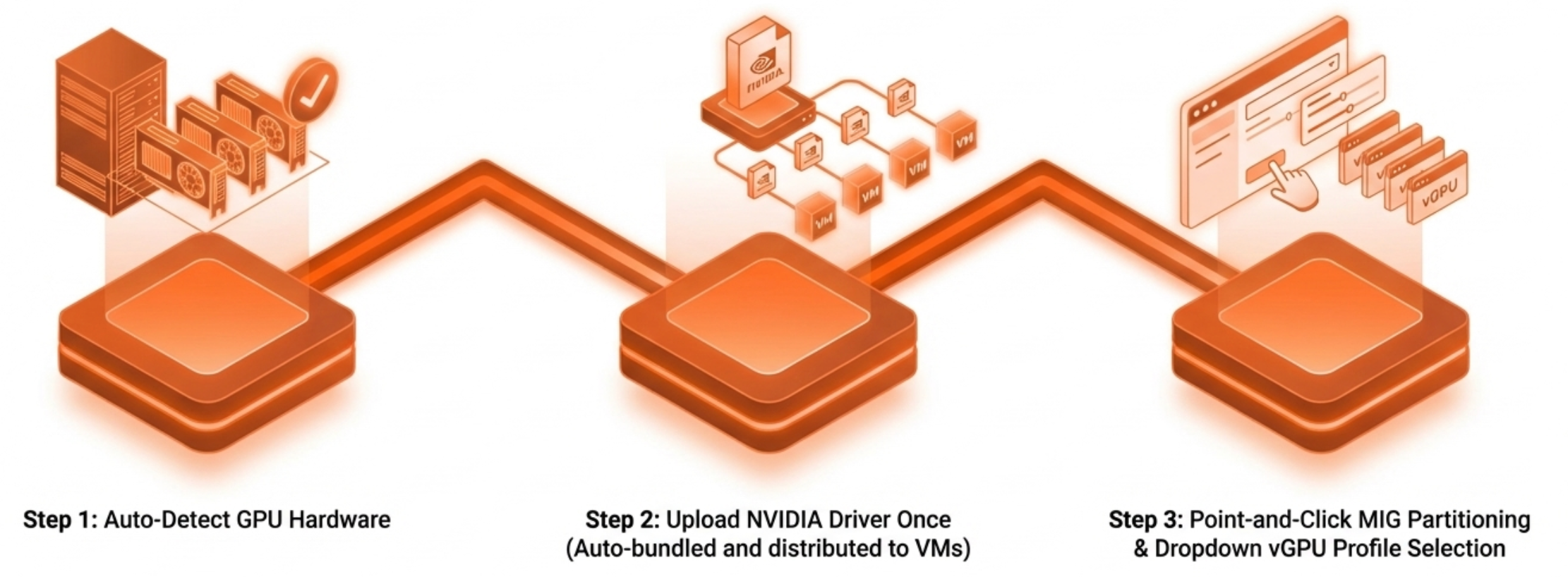
No single component here is new. Vector databases, embedding models, and LLM inference are all well-understood technologies. The significance is that NVIDIA has assembled them into a repeatable recipe that runs inside a virtual workstation. That is the same kind of environment IT teams already know how to provision, snapshot, replicate, and recover. That last point matters more than most AI conversations acknowledge.

Key Terms
Retrieval-Augmented Generation (RAG)

An architecture that connects a large language model to external data sources through a vector database, allowing the LLM to answer questions using organizational data it was not trained on.

NVIDIA AI Virtual Workstation (AI vWS) Toolkit

A collection of guided deployment workflows from NVIDIA that walk teams through standing up AI applications inside GPU-accelerated virtual machines, including RAG, agentic RAG, fine-tuning, and video search.

NVIDIA vGPU

A software layer that allows multiple virtual machines to share a single physical GPU, with each VM receiving dedicated memory and a full NVIDIA driver stack. Requires a separate software license from an NVIDIA-authorized partner.

MIG (Multi-Instance GPU)

Hardware-level GPU partitioning that divides a single GPU into isolated instances with dedicated compute engines, memory, and bandwidth. Isolation is enforced in silicon, not software.

NVIDIA AI Sizing Advisor

A free, wizard-driven tool from NVIDIA that recommends GPU configurations for specific AI workloads and includes a smoke test to validate the recommendation before deployment.

FP4 (4-bit Floating Point)

A low-precision numerical format supported by fifth-generation Tensor Cores in Blackwell GPUs. Increases inference throughput by processing more operations per cycle at reduced precision.

AI Development Needs Infrastructure Discipline

The gap between a working AI prototype and a production-ready deployment is almost entirely an infrastructure problem. Data scientists build remarkable things in notebooks and local environments. Then someone needs to make it recoverable, reproducible, and manageable at the organizational level.

A RAG application running on a developer’s physical workstation has no backup strategy. It has no replication path. If the hardware fails, the environment gets rebuilt manually. If a second team needs the same configuration, someone walks through the entire installation process again.

A RAG application running inside a GPU virtual workstation inherits every infrastructure capability the platform provides. Snapshots capture the entire environment — the vector database, the model weights, the application configuration — in a single operation. Replication copies the working environment to a disaster recovery site. Cloning the VM gives a new team member the same configuration in minutes instead of days.

This is not a theoretical distinction. It is the difference between an AI initiative that lives on one person’s machine and one that operates as organizational infrastructure.

The GPU Virtual Workstation Platform Matters

NVIDIA’s toolkit assumes a functioning GPU virtual workstation exists. It does not prescribe how that workstation gets provisioned, how GPU resources get allocated, or how the driver stack gets managed. Those are platform responsibilities.

On many hypervisors, standing up a GPU virtual workstation still involves a long sequence of manual steps. Configure IOMMU at the host level. Install the NVIDIA vGPU Manager. Match driver versions across the hypervisor, the vGPU software stack, and the guest OS. Assign a vGPU profile through configuration files or CLI commands.

Some platforms have improved parts of this experience, but most still treat GPU management as a separate discipline from core infrastructure operations. MIG partitioning — splitting a high-end GPU into hardware-isolated instances so multiple team members can work at the same time — still requires nvidia-smi CLI expertise on most platforms.

VergeOS GPU Virtual Workstation Provisioning MethodVergeOS compresses that entire sequence into a workflow an IT generalist completes without specialized GPU knowledge. The platform detects GPU hardware automatically. IT teams obtain drivers directly from NVIDIA, available to customers with valid NVIDIA vGPU software licenses, and upload them once. VergeOS bundles and distributes them to VMs automatically at assignment. vGPU profiles are selected from a dropdown. MIG partitioning is point-and-click. The GPU virtual workstation that the RAG toolkit assumes is ready in minutes, not days.
The operational contrast sharpens at scale. One RAG workstation is a project. Ten RAG workstations across three engineering teams, each with isolated GPU resources, snapshot schedules, and DR replication, is an infrastructure operation. VergeOS treats it as one. GPU workloads are managed through the same interface as compute, storage, and networking. No separate management plane. No GPU specialist on call. NVIDIA introduced VergeOS as a supported vGPU platform, and both vendors stand behind the deployment when issues arise.

Right-Sizing the GPU Virtual Workstation

The RAG toolkit’s minimum GPU virtual workstation requirement of 32 GB system memory and a capable vGPU allocation aligns well with the hardware VergeOS has validated. Teams deploying multiple RAG environments from a single card have a strong option in the RTX Pro 6000 Blackwell Server Edition. MIG partitioning on that card provides up to four hardware-isolated instances, each with dedicated memory and compute, from a single GPU. Four data science teams get four isolated RAG environments from one card.

Organizations that prioritize density have another option in the RTX 4500 Blackwell Server Edition. That card fits up to 16 units in a 4U server chassis at 165 watts per card. Each card carries 32 GB of GDDR7 memory and fifth-generation Tensor Cores with FP4 inference support. That combination handles RAG workloads with headroom for larger models and document collections as the use case matures.

NVIDIA’s AI Sizing Advisor helps teams determine the right GPU virtual workstation configuration before a single VM is provisioned. It is a free, wizard-driven tool — not a chatbot — that recommends configurations based on specific workload parameters and includes a smoke test to validate the recommendation.

The Pattern, Not Just the Project

The RAG toolkit is the most visible entry point, but it represents a broader pattern. NVIDIA’s toolkit portfolio also includes Agentic RAG for multi-step retrieval workflows, a fine-tuning toolkit for model customization, and a video search and summarization toolkit arriving this year. Each follows the same model: a guided deployment path that assumes a GPU virtual workstation exists.

Organizations that build the infrastructure layer once — GPU provisioning, driver management, MIG configuration, snapshot and recovery workflows — deploy every subsequent toolkit as an application project rather than an infrastructure project. The same infrastructure that already runs engineering VDI, simulation workloads, and scientific visualization extends to AI development without a second management stack. The platform investment compounds.

VergeOS is designed for exactly this pattern. The same infrastructure that runs your first RAG workstation runs your tenth, your fine-tuning environment, and your inference endpoints. One interface. The same operational workflows. No need to expand the team that manages it.

The AI toolkit is ready. The question is whether your infrastructure is ready to run it as an organizational capability rather than a one-off experiment. Watch the GPU Virtualization Without the Complexity on-demand webinar for a live demonstration of all three GPU modes in the VergeOS interface. Download the GPU Virtualization Without the Complexity white paper for a full technical breakdown of GPU modes, driver management, and deployment scenarios.

Take a Test Drive Today — No hardware required.

Explore the full platform details on the Abstracted GPU Infrastructure page.

Frequently Asked Questions
What is the NVIDIA RAG Application Toolkit and what does it include?
The RAG Application Toolkit is a guided deployment workflow from NVIDIA that walks teams through building a retrieval-augmented generation application inside a GPU virtual workstation. It covers VM provisioning, NVIDIA AI Workbench installation, vector database configuration, LLM deployment (Llama 3 8B is the recommended starting model), and a chat interface for querying organizational data. The minimum VM requirement is 8 vCPUs, 32 GB system memory, 120 GB storage, and a vGPU allocation.
Do we need GPU specialists on staff to deploy RAG workloads on VergeOS?
No. VergeOS manages driver deployment, MIG configuration, vGPU profile assignment, and GPU monitoring through the same interface IT teams already use for compute, storage, and networking. The platform abstracts GPU complexity so an IT generalist who has never managed a GPU can deploy and operate vGPU workloads from day one.
How does running RAG in a virtual workstation compare to running it on a physical developer machine?
A RAG application in a VM inherits full infrastructure capabilities: snapshots capture the entire environment in one operation, replication copies it to a DR site, and cloning gives a new team member the identical configuration in minutes. A physical workstation has none of these. If the hardware fails, the environment is rebuilt manually. If a second team needs the same configuration, someone repeats the entire installation process.
Which NVIDIA GPUs are validated for RAG workloads on VergeOS?
VergeOS 26.1.3 has validated vGPU operation on the A100, A30, A40, and L40 series data center GPUs. MIG vGPU functionality has been validated on the RTX Pro 6000 Blackwell Server Edition, which supports up to four hardware-isolated instances from a single card. The RTX 4500 Blackwell Server Edition provides a density option at up to 16 cards per 4U chassis. NVIDIA vGPU software licenses are required and are available through NVIDIA-authorized partners.
Can multiple teams share a single GPU for separate RAG environments?
Yes. MIG partitioning on the RTX Pro 6000 Blackwell Server Edition divides a single GPU into up to four hardware-isolated instances, each with dedicated compute engines, memory, and bandwidth. Each instance operates as an independent GPU from the application’s perspective. Four teams get four isolated RAG environments from one card with no contention between them.
What other AI toolkits run on this same infrastructure?
NVIDIA’s AI vWS toolkit portfolio includes Agentic RAG for multi-step retrieval workflows, a fine-tuning toolkit for model customization, a PDF-to-podcast converter, and a video search and summarization toolkit. Each follows the same deployment model: a guided path that assumes a GPU virtual workstation exists. Organizations that build the infrastructure layer once deploy every subsequent toolkit as an application project.
What does NVIDIA’s supported platform designation mean for support escalation?
NVIDIA introduced VergeOS as a supported vGPU platform. That designation means the configuration has been tested against NVIDIA’s technical requirements. When GPU issues arise in production, both NVIDIA and VergeIO engineering teams collaborate on resolution. No finger-pointing between vendors. No gaps in support coverage.

Filed Under: AI Tagged With: AI, Enterprise AI, GPU, NVIDIA - VergeOS AI Workstation Campaign, vGPU

August 11, 2025 by George Crump

In his recent blog, “Edge AI and IoT: AI’s Hidden Infrastructure Problem”, Keith Townsend (@CTOAdvisor) explains why edge AI fails. The low success rate is not due to the models themselves. It is due to the fragmented layers of firmware, drivers, and operating environments that underlie them. As Townsend points out, this infrastructure stack creates complexity, spread across diverse hardware at multiple sites. It leads to an operational environment where drift is inevitable, upgrades are inconsistent, and performance is unpredictable. Without a disciplined approach to managing these stacks, edge AI pilot projects rarely transition into stable, scalable production deployments.

VergeIQ, Private AI for Core Data Centers and the Edge

That’s the exact problem VergeIQ is built to solve. VergeIQ is a private, enterprise-class service that provides a complete AI pipeline. It delivers everything from data ingestion and preparation to model training, inference, and lifecycle management.

VergeIQ is embedded directly into VergeOS. It benefits from an infrastructure platform that integrates virtualization, storage, networking, and now AI into a single, cohesive operating environment. It eliminates the multiple, disconnected layers that create drift and operational friction. This unified design allows AI workloads to operate in the same secure, version-controlled environment as other critical enterprise applications.

Edge AI Requires Centralized, Integrated Infrastructure

In VergeOS, AI is a service, like file services: you simply turn it on. There’s no need to provision VMs, deploy containers, or manage separate orchestration layers.

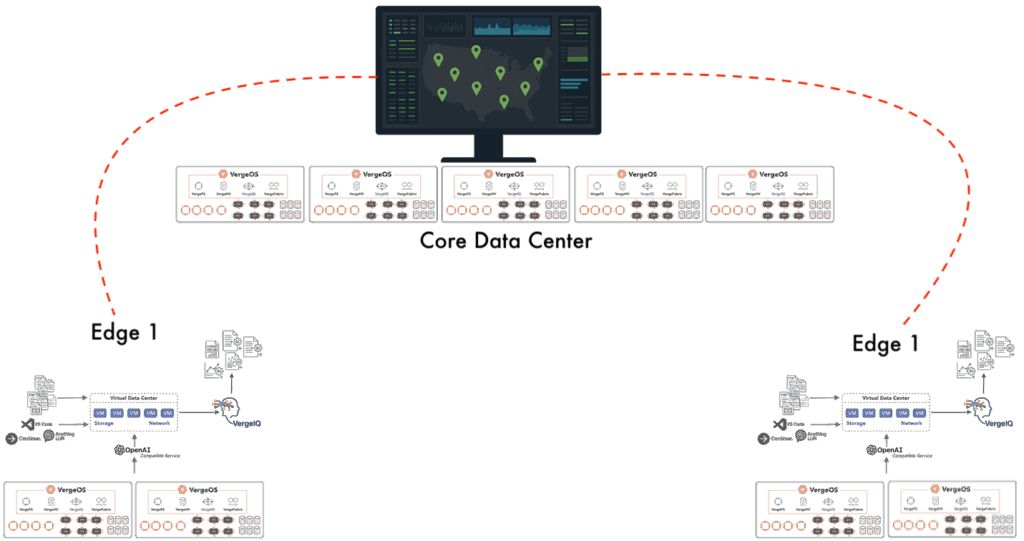
Because AI capabilities are native to VergeOS, IT can provision Virtual Data Centers (VDCs) as siloed AI environments. Each VDC operates with its own isolated compute, storage, and networking resources. The AI “service” can be assigned to whichever VDCs need it. VDCs enable predictable AI performance and security without interfering with other workloads.

Lack of single point of management is one reason why edge AI fails

At the recent Future of Memory and Storage (formerly Flash Memory Summit) event, the VergeOS architecture enabled us to set up three separate AI environments in under an hour. This install time included physical setup, power-on, and connectivity verification. These environments ran as private, self-contained edge AI deployments, without relying on the show’s network. The result is an operational model where AI deployments are as fast to launch as they are secure and repeatable.

Real-Time Inventory and Observability

One of the reasons edge AI fails is that IT struggles to maintain accurate visibility into what is running where. Unknown infrastructure stacks are unmanageable, and without complete telemetry, infrastructure teams are blind to drift until it causes failures. VergeOS addresses this problem with ioMetrics. It captures real-time data about hardware configurations, firmware and driver versions, and operating system builds. This comprehensive view enables the immediate detection of deviations, ensuring that every edge environment remains in a known, validated state.

For organizations managing dozens—or even hundreds—of remote AI deployments, VergeOS’s Sites Dashboard extends that visibility into operational control. Sites Dashboard provides a single, centralized interface for monitoring and managing all VergeOS-powered edge locations in real-time. Platform teams can apply updates, adjust configurations, enforce security policies, and spin up or tear down environments across the entire deployment footprint without needing to send personnel on-site.

Edge AI Requires Secure, Unified Deployment

Security is another reason why edge AI fails. At the edge, physical access to devices and diverse deployment locations create an expanded attack surface. VergeIQ enforces secure boot processes, validates firmware integrity, and uses signed binaries for all components in the infrastructure stack. Each VDC is treated as an immutable artifact that has been validated in staging before being rolled out to production. If an update introduces instability, built-in rollback capabilities allow teams to revert to a known good state with minimal disruption. Because VergeOS integrates AI, it eliminates the need for separate orchestration layers or container clusters. The result is faster time-to-value and a reduced operational burden for platform teams.

Edge AI Requires Vendor-Neutral Acceleration

A common trade-off in edge AI is the choice between predictability and portability. Vendor-integrated stacks, such as those tied to a specific GPU vendor, can simplify lifecycle management. However, they introduce long-term lock-in, creating another reason why edge AI fails. VergeIQ supports heterogeneous accelerators, including NVIDIA, AMD, and other specialized processors—without compromising the ability to manage them consistently. Resource orchestration, clustering, and pooling are handled by VergeOS, allowing AI workloads to run optimally across almost any hardware mix. VergeOS flexibility enables organizations to design hardware strategies that align with business needs, rather than adhering to the vendor’s roadmap.

Abstraction Without Losing Control

Hardware standardization is not always possible in edge environments. The edge must adapt to local constraints, legacy equipment, or specific workload requirements. VergeIQ provides a uniform abstraction layer over diverse hardware, ensuring that AI behaves predictably regardless of the underlying platform. This is not an abstraction for its own sake. It is grounded in a lifecycle-managed infrastructure stack that is versioned, tested, and enforced across the entire deployment footprint. By controlling the infrastructure stack while abstracting its differences, VergeIQ enables both operational consistency and hardware flexibility. StorageSwiss explores the value of this kind of integrated approach to infrastructure in its article, “Why Hyperconverged Infrastructure Needs More Than Just Compute and Storage.”

Why VergeIQ Delivers Where Others Struggle

VergeIQ embodies the principle that infrastructure discipline must come before orchestration. By unifying AI workloads with the same Infrastructure Platform that runs enterprise applications, IT:

  • Standardizes and collapses the infrastructure stack
  • Maintains real-time observability
  • Secures the entire lifecycle
  • Enables portable acceleration strategies

These outcomes transform edge AI from a fragile, site-by-site experiment into a predictable, centrally managed platform that can scale without operational chaos.


See VergeIQ in action.
Join our webinar, “Introducing VergeIQ – Enterprise AI Infrastructure”, to learn how you can simplify, secure, and scale your AI deployments from edge to core.
Register here.

Filed Under: AI Tagged With: AI, Artificial Intelligence, Edge

June 27, 2025 by George Crump

the infrastructure problem

VMware’s pricing changes, cloud cost overruns, or the AI skills shortage are symptoms of the infrastructure problem: legacy environments that demand new layers of complexity with every new initiative. Each shift in strategy—whether it’s migrating to the cloud, deploying AI workloads, or navigating vendor transitions—exposes just how fragile and fragmented traditional architectures have become. IT teams are forced to bolt on new platforms, hire niche expertise, or overprovision resources just to keep up. The result isn’t innovation—it’s operational drag. It’s time to rethink infrastructure from the ground up.

Watch our on-demand industry briefing with ESG to learn the impact of these challenges and how to solve them

According to recent (May 2025) ESG research titled “Private AI, Virtualization, and Cloud: Transforming the Future of Infrastructure Modernization,” a survey of 380 mid-sized to large data centers, organizations everywhere are scrambling to address these top challenges:

  1. VMware’s acquisition by Broadcom has created uncertainty for the 80% of enterprises relying on their virtualization platform.
  2. Simultaneously, 75% of organizations are rethinking their cloud strategies as costs spiral beyond projections.
  3. And 53% of organizations plan to deploy private, on-premises AI infrastructure within the next two years, but 70% struggle to find qualified staff to manage increasingly complex infrastructure environments.

IT leaders are approaching these as separate crises requiring individual solutions. But what if there’s a single root cause driving all these problems?

The Symptoms of the Infrastructure Problem

the infrastructure problem

The evidence of the infrastructure problem is everywhere:

  • VMware’s disruption has left organizations hunting for hypervisor alternatives, only to discover that most options require new skill sets and architectural approaches.
  • Cloud repatriation is accelerating as the economics of long-term workloads in public cloud environments prove unsustainable—what promised operational flexibility has become a financial burden.
  • AI adoption is stalling because implementing on-premises AI is a must-have to mine proprietary data, but vendors are suggesting it requires building separate infrastructure stacks with specialized hardware, networking, and storage.
  • Talent acquisition has become nearly impossible as the complexity of managing modern infrastructure outpaces the available skill pool.

These issues dominate IT planning discussions, budget meetings, and strategic reviews. However, focusing on symptoms instead of causes leads to fragmented solutions that exacerbate the underlying problem.

Software is the Source of the Infrastructure Problem

The source of the infrastructure problem isn’t any single vendor, technology, or market force. It’s the acceptance of fundamentally flawed infrastructure software that forces fragmentation by design.

For over two decades, the industry has normalized building data centers by assembling disconnected components—hypervisors that require separate storage systems, networking hardware that needs additional security appliances, backup solutions that demand their own management consoles, and now AI platforms that require new and again isolated stacks.

This fragmented approach creates four compounding problems:

Hardware Vendor Lock-In: Traditional infrastructure software ties organizations to proprietary hardware ecosystems. Storage controllers costing 10X what they should, certified network switches, rigid hardware compatibility lists—all designed to extract maximum revenue rather than deliver maximum value.

Operational Silos: Every new initiative spawns its own infrastructure requirements. Virtualization teams, storage specialists, network engineers, backup administrators, and now AI infrastructure experts—each managing separate tools, consoles, and technologies that barely communicate with each other.

The Add-On Trap: Poor infrastructure software creates gaps that must be filled with additional vendor solutions. What starts as “adding backup capabilities” becomes an ecosystem of interconnected products, each requiring its own licensing, hardware, support contracts, and specialized expertise.

the infrastructure problem

Complexity Explosion: The staffing crisis isn’t just about finding qualified people—it’s about the exponential complexity created when organizations need specialists for every infrastructure domain, plus the integration expertise to make them work together.

How to Solve the Infrastructure Problem

Solving the infrastructure problem becomes possible when infrastructure software is designed correctly from the ground up. VergeOS demonstrates this approach by integrating virtualization, storage, networking, and AI capabilities into a single codebase, creating a unified platform.

Instead of assembling separate components, organizations get unified functionality that eliminates vendor lock-in, operational silos, add-on complexity, and excessive staffing requirements while leveraging existing hardware. A single platform addresses what organizations currently treat as separate problems: VMware alternatives, cloud cost optimization, AI infrastructure deployment, and skills shortage mitigation.

This isn’t theoretical—it’s happening today. Read our case studies to learn how organizations using VergeOS report reducing infrastructure costs, in some cases, by over 90%, eliminating multiple vendor relationships, and enabling single administrators to manage entire infrastructure stacks that previously required specialized teams.

The Path Forward

The infrastructure challenges consuming your planning cycles aren’t inevitable. They’re the predictable result of accepting software that forces fragmentation rather than enabling consolidation.

VMware disruption, cloud cost overruns, AI deployment complexity, and skills shortages are symptoms of a deeper architectural problem. Addressing symptoms individually—such as finding new hypervisors, optimizing cloud spend, building AI infrastructure, and hiring more specialists—treats the effects while leaving the cause untouched.

The solution requires recognizing that modern infrastructure demands modern architecture. Software that natively integrates all infrastructure functions. Platforms that work with commodity hardware rather than forcing proprietary purchases. Systems that simplify rather than complicate operations.

Organizations that recognize this shift now will gain significant advantages over those that focus on treating symptoms instead of addressing the underlying problem.

To learn more, download our white paper, “Four Forces Accelerating Infrastructure Modernization.”

Filed Under: Virtualization Tagged With: AI, Alternative, Cloud, IT infrastructure, VMware

June 11, 2025 by George Crump

Eliminating enterprise AI deployment barriers has become critical, as 70% of enterprise AI projects fail due to infrastructure complexity. However, organizations cannot afford to delay private AI adoption in today’s competitive landscape. As we detailed in our recent Blocks and Files analysis, traditional enterprise AI solutions create significant barriers that prevent broader adoption. These roadblocks—from infrastructure complexity to hardware lock-in—have limited private AI deployment to the largest corporations, which have the resources and expertise to overcome them.

VergeOS, with integrated VergeIQ, directly addresses every identified barrier through a fundamentally different approach: treating AI as a native infrastructure resource rather than a separate technology stack. By integrating generative AI capabilities directly into the unified data center operating system, VergeOS successfully eliminates the enterprise AI deployment barriers that have historically prevented mid-sized enterprises from deploying private AI.

Eliminate Enterprise AI Complexity Through True Integration

Traditional AI deployments require managing multiple software layers—such as containers, Kubernetes, orchestration platforms, and specialized AI frameworks—each adding complexity and requiring dedicated expertise. Unlike bolt-on AI solutions that create additional management overhead, VergeIQ operates as a native VergeOS service, eliminating the operational complexity of managing separate AI infrastructure.

The result is dramatic simplification: instead of requiring specialized AI infrastructure expertise, organizations can deploy and manage enterprise AI using existing IT skills and established operational procedures. This approach represents a fundamental advancement in eliminating enterprise AI deployment barriers through architectural convergence.

Built-In Capabilities Replace Separate Installations

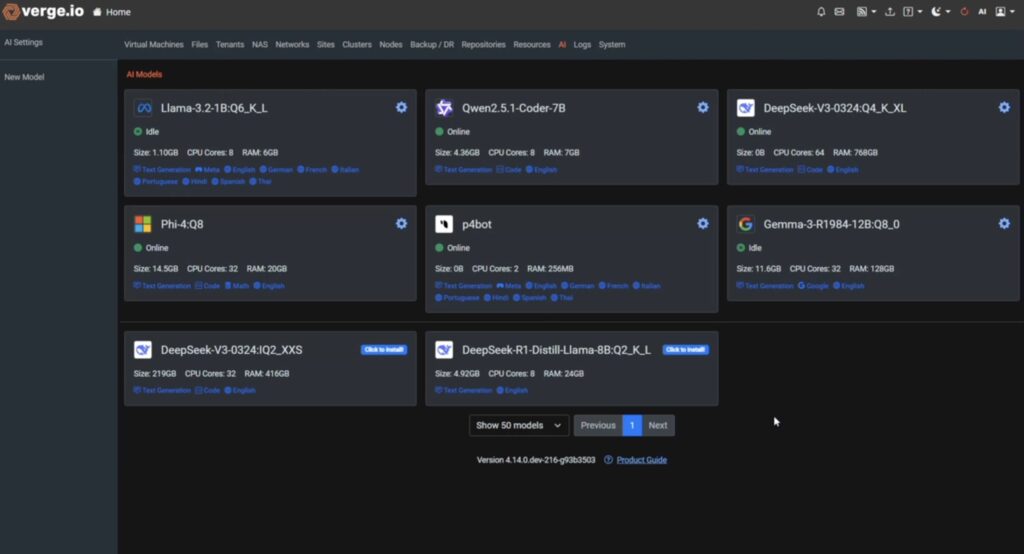
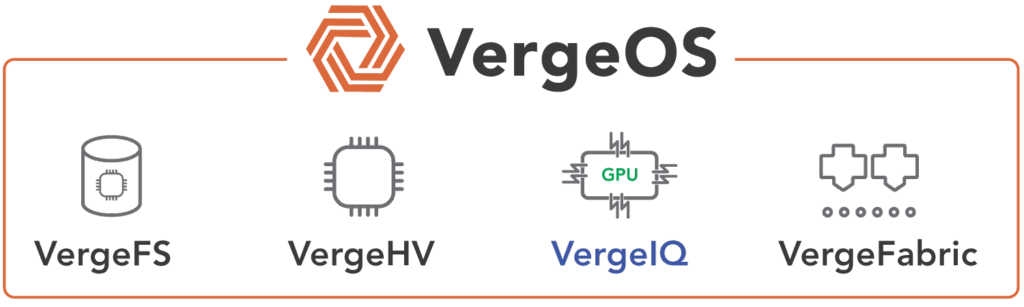
Once VergeOS is installed, VergeIQ is immediately available as a native resource alongside virtualization (VergeHV), storage (VergeFS), and networking (VergeFabric). Organizations can deploy and utilize popular large language models like LLaMa, Qwen, Phi, and Gemma within minutes, without requiring additional software installations or complex configurations. This integration means IT teams manage AI workloads using the same unified interface they use for all infrastructure functions.

Eliminating Enterprise AI Deployment Barriers
Install from a Curated List of Models

VergeIQ includes comprehensive generative AI capabilities as part of the base VergeOS installation. Organizations don’t need to purchase, install, or integrate separate AI platforms, eliminating both the software licensing costs and integration complexity that plague traditional approaches.

Immediate and Practical Enterprise AI Value

Day one capabilities include document analysis of PDFs, spreadsheets, and text files; secure auditing and optimization of proprietary source code; automated infrastructure script generation; tailored enterprise content creation; and comprehensive infrastructure intelligence. All capabilities are available immediately upon deployment of VergeOS.

Eliminating Enterprise AI Deployment Barriers

Additionally, VergeIQ enables experimentation without token-based pricing penalties. Organizations can set up secure, isolated virtual labs for testing and validation without requiring dedicated GPU resources, accelerating innovation while reducing operational risk.

This built-in approach ensures seamless compatibility and performance optimization, as VergeIQ is explicitly designed for the VergeOS environment rather than being bolted onto existing infrastructure.

Single Storage System Handles All Enterprise AI and Business Workloads

Traditional AI deployments create storage complexity by requiring separate, specialized storage systems for different workload types—high-performance storage for training, medium-performance for inference, and archival storage for long-term data retention. This specialization creates significant infrastructure duplication and operational overhead.

Eliminating Enterprise AI Deployment Barriers

VergeFS, VergeOS’s integrated software-defined storage, provides unified storage that handles all AI workload requirements within a single system. The intelligent tiering capabilities automatically optimize data placement based on access patterns and performance requirements, eliminating the need for separate storage infrastructures.

Organizations can leverage their existing storage investments while accommodating AI requirements, dramatically reducing both capital expenses and operational complexity. VergeFS scales seamlessly from initial AI pilots to full production deployments without requiring architectural changes or additional storage systems.

Vendor-Neutral Hardware Approach Prevents Lock-In

VergeIQ provides complete vendor neutrality for compute hardware, supporting GPUs from multiple vendors or functioning on CPU-based systems. This flexibility ensures organizations aren’t locked into specific hardware vendors or dependent on GPU availability for AI functionality.

The platform features intelligent GPU orchestration that maximizes hardware efficiency across all vendors, while CPU-based AI capabilities ensure continued operation even when GPU resources are unavailable. Organizations can start with existing hardware and add GPU acceleration as needed, or change GPU vendors without architectural disruption.

This approach protects organizations against the rapid changes in AI hardware markets, allowing them to adopt new technologies as they emerge without being constrained by their initial infrastructure choices. Vendor neutrality is essential for eliminating enterprise AI deployment barriers that create long-term technological dependencies.

Enterprise AI Security Without Complexity

VergeOS includes comprehensive security features as part of its firmware-style operating environment. These built-in capabilities include network segmentation through VergeFabric, end-to-end data encryption, secure authentication systems, comprehensive audit logging, and role-based access controls.

For AI workloads, this means sensitive enterprise data remains secure within organizational boundaries without requiring additional security appliances or complex configurations. The integrated security model ensures that AI deployments meet regulatory compliance requirements while maintaining the operational simplicity that makes private AI practical for organizations of all sizes.

Unlike traditional approaches that require layering security solutions on top of AI platforms, VergeOS provides enterprise-grade security as a fundamental platform characteristic.

Broader IT Problem Resolution

VergeOS, combined with VergeIQ, addresses multiple critical IT challenges simultaneously. For organizations evaluating VMware alternatives due to Broadcom’s pricing and licensing changes, VergeOS offers more than an alternative; it modernizes the entire infrastructure without requiring hardware replacement.

The same installation that replaces VMware infrastructure provides comprehensive generative AI capabilities, storage modernization through VergeFS, and advanced networking through VergeFabric. This unified approach maximizes organizational value while minimizing the complexity of managing multiple infrastructure solutions. Log in to our case studies library to learn how the transition has gone for our customers.

Eliminating Enterprise AI Deployment Barriers

Alternatively, organizations can deploy VergeOS alongside existing VMware infrastructure to immediately gain AI capabilities, then transition away from VMware when timing aligns with their broader infrastructure strategy. This unified approach is central to eliminating enterprise AI deployment barriers while addressing broader requirements for infrastructure modernization.

Implementation Path for Enterprise AI Success

VergeOS with VergeIQ removes the traditional barriers that have prevented broader enterprise AI adoption. By treating AI as a native infrastructure resource, organizations gain immediate access to powerful generative AI capabilities without the complexity, cost, and operational overhead of traditional approaches.

The platform’s vendor-neutral approach, integrated security, unified storage, and immediate value delivery create a practical path for organizations to deploy private AI that meets enterprise requirements while remaining operationally manageable.

Organizations can start with pilot deployments using existing hardware, validate business value, and then scale confidently in their architectural choices, eliminating the typical enterprise AI risk of significant upfront investments with uncertain outcomes.

For organizations seeking to leverage the transformational potential of private AI without the traditional deployment barriers, VergeOS with VergeIQ provides a comprehensive solution that makes enterprise AI practical, secure, and immediately valuable.

See VergeIQ in Action: Live Demonstration Tomorrow

Ready to see how VergeOS with VergeIQ succeeds in eliminating enterprise AI deployment barriers in real-time? Join us tomorrow, Thursday, June 12th at 1:00 PM ET, for our world-premier VergeIQ webinar and demonstration.

Watch our product experts showcase how VergeIQ delivers enterprise-ready AI deployments in minutes, not months. You’ll see live demonstrations of curated Large Language Models, such as LLaMa, Falcon, and DeepSeek, running with near-bare-metal performance, GPU pooling and clustering capabilities, and disconnected, sovereign AI solutions.

This comprehensive demonstration will show how VergeIQ transforms private AI from a complex, resource-intensive challenge into a simple, immediate infrastructure capability.

Register now for tomorrow’s live demonstration and discover how VergeOS with VergeIQ can deliver immediate AI value within your existing infrastructure strategy.

Filed Under: AI Tagged With: AI, Enterprise AI

June 5, 2025 by George Crump

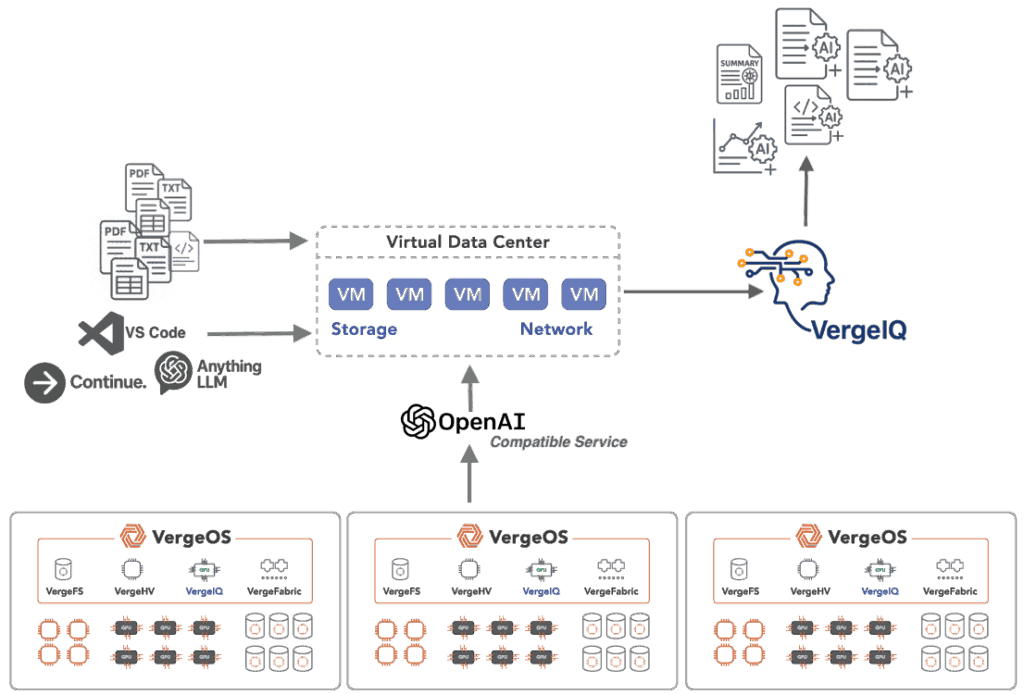
Using existing frameworks that enable the creation and use of AI agents—that’s the core benefit of VergeIQ’s OpenAI-compatible service. With this capability, VergeIQ, makes enterprise-grade generative AI secure, manageable, and easily accessible—not just for developers, but for anyone who uses familiar, off-the-shelf AI software tools such as VS Code, Continue, and Anything LLM.

Fully integrated within VergeOS—the comprehensive data center operating system and leading VMware alternative—VergeIQ delivers immediate, seamless access to powerful generative AI capabilities without additional setup. Once VergeOS is installed, VergeIQ is ready to go. Enterprises can quickly deploy secure, locally hosted large language models (LLMs), allocate GPU resources dynamically, and interact with sensitive internal data entirely within their own data centers. With VergeOS, AI is on-premises, private, and secure.

VergeIQ’s OpenAI-compatible service Enables Familiar Tools

By providing an OpenAI-compatible router or service, VergeIQ removes the typical hurdles to private AI adoption. Users can seamlessly migrate their workflows to VergeIQ. No new tools, retraining, or significant code changes are needed—simply point your existing applications to VergeIQ’s internal API endpoint and begin working.

For business analysts, content creators, support specialists, and IT teams, this means quickly integrating powerful generative AI into everyday workflows without any steep learning curves.

Developers already familiar with OpenAI’s libraries and documentation can start building applications on VergeIQ without having to learn a new interface or rewrite their code. The only change required is pointing applications to a new, internal API endpoint.

VergeIQ’s OpenAI-compatible service

If you don’t use any of these tools, then don’t worry, VergeOS with VergeIQ includes everything you need to leverage AI to understand your data and create new content.

Complete On-Premises Security and Control

VergeIQ’s OpenAI-compatible service ensures your sensitive data never leaves your environment. Unlike cloud-based AI services that transmit data externally, VergeIQ operates entirely within your premises. This complete on-premises deployment capability allows enterprises to run fully disconnected—no internet or cloud connectivity required—ensuring absolute control, full regulatory compliance, and secure management of confidential data.

On-premises operations not only enhance privacy but also dramatically reduce latency, providing real-time responses and faster insights.

Behind-the-Scenes Intelligence, Effortless Use

Underneath the familiar OpenAI-compatible interface, VergeOS intelligently manages all AI operations, including GPU orchestration, automatic model loading, resource allocation, and infrastructure optimization. Administrators can rely on VergeOS to dynamically scale resources, minimize manual intervention, and maximize performance without the complexities typically associated with on-premises AI deployments.

The result is enterprise-grade AI that’s easy to manage for IT teams, providing cloud-like simplicity with the full security and control of local infrastructure.

VergeIQ’s OpenAI-Compatible Service Enables Predictable Costs and Unlimited Usage

Unlike public cloud AI models that impose ongoing per-token or subscription fees, VergeIQ delivers predictable, flat-rate costs as part of VergeOS. Organizations aren’t penalized as their AI adoption grows. Enterprises can scale their AI use internally without escalating expenses, ensuring sustainable growth, cost-effective operations, and predictable budgeting.

Local AI Infrastructure with Cloud Convenience

VergeIQ’s OpenAI-compatible service offers a best-of-both-worlds approach, combining the security and privacy of fully private, on-premises infrastructure with the simplicity and familiarity of cloud-based AI interfaces. VergeOS provides enterprises a trusted, secure, fully controlled AI environment that’s immediately accessible and easy to use.

With VergeIQ, organizations gain rapid, secure AI capabilities without sacrificing convenience, compatibility, or performance.

Examples of Tools Compatible with VergeIQ’s OpenAI-Compatible Service

CategoryToolDescription
Desktop ApplicationsLM StudioLocal AI model runner with OpenAI-compatible API.
OllamaCLI tool for local model deployment with built-in API server.
GPT4AllDesktop application connecting to various local or remote backends.
JanOpen-source ChatGPT alternative with API integration.
AnythingLLMApplication for document-based chat and AI model management.
Web InterfacesOpen WebUIWeb interface for managing OpenAI-compatible API models.
ChatGPT Next WebSelf-hostable, open-source alternative to ChatGPT.
LibreChatOpen-source ChatGPT alternative supporting multiple API providers.
Chatbot UIMinimalist web-based AI interface supporting various APIs.
Development ToolsContinue.devVS Code/JetBrains extension providing AI-powered coding assistance.
CursorAI-powered code editor configurable with custom API endpoints.
AiderCommand-line coding assistant leveraging AI.
OpenAI SDKs (Python/Node.js)Official libraries compatible with VergeIQ’s API endpoint.
Mobile ApplicationsMela (iOS)Mobile chat application supporting custom API endpoints.
AI Chat (Android)Android AI chat apps configurable with custom APIs.
Browser ExtensionsChatGPT BoxBrowser extension allowing custom API endpoint configuration.
WebChatGPTExtension configurable to various API providers.
Command-Line Toolsllm (by Simon Willison)CLI tool for interacting with AI models using custom endpoints.
chatgpt-cliCLI implementations supporting interaction via custom APIs.

Beyond AI: Infrastructure Observability with ioMetrics

The openness of VergeOS extends beyond its AI capabilities. VergeOS includes ioMetrics, a powerful observability and monitoring solution built directly into the platform. ioMetrics enables IT teams to collect real-time data on infrastructure performance, usage patterns, resource allocation, and more.

With ioMetrics, administrators can:

  • Monitor Infrastructure Performance: Track the performance and utilization of CPUs, GPUs, memory, storage, and networking resources within your data center.
  • Analyze Resource Trends: Identify trends and usage patterns to optimize resource allocation and predict future infrastructure needs.
  • Proactively Address Issues: Detect potential bottlenecks or performance issues before they impact users, reducing downtime and maintaining high availability.
  • Leverage Open Standards: Integrate seamlessly with industry-standard observability tools like Grafana, Prometheus, and other monitoring dashboards.

By combining ioMetrics with VergeIQ’s AI capabilities, organizations can take infrastructure management to another level—using AI-driven analytics and actionable insights to improve decision-making, operational efficiency, and service reliability.

Filed Under: AI Tagged With: AI, VergeIQ

855-855-8300

Get Started

  • Versions
  • Request Tour

VergeIO For

  • VMware Alternative
  • SAN Replacement
  • Solving Infrastructure Modernization Challenges
  • Artificial Intelligence
  • Hyperconverged
  • Server Room
  • Secure Research Computing

Product

  • Benefits
  • Documents
  • Architecture Overview
  • Use Cases
  • Videos

Company

  • About VergeIO
  • Blog
  • Technical Documentation
  • Legal

© 2026 VergeIO. All Rights Reserved.