Using infrastructure to prepare for ransomware is a different posture than the one most data centers run today. The common model assumes the team will perform perfectly under pressure, at 3 a.m., with executives on the phone and a ransom clock running. The future asks for something steadier. It asks for ransomware-ready infrastructure, built in advance to both defend against an attack and recover from one, rather than the familiar scramble that starts only after the damage is done.
Key Takeaways
- Preparation beats reaction. Infrastructure built to contain and recover from ransomware turns the attack into a drill you have already run.
- VDC isolation, immutable snapshots, ioGuardian, and off site replication stack protection on the platform instead of outside it.
- ioFortify detects the attack inside the storage layer in 10 to 15 minutes, well within the roughly six day attacker dwell window.
Today, most data centers depend almost entirely on their backup infrastructure to recover from ransomware. That dependence is the weak point. Three years ago I made the case that ransomware is an infrastructure problem, not a data problem, and recovery is where that point becomes hardest to ignore. Ransomware-ready infrastructure works the other way. It is proactive. It uses virtual data centers, or VDCs, to isolate the blast radius of an attack. It provides protection on the platform instead of outsourcing recovery to a separate backup application. It stacks multiple layers of data availability and recoverability under the workloads it runs.
Key Terms
The Real Cost of Reacting to Ransomware Instead of Preparing Your Infrastructure
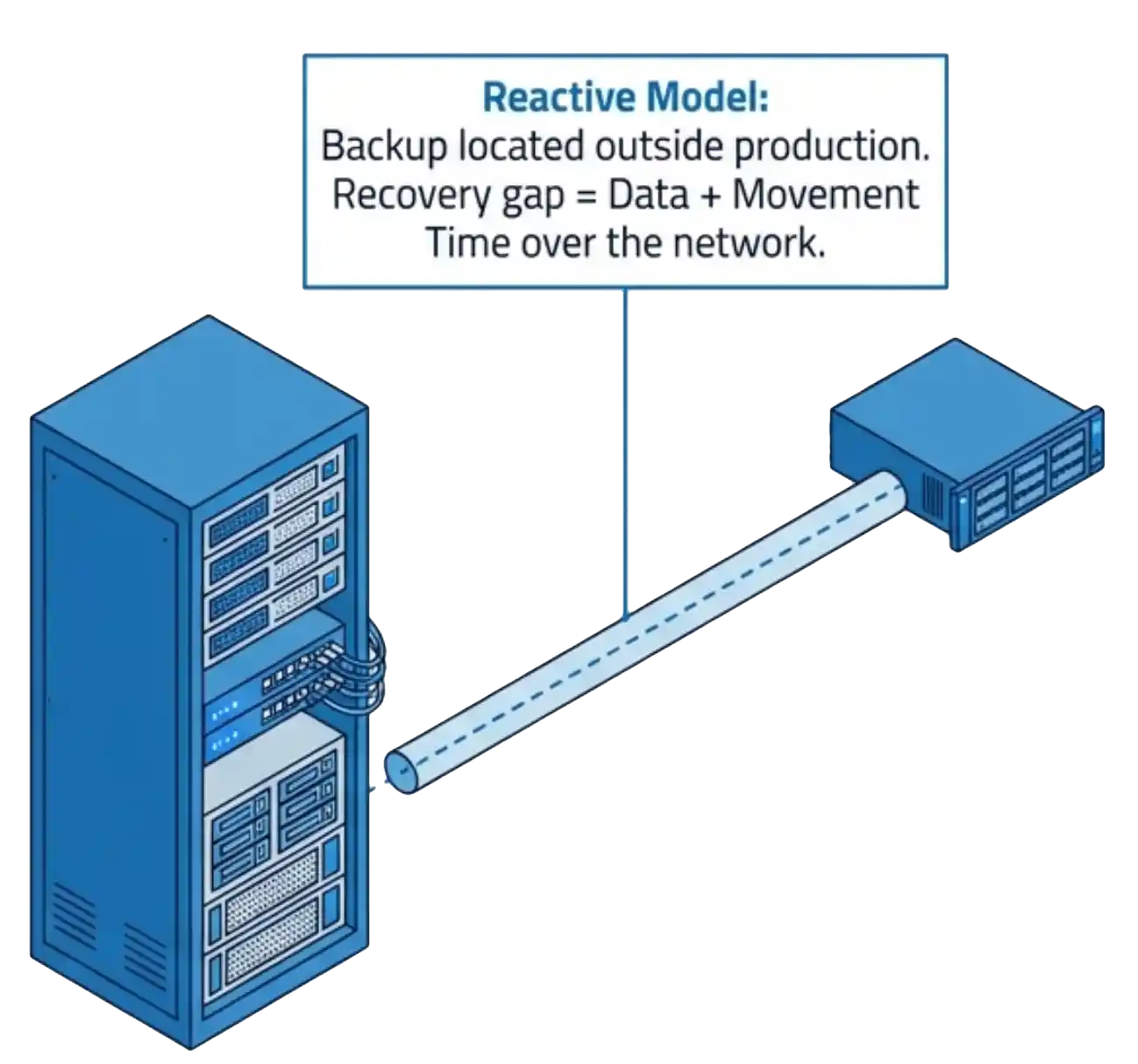
The trouble with the backup-first model is location. Most backup systems do not live inside the production infrastructure. They live outside it. The most recent backup is already hours, sometimes days, old, and by definition it has to travel back from the backup system to production before anything runs again. The cost is time.
A data loss window opens between the last good backup and the moment recovery completes. Part of that window is nothing more than the time it takes to move backup data across to the production side. Ransomware rarely takes just a few files. It takes thousands of files across multiple servers, which stretches every one of those minutes into hours. Preparation closes the gap by keeping protection and recovery on the same platform as the workloads.
Prepare Your Infrastructure to Contain Ransomware
Preparation begins with containment. In most environments the blast radius of an attack depends on firewall rules and segmentation that someone maintains by hand. That work is rarely complete, and it is almost never tested at the moment it matters.

VergeOS takes a different path. Each virtual data center is a self contained environment with its own compute, networking, storage, and access controls. Ransomware that enters one VDC stays in that VDC. The containment is the default behavior of the platform, in force today, before any alert fires. You do not assemble it during the incident. It is already there.
Two patterns show how this works in practice. A cloud service provider can build a virtual data center for each customer. One tenant hit with ransomware stays sealed inside that tenant, with no path into the others sharing the platform. The same model works inside the enterprise. A team can separate mission critical data, business critical data, and user applications into their own virtual data centers. An infection in the user application VDC finds no route into the systems that run the business.
Rehearse Ransomware Recovery Before You Need It
A plan you have never run is a guess. The teams that recover fastest are the ones that have practiced, and most infrastructure makes practice expensive or risky. Standing up a copy of production usually means new hardware, long copy windows, and a real chance of disrupting the systems you depend on.

VergeOS removes that friction. A single clone command stands up an isolated, space efficient copy of an entire VDC. The copy runs independent from production, so teams test patches, validate recovery steps, and walk the full response without touching live workloads. Honeypots and decoy targets add another rehearsal tool. They confirm that defenses fire and that recovery works before a real attacker tests them for you. Run the drill on a schedule. The first time you execute the recovery workflow should not be the day you are under attack.
The scope of that copy is what makes the drill honest. You are not testing recovery against a single VM pulled out of context. You are testing it against a faithful, isolated clone of the entire data center, with every workload, network, and dependency in place. That fidelity gives the team a true feel for how an attack moves and how recovery plays out, before either one happens for real.
Set the Right Snapshots to Immutable
Recovery depends on a clean copy the attacker cannot reach. VergeOS captures that copy with ioClone, which pairs a blockchain inspired file system inside VergeFS with global inline deduplication. The result is an instant, independent, space efficient snapshot, taken at the level the situation calls for. VergeOS snapshots the entire instance, a single virtual data center, or an individual VM. A coarser snapshot drills into its contents, so an instance level snapshot can extract one VDC or one VM when recovery needs a single piece.

Every snapshot is read only by default, so nothing in the running environment alters it. From there you set the snapshots that matter for recovery to immutable. Ransomware cannot encrypt or delete an immutable snapshot. VergeOS takes snapshots as often as every 10 to 15 minutes, retains them as long as you need, and places effectively no limit on their count. That cadence compresses the recovery point from hours down to minutes.
The discipline that matters is retention. Set retention times on your immutable snapshots so a portion of them survives an attacker who gains system access and starts deleting snapshots. An immutable snapshot under retention holds until its window expires, even against someone with administrative control. That guarantee is the difference between a snapshot you hope is there and one you know is there.
Add Layers Below the Snapshot
Snapshots defend against encryption. Hardware fails for its own reasons, often at the worst time, and a ransomware event can strike during a drive or node failure. ioGuardian covers that ground. It provides near continuous data protection that keeps VMs running through multiple simultaneous drive or server failures, with a recovery point measured in minutes rather than hours.
ioGuardian also stands behind the snapshots themselves. If an attacker compromises snapshot retention, it gives you a separate recovery path that does not depend on those snapshots. It is the layer that keeps the environment available when more than one thing breaks at once.
Extend Protection Off Site
A site wide event calls for a copy somewhere else. ioReplicate delivers three click recovery of an entire VDC, including its VMs, networking, and storage, to a remote VergeOS instance. Replication runs asynchronously, adapts to WAN conditions, and moves only deduplicated data, so it stays practical across real network links. The proof is in the testing. Customers report a 100 percent DR test success rate with the VDC model, and the tests run in under an hour. Off site protection you can actually test is the layer that survives the loss of a whole location.
Reactive Versus Prepared
The difference between the two postures is not effort during the attack. It is the work the infrastructure did to prepare for ransomware before it. The table below sets the common reactive defaults against what VergeOS has standing by the time an attacker shows up.
| Dimension | Reactive default | Prepared with VergeOS |
|---|---|---|
| Blast radius | Hand maintained firewall rules, rarely tested | VDC isolation, on by default |
| Recovery practice | Rare, needs spare hardware | Clone a full VDC, rehearse with no risk |
| Recovery point | Hours between protection events | Read only snapshots every 10 to 15 minutes |
| Detection | Endpoint or log tooling, hours to flag | Storage layer signature in 10 to 15 minutes |
| Recovery method | Restore from backup, rebuild per VM | Promote a clean snapshot, no data movement |
What to Do When Ransomware Hits
Detecting Ransomware in the Storage Layer
Preparation changes the character of the response. The work runs calm and rehearsed instead of frantic and improvised. ioFortify starts the clock in your favor. The same deduplication engine that makes snapshots efficient also serves as a sensor. Encryption produces unique blocks, which defeats deduplication, and ioFortify catches that signature inside the storage layer within 10 to 15 minutes. That window sits well inside the roughly six day average dwell time attackers count on.
Encryption produces unique blocks, which breaks deduplication. That broken signature is the alarm, and it surfaces in the storage layer in minutes rather than days.
The Response Path
From the alert, the response follows a short, practiced path.
- Mount a clean snapshot that is 10 to 15 minutes old in a quarantined state.
- Scan the snapshot, then remove the payload if it is present.
- Promote the clean snapshot to primary, which mounts with no data movement, and tear down the infected copy, keeping a forensic image.
There is no restore from backup, no wait for capacity, and no per VM rebuild loop. A clean data center comes back in minutes, and the forensic copy preserves how the attack unfolded.
Using Infrastructure to Prepare for Ransomware Is a Decision You Make Now
The platform decides how an attack ends long before it starts. Isolation contains it. Drills make the response familiar. Immutable snapshots, ioGuardian, and replication hand you clean copies at every level. ioFortify shortens the gap between compromise and detection from days to minutes. Using infrastructure to prepare for ransomware is not a product you buy in a panic. You build it in, and then you rehearse it.
Two actions move you forward today. Set immutability and a retention window on the snapshots that anchor recovery. Then schedule a recovery drill this quarter and run the full workflow end to end. The goal is a day when the ransom note arrives and your data center is already back.
Schedule a Ransomware Readiness Assessment
Walk through your current recovery posture with a VergeOS expert and find where preparation closes the gap.