An AI-powered VMware alternative now runs in production, and the mechanics matter more than the headline. VergeIO built Verge CLI as three working parts that let an AI assistant operate a VergeOS environment in plain language, with the administrator setting the limits. This post walks through how the pieces fit, what happens when you issue a request, and why a single code base changes the result.
Key Takeaways
- Verge CLI ships as three components that work together: a command-line interface, an MCP server, and a set of agent skills.
- One code base and one API let the assistant act across compute, storage, networking, and data protection in a single coherent operation.
- You choose the model. Cloud assistants such as Claude Code and OpenAI Codex, or local open-weight models such as Llama, Qwen, and DeepSeek, all connect through the same open standard.
Inside the AI-Powered VMware Alternative: The Brains, the Hands, and the Know-How
Verge CLI is three parts, not one tool. Each part has a job, and together they turn a plain-language request into a real change on the platform. Think of them as the hands, the brains, and the know-how.
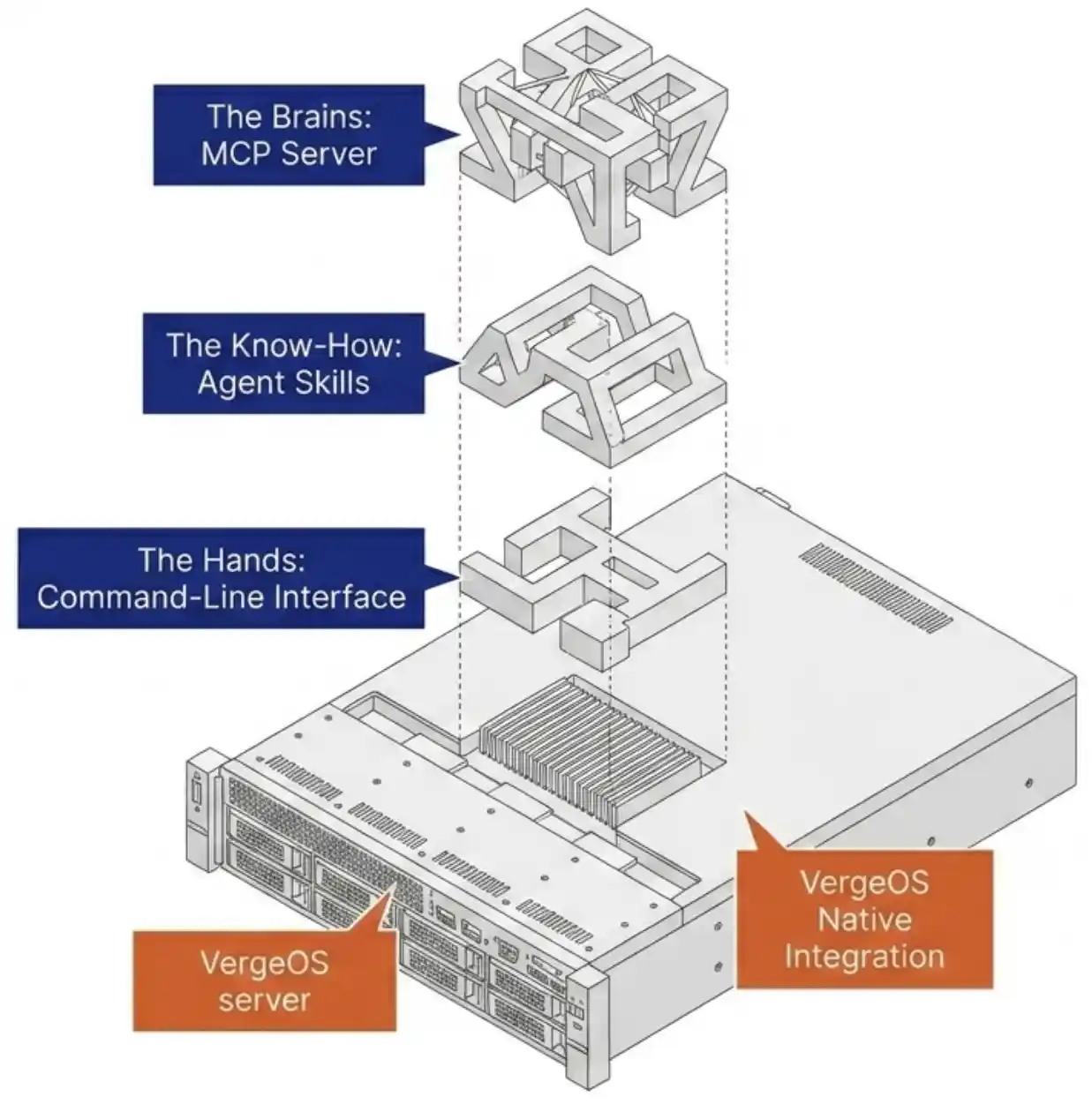
The Hands: The Command Line of the AI-Powered VMware Alternative
The Verge CLI maps to the full VergeOS API. One command set covers compute, storage, networking, and data protection. These commands are the actions the assistant takes on the platform. VergeOS has always been API-first, so the command line was a natural extension of its design. It runs commands the platform already understands rather than clicking through a graphical console.
The Brains: The MCP Server
The MCP server builds on the open Model Context Protocol. It connects an AI platform to the environment and gives the assistant a secure, scoped view of the environment and its documentation. The assistant reasons against VergeOS documentation through this server, so its conclusions track how the platform behaves rather than what a model guesses. The server also marks the boundary of what the assistant can see and touch, which keeps the AI inside the limits that an administrator sets.
The Know-How: Agent Skills in an AI-Driven VMware Alternative
The agent skills encode how VergeOS experts design networks, build environments, and run diagnostics. The assistant works like a seasoned operator instead of a generic chatbot. A request to build a secured three-tier environment carries the firewall rules between tiers that an experienced engineer would apply. The know-how is the difference between a tool that answers documentation questions and an operator that builds it correctly the first time.
One Code Base, One API: How the AI-Driven VMware Alternative Works

Here is what the architecture buys you. A request to build a virtual machine, place it on a network, carve storage, and set replication runs as one coherent action against one API. The assistant issues the work, the platform executes it, and the state stays consistent.
A layered stack works differently. The same request crosses vSphere, vSAN, NSX, and a separate backup product. Each part can half succeed, and the agent then reconciles partial state across four control planes. The single code base removes that class of error. One request, one API, one result.
MCP-based infrastructure management now spans several vendors. Nutanix, Red Hat, and Microsoft offer solutions, and community servers are available for VMware and Proxmox. VergeOS gives an AI assistant control of compute, storage, networking, and data protection through a single code base and a single API. Some vendors simulate this with a unified control plane in a management GUI. Those platforms still draw on layered and acquired components, with networking and data protection as separate licensed layers. VergeOS runs as one code base from the start, so the assistant meets one API rather than a federation of them. The architecture beneath a VMware alternative decides the result, a point made in the analysis that architecture is what separates one VMware alternative from another.
Root-Cause Diagnosis in an AI-Driven VMware Alternative
One data model spans all four domains, so the assistant traces a symptom from virtual machine to storage to network and finds the real source. A system-wide diagnostic reads real log lines, follows the dependency from the surface fault to the underlying cause, and reports where the real problem lives. The reasoning comes from VergeOS documentation through the MCP server, so the diagnosis matches how the platform runs.
Choosing the Model for Your AI-Powered VMware Alternative: Cloud or Local
If you plan to run local open-weight models, or build a full private AI deployment, the GPU choices decide the cost and the result. Schedule a meeting to take part in our GPU analysis and size the hardware before you commit.
Get Your GPU AnalysisThe integration stays the same. Only the location of the model and the data changes. Most organizations run a cloud frontier assistant such as Anthropic Claude Code or OpenAI Codex, and that path fits the majority of accounts. Teams under strict security or compliance rules run a local open-weight model, such as Llama, Qwen, or DeepSeek, through a runtime like Ollama and keep all operations and environment data on their own infrastructure. A customer can start with a cloud assistant and later move to a local model on the same platform. The open standard makes any MCP-compatible client a valid front end, so you are not locked to a single vendor’s assistant.
The Administrator Stays in Control of the AI-Driven VMware Alternative
The assistant proposes the work and runs it step by step once an administrator approves each change. The administrator decides what the assistant sees, what it runs on its own, and what waits for sign-off. The buyer and the operator remain the same person who runs the platform today. The assistant shortens the learning curve on a new platform and guides the team through advanced features they would otherwise postpone. An AI-powered VMware alternative changes the daily work and leaves ownership where it belongs. It does not replace the people who own the environment.
What an AI-Powered VMware Alternative Means for You
For IT AdministratorsAn AI-powered VMware alternative pays off most for the person who runs the environment. Verge CLI removes the busywork and shortens the learning curve, and it keeps you in control the whole time.
Skip the Learning Curve
The assistant guides you through VergeOS in plain language, so you are productive on day one rather than month three.
Operate the Whole Stack
Create VMs, build networks, carve storage, and set data protection in one conversation, without mastering four separate tools.
Stay in Control
You decide what the assistant runs on its own and what waits for your approval. It runs only inside the limits you set.
Find Root Cause Faster
The assistant reasons against VergeOS documentation and traces a fault across compute, storage, and networking, so you fix the real problem rather than the symptom.
Reclaim Your Time
Hand off routine work like VM creation, workload moves, and network changes, and spend your hours on the projects that matter.
Grow Your Value
You become the operator of an AI-assisted platform, with deeper reach and more impact.
Getting Started with the AI-Powered VMware Alternative
Four steps put the capability to work. Install Verge CLI on the VergeOS environment. Connect an MCP client, whether a cloud assistant or a local model. Verify the connection and set the limits on what the assistant may run on its own. Then operate in plain language, from building networks to deploying workloads to diagnosing faults. The same flow holds for a VMware refugee mid-migration and for an existing customer adopting deeper features. Either way, an AI-powered VMware alternative reaches production sooner.
Key Terms
The AI-Powered VMware Alternative vs. a Layered Stack
| Capability | VergeOS with Verge CLI | Layered stack (vSphere, vSAN, NSX, backup) |
|---|---|---|
| Control surface | One API across the full stack | A separate API per product |
| Cross-domain request | One coherent action | Crosses four control planes, can half succeed |
| Root-cause diagnosis | One data model traces the fault end to end | Stitched across separate tools |
| AI integration | Supported part of the product | Unsupported community add-ons for VMware and Proxmox |
| Model choice | Cloud or local through MCP | Tied to the vendor’s assistant |
Reading about a plain-language operation is one thing. Watching it build a network and trace a fault is another. VergeIO and Truth in IT run an AI agent against a live VergeOS environment on June 23, 2026, at 1:00 PM ET. The 45-minute session is a live demo and Q&A with the team that built Verge CLI.
Register for the June 23 Webinar Schedule a Technical Deep Dive

