• Skip to main content
  • Architecture
    • Overview
      Learn about VergeOS’ unique unfied architecture that integrates virtualization, storage, networking, AI, backup and DR into a single data center operating system
    • Infrastructure Wide Deduplication
      VergeOS transforms deduplication from a storage-only commodity into a native, infrastructure-wide capability that spans storage, virtualization, and networking, eliminating hidden resource taxes
    • VergeFS
      VergeFS is a distributed, high-performance global file system integrated into VergeOS, unifying storage across nodes, tiers, and workloads while eliminating the need for external SANs
    • VergeFabric
      VergeFabric is VergeOS’s integrated virtual networking layer, delivering high-speed, low-latency communication across nodes while eliminating the complexity of traditional network configurations.
    • Infrastructure Automation
      VergeOS integrates Packer, Terraform, and Ansible to deliver an end-to-end automation pipeline that eliminates infrastructure drift and enables predictable, scalable deployments.
    • VergeIQ
      Unlock secure, on-premises generative AI—natively integrated into VergeOS. With VergeIQ, your enterprise gains private AI capabilities without the complexity, cloud dependency, or token-based pricing.
  • Features
    • Virtual Data Centers
      A VergeOS Virtual Data Center (VDC) is a fully isolated, self-contained environment within a single VergeOS instance that includes its own compute, storage, networking, and management controls
    • High Availability
      VergeOS provides a unified, easy-to-manage infrastructure that ensures continuous high availability through automated failover, storage efficiency, clone-like snapshots, and simplified disaster recovery
    • ioClone
      ioClone utilizes global inline deduplication and a blockchain-inspired file system within VergeFS to create instant, independent, space-efficient, and immutable snapshots of individual VMs, volumes, or entire virtual data centers.
    • ioReplicate
      ioReplicate is a unified disaster-recovery solution that enables simple, cost-efficient DR testing and failover via three‑click recovery of entire Virtual Data Centers—including VMs, networking, and storage.
    • ioFortify
      ioFortify creates immutable, restorable VDC checkpoints and provides proactive ransomware detection with instant alerts for rapid recovery and response.
    • ioMigrate
      ioMigrate enables large-scale VMware migrations, automating the rehosting of hundreds of VMs (including networking settings) in seconds with minimal downtime by seamlessly transitioning entire VMware environments onto existing hardware stacks.
    • ioProtect
      ioProtect offers near-real-time replication of VMware VMs—including data, network, and compute configurations—to a remote disaster‑recovery site on existing hardware, slashing DR costs by over 60% while supporting seamless failover and testing in an efficient, turnkey VergeOS Infrastructure.
    • ioOptimize
      ioOptimize leverages AI and machine learning to seamlessly integrate new and old hardware and automatically migrate workloads from aging or failing servers.
    • ioGuardian
      ioGuardian is VergeIO’s built-in data protection and recovery capability, providing near-continuous backup and rapid VM recovery during multiple simultaneous drive or server failures.
  • IT Initiatives
    • VMware Alternative
      VergeOS offers seamless migration from VMware, enhancing performance and scalability by consolidating virtualization, storage, and networking into a single, efficient platform.
    • Hyperconverged Alternative
      VergeIO’s page introduces ultraconverged infrastructure (UCI) via VergeOS, which overcomes HCI limitations by supporting external storage, scaling compute and storage independently, using existing hardware, simplifying provisioning, boosting resiliency, and cutting licensing costs.
    • SAN Replacement / Storage Refresh
      VergeIO’s storage by replacing aging SAN/NAS systems within its ultraconverged infrastructure, enhancing security, scalability, and affordability.
    • Infrastructure Modernization
      Legacy infrastructure is fragmented, complex, and costly, built from disconnected components. VergeOS unifies virtualization, storage, networking, data protection, and AI into one platform, simplifying operations and reducing expenses.
    • Virtual Desktop Infrastructure (VDI)
      VergeOS for VDI delivers a faster, more affordable, and easier-to-manage alternative to traditional VDI setups—offering organizations the ability to scale securely with reduced overhead
    • Secure Research Computing
      VergeIO's Secure Research Computing solution combines speed, isolation, compliance, scalability, and resilience in a cohesive platform. It’s ideal for institutions needing segmented, compliant compute environments that are easy to deploy, manage, and recover.
    • Venues, Remote Offices, and Edge
      VergeOS delivers resiliency and centralized management across Edge, ROBO, and Venue environments. With one platform, IT can keep remote sites independent while managing them all from a single pane of glass.
  • Blog
      • GPU Infrastructure Without the ComplexityGPU infrastructure doesn't have to require GPU specialists. VergeOS delivers point-and-click MIG configuration, automated driver management, and NVIDIA joint support — so standard IT teams can run visual compute and AI development workloads on the infrastructure they already own.
      • Data Availability is Critical During the Memory SupercycleRising RAM and flash prices force organizations onto aging and refurbished hardware. Data availability determines whether those hardware failures are routine events or business-stopping emergencies. VergeOS delivers layered protection from the drive level through node-level redundancy to cross-site replication, all on the hardware you already own.
      • Will Hard Drives Save Us From the Flash and RAM Supercycle?DRAM is up 171%. Flash jumped 55–60%. Will hard drives solve the flash and memory supercycle? The short answer is no — and here's what actually does.
    • View All Posts
  • Resources
    • Become a Partner
      Get repeatable sales and a platform built to simplify your customers’ infrastructure.
    • Technology Partners
      Learn about our technology and service partners who deliver VergeOS-powered solutions for cloud, VDI, and modern IT workloads.
    • White Papers
      Explore VergeIO’s white papers for practical insights on modernizing infrastructure. Each paper is written for IT pros who value clarity, performance, and ROI.
    • In The News
      See how VergeIO is making headlines as the leading VMware alternative. Industry analysts, press, and partners highlight our impact on modern infrastructure.
    • Press Releases
      Get the latest VergeOS press releases for news on product updates, customer wins, and strategic partnerships.
    • Case Studies
      See how organizations like yours replaced VMware, cut costs, and simplified IT with VergeOS. Real results, real environments—no fluff.
    • Webinars
      Explore VergeIO’s on-demand webinars to get straight-to-the-point demos and real-world infrastructure insights.
    • Documents
      Get quick, no-nonsense overviews of VergeOS capabilities with our datasheets—covering features, benefits, and technical specs in one place.
    • Videos
      Watch VergeIO videos for fast, focused walkthroughs of VergeOS features, customer success, and VMware migration strategies.
    • Technical Documentation
      Access in-depth VergeOS technical guides, configuration details, and step-by-step instructions for IT pros.
  • How to Buy
    • Schedule a Demo
      Seeing is believing, set up a call with one of our technical architects and see VergeOS in action.
    • Versions
      Discover VergeOS’s streamlined pricing and flexible deployment options—whether you bring your own hardware, choose a certified appliance, or run it on bare metal in the cloud.
    • Test Drive – No Hardware Required
      Explore VergeOS with VergeIO’s hands-on labs and gain real-world experience in VMware migration and data center resiliency—no hardware required
  • Company
    • About VergeIO
      Learn who we are, what drives us, and why IT leaders trust VergeIO to modernize and simplify infrastructure.
    • Support
      Get fast, expert help from VergeIO’s support team—focused on keeping your infrastructure running smoothly.
    • Careers
      Join VergeIO and help reshape the future of IT infrastructure. Explore open roles and growth opportunities.
  • 855-855-8300
  • Contact
  • Search
  • 855-855-8300
  • Contact
  • Search
  • Architecture
    • Overview
    • VergeFS
    • VergeFabric
    • Infrastructure Automation
    • VergeIQ
  • Features
    • Virtual Data Centers
    • High Availability
    • ioClone
    • ioReplicate
    • ioFortify
    • ioMigrate
    • ioProtect
    • ioOptimize
    • ioGuardian
  • IT Initiatives
    • VMware Alternative
    • Hyperconverged Alternative
    • SAN Replacement / Storage Refresh
    • Infrastructure Modernization
    • Virtual Desktop Infrastructure (VDI)
    • Secure Research Computing
    • Venues, Remote Offices, and Edge
  • Blog
  • Resources
    • Become a Partner
    • Technology Partners
    • White Papers
    • In The News
    • Press Releases
    • Case Studies
    • Webinars
    • Documents
    • Videos
    • Technical Documentation
  • How to Buy
    • Schedule a Demo
    • Versions
    • Test Drive – No Hardware Required
  • Company
    • About VergeIO
    • Support
    • Careers
×
  • Architecture
    • Overview
    • VergeFS
    • VergeFabric
    • Infrastructure Automation
    • VergeIQ
  • Features
    • Virtual Data Centers
    • High Availability
    • ioClone
    • ioReplicate
    • ioFortify
    • ioMigrate
    • ioProtect
    • ioOptimize
    • ioGuardian
  • IT Initiatives
    • VMware Alternative
    • Hyperconverged Alternative
    • SAN Replacement / Storage Refresh
    • Infrastructure Modernization
    • Virtual Desktop Infrastructure (VDI)
    • Secure Research Computing
    • Venues, Remote Offices, and Edge
  • Blog
  • Resources
    • Become a Partner
    • Technology Partners
    • White Papers
    • In The News
    • Press Releases
    • Case Studies
    • Webinars
    • Documents
    • Videos
    • Technical Documentation
  • How to Buy
    • Schedule a Demo
    • Versions
    • Test Drive – No Hardware Required
  • Company
    • About VergeIO
    • Support
    • Careers
VergeOS 26.1.3 × NVIDIA vGPU 20 — Now Validated

GPU Infrastructure Without the Complexity

Your IT team already manages compute, storage, and networking in VergeOS. Now they manage GPUs the same way — from the same interface, with no specialists required.
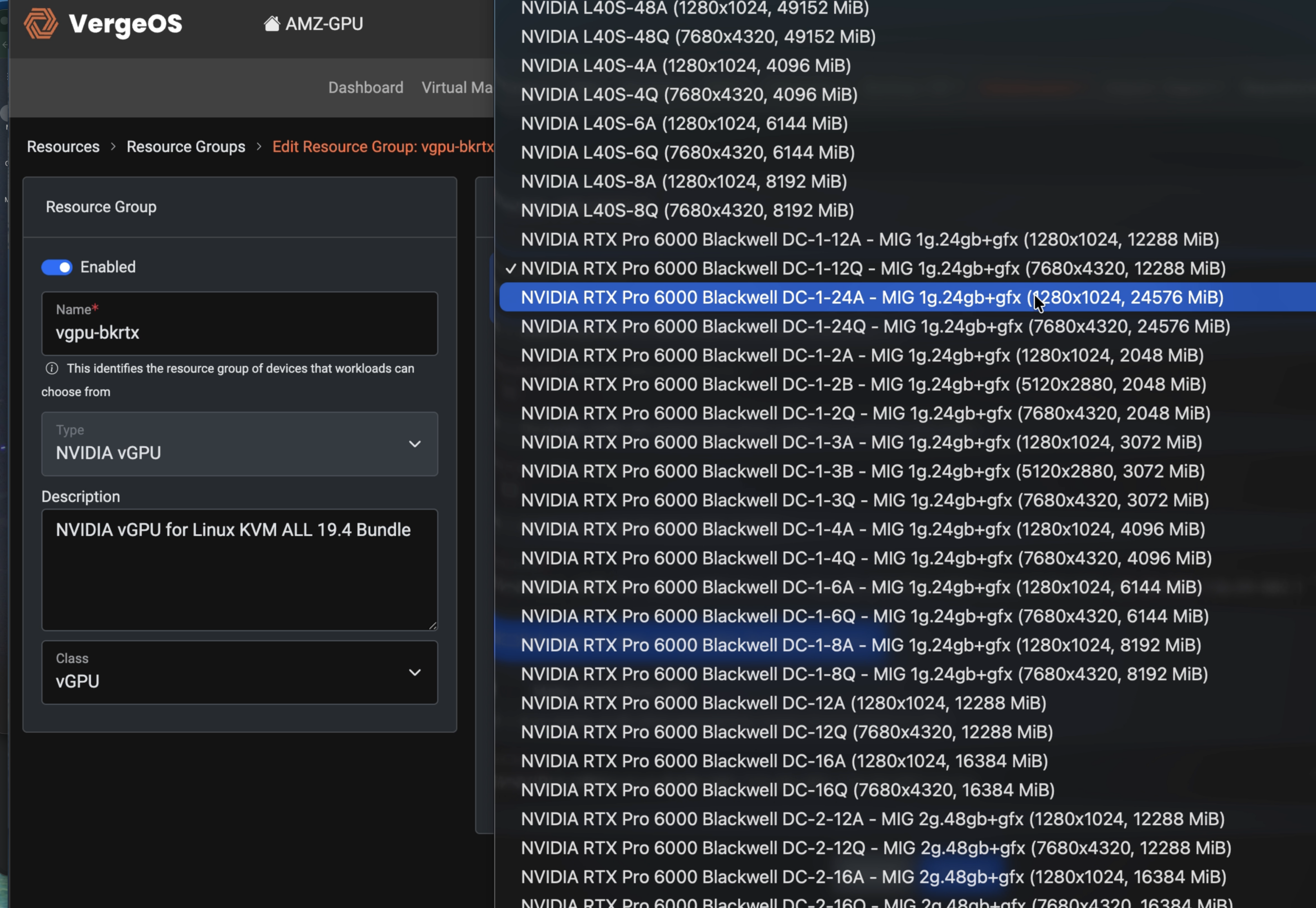

Register — April 2 Live Webinar See How It Works
GPU management in the VergeOS interface
In partnership with
NVIDIA
VergeIO
3
GPU modes in one interface
Pass-through · vGPU · MIG
0
CLI commands required
Point-and-click MIG configuration
48
VMs per GPU maximum
RTX Pro 6000 with MIG + time slicing
1×
Driver upload required
VergeOS handles bundling and deployment
The Problem

The Expertise Gap Is the Real Barrier to GPU Adoption

GPU hardware is accessible. Budget is there. The question every IT team faces is the same: who manages this?

Driver compatibility across hypervisor versions. MIG partitioning via command line. GPU-aware DR workflows. None of this is in the standard sysadmin skill set — so organizations hire GPU specialists, engage consultants, or defer the project entirely.
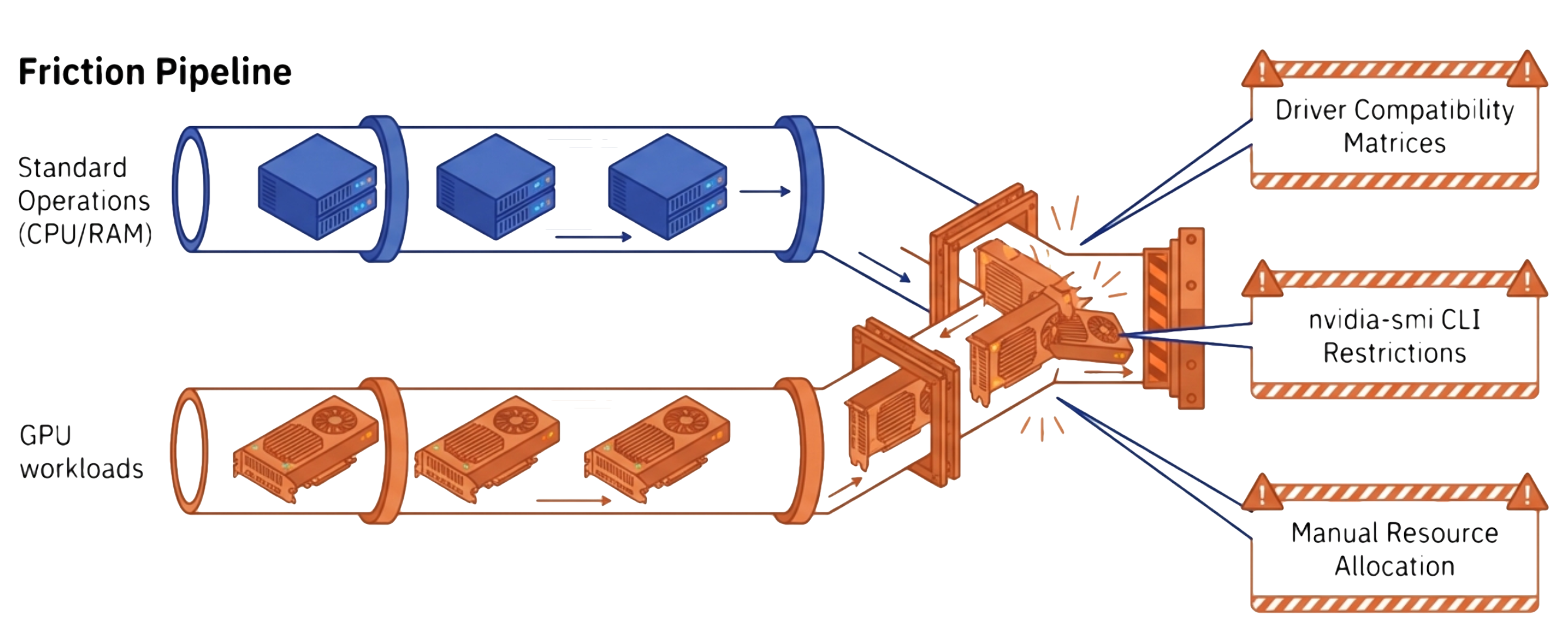
GPU management complexity and friction without VergeOS
Manual driver installation and compatibility tracking on every host
CLI-only MIG configuration via nvidia-smi — no GUI, no API
Separate monitoring tools disconnected from infrastructure metrics
No unified snapshot, replication, or DR workflow for GPU-enabled VMs
VergeOS Advantage

Modernizing and Simplifying GPU Resource Management

Comparing legacy GPU management to VergeOS

Three Pillars of the VergeOS GPU Approach

01

Simplicity at Scale

GPU management — pass-through, vGPU, and MIG — through a single point-and-click interface. Full REST API for programmatic control. The nvidia-smi command line is never required.

02

GPU as Infrastructure

GPUs are first-class VergeOS resources — scheduled, monitored, snapshotted, and replicated alongside compute and storage. Drivers uploaded once, automatically deployed bit-for-bit to every guest VM.

03

Validated with NVIDIA

NVIDIA introduced VergeOS as a supported vGPU platform. VergeOS 26.1.3 validated with vGPU 20. Drivers deployed bit-for-bit identical to NVIDIA’s release. Joint support paths — both vendors stand behind your deployment.

Deployment Scenarios

What Your Team Can Deploy Today

What you can deploy with VergeOS GPU management today
Visual Compute / Simulation

Engineering Simulation and Scientific Visualization

Engineers, designers, and scientists running CFD simulation, mesh preparation, real-time flow visualization, and scientific rendering need workstation-class GPU performance in virtual environments. VergeOS delivers those capabilities through the same point-and-click interface that manages the rest of the infrastructure — no dedicated workstation hardware and no GPU specialists required.

VDI / Virtual Desktops

GPU-Accelerated VDI

Engineers, designers, and analysts get workstation-class GPU acceleration without dedicated hardware. VergeOS integrates with Inuvika OVD Enterprise for full application virtualization — provisioned from the same interface as standard desktops.

Visual Compute / AI Development

On-Premises AI Inference

Organizations with sensitive designs, regulated records, or competitive research that cannot leave the building run inference on-premises to maintain data control. VergeOS hosts these workloads in GPU-enabled VMs with MIG isolation — each service gets guaranteed compute and memory inside your security boundary.

Multi-Tenant / Dev

Shared GPU Dev Environments

Split a single high-end GPU into MIG instances for multiple data science teams. Hardware-enforced isolation means no noisy neighbors and no contention. Reconfigure as project requirements shift — no command line needed.

Edge / Distributed

Edge AI Deployment

VergeOS deploys to edge locations with the same GPU capabilities as your data center. Manufacturing QC, retail analytics, healthcare imaging — real-time inference where cloud round-trips won’t work.

Technical Architecture

Three GPU Modes. One Interface.

VergeOS supports all three NVIDIA GPU virtualization modes as native capabilities. Select the right model for each workload — VergeOS handles configuration, driver management, and the full operational lifecycle.

Mode Best For GPU Sharing Isolation Licensing
GPU Pass-ThroughFull-GPU simulation, scientific compute, bare-metal workloads requiring dedicated accessNone — one VM per GPUCompleteNone
NVIDIA vGPUVDI, multi-user inference, developer GPU accessTime-sliced across VMsSoftware-levelvGPU License Required
Multi-Instance GPU (MIG)Multi-tenant isolation, regulated workloads, guaranteed SLAsHardware-partitioned slicesHardware-enforced in siliconNone beyond hardware
MIG + Time SlicingMaximum VM density with per-tenant isolationMIG isolation + time slicing within each instanceHardware-enforced (MIG tier)vGPU License Required

NVIDIA vGPU software licenses are required for vGPU operation and are available through NVIDIA-authorized partners.

NVIDIA Partnership

Supported. Validated. Joint Support.

NVIDIA introduced VergeOS as a supported vGPU platform. Both vendors stand behind your deployment — when GPU issues arise, VergeOS and NVIDIA engineering collaborate with no finger-pointing and no coverage gaps.

Validated GPU Models

A100, A30, A40, L40 series — full vGPU operation confirmed in VergeOS 26.1.3. RTX Pro 6000 Blackwell Server Edition — MIG vGPU validated.

Driver Process

Customers obtain NVIDIA GPU drivers (available with valid vGPU licenses) and upload once. VergeOS bundles them into an ISO and auto-attaches to guests on GPU assignment. Deployed drivers are bit-for-bit identical to NVIDIA’s release.

vGPU 20 Support

VergeOS 26.1.3 validated with vGPU 20 — the March 2026 major release. Includes support for the RTX 4500 Blackwell Server Edition tier and MIG + time slicing on KVM.

Field Validation

NVIDIA field engineers evaluating VergeOS cited automated MIG configuration as a standout differentiator: “That’s huge” — direct reaction to MIG configuration in the VergeOS UI.

Live Webinar — April 2, 2026

GPU Virtualization Without the Complexity

Join Aaron Richman and NVIDIA’s Jimmy Rotella for a live walkthrough of vGPU, pass-through, and MIG in a unified private cloud environment. See MIG configuration in the UI, one-time driver upload, and GPU-aware DR — no CLI, no specialist required.

Thursday, April 2, 2026
Hosted by Aaron Richman
with Jimmy Rotella, NVIDIA
Register Now →

Ready to See VergeOS GPU Management in Action?

Schedule a technical deep dive to see how VergeOS handles GPU pass-through, vGPU, and MIG on your existing infrastructure — managed by the same team that runs your VMs today.

Schedule a Demo Download White Paper

855-855-8300  ·  verge.io

VergeOS × NVIDIA vGPU 20 — Visual Compute & AI Development Campaign · Q1 2026

© 2026 VergeIO Inc. All Rights Reserved.

855-855-8300

Get Started

  • Versions
  • Request Tour

VergeIO For

  • VMware Alternative
  • SAN Replacement
  • Solving Infrastructure Modernization Challenges
  • Artificial Intelligence
  • Hyperconverged
  • Server Room
  • Secure Research Computing

Product

  • Benefits
  • Documents
  • Architecture Overview
  • Use Cases
  • Videos

Company

  • About VergeIO
  • Blog
  • Technical Documentation
  • Legal

© 2026 VergeIO. All Rights Reserved.