• Skip to main content
  • Architecture
    • Overview
      Learn about VergeOS’ unique unfied architecture that integrates virtualization, storage, networking, AI, backup and DR into a single data center operating system
    • Infrastructure Wide Deduplication
      VergeOS transforms deduplication from a storage-only commodity into a native, infrastructure-wide capability that spans storage, virtualization, and networking, eliminating hidden resource taxes
    • VergeFS
      VergeFS is a distributed, high-performance global file system integrated into VergeOS, unifying storage across nodes, tiers, and workloads while eliminating the need for external SANs
    • VergeFabric
      VergeFabric is VergeOS’s integrated virtual networking layer, delivering high-speed, low-latency communication across nodes while eliminating the complexity of traditional network configurations.
    • Infrastructure Automation
      VergeOS integrates Packer, Terraform, and Ansible to deliver an end-to-end automation pipeline that eliminates infrastructure drift and enables predictable, scalable deployments.
    • VergeIQ
      Unlock secure, on-premises generative AI—natively integrated into VergeOS. With VergeIQ, your enterprise gains private AI capabilities without the complexity, cloud dependency, or token-based pricing.
  • Features
    • Virtual Data Centers
      A VergeOS Virtual Data Center (VDC) is a fully isolated, self-contained environment within a single VergeOS instance that includes its own compute, storage, networking, and management controls
    • High Availability
      VergeOS provides a unified, easy-to-manage infrastructure that ensures continuous high availability through automated failover, storage efficiency, clone-like snapshots, and simplified disaster recovery
    • ioClone
      ioClone utilizes global inline deduplication and a blockchain-inspired file system within VergeFS to create instant, independent, space-efficient, and immutable snapshots of individual VMs, volumes, or entire virtual data centers.
    • ioReplicate
      ioReplicate is a unified disaster-recovery solution that enables simple, cost-efficient DR testing and failover via three‑click recovery of entire Virtual Data Centers—including VMs, networking, and storage.
    • ioFortify
      ioFortify creates immutable, restorable VDC checkpoints and provides proactive ransomware detection with instant alerts for rapid recovery and response.
    • ioMigrate
      ioMigrate enables large-scale VMware migrations, automating the rehosting of hundreds of VMs (including networking settings) in seconds with minimal downtime by seamlessly transitioning entire VMware environments onto existing hardware stacks.
    • ioProtect
      ioProtect offers near-real-time replication of VMware VMs—including data, network, and compute configurations—to a remote disaster‑recovery site on existing hardware, slashing DR costs by over 60% while supporting seamless failover and testing in an efficient, turnkey VergeOS Infrastructure.
    • ioOptimize
      ioOptimize leverages AI and machine learning to seamlessly integrate new and old hardware and automatically migrate workloads from aging or failing servers.
    • ioGuardian
      ioGuardian is VergeIO’s built-in data protection and recovery capability, providing near-continuous backup and rapid VM recovery during multiple simultaneous drive or server failures.
  • IT Initiatives
    • VMware Alternative
      VergeOS offers seamless migration from VMware, enhancing performance and scalability by consolidating virtualization, storage, and networking into a single, efficient platform.
    • Hyperconverged Alternative
      VergeIO’s page introduces ultraconverged infrastructure (UCI) via VergeOS, which overcomes HCI limitations by supporting external storage, scaling compute and storage independently, using existing hardware, simplifying provisioning, boosting resiliency, and cutting licensing costs.
    • SAN Replacement / Storage Refresh
      VergeIO’s storage by replacing aging SAN/NAS systems within its ultraconverged infrastructure, enhancing security, scalability, and affordability.
    • Infrastructure Modernization
      Legacy infrastructure is fragmented, complex, and costly, built from disconnected components. VergeOS unifies virtualization, storage, networking, data protection, and AI into one platform, simplifying operations and reducing expenses.
    • Virtual Desktop Infrastructure (VDI)
      VergeOS for VDI delivers a faster, more affordable, and easier-to-manage alternative to traditional VDI setups—offering organizations the ability to scale securely with reduced overhead
    • Secure Research Computing
      VergeIO's Secure Research Computing solution combines speed, isolation, compliance, scalability, and resilience in a cohesive platform. It’s ideal for institutions needing segmented, compliant compute environments that are easy to deploy, manage, and recover.
    • Venues, Remote Offices, and Edge
      VergeOS delivers resiliency and centralized management across Edge, ROBO, and Venue environments. With one platform, IT can keep remote sites independent while managing them all from a single pane of glass.
  • Blog
      • The Kubernetes VMware Exit Math, ExplainedVergeIO announced general availability of Kubernetes support in VergeOS, distributed as four Helm charts on GitHub. VMware shops running Kubernetes today pay three separate taxes: vSphere licensing, a Kubernetes distribution fee, and overlay storage. VergeOS consolidates all three into a single integrated platform. Rancher remains the management plane your team uses.
      • How VergeOS Makes Refurbished SSDs SafeRefurbished enterprise SSDs cut forty to sixty percent off the storage refresh bill. They also pose four supplier-side risks: tampered SMART data, OEM firmware lock, residual data, and batch-failure correlation. VergeOS handles each one at the platform layer.
      • The SAN Refresh That Pays for Your VMware ExitRefurbished enterprise SSDs cut your 2026 SAN refresh below 2025 prices. The hardware savings fund the VMware exit. Two wins from one budget cycle.
    • View All Posts
  • Resources
    • Become a Partner
      Get repeatable sales and a platform built to simplify your customers’ infrastructure.
    • Technology Partners
      Learn about our technology and service partners who deliver VergeOS-powered solutions for cloud, VDI, and modern IT workloads.
    • White Papers
      Explore VergeIO’s white papers for practical insights on modernizing infrastructure. Each paper is written for IT pros who value clarity, performance, and ROI.
    • In The News
      See how VergeIO is making headlines as the leading VMware alternative. Industry analysts, press, and partners highlight our impact on modern infrastructure.
    • Press Releases
      Get the latest VergeOS press releases for news on product updates, customer wins, and strategic partnerships.
    • Case Studies
      See how organizations like yours replaced VMware, cut costs, and simplified IT with VergeOS. Real results, real environments—no fluff.
    • Webinars
      Explore VergeIO’s on-demand webinars to get straight-to-the-point demos and real-world infrastructure insights.
    • Documents
      Get quick, no-nonsense overviews of VergeOS capabilities with our datasheets—covering features, benefits, and technical specs in one place.
    • Videos
      Watch VergeIO videos for fast, focused walkthroughs of VergeOS features, customer success, and VMware migration strategies.
    • Technical Documentation
      Access in-depth VergeOS technical guides, configuration details, and step-by-step instructions for IT pros.
  • How to Buy
    • Schedule a Demo
      Seeing is believing, set up a call with one of our technical architects and see VergeOS in action.
    • Versions
      Discover VergeOS’s streamlined pricing and flexible deployment options—whether you bring your own hardware, choose a certified appliance, or run it on bare metal in the cloud.
    • Test Drive – No Hardware Required
      Explore VergeOS with VergeIO’s hands-on labs and gain real-world experience in VMware migration and data center resiliency—no hardware required
  • Company
    • About VergeIO
      Learn who we are, what drives us, and why IT leaders trust VergeIO to modernize and simplify infrastructure.
    • Support
      Get fast, expert help from VergeIO’s support team—focused on keeping your infrastructure running smoothly.
    • Careers
      Join VergeIO and help reshape the future of IT infrastructure. Explore open roles and growth opportunities.
  • 855-855-8300
  • Contact
  • Search
  • 855-855-8300
  • Contact
  • Search
  • Architecture
    • Overview
    • VergeFS
    • VergeFabric
    • Infrastructure Automation
    • VergeIQ
  • Features
    • Virtual Data Centers
    • High Availability
    • ioClone
    • ioReplicate
    • ioFortify
    • ioMigrate
    • ioProtect
    • ioOptimize
    • ioGuardian
  • IT Initiatives
    • VMware Alternative
    • Hyperconverged Alternative
    • SAN Replacement / Storage Refresh
    • Infrastructure Modernization
    • Virtual Desktop Infrastructure (VDI)
    • Secure Research Computing
    • Venues, Remote Offices, and Edge
  • Blog
  • Resources
    • Become a Partner
    • Technology Partners
    • White Papers
    • In The News
    • Press Releases
    • Case Studies
    • Webinars
    • Documents
    • Videos
    • Technical Documentation
  • How to Buy
    • Schedule a Demo
    • Versions
    • Test Drive – No Hardware Required
  • Company
    • About VergeIO
    • Support
    • Careers
×
  • Architecture
    • Overview
    • VergeFS
    • VergeFabric
    • Infrastructure Automation
    • VergeIQ
  • Features
    • Virtual Data Centers
    • High Availability
    • ioClone
    • ioReplicate
    • ioFortify
    • ioMigrate
    • ioProtect
    • ioOptimize
    • ioGuardian
  • IT Initiatives
    • VMware Alternative
    • Hyperconverged Alternative
    • SAN Replacement / Storage Refresh
    • Infrastructure Modernization
    • Virtual Desktop Infrastructure (VDI)
    • Secure Research Computing
    • Venues, Remote Offices, and Edge
  • Blog
  • Resources
    • Become a Partner
    • Technology Partners
    • White Papers
    • In The News
    • Press Releases
    • Case Studies
    • Webinars
    • Documents
    • Videos
    • Technical Documentation
  • How to Buy
    • Schedule a Demo
    • Versions
    • Test Drive – No Hardware Required
  • Company
    • About VergeIO
    • Support
    • Careers
VergeOS · Native Kubernetes Integration · GA

Kubernetes Without the VMware Tax

VMware shops running Kubernetes pay three taxes at once. VergeOS collapses all three without disrupting Rancher. The control plane stays. The substrate changes. Workloads move on your timeline.
Register for May 20 Webinar Schedule a Demo
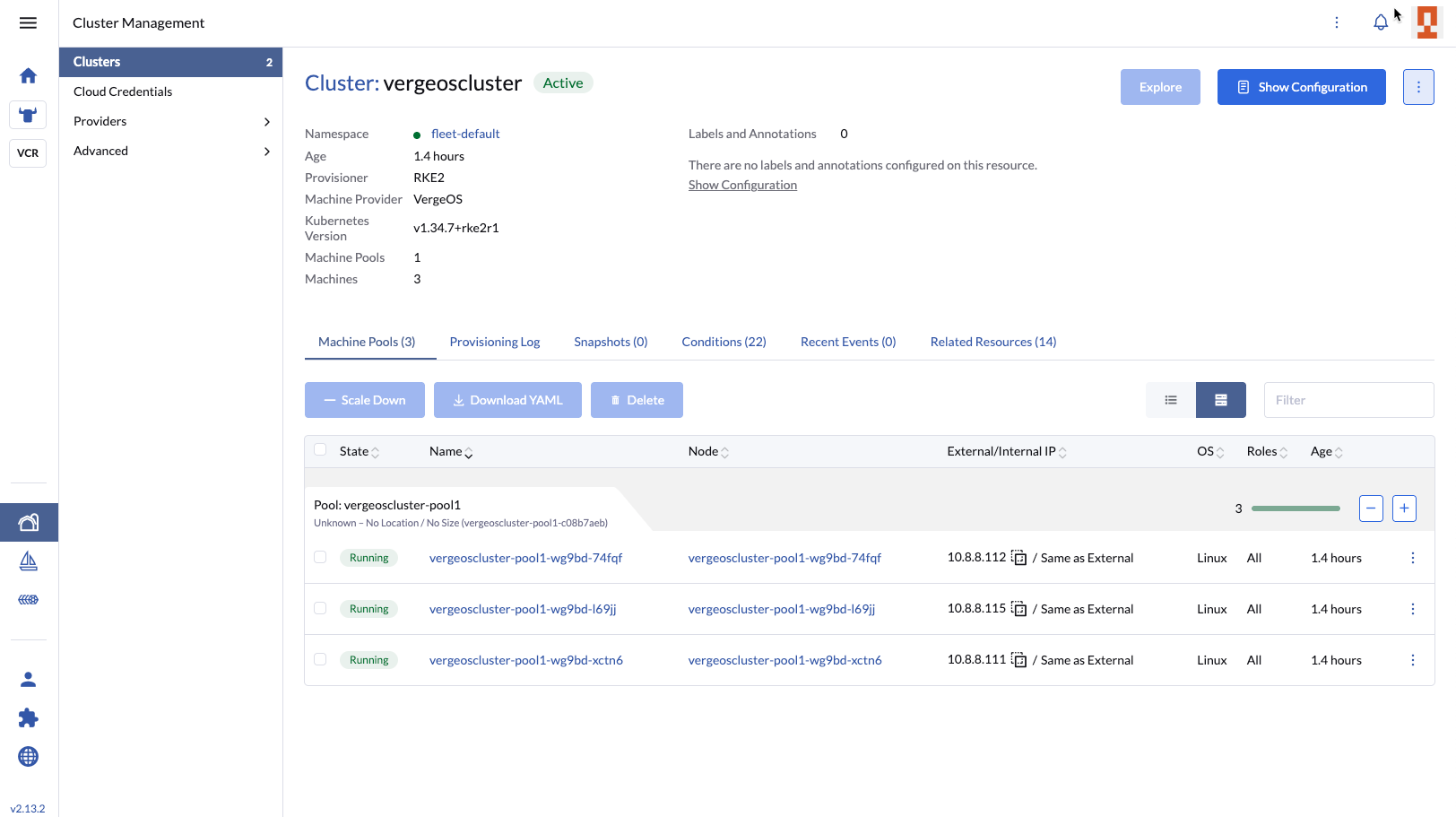
Rancher provisioning a Kubernetes cluster on VergeOS
3Taxes Collapsed
1Platform Decision
4Helm Charts · GA
0Rancher Disruption
The Three-Tax Problem

VMware shops pay three vendors to do one job.

vSphere hosts the cluster nodes. A Kubernetes distribution manages them. An overlay storage layer gives them persistent volumes. Three contracts, three operational models, three renewals on three different calendars.

×

The Status Quo

  • vSphere licensing for every cluster node, subscription-only after Broadcom restructuring.
  • Kubernetes distribution tax on top — Tanzu, OpenShift, Rancher Prime, or engineering hours for upstream.
  • Overlay storage like Longhorn, Portworx, or OpenEBS bolted on because vSphere policies do not extend cleanly into Kubernetes.
  • Two operational models in one stack — vCenter for infrastructure, declarative GitOps for clusters, with friction at the boundary.
  • Renewals compound across all three line items each cycle.
✓

VergeOS Collapses It

  • One platform handles compute, storage, and networking. The vSphere line item disappears.
  • Rancher stays the management plane. Application teams see no change in how they consume Kubernetes.
  • Native CSI driver delegates storage operations directly to vSAN. Provisioned volumes get inline dedup, multi-tier placement, and integrated snapshots.
  • Cloud Controller Manager provisions LoadBalancer services through VergeOS VNet NAT rules. No external load balancer to manage.
  • Phased migration friendly. New clusters land on VergeOS. Old clusters stay on vSphere. Rancher manages both.
Common Scenarios

Three starting points. One platform decision.

Most teams reach this conversation from one of three places. VergeOS plus Rancher fits all three without forcing a single migration narrative.

VMware + Rancher today

VMware Exit with Rancher Continuity

Keep your Rancher control plane unchanged. VergeOS replaces vSphere as the substrate. Application teams see no change. Platform teams see the vSphere line item disappear.

VMware + Tanzu (TKG)

Tanzu Replacement with Phased Migration

TKG environments facing Broadcom roadmap uncertainty plus bundled licensing pressure. Migration is a project, not a port. VergeOS plus Rancher absorbs the work.

Bare-Metal Kubernetes

Operational Uplift for Bare-Metal Clusters

Teams running Kubernetes directly on hardware gain live migration, integrated DR, and a shared snapshot model without changing their Kubernetes operations workflow.

Architecture

Same Rancher. Same applications. New substrate.

The Kubernetes control plane and the application layer stay constant. What changes is the substrate underneath — and the overlay storage that no longer needs to exist.

× Before · VMware Stack

Application WorkloadsPods · Deployments · Services
Rancher · RKE2 / K3sControl Plane
Longhorn / Portworx / OpenEBSOverlay Storage
vSphere · vSAN · NSXHypervisor + SDS + SDN
Three vendors, three renewals, three operational models.

✓ After · VergeOS Stack

Application WorkloadsUnchanged
Rancher · RKE2 / K3sUnchanged · same control plane
VergeOS Native CSI + CCM + AutoscalerHelm Charts · verge-io GitHub
VergeOS · vSAN · VNetUnified Platform
Two layers retired. The Kubernetes contract on top is preserved.
See It Live

Watch Rancher provision a cluster on VergeOS in real time.

David Zarzycki, the principal engineer who built the Rancher integration, runs a live demonstration of end-to-end cluster provisioning. He walks through node driver behavior, CSI volume operations, Cloud Controller Manager LoadBalancer provisioning, and the Cluster Autoscaler responding to real workload demand. George Crump frames the three-tax argument. Aaron Richman hosts.

What you’ll see:

  • Rancher node driver provisioning a fresh RKE2 cluster on VergeOS
  • CSI driver creating a persistent volume backed by vSAN
  • Cloud Controller Manager allocating a LoadBalancer service through VergeOS VNet
  • Cluster Autoscaler scaling a node pool based on pod resource requests
  • Live Q&A with audience-driven roadmap polling
Register for the Webinar
Wed 20 May

Live Demonstration

1:00 PM ET · 10:00 AM PT · 60 minutes
David Zarzycki
David ZarzyckiPrincipal Engineer · Demo Lead
George Crump
George CrumpCMO · SME
Aaron Richman
Aaron RichmanField Evangelist · Host
How It Works

Four steps from Helm install to running clusters.

No proprietary tooling. No new operational model. Standard Kubernetes contracts the whole way through.

Step 01

Install the Helm Charts

Pull the CSI driver, Cloud Controller Manager, Cluster Autoscaler, and Rancher node driver from the verge-io GitHub repository. Helm install into your existing Rancher instance.

Step 02

Configure VergeOS Credentials

Add VergeOS as a cloud credential in Rancher. The UI extension surfaces VergeOS-specific configuration forms — the same flow Rancher uses for vSphere.

Step 03

Provision Clusters

Use Rancher’s standard cluster creation flow. The node driver clones VergeOS template VMs and registers them as cluster nodes. CPU, RAM, and network configure through the same UI you use for vSphere clusters today.

Step 04

Migrate Workloads on Your Timeline

Stateless services first. Stateful workloads after validation. Rancher manages clusters on both vSphere and VergeOS for the duration of the migration. Retire vSphere when ready.

Production Validation

Already running stateful workloads on real production traffic.

The native Rancher and Kubernetes integration was developed with a European sports gaming platform serving as the design partner. The customer’s engineering team validated the CSI Driver, Cloud Controller Manager, and Rancher Node Driver against real production workloads during the MVP phase. The integration is approved for use in their production environment.

What that proves: the integration is real work, not a marketing slide. The same components that ship to GitHub today carry stateful traffic in a sports gaming environment that does not tolerate downtime.

Customers shouldn’t have to rebuild their applications to leave VMware — and once they leave, they shouldn’t be locked in again. With Rancher on VergeOS, the workloads move, and they stay portable.Jason Yaeger · SVP Product and Engineering · VergeIO
ComponentStatus
CSI DriverValidated
Cloud Controller ManagerValidated
Cluster AutoscalerGA on GitHub
Rancher Node Driver + UI ExtensionValidated
K8s DistributionsRKE2 · K3s · Upstream
Production DeploymentApproved
License ModelPer Physical Server
Evaluation Framework

The five questions to answer before you commit.

Use this framework to evaluate VergeOS against your existing VMware-plus-Kubernetes stack — or against any other platform you are considering.

Does the platform run my existing Kubernetes distribution unchanged?

VergeOS does not introduce a Kubernetes distribution. RKE2, K3s, upstream Kubernetes, and vendor distributions all run on VergeOS through Rancher or directly on VergeOS VMs. The CSI driver and Cloud Controller Manager work with any cluster that meets the upstream Kubernetes specification.

If a platform requires you to adopt a specific distribution, you are trading one form of lock-in for another.

How does storage work for stateful workloads?

The VergeOS CSI driver delegates storage operations directly to the VergeOS API. Persistent volumes are vSAN volumes — with inline deduplication, multi-tier placement across NVMe / SSD / HDD, and snapshots that integrate with VergeOS system snapshots. A Kubernetes persistent volume snapshot is a vSAN snapshot, which means stateful workloads share the same DR and replication infrastructure that protects production VMs.

Compare to overlay storage solutions like Longhorn or Portworx, which run their own replicated storage engines on top of the hypervisor — doubling work, breaking dedup, and splintering management.

Can I run Kubernetes and traditional VMs on the same infrastructure?

Yes. Most enterprises run a mix of containerized applications and traditional VMs — databases that have not been containerized, packaged software supported only on VMs, legacy applications that predate the cloud-native era. VergeOS runs all of these workloads alongside Kubernetes clusters on shared infrastructure with shared storage and shared networking.

Kubernetes-only platforms force you to maintain separate infrastructure for these workloads. That is not a trade most enterprises want to make.

What does the migration actually look like?

Industry research describes the dominant Kubernetes migration pattern as parallel operation with iterative workload movement. VergeOS plus Rancher fits this pattern natively. New clusters land on VergeOS. Old clusters stay on vSphere. Rancher manages both for the duration of the migration. Workloads move on your timeline, starting with stateless services and finishing with stateful workloads after the new platform validates under real load.

For Tanzu customers, the migration includes reconstruction of StorageClasses (replacing SPBM-projected policies), networking plane replacement (replacing NSX-T), and developer experience continuity (typically Backstage, Argo CD, Tekton, and Crossplane in place of TAP). VergeOS is the platform built to absorb the work.

What changes for my application teams?

Nothing. Application teams continue to use Rancher, kubectl, and standard Kubernetes APIs. The substrate underneath changes. The contract above does not. Pods schedule the same way. Services expose the same way. Persistent volumes mount the same way. The integration is native at the platform layer, not visible to the application layer.

This is the entire point of the Rancher continuity argument. VergeOS slots in as a new substrate alongside vSphere, and after cutover becomes the substrate. Application teams see no change in their day-to-day interaction with Kubernetes.

Go Deeper

Resources for the technical evaluation.

Live Webinar

Kubernetes Without the VMware Tax

David Zarzycki demos end-to-end Rancher provisioning on VergeOS, plus migration patterns and live Q&A. May 20 at 1:00 PM ET.

Register
Helm Charts

verge-io on GitHub

CSI driver, Cloud Controller Manager, Cluster Autoscaler, and Rancher node driver. All four components, all Helm charts, all generally available.

Browse the Repo
Talk to an Engineer

Schedule a Demo

See Rancher provisioning a cluster on VergeOS against your specific environment. Bring your migration questions — we will answer them honestly.

Book Time
FAQ

Common questions, direct answers.

Is this real Kubernetes integration or a wrapper?

Native, not bolted on. VergeOS ships a CSI driver and a Cloud Controller Manager as Helm charts from the verge-io GitHub repository. The CCM provisions LoadBalancer services through VergeOS VNet NAT rules. The CSI driver delegates storage operations directly to the VergeOS API — provisioned volumes participate in the full vSAN feature set including inline dedup, multi-tier placement, and integrated snapshots.

Are you replacing Rancher?

No. Rancher remains the management plane. VergeOS replaces vSphere as the substrate underneath. The native Rancher node driver and UI extension provision clusters on VergeOS exactly the way Rancher provisions clusters on vSphere today — same flow, same forms, same operational model.

What Kubernetes distributions do you support?

RKE2 and K3s through the Rancher node driver. Upstream Kubernetes and other distributions through the standard CSI and CCM contracts. The integration is distribution-agnostic at the storage and networking layer — if your cluster meets the upstream Kubernetes specification, the components work.

Why not just use Longhorn or Portworx for storage?

Unified storage policy across VMs and pods. Stateful Kubernetes workloads share the same vSAN that protects production VMs — same snapshot semantics, same DR model, same deduplication, same UI. Overlay storage layers run their own replicated storage engine on top of the hypervisor, which doubles work, breaks dedup, and splinters management.

How do you handle migration from Tanzu (TKG)?

Phased, with Rancher managing both substrates during cutover. New clusters land on VergeOS. Existing TKG clusters stay on vSphere. Stateless services move first. Stateful workloads move after validation. The honest position: migration is a project, not a port. SPBM-projected StorageClasses and NSX-T networking need reconstruction. VergeOS is the platform built to absorb that work.

What about TAP and the developer experience layer?

Tanzu Application Platform v1.12 was designated long-term support in March 2026, so TAP technically remains supported. The investment thesis behind it has been undermined — Tanzu Platform SaaS reached End of Availability May 1, 2025, legacy Tanzu SKUs were retired in May 2024, and Broadcom has cut substantial workforce across the Tanzu organization. Most TAP shops migrate to a CNCF-native developer experience built on Backstage, Argo CD, Tekton, and Crossplane.

Can I run this on bare metal?

VergeOS itself runs on bare metal commodity hardware. Kubernetes clusters then run on VergeOS VMs — the enterprise pattern. This gives you live migration, integrated DR, snapshot-based recovery, and unified storage policy across containerized and traditional workloads. If you are running Kubernetes directly on bare metal today, this is the operational uplift path.

Ready to collapse the stack?

See Rancher provisioning a cluster on VergeOS the same way it does on vSphere today — live, on May 20. Or schedule a demo against your specific environment.

Register for May 20 Webinar Schedule a Demo
VergeOS · Native Kubernetes Integration · Generally Available VergeIO · Ann Arbor, MI · May 2026

855-855-8300

Get Started

  • Versions
  • Request Tour

VergeIO For

  • VMware Alternative
  • SAN Replacement
  • Solving Infrastructure Modernization Challenges
  • Artificial Intelligence
  • Hyperconverged
  • Server Room
  • Secure Research Computing

Product

  • Benefits
  • Documents
  • Architecture Overview
  • Use Cases
  • Videos

Company

  • About VergeIO
  • Blog
  • Technical Documentation
  • Legal

© 2026 VergeIO. All Rights Reserved.