VMware Alternative or
Private Cloud OS?
The Decision That Determines Your Infrastructure for the Next Decade
Hypervisor swaps solve licensing costs. Infrastructure consolidation solves operational overhead costing five times more. Which problem costs your organization more?
Hypervisor swaps solve licensing costs. Infrastructure consolidation solves operational overhead costing five times more. Which problem costs your organization more?
The VMware Exit Most Organizations Are Planning
The Visible Problem
Broadcom's VMware licensing changes increased costs from 15-25% of infrastructure TCO to 30-40%. Organizations reacted to the price increase with hypervisor replacement strategies.
The Hidden Problem
Coordination overhead across separate storage, compute, and networking products consumes 40-60% of infrastructure team time. This operational cost existed before Broadcom and persists after hypervisor replacement.
The Question No One Asks
Are you solving the licensing problem or the infrastructure problem? Procurement sees licensing costs. Operations pays coordination overhead for the next five years.
Two Paths. Two Outcomes
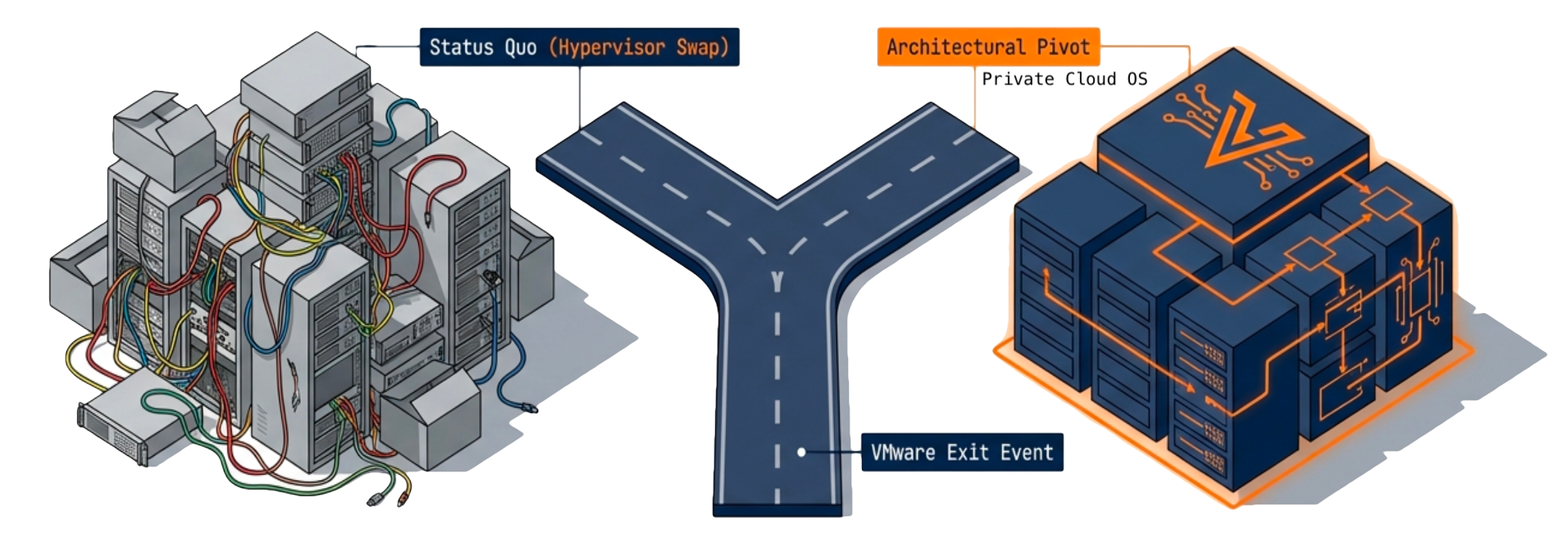
Path A: Hypervisor Replacement
Swap VMware for Proxmox, Nutanix AHV, Hyper-V, or OpenStack while preserving existing infrastructure architecture.
What Changes:
- Licensing vendor and costs
- Hypervisor management interface
- Team training requirements
What Stays the Same:
- Separate storage arrays with independent lifecycles
- Coordination overhead across products
- Multi-vendor support relationships
- Hardware refresh cycle misalignment
- Team expertise fragmentation
Path B: Private Cloud OS Consolidation
Consolidate compute, storage, networking, and data protection into a unified platform that runs on existing hardware.
What Changes:
- Licensing costs eliminated (included in platform)
- Single platform replaces five products
- One upgrade path eliminates coordination
- Unified diagnostics replace multi-vendor troubleshooting
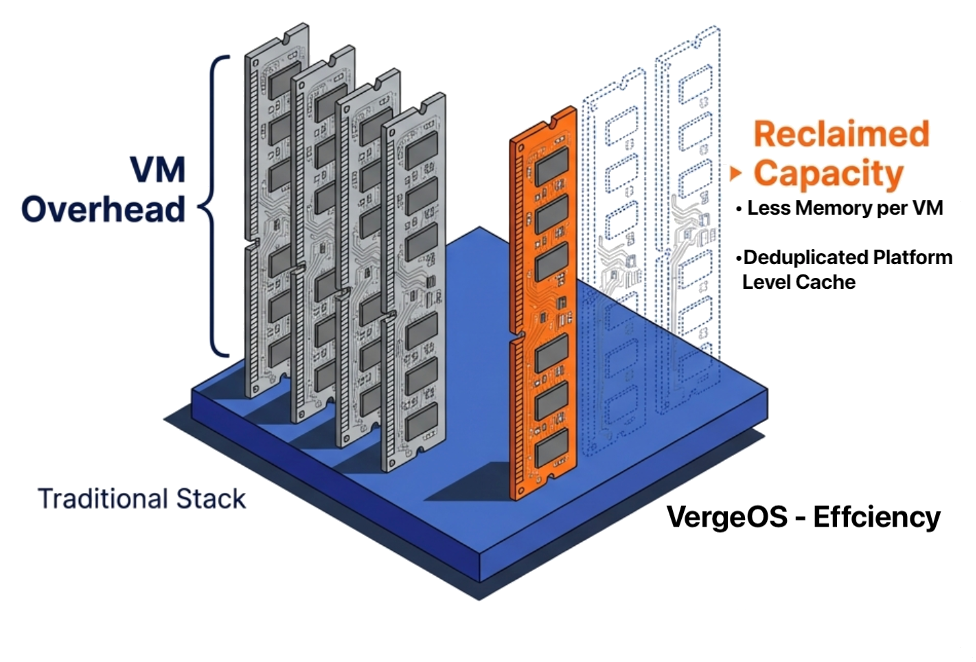
- Platform-level efficiency reduces server count 30-40%
Hardware Impact:
- Runs on existing VxRail and commodity x86 servers
- Capital requirements drop to near zero
- No vendor hardware lock-in
How Platform-Level Integration Delivers Efficiency
Orchestrated private clouds coordinate separate storage, compute, and networking products through automation APIs. Each infrastructure layer maintains its own control plane, metadata structures, and resource allocation mechanisms. When a VM requests storage, the request traverses multiple management layers—hypervisor to storage API to array controller to physical disk—with each layer maintaining separate caching, deduplication, and optimization logic. This architectural separation creates coordination overhead that consumes 40-60% of infrastructure team time managing version compatibility, troubleshooting cross-product failures, and coordinating upgrade windows across vendors.
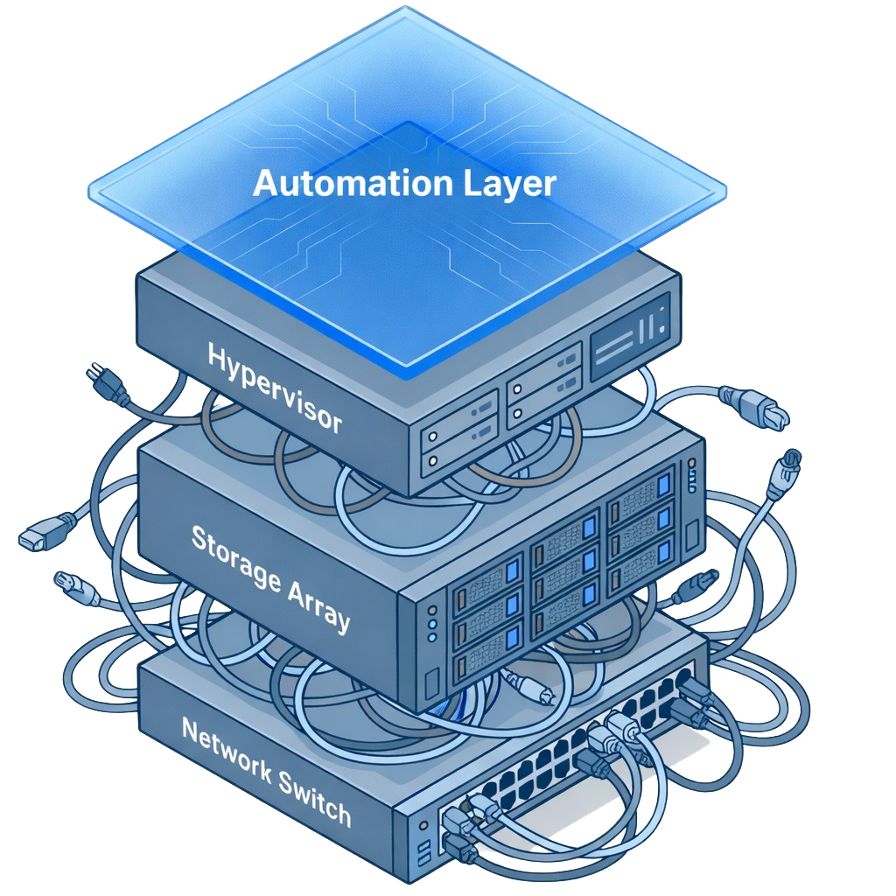
Platform-level integration changes the resource path. VergeOS implements storage, networking, and data services within a single control plane that sees all infrastructure resources simultaneously. When a VM requests storage, the platform allocates from a unified resource pool without API translation layers. The same DRAM that runs VMs also caches storage I/O—creating 3-4X more effective caching than separated architectures where storage arrays cache independently from compute servers. Deduplication, compression, and thin provisioning operate across the entire infrastructure rather than within product boundaries. This architectural consolidation typically reduces physical server requirements by 30-40% because the platform eliminates the redundant caching, metadata overhead, and resource fragmentation inherent in coordinating separate products.
Resources to Guide Your Decision
Technical White Paper
Architectural comparison between orchestrated private clouds and integrated Private Cloud Operating Systems.
Download White Paper →Decision Framework
Questions to ask vendors that expose operational costs procurement spreadsheets ignore.
Get the Framework →What is a Private Cloud OS?
Deep-dive analysis of what separates virtualization from private cloud architecture.
Read Analysis →Competitive Battlecard
Dell Private Cloud vs VergeOS architectural comparison with objection handling.
View Battlecard →Blog: From VMware to Private Cloud
Why infrastructure consolidation beats hypervisor swaps for organizations exiting VMware.
Read Blog →Case Studies
Real organizations migrating from VMware to VergeOS with actual efficiency gains and ROI data.
View Case Studies →Frequently Asked Questions (FAQ)
What's the difference between a hypervisor swap and a Private Cloud OS?
+A hypervisor swap replaces your virtualization layer (VMware, Hyper-V, etc.) while keeping your existing infrastructure architecture intact—separate storage arrays, networking products, and management tools. A Private Cloud OS consolidates compute, storage, networking, and data protection into a single unified platform. The hypervisor swap solves licensing costs. The Private Cloud OS solves the operational overhead that consumes 40-60% of infrastructure team time.
Can VergeOS run on our existing hardware?
+Yes. VergeOS runs on any x86 server hardware including Dell VxRail, HPE, Cisco, Lenovo, and commodity white-box servers. You can deploy VergeOS on your existing infrastructure with zero capital investment. Platform-level efficiency typically reduces server count by 30-40%, meaning you can run the same workloads on fewer physical servers than you're using today.
How long does migration from VMware to VergeOS take?
+Most organizations complete their VMware migration in 60-120 days depending on environment complexity and team availability. VergeOS provides migration tools and services to streamline the process. Many customers run VergeOS alongside VMware during the transition, moving workloads incrementally to minimize risk and operational disruption.
What happens to our existing storage investment?
+VergeOS includes enterprise storage capabilities built into the platform—no separate storage array required. If you have existing storage arrays, you can continue using them during migration, then repurpose or retire them as you transition workloads to VergeOS's integrated storage. This eliminates ongoing storage licensing, maintenance contracts, and the coordination overhead of managing separate storage infrastructure.
How does VergeOS compare to Dell Private Cloud or Nutanix?
+Dell Private Cloud and Nutanix coordinate separate products through automation layers—you still manage storage, compute, networking, and data protection as distinct infrastructure components. VergeOS consolidates these into a single platform with one upgrade path, one support relationship, and unified diagnostics. This architectural difference translates to lower operational overhead, simpler troubleshooting, and no vendor hardware lock-in.
What about enterprise features like high availability and disaster recovery?
+VergeOS includes enterprise features as part of the platform—no additional licensing required. This includes:
- Built-in high availability and clustering
- Native replication and disaster recovery
- Integrated backup and snapshots
- Multi-tenancy with Virtual Data Centers
- GPU virtualization and fractional allocation
What's the learning curve for infrastructure teams?
+Teams familiar with VMware typically become productive with VergeOS within 1-2 weeks. The platform uses familiar concepts like VMs, networks, and storage, but simplifies operations by eliminating the need to coordinate separate products. VergeOS provides training, documentation, and professional services to accelerate adoption. Many teams report that troubleshooting becomes easier because there's a single platform to diagnose rather than multiple vendors pointing at each other.
How is VergeOS licensed and priced?
+VergeOS is licensed per physical CPU socket with all features included—no separate licenses for storage, networking, replication, or data protection. Pricing is transparent and predictable with no surprise costs for features you'll need later. Contact our team for a customized quote based on your infrastructure requirements and to see a cost comparison against your current VMware and infrastructure spending.