Legacy HCI promised to simplify the data center and hand control back to IT. Instead it set three clocks the business no longer controls: your renewal date, your refresh cadence, and the servers you are allowed to buy. Here is how each clock got set, and how you take it back.
Somewhere in the last several years, IT stopped running the data center and the hypervisor vendors took over. The renewal date, the hardware refresh, and the list of servers a team is allowed to buy now answer to a contract rather than a workload. That inversion did not arrive as a single event. It arrived as three clocks, each set by a vendor, each ticking on a schedule the business never chose. Legacy HCI promised simplicity and delivered a new set of controllers. Reading the three clocks is the first step to taking the control back.
Key Takeaways
- Legacy HCI moved three decisions from the workload to the vendor: the renewal date, the refresh date, and the hardware you are allowed to buy.
- Core and socket-based licensing lets a vendor reprice the platform overnight. Broadcom’s 16-to-72 core reversal proved the lever is still in the vendor’s hand.
- Storage stays chained to virtualization through per-core vSAN licensing and the Nutanix controller VM, so you buy compute cores to add capacity.
- A single-codebase Private Cloud Operating System hands all three clocks back: any hardware, any storage, on your schedule.
The First Clock: Your Renewal Date
The renewal clock decides what you pay and when you pay it. The hypervisor license sets that clock, and the license has quietly replaced the workload as the first question in the room. A processor choice used to be an engineering call. Core-based licensing turned it into a math problem. VMware and Nutanix both price the platform by the physical core on a subscription, so every core added to a server adds license cost. The fastest processor stops being the sensible one. Teams pick fewer, faster cores to hold the core count down, and the software bill routinely passes the hardware bill for the same box.
VMware made the clock impossible to ignore. For years the per-CPU model capped each license at 32 cores, so buyers sized CPUs and clusters to stay under the cap. The pricing model drew the architecture, and the architecture followed the invoice. Broadcom then pushed the lever harder. On April 10, 2025, it raised the minimum purchase from 16 cores per CPU to 72 across every product. A two-node cluster with 32 total cores had to license 72 and pay for 40 cores that would never run a workload.
Intense pressure from the customer community forced Broadcom to roll the 72-core floor back to 16 later that year. The reversal is a relief, not a reprieve. A vendor moved the minimum overnight and moved thousands of designs with it, and the willingness to do it again has not gone anywhere. The precedent is the real lesson. Any model that meters the platform by core count or by socket keeps that lever in the vendor’s hand, and the lever gets pulled when the vendor decides, not when the workload changes. IT planners should read the episode as a standing threat rather than a settled question.
| Scenario (10 servers, ~320 cores) | Annual VMware cost (reported) |
|---|---|
| Before Broadcom (vSphere + vSAN) | ~$40,000 to $43,000 |
| After Broadcom (VCF, 72-core minimum) | ~$200,000 to $270,000 |
Reported increases ran 500 to 600 percent for a typical mid-market shop and reached far higher across the broader base. A 20 percent surcharge for late renewal turned the renewal date itself into a pressure point. None of those numbers came from a workload that grew. They came from a vendor that changed the rules. The scale of that repricing has been characterized as a Broadcom licensing shock across the industry. Nutanix carries the same exposure from the other direction. Its platform licenses by the core on a subscription split across separate products, so the core count and the renewal date set the budget the same way. The names on the invoice differ. The mechanism is identical.
The Second Clock: Your Refresh Date
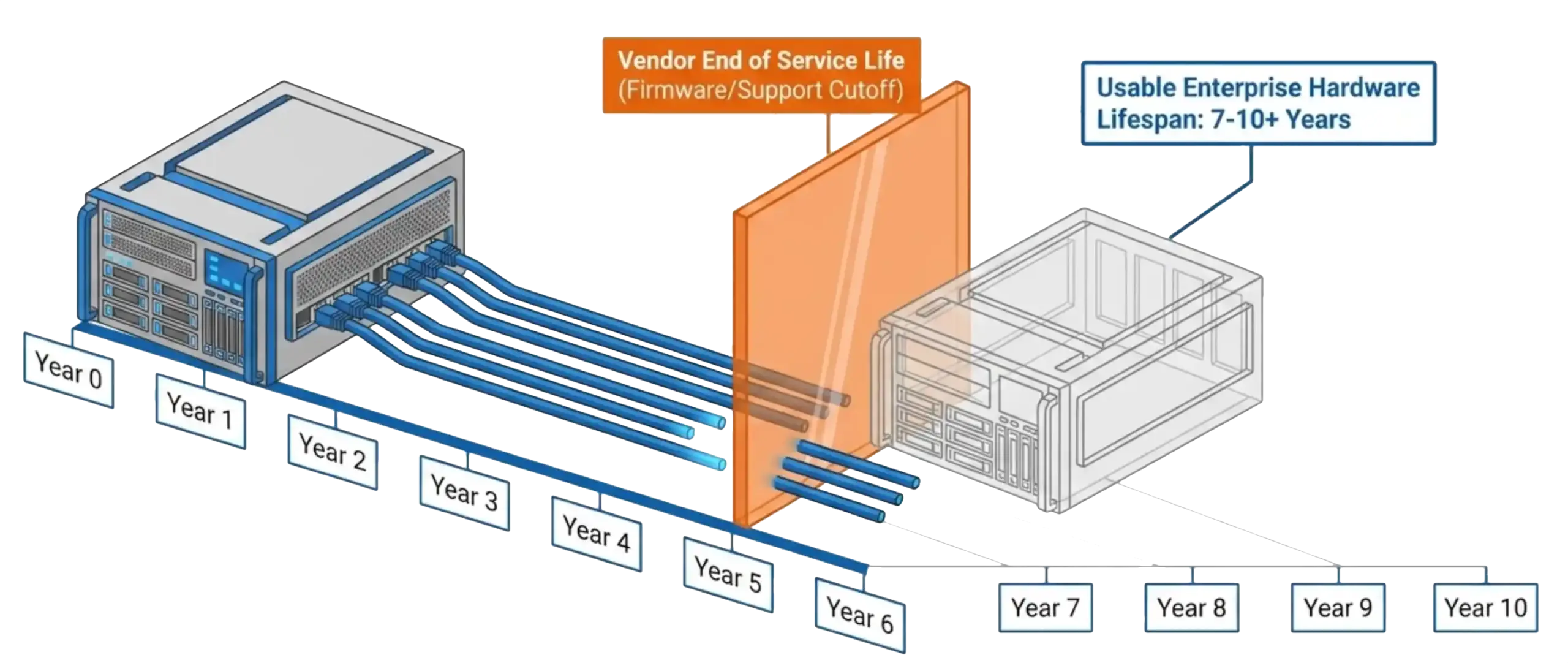
The refresh clock decides when working hardware has to go. That order rarely comes from the workload or the business. It comes from the hardware vendor’s support calendar. Dell provides about five years of standard support on a PowerEdge generation, with one to two years of extended support after that. Reach End of Service Life and the firmware updates, the BIOS updates, the parts replacement, and the technical support all stop. HPE and Cisco run similar clocks.
The hardware does not fail on that date. Enterprise servers run well for seven to ten years and often longer. The vendor calendar, not the equipment, forces the decision. Unpatched firmware becomes a security exposure, spare parts get scarce, and compliance frameworks demand active vendor support. A working fleet gets retired early to satisfy a support matrix, and capital gets spent on the vendor’s timeline rather than the one the business would pick. Third-party maintenance survives as an entire industry for one reason. Buyers want to keep good hardware running past the date the vendor chose for them.
The Third Clock: The Hardware You Are Allowed to Buy
The third clock decides which servers even qualify. A Hardware Compatibility List narrows the field to the models a vendor has certified, and platforms such as vSAN enforce that list at the cluster level. The vendor, not the buyer, approves the hardware. Step off the list and support goes with it.

vSAN shows how far the control reaches into the design. Broadcom licenses vSAN per core on every server in the cluster, whether that server does virtualization work or storage work. The model couples storage to virtualization. A team cannot add a storage-only node to absorb data growth without paying for cores it does not need. Data grows, and the license grows with it whether the virtualization load does or not. That math sends buyers back to an external array, where capacity is priced by the terabyte rather than the core. The converged platform that promised to remove the storage tier quietly rebuilds it. NSX repeats the pattern on the network. The three-tier data center returns, put back together after the converged software priced or limited itself out of reach.
Nutanix sets the same clock with a different mechanism. Its storage runs inside a controller VM on every node, and that controller reserves roughly 16 vCPUs and 64 GB of memory before a single application runs. The storage service rides on the same nodes as the virtualization, so growth in one pulls the other along. The platform also certifies its own hardware, so the compatibility list again decides what the team may buy. Two vendors, one result. The storage tier and the virtualization tier scale on the vendor’s terms rather than the workload’s.
Key Terms
Three Clocks, One Cause
The three clocks look like separate problems, and Legacy HCI is the single cause behind all three. Someone else’s licensing model, support calendar, and compatibility list decide what the data center does and when it does it. The renewal clock sets the budget. The refresh clock sets the timeline. The hardware clock sets the parts list. Control of all three left the IT team one contract at a time, and each renewal hardens the terms further. A buyer who cannot leave cannot negotiate, and a vendor who knows the buyer cannot leave prices accordingly.
Legacy HCI vs. the Private Cloud Operating System
| Legacy HCI | VergeOS (PCOS) | |
|---|---|---|
| Renewal terms | Vendor sets core minimums and reprices at renewal | One platform license, no core rounding |
| Refresh timing | Hardware retired on the vendor’s EOSL calendar | Hardware runs until it fails, on your schedule |
| Hardware selection | Restricted to the certified compatibility list | Any commodity x86, generations mixed freely |
| Storage scaling | Coupled to virtualization by per-core licensing or a controller VM | Storage and virtualization scale independently |
| Cost of exit | Rises with lock-in and proprietary formats | Cheap by design, open formats |
Take the Clock Back to Regain Control
Regaining control means breaking the dependency at the root. The industry already has a name for the answer. The software-defined data center runs the whole stack in software and turns the hardware underneath into interchangeable capacity. The plain way to say it is cattle, not pets. Pets get names, individual care, and a support contract that dictates when they live and die. Cattle get numbers. One node is as good as the next, generations mix freely, and a box retires on your schedule rather than the vendor’s.
The Private Cloud Operating System delivers on the promise that Legacy HCI and the software-defined data center both made and missed. Any hardware, any storage, on your schedule. VergeOS runs on commodity x86 the team already owns, absorbs the storage a workload needs without a certified array, and hands the renewal and refresh calendars back to the business.
How We Do It: One Codebase, Not Legacy HCI’s Stitched Modules
The difference is architectural. Legacy HCI stitched separate products together and hid the seams behind a shared interface. Storage was one module, networking another, virtualization a third, each with its own code, its own updates, and its own compatibility list. The interface made the stack look like one platform. The parts underneath stayed separate, and the seams set the three clocks.

VergeOS takes the other path. One codebase runs virtualization, storage, network, and data protection as native services of a single operating system, not as modules bolted together at the console. One install, one license, and one update cover the whole stack. The reason the hardware stops dictating terms is that the software owns the entire stack rather than certifying pieces of it. A single codebase is what lets a node join or leave on your schedule, lets generations of hardware mix in one system, and lets virtualization, storage, and network scale on the workload’s terms rather than the vendor’s.
The result shows in two operations the legacy stack cannot match. A running node evacuates and pulls from the cluster with its workloads still live, so the retirement date belongs to you. A full environment of virtualization, storage, and network stands up from a single interface in minutes, with no three vendors to coordinate.
Legacy HCI promised simplicity and delivered a new set of controllers. The three clocks are the price it charged for that trade. Taking them back starts with an architecture that stops the license and the hardware from setting the schedule. Take a Test Drive Today and run the operations on hardware you already own.